
Anatomy Engine
БесплатноНе проверенProvides a 3D full-body anatomy and biomechanics engine with 22 MCP tools for querying anatomical structures, connections, and clinical information, plus an int

Описание
Provides a 3D full-body anatomy and biomechanics engine with 22 MCP tools for querying anatomical structures, connections, and clinical information, plus an interactive 3D viewer.
README
A 3D full-body anatomy + biomechanics engine, exposed as a Model Context Protocol (MCP) server with an inline 3D viewer. It gives an AI agent (or any app) real anatomical structure, biomechanical relationships, and an interactive body to render.
⚠️ Awaiting clinician approval. The anatomical & clinical data is AI-authored and has not yet been reviewed by a licensed clinician. For educational purposes only — educational & directional, not diagnostic. See disclaimer.
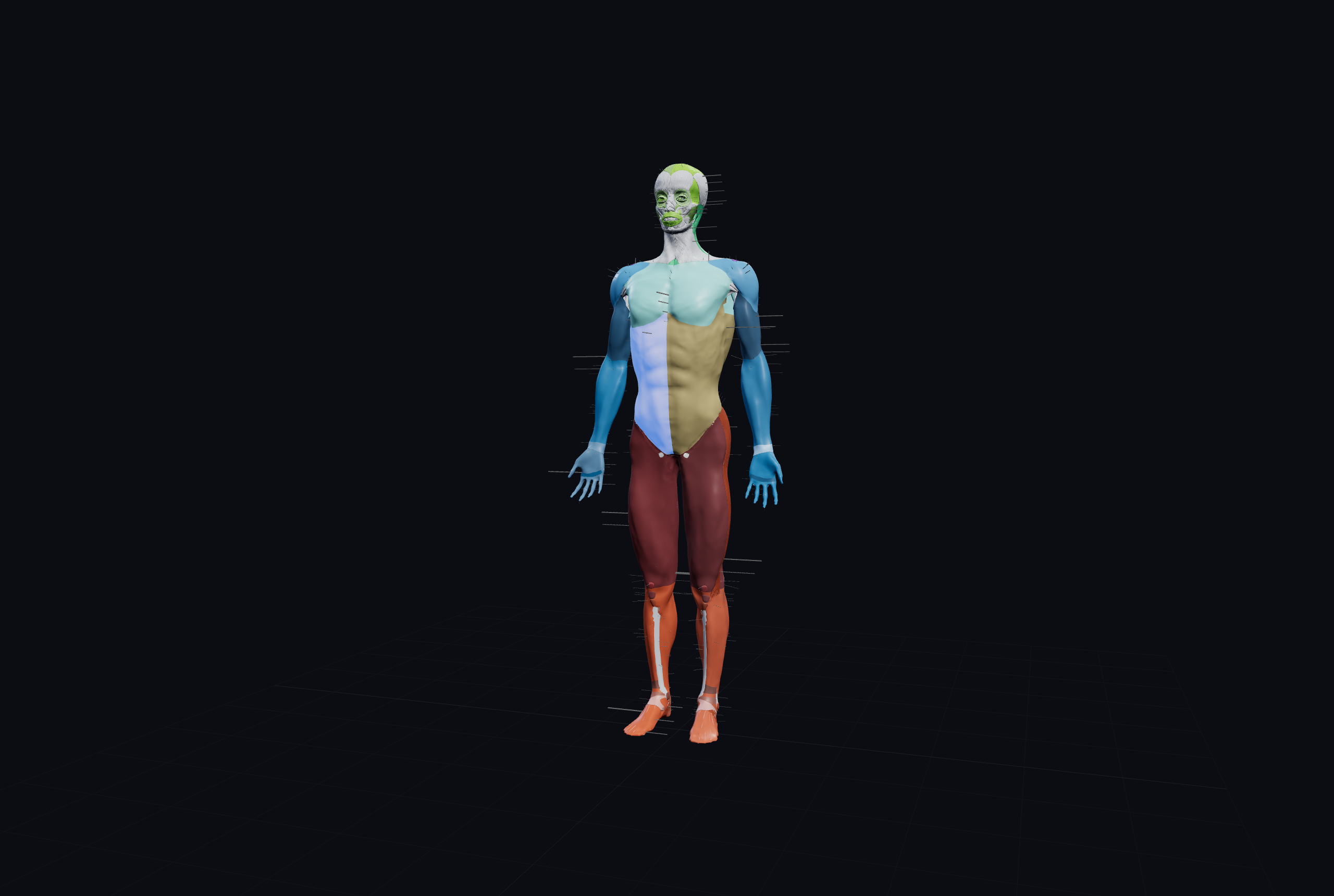


Skeleton + muscles (top) · nervous system · cardiovascular system — any of 7 systems, toggled independently.
What it is
- 22 MCP tools over a hand-authored knowledge core — structures, connections, innervation, blood supply, fascial chains, muscle roles, movements, postures, task activation, and correctives.
- 7 real Z-Anatomy systems (skeletal, muscular, nervous, cardiovascular, visceral, ligamentous, skin), Draco-compressed, with a mobile "lite" tier.
- A bone-identity rig — hover to identify any part, click for its biomechanical links, isolate a region, and articulate named postures (pelvic tilt, forward head, rounded shoulders…).
It's the reusable core beneath LooksLab; it has no accounts or paywall of its own.
Quick start
npm install
npm run playground   # → http://localhost:4599  (every tool as a button + live 3D viewer)
npm test             # smoke tests
npm run validate-data
Use as an MCP server
Once published, point any MCP client at the package:
{
  "mcpServers": {
    "anatomy-engine": { "command": "npx", "args": ["-y", "@ajfutures/anatomy-engine"] }
  }
}
Or run straight from a local checkout — { "command": "npx", "args": ["tsx", "src/index.ts"], "cwd": "…/anatomy-engine" }.
The 22 tools
All reads are educational & directional, not diagnostic. Every tool returns structured JSON.
Browse & search
| Tool | Params | What it returns |
|---|---|---|
list_systems |
— | The 7 anatomical systems, in load-priority order. |
list_structures |
system? |
All structures, optionally filtered to one system. |
get_structure |
id |
One structure: English/Latin names, region, side, description, and the patterns it participates in. |
search_anatomy |
query |
Fuzzy natural-language → structure ids (handles gym slang: "glute", "hammy", "rear delt"). Structured outputSchema. Resolve a plain name to an id before calling other tools. |
focus_region |
region, side? |
Every structure in a body area (optionally one side) + a viewer URL that isolates it. |
Connections & biomechanics
| Tool | Params | What it returns |
|---|---|---|
get_relationships |
id |
Curated biomechanical links (antagonist / synergist / coupled) with functional notes + corrective ideas. |
get_connections |
id |
Everything connected to a structure — typed (regional / synergist / antagonist / kinetic_chain / fascial / attachment), grouped + flat. |
get_fascial_chain |
id | chain |
Myofascial (Anatomy-Trains) lines a structure sits in, or a line's members — to trace tension up/down the chain. |
get_muscle_roles |
id, action |
For a movement (e.g. "hip extension"), classifies the structure's role and lists agonists / antagonists / synergists / stabilizers. |
describe_movement |
joint, direction |
Range of motion, which muscles shorten vs. lengthen, and the downstream postural effect. |
get_pose |
name |
A named posture (e.g. anterior_pelvic_tilt) as joint-angle targets + its tight/weak muscle-balance read. |
analyze_task |
task, phase? |
Muscle activation by phase for a multi-joint task (gait, squat, hip_hinge, overhead_press). |
list_patterns |
— | The named postural muscle-balance patterns (crossed syndromes, pronation chain). |
get_pattern |
id |
A pattern's likely-tight and likely-weak muscles, what it's measured by, and full corrective detail. |
get_interventions |
id, goal |
Corrective options for a structure by goal (release / stretch / strengthen / mobilize). |
Anatomy facts
| Tool | Params | What it returns |
|---|---|---|
get_innervation |
id |
Nerve supply: nerve, spinal roots (myotome), plexus. |
get_blood_supply |
id |
Arterial supply + venous/lymphatic drainage. |
Clinical — educational & red-flag-screened, never diagnostic
| Tool | Params | What it returns |
|---|---|---|
get_referred_pain |
id |
Trigger-point referral zones a muscle commonly sends sensation to (e.g. upper trapezius → temple). |
list_pathologies |
id |
Conditions associated with a structure, each with common signs + red flags to screen for. |
get_contraindications |
target |
Movements/loads to be cautious with — by pathology id, or a structure id (aggregates its conditions). |
map_symptoms |
region, symptom |
Structures/conditions in an area to learn about — explicitly not a diagnosis, not ranked, always returns red flags and points to in-person care. |
Viewer
| Tool | Params | What it returns |
|---|---|---|
show_anatomy |
systems?, pose?, region? |
The resolved selection + the ui://anatomy/viewer inline 3D resource (hover-identify, click, isolate, articulate). |
Using it with an AI agent
The point of the engine is that an agent can chain these tools to reason about a real question — turning a vague, plain-language ask into structured anatomy, then a grounded, sourced answer. Five examples:
1. "What exercises are beneficial for anterior pelvic tilt?"
The agent calls get_pose("anterior_pelvic_tilt") → get_pattern("lower_crossed_syndrome") to read out
which muscles are likely tight (hip flexors / iliopsoas, lumbar erectors) and likely weak (glutes,
deep core), then get_interventions(...) on each. → "Release and stretch the hip flexors and low back;
strengthen the glutes and deep core — here are specific correctives."
2. "My lateral hip aches when I sleep on that side — what could it be and what should I avoid?"
map_symptoms("hip", "ache lying on my side") surfaces the gluteus medius and gluteal tendinopathy →
list_pathologies("gluteus_medius") for signs + red flags → get_contraindications("gluteal_tendinopathy").
→ "This pattern is often gluteal tendinopathy; commonly aggravated by crossing the legs and side-lying —
things to be cautious with are X, Y. These red flags mean see a clinician." (Never a diagnosis.)
3. "Which muscles are the prime movers coming up out of a squat?"
analyze_task("squat", "ascent"). → "Prime movers: gluteus maximus and quadriceps; synergists: hamstrings,
adductor magnus, soleus; stabilizers: lumbar erectors and abdominals."
4. "I keep getting tension headaches and my upper traps are tight — what's the link?"
search_anatomy("upper trap") → get_referred_pain("upper_trapezius") (refers to the temple) +
get_pattern("upper_crossed_syndrome") → get_interventions(...), with list_pathologies red-flag screening
for cervicogenic headache. → "The upper trapezius refers pain to the temple and is a classic driver of
tension headaches with forward-head posture; here's how to release it — and these red flags warrant a
professional."
5. "Show me forward-head posture in 3D and the muscles involved."
get_pose("forward_head") for the tight/weak read, then show_anatomy({ systems: ["skeletal","muscular"], pose: "forward_head" }) returns the inline 3D viewer articulated into that posture, with the involved
muscles highlightable. → An interactive body the user can rotate, plus the muscle-balance explanation.
In each case the engine supplies the structured anatomical facts and relationships; the agent does the plain-language conversation and turns them into recommendations — grounded, and consistently framed as educational, not diagnostic.
Disclaimer
This engine is for education and orientation only. It is not medical advice, not a diagnosis, and not a substitute for a licensed clinician. The clinical tools ship with red-flag screening and non-diagnostic framing.
Status: awaiting clinician approval — for educational purposes only. The anatomical/clinical data is AI-authored and has not yet been reviewed by a licensed clinician.
License & attribution
- Code & data: MIT — see LICENSE.
- 3D meshes: derived from Z-Anatomy (CC BY-SA 4.0), itself from
BodyParts3D/DBCLS. Attribution + share-alike obligations apply wherever the meshes are displayed —
see NOTICE. The meshes are not bundled in the npm package; they're built by
pipeline/export.pyand served from a hosted asset base.
Установка Anatomy Engine
У этого сервера нет опубликованного пакета — он собирается из исходников. Открой репозиторий и следуй инструкции в README.
▸ github.com/AJFUTURES/anatomy-engineFAQ
Anatomy Engine MCP бесплатный?
Да, Anatomy Engine MCP бесплатный — установка в пару кликов через Unyly без оплаты.
Нужен ли API-ключ для Anatomy Engine?
Нет, Anatomy Engine работает без API-ключей и переменных окружения.
Anatomy Engine — hosted или self-hosted?
Self-hosted: сервер запускается локально на твоей машине командой из раздела установки.
Как установить Anatomy Engine в Claude Desktop, Claude Code или Cursor?
Открой Anatomy Engine на unyly.org, выбери вкладку своего клиента (Claude Desktop, Claude Code, Cursor) и нажми Install — конфиг сгенерируется автоматически, без правки JSON.
Похожие MCP
GitHub
PRs, issues, code search, CI status
 автор: GitHub
Filesystem
Secure file operations with configurable access controls.
Memory
Knowledge graph-based persistent memory system.
Template MCP Server
A CLI tool to create a new Model Context Protocol server project with TypeScript support, dual transport options, and an extensible structure
 автор: mcpdotdirect
Compare Anatomy Engine with
Не уверен что выбрать?
Найди свой стек за 60 секунд
Автор?
Embed-бейдж для README
Похожее
Все в категории development