
Anvil
БесплатноНе проверенA throwaway Docker sandbox for agents to run code and shell commands safely.

Описание
A throwaway Docker sandbox for agents to run code and shell commands safely.
README
A throwaway Docker sandbox for agents.
Run code or shell commands in a resource-limited, network-isolated, single-use container and get back a structured result — stdout, stderr, exit_code, timed_out, duration_ms. So an agent can verify its work, reproduce a bug, or check output without ever touching the host.
Part of tools-for-agents. Zero npm dependencies — drives the docker CLI directly.
Safe by default
Every run is launched with:
--network none— no network unless you opt in (network: "on")--memory 512m --cpus 1 --pids-limit 512— bounded resources--cap-drop ALL --security-opt no-new-privileges— minimal privileges--rmephemeral container, work dir is a fresh temp mount, removed after- a hard timeout (default 30s, max 300s) that
docker kills the container - optional
secure: true→ read-only rootfs + tmpfs/tmp
CLI
node src/cli.js check                          # docker version + presets
node src/cli.js run python 'print(2**10)'      # → 1024
node src/cli.js run node 'console.log(6*7)'    # → 42
echo 'print("hi")' | node src/cli.js run python -
node src/cli.js sh 'apk info 2>/dev/null | head'
Run history (anvil serve)
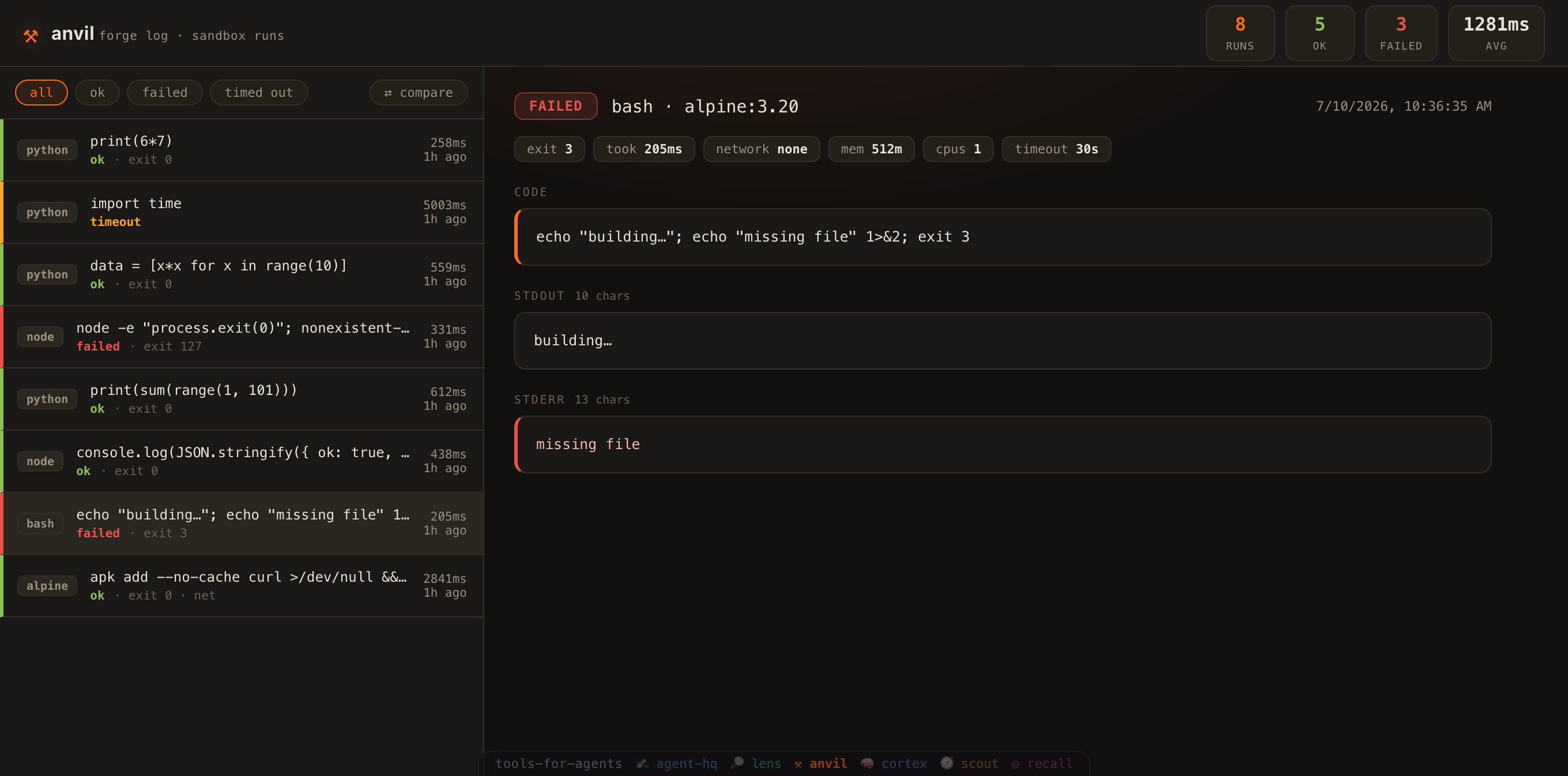
anvil is stateless by default. Set ANVIL_DB to record every run, then browse them in a dashboard:
export ANVIL_DB=./.anvil/runs.db          # opt in to the run log
node src/cli.js run python 'print(2**10)'  # …runs are now recorded
node src/cli.js serve                       # → http://localhost:7930  (--port to change)
A zero-dependency forge log of what the sandbox executed:
- Run list — every execution with its language, status (ok / failed / timed out), exit code and duration, colour-coded at a glance.
- Run detail — the exact code or command, full stdout and stderr, and the resource limits it ran under (network, memory, cpus, timeout). Each block has a one-click ⧉ copy so you can lift the code or its output straight to the clipboard.
- Compare two runs — hit ⇄ compare, pick any two runs, and see a side-by-side line diff of their code, stdout and stderr, plus every limit that changed (
took 258ms → 559ms,mem 512m → 256m). - New run — hit + new run to type a snippet (bash / node / python), execute it in a fresh sandbox right from the dashboard, and watch the result open in the detail. Runs go through the same guarded, network-off container as the CLI (⌘/Ctrl+Enter to run). Pick a resource profile in one click — 🔒 strict (network off · 256m · 0.5 cpu · 15s), ⚙ default (512m · 1 cpu · 30s), or 🌐 networked (network on · 60s) — and the sandbox's memory, CPU, timeout and network are set for you (recorded with the run).
- Run code against something —
run()has always taken{ path: content }files and written them into/workbeside your snippet (agents use it), and the form never offered it. Now + file adds fixture files — a module and its test, a parser and a sample payload — and + stdin pipes input to the process. A snippet on its own can only prove syntax; a snippet with a fixture can prove behaviour. Paths that try to climb out of the sandbox are refused before a container starts. - Run a real repo, from the browser — the new-run form used to do snippets only, so the dashboard couldn't do the thing anvil is for. Switch it to command in an image, point mount at a directory, and it runs any command in any image with your repo mounted read-only at
/repo—cd /repo && npm test— without the repo ever leaving your disk or being writable by the container (touch /repo/x→ Read-only file system). There's a read-only rootfs switch too. A mount that doesn't exist is refused in the form, before docker gets a chance to fail at you. - Watch it run — the sandbox writes as it goes, so anvil now says so as it goes: hit ▶ run and the container's stdout/stderr stream into a live console (with an elapsed timer) instead of leaving you staring at a spinner until it returns. A 30-second run no longer looks identical to a hung one. Streaming is opt-in on the API (
POST /api/exec?stream=1→ an event stream ending with the logged run), andrun({ onData })gives the same live chunks to any caller — the CLI, an agent, anything. - Re-run — hit ↻ re-run on any run to re-execute its exact code and limits in a fresh sandbox; the new run is logged and opened, so you can compare it against the original.
- Keep a run in cortex — a run is evidence: this code, in this sandbox, produced this output. Hit 🧠 → cortex and it becomes a note in your second brain — status, exit code, duration and the resource limits it ran under, the code as a fenced block, and its stdout/stderr — carrying a
#run=<id>link straight back to the run in the forge log. anvil never writes: your browser POSTs to cortex's own/api/capture(point it elsewhere withANVIL_CORTEX_URL). - Link to a run — opening a run puts it in the URL (
…/#run=<id>), so any run in the log can be linked, bookmarked or handed to someone else. - Prune the log — the forge log grows with every run, so ✕ delete drops a single noisy run and 🗑 clear empties the whole log. Both arm on the first click and only fire on the second (clicking away, or waiting, cancels), and both live behind
DELETEon the API — a strayGETcan never prune anything. - Search — a live search box filters the log by code, command, language or captured output as you type (matches highlighted, with a running
3 / 7count);Escclears it. Composes with the status filters, so you can find "thatcurlrun that failed" in a long history. - Filters + stats — narrow to failures, see ok/failed counts, average duration, and a by-language breakdown of everything the sandbox has run (
python 3 · node 1 · bash 1). - Keyboard navigation — press
j/k(or ↑/↓) to move a cursor through the run list and open each run as you go — browse the whole forge log from the keyboard without touching the mouse (it stands down while you're typing in the search box or in compare mode). - Keyboard-accessible — every control has a visible focus ring, and the run rows open with Tab + Enter (not just the mouse), with aria-labels throughout.
Logging is opt-in, fire-and-forget and fully guarded — it never slows or breaks a run. Try the demo without Docker: ANVIL_DB=./.anvil/runs.db node scripts/seed.js then anvil serve.
MCP server (for agents)
{
  "mcpServers": {
    "anvil": { "command": "node", "args": ["/abs/path/to/anvil/mcp/mcp-server.js"] }
  }
}
Tools
| Tool | Use it to… |
|---|---|
anvil_run_code |
Run a bash / node / python snippet, get structured output. |
anvil_run_command |
Run a shell command with supplied files and/or a host dir mounted read-only at /repo (e.g. run a test suite). |
anvil_check |
Docker availability + language presets. |
Example: verify a repo's syntax without copying it
{ "name": "anvil_run_command",
  "arguments": { "image": "node:22-alpine", "mount": "/path/to/repo/src",
                 "cmd": "node --check /repo/core.js && echo OK" } }
Result shape
{ "ok": true, "exit_code": 0, "timed_out": false, "duration_ms": 178,
  "image": "python:3.12-alpine", "stdout": "...", "stderr": "" }
The agent toolkit
anvil is the run safely leg of tools-for-agents — an operating system for agents.
Seven zero-dependency, MCP-native tools that form one loop:
| 🛰️ | agent-hq | coordinate — shared memory, a kanban agents claim work from, a registry, a cost ledger |
| 🔎 | lens | read code — token-budgeted retrieval — search, outlines, surgical reads |
| ⚒ | anvil | run safely — a throwaway Docker sandbox: network off, capped, timed |
| 🧠 | cortex | remember — an Obsidian-compatible second brain, wikilinked |
| 🧭 | scout | read the web — a URL becomes clean, cached, searchable markdown |
| 🎯 | recall | recall it all — one query across brain, team, reading and code |
| 👁 | iris | see — look at what you built, before you claim it works |
Reading this as an agent? /llms.txt is the map, and /tools.json hands you all 70 MCP tools — every name, every description, every install command — in one fetch, without cloning anything.
MIT licensed.
Установка Anvil
У этого сервера нет опубликованного пакета — он собирается из исходников. Открой репозиторий и следуй инструкции в README.
▸ github.com/tools-for-agents/anvilFAQ
Anvil MCP бесплатный?
Да, Anvil MCP бесплатный — установка в пару кликов через Unyly без оплаты.
Нужен ли API-ключ для Anvil?
Нет, Anvil работает без API-ключей и переменных окружения.
Anvil — hosted или self-hosted?
Self-hosted: сервер запускается локально на твоей машине командой из раздела установки.
Как установить Anvil в Claude Desktop, Claude Code или Cursor?
Открой Anvil на unyly.org, выбери вкладку своего клиента (Claude Desktop, Claude Code, Cursor) и нажми Install — конфиг сгенерируется автоматически, без правки JSON.
Похожие MCP
GitHub
PRs, issues, code search, CI status
 автор: GitHub
Filesystem
Secure file operations with configurable access controls.
Memory
Knowledge graph-based persistent memory system.
Template MCP Server
A CLI tool to create a new Model Context Protocol server project with TypeScript support, dual transport options, and an extensible structure
 автор: mcpdotdirect
Compare Anvil with
Не уверен что выбрать?
Найди свой стек за 60 секунд
Автор?
Embed-бейдж для README
Похожее
Все в категории development