
Apache Atlas
БесплатноНе проверенConnects LLM agents to Apache Atlas for searching, tracing lineage, and managing metadata. Read-only by default, with optional write mode for creating entities

Описание
Connects LLM agents to Apache Atlas for searching, tracing lineage, and managing metadata. Read-only by default, with optional write mode for creating entities and classifications.
README


A community-built MCP (Model Context Protocol) server that connects LLM agents to Apache Atlas metadata governance platform. Not affiliated with the Apache Software Foundation.
Read-only by default. Write operations (create/delete entities, manage classifications) require explicit opt-in via --write flag or ATLAS_ALLOW_WRITE=true.
Why?
Apache Atlas is a widely-used open-source metadata governance framework for Hadoop ecosystems and beyond. With the 2.4.0 release (Jan 2025) breaking a 2-year gap and 2.5.0 (RC) adding PostgreSQL backend support and Trino extractor, Atlas is seeing renewed activity.
This MCP server lets AI agents:
- Search data assets across your entire metadata catalog
- Trace lineage — understand how data flows from source to destination
- Browse glossaries — look up business terms and definitions
- Inspect types — understand the metadata schema structure
- Manage classifications — apply governance tags like PII, GDPR, Confidential (write mode)
- Create/delete entities — modify metadata catalog (write mode)
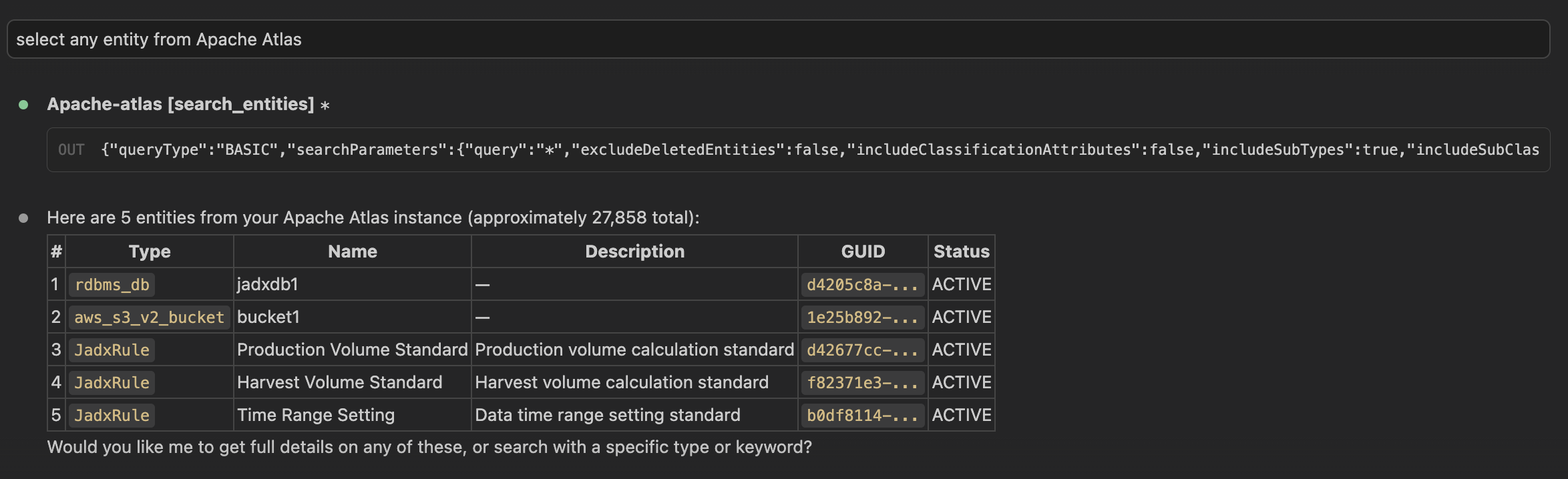
Quick Start
Installation
# Using uv (recommended)
uv add apache-atlas-mcp

# Using pip
pip install apache-atlas-mcp

# Run without installing
uvx apache-atlas-mcp
Configuration
Set environment variables to connect to your Atlas instance:
export ATLAS_BASE_URL=http://your-atlas-server:21000
export ATLAS_USERNAME=your-username
export ATLAS_PASSWORD=your-password
All configuration options:
| Variable | Default | Description |
|---|---|---|
ATLAS_BASE_URL |
(required) | Atlas server URL (e.g., http://localhost:21000) |
ATLAS_USERNAME |
(required) | Authentication username |
ATLAS_PASSWORD |
(required) | Authentication password |
ATLAS_VERIFY_SSL |
true |
Verify SSL certificates |
ATLAS_TIMEOUT |
30 |
HTTP request timeout (seconds) |
ATLAS_ALLOW_WRITE |
false |
Enable write operations (create, delete, classify) |
Usage with Claude Desktop
Add to your claude_desktop_config.json:
{
  "mcpServers": {
    "apache-atlas": {
      "command": "uvx",
      "args": ["apache-atlas-mcp"],
      "env": {
        "ATLAS_BASE_URL": "http://your-atlas-server:21000",
        "ATLAS_USERNAME": "your-username",
        "ATLAS_PASSWORD": "your-password"
      }
    }
  }
}
To enable write operations:
{
  "mcpServers": {
    "apache-atlas": {
      "command": "uvx",
      "args": ["apache-atlas-mcp", "--write"],
      "env": {
        "ATLAS_BASE_URL": "http://your-atlas-server:21000",
        "ATLAS_USERNAME": "your-username",
        "ATLAS_PASSWORD": "your-password"
      }
    }
  }
}
Usage with Claude Code
# Read-only (default)
claude mcp add atlas-server -- uvx apache-atlas-mcp

# With write operations enabled
claude mcp add atlas-server -- uvx apache-atlas-mcp --write
Run Directly
# Read-only (default)
apache-atlas-mcp

# With write operations enabled
apache-atlas-mcp --write
Available Tools
Read-Only Tools (always available)
Entity Search
| Tool | Description |
|---|---|
search_entities |
Basic search by keyword, type, or classification |
dsl_search |
Advanced search using Atlas DSL query language |
quick_search |
Fast partial-match search (autocomplete-style) |
get_entity |
Get full entity details by GUID |
get_entity_by_attribute |
Get entity by unique attribute (e.g., qualifiedName) |
get_entities_bulk |
Fetch multiple entities by GUIDs |
Lineage
| Tool | Description |
|---|---|
get_lineage |
Trace upstream/downstream data flow by GUID |
get_lineage_by_attribute |
Trace lineage by unique attribute |
Classifications
| Tool | Description |
|---|---|
get_classifications |
List all classifications on an entity |
Glossary
| Tool | Description |
|---|---|
list_glossaries |
List all business glossaries |
get_glossary |
Get glossary details with terms and categories |
get_glossary_terms |
List terms in a glossary |
get_glossary_term |
Get full details of a glossary term |
Type Definitions
| Tool | Description |
|---|---|
get_all_type_definitions |
Get the complete Atlas type system |
get_type_definition |
Get a specific type definition by name |
get_entity_type_definition |
Get an entity type with all attributes |
Write Tools (requires --write or ATLAS_ALLOW_WRITE=true)
| Tool | Description |
|---|---|
create_entity |
Create or update an entity |
delete_entity |
Soft-delete an entity |
add_classification |
Apply a classification tag (with lineage propagation) |
remove_classification |
Remove a classification from an entity |
Architecture
LLM Agent  <-->  MCP Protocol  <-->  Apache Atlas MCP Server  <-->  Atlas REST API v2
                                              |
                                       FastMCP + httpx
                                              |
                                     Apache Atlas Instance
                                     (HBase / PostgreSQL backend)
The server wraps the Atlas REST API v2 using:
- FastMCP for MCP protocol handling
- httpx for async HTTP communication
- Pydantic V2 for data validation and serialization
The REST API is backend-independent — it works regardless of whether Atlas uses HBase, Cassandra, or the new PostgreSQL backend (Atlas 2.5.0+).
Compatibility
- Apache Atlas: 2.1.0+ (tested with 2.3.2 and 2.4.0)
- Python: 3.11+
- Authentication: HTTP Basic (Atlas file-based auth, LDAP, or AD — all use Basic HTTP headers)
Development
# Clone the repository
git clone https://github.com/DanMeon/apache-atlas-mcp.git
cd apache-atlas-mcp

# Install dependencies
uv sync --group dev

# Run tests
uv run pytest tests/ -v --cov

# Lint & type check
uv run ruff check src/ tests/
uv run pyright src/apache_atlas_mcp/
License
MIT
Установить Apache Atlas в Claude Desktop, Claude Code, Cursor
unyly install apache-atlas-mcpСтавит в Claude Desktop, Claude Code, Cursor и VS Code — сам разбирается с npx, uvx и сборкой из исходников.
Впервые? Поставь CLI: curl -fsSL https://unyly.org/install | sh
Или настроить вручную
Выполни в терминале:
claude mcp add apache-atlas-mcp -- uvx apache-atlas-mcpFAQ
Apache Atlas MCP бесплатный?
Да, Apache Atlas MCP бесплатный — установка в пару кликов через Unyly без оплаты.
Нужен ли API-ключ для Apache Atlas?
Нет, Apache Atlas работает без API-ключей и переменных окружения.
Apache Atlas — hosted или self-hosted?
Доступен hosted-вариант: Unyly запускает сервер в облаке, локальная установка не обязательна.
Как установить Apache Atlas в Claude Desktop, Claude Code или Cursor?
Открой Apache Atlas на unyly.org, выбери вкладку своего клиента (Claude Desktop, Claude Code, Cursor) и нажми Install — конфиг сгенерируется автоматически, без правки JSON.
Похожие MCP
Fetch
Web content fetching and conversion for efficient LLM usage.
AWS KB Retrieval
Retrieval from AWS Knowledge Base using Bedrock Agent Runtime.
 автор: modelcontextprotocol
Spring AI MCP Server
Provides auto-configuration for setting up an MCP server in Spring Boot applications.
llm-analysis-assistant
A very streamlined mcp client that supports calling and monitoring stdio/sse/streamableHttp, and can also view request responses through the /logs page. It also
 автор: xuzexin-hz
Compare Apache Atlas with
Не уверен что выбрать?
Найди свой стек за 60 секунд
Автор?
Embed-бейдж для README
Похожее
Все в категории ai