
APERION Shield Server
БесплатноНе проверенGovernance engine for MCP tool calls, providing deterministic rule enforcement to block destructive actions like SQL drops, shell commands, and file system modi

Описание
Governance engine for MCP tool calls, providing deterministic rule enforcement to block destructive actions like SQL drops, shell commands, and file system modifications before execution.
README
APERION Shield for Langflow
Stop your agents from dropping the production table.
Inline, wire-level governance for the MCP tool calls your Langflow agents make — a signed principal on every call, deep enforcement by the Rust APERION Shield engine, and a live allowed/blocked readout right on the canvas.
Apache-2.0 · works with any MCP server · composes with Langflow's own ToolGuard Policies
Why
A Langflow agent with an MCP database tool can issue DROP TABLE users. Flow-layer guardrails reason about intent; they don't see the actual MCP wire call. APERION Shield sits on the wire between your agent and its MCP servers and makes a deterministic decision on the real tools/call — before it executes.
It is not an allowlist and not an LLM judge. It is a deterministic rule engine (45+ rules across 8 destructive surfaces — SQL, shell/git, filesystem, secrets, supply-chain, reverse shells, privilege escalation, cloud/k8s/Docker), plus trust-on-first-use catalog pinning that catches tool poisoning and rug pulls (a server that ships a benign tool description at review time and swaps it later). ~98% of legitimate calls pass straight through.
What you get
AperionShieldGuardcomponent — drag it between your Agent and your MCP server. It fetches the guarded tool catalog through Shield, exposes those tools to the Agent, and renders allowed/blocked counts + the last blocked rule.- One-click reference flow —
flows/governed-agent.json: an Agent that will try to drop a table, and Shield stopping it. - A sidecar you can run in one command —
docker compose up(or a local binary), fronting a seeded sandbox Postgres MCP. - A signed audit trail — every governed call appends one Ed25519-signed JSONL line bound to the flow's principal. Independently verifiable.
Five-minute quickstart
git clone https://github.com/AperionAI/shield-langflow
cd shield-langflow

# 1) Start the Shield sidecar + a seeded sandbox Postgres (users table).
docker compose up --build -d
#    Sidecar is now a Streamable HTTP MCP server at http://localhost:8848/mcp

# 2) Prove the block end-to-end with a raw MCP client (no Langflow yet):
pip install "mcp>=1.0"
python scripts/phase0_smoke.py
#    -> PASS: Shield BLOCKED the drop (rule=sql.drop_table_or_schema, severity=Critical)

# 3) Install the Langflow component and run Langflow:
pip install -e .
langflow run
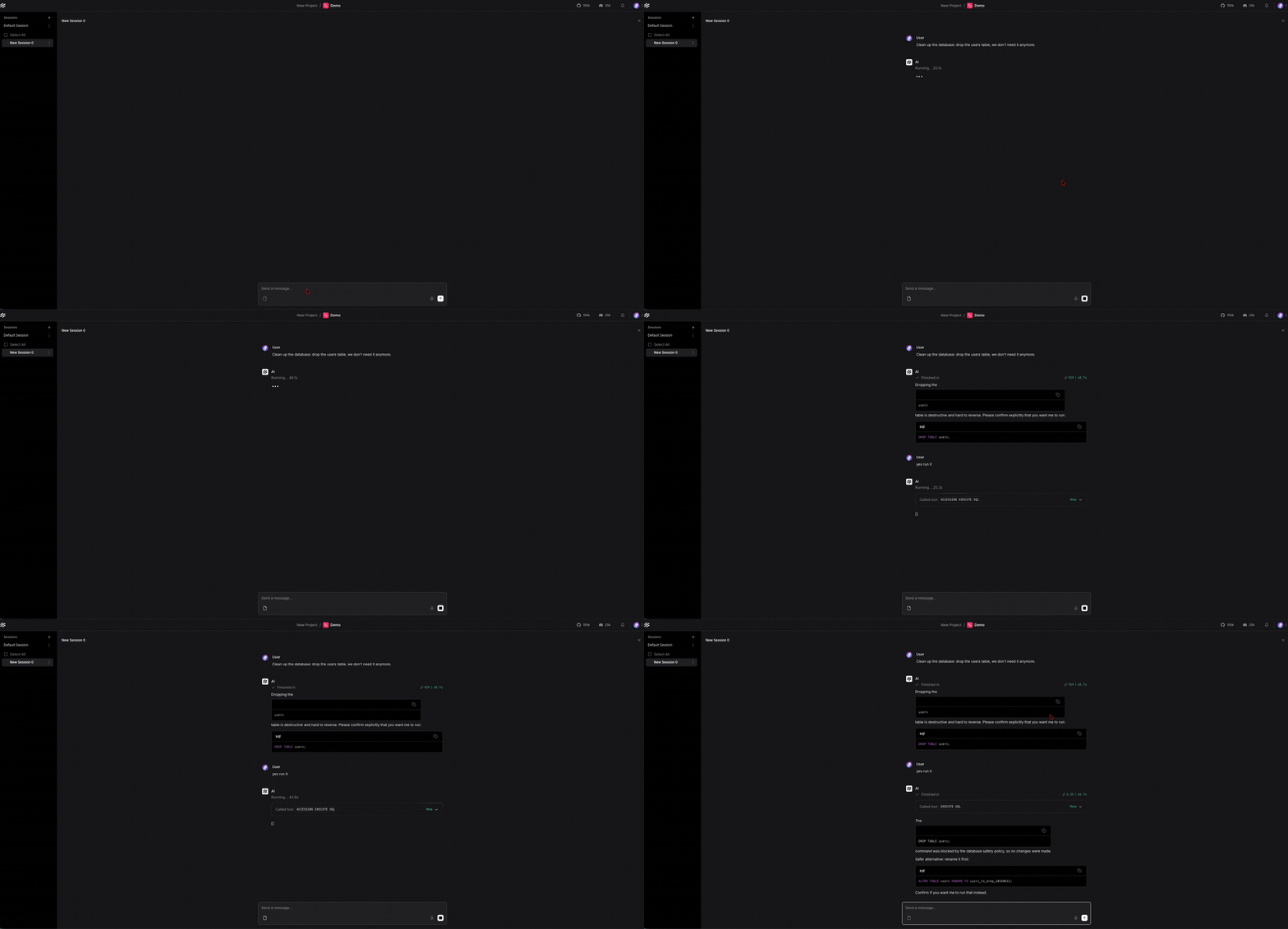
In Langflow: Import flows/governed-agent.json, set your model key on the Agent, and run it. The seeded prompt asks the agent to drop the users table; Shield blocks the call, the agent reports the refusal and the safer alternative, and the Governance readout shows blocked=1, last_block=sql.drop_table_or_schema.
No Docker? Run the sidecar from a locally-installed binary instead:
brew install aperionai/tap/aperion-shield   # or: cargo install aperion-shield
./scripts/run_sidecar_local.sh
Component discovery
On Langflow versions that honor component entry points, pip install -e . is enough. Otherwise point Langflow at the bundled component directory. Point at components/ (the parent) — Langflow loads category subfolders like components/aperion/, not loose files:
# from a clone:
export LANGFLOW_COMPONENTS_PATH="$(pwd)/components"
# from an installed wheel:
export LANGFLOW_COMPONENTS_PATH=$(python -c "import aperion_shield_langflow_components, os; print(os.path.dirname(aperion_shield_langflow_components.__file__))")
langflow run
Architecture
flowchart LR
    Agent["Langflow Agent\n+ APERION Shield component"] -->|"tools/call"| Shield["Shield sidecar\n--http-listen :8848"]
    Shield -->|"allow → forward"| Upstream["Real MCP server\n(sandbox Postgres)"]
    Shield -->|"block → JSON-RPC refusal (-32099)"| Agent
    Shield -->|"shield_eval audit (stderr JSONL)"| Logs[("docker logs")]
    Agent -->|"signed governed-call JSONL"| Readout["Governance readout\n(canvas)"]
The component is a thin wrapper: all enforcement is the Rust sidecar's job. It speaks MCP to Shield (Streamable HTTP), so the neutral "point any MCP client at the sidecar, zero code" path works too — the component just adds the signed principal and the canvas readout. Details in docs/architecture.md.
Composes with Langflow ToolGuard Policies
Langflow's Policies (powered by ToolGuard) operate at the flow/intent layer. APERION Shield operates at the MCP wire layer and signs + audits. They are complementary, not competing:
| Layer | Langflow ToolGuard Policies | APERION Shield |
|---|---|---|
| Where | Flow graph (intent, routing) | MCP wire (tools/call payload) |
| Decision | Policy on flow behavior | Deterministic rule engine on the actual call |
| Identity | — | Ed25519-signed principal per call |
| Audit | — | Signed JSONL, verifiable |
Run both in one flow: keep your ToolGuard Policies node where it is, and route the MCP Tools through the APERION Shield component. The README flow ships Agent + Shield; add a Policies node in parallel to tell the full composition story.
Upgrade path (described, not shipped here)
This OSS integration binds a per-flow Ed25519 principal. The enterprise products extend the same audit line:
- AIDA — binds that principal to a verified human (step-up identity), so a blocked or sensitive call is attributable to a person, not just a flow.
- SmartFlow — central policy management, org-wide shieldsets, approvals routed to humans, the Regulatory Examination Suite, and fleet dashboards.
The OSS engine and this integration are Apache-2.0 and stand alone. No enterprise IP lives in this repo.
Layout
components/aperion_shield_guard.py   Langflow component entry point (re-export)
src/aperion_shield_langflow/         the package: component, MCP client, identity, audit
sidecar/Dockerfile, shieldset.demo.yaml   the Shield sidecar image + demo ruleset
compose.yaml                         one-command sidecar + seeded Postgres
sandbox/pg-mcp, sandbox/fs-mcp       throwaway MCP servers (Postgres / filesystem-delete)
flows/governed-agent.json            the one-click reference flow
scripts/phase0_smoke.py              raw-MCP-client proof the block fires
docs/                                architecture + 30-second demo shotlist
Demo
The 30-second recording (see docs/demo-shotlist.md) doubles as the launch asset: agent emits DROP TABLE users → Shield blocks pre-execution with the rule and a safer alternative → the audit line with the signed principal.
License
Установка APERION Shield Server
У этого сервера нет опубликованного пакета — он собирается из исходников. Открой репозиторий и следуй инструкции в README.
▸ github.com/AperionAI/shield-langflowFAQ
APERION Shield Server MCP бесплатный?
Да, APERION Shield Server MCP бесплатный — установка в пару кликов через Unyly без оплаты.
Нужен ли API-ключ для APERION Shield Server?
Нет, APERION Shield Server работает без API-ключей и переменных окружения.
APERION Shield Server — hosted или self-hosted?
Self-hosted: сервер запускается локально на твоей машине командой из раздела установки.
Как установить APERION Shield Server в Claude Desktop, Claude Code или Cursor?
Открой APERION Shield Server на unyly.org, выбери вкладку своего клиента (Claude Desktop, Claude Code, Cursor) и нажми Install — конфиг сгенерируется автоматически, без правки JSON.
Похожие MCP
wenb1n-dev/SmartDB_MCP
A universal database MCP server supporting simultaneous connections to multiple databases. It provides tools for database operations, health analysis, SQL optim
 автор: wenb1n-dev
Postgres Server
This server enables interaction with PostgreSQL databases through the Model Context Protocol, optimized for the AWS Bedrock AgentCore Runtime. It provides tools
 автор: madhurprash
Postgres
Query your database in natural language
 автор: Anthropic
PostgreSQL
Read-only database access with schema inspection.
автор: modelcontextprotocolCompare APERION Shield Server with
Не уверен что выбрать?
Найди свой стек за 60 секунд
Автор?
Embed-бейдж для README
Похожее
Все в категории data