

Описание
Api Football — Model Context Protocol server
README
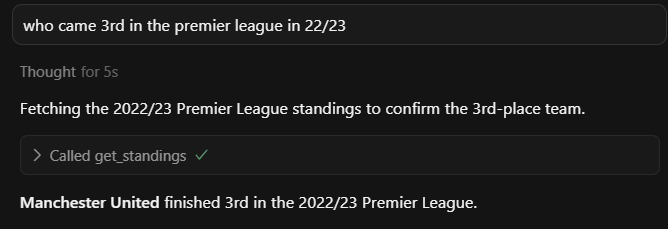
A Model Context Protocol (MCP) server that provides access to football/soccer data through the API-Football service. This creates a standardised way for language models to interact with this API, and users a way to query in natural language.
Architecture
graph TD
    LLM["`**LLM with MCP Client**
    Claude/GPT-4/etc.`"]

    subgraph Server ["`**MCP Server**
    Football Data Gateway`"]
        direction TB
        MCP["`**MCP Protocol Handler**
        Request Router & Response Manager`"]

        subgraph Functions ["`**Available Functions**`"]
            direction LR
            API1["`**get_leagues**
            Fetch league data`"]
            API2["`**get_teams**
            Fetch team data`"]
            API3["`**get_players**
            Fetch player data`"]
            API4["`**get_fixtures**
            Fetch match data`"]
        end

        MCP --> Functions
    end

    ExtAPI["`**API-Football**
    External Sports Data API`"]

    %% Main connections
    LLM <===> MCP

    %% Function connections to external API
    API1 <--> ExtAPI
    API2 <--> ExtAPI
    API3 <--> ExtAPI
    API4 <--> ExtAPI

    %% Styling with improved colors
    classDef llm fill:#4CAF50,stroke:#2E7D32,stroke-width:3px,color:#fff
    classDef mcp fill:#2196F3,stroke:#1565C0,stroke-width:2px,color:#fff
    classDef functions fill:#FF9800,stroke:#F57C00,stroke-width:2px,color:#fff
    classDef external fill:#9C27B0,stroke:#6A1B9A,stroke-width:3px,color:#fff
    classDef server fill:#E3F2FD,stroke:#1976D2,stroke-width:2px,color:#1976D2

    class LLM llm
    class MCP mcp
    class API1,API2,API3,API4 functions
    class ExtAPI external
    class Server server
1. Clone and Setup
Clone the repository:
git clone https://github.com/danknight/api-football-mcp-server.git
cd api-football-mcp-server
Install dependencies:
pip install -r requirements.txt
2. Get Your API Key and Set Environment
Create a .env file with your credentials:
API_FOOTBALL_KEY=your_api_key_here
Sign up on API-Football to get an API key.
3. Configure MCP Client
Register this server in your MCP client (e.g. Cursor, Claude for Desktop).
{
  "mcpServers": {
    "api-football": {
      "command": "python",
      "args": ["absolute/path/to/server.py"],
      "env": {
        "API_FOOTBALL_KEY": "YOUR_API_KEY"
      }
    }
  }
}
Or run directly from the command line and explore with Inspector:
python server.py
Tools
The following tools are exposed to MCP clients:
League Information
| Tool Name | Description | Parameters |
|---|---|---|
get_leagues |
Get available leagues | country (str, optional), season (int, optional) |
get_league_info |
Get detailed league information | league_id (int) |
get_countries |
Get available countries | None |
get_standings |
Get league standings | league_id (int), season (int) |
Team Information
| Tool Name | Description | Parameters |
|---|---|---|
get_teams |
Get teams in a league | league_id (int), season (int, optional) |
get_team_stats |
Get statistics for a team | team_id (int), league_id (int), season (int, optional) |
get_team_id_by_name |
Get team ID by team name | team_name (str), league_id (int, optional), season (int, optional) |
get_team_transfers |
Get transfer information for a team | team_id (int) |
Player Information
| Tool Name | Description | Parameters |
|---|---|---|
get_players |
Get players in a team | team_id (int), season (int) |
get_player_stats |
Get statistics for a player | player_id (int), season (int) |
Match/Fixture Information
| Tool Name | Description | Parameters |
|---|---|---|
get_fixtures |
Get fixtures/matches | league_id (int, optional), team_id (int, optional), season (int, optional), date (str, optional), next (int, optional), last (int, optional) |
get_fixture_stats |
Get statistics for a fixture | fixture_id (int) |
get_predictions |
Get predictions for a fixture | fixture_id (int) |
get_head_to_head |
Get head-to-head statistics between teams | team1_id (int), team2_id (int) |
Player Statistics
| Tool Name | Description | Parameters |
|---|---|---|
get_top_scorers |
Get top scorers in a league | league_id (int), season (int) |
get_top_assists |
Get top assisters in a league | league_id (int), season (int) |
Other Information
| Tool Name | Description | Parameters |
|---|---|---|
get_venue |
Get venue information | venue_id (int) |
get_injuries |
Get injury information | team_id (int), player_id (int), season (int) |
Usage Examples
Get leagues in a specific country
get_leagues(country="England")
Get teams in a specific league
get_teams(league_id=39, season=2023) # Premier League 2023
Get team statistics
get_team_stats(team_id=42, league_id=39, season=2023) # Arsenal stats
Get fixtures for a team
get_fixtures(team_id=42, next=5) # Next 5 Arsenal matches
Get top scorers in a league
get_top_scorers(league_id=39, season=2023) # Premier League top scorers
Development
Running Tests
Currently, no tests are implemented. To add tests:
- Create a
tests/directory - Add test files following the naming convention
test_*.py - Run tests with
python -m pytest
Adding New Tools
To add a new tool:
- Add a new function in
main.pydecorated with@mcp.tool() - Implement the API call using
make_api_request() - Update this README with the new tool information
- Test the tool with the MCP Inspector
Установка Api Football
У этого сервера нет опубликованного пакета — он собирается из исходников. Открой репозиторий и следуй инструкции в README.
▸ github.com/dankniight/api-football-mcp-serverFAQ
Api Football MCP бесплатный?
Да, Api Football MCP бесплатный — установка в пару кликов через Unyly без оплаты.
Нужен ли API-ключ для Api Football?
Нет, Api Football работает без API-ключей и переменных окружения.
Api Football — hosted или self-hosted?
Self-hosted: сервер запускается локально на твоей машине командой из раздела установки.
Как установить Api Football в Claude Desktop, Claude Code или Cursor?
Открой Api Football на unyly.org, выбери вкладку своего клиента (Claude Desktop, Claude Code, Cursor) и нажми Install — конфиг сгенерируется автоматически, без правки JSON.
Похожие MCP
GitHub
PRs, issues, code search, CI status
 автор: GitHub
Filesystem
Secure file operations with configurable access controls.
Memory
Knowledge graph-based persistent memory system.
Template MCP Server
A CLI tool to create a new Model Context Protocol server project with TypeScript support, dual transport options, and an extensible structure
 автор: mcpdotdirect
Compare Api Football with
Не уверен что выбрать?
Найди свой стек за 60 секунд
Автор?
Embed-бейдж для README
Похожее
Все в категории development