
Apple Mail
БесплатноНе проверенA high-performance MCP server for Apple Mail that uses optimized JavaScript for Automation (JXA) to search and manage emails. It enables users to list accounts,

Описание
A high-performance MCP server for Apple Mail that uses optimized JavaScript for Automation (JXA) to search and manage emails. It enables users to list accounts, fetch mailboxes, and retrieve today's, unread, or flagged messages with significantly improved speed through batch property fetching.
README

Python 3.11+ License: GPL v3 macOS MCP Code style: ruff CI
The only Apple Mail MCP server with full-coverage body search — reliable on large mailboxes where AppleScript-based servers timeout. 8 tools for reading, searching, and extracting email content.
Read the docs for the full guide.
Quick Start
pipx install apple-mail-mcp
Add to your MCP client:
{
  "mcpServers": {
    "mail": {
      "command": "apple-mail-mcp"
    }
  }
}
Build the Search Index (Recommended)
# Requires Full Disk Access for Terminal
# System Settings → Privacy & Security → Full Disk Access → Add Terminal

apple-mail-mcp index --verbose
Configure (Optional)
apple-mail-mcp init # writes ~/.apple-mail-mcp/config.toml
Writes a commented config file you can edit to set defaults like your
primary account or mailbox. Every key has a matching APPLE_MAIL_* env
var if you prefer environment-based config. See
Configuration
for the full schema and precedence rules.
Tools
| Tool | Purpose |
|---|---|
list_accounts() |
List email accounts |
list_mailboxes(account?) |
List mailboxes |
get_emails(filter?, limit?) |
Get emails — all, unread, flagged, today, last_7_days |
get_email(message_id) |
Get single email with full content + attachments |
search(query, scope?, before?, after?, highlight?) |
Search — all, subject, sender, body, attachments |
get_email_links(message_id) |
Extract links from an email |
get_email_attachment(message_id, filename) |
Extract attachment content |
get_attachment(message_id, filename) |
Deprecated — use get_email_attachment() |
Performance
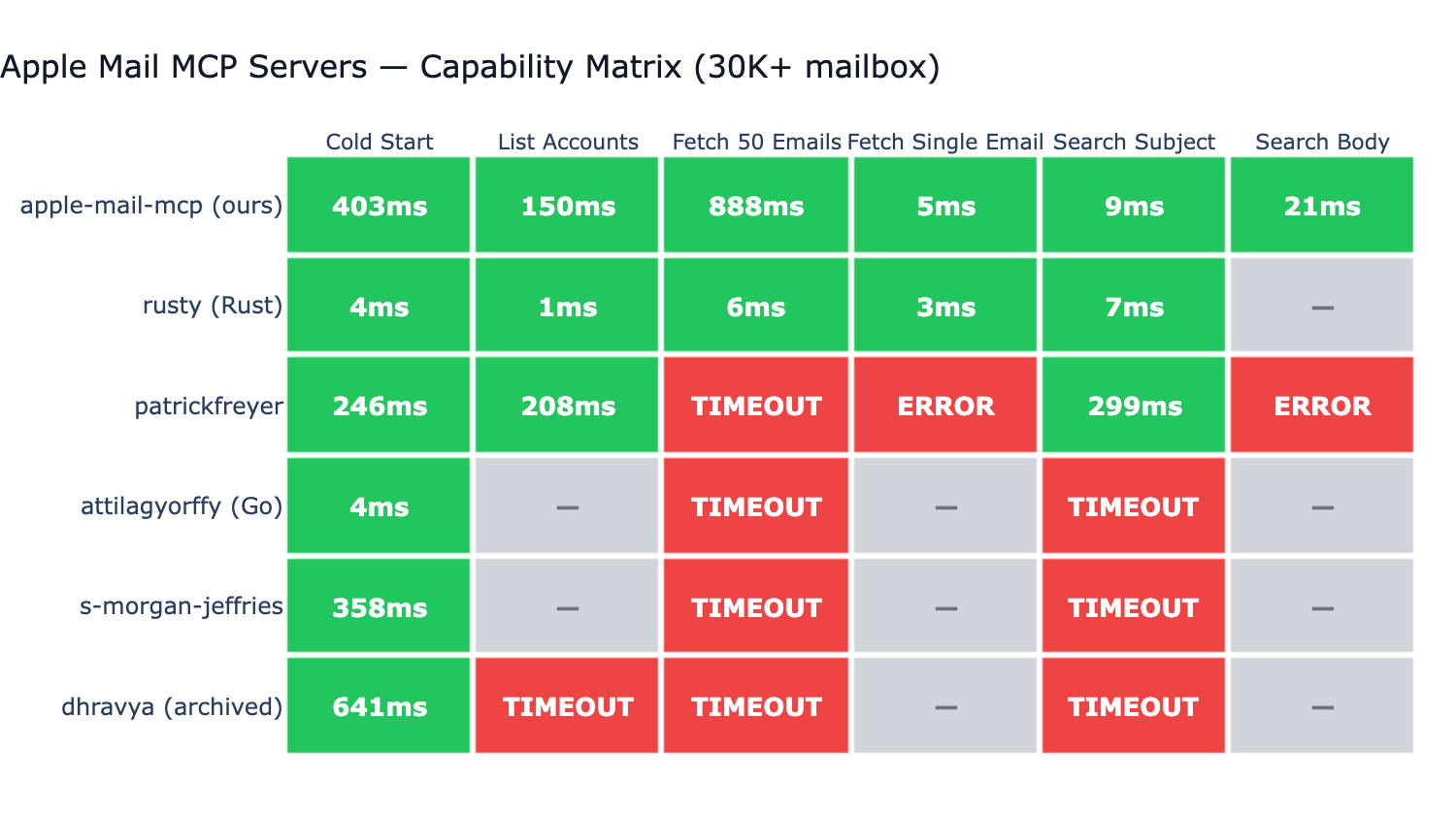
Tested against 6 other Apple Mail MCP servers on a real ~73K-message mailbox:
- Only server with full-coverage body search. Most competitors don't support body search at all; the one that does (BastianZim) live-scans only the 5000 most recent messages — silent miss on anything older. Our FTS5 index covers the entire mailbox.
- ~3ms single email fetch via disk-first
.emlxreading (no JXA round-trip). - ~1ms
list_accountsand ~5ms 50-email listing via direct Envelope-Index SQLite reads (0.4+) — same path BastianZim/rusty/pl-lyfx use, with JXA as the correctness fallback. - ~7ms subject search via FTS5 — competitive with native Rust on the same operation.
- Reliable across all 6 benchmarked operations on a 73K mailbox; AppleScript-based servers timeout, throw syntax errors, or skip operations they don't support.
Configuration
Apple Mail MCP works out of the box. To customize defaults, run
apple-mail-mcp init to generate a config.toml template — or use
the matching APPLE_MAIL_* environment variables. See the
Configuration docs
for the full schema and the CLI > env > file > default precedence.
Per-client env overrides via the MCP client's launch config also work:
{
  "mcpServers": {
    "mail": {
      "command": "apple-mail-mcp",
      "args": ["--watch"],
      "env": {
        "APPLE_MAIL_DEFAULT_ACCOUNT": "Work"
      }
    }
  }
}
CLI Usage
All tools are also available as standalone CLI commands (no MCP server needed):
apple-mail-mcp search "quarterly report" --scope subject
apple-mail-mcp search "invoice" --after 2026-01-01 --limit 10
apple-mail-mcp read 12345
apple-mail-mcp emails --filter unread --limit 10
apple-mail-mcp accounts
apple-mail-mcp mailboxes --account Work
apple-mail-mcp extract 12345 invoice.pdf
All commands output JSON. Generate a Claude Code skill for CLI-based access:
apple-mail-mcp integrate claude > ~/.claude/skills/apple-mail.md
Development
git clone https://github.com/imdinu/apple-mail-mcp
cd apple-mail-mcp
uv sync
uv run ruff check src/
uv run pytest
License
GPL-3.0-or-later
Установить Apple Mail в Claude Desktop, Claude Code, Cursor
unyly install apple-mail-mcpСтавит в Claude Desktop, Claude Code, Cursor и VS Code — сам разбирается с npx, uvx и сборкой из исходников.
Впервые? Поставь CLI: curl -fsSL https://unyly.org/install | sh
Или настроить вручную
Выполни в терминале:
claude mcp add apple-mail-mcp -- uvx apple-mail-mcpПошаговые гайды: как установить Apple Mail
FAQ
Apple Mail MCP бесплатный?
Да, Apple Mail MCP бесплатный — установка в пару кликов через Unyly без оплаты.
Нужен ли API-ключ для Apple Mail?
Нет, Apple Mail работает без API-ключей и переменных окружения.
Apple Mail — hosted или self-hosted?
Self-hosted: сервер запускается локально на твоей машине командой из раздела установки.
Как установить Apple Mail в Claude Desktop, Claude Code или Cursor?
Открой Apple Mail на unyly.org, выбери вкладку своего клиента (Claude Desktop, Claude Code, Cursor) и нажми Install — конфиг сгенерируется автоматически, без правки JSON.
Похожие MCP
Gmail
Read, send and search emails from Claude
 автор: Google
Slack
Send, search and summarize Slack messages
 автор: Slack
Runbear
No-code MCP client for team chat platforms, such as Slack, Microsoft Teams, and Discord.
Discord Server
A community discord server dedicated to MCP by [Frank Fiegel](https://github.com/punkpeye)
Compare Apple Mail with
Не уверен что выбрать?
Найди свой стек за 60 секунд
Автор?
Embed-бейдж для README
Похожее
Все в категории communication