
APS Server
БесплатноНе проверенEnables interaction with Autodesk ACC (Autodesk Construction Cloud) through the APS toolkit, allowing users to query hubs, projects, files, and versions via nat

Описание
Enables interaction with Autodesk ACC (Autodesk Construction Cloud) through the APS toolkit, allowing users to query hubs, projects, files, and versions via natural language through Claude Desktop.
README
A minimal MCP server integrating Autodesk ACC APIs via APS toolkit.
Video Overview
Setup
Option 1: Using uv (recommended)
Install uv if you don't have it:
curl -LsSf https://astral.sh/uv/install.sh | shCopy
.env.sampleto.envand fill in your credentials:cp .env.sample .envCreate and activate a virtual environment:
uv venv
# On Windows:
.venv\Scripts\activate
# On Unix or MacOS:
source .venv/bin/activate
Install dependencies:
uv pip install -r requirements.txtRun the MCP server:
python aps_dm_server.py
Option 2: Using pip
Copy
.env.sampleto.envand fill in your credentials:cp .env.sample .envCreate and activate a virtual environment:
python -m venv .venv
# On Windows:
.venv\Scripts\activate
# On Unix or MacOS:
source .venv/bin/activate
Install dependencies:
pip install -r requirements.txtRun the MCP server:
python aps_dm_server.py
Integration with Claude Desktop
To use this MCP server with Claude Desktop:
Make sure you have Claude Desktop installed (download from Claude.ai)
Open your Claude Desktop configuration file:
code ~/Library/Application\ Support/Claude/claude_desktop_config.jsonCreate it if it doesn't exist.
Add the appropriate configuration:
Option A: Direct Python from virtual environment (most reliable)
{
    "mcpServers": {
        "acc": {
            "command": "/ABSOLUTE/PATH/TO/YOUR/.venv/bin/python",
            "args": [
                "/ABSOLUTE/PATH/TO/YOUR/aps_dm_server.py"
            ],
            "env": {
                "PYTHONPATH": "/ABSOLUTE/PATH/TO/YOUR/PROJECT/FOLDER"
            }
        }
    }
}
Replace paths with absolute paths to your environment and project.
Option B: Using uv
{
    "mcpServers": {
        "acc": {
            "command": "/ABSOLUTE/PATH/TO/uv",
            "args": [
                "--directory",
                "/ABSOLUTE/PATH/TO/YOUR/PROJECT/FOLDER",
                "run",
                "aps_dm_server.py"
            ]
        }
    }
}
Find the absolute path to
uvby runningwhich uvin your terminal.Save the file and restart Claude Desktop completely
Look for the hammer icon in Claude Desktop to access the ACC tools
macOS Specific Setup
macOS users may encounter permission issues when integrating with Claude Desktop:
Permission Issues: If you see errors like
Operation not permittedin logs:- Open System Preferences → Privacy & Security → Full Disk Access
- Add Terminal and Claude applications by clicking the "+" button
Working Directory Issues: If you see errors about current directory not existing:
- Always use absolute paths in your configuration
- Consider storing projects in locations with fewer permissions restrictions (e.g., Documents folder)
Finding the correct Python path: To get the exact path to your virtual environment's Python:
source .venv/bin/activate  # Activate your environment first
which python  # Get the full path
Checking logs for troubleshooting:
tail -n 50 -f ~/Library/Logs/Claude/mcp*.log
Requirements
- Python 3.11 or higher
- Dependencies listed in requirements.txt
System Architecture
This MCP server acts as a bridge between Claude AI and the Autodesk APS platform. The diagram below illustrates how data flows through the system:
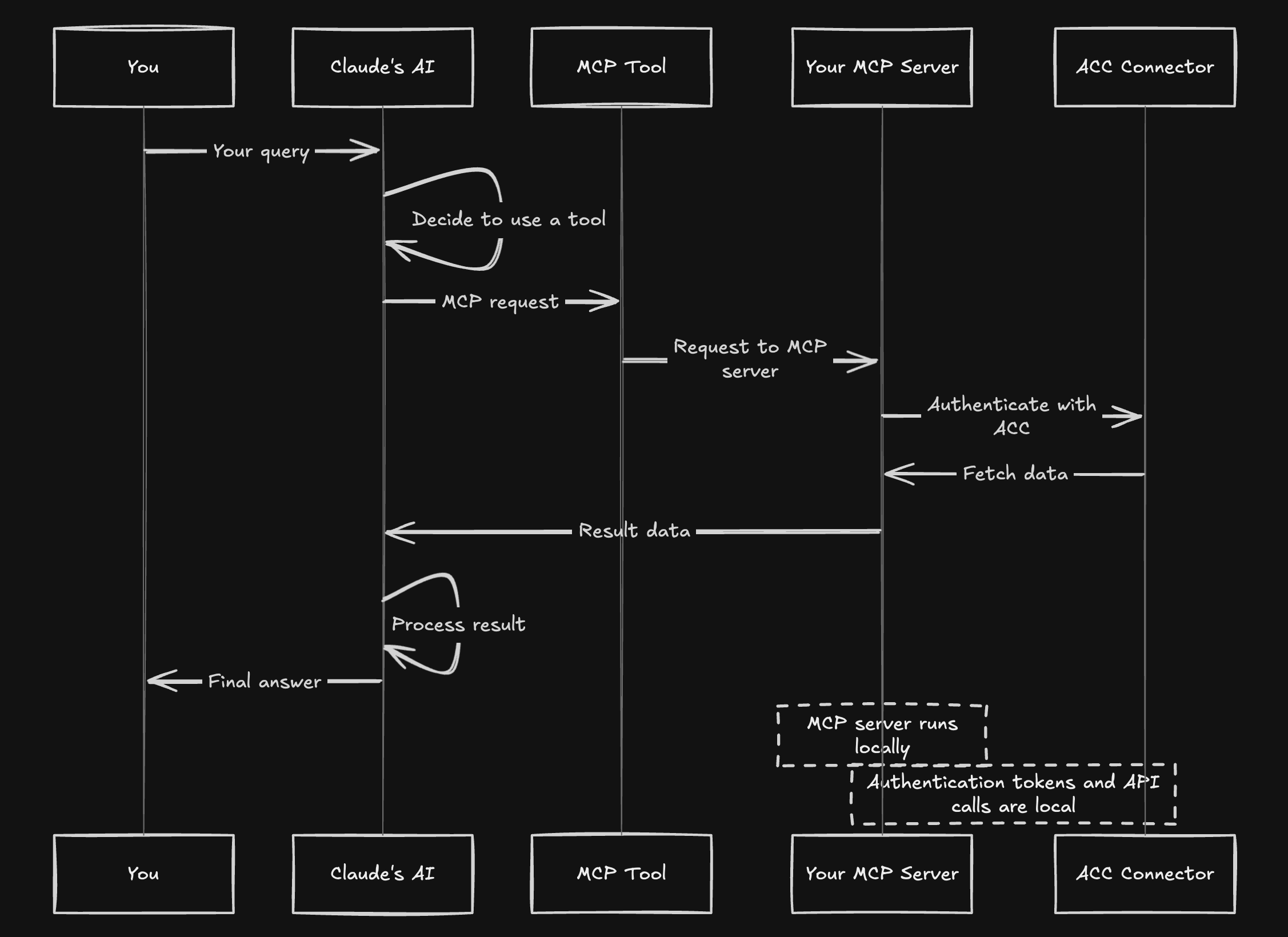
- Your query to Claude triggers tool selection
- Claude sends MCP requests to your local server
- The MCP server connects to APS/ACC using your credentials
- Data flows back to Claude which processes and formats results
Available Tools
The MCP server exposes the following tools:
get_hubs: Get all available hubsget_projects: Get all projects within a hubget_project_files: Get files in a specific folder of a projectget_versions: Get version information for a specific item
Troubleshooting
If you encounter issues with Claude Desktop integration:
Server not showing up:
- Check configuration file syntax (valid JSON)
- Use absolute paths everywhere
- Restart Claude Desktop completely
Permission errors:
- Grant Full Disk Access to Terminal and Claude
- Try using Python directly rather than through uv
- Try moving the project to a location with fewer restrictions
Environment errors:
- Ensure all dependencies are installed
- Try using the direct path to Python in your virtual environment
- Check your
.envfile has correct Autodesk credentials
Logs check:
tail -n 50 -f ~/Library/Logs/Claude/mcp*.logManual testing: Test your server works by running it directly:
cd /path/to/your/project
source .venv/bin/activate
python aps_dm_server.py
Using with OpenAI Agents SDK
This project includes integration with the OpenAI Agents SDK, allowing you to use the MCP server with an OpenAI agent.
Make sure your
.envfile includes your OpenAI API key:OPENAI_API_KEY=your_openai_api_keyInstall the additional dependencies:
uv pip install openai>=1.31.0Run the agent:
python main_agent.py
This will start an interactive session where you can ask the agent questions about your Autodesk projects.
Dependencies and Licensing
This project uses the following open source components:
- aps-toolkit - A library for Autodesk Platform Services (GPL-3.0)
- mcp - Multimodal Capability Protocol implementation
- python-dotenv - Environment variable management
- openai and openai-agents - OpenAI integration
This project is licensed under the GNU General Public License v3.0 as required by the aps-toolkit dependency.
Disclaimer
This software is provided "as is", without warranty of any kind, express or implied. This is a prototype for demonstration purposes only. The author takes no responsibility for any damages or issues that may arise from using this software. Use at your own risk.
Установка APS Server
У этого сервера нет опубликованного пакета — он собирается из исходников. Открой репозиторий и следуй инструкции в README.
▸ github.com/kpphillips/aps-mcp-serverFAQ
APS Server MCP бесплатный?
Да, APS Server MCP бесплатный — установка в пару кликов через Unyly без оплаты.
Нужен ли API-ключ для APS Server?
Нет, APS Server работает без API-ключей и переменных окружения.
APS Server — hosted или self-hosted?
Self-hosted: сервер запускается локально на твоей машине командой из раздела установки.
Как установить APS Server в Claude Desktop, Claude Code или Cursor?
Открой APS Server на unyly.org, выбери вкладку своего клиента (Claude Desktop, Claude Code, Cursor) и нажми Install — конфиг сгенерируется автоматически, без правки JSON.
Похожие MCP
Fetch
Web content fetching and conversion for efficient LLM usage.
AWS KB Retrieval
Retrieval from AWS Knowledge Base using Bedrock Agent Runtime.
 автор: modelcontextprotocol
Spring AI MCP Server
Provides auto-configuration for setting up an MCP server in Spring Boot applications.
llm-analysis-assistant
A very streamlined mcp client that supports calling and monitoring stdio/sse/streamableHttp, and can also view request responses through the /logs page. It also
 автор: xuzexin-hz
Compare APS Server with
Не уверен что выбрать?
Найди свой стек за 60 секунд
Автор?
Embed-бейдж для README
Похожее
Все в категории ai