
ArkComposer
БесплатноНе проверенAI-powered music notation & composition tool with built-in MCP server. Compose through conversation with Claude Code Desktop or any LLM. Free.

Описание
AI-powered music notation & composition tool with built-in MCP server. Compose through conversation with Claude Code Desktop or any LLM. Free.
README
Current packaged release: 1.2.5.12
Windows score editor and AI-assisted composition workstation.
Write, edit, arrange, and refine music in a full score editor, then use built-in AI tools or MCP-connected clients when you want generation help.
👨💻 About the Author
Park Byoung Gu (박병구)
Director & SW Group Manager at AXT (Ajinextek) — a leading company in industrial motion controller markets — where he leads software R&D.
ArkComposer is a personal hobby project, built on weekends and spare moments, driven by a deep love of music.
What Makes ArkComposer Different
- Full score editing and composition tools live in one workflow instead of separate notation and generator apps
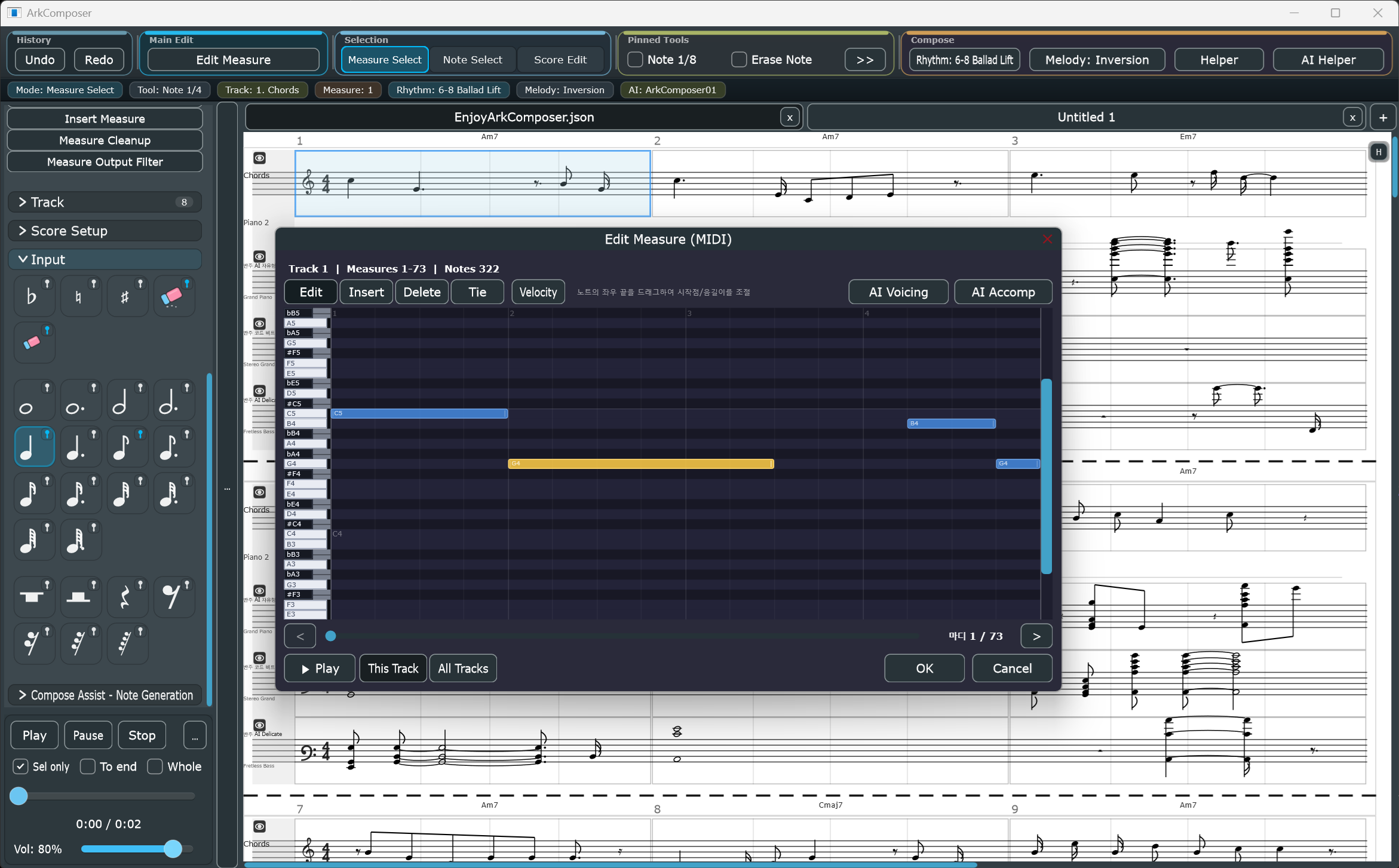
Edit Measure (MIDI)gives you a modeless piano-roll editor for precise measure-level repair, timing edits, velocity shaping, and AI-assisted rewriting- Built-in composition helpers cover rhythm, melody variation, chord suggestion, voice leading, accompaniment, and AI generation
- Melody recording can capture microphone input or system sound playback and convert the detected melody into editable score notation
- An MCP server is built into the app, so external AI clients can control the same score editor when needed
- Visual analysis overlays and score-aware editing tools stay tied to the musical structure instead of raw MIDI only
Features
Top-Bar Workflow
- Undo / Redo stays at the far left for quick recovery
Edit MeasureopensEdit Measure (MIDI)for the current measure selectionMeasure Select,Note Select, andScore Editsplit selection from direct score editing- Pinned note and eraser tools can switch the app into score editing immediately
- Rhythm, Melody, Helper, and AI Helper menus are grouped on the right side of the top bar
- A status bar below the top menu shows the current mode, tool, track, selected measures, rhythm, melody, and AI state
Score Editing
- Multi-track score editor with treble and bass clef support
- Note input: whole, half, quarter, 8th, 16th, 32nd (+ dotted variants)
- Accidentals, dynamics (p, mf, f, cresc, dim), tempo marks (accel, rit)
- Key signature: major/minor, all 15 keys, 3 apply modes (pitch-fixed / position-fixed / transpose)
- Time signatures: 4/4, 3/4, 2/4, 6/8, 12/8
- Chord symbol display above measures
- Lyrics editor with per-measure editing
- Multi-document tabs with independent undo/redo per tab
Edit Measure (MIDI)
- Piano-roll style editor for note timing, duration, pitch, and velocity inside selected measures
- Edit / Insert / Delete / Tie modes for fast repair without leaving the score workflow
- Track-wide measure navigation slider for moving across the active track while staying in the same editor
- Built-in playback controls for checking only the current track or all tracks
- Velocity popup editor for shaping dynamics inside the current measure range
- Designed for repeated measure cleanup and detailed note-level correction after generation or manual entry
Track Management
- Add, delete, merge, split (by pitch range), reorder tracks
- Hide/show individual tracks
- Per-track instrument settings: SoundFont, Program (0–127), MIDI Channel, Bank MSB/LSB, Volume, Pan, Percussion
Compose Assist
Rhythmreassigns rhythm patterns to selected measuresMelodyapplies transforms such as inversion and other note-sequence variations- Melody recording supports mic-in or sound playback capture, then converts the detected melody into editable score notes
Helpergroups chord suggestion, voice leading, accompaniment, and composition guidanceAI Helpergroups AI-backed generation tools for voicing and accompaniment- Voice Leading provides tunable parameters for harmonic line shaping and chord motion
- Accompaniment supports Arpeggio, Chord Beat, Drum Groove, and AI-driven styles
AI Voicing and AI Accompaniment
AI Voicingis available from the AI Helper menu and directly insideEdit Measure (MIDI)- Use
AI Voicingwhen the current track already has harmonic intent but needs cleaner voicing, redistribution, or regeneration AI AccompinsideEdit Measure (MIDI)generates accompaniment that follows the current melody and harmony while staying in the measure-edit workflow- AI accompaniment styles include
AI Chord Beat,AI Arpeggio,AI Free,AI Free (Melody Variation), andAI Drum Beat - Built-in ONNX and TinyGRU models can be selected from the app for local generation
AI Integration via MCP
- Full MCP server built into the app (stdio and TCP modes)
- Compatible with Claude Code and other MCP-capable clients
- Compose through natural language, then continue refining the result in the score editor or
Edit Measure (MIDI) - Scope control includes targeted edits such as selected range and whole-song operations
- MCP exposes self-documentation so connected AI clients can inspect available tools
Audio & Export
- Playback with SoundFont synthesis (.sf2)
- Record melody from microphone input or system sound playback and convert it to editable score notation
- Export audio: WAV (lossless) / MP3 (compressed, requires
lame.exeinTools/) - Export score: PDF / PNG / JPG
- Export video: MP4/H.264 with score frames, playback cursor, and optional AAC audio via bundled FFmpeg
- Import / Export MIDI
- Native save format:
.arkusing ArkScore v3 compact JSON - Legacy score formats remain readable:
.json,.arkscore,.arkscore.json
Plugin Filter Structure
- Built-in audio effect filters (Distortion, Echo, and more)
- Extensible plugin architecture for custom effects
AI Composition via MCP
Mode 1 — stdio (Claude Code) ✅ Tested
Launch ArkComposer in MCP stdio mode:
ArkComposer.exe --mcp-mode
Add to your claude_desktop_config.json:
{
  "mcpServers": {
    "arkcomposer": {
      "command": "C:/path/to/ArkComposer.exe",
      "args": ["--mcp-mode"]
    }
  }
}
Then talk to Claude Code:
"Create an 8-bar melody in C major, 4/4 time"
"Add an arpeggio accompaniment track"
"Apply jazz voice leading to measures 1–4"
"Continue the melody for 4 more measures"
Mode 2 — TCP (Codex CLI and others) ✅ Tested
- Launch ArkComposer normally
- In the left palette, click MCP Server
- Enter a TCP port (e.g.
7890) → Click Start - Connect your MCP-compatible client to
localhost:7890
Note on ChatGPT: ChatGPT does not natively support MCP.
To use ArkComposer with ChatGPT, you need to implement a separate OpenAPI server that bridges ChatGPT function calls to ArkComposer's MCP tools.
MCP Tool Surface
ArkComposer exposes a full score editing API over MCP:
| Category | Tools |
|---|---|
| Score reading | get_score, get_score_range, get_score_compact, get_score_range_compact |
| Note editing | add_note, add_notes_batch, add_notes_compact, change_note, delete_note |
| Track management | add_track, delete_track, set_track_props |
| Measure management | add_measure, delete_measure, delete_measures_range, clear_measure, set_measure_props |
| Document | new_song, set_title, undo |
Full AI usage guide: docs/HowToUse_ArkCompoerForLLM.md Also available at runtime via MCP resource:
arkcomposer://docs/how-to-use-llm
Installation
Requirements
- Windows 10 / 11 (64-bit)
- MP3 export uses
Tools/lame.exe. - MP4 video export uses
Tools/ffmpeg.exe.
SoundFonts
Place .sf2 files in the SoundFonts/ folder.
ArkComposer ships with:
GeneralUser GS v1.471.sf2— GeneralUser GS License v2.0 (S. Christian Collins)GeneralUser_GS_SoftSynth_v1.44.sf2— GeneralUser GS License v2.0 (S. Christian Collins)
Download
Roadmap
- macOS / Linux support (C++ / JUCE core is cross-platform ready)
- Cloud sync
- Plugin marketplace
- More AI model integrations
Credits
| Component | Author | License |
|---|---|---|
| JUCE Framework | Raw Material Software | JUCE Starter |
| GeneralUser GS v1.471.sf2 | S. Christian Collins | GeneralUser GS License v2.0 |
| GeneralUser_GS_SoftSynth_v1.44.sf2 | S. Christian Collins | GeneralUser GS License v2.0 |
| FluidSynth | Peter Hanappe and contributors | LGPL 2.1 |
| LAME MP3 Encoder | Mark Taylor and contributors | LGPL 2 |
| FFmpeg | FFmpeg developers / Gyan.dev Windows build | GPLv3 for the bundled static essentials build |
| Demucs / HTDemucs-6S ONNX model | Meta / Facebook Research; ONNX conversion artifact referenced by Tools/demucs/manifest.json |
Demucs upstream MIT; preserve model/source attribution and applicable artifact terms |
| ONNX Runtime | Microsoft and contributors | MIT |
| SDL3 | Sam Lantinga and contributors | zlib |
| libsndfile | Erik de Castro Lopo and contributors | LGPL 2.1 |
See Credits.txt for full details.
Third-Party License Notices
- FFmpeg is included as a separate
Tools/ffmpeg.exeexecutable for audio conversion/analysis workflows. The bundled binary reports a Gyan.dev essentials build configured with GPL/version3 options, so FFmpeg copyright, GPL terms, build/source availability, and upstream notices must be preserved when distributing ArkComposer. - Demucs / HTDemucs-6S is included as a local AI model asset for audio source-separation-assisted workflows. Keep the Demucs/Meta attribution, model artifact source information from
Tools/demucs/manifest.json, and any applicable model artifact license notice with redistribution. - ONNX Runtime is included as
onnxruntime.dllandonnxruntime_providers_shared.dllfor local ONNX inference. Preserve the Microsoft/contributor attribution and MIT license notice. - GeneralUser GS SoundFont files are included as bundled sound assets. Preserve the S. Christian Collins attribution and the GeneralUser GS License v2.0 notice.
- These third-party components are not owned by ArkComposer. Their licenses apply to their own binaries, libraries, models, and assets separately from the ArkComposer application license.
License
ArkComposer is free to download and use.
Music created with ArkComposer may be used for personal or commercial purposes without restriction.
Redistribution of ArkComposer itself is not permitted.
Source code is proprietary and not included in this distribution.
Built with C++ and JUCE
Website: arkcomposer.com
Установка ArkComposer
У этого сервера нет опубликованного пакета — он собирается из исходников. Открой репозиторий и следуй инструкции в README.
▸ github.com/arkark2010arkark/ArkComposerFAQ
ArkComposer MCP бесплатный?
Да, ArkComposer MCP бесплатный — установка в пару кликов через Unyly без оплаты.
Нужен ли API-ключ для ArkComposer?
Нет, ArkComposer работает без API-ключей и переменных окружения.
ArkComposer — hosted или self-hosted?
Self-hosted: сервер запускается локально на твоей машине командой из раздела установки.
Как установить ArkComposer в Claude Desktop, Claude Code или Cursor?
Открой ArkComposer на unyly.org, выбери вкладку своего клиента (Claude Desktop, Claude Code, Cursor) и нажми Install — конфиг сгенерируется автоматически, без правки JSON.
Похожие MCP
GitHub
PRs, issues, code search, CI status
 автор: GitHub
Filesystem
Secure file operations with configurable access controls.
Memory
Knowledge graph-based persistent memory system.
Template MCP Server
A CLI tool to create a new Model Context Protocol server project with TypeScript support, dual transport options, and an extensible structure
 автор: mcpdotdirect
Compare ArkComposer with
Не уверен что выбрать?
Найди свой стек за 60 секунд
Автор?
Embed-бейдж для README
Похожее
Все в категории development