
Armor Crypto
БесплатноНе проверенA single source for integrating AI Agents with the Crypto ecosystem, including wallet creation, swaps, transfers, and event-based trades like DCA and stop loss.

Описание
A single source for integrating AI Agents with the Crypto ecosystem, including wallet creation, swaps, transfers, and event-based trades like DCA and stop loss.
README
Alpha Test version 0.1.24
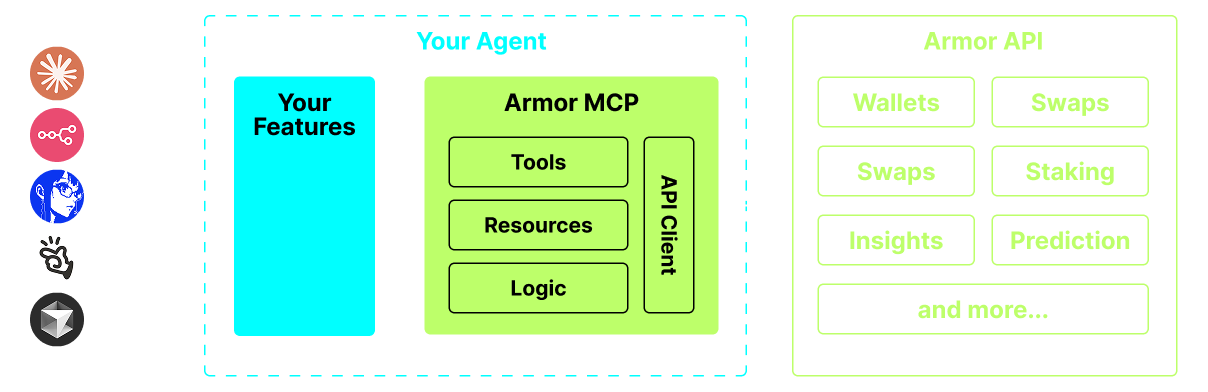
A single source for integrating AI Agents with the Crypto ecosystem. This includes Wallet creation and management, swaps, transfers, event-based trades like DCA, stop loss and take profit, and much more. The Armor MCP supports Solana in Alpha and, when in beta, will support more than a dozen blockchains, including Ethereum. Base, Avalanche, Bitcoin, Sui, Berachain, megaETH, Optimism, Ton, BNB, and Arbitrum, among others. Using Armor's MCP you can bring all of crypto into your AI Agent with unified logic and a complete set of tools.
Features
🧠 AI Native
📙 Wallet Management
🔃 Swaps
🌈 Specialized trades (DCA, Stop Loss etc.)
⛓️ Multi-chain
↔️ Cross-chain transations
🥩 Staking
🤖 Fast intergration to Agentic frameworks
👫 Social Sentiment
🔮 Prediction
Requirements
1. Make sure you have python installed
2. Install uv
Linux / Windows
pip install uv
Mac
brew install uv
3. Claude Desktop or your AI Agent will run the MCP
See Usage & Configuration for details.
Alpha Testing
We are currently in pre-alpha, and we are testing the capabilities of various agents and agentic frameworks like Claude Desktop, Cline, Cursor, n8n, etc.
Current Features & Tools
- Wallet Management
- Grouping & Organization
- Archiving
- Swap & Trades
- Normal swap
- DCA (place / list / cancel)
- Scheduled Orders
- Limit Orders (place / list / cancel)
- Staking and Unstaking
- Token Search and Trending Tokens
- Statistical Calculator for accurate Analysis
- Supports Solana blockchain
Coming Soon
- More Blockchain Support
- Minting
- Armor Agents as a Tool (or A2A)
MCP Setup
Currently you need to have the Armor NFT to get an API Key. Get it here
Usage & Configuration
To use the Armor MCP with your agent, you need the following configuration, replace <PUT-YOUR-KEY-HERE> with your API key:
{
  "mcpServers": {
    "armor-crypto-mcp": {
      "command": "uvx",
      "args": ["armor-crypto-mcp@latest", "--version"],
      "env": {
        "ARMOR_API_KEY": "<PUT-YOUR-KEY-HERE>"
      }
    }
  }
}
Use in Claude Desktop
- Must have Developer Mode enabled
- Open Claude Desktop's File Menu top left of the window.
- Go to File > Settings
- Under Developer, click Edit Configuration
- In the config file, insert the
armor-wallet-mcpsection from above - Make sure to replace the placeholder with your API key
- Save the file and start a new Chat in Claude Desktop
Use in Cline
- Click on the
MCP Serversbutton in the Cline tab in VSCode on the left panel - Scroll to the bottom of the left panel and click on
Configure MCP Servers - In the config file, insert
armor-wallet-mcpsection from above - Make sure to replace the placeholder with your API key
- Save the file, click
Doneunder theMCP Serverstab and start chatting with Cline
Use in n8n
- Open the n8n app
- Bottom-left of screen click
...next to your username and clickSettings - On the left panel, click
Community nodesand thenInstall a Community Nodebutton - In the search field for
npm Package Nametype in mcp - Install
MCP Nodes - Add any MCP node, for example:
List Tools - In the MCP Client
Parameterstab, clickSelect Credentialand clickCreate new credential - Under
Commandenteruvx - Under
Argumentsenterarmor-crypto-mcp - Under
EnvironmentsenterARMOR_API_KEY=eyJhbGciOiJIUzI1NiIsIn...paste the full API Key value after the= - Back in the
Parameterstab you can choose the MCPOperationfor that Node
Using Armor MCP
Once you have setup the Armor MCP here are some prompts you can use to get started
Установка Armor Crypto
У этого сервера нет опубликованного пакета — он собирается из исходников. Открой репозиторий и следуй инструкции в README.
▸ github.com/aurora-smith-ts58tc/armor-crypto-mcpFAQ
Armor Crypto MCP бесплатный?
Да, Armor Crypto MCP бесплатный — установка в пару кликов через Unyly без оплаты.
Нужен ли API-ключ для Armor Crypto?
Нет, Armor Crypto работает без API-ключей и переменных окружения.
Armor Crypto — hosted или self-hosted?
Self-hosted: сервер запускается локально на твоей машине командой из раздела установки.
Как установить Armor Crypto в Claude Desktop, Claude Code или Cursor?
Открой Armor Crypto на unyly.org, выбери вкладку своего клиента (Claude Desktop, Claude Code, Cursor) и нажми Install — конфиг сгенерируется автоматически, без правки JSON.
Похожие MCP
Stripe
Payments, customers, subscriptions
 автор: Stripe
malamutemayhem/unclick-agent-native-endpoints
110+ tools for AI agents spanning social media, finance, gaming, music, AU-specific services, and utilities. Zero-config local tools plus platform connectors. n
 автор: malamutemayhem
whiteknightonhorse/APIbase
Unified API hub for AI agents with 56+ tools across travel (Amadeus, Sabre), prediction markets (Polymarket), crypto, and weather. Pay-per-call via x402 micropa
 автор: whiteknightonhorse
trackerfitness729-jpg/sitelauncher-mcp-server
Deploy live HTTPS websites in seconds. Instant subdomains ($1 USDC) or custom .xyz domains ($10 USDC) on Base chain. Templates for crypto tokens and AI agent pr
 автор: trackerfitness729-jpg
Compare Armor Crypto with
Не уверен что выбрать?
Найди свой стек за 60 секунд
Автор?
Embed-бейдж для README
Похожее
Все в категории finance