
Atelier
БесплатноНе проверенConverts spoken descriptions into standards-compliant floor plans and furnished 3D models, enabling real-time collaborative editing through a live browser edito

Описание
Converts spoken descriptions into standards-compliant floor plans and furnished 3D models, enabling real-time collaborative editing through a live browser editor with Claude AI.
README
English · 🇻🇳 Tiếng Việt
Atelier 📐
An AI architect that plugs into any MCP client — Claude Code, Codex CLI, Gemini CLI, Claude Desktop, Cursor… From a spoken description to standards-compliant floor plans and a furnished 3D model, with a live browser editor you can edit by hand while the AI works.
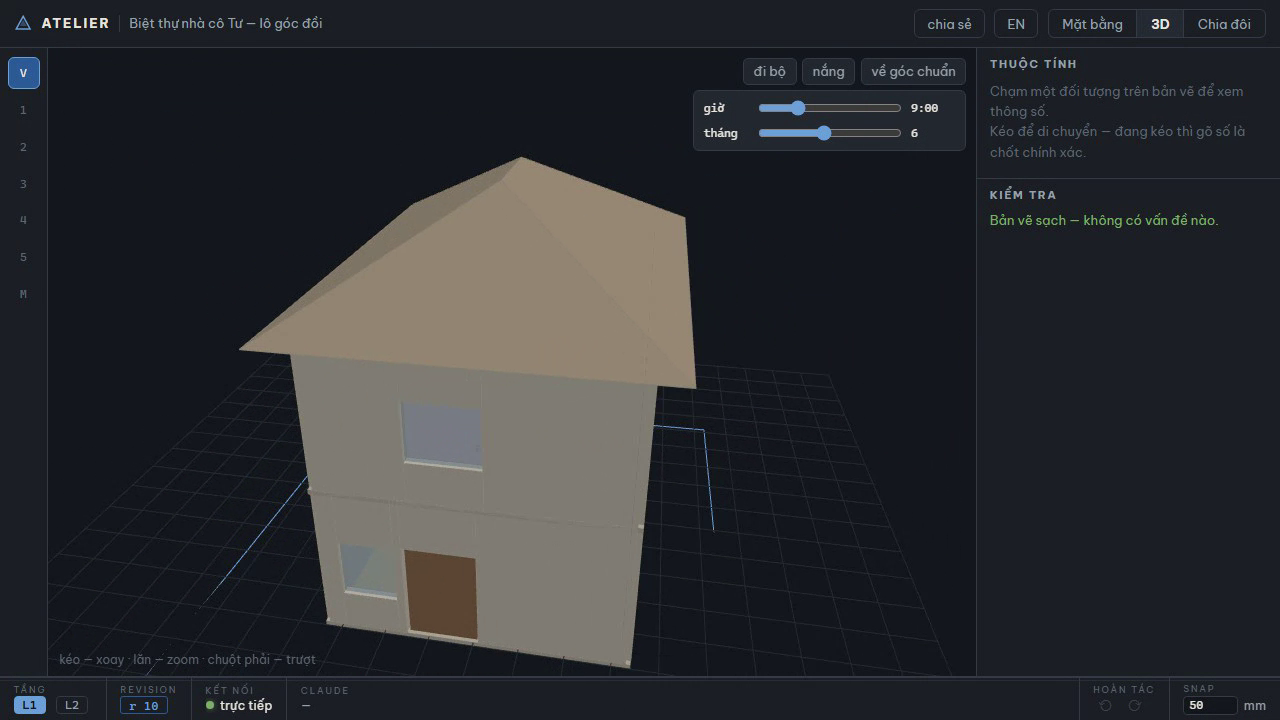
Multi-typology, multi-region by design. Atelier started with the Vietnamese tube house (nhà ống) — TCVN drawing symbols, Vietnamese dimensional rules, Lỗ Ban feng-shui rulers — and now covers six house types on any lot: tube house, hip-roof villa on a sloping corner lot, single-storey house, garden house, apartment renovation, and a UK detached (validated against the UK Approved Documents pack). Building standards are pluggable rule packs (TCVN first, community packs welcome — see CONTRIBUTING); pitched roofs, per-edge frontages and sloping terrain are first-class schema. The editor UI is bilingual and auto-detects by country (the VI/EN button overrides).
Atelier /ˌætəlˈjeɪ/ — "design workshop".
| Standards-compliant plan, 3-chain dims | First-person walkthrough (WASD) | A/B design comparison |
|---|---|---|
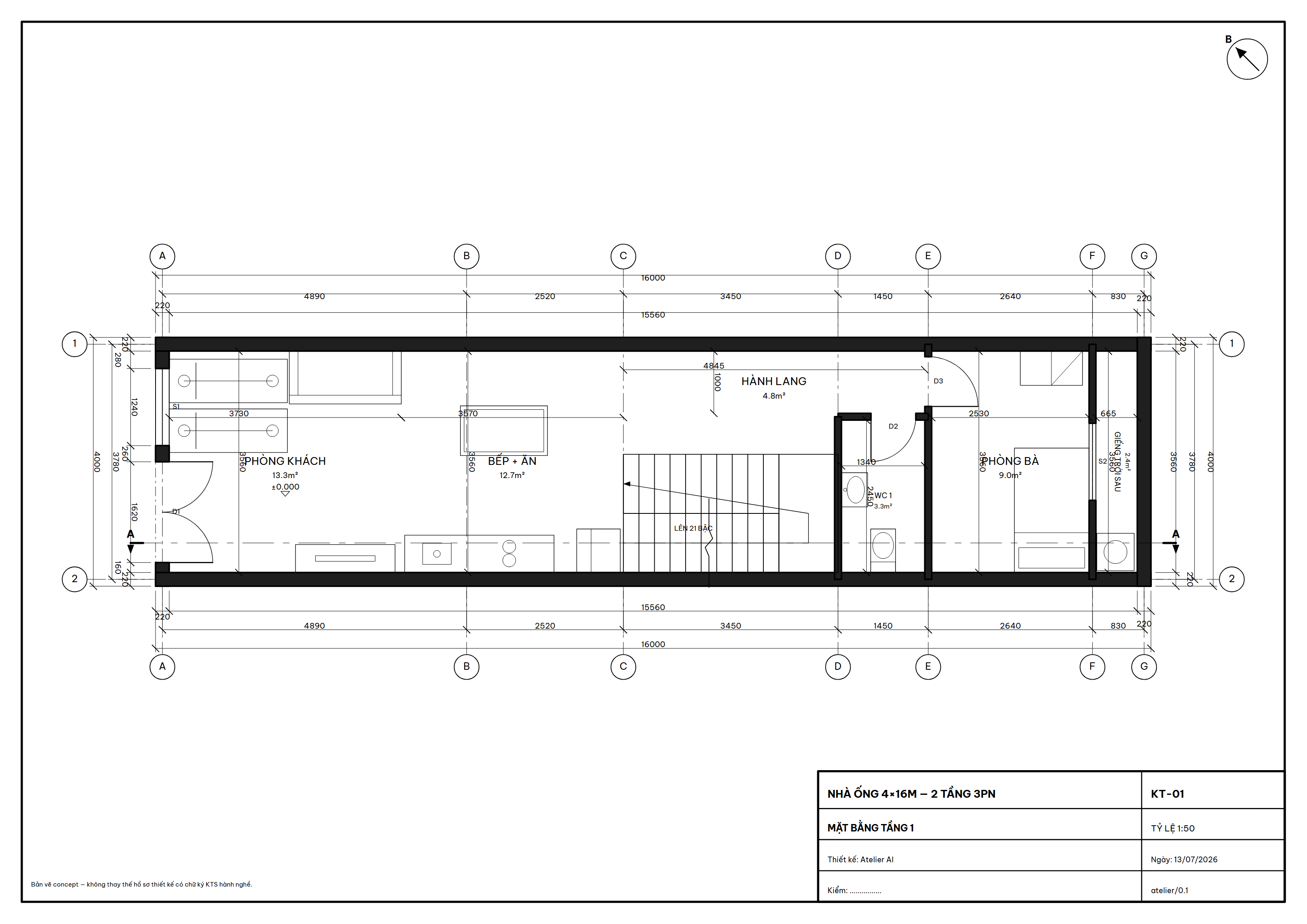 |
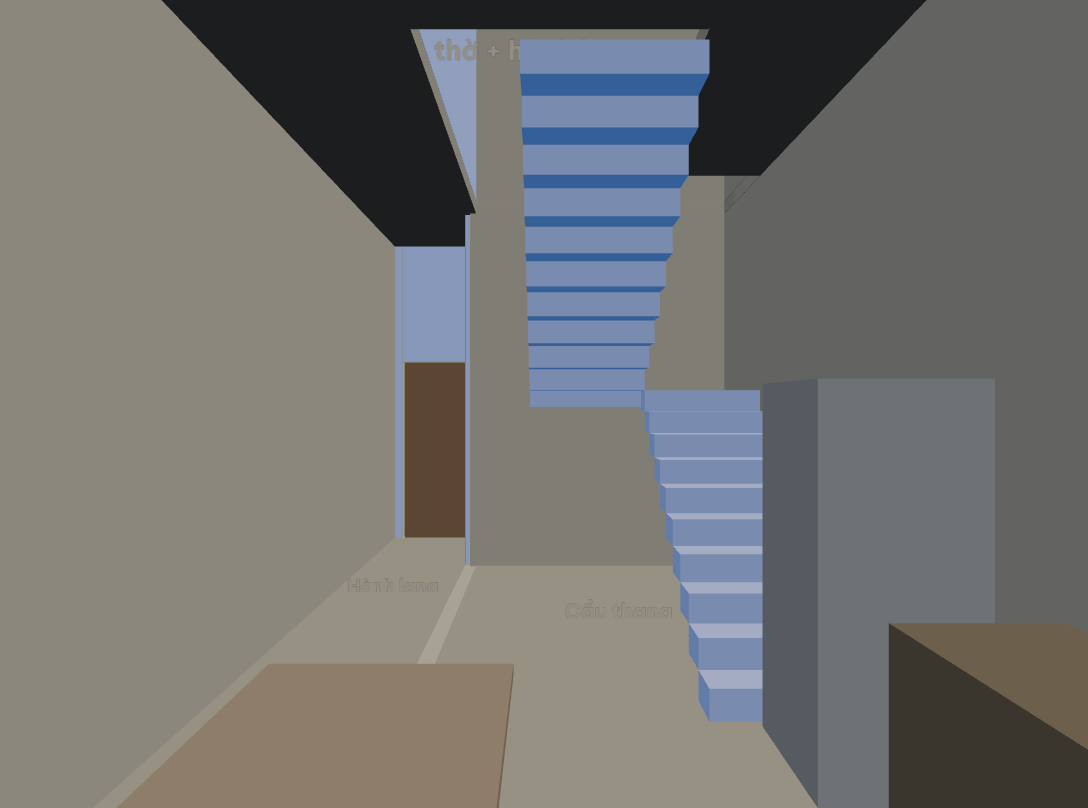 |
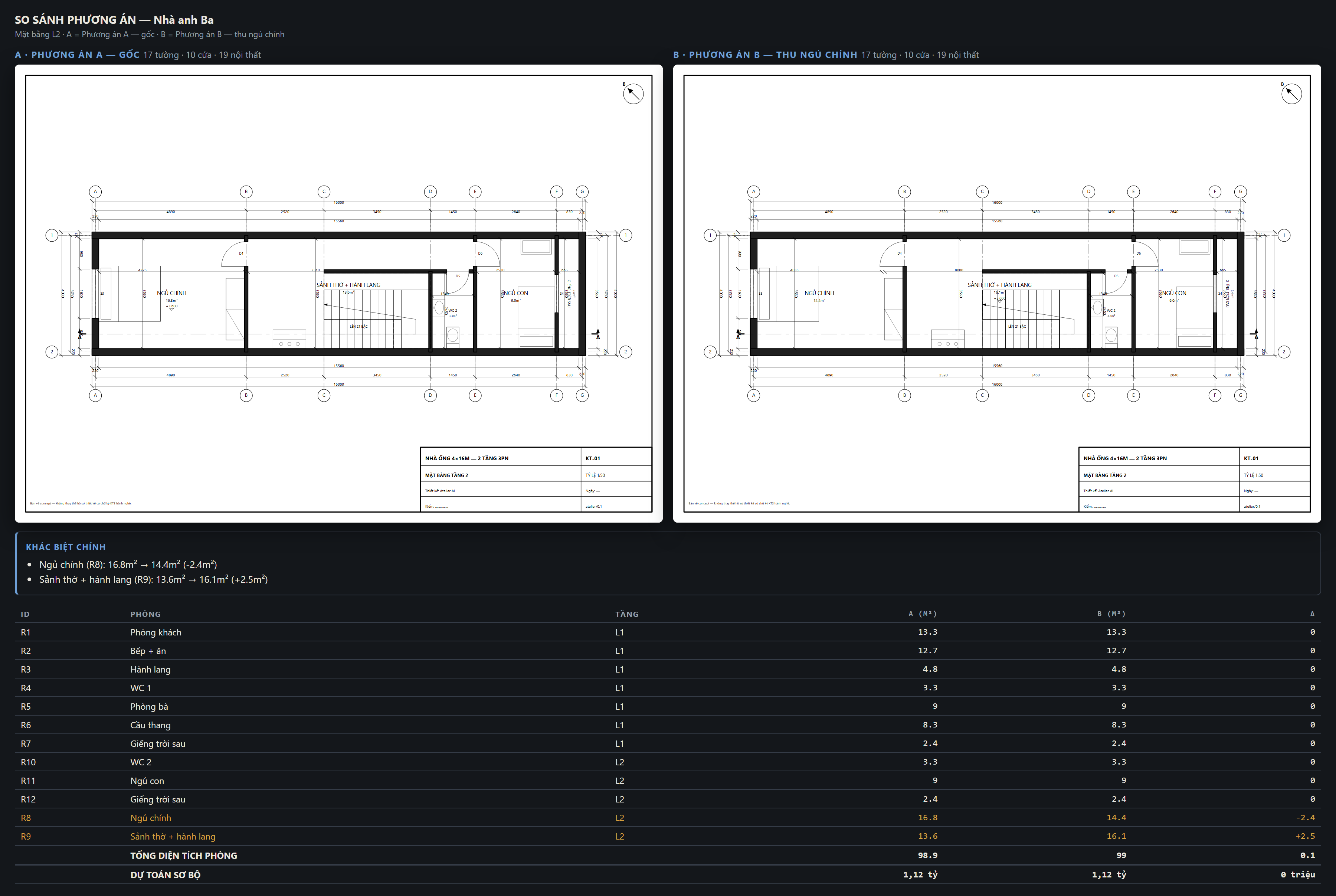 |
50-second demo — empty lot to documented villa
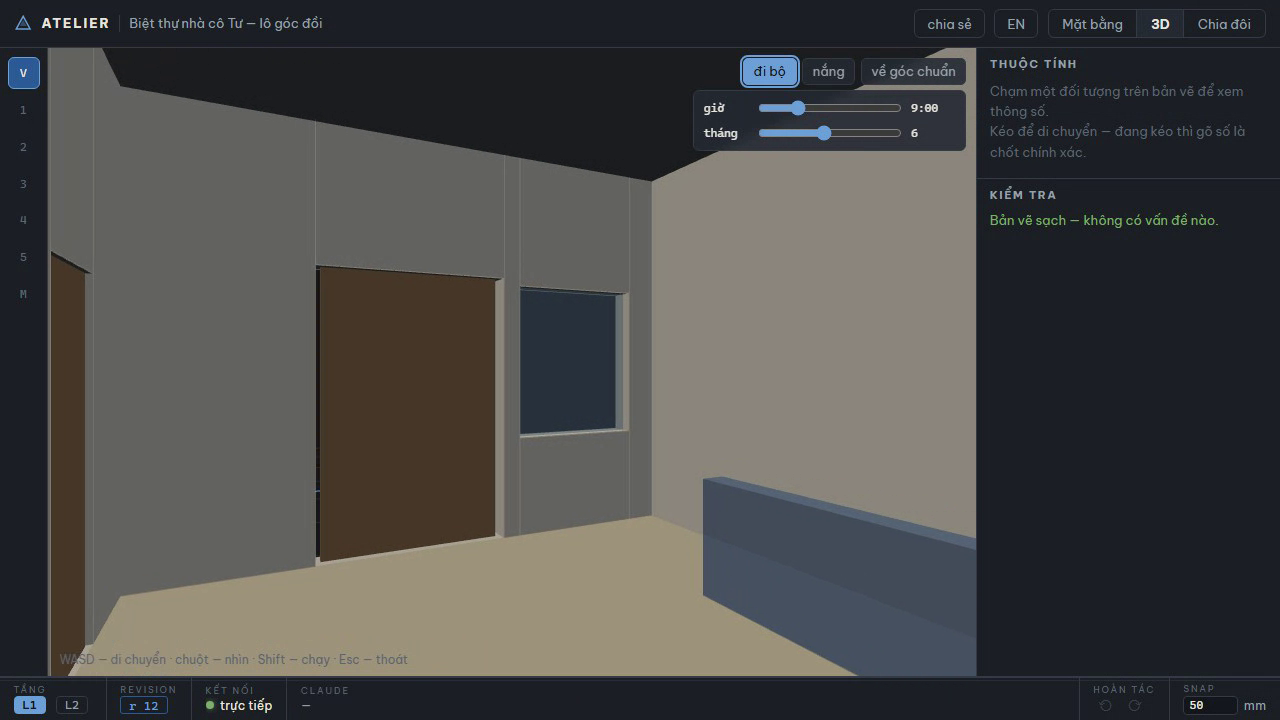
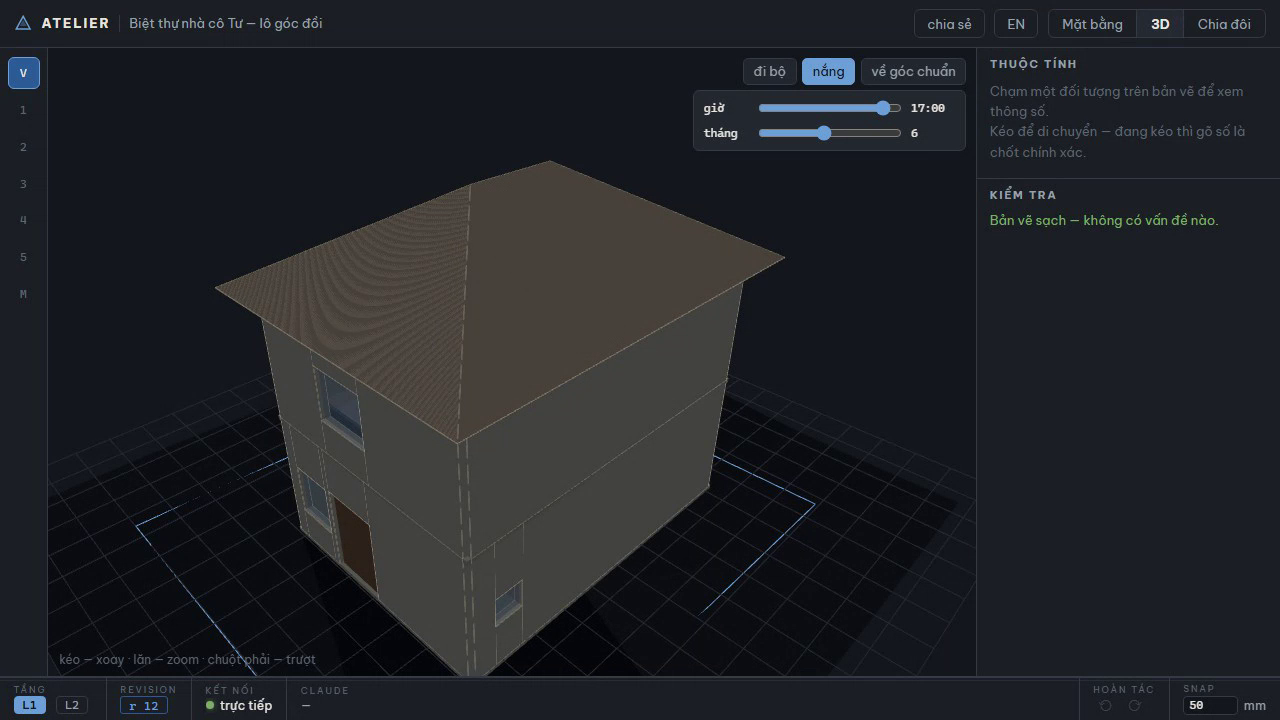
▶ Watch the video (50s, webm) — one continuous take, no cuts: interview brief → ground floor grows batch-by-batch on the 2D plan → switch to 3D while the first floor and the 30° hip roof land on sloping terrain → orbit → furniture from the catalog → first-person walkthrough → sun study 8:00→17:00 → validator clean, 6-sheet documentation set exported. Reproduce it yourself: npx tsx packages/server/scripts/demo-video.ts.
| Plan grows live (split view) | Hip roof on sloping corner lot | Walking the living room | Sun study 17:00 |
|---|---|---|---|
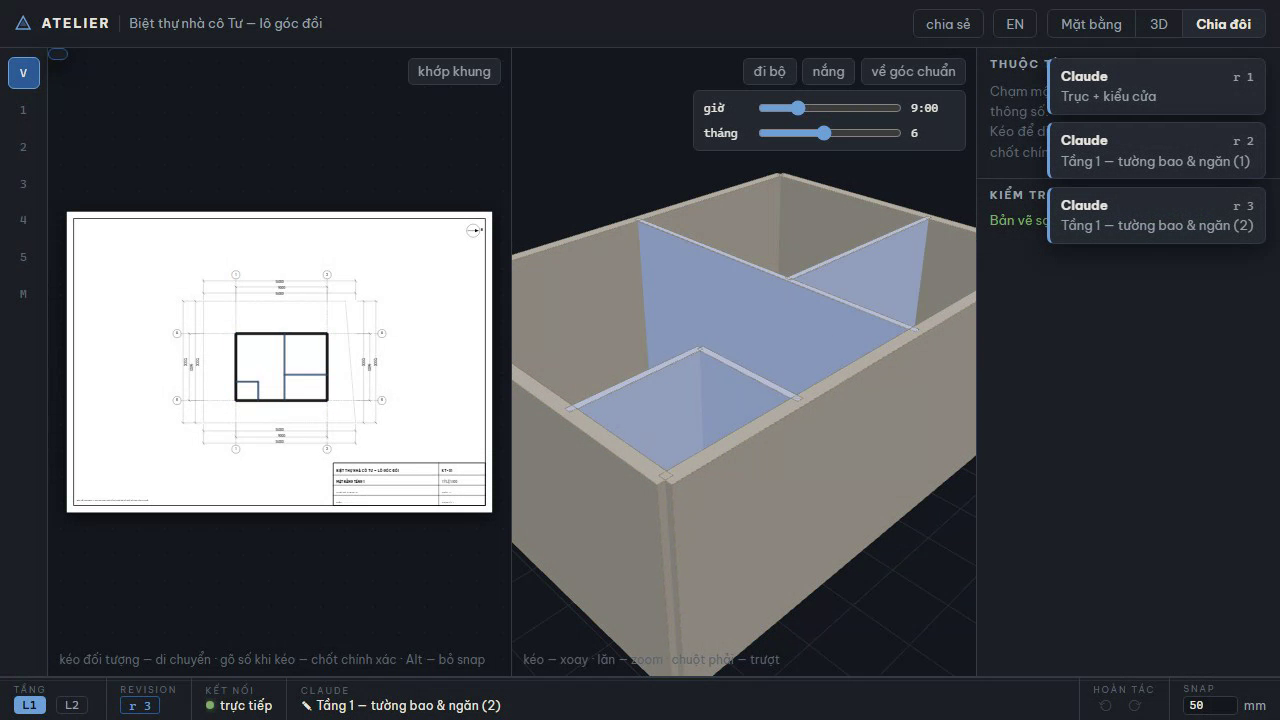 |
 |
 |
 |
Core idea
One parametric model (JSON) is the single source of truth. Claude edits it through MCP tools; humans edit it directly in the web editor (drag, type exact numbers); both sync in real time over WebSocket. A deterministic renderer generates symbol-correct 2D drawings and the furnished 3D model from the same source — so 2D and 3D can never drift apart, and drawing symbols are always correct because the AI never draws them.
Claude Code ──MCP──► Server (model + validator + renderer) ◄──WebSocket──► Browser (live editor)
Install (30 seconds)
You don't clone anything — Atelier ships as an npm package (atelier-mcp), and it's a standard MCP server, so it is not tied to Claude: any MCP client can run it. The server is always the same one command — npx -y atelier-mcp — only the registration step differs per client.
Stand in your own house folder (one folder = one house) and run ONE command — it detects every MCP client on your machine and registers with each:
mkdir my-house && cd my-house
npx -y atelier-mcp setup          # finds Claude Code / Codex CLI / Gemini CLI /
                                  # Claude Desktop / Cursor and registers Atelier
npx playwright install chromium   # optional, once — PNG/PDF export
Registering manually instead (or for other MCP clients)
claude mcp add atelier -- npx -y atelier-mcp   # Claude Code
codex mcp add atelier -- npx -y atelier-mcp    # OpenAI Codex CLI
gemini mcp add atelier npx -y atelier-mcp      # Gemini CLI
GUI clients (Claude Desktop, Cursor, …) have no "current folder" — point ATELIER_DIR at your house folder in their MCP config JSON:
{ "mcpServers": { "atelier": {
    "command": "npx", "args": ["-y", "atelier-mcp"],
    "env": { "ATELIER_DIR": "C:\\path\\to\\my-house" } } } }
Then start your agent and say "design me a 4×16m tube house". Works best with a model that reads Vietnamese well (tool descriptions and validator messages are Vietnamese-first) and a client that shows images from tool results — the agent inspects its own drawings.
From source (contributors)
pnpm install
npx playwright install chromium   # PNG/PDF rendering + demos
pnpm build:web
pnpm demo:p5                      # the 60-second demo: live build → drag a wall,
                                  # type 4200 → walk through the house in 3D
The repo ships a ready .mcp.json — open Claude Code in this folder and it registers the atelier server from source. pnpm build:cli builds the npm package (packages/cli, single-file bundle + web editor + fonts; verify with npx tsx packages/cli/smoke.mts <installed-pkg-path>).
What's the "60-second demo"?
The project's definition of success (doc 01), and it runs end-to-end (pnpm demo:p5):
Describe "4×16m tube house, 2 floors, 3 bedrooms, parking for 2 motorbikes" → a two-storey plan with correct symbols grows live in the browser → the user grabs a wall, types
4200 ⏎→ dims update, Claude notices the change and adapts the adjacent rooms → switch to 3D and walk (WASD) through the furnished house.
Status — roadmap complete
All six phases (P0–P5) plus the first three backlog items shipped:
| Phase | Delivered | Demo |
|---|---|---|
| P1 — Engine + static drawings | Parametric model, 22-rule validator with sources checked against TCVN 13967:2024, SVG/PNG plan renderer (symbols + 3-chain dims), 7 MCP tools, design-process skill | demo:p1 |
| P2 — One-way live | editor_open launches the browser editor (Vite + Three.js) in the same process; every apply_ops appears instantly in 2D (server-rendered SVG) and 3D (incremental maquette); capture_view lets Claude see exactly what the user sees |
demo:p2 |
| P3 — Hand editing | Drag walls/doors/furniture with a type-a-number HUD (drag, type 4200 ⏎ → exactly 4200mm), snapping, per-origin undo, soft-locks ("the user always wins" — agent writes on a user-held entity are rejected), editable properties panel, get_changes_since with old → new summaries |
demo:p3 |
| P4 — Documentation set | Numbered sheet set KT-01…: floor plans (clear-dimension interior dims, section mark), front elevation, section A-A through the stair (poché, door voids, step profile), room & door schedules; export multi-page A3 PDF, DXF (pure TS, true mm — measurable in CAD), SVG | demo:p4 |
| P5 — Furniture & experience | 106-asset catalog (true mm sizes, clearances, CC0 parametric geometry + license manifest), per-category 3D builders, floor finishes, catalog panel in the editor, WASD walkthrough (pointer lock, 1600mm eye height), sun study (hour/month sliders, real shadows from latitude + site orientation), assets_search with a visual contact sheet |
demo:p5 |
Backlog shipped: rough cost estimate (estimate_cost + a KT-06 sheet: converted areas × an editable local price table, auto-checked against the interview budget) · view-only share links (/xem/<token>, server-enforced read-only — send it to your spouse) · A/B design comparison (variant_save/open/compare, two plans side by side with per-room m² and per-variant cost deltas) · local zoning rule pack (PLN-01…06: setbacks for any lot shape, density, floors, height, canopy overhang — checks only what the interview brief declares) · IFC4 export (export ifc, pure-TS STEP writer: walls with proper opening voids/fills, slabs with real holes, stairs, rooms as IfcSpace — concept-level handover, not construction documents) · photoreal path (export gltf → one GLB in true metres, one node per entity, plus scripts/render-photoreal.py for headless-Blender Cycles renders using the same sun model as the editor's sun study) · legacy plan import (underlay_import traces an old DXF or plan photo as a dim layer under the live plan — scale from DXF units or a 2-point calibration; underlay_trace proposes walls from parallel stroke pairs, always human-reviewed before applying).
Multi-typology & multi-region (P6–P9, doc 12) — shipped: rule packs as data (standards are pluggable JSON packs selected per project via config.region/typology; the geometry core always runs; write your own) · pitched roofs (gable/hip/shed entity, one geometry source feeding plan/elevation/section/3D/GLB/IfcRoof/estimate at true sloped m²) · per-edge frontages (corner lots, per-edge setbacks — PLN-07) · sloping terrain (per-vertex ground elevations: sloped ground lines in elevations/sections, 3D terrain mesh, height measured from street level) · 6-template library (tube house, villa, single-storey, garden house, apartment, UK detached — each a golden-tested fixture) · region layer (units + default packs + currency; UK Approved Documents is the first non-VN pack, honestly flagged ⚠ until each number is verified against the source; estimates never leak another region's currency).
Bilingual: English README + full English design docs (docs/en/) + bilingual editor UI auto-detected by country (VN → vi, elsewhere → en; asset catalog included). Out of scope by design: structure & MEP (this is a concept tool, not construction documents).
Design docs
The full spec lives in docs/en/ (English) with the Vietnamese originals in docs/ — each file cross-links its counterpart; the Vietnamese original is authoritative if they differ:
| # | Doc | Contents |
|---|---|---|
| 01 | Vision & positioning | Users, non-goals, competitive landscape, differentiators |
| 02 | Design process | Interview → brief → 5 phases with approval checkpoints |
| 03 | System architecture | Dual-client, single process, data flow |
| 04 | Data schema | Parametric model: walls, openings, rooms, stairs, furniture |
| 05 | MCP tools | 19 tools + the ops vocabulary |
| 06 | Sync protocol | WebSocket, revisions, conflicts, undo |
| 07 | Validator & rules | TCVN rules + geometry + Lỗ Ban rulers |
| 08 | 2D renderer | Layers, line weights, symbols, dims, title block |
| 09 | Web editor | Hand-editing UX: drag, type numbers, 3D, walkthrough |
| 10 | Roadmap | 6 phases with Definitions of Done + backlog |
| 11 | Decisions | 10 ADRs + 8 settled questions |
| 12 | Multi-typology expansion | P6–P9: rule packs, roofs/terrain, templates, regions + market research annex |
| 13 | Writing a rule pack | Contributor guide: pack schema, sourcing rules, regions |
Stack
TypeScript monorepo — Node.js (MCP server + WebSocket), Three.js (3D), SVG (2D drawings), Vite (web editor), Vitest + Playwright (247 tests incl. real-browser e2e). Rationale in doc 03.
Dev environment
The repo integrates haido — a code-anchored memory layer that served as the project's own long-term memory while Atelier was being built:
.mcp.json→haido serveMCP server (recall / remember / related / overview / stale / reanchor).claude/settings.json→ hooks that feed project knowledge into every Claude Code session- Local DB in
.haido/(gitignored); shared knowledge ships as a memory pack indocs/memory-pack/
License & disclaimer
- Code: MIT. Font Be Vietnam Pro: SIL OFL 1.1 (
OFL.txtnext to the font files). Furniture catalog (parametric): CC0-1.0 (packages/core/assets/license-manifest.json). - Standards data in
rules/*.jsoncites TCVN/QCVN sources per rule; the price tablerules/don-gia.jsonis reference-only — edit it for your region. - ⚠ Atelier outputs are concept drawings — for thinking, discussing and working with an architect; they do not replace permit/construction documents signed by a licensed architect.
The 5 invariants
- Claude never draws directly — it only edits the parametric model; the renderer draws.
- Standard symbols live in the renderer — encoded once per TCVN, correct 100% of the time.
- Every mutation goes through one gate (
apply_ops) — transaction, validation, broadcast. - The user always wins — hand edits are never overwritten by the AI.
- Claude must look before inviting the user to look — validate + render + capture after every significant change.
Установка Atelier
У этого сервера нет опубликованного пакета — он собирается из исходников. Открой репозиторий и следуй инструкции в README.
▸ github.com/lebac-svg/AtelierFAQ
Atelier MCP бесплатный?
Да, Atelier MCP бесплатный — установка в пару кликов через Unyly без оплаты.
Нужен ли API-ключ для Atelier?
Нет, Atelier работает без API-ключей и переменных окружения.
Atelier — hosted или self-hosted?
Self-hosted: сервер запускается локально на твоей машине командой из раздела установки.
Как установить Atelier в Claude Desktop, Claude Code или Cursor?
Открой Atelier на unyly.org, выбери вкладку своего клиента (Claude Desktop, Claude Code, Cursor) и нажми Install — конфиг сгенерируется автоматически, без правки JSON.
Похожие MCP
Playwright
Browser automation, scraping, screenshots
 автор: Microsoft
Puppeteer
Browser automation and web scraping.
 автор: modelcontextprotocol
opentabs-dev/opentabs
Plugin-based MCP server + Chrome extension that gives AI agents access to web applications through the user's authenticated browser session. 100+ plugins with a
 автор: opentabs-dev
robhunter/agentdeals
1,500+ developer infrastructure deals, free tiers, and startup programs across 54 categories. Search deals, compare vendors, plan stacks, and track pricing chan
 автор: robhunter
Compare Atelier with
Не уверен что выбрать?
Найди свой стек за 60 секунд
Автор?
Embed-бейдж для README
Похожее
Все в категории browse