
Auth Fetch
БесплатноНе проверенEnables AI assistants to access content from authenticated web pages by opening a real browser for manual login and session capture. It saves browser profiles l

Описание
Enables AI assistants to access content from authenticated web pages by opening a real browser for manual login and session capture. It saves browser profiles locally so users only need to log in once per service for future automated access.
README
npm version npm downloads License: MIT auth-fetch-mcp MCP server
MCP server that lets AI assistants fetch content from authenticated web pages.
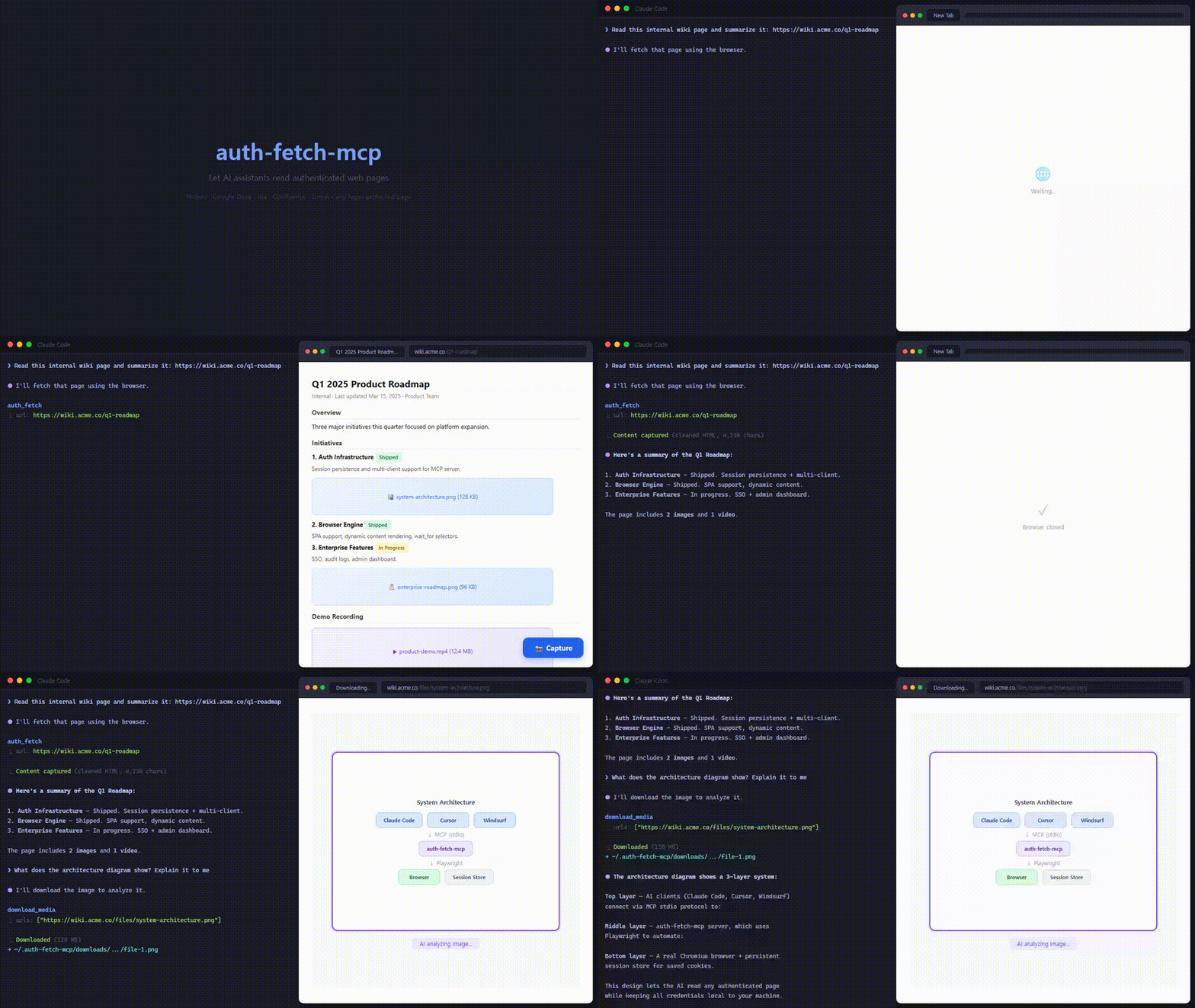
When your AI tries to read a URL that requires login, this tool opens a real browser for you to sign in — then captures the page content as cleaned HTML. Sessions are saved locally, so you only log in once per service.
Demo
Quick Start
Claude Code
claude mcp add --scope user auth-fetch -- npx auth-fetch-mcp@latest
.mcp.json (Cursor, Windsurf, etc.)
{
  "mcpServers": {
    "auth-fetch": {
      "command": "npx",
      "args": ["auth-fetch-mcp@latest"]
    }
  }
}
Chromium is auto-installed on first run if not already present.
How It Works
- Ask your AI to read any authenticated page — just paste the URL.
- A browser window opens automatically and navigates to the page.
- Log in as you normally would (supports SSO, 2FA, CAPTCHA — anything).
- Click the "📸 Capture" button in the bottom-right corner when ready.
- The page content is captured as cleaned HTML (noise elements stripped, media tags preserved), the browser closes, and your AI receives the content.
Tools
auth_fetch
The primary tool. Fetches page content using a real browser, opening a window for login if needed. Returns cleaned HTML with noise elements (nav, footer, scripts, etc.) stripped and media tags (<img>, <video>, <iframe>) preserved.
| Parameter | Type | Required | Description |
|---|---|---|---|
url |
string | yes | The URL to fetch content from (only http/https; see URL restrictions) |
wait_for |
string | no | CSS selector to wait for before capturing (useful for SPAs) |
download_media
Downloads files from URLs using saved browser sessions. Use this to lazily download images, videos, or other files found in auth_fetch results. The browser's saved cookies handle authentication automatically — no need to log in again.
| Parameter | Type | Required | Description |
|---|---|---|---|
urls |
string[] | yes | One or more URLs to download (only http/https; see URL restrictions) |
output_dir |
string | no | Subdirectory under ~/.auth-fetch-mcp/downloads/ to save files into. Absolute paths or .. segments that escape this root are rejected. Defaults to ~/.auth-fetch-mcp/downloads/<timestamp>/ |
Example flow:
1. auth_fetch("https://notion.so/my-page")
   → Returns HTML with <img src="https://s3.notion.so/signed-url..."/> tags

2. AI reads the HTML, identifies an image it needs

3. download_media(["https://s3.notion.so/signed-url..."])
   → Downloads the image using saved session cookies
   → Returns { localPath: "~/.auth-fetch-mcp/downloads/.../file-1.png" }
list_pages
Lists all open tabs in the browser with their URLs and titles.
close_browser
Closes the browser window. Login sessions are saved and will be reused next time.
URL restrictions
To prevent SSRF (server-side request forgery) attacks driven by prompt injection, both auth_fetch and download_media validate every URL before dispatching it:
- Only
httpandhttpsschemes are allowed.file:,data:,javascript:, etc. are rejected. - The hostname is resolved via DNS and the resulting IP is checked. Requests are rejected when the address falls in private, loopback, link-local, CGNAT, or multicast ranges:
- IPv4:
0.0.0.0/8,10.0.0.0/8,100.64.0.0/10,127.0.0.0/8,169.254.0.0/16,172.16.0.0/12,192.0.0.0/24,192.168.0.0/16,198.18.0.0/15,224.0.0.0/4,240.0.0.0/4 - IPv6:
::,::1,fc00::/7,fe80::/10,ff00::/8, IPv4-mapped equivalents
- IPv4:
download_mediaadditionally constrainsoutput_dirto stay inside~/.auth-fetch-mcp/downloads/. Absolute paths and..segments that escape this root are rejected.
Allowing private hosts
If you need to access a host on your local machine or LAN (e.g., a dev server, NAS, or Tailscale node), opt in with environment variables:
| Variable | Effect |
|---|---|
AUTH_FETCH_ALLOW_PRIVATE |
Set to 1, true, or yes to disable all private/loopback/link-local checks. Most permissive — use only in trusted environments. |
AUTH_FETCH_ALLOW_HOSTS |
Comma-separated allowlist of hostnames or IPs. Matches against the URL's hostname and every resolved IP. |
.mcp.json example:
{
  "mcpServers": {
    "auth-fetch": {
      "command": "npx",
      "args": ["auth-fetch-mcp@latest"],
      "env": {
        "AUTH_FETCH_ALLOW_HOSTS": "localhost,127.0.0.1,192.168.1.10"
      }
    }
  }
}
Heads up: enabling these variables re-opens those hosts to any prompt the MCP client (LLM) processes. Prefer the narrowest possible allowlist over
AUTH_FETCH_ALLOW_PRIVATE=1, and only enable them in environments you trust.
Data Storage
All data is stored locally under ~/.auth-fetch-mcp/. Nothing is sent to external servers.
| What | Where | When | Persistent? |
|---|---|---|---|
| Browser sessions (cookies, local storage) | ~/.auth-fetch-mcp/browser-data/ |
After first login | Yes — reused across restarts |
| Downloaded media files | ~/.auth-fetch-mcp/downloads/<timestamp>/ |
Only when download_media is called |
Yes — stays until you delete it |
| Captured page content (HTML) | Not saved to disk | Passed directly to AI via stdio | No — exists only in the AI's context |
To clear all data:
# Clear login sessions only
rm -rf ~/.auth-fetch-mcp/browser-data/

# Clear downloaded files only
rm -rf ~/.auth-fetch-mcp/downloads/

# Clear everything
rm -rf ~/.auth-fetch-mcp/
Supported AI Tools
- Claude Code
- Cursor
- Windsurf
- Any MCP-compatible client using stdio transport
Limitations
- Requires a local environment (does not work in web-based chat interfaces)
- First access to each service requires manual login
- Very long pages are truncated to fit LLM context windows (100K chars)
- Some sites with aggressive bot detection may not work (try the
wait_foroption) - Private, loopback, and link-local hosts are blocked by default — opt in via
AUTH_FETCH_ALLOW_PRIVATE/AUTH_FETCH_ALLOW_HOSTS(see URL restrictions)
Privacy
- All data stays on your machine — nothing is sent to external servers
- Captured HTML is never written to disk — it only passes through the stdio pipe to the AI tool
- Browser sessions are stored locally as a standard Chromium profile
- Downloaded files go to a local directory you control
Contributing
Contributions are welcome! Please open an issue or submit a pull request.
git clone https://github.com/ymw0407/auth-fetch-mcp.git
cd auth-fetch-mcp
npm install
npm run build
License
MIT
Установить Auth Fetch в Claude Desktop, Claude Code, Cursor
unyly install auth-fetch-mcpСтавит в Claude Desktop, Claude Code, Cursor и VS Code — сам разбирается с npx, uvx и сборкой из исходников.
Впервые? Поставь CLI: curl -fsSL https://unyly.org/install | sh
Или настроить вручную
Выполни в терминале:
claude mcp add auth-fetch-mcp -- npx -y auth-fetch-mcpПошаговые гайды: как установить Auth Fetch
FAQ
Auth Fetch MCP бесплатный?
Да, Auth Fetch MCP бесплатный — установка в пару кликов через Unyly без оплаты.
Нужен ли API-ключ для Auth Fetch?
Нет, Auth Fetch работает без API-ключей и переменных окружения.
Auth Fetch — hosted или self-hosted?
Self-hosted: сервер запускается локально на твоей машине командой из раздела установки.
Как установить Auth Fetch в Claude Desktop, Claude Code или Cursor?
Открой Auth Fetch на unyly.org, выбери вкладку своего клиента (Claude Desktop, Claude Code, Cursor) и нажми Install — конфиг сгенерируется автоматически, без правки JSON.
Похожие MCP
Playwright
Browser automation, scraping, screenshots
 автор: Microsoft
Puppeteer
Browser automation and web scraping.
 автор: modelcontextprotocol
opentabs-dev/opentabs
Plugin-based MCP server + Chrome extension that gives AI agents access to web applications through the user's authenticated browser session. 100+ plugins with a
 автор: opentabs-dev
robhunter/agentdeals
1,500+ developer infrastructure deals, free tiers, and startup programs across 54 categories. Search deals, compare vendors, plan stacks, and track pricing chan
 автор: robhunter
Compare Auth Fetch with
Не уверен что выбрать?
Найди свой стек за 60 секунд
Автор?
Embed-бейдж для README
Похожее
Все в категории browse