
Auth0 3lo Server
БесплатноНе проверенDemonstrates the AgentCore Gateway 3-Legged OAuth flow with Auth0, exposing whoami and echo tools for end-to-end authorization code testing.

Описание
Demonstrates the AgentCore Gateway 3-Legged OAuth flow with Auth0, exposing whoami and echo tools for end-to-end authorization code testing.
README
A complete working example of the Amazon Bedrock AgentCore Gateway 3-Legged OAuth (Authorization Code) flow using Auth0 as both the inbound JWT authorizer and the outbound credential provider, with a Lambda MCP server as the target.
What This Demonstrates
- Inbound JWT authentication (Auth0 token → Gateway)
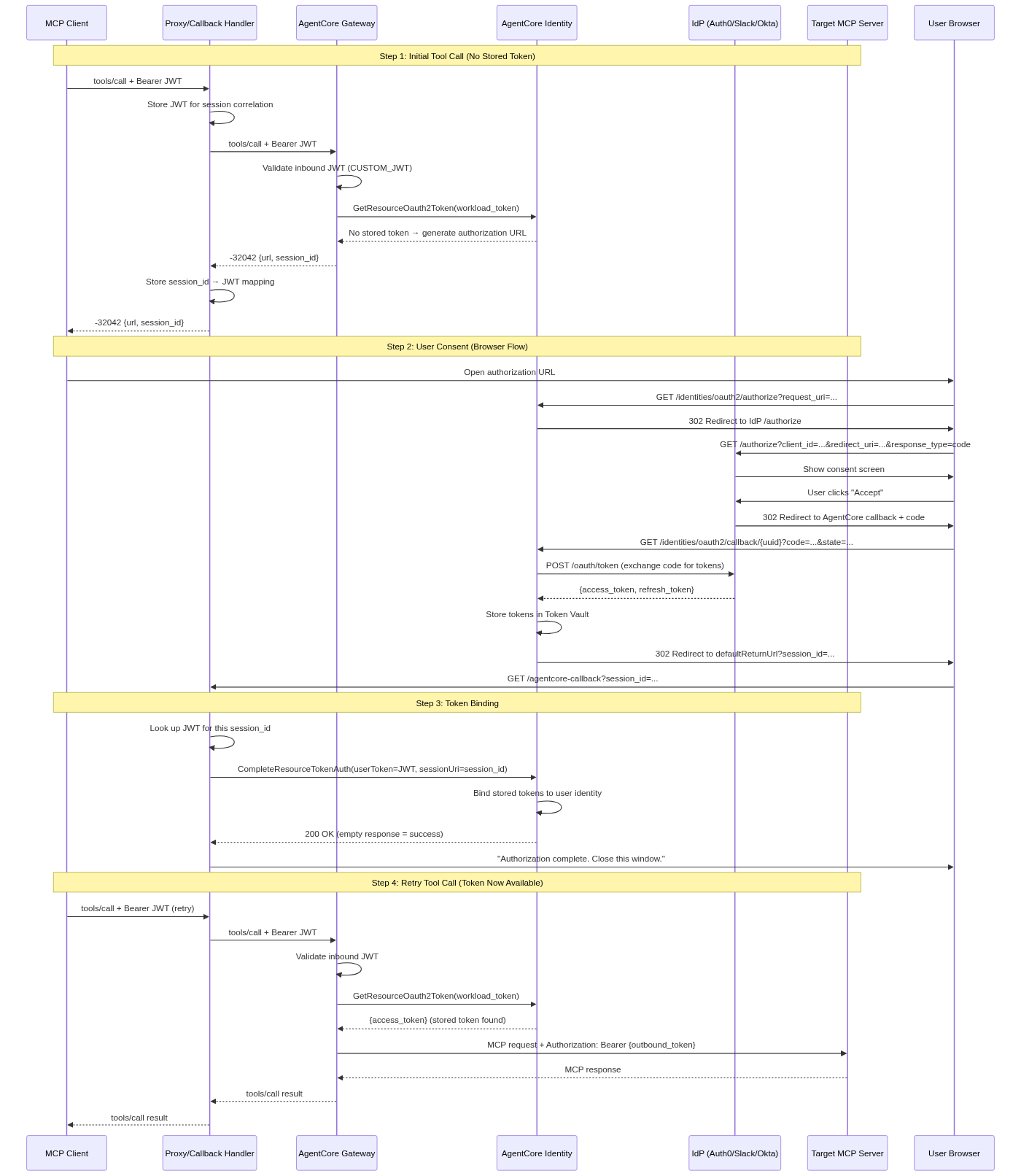
tools/listdiscovering tools from a remote MCP servertools/calltriggering a -32042 OAuth elicitation- User completing OAuth consent at Auth0
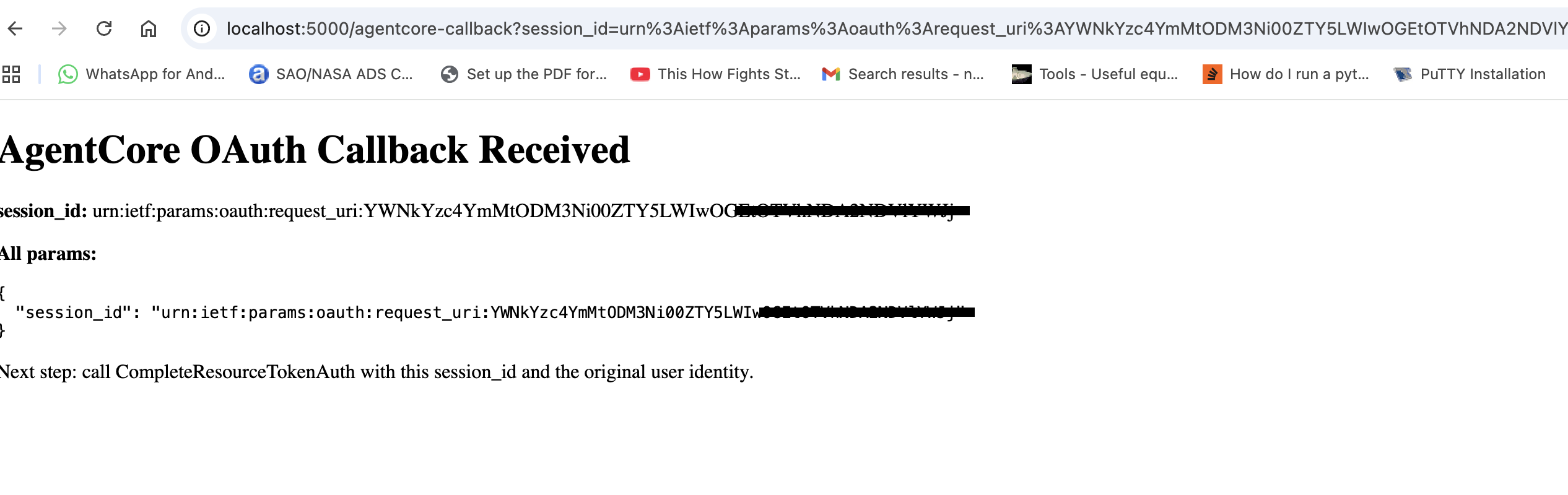
- Callback handler receiving the session_id
CompleteResourceTokenAuthbinding the token to the user- Subsequent
tools/callsucceeding end-to-end
Architecture
MCP Client (curl) --> AgentCore Gateway --> Lambda MCP Server
       |                    |
       |                    +--> AgentCore Identity (token store)
       |                                |
       |                                +--> Auth0 (consent + code exchange)
       |
       +--> Callback Handler (Flask @ localhost:5000)
                    |
                    +--> Receives session_id after consent
                    +--> Calls CompleteResourceTokenAuth
Prerequisites
- AWS account with Amazon Bedrock AgentCore access
- AWS CLI with
bedrock-agentcoreandbedrock-agentcore-controlcommands - Auth0 free developer account (sign up)
- Python 3.12+
- pip
Quick Start
# Clone this repo
git clone <repo-url>
cd agentcore-3lo-auth0-example

# Install dependencies
pip install -r requirements.txt

# Copy and fill in your credentials
cp .env.example .env
# Edit .env with your Auth0 and AWS values

# Start the Flask app
python app.py
Then follow the step-by-step guide below.
Step-by-Step Guide
Step 1: Auth0 Configuration
Create an API
- Auth0 Dashboard > APIs > Create API
- Name:
agentcore-gateway-api - Identifier:
https://agentcore-gateway-api - Signing Algorithm: RS256
Configure API Settings
- Permissions tab: Add
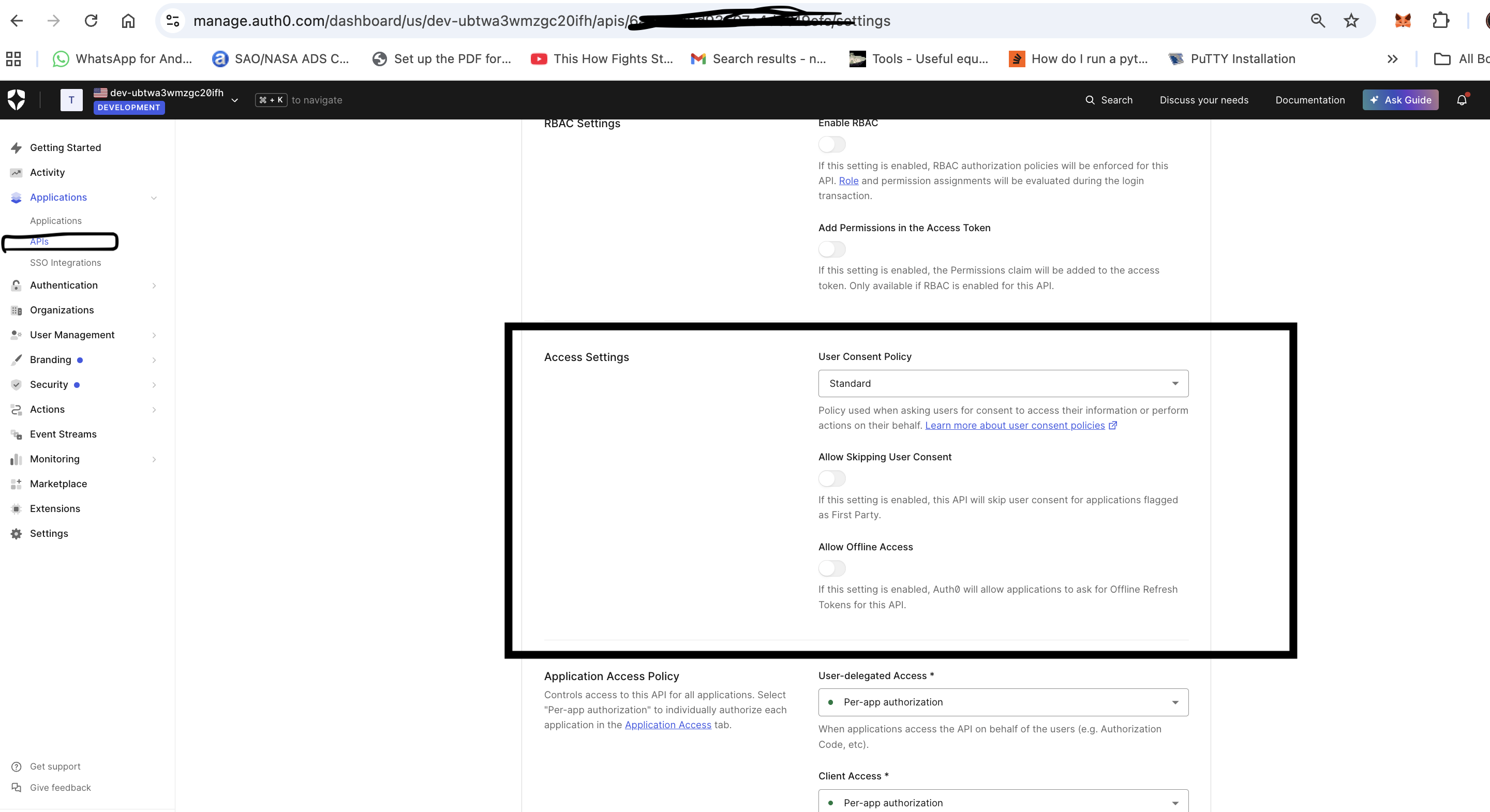
access:tools(description: "Access MCP tools") - Settings tab: Set "Allow Skipping User Consent" to OFF
Create an Application
- Auth0 Dashboard > Applications > Create Application
- Name:
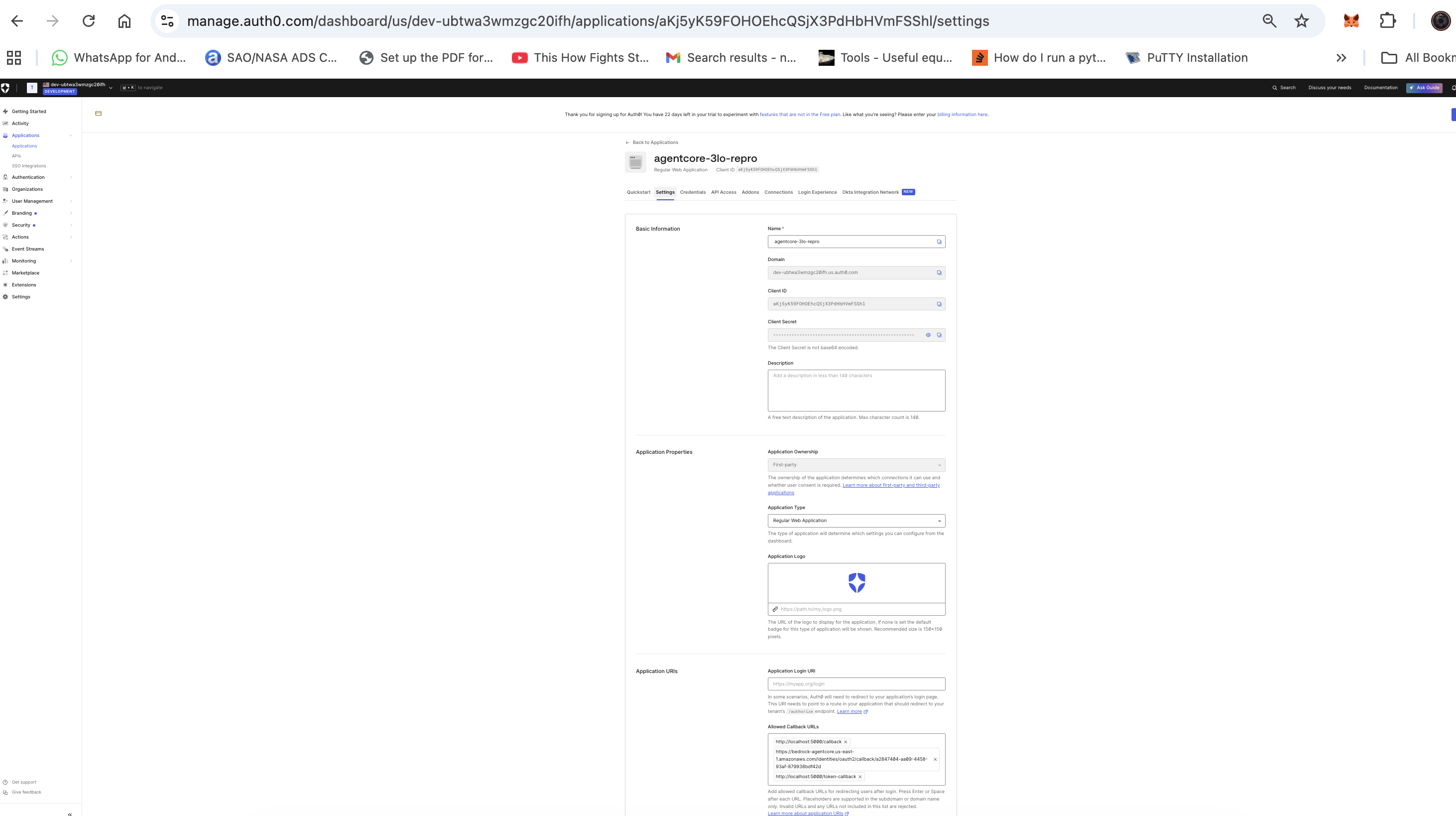
agentcore-3lo-repro, Type: Regular Web Application - Settings:
- Allowed Callback URLs:
http://localhost:5000/callback, http://localhost:5000/token-callback - Allowed Logout URLs:
http://localhost:5000/
- Allowed Callback URLs:
You will add the AgentCore callback URL to this list in Step 4.
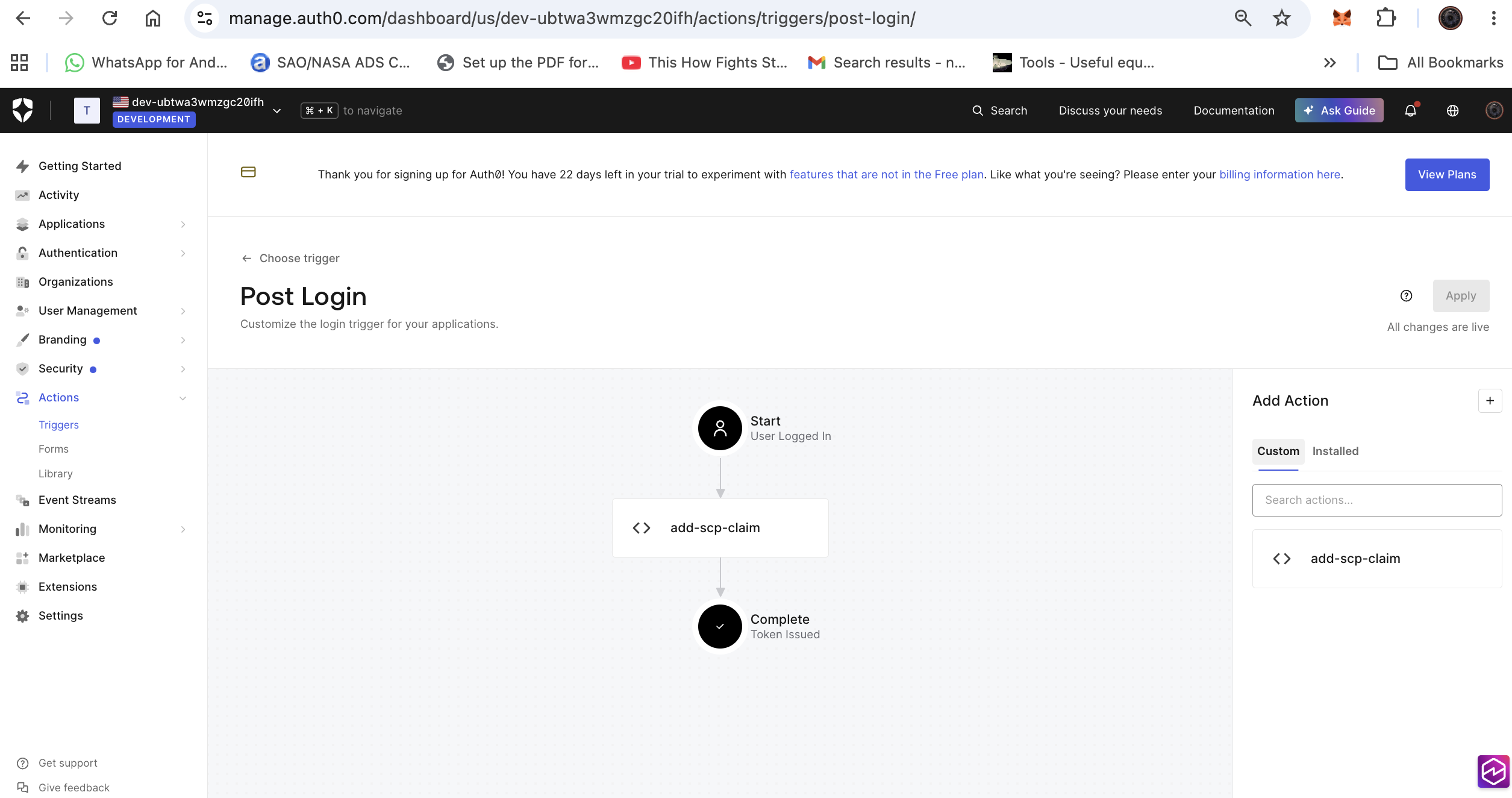
Deploy a Post Login Action
- Auth0 Dashboard > Actions > Library > Build Custom
- Name:
add-scp-claim, Trigger: Login / Post Login
exports.onExecutePostLogin = async (event, api) => {
  const scopes = event.transaction.requested_scopes || [];
  if (!scopes.includes('openid')) {
    scopes.push('openid');
  }
  api.accessToken.setCustomClaim('scp', scopes);
};
- Deploy, then add to the Login flow (Actions > Flows > Login)
Step 2: AWS IAM Role
Create an execution role for the Gateway with trust policy for bedrock-agentcore.amazonaws.com:
{
  "Version": "2012-10-17",
  "Statement": [
    {"Effect": "Allow", "Action": "bedrock-agentcore:*", "Resource": "*"},
    {"Effect": "Allow", "Action": "lambda:InvokeFunction", "Resource": "*"},
    {"Effect": "Allow", "Action": "secretsmanager:GetSecretValue",
     "Resource": "arn:aws:secretsmanager:<region>:<account>:secret:bedrock-agentcore-identity*"}
  ]
}
Step 3: Create AgentCore Gateway
Important: Use only
allowedAudience. Do NOT useallowedClientswith Auth0 — Auth0 places client_id in theazpclaim, notclient_id, causinginsufficient_scopeerrors.
aws bedrock-agentcore-control create-gateway \
  --name "auth0-3lo-example" \
  --role-arn "arn:aws:iam::<account>:role/<role-name>" \
  --protocol-type MCP \
  --protocol-configuration '{"mcp":{"supportedVersions":["2025-11-25"]}}' \
  --authorizer-type CUSTOM_JWT \
  --authorizer-configuration '{
    "customJWTAuthorizer": {
      "discoveryUrl": "https://<tenant>.us.auth0.com/.well-known/openid-configuration",
      "allowedAudience": ["https://agentcore-gateway-api"]
    }
  }' \
  --region us-east-1
Wait for status: READY.
Step 4: Create OAuth2 Credential Provider
aws bedrock-agentcore-control create-oauth2-credential-provider \
  --name "auth0-3lo-example" \
  --credential-provider-vendor "CustomOauth2" \
  --oauth2-provider-config-input '{
    "customOauth2ProviderConfig": {
      "oauthDiscovery": {
        "authorizationServerMetadata": {
          "issuer": "https://<tenant>.us.auth0.com/",
          "authorizationEndpoint": "https://<tenant>.us.auth0.com/authorize",
          "tokenEndpoint": "https://<tenant>.us.auth0.com/oauth/token",
          "responseTypes": ["code"]
        }
      },
      "clientId": "<your-client-id>",
      "clientSecret": "<your-client-secret>",
      "clientAuthenticationMethod": "CLIENT_SECRET_POST"
    }
  }' \
  --region us-east-1
The response includes a callbackUrl. Add this URL to your Auth0 application's Allowed Callback URLs.
Step 5: Register Workload Identity Return URL
aws bedrock-agentcore-control update-workload-identity \
  --name "<gateway-id>" \
  --allowed-resource-oauth2-return-urls '["http://localhost:5000/agentcore-callback"]' \
  --region us-east-1
Step 6: Create Lambda MCP Server
Deploy the included Lambda function (see lambda/ directory):
cd lambda && zip -r ../lambda.zip . && cd ..

aws lambda create-function \
  --function-name auth0-3lo-mcp-server \
  --runtime python3.12 \
  --handler lambda_function.lambda_handler \
  --role arn:aws:iam::<account>:role/<lambda-role> \
  --zip-file fileb://lambda.zip \
  --region us-east-1

aws lambda create-function-url-config \
  --function-name auth0-3lo-mcp-server \
  --auth-type NONE \
  --region us-east-1

aws lambda add-permission \
  --function-name auth0-3lo-mcp-server \
  --statement-id FunctionURLAllowPublicAccess \
  --action lambda:InvokeFunctionUrl \
  --principal "*" \
  --function-url-auth-type NONE \
  --region us-east-1
Step 7: Create Gateway Target
aws bedrock-agentcore-control create-gateway-target \
  --gateway-identifier "<gateway-id>" \
  --name "auth0-3lo-lambda-mcp" \
  --target-configuration '{
    "mcp": {
      "mcpServer": {
        "endpoint": "<lambda-function-url>",
        "mcpToolSchema": {
          "inlinePayload": "{\"tools\":[{\"name\":\"whoami\",\"description\":\"Returns user info\",\"inputSchema\":{\"type\":\"object\",\"properties\":{},\"required\":[]}},{\"name\":\"echo\",\"description\":\"Echoes input\",\"inputSchema\":{\"type\":\"object\",\"properties\":{\"message\":{\"type\":\"string\"}},\"required\":[\"message\"]}}]}"
        }
      }
    }
  }' \
  --credential-provider-configurations '[{
    "credentialProviderType": "OAUTH",
    "credentialProvider": {
      "oauthCredentialProvider": {
        "providerArn": "arn:aws:bedrock-agentcore:us-east-1:<account>:token-vault/default/oauth2credentialprovider/auth0-3lo-example",
        "scopes": ["openid", "profile", "email"],
        "grantType": "AUTHORIZATION_CODE",
        "defaultReturnUrl": "http://localhost:5000/agentcore-callback",
        "customParameters": {
          "audience": "https://agentcore-gateway-api"
        }
      }
    }
  }]' \
  --region us-east-1
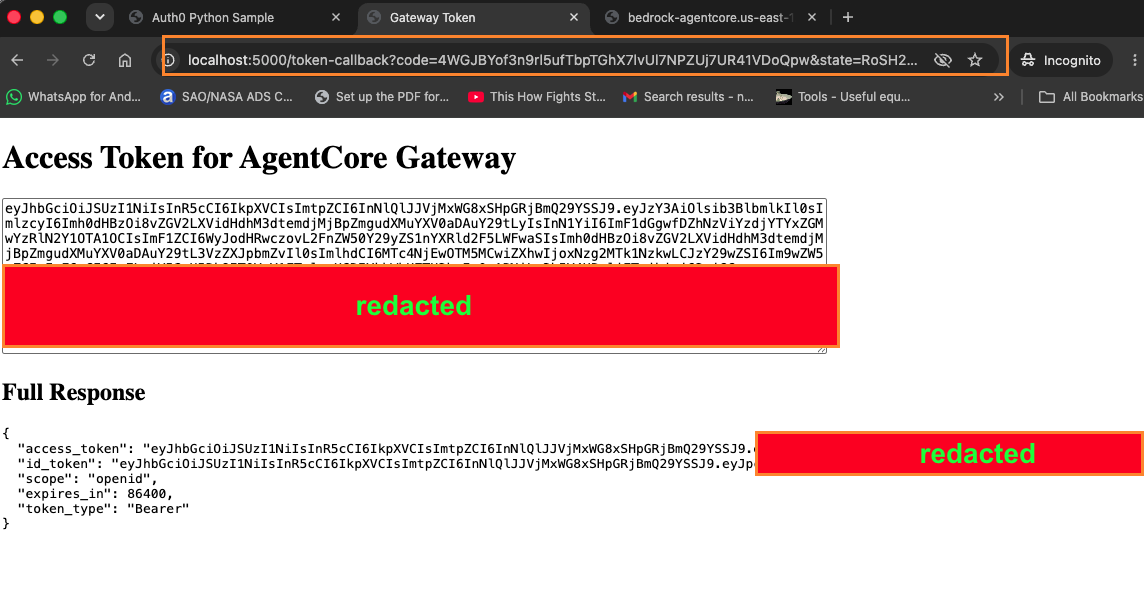
Step 8: Get an Access Token
- Start Flask:
python app.py - Open http://localhost:5000/token in your browser
- Log in to Auth0
- Copy the access token displayed
Step 9: Test the Flow
TOKEN="<your-access-token>"
GATEWAY="<gateway-id>"

# 1. List tools (confirms inbound auth)
curl -s -X POST "https://${GATEWAY}.gateway.bedrock-agentcore.us-east-1.amazonaws.com/mcp" \
  -H "Content-Type: application/json" \
  -H "Authorization: Bearer ${TOKEN}" \
  -H "MCP-Protocol-Version: 2025-11-25" \
  -d '{"jsonrpc":"2.0","id":"1","method":"tools/list","params":{}}'

# 2. Call a tool (triggers -32042 elicitation)
curl -s -X POST "https://${GATEWAY}.gateway.bedrock-agentcore.us-east-1.amazonaws.com/mcp" \
  -H "Content-Type: application/json" \
  -H "Authorization: Bearer ${TOKEN}" \
  -H "MCP-Protocol-Version: 2025-11-25" \
  -d '{"jsonrpc":"2.0","id":"1","method":"tools/call","params":{"name":"auth0-3lo-lambda-mcp___echo","arguments":{"message":"hello"}}}'

# 3. Open the URL from the -32042 response IMMEDIATELY (60s TTL)
#    Complete consent in browser
#    Browser lands on localhost:5000/agentcore-callback?session_id=...

# 4. Complete token binding
SESSION_ID="<session_id_from_callback>"
aws bedrock-agentcore complete-resource-token-auth \
  --user-identifier "{\"userToken\":\"${TOKEN}\"}" \
  --session-uri "${SESSION_ID}" \
  --region us-east-1

# 5. Retry the tool call (should succeed now)
curl -s -X POST "https://${GATEWAY}.gateway.bedrock-agentcore.us-east-1.amazonaws.com/mcp" \
  -H "Content-Type: application/json" \
  -H "Authorization: Bearer ${TOKEN}" \
  -H "MCP-Protocol-Version: 2025-11-25" \
  -d '{"jsonrpc":"2.0","id":"1","method":"tools/call","params":{"name":"auth0-3lo-lambda-mcp___echo","arguments":{"message":"hello from 3LO end-to-end"}}}'
Expected final response:
{
  "jsonrpc": "2.0",
  "id": "1",
  "result": {
    "content": [{"type": "text", "text": "Echo: hello from 3LO end-to-end"}]
  }
}
Key Learnings
| Issue | Root Cause | Fix |
|---|---|---|
insufficient_scope on all requests |
allowedClients in gateway config; Auth0 uses azp not client_id |
Use only allowedAudience |
authorizationCode must not be null |
Auth0 skips consent for first-party apps without permissions | Add API permission + disable consent skip |
Authorization error when sending message |
Lambda Function URL missing resource policy | aws lambda add-permission with lambda:InvokeFunctionUrl |
Invalid request on consent URL |
request_uri TTL expired (~60 seconds) | Open URL immediately after generation |
| Token never persists | Nothing calls CompleteResourceTokenAuth |
Implement callback handler (this repo) |
Auth0 Configuration Checklist
- API created with custom identifier (audience)
- At least one permission defined on the API
- "Allow Skipping User Consent" is OFF
- Post Login Action deployed (adds
scpclaim) - Application callback URLs include AgentCore callback URL
- Application type: Regular Web Application
- Token Endpoint Auth Method: client_secret_post
File Structure
.
├── README.md
├── requirements.txt
├── .env.example
├── .gitignore
├── app.py                          # Flask app (token endpoint + callback handler)
├── callback_handler.py             # Standalone callback handler example
├── lambda/
│   └── lambda_function.py          # Lambda MCP server (echo + whoami tools)
└── screenshots/
    ├── 3lo-sequence-diagram.png
    ├── 02-auth0-app-settings-callbacks.png
    ├── 04-auth0-api-settings-consent.png
    ├── 05-auth0-api-permissions.png
    ├── 08-agentcore-callback-received.png
    └── 09-auth0-login-flow-action.png
Cleanup
aws bedrock-agentcore-control delete-gateway-target \
  --gateway-identifier "<gateway-id>" --target-id "<target-id>" --region us-east-1

aws bedrock-agentcore-control delete-gateway \
  --gateway-identifier "<gateway-id>" --region us-east-1

aws bedrock-agentcore-control delete-oauth2-credential-provider \
  --name "auth0-3lo-example" --region us-east-1

aws lambda delete-function --function-name auth0-3lo-mcp-server --region us-east-1
Documentation
- Session binding (CompleteResourceTokenAuth)
- Gateway outbound auth
- Auth0 integration
- CompleteResourceTokenAuth API
- AWS blog: Authorization code flow
License
MIT
Установка Auth0 3lo Server
У этого сервера нет опубликованного пакета — он собирается из исходников. Открой репозиторий и следуй инструкции в README.
▸ github.com/Neloh/agentcore-gateway-3lo-auth0FAQ
Auth0 3lo Server MCP бесплатный?
Да, Auth0 3lo Server MCP бесплатный — установка в пару кликов через Unyly без оплаты.
Нужен ли API-ключ для Auth0 3lo Server?
Нет, Auth0 3lo Server работает без API-ключей и переменных окружения.
Auth0 3lo Server — hosted или self-hosted?
Доступен hosted-вариант: Unyly запускает сервер в облаке, локальная установка не обязательна.
Как установить Auth0 3lo Server в Claude Desktop, Claude Code или Cursor?
Открой Auth0 3lo Server на unyly.org, выбери вкладку своего клиента (Claude Desktop, Claude Code, Cursor) и нажми Install — конфиг сгенерируется автоматически, без правки JSON.
Похожие MCP
GitHub
PRs, issues, code search, CI status
 автор: GitHub
Filesystem
Secure file operations with configurable access controls.
Memory
Knowledge graph-based persistent memory system.
Template MCP Server
A CLI tool to create a new Model Context Protocol server project with TypeScript support, dual transport options, and an extensible structure
 автор: mcpdotdirect
Amap Maps Mcp Server
MCP server for using the AMap Maps API
 автор: duxiaohui
Supabase
Database, auth and storage
 автор: Supabase
Everything
Reference / test server with prompts, resources, and tools.
Git
Tools to read, search, and manipulate Git repositories.
Sequential Thinking
Dynamic and reflective problem-solving through thought sequences.
Time
Time and timezone conversion capabilities.
Compare Auth0 3lo Server with
Не уверен что выбрать?
Найди свой стек за 60 секунд
Автор?
Embed-бейдж для README
Похожее
Все в категории development