
AWS Athena Cost Server
БесплатноНе проверенAnalyzes AWS Athena query costs by comparing baseline vs spike periods, querying PostgreSQL, and extracting patterns from expensive queries.

Описание
Analyzes AWS Athena query costs by comparing baseline vs spike periods, querying PostgreSQL, and extracting patterns from expensive queries.
README
An MCP (Model Context Protocol) server for analyzing AWS Athena query costs. This server provides tools to query, analyze, and compare Athena query execution data stored in PostgreSQL to investigate cost increases and generate reports.
Architecture
┌─────────────────────────────────┐
│   Daily Process (Standalone)    │
│  scripts/daily_fetch_queries.py │
│  - Fetches from AWS Athena API  │
│  - Stores in PostgreSQL         │
│  - Runs via cron                │
└──────────────┬──────────────────┘
               │
               ▼
┌─────────────────────────────────┐
│      PostgreSQL Database        │
│         (queries table)         │
└──────────────┬──────────────────┘
               │
               ▼
┌─────────────────────────────────┐
│      MCP Server Tools          │
│  - fetch_athena_queries         │
│  - compare_expensive_queries    │
│  - analyze_cost_increase        │
└─────────────────────────────────┘
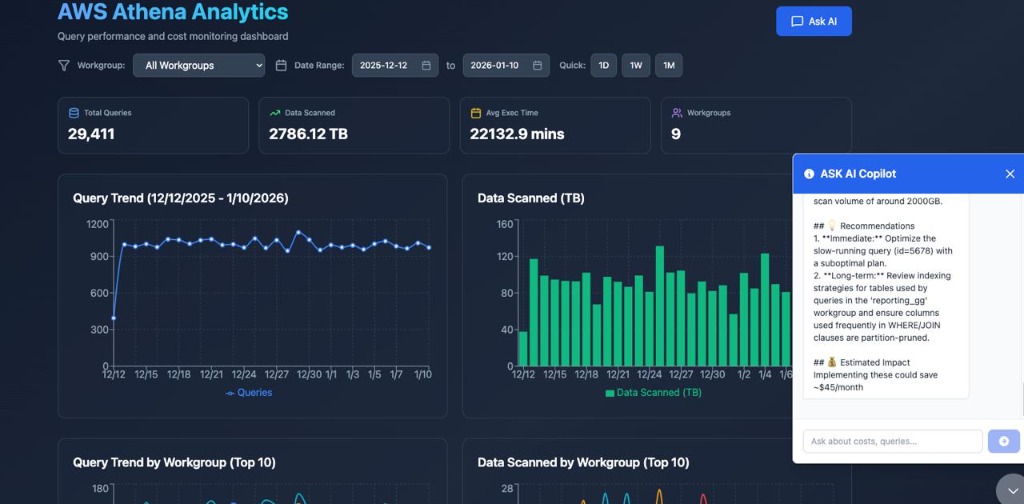
Dashboard Preview
Features
- Daily Data Collection: Automated daily process to fetch query execution data from AWS Athena API for all workgroups
- Fetch Athena Queries: Query PostgreSQL database and export to CSV
- Analyze Cost Increases: Compare baseline vs spike periods to identify cost drivers
- Compare Expensive Queries: Extract patterns and features from expensive queries
Installation
Prerequisites:
- Python 3.10 or higher (required for the
mcppackage) - AWS credentials configured
- Clone this repository:
git clone <repository-url>
cd mcp-aws-cost
- Create a virtual environment and install dependencies:
# Create virtual environment with Python 3.10+
python3.10 -m venv venv
# Or if you have Python 3.13:
# python3.13 -m venv venv

# Activate the virtual environment
source venv/bin/activate  # On macOS/Linux
# or
# venv\Scripts\activate  # On Windows

# Install dependencies
pip install -r requirements.txt
Note: The mcp package requires Python 3.10 or higher. If your default python or python3 is version 3.9 or lower, you must use python3.10 or python3.13 explicitly.
- Configure AWS credentials:
- Set up AWS credentials using
aws configure - Or set environment variables:
AWS_ACCESS_KEY_ID,AWS_SECRET_ACCESS_KEY,AWS_DEFAULT_REGION - Or use IAM roles if running on AWS infrastructure
- Set up AWS credentials using
Usage
Running the MCP Server
The server uses stdio transport and can be run directly:
# Make sure virtual environment is activated
source venv/bin/activate
python -m src.server
Or configure it in your MCP client configuration file (e.g., mcp.json):
{
  "mcpServers": {
    "aws-athena-cost": {
      "command": "python",
      "args": ["-m", "src.server"],
      "env": {
        "AWS_DEFAULT_REGION": "us-east-1"
      }
    }
  }
}
Available Tools
1. fetch_athena_queries
Queries Athena query execution data from PostgreSQL database and exports to CSV. Can query a specific workgroup or all workgroups.
Note: This tool queries the PostgreSQL database only. Data is collected by the daily process (scripts/daily_fetch_queries.py).
Parameters:
workgroup(string, optional): Athena workgroup name (e.g., "ETL"). If not provided, queries all workgroupsstart_date(string, required): Start date in YYYY-MM-DD formatend_date(string, required): End date in YYYY-MM-DD formatoutput_dir(string, optional): Output directory for CSV (default: ./reports)
Example - Specific workgroup:
{
  "workgroup": "ETL",
  "start_date": "2025-12-10",
  "end_date": "2025-12-16"
}
Example - All workgroups:
{
  "start_date": "2025-12-10",
  "end_date": "2025-12-16"
}
Returns:
file_path: Path to generated CSV filetotal_processed: Total queries processedmatched_count: Number of queries matching date range (and workgroup if specified)
2. analyze_cost_increase
Analyzes cost increases by comparing baseline vs spike periods. Can query from PostgreSQL database or read from CSV file.
Parameters:
csv_file(string, optional): Path to CSV file with query data. If not provided, queries PostgreSQLbaseline_start(string, required): Baseline period start date (YYYY-MM-DD)baseline_end(string, required): Baseline period end date (YYYY-MM-DD)spike_start(string, required): Spike period start date (YYYY-MM-DD)spike_end(string, required): Spike period end date (YYYY-MM-DD)workgroup(string, optional): Workgroup filter for PostgreSQL query
Example - Using CSV:
{
  "csv_file": "./reports/athena_ETL_2025-11-08_to_2025-11-27.csv",
  "baseline_start": "2025-11-08",
  "baseline_end": "2025-11-11",
  "spike_start": "2025-11-12",
  "spike_end": "2025-11-27"
}
Example - Using PostgreSQL:
{
  "baseline_start": "2025-11-08",
  "baseline_end": "2025-11-11",
  "spike_start": "2025-11-12",
  "spike_end": "2025-11-27",
  "workgroup": "ETL"
}
Returns:
- Summary statistics
- Daily metrics comparison
- Period comparison (baseline vs spike)
- Query pattern analysis
- Top expensive queries
- New query patterns identified
3. compare_expensive_queries
Compares expensive queries and extracts patterns. Can query from PostgreSQL database or read from CSV file.
Parameters:
csv_file(string, optional): Path to CSV file with query data. If not provided, queries PostgreSQLquery_pattern(string, optional): Pattern to filter queries (e.g., table name)query_id(string, optional): Specific query execution ID to analyzebaseline_start(string, optional): Baseline start date for comparison (YYYY-MM-DD)baseline_end(string, optional): Baseline end date for comparison (YYYY-MM-DD)target_date(string, optional): Target date for comparison (YYYY-MM-DD)start_date(string, optional): Start date for PostgreSQL query (YYYY-MM-DD, required if csv_file not provided)end_date(string, optional): End date for PostgreSQL query (YYYY-MM-DD, required if csv_file not provided)workgroup(string, optional): Workgroup filter for PostgreSQL query
Example - Using CSV:
{
  "csv_file": "./reports/athena_ETL_2025-12-10_to_2025-12-16.csv",
  "query_pattern": "parquet__all_crm_users",
  "baseline_start": "2025-12-10",
  "baseline_end": "2025-12-14",
  "target_date": "2025-12-15"
}
Example - Using PostgreSQL:
{
  "start_date": "2025-12-10",
  "end_date": "2025-12-16",
  "query_pattern": "parquet__all_crm_users",
  "baseline_start": "2025-12-10",
  "baseline_end": "2025-12-14",
  "target_date": "2025-12-15",
  "workgroup": "ETL"
}
Returns:
- Query details with extracted features
- Statistical comparisons
- Pattern analysis by source table and date ranges
Project Structure
mcp-aws-cost/
├── src/
│   ├── __init__.py
│   ├── server.py              # Main MCP server entry point
│   ├── tools/
│   │   ├── __init__.py
│   │   ├── fetch_queries.py   # Fetch queries from AWS Athena
│   │   ├── analyze_cost.py    # Analyze cost increases
│   │   └── compare_queries.py # Compare expensive queries
│   └── utils/
│       ├── __init__.py
│       ├── query_parser.py     # Query pattern extraction utilities
│       └── report_formatter.py # Report formatting utilities
├── reports/                    # Directory for CSV exports (gitignored)
├── requirements.txt
├── README.md
└── pyproject.toml
Dependencies
mcp: MCP Python SDKboto3: AWS SDK for Pythonpandas: Data analysis librarypython-dateutil: Date parsing utilities
AWS Permissions
The server requires the following AWS permissions:
athena:ListQueryExecutions- List query executions in workgroupathena:BatchGetQueryExecution- Get query execution detailsathena:GetQueryExecution- Get individual query execution details
Error Handling
The server includes comprehensive error handling:
- Validates date formats (YYYY-MM-DD)
- Handles missing CSV files gracefully
- Provides clear error messages for AWS API failures
- Validates query IDs and patterns exist in data
License
[Add your license here]
Contributing
[Add contribution guidelines here]
Установка AWS Athena Cost Server
У этого сервера нет опубликованного пакета — он собирается из исходников. Открой репозиторий и следуй инструкции в README.
▸ github.com/Igalem/mcp-aws-costFAQ
AWS Athena Cost Server MCP бесплатный?
Да, AWS Athena Cost Server MCP бесплатный — установка в пару кликов через Unyly без оплаты.
Нужен ли API-ключ для AWS Athena Cost Server?
Нет, AWS Athena Cost Server работает без API-ключей и переменных окружения.
AWS Athena Cost Server — hosted или self-hosted?
Доступен hosted-вариант: Unyly запускает сервер в облаке, локальная установка не обязательна.
Как установить AWS Athena Cost Server в Claude Desktop, Claude Code или Cursor?
Открой AWS Athena Cost Server на unyly.org, выбери вкладку своего клиента (Claude Desktop, Claude Code, Cursor) и нажми Install — конфиг сгенерируется автоматически, без правки JSON.
Похожие MCP
GitHub
PRs, issues, code search, CI status
 автор: GitHub
Filesystem
Secure file operations with configurable access controls.
Memory
Knowledge graph-based persistent memory system.
Template MCP Server
A CLI tool to create a new Model Context Protocol server project with TypeScript support, dual transport options, and an extensible structure
 автор: mcpdotdirect
Compare AWS Athena Cost Server with
Не уверен что выбрать?
Найди свой стек за 60 секунд
Автор?
Embed-бейдж для README
Похожее
Все в категории development