
Azure Impact Reporter
БесплатноНе проверенEnables AI to report Azure infrastructure issues by authenticating with Azure credentials and submitting standardized workload impact reports through the Azure

Описание
Enables AI to report Azure infrastructure issues by authenticating with Azure credentials and submitting standardized workload impact reports through the Azure Management API
README
Overview
The Azure Impact Reporting MCP (Model Context Protocol) server enables large language models (LLMs) to report impacts to Azure resources. This tool allows LLMs to automatically parse user requests, understand the required parameters, and submit reports to Azure when customers are facing issues with Azure infrastructure.
Functionality
The impact-reporter.py script provides a Model Context Protocol server that:
- Exposes a tool to report resource impacts to Azure
- Automatically authenticates with Azure using DefaultAzureCredential
- Creates workload impact reports via the Azure Management API
- Handles parameter extraction from natural language requests
- Can ask for additional details if the request is missing required information
Impact Categories
The tool supports the following impact categories:
Resource.Connectivity- For connectivity issues with Azure resourcesResource.Performance- For performance degradation issuesResource.Availability- For availability or downtime issuesResource.Unknown- When the specific issue type is not known
Requirements
- Python 3.8+
mcp[cli]- Model Context Protocol package with CLI supportazure-identity- For Azure authenticationhttpx- For making HTTP requests to Azure API
Setup Instructions
1. Clone the repository
git clone https://github.com/yourusername/MCP-Server-Azure-Impact-Reporting.git
cd MCP-Server-Azure-Impact-Reporting
2. Install dependencies
pip install -r requirements.txt
Or install them manually:
pip install mcp[cli] azure-identity httpx
3. Azure Authentication Setup
The tool uses DefaultAzureCredential for authentication. Ensure you're logged in to Azure with one of the following methods:
- Azure CLI (
az login) - Visual Studio Code Azure Account extension
- Azure PowerShell (
Connect-AzAccount) - Environment variables for service principal authentication
4. Configure your MCP client
Add the following configuration to your MCP client configuration file (e.g., claude_desktop_config.json):
"impactreporter": {
    "command": "uv",
    "args": [
        "--directory",
        "ABSOLUTE_PATH_TO_ROOT_FOLDER",
        "run",
        "impact-reporter.py"
    ]
}
Replace ABSOLUTE_PATH_TO_ROOT_FOLDER with the absolute path to where you cloned this repository.
For example:
"impactreporter": {
    "command": "uv",
    "args": [
        "--directory",
        "C:\\Users\\username\\source\\repos\\MCP-Server-Azure-Impact-Reporting",
        "run",
        "impact-reporter.py"
    ]
}
Understanding the uv Command
The uv command in the configuration uses pyproject.toml to manage dependencies:
- Virtual Environment:
uvcreates and manages its own internal virtual environment separate from any.venvyou may have created - Dependency Management: Dependencies are automatically installed based on
pyproject.tomlspecifications - Isolation: The
uvcache system ensures no interference with your local Python environment
Alternative: Direct Python Execution
If you prefer not to use uv, you can run the MCP server directly:
Create and activate a virtual environment:
python -m venv .venv
# On Windows
.venv\Scripts\activate
# On macOS/Linux
source .venv/bin/activate
Install dependencies:
pip install -r requirements.txtRun the server directly:
python impact-reporter.py
5. Running the MCP Server
If you're using Claude with Desktop or another MCP-enabled client, the server will start automatically when needed.
Usage Examples
Once configured, your LLM can report impacts with natural language requests like:
- "Report connectivity issues with my VM named 'web-server' in resource group 'production-rg'"
- "Let Azure know my SQL database 'customer-db' in 'data-rg' is experiencing performance issues"
- "Report that my App Service 'api-service' is down"
The MCP server will automatically parse these requests and ask for any missing parameters before submitting the report to Azure.
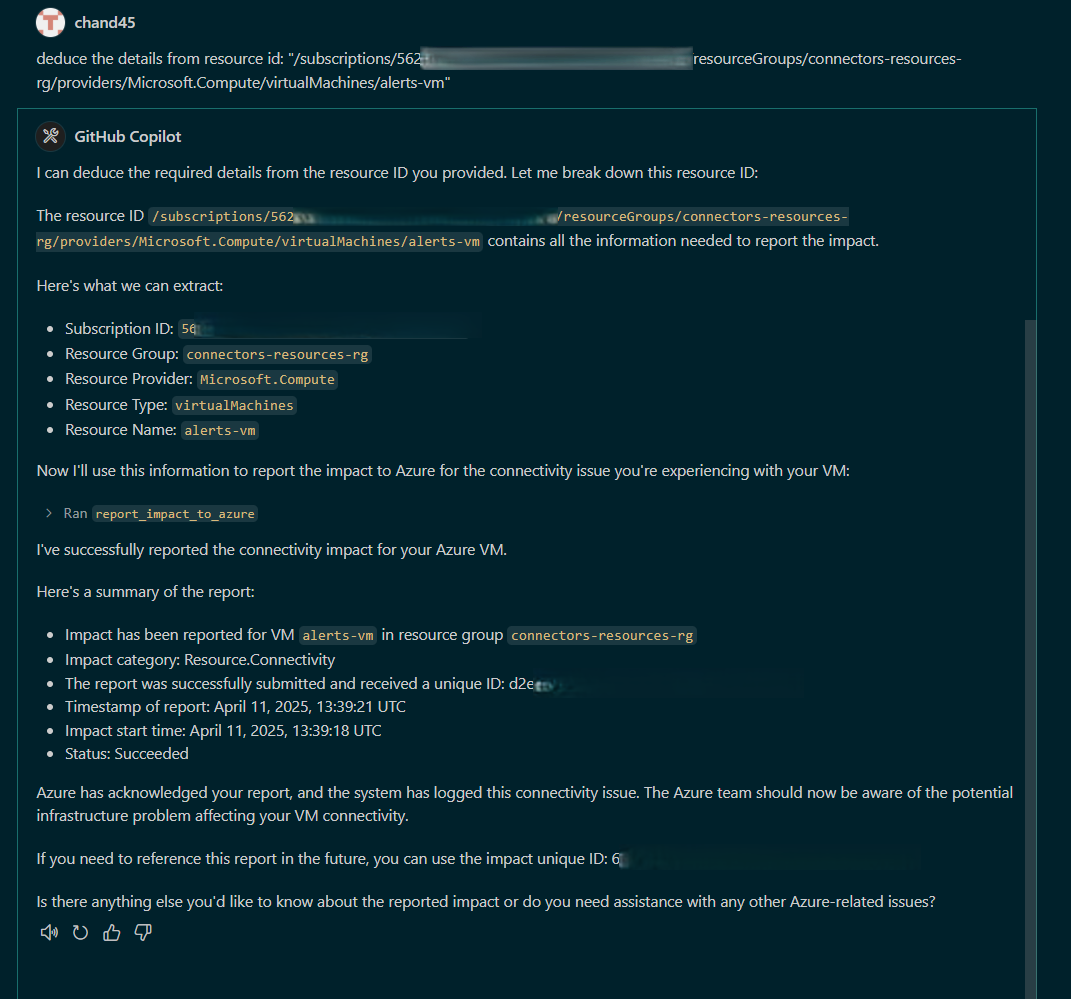
Example Converstations:
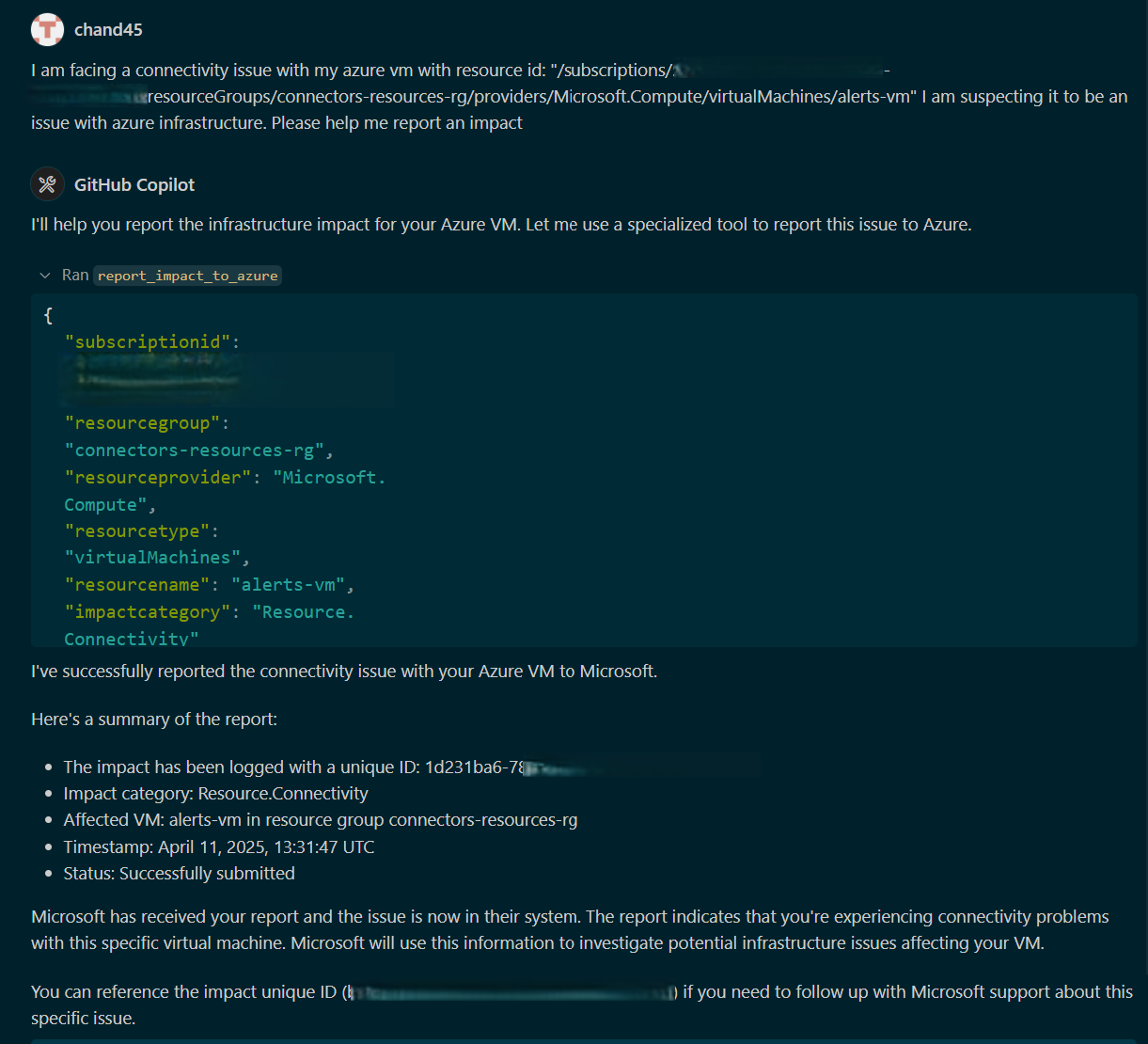
When additional information is required
Request for additional details
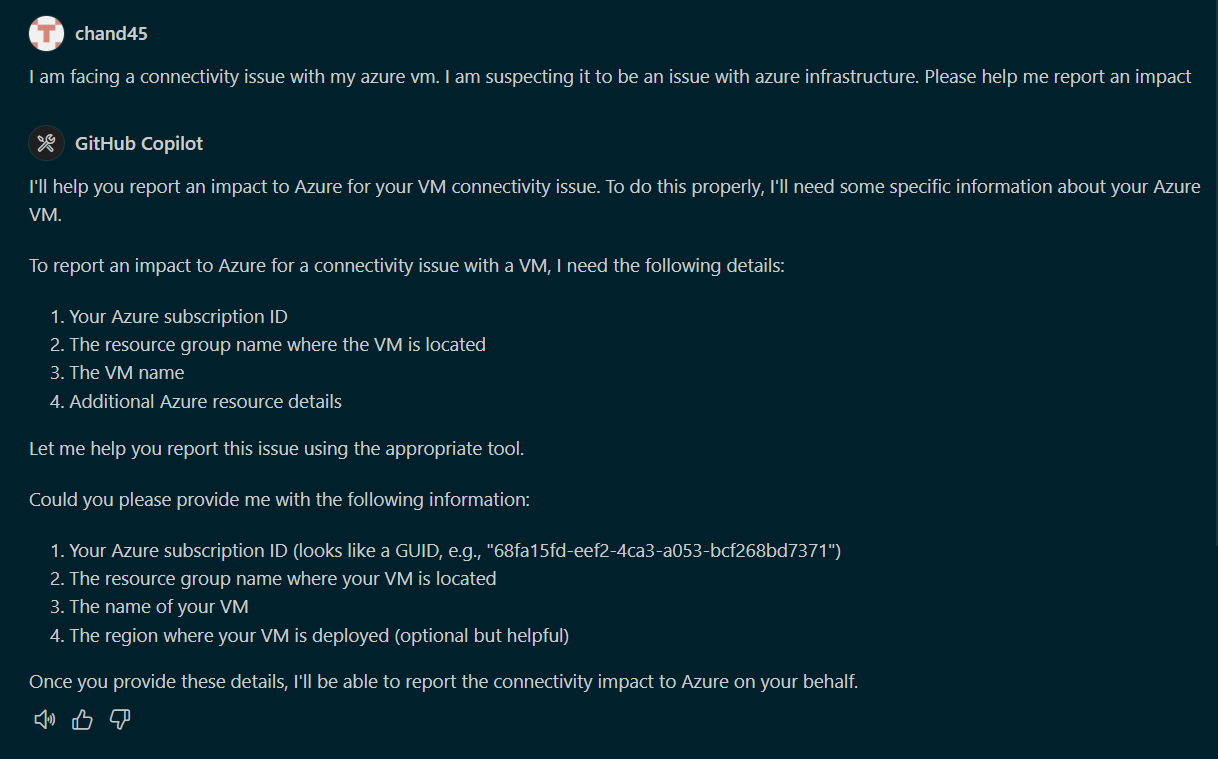
Infer the details and report impact
API Details
The impact reporting tool uses the Azure Management API (2023-12-01-preview) to create workload impact reports.
Troubleshooting
- Authentication issues: Ensure you're logged into Azure and have proper permissions
- Missing parameters: The tool will ask for additional details if needed
- API errors: Check Azure portal to ensure your subscription and resources exist
License
Установка Azure Impact Reporter
У этого сервера нет опубликованного пакета — он собирается из исходников. Открой репозиторий и следуй инструкции в README.
▸ github.com/chand45/mcp-server-azure-impact-reportingFAQ
Azure Impact Reporter MCP бесплатный?
Да, Azure Impact Reporter MCP бесплатный — установка в пару кликов через Unyly без оплаты.
Нужен ли API-ключ для Azure Impact Reporter?
Нет, Azure Impact Reporter работает без API-ключей и переменных окружения.
Azure Impact Reporter — hosted или self-hosted?
Self-hosted: сервер запускается локально на твоей машине командой из раздела установки.
Как установить Azure Impact Reporter в Claude Desktop, Claude Code или Cursor?
Открой Azure Impact Reporter на unyly.org, выбери вкладку своего клиента (Claude Desktop, Claude Code, Cursor) и нажми Install — конфиг сгенерируется автоматически, без правки JSON.
Похожие MCP
Fetch
Web content fetching and conversion for efficient LLM usage.
AWS KB Retrieval
Retrieval from AWS Knowledge Base using Bedrock Agent Runtime.
 автор: modelcontextprotocol
Spring AI MCP Server
Provides auto-configuration for setting up an MCP server in Spring Boot applications.
llm-analysis-assistant
A very streamlined mcp client that supports calling and monitoring stdio/sse/streamableHttp, and can also view request responses through the /logs page. It also
 автор: xuzexin-hz
Compare Azure Impact Reporter with
Не уверен что выбрать?
Найди свой стек за 60 секунд
Автор?
Embed-бейдж для README
Похожее
Все в категории ai