
Azure Platform Engineering Server
БесплатноНе проверенProvides AI agents with real-time access to live Azure infrastructure, including AKS cluster health, resource management, policy validation, and Terraform analy

Описание
Provides AI agents with real-time access to live Azure infrastructure, including AKS cluster health, resource management, policy validation, and Terraform analysis through a Model Context Protocol interface.
README
A Model Context Protocol (MCP) server connected to real Azure infrastructure. Deploys a live AKS cluster and provides AI agents with real-time access to cluster health, Azure resources, policy validation, and Terraform analysis.
No simulated data. Every API call hits live Azure services.
What This Does
This MCP server gives AI agents (Claude Code, GitHub Copilot, etc.) structured access to a real Azure platform:
| Tool | Data Source | What It Returns |
|---|---|---|
check_cluster_health |
Kubernetes API (live AKS) | Real node status, pod health, events, recommendations |
validate_manifest |
PyYAML parser | Policy compliance for real YAML manifests |
analyze_terraform |
HCL analysis | Quality score for Terraform modules |
query_azure_resources |
Azure Resource Manager API | Real resource groups, AKS clusters, VMs |
Architecture
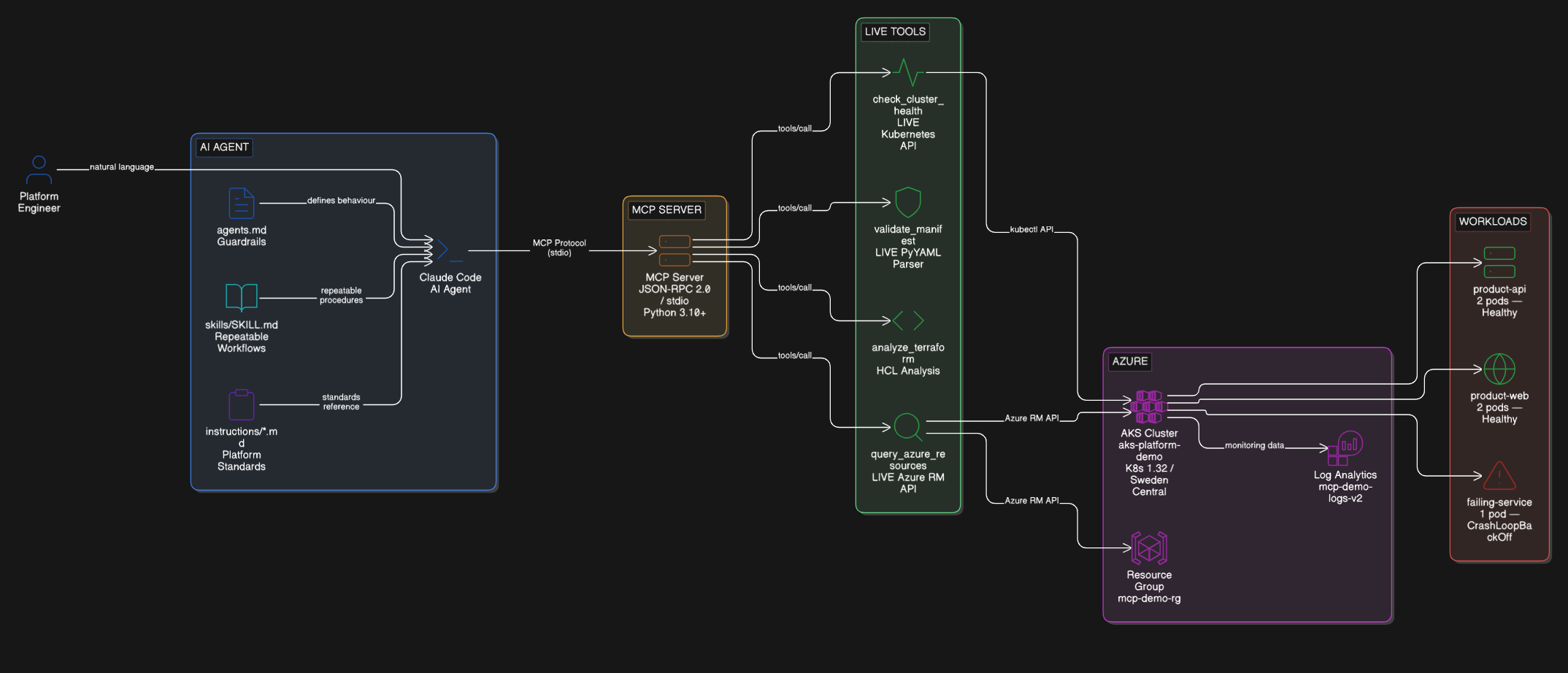
How It Works
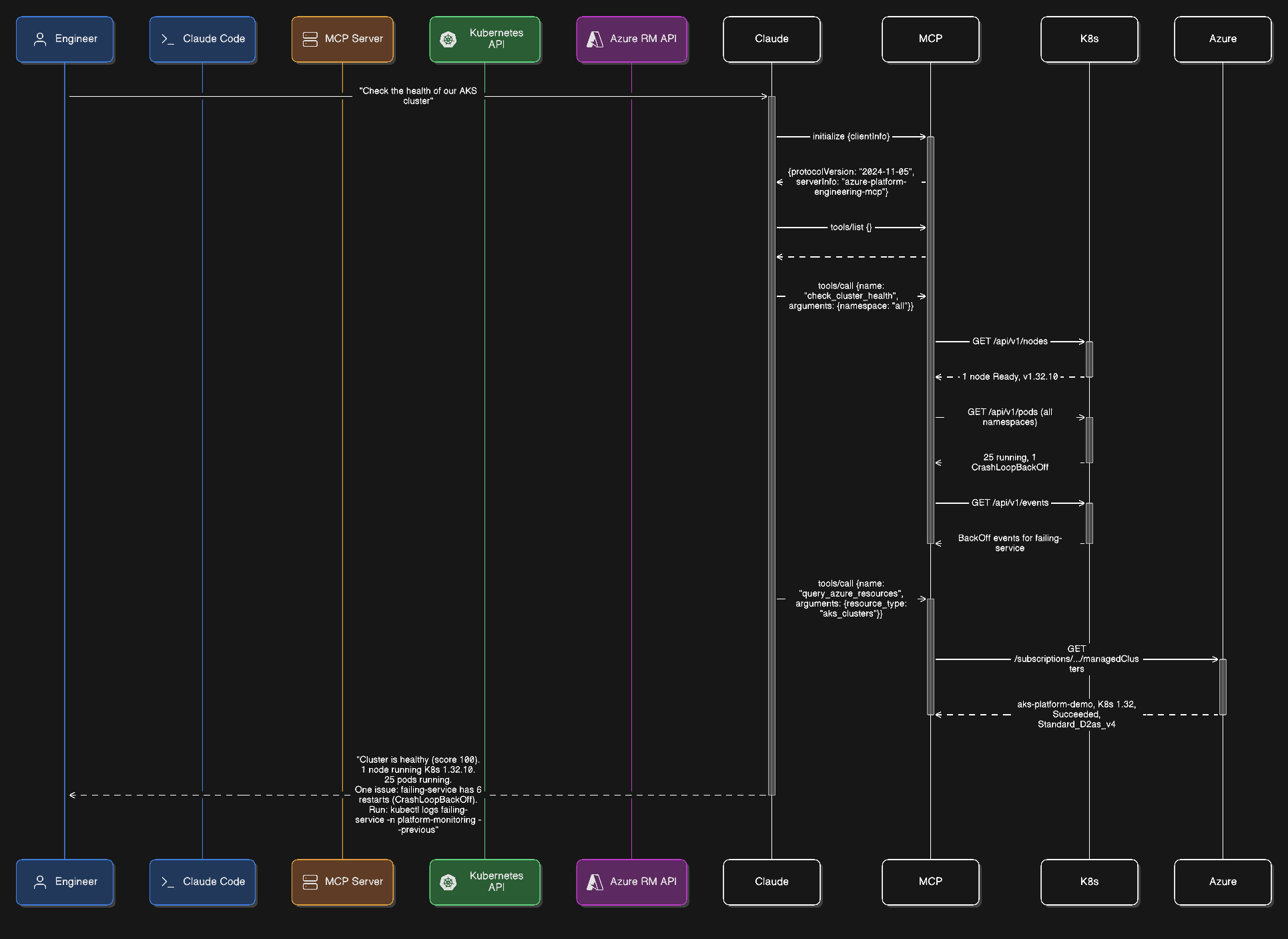
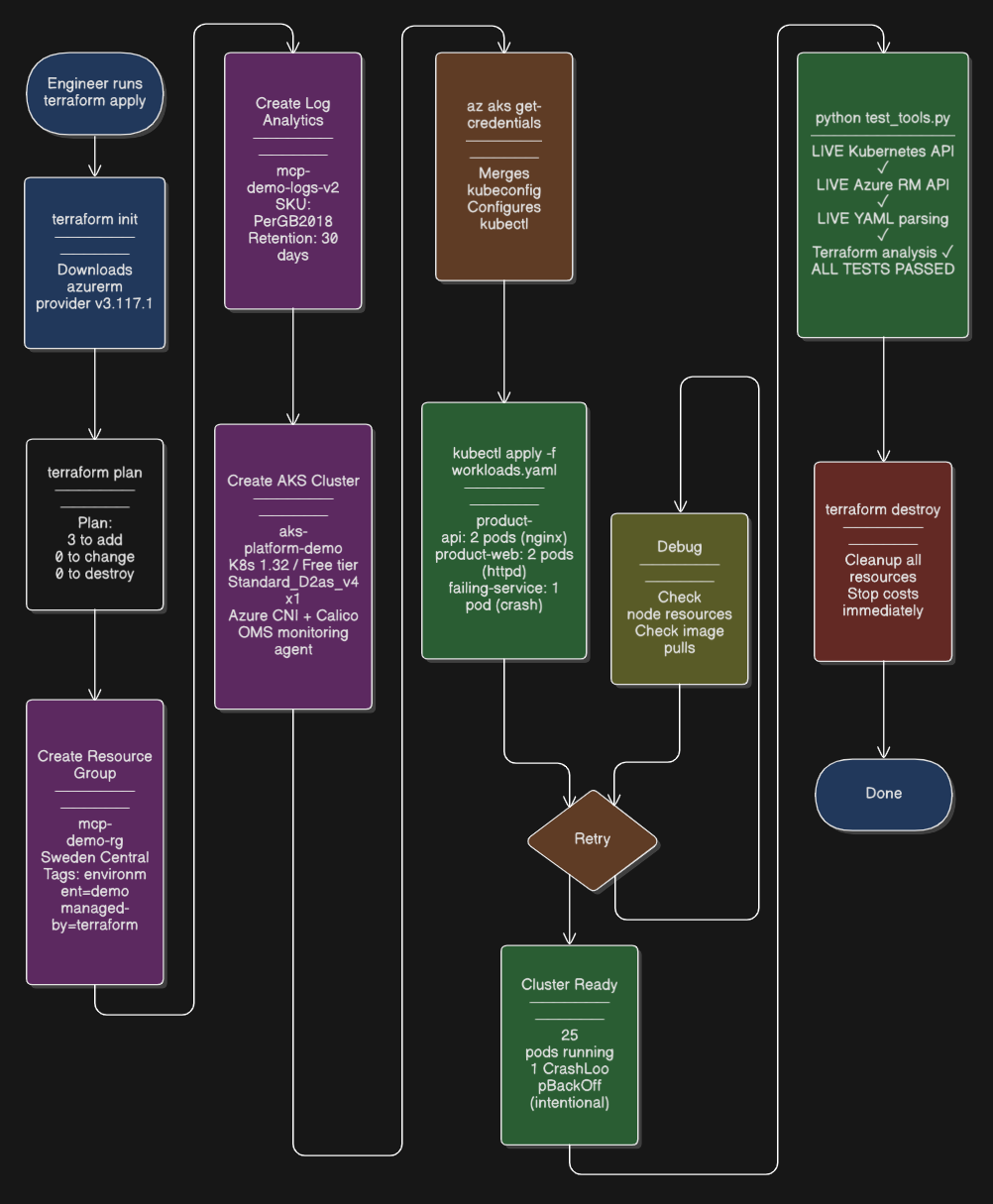
Deployment Pipeline
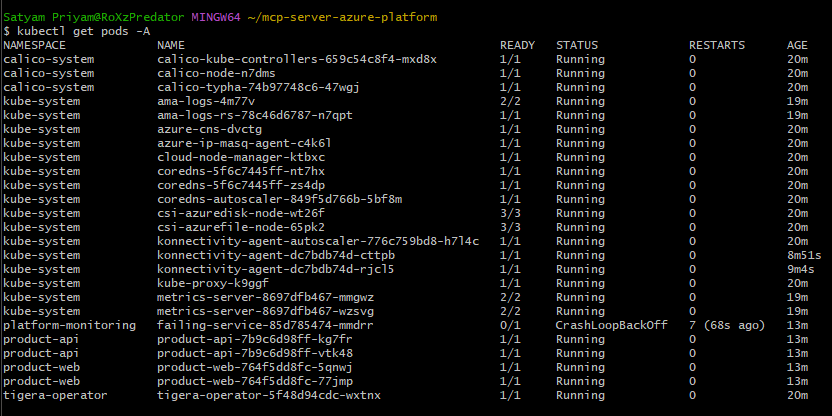
Live Proof
This was deployed and tested against a real AKS cluster on Azure for Students.
kubectl get nodes

kubectl get pods (with real CrashLoopBackOff)
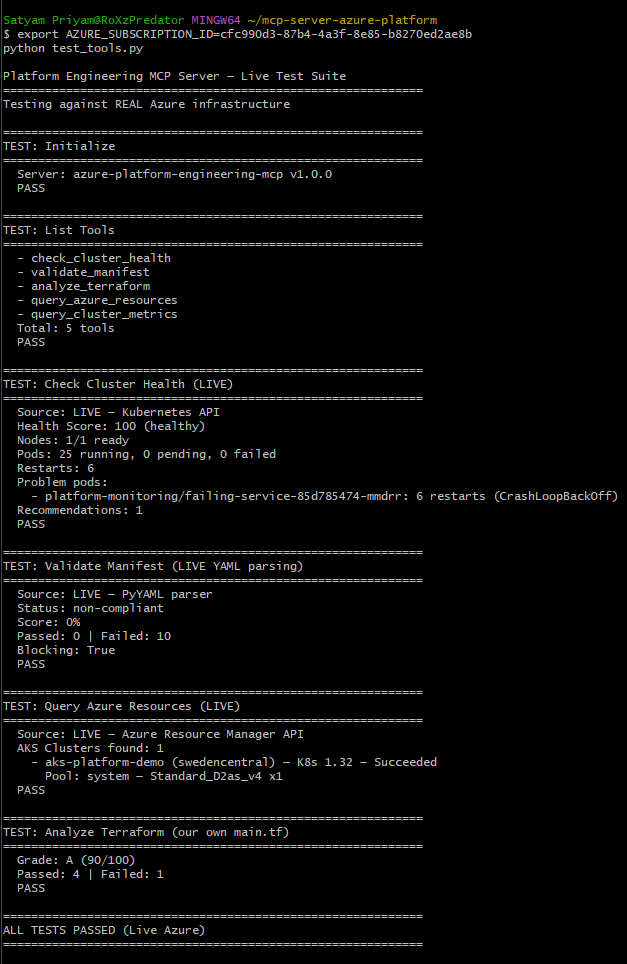
MCP Server Test Output (LIVE)
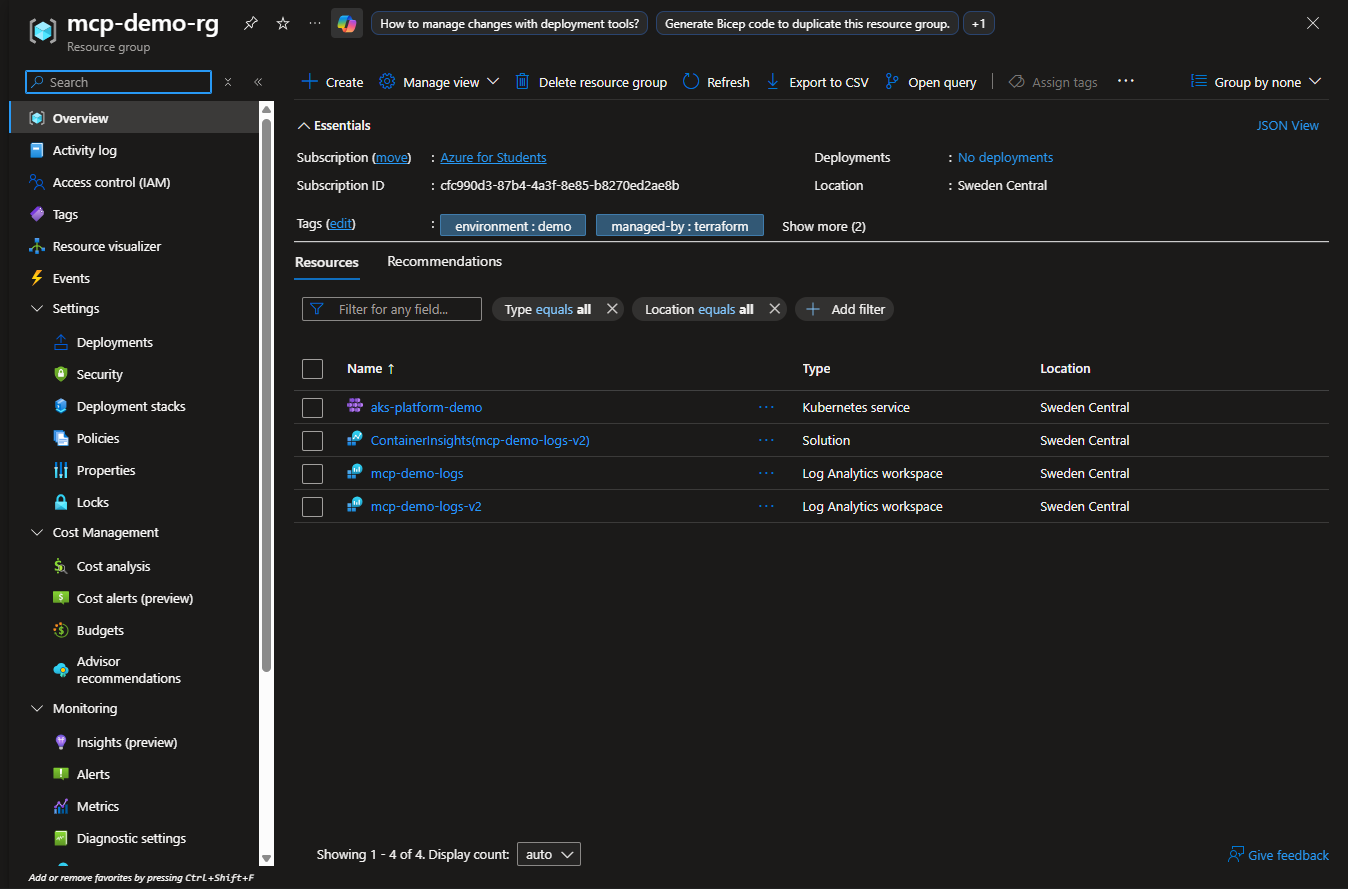
Azure Portal
Infrastructure
Deployed via Terraform in terraform/main.tf:
| Resource | Details |
|---|---|
| Resource Group | mcp-demo-rg (Sweden Central) |
| AKS Cluster | aks-platform-demo — Kubernetes 1.32 |
| Node Pool | 1x Standard_D2as_v4 (cost-optimised) |
| Network | Azure CNI + Calico network policy |
| Monitoring | Log Analytics workspace + OMS agent |
| Workloads | 3 namespaces: product-api, product-web, platform-monitoring |
The platform-monitoring namespace includes an intentionally failing pod to demonstrate how the health check tool detects and reports real CrashLoopBackOff incidents.
Setup
Prerequisites
- Azure subscription (Azure for Students works)
- Azure CLI (
az) - Terraform
- kubectl
- Python 3.10+
Deploy
# 1. Clone
git clone https://github.com/sat0ps/mcp-server-azure-platform.git
cd mcp-server-azure-platform

# 2. Login to Azure
az login

# 3. Deploy infrastructure
cd terraform
terraform init
terraform plan
terraform apply

# 4. Configure kubectl
az aks get-credentials --resource-group mcp-demo-rg --name aks-platform-demo

# 5. Deploy sample workloads
kubectl apply -f workloads.yaml

# 6. Install dependencies
cd ..
pip install -r requirements.txt

# 7. Set subscription ID
export AZURE_SUBSCRIPTION_ID=$(az account show --query id -o tsv)

# 8. Test
python test_tools.py
Tear Down (stop costs)
cd terraform
terraform destroy
Live Test Output
Platform Engineering MCP Server — Live Test Suite
============================================================
Testing against REAL Azure infrastructure

TEST: Initialize
  Server: azure-platform-engineering-mcp v1.0.0
  PASS

TEST: Check Cluster Health (LIVE)
  Source: LIVE — Kubernetes API
  Health Score: 100 (healthy)
  Nodes: 1/1 ready
  Pods: 25 running, 0 pending, 0 failed
  Problem pods:
    - platform-monitoring/failing-service: 6 restarts (CrashLoopBackOff)
  PASS

TEST: Query Azure Resources (LIVE)
  Source: LIVE — Azure Resource Manager API
  AKS Clusters found: 1
    - aks-platform-demo (swedencentral) — K8s 1.32 — Succeeded
      Pool: system — Standard_D2as_v4 x1
  PASS

ALL TESTS PASSED (Live Azure)
Diagrams
| Diagram | What It Shows |
|---|---|
| Architecture Overview | Full system: agent → MCP → live tools → real Azure |
| MCP Protocol Flow | Real request flow with CrashLoopBackOff detection |
| Deployment Pipeline | terraform apply → kubectl → test → destroy |
| Incident Detection | How MCP found the failing-service pod |
| Policy Validation | YAML validation gate with real PyYAML parsing |
| Agent Configuration | How agents.md + skills + instructions work together |
| Terraform PR Review | AI-driven PR review with quality scoring |
Project Structure
├── mcp_server.py              # MCP server (JSON-RPC 2.0 over stdio)
├── tools/
│   ├── kubernetes_live.py     # Real K8s API health checks
│   ├── compliance_live.py     # Real YAML policy validation
│   ├── terraform_live.py      # Terraform HCL analysis
│   ├── azure_resources.py     # Real Azure Resource Manager queries
│   └── azure_metrics.py       # Azure Monitor metrics (SDK v2 WIP)
├── terraform/
│   ├── main.tf                # AKS + monitoring infrastructure
│   └── workloads.yaml         # Sample K8s deployments
├── .claude/
│   ├── agents.md              # Agent behaviour configuration
│   └── mcp.json               # Claude Code MCP config
├── skills/
│   └── SKILL.md               # Repeatable agent procedures
├── instructions/
│   ├── terraform-standards.md # Terraform quality standards
│   └── kubernetes-standards.md# K8s deployment requirements
├── scripts/
│   └── setup.sh               # Automated deployment script
├── diagrams/                  # Architecture diagrams + live screenshots
├── requirements.txt           # Python dependencies
└── test_tools.py              # Live test suite
Authentication
Uses DefaultAzureCredential — works with az login, managed identity, and service principals. No credentials stored in the repo.
Related
- Microsoft Azure MCP Server — Microsoft's official generic Azure MCP server
- Model Context Protocol — MCP specification
- platform-engineering-mcp-server — Simulated version (design-first approach)
License
MIT
Установка Azure Platform Engineering Server
У этого сервера нет опубликованного пакета — он собирается из исходников. Открой репозиторий и следуй инструкции в README.
▸ github.com/sat0ps/mcp-server-azure-platformFAQ
Azure Platform Engineering Server MCP бесплатный?
Да, Azure Platform Engineering Server MCP бесплатный — установка в пару кликов через Unyly без оплаты.
Нужен ли API-ключ для Azure Platform Engineering Server?
Нет, Azure Platform Engineering Server работает без API-ключей и переменных окружения.
Azure Platform Engineering Server — hosted или self-hosted?
Доступен hosted-вариант: Unyly запускает сервер в облаке, локальная установка не обязательна.
Как установить Azure Platform Engineering Server в Claude Desktop, Claude Code или Cursor?
Открой Azure Platform Engineering Server на unyly.org, выбери вкладку своего клиента (Claude Desktop, Claude Code, Cursor) и нажми Install — конфиг сгенерируется автоматически, без правки JSON.
Похожие MCP
Fetch
Web content fetching and conversion for efficient LLM usage.
AWS KB Retrieval
Retrieval from AWS Knowledge Base using Bedrock Agent Runtime.
 автор: modelcontextprotocol
Spring AI MCP Server
Provides auto-configuration for setting up an MCP server in Spring Boot applications.
llm-analysis-assistant
A very streamlined mcp client that supports calling and monitoring stdio/sse/streamableHttp, and can also view request responses through the /logs page. It also
 автор: xuzexin-hz
Compare Azure Platform Engineering Server with
Не уверен что выбрать?
Найди свой стек за 60 секунд
Автор?
Embed-бейдж для README
Похожее
Все в категории ai