loading…
/ru
Весь каталог
CREATE —
READ —
UPDATE —
DELETE —
SEARCH —
CREATE TABLE —
DROP TABLE —
Tool:
Step 1: Add middleware to
Step 3: Add to
Azure SQL Server
БесплатноНе проверенConnects Microsoft Copilot Studio to Azure SQL Databases, enabling natural language interactions for data querying, record management, and schema inspection. It
Описание
Connects Microsoft Copilot Studio to Azure SQL Databases, enabling natural language interactions for data querying, record management, and schema inspection. It features 12 specialized tools for performing CRUD operations, executing SQL queries, and generating data visualizations like charts.
README
A Model Context Protocol (MCP) server that connects Microsoft Copilot Studio to your Azure SQL Database. Supports 12 tools for querying, CRUD operations, schema inspection, search, and chart visualization.
Table of Contents
- Prerequisites
- Installation
- Configuration
- Code Fixes (Important)
- Running the Server
- Exposing to the Internet
- Copilot Studio Setup
- All 12 Tools Reference
- CRUD Operations
- Chart Visualization
- Example Queries & Use Cases
- Production Deployment
- API Key Authentication
- Troubleshooting
- Security Checklist
Architecture
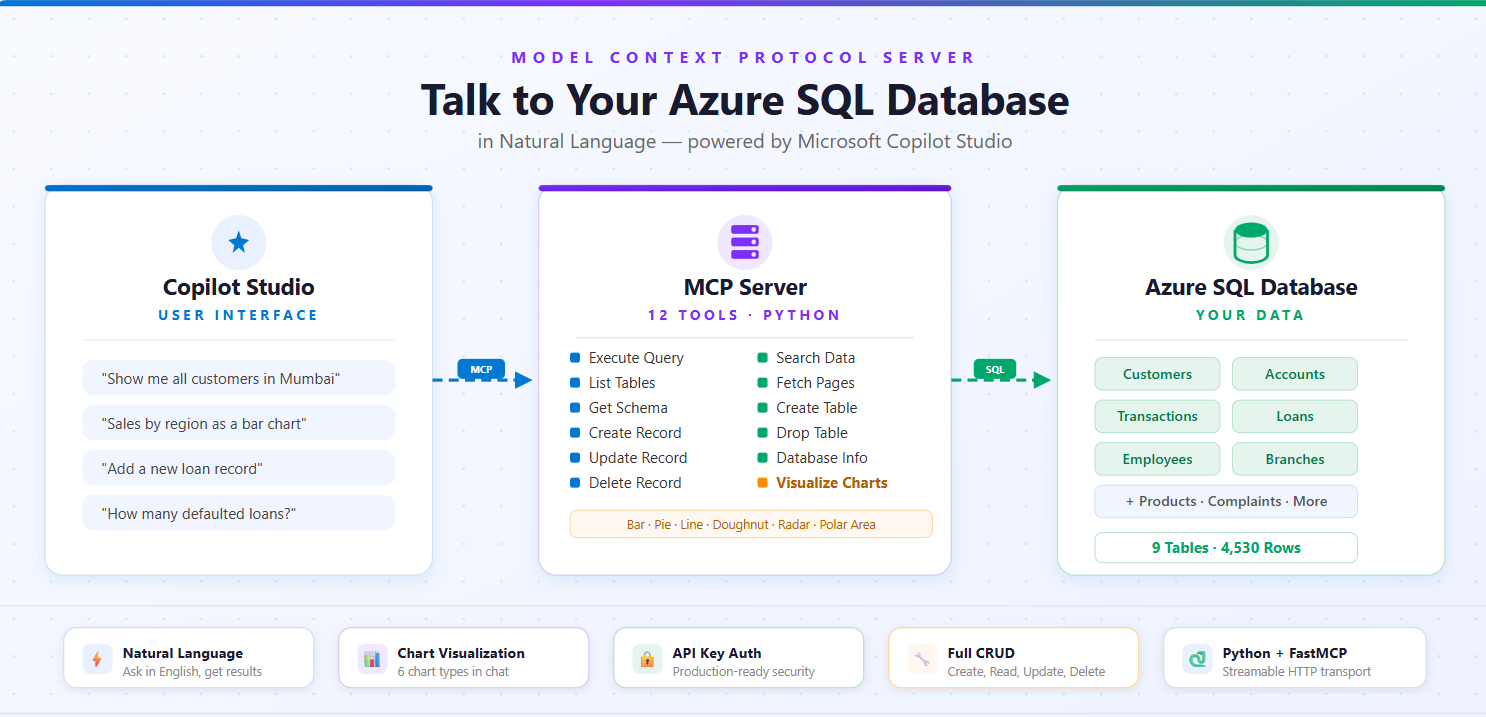
1. Prerequisites
- Python 3.8+
- ODBC Driver 18 for SQL Server — Download here
- Azure SQL Database with server hostname, database name, username, and password
- Cloudflare Tunnel (for local testing) —
winget install Cloudflare.cloudflared
Install ODBC Driver
Windows: Download and install from the link above.
macOS:
brew tap microsoft/mssql-release https://github.com/Microsoft/homebrew-mssql-release
brew update
brew install msodbcsql18 mssql-tools18
Linux (Ubuntu/Debian):
curl https://packages.microsoft.com/keys/microsoft.asc | sudo apt-key add -
curl https://packages.microsoft.com/config/ubuntu/$(lsb_release -rs)/prod.list | sudo tee /etc/apt/sources.list.d/mssql-release.list
sudo apt-get update
sudo ACCEPT_EULA=Y apt-get install -y msodbcsql18
2. Installation
git clone <your-repo-url>
cd azure-sql-mcp-server
python -m venv venv
venv\Scripts\activate          # Windows
# source venv/bin/activate     # macOS/Linux
pip install -r requirements.txt
3. Configuration
Create a .env file in the project root:
AZURE_SQL_SERVER=your-server.database.windows.net
AZURE_SQL_DATABASE=your-database-name
AZURE_SQL_USERNAME=your-username
AZURE_SQL_PASSWORD=your-password
AZURE_SQL_DRIVER=ODBC Driver 18 for SQL Server
Never commit
.envto version control. Add it to.gitignore.
4. Code Fixes
The MCP SDK requires specific configuration. Apply these 3 fixes to azure_sql_mcp.py:
Fix 1: Lifespan function signature
# ❌ BEFORE
@asynccontextmanager
async def app_lifespan():

# ✅ AFTER — FastMCP passes the server instance
@asynccontextmanager
async def app_lifespan(server: FastMCP):
Fix 2: Host and port on the constructor
# ❌ BEFORE
mcp = FastMCP("azure_sql_mcp", lifespan=app_lifespan)

# ✅ AFTER — host/port go on the constructor, NOT on run()
mcp = FastMCP("azure_sql_mcp", host="0.0.0.0", port=8000, lifespan=app_lifespan)
Fix 3: HTTP transport
# ❌ BEFORE
if __name__ == "__main__":
    mcp.run()

# ✅ AFTER — streamable-http (with hyphen) for Copilot Studio
if __name__ == "__main__":
    mcp.run(transport="streamable-http")
5. Running the Server
cd azure-sql-mcp-server
.\venv\Scripts\Activate.ps1       # Windows
python azure_sql_mcp.py
You should see:
INFO: Initializing Azure SQL MCP server...
INFO: Database connection established
INFO: Database connection verified
INFO: Uvicorn running on http://0.0.0.0:8000 (Press CTRL+C to quit)
MCP endpoint: http://localhost:8000/mcp
6. Exposing to the Internet
Copilot Studio needs a public HTTPS URL. Use Cloudflare Tunnel (free, no signup).
Why not ngrok? ngrok's free tier shows a browser warning page (
ERR_NGROK_6024) that blocks API clients like Copilot Studio.
Steps
Install (one-time):
winget install Cloudflare.cloudflaredClose and reopen your terminal after install.
In a new terminal (keep the server running in the first one):
cloudflared tunnel --url http://localhost:8000Copy the URL from the output:
https://electronic-annie-jose-spoken.trycloudflare.comYour MCP server URL for Copilot Studio:
https://electronic-annie-jose-spoken.trycloudflare.com/mcp
URLs change on restart. For a permanent URL, deploy to Azure App Service (see Production Deployment).
7. Copilot Studio Setup
Step 1: Add the MCP Server
- Go to Copilot Studio
- Open your agent → Tools → Add a tool → New tool → Model Context Protocol
- Fill in:
| Field | Value |
|---|---|
| Server name | azure-sql-mcp |
| Server description | Azure SQL Database for querying tables, retrieving data, inspecting schema, and visualizing data with charts |
| Server URL | https://YOUR-CLOUDFLARE-URL.trycloudflare.com/mcp |
| Authentication | None (local testing) or API key (production) |
- Click Create → Next → Create new connection → Add and configure
Step 2: Configure the Agent (Overview tab)
Both fields are required — the agent won't work without them.
Description:
Azure SQL Database Assistant that queries tables, retrieves data, inspects schema, manages records, and visualizes data with charts.
Instructions (click Edit):
You are an Azure SQL Database assistant. You help users interact with their database using natural language.

Your capabilities:
- List tables and describe their schema
- Execute SQL queries (SELECT, INSERT, UPDATE, DELETE)
- Search for data across table columns
- Create and drop tables
- Visualize data as charts (bar, pie, line, doughnut)
- Provide database information and statistics

Rules:
- Always use the MCP tools to answer database questions - never guess table names or data
- Before querying, list tables first if you don't know the schema
- Use parameterized queries when possible
- Ask for confirmation before UPDATE, DELETE, or DROP operations
- Format results clearly for the user
- When asked for charts, pick the most appropriate chart type based on the data
Step 3: Publish and Test
Click Publish, wait a minute, then test with prompts like:
- "Show me all tables in the database"
- "What's the schema of the customers table?"
- "Get the first 10 rows from orders"
- "How many records are in each table?"
- "Show me sales by region as a bar chart"
8. All 12 Tools Reference
| # | Tool | What it does | Read-Only |
|---|---|---|---|
| 1 | azure_sql_execute_query |
Run any SQL query | No |
| 2 | azure_sql_list_tables |
List all tables with row counts | Yes |
| 3 | azure_sql_get_table_schema |
Get column details for a table | Yes |
| 4 | azure_sql_get_table_data |
Fetch paginated table data | Yes |
| 5 | azure_sql_get_database_info |
Database metadata & stats | Yes |
| 6 | azure_sql_create_record |
INSERT a new row | No |
| 7 | azure_sql_update_record |
UPDATE existing rows (WHERE required) | No |
| 8 | azure_sql_delete_record |
DELETE rows (WHERE required) | No |
| 9 | azure_sql_search |
Search text across columns | Yes |
| 10 | azure_sql_create_table |
Create a new table | No |
| 11 | azure_sql_drop_table |
Drop a table | No |
| 12 | azure_sql_visualize_data |
Generate charts (Adaptive Card) | Yes |
All tools support both markdown and json response formats.
9. CRUD Operations
CREATE — azure_sql_create_record
{
  "table_name": "customers",
  "data": {
    "name": "John Doe",
    "email": "[email protected]",
    "city": "Seattle"
  }
}
Natural language: "Add a new customer named John Doe with email [email protected]"
READ — azure_sql_execute_query
{
  "query": "SELECT * FROM customers WHERE city = ?",
  "params": ["Seattle"],
  "response_format": "markdown"
}
Natural language: "Show me all customers from Seattle"
UPDATE — azure_sql_update_record
{
  "table_name": "customers",
  "data": { "email": "[email protected]" },
  "where": { "id": 123 }
}
Safety: WHERE clause is required — prevents accidental mass updates.
Natural language: "Update customer 123's email to [email protected]"
DELETE — azure_sql_delete_record
{
  "table_name": "customers",
  "where": { "id": 999 }
}
Safety: WHERE clause is required — prevents accidental mass deletion.
Natural language: "Delete customer with ID 999"
SEARCH — azure_sql_search
{
  "table_name": "customers",
  "search_term": "john",
  "columns": ["name", "email"],
  "limit": 50
}
If columns is omitted, all text columns are searched automatically.
Natural language: "Search for 'john' in customers table"
CREATE TABLE — azure_sql_create_table
{
  "table_name": "employees",
  "columns": [
    { "name": "id", "type": "INT", "primary_key": true, "identity": true },
    { "name": "name", "type": "NVARCHAR(100)", "nullable": false },
    { "name": "email", "type": "NVARCHAR(255)" },
    { "name": "hire_date", "type": "DATE" },
    { "name": "salary", "type": "DECIMAL(10,2)" }
  ],
  "if_not_exists": true
}
Column properties: name, type, primary_key, identity, nullable, default.
Natural language: "Create a customers table with id, name, email, and phone columns"
DROP TABLE — azure_sql_drop_table
"old_backup_table"
Uses DROP TABLE IF EXISTS — won't error if table doesn't exist.
Natural language: "Drop the old_backup_table"
10. Chart Visualization
Tool: azure_sql_visualize_data
Generates charts via QuickChart API and returns Adaptive Cards that render directly in Copilot Studio.
Parameters
| Parameter | Required | Default | Description |
|---|---|---|---|
query |
Yes | — | SQL query to get chart data |
chart_type |
No | bar |
bar, pie, line, doughnut, radar, polarArea |
title |
Yes | — | Chart title |
label_column |
Yes | — | Column for labels (X-axis / slices) |
value_column |
Yes | — | Column for values (Y-axis / data) |
width |
No | 800 | 400–1200 pixels |
height |
No | 500 | 300–800 pixels |
Chart Types
| Type | Best For |
|---|---|
bar |
Comparing categories (sales by region) |
pie |
Proportions (market share) |
line |
Trends over time (monthly revenue) |
doughnut |
Modern proportions (budget breakdown) |
radar |
Multi-dimensional data (performance metrics) |
polarArea |
Cyclical data (seasonal patterns) |
Example: Bar Chart
{
  "query": "SELECT region, SUM(sales) as total FROM orders GROUP BY region ORDER BY total DESC",
  "chart_type": "bar",
  "title": "Sales by Region",
  "label_column": "region",
  "value_column": "total"
}
Example: Pie Chart
{
  "query": "SELECT category, COUNT(*) as count FROM products GROUP BY category",
  "chart_type": "pie",
  "title": "Products by Category",
  "label_column": "category",
  "value_column": "count"
}
Example: Line Chart (Trends)
{
  "query": "SELECT FORMAT(order_date, 'yyyy-MM') as month, SUM(total) as revenue FROM orders WHERE order_date >= DATEADD(month, -6, GETDATE()) GROUP BY FORMAT(order_date, 'yyyy-MM') ORDER BY month",
  "chart_type": "line",
  "title": "Revenue Trend (Last 6 Months)",
  "label_column": "month",
  "value_column": "revenue"
}
What Copilot Displays
Every chart returns an Adaptive Card with the chart image, plus automatic statistics: Total, Average, Highest (with label), Lowest (with label), and Data Points count.
Best Practices for Charts
- Bar charts: 3–15 categories, sorted by value DESC
- Pie charts: 3–8 slices, sorted by value DESC
- Line charts: 5–50 points, sorted by date/time ASC
- Use clear column aliases:
SUM(sales) as total_salesnotSUM(s) - Test your query with
azure_sql_execute_queryfirst, then visualize
11. Example Queries & Use Cases
Data Exploration
"Show me all tables in the database"
"What columns does the orders table have?"
"Show me 10 sample products"
Data Analysis
"How many orders were placed last month?"
"Which customer has the highest order total?"
"What's the average product price by category?"
"Show me sales trends for the last 6 months"
Data Quality
"Are there any customers with missing email addresses?"
"Find duplicate customer records"
"Show me orders with invalid status values"
Parameterized Queries (SQL injection safe)
{
  "query": "SELECT * FROM customers WHERE city = ? AND status = ?",
  "params": ["Seattle", "active"],
  "response_format": "json"
}
Aggregation
{
  "query": "SELECT category, COUNT(*) as product_count, AVG(price) as avg_price FROM products GROUP BY category ORDER BY product_count DESC"
}
Joins
{
  "query": "SELECT c.customer_name, COUNT(o.order_id) as order_count FROM customers c LEFT JOIN orders o ON c.customer_id = o.customer_id GROUP BY c.customer_name ORDER BY order_count DESC"
}
Time-Based Queries
-- Daily (last 30 days)
SELECT CAST(order_date AS DATE) as day, SUM(total) as revenue
FROM orders WHERE order_date >= DATEADD(day, -30, GETDATE())
GROUP BY CAST(order_date AS DATE) ORDER BY day

-- Monthly
SELECT FORMAT(order_date, 'yyyy-MM') as month, SUM(total) as revenue
FROM orders WHERE YEAR(order_date) = YEAR(GETDATE())
GROUP BY FORMAT(order_date, 'yyyy-MM') ORDER BY month

-- Quarterly
SELECT 'Q' + CAST(DATEPART(quarter, order_date) AS VARCHAR) as quarter, SUM(total) as revenue
FROM orders WHERE YEAR(order_date) = YEAR(GETDATE())
GROUP BY DATEPART(quarter, order_date) ORDER BY DATEPART(quarter, order_date)
Complete CRUD Workflow
- Create table →
azure_sql_create_table - Insert data →
azure_sql_create_record - Search →
azure_sql_search - Update →
azure_sql_update_record - Visualize →
azure_sql_visualize_data - Clean up →
azure_sql_delete_recordorazure_sql_drop_table
12. Production Deployment
Azure App Service
Create deployment files:
runtime.txt:python-3.11Procfile:web: python azure_sql_mcp.pyDeploy:
az login
az group create --name mcp-servers --location eastus
az appservice plan create --name mcp-plan --resource-group mcp-servers --sku B1 --is-linux
az webapp create --name azure-sql-mcp --resource-group mcp-servers --plan mcp-plan --runtime "PYTHON:3.11"

az webapp config appsettings set --name azure-sql-mcp --resource-group mcp-servers --settings \
    AZURE_SQL_SERVER="your-server.database.windows.net" \
    AZURE_SQL_DATABASE="your-database" \
    AZURE_SQL_USERNAME="your-username" \
    AZURE_SQL_PASSWORD="your-password" \
    AZURE_SQL_DRIVER="ODBC Driver 18 for SQL Server" \
    PORT="8000"

az webapp up --name azure-sql-mcp --resource-group mcp-servers
Permanent URL:
https://azure-sql-mcp.azurewebsites.net/mcp
Docker
FROM python:3.11-slim

RUN apt-get update && apt-get install -y curl apt-transport-https gnupg2 \
    && curl https://packages.microsoft.com/keys/microsoft.asc | apt-key add - \
    && curl https://packages.microsoft.com/config/debian/11/prod.list > /etc/apt/sources.list.d/mssql-release.list \
    && apt-get update \
    && ACCEPT_EULA=Y apt-get install -y msodbcsql18 \
    && apt-get clean && rm -rf /var/lib/apt/lists/*

WORKDIR /app
COPY requirements.txt .
RUN pip install --no-cache-dir -r requirements.txt
COPY azure_sql_mcp.py .

EXPOSE 8000
CMD ["python", "azure_sql_mcp.py"]
docker build -t azure-sql-mcp .
docker run -p 8000:8000 --env-file .env azure-sql-mcp
13. API Key Authentication
For production, add API key middleware to protect your server.
Step 1: Add middleware to azure_sql_mcp.py
Add this above the Pydantic Models section:
from starlette.middleware.base import BaseHTTPMiddleware
from starlette.requests import Request
from starlette.responses import JSONResponse

MCP_API_KEY = os.getenv("MCP_API_KEY", "")

class APIKeyMiddleware(BaseHTTPMiddleware):
    async def dispatch(self, request: Request, call_next):
        if not MCP_API_KEY:
            return await call_next(request)
        api_key = request.headers.get("X-API-Key", "")
        if api_key != MCP_API_KEY:
            return JSONResponse(status_code=401, content={"error": "Invalid API key"})
        return await call_next(request)
Step 2: Update the entry point
if __name__ == "__main__":
    app = mcp.streamable_http_app()
    app.add_middleware(APIKeyMiddleware)

    import uvicorn
    port = int(os.getenv("PORT", 8000))
    uvicorn.run(app, host="0.0.0.0", port=port)
Step 3: Add to .env
MCP_API_KEY=your-secret-api-key-here
Generate a strong key: python -c "import secrets; print(secrets.token_urlsafe(32))"
Step 4: Configure in Copilot Studio
| Field | Value |
|---|---|
| Authentication type | API key |
| Type | Header |
| Header name | X-API-Key |
Enter the same key value when creating the connection.
14. Troubleshooting
| Problem | Fix |
|---|---|
app_lifespan() takes 0 positional arguments |
Add server: FastMCP parameter to app_lifespan() |
FastMCP.run() got unexpected keyword argument 'port' |
Set host/port on FastMCP() constructor, not run() |
| Server starts but no HTTP output | Set transport to streamable-http in run() |
| ngrok warning page blocks Copilot Studio | Use Cloudflare Tunnel instead |
cloudflared not recognized after install |
Close and reopen your terminal |
| Copilot says "Server URL is not valid" | URL must be HTTPS and end with /mcp |
Copilot SystemError |
Check both terminals running (server + tunnel), URL ends with /mcp |
| "This feature isn't available until your agent has finished setting up" | Fill in agent Description and Instructions on Overview tab, then Publish |
| Copilot "Connector request failed: Not Found" | URL needs /mcp at the end |
| Copilot says "Authentication failed" | Verify API key matches between Copilot Studio and MCP_API_KEY |
| Tools not appearing in Copilot Studio | Check server logs for errors, verify server is running |
| Connection to Azure SQL fails | Check .env credentials and Azure SQL firewall rules |
| ODBC driver not found | Install ODBC Driver 18 |
| Query timeout | Optimize query, add indexes, use TOP to limit rows |
| Permission denied | Grant necessary permissions to database user |
| Chart shows "Column Not Found" | Match label_column/value_column exactly to query output columns |
| Chart shows "No Data Found" | Check your WHERE clause and date ranges |
Check installed ODBC drivers
# Windows (PowerShell)
Get-OdbcDriver

# macOS/Linux
odbcinst -q -d
15. Security Checklist
-
.envfile is in.gitignore(never commit credentials) - Server URL uses HTTPS
- API key authentication enabled for production
- Parameterized queries used for user input
- Azure SQL firewall restricts access to known IPs
- Database user has least-privilege permissions
- Azure SQL auditing enabled
- API key and passwords rotated regularly
- No multiple SQL statements allowed (built-in)
- WHERE clause required for UPDATE/DELETE (built-in)
Project Structure
azure-sql-mcp-server/
├── azure_sql_mcp.py           # Main MCP server (all 12 tools)
├── requirements.txt           # Python dependencies
├── .env.example               # Environment variables template
├── .env                       # Your config (not in git)
├── AZURE_SQL_MCP_GUIDE.md     # This file
└── .gitignore
Adding Custom Tools
class CustomInput(BaseModel):
    param1: str = Field(..., description="Parameter description")
    response_format: ResponseFormat = Field(default=ResponseFormat.MARKDOWN)

@mcp.tool(
    name="azure_sql_custom_tool",
    annotations={
        "title": "Custom Tool",
        "readOnlyHint": True,
        "destructiveHint": False,
        "idempotentHint": True,
        "openWorldHint": False
    }
)
async def custom_tool(params: CustomInput) -> str:
    """Tool description."""
    try:
        results = execute_query("SELECT ...")
        if params.response_format == ResponseFormat.JSON:
            return json.dumps(results, indent=2, default=str)
        return "**Results**\n..."
    except Exception as e:
        return _handle_db_error(e)
Changelog
v2.0.0 — Chart Visualization
- Added
azure_sql_visualize_datatool (6 chart types) - Adaptive Card output for Copilot Studio
- Auto-statistics (total, average, min, max)
- QuickChart API integration (no API key required)
v1.0.0 — Initial Release
- 5 core tools: execute_query, list_tables, get_table_schema, get_table_data, get_database_info
- Pydantic validation, parameterized queries, dual output formats
v2.1.0 — Full CRUD + Deployment
- Added 7 new tools: create_record, update_record, delete_record, search, create_table, drop_table, visualize_data
- Cloudflare Tunnel support (replaces ngrok)
- API key authentication middleware
- Copilot Studio agent configuration (description + instructions)
Как установить
Выполни в терминале:
claude mcp add azure-sql-mcp-server -- npx 

