
Badhansen/notion-mcp
БесплатноНе проверенManage personal todo lists via Notion's API.

Описание
Manage personal todo lists via Notion's API.
README
A simple Model Context Protocol (MCP) server that integrates with Notion's API to manage my personal todo list.
Demo
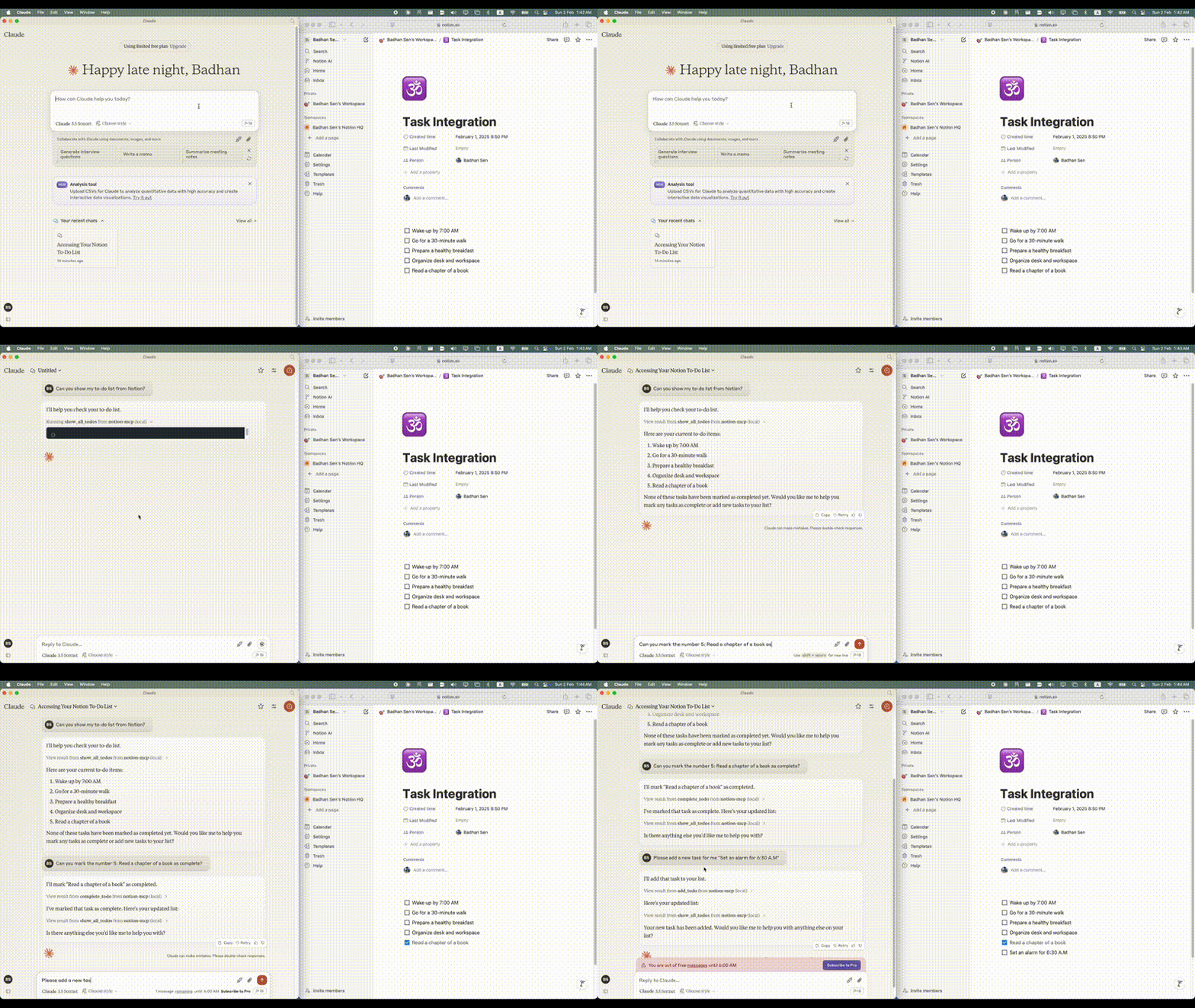
Visual Guide
Notion MCP Query 1
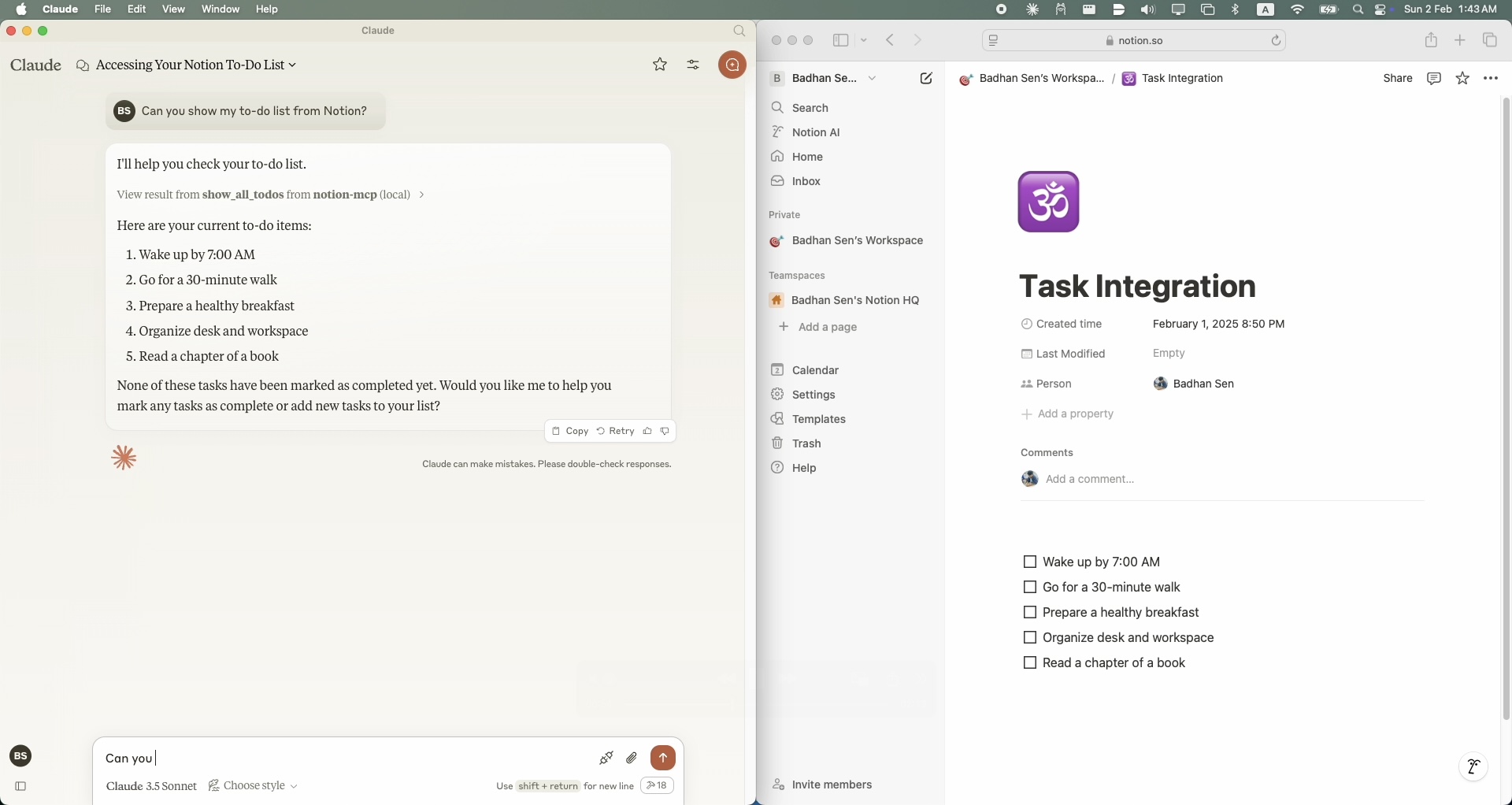
Notion MCP Query 2
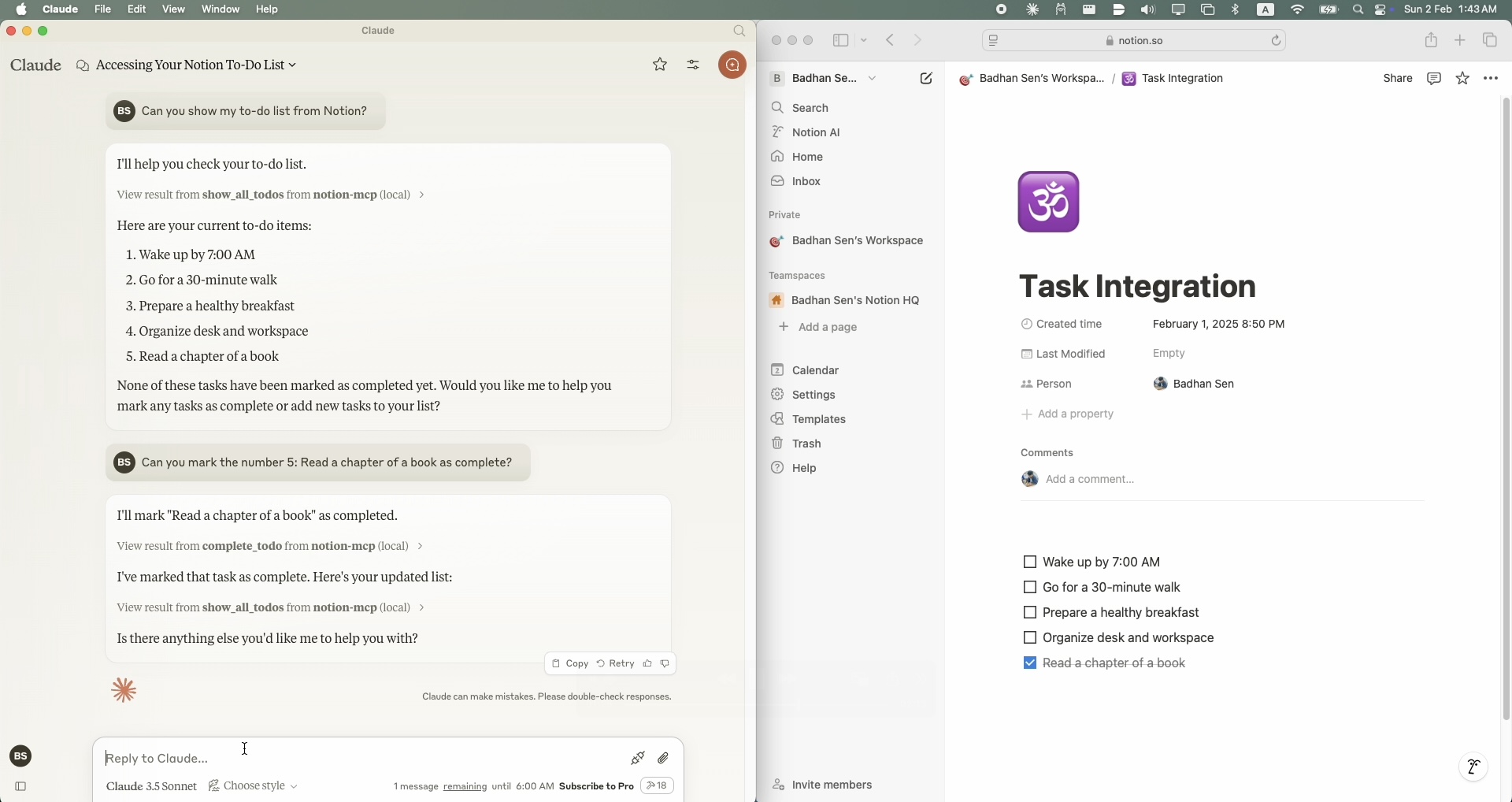
Notion MCP Query 3
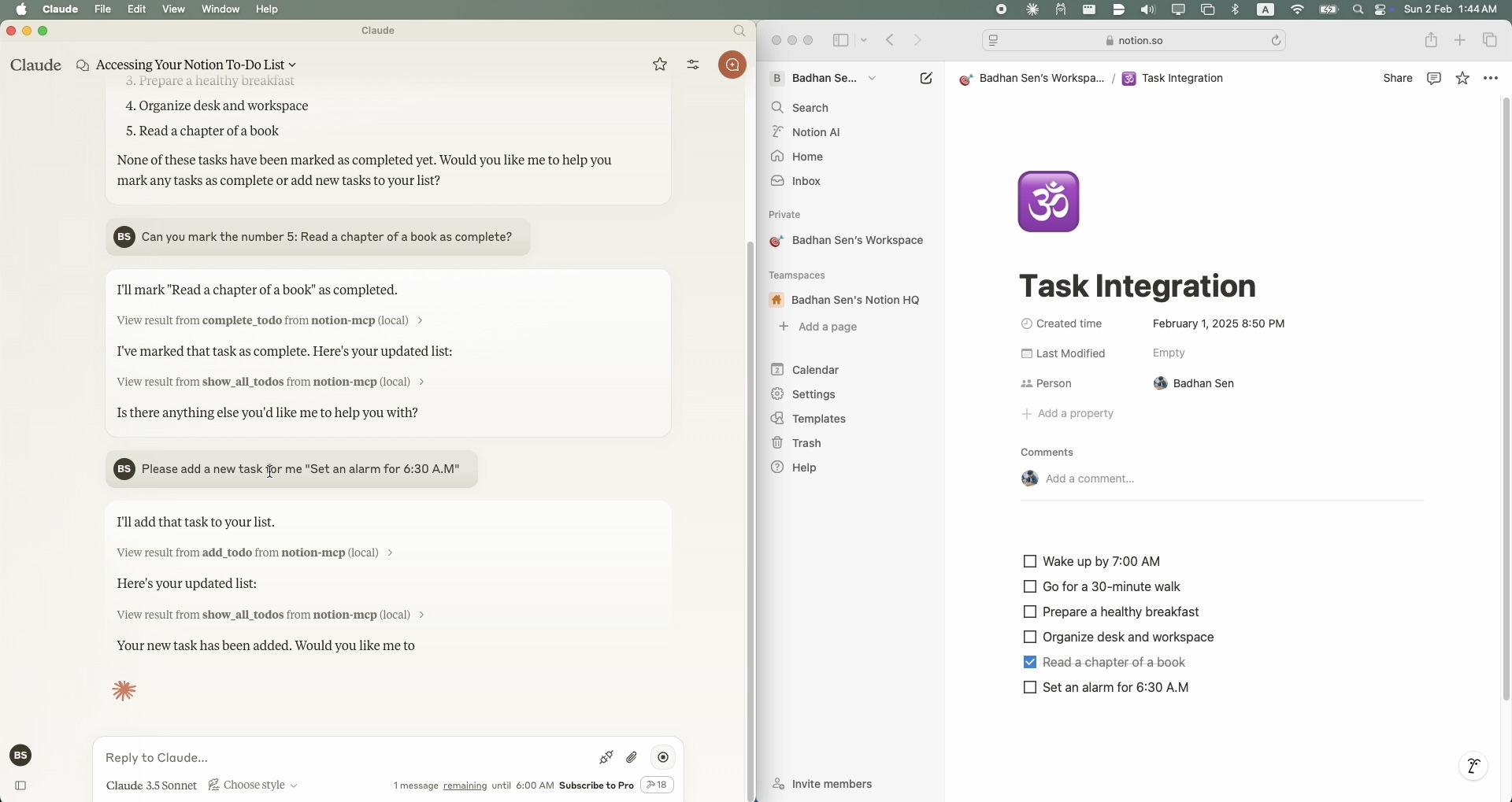
Prerequisites
- Python 3.11 or higher
- A Notion account with API access
- A Notion integration token
- A Notion page where you want to manage your todo list
- Claude Desktop clint
Setup
Installing via Smithery
To install Notion MCP for Claude Desktop automatically via Smithery:
npx -y @smithery/cli install @Badhansen/notion-mcp --client claude
- Clone the repository:
git clone https://github.com/Badhansen/notion-mcp.git
cd notion-mcp
- Set up Python environment:
uv venv
source .venv/bin/activate
uv pip install -e .
- Create a Notion integration:
- Go to https://www.notion.so/my-integrations
- Create new integration
- Copy the API key
- Share your database/page with the integration:
- Open your notion workspace with a database/table present or a page.
- Click "..." menu → "Add connections"
- Select your integration (Search by name)
Configuration
- Create
.envfile:
cp .env.example .env
- Configure Notion credentials in
.env:
NOTION_TOKEN=<your-notion-api-token>
PAGE_ID=<your-notion-page-id>
NOTION_VERSION="2022-06-28"
NOTION_BASE_URL="https://api.notion.com/v1"
- To use it with Claude Desktop as intended you need to adjust your
claude_desktop_config.jsonfile. Go toClaude Desktop -> Settings -> Developer -> Edit Config. Now add theNotionserver configuration.
{
    "mcpServers": {
        "notion-mcp": {
            "command": "uv",
            "args": [
                "--directory",
                "/Users/username/Projects/Python/notion-mcp/src" /* Path to your project */,
                "run",
                "server.py"
            ]
        }
    }
}
Development
Project structure:
notion-mcp/
├── docs/
├── src/
│ └── server.py
├── .env
├── .python-version
├── README.md
├── pyproject.toml
└── uv.lock
Support Functions
Show Tasks
To show all tasks from your Notion workspace, use the show_all_todos function:
{
    "name": "show_all_todos",
    "arguments": {}
}
Add Task
To add a new task to your Notion workspace, use the add_todo function:
{
    "name": "add_todo",
    "arguments": {
        "task": "Your task description"
    }
}
Update Task
To update an existing task in your Notion workspace, use the complete_todo function:
{
    "name": "complete_todo",
    "arguments": {
        "task_id": "your-task-id"
    }
}
Contributing
- Fork the repository
- Create feature branch
- Submit pull request
License
MIT License. See LICENSE file for details.
Установка Badhansen/notion-mcp
У этого сервера нет опубликованного пакета — он собирается из исходников. Открой репозиторий и следуй инструкции в README.
▸ github.com/Badhansen/notion-mcpFAQ
Badhansen/notion-mcp MCP бесплатный?
Да, Badhansen/notion-mcp MCP бесплатный — установка в пару кликов через Unyly без оплаты.
Нужен ли API-ключ для Badhansen/notion-mcp?
Нет, Badhansen/notion-mcp работает без API-ключей и переменных окружения.
Badhansen/notion-mcp — hosted или self-hosted?
Self-hosted: сервер запускается локально на твоей машине командой из раздела установки.
Как установить Badhansen/notion-mcp в Claude Desktop, Claude Code или Cursor?
Открой Badhansen/notion-mcp на unyly.org, выбери вкладку своего клиента (Claude Desktop, Claude Code, Cursor) и нажми Install — конфиг сгенерируется автоматически, без правки JSON.
Похожие MCP
Notion
Read and write pages in your workspace
 автор: Notion
Linear
Issues, cycles, triage — from Claude
 автор: Linear
Google Drive
Search and read your Drive files
 автор: Google
mindsdb/mindsdb
Connect and unify data across various platforms and databases with [MindsDB as a single MCP server](https://docs.mindsdb.com/mcp/overview).
 автор: mindsdb
fulcradynamics/fulcra-context-mcp
Access personal health and biometric data (sleep stages, heart rate, HRV, glucose, workouts), calendar and location via the Fulcra Life API.
 автор: fulcradynamics
rinadelph/Agent-MCP
Framework for building multi-agent systems that coordinate over MCP, with task management, shared context and RAG.
 автор: rinadelph
WhenLabs-org/when
Developer toolkit: stack detection for AI context files, port conflicts, .env schema validation, docs drift, dependency license audits and task timing.
 автор: WhenLabs-org
Beltran12138/wecom-docs-mcp-server
WeCom (Enterprise WeChat) document operations via MCP: create, read, and edit Docs and Smartsheets (9 tools). Fills the doc-CRUD gap — existing WeCom MCP server
 автор: Beltran12138
freema/mcp-gsheets
Google Sheets API integration for reading, writing, formatting and sheet management.
 автор: freema
mattijsdp/dbt-docs-mcp
dbt-core (OSS) project metadata, model and column-level lineage, and dbt documentation.
 автор: mattijsdp
Compare Badhansen/notion-mcp with
Не уверен что выбрать?
Найди свой стек за 60 секунд
Автор?
Embed-бейдж для README
Похожее
Все в категории productivity