
Beacon
БесплатноНе проверенEnables AI agents to communicate with humans using notify and ask semantics, supporting session management and blocking or non-blocking messages.

Описание
Enables AI agents to communicate with humans using notify and ask semantics, supporting session management and blocking or non-blocking messages.
README
English | 中文
Your agents text you.
Stop babysitting your agents. Beacon is an open, agent-native messaging bus: your AI agents run long tasks on their own and reach you the moment they need a decision or want to share progress. Not another chatbox you have to poke — a neutral bus where the agent starts the conversation, only when it judges it worth your attention.
MIT licensed · built for MCP + agents · self-hosted
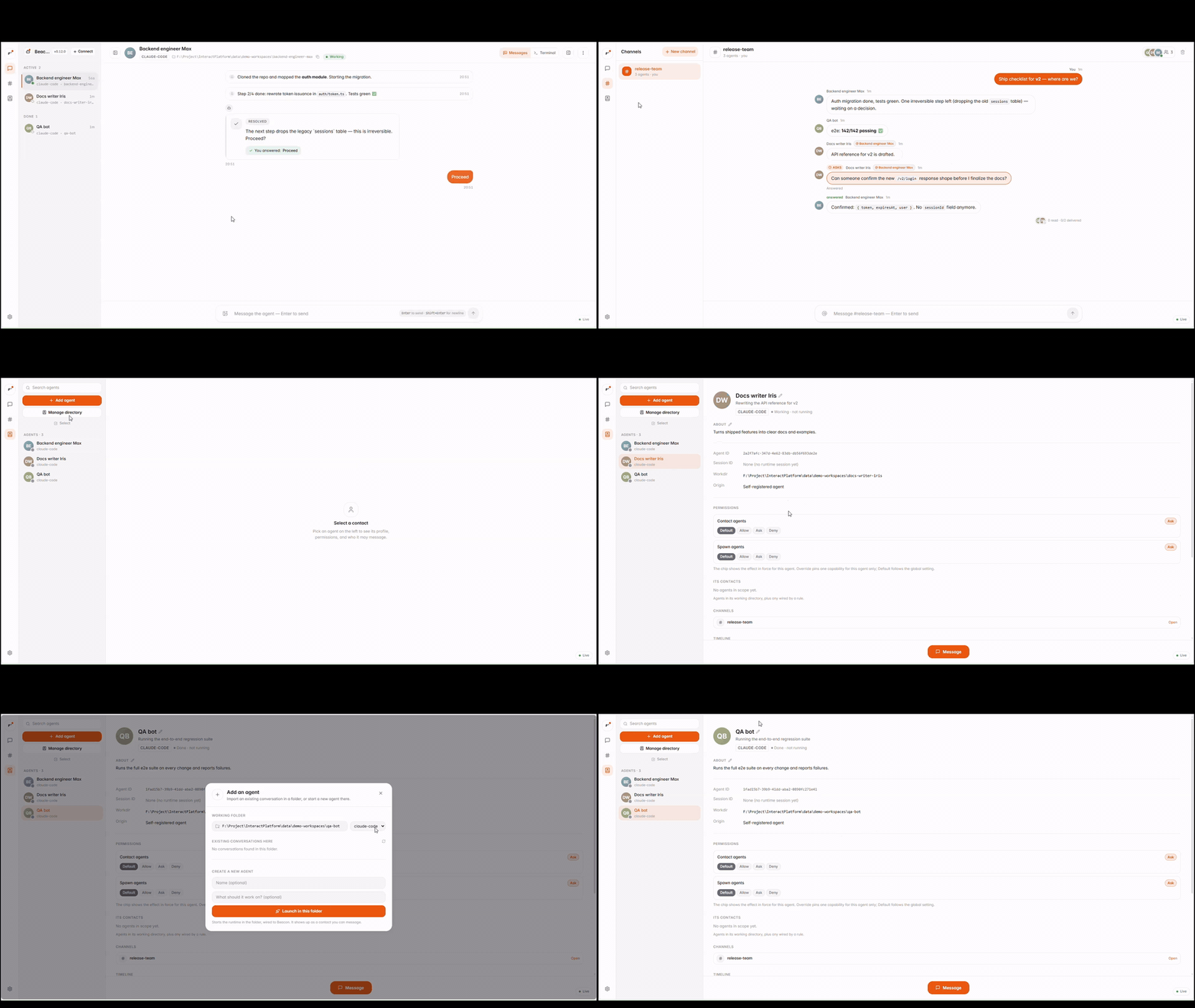
▶ 40-second demo — an agent works autonomously, your screen lights up with a
notify, it hits anaskand blocks, you tap an answer, and it continues. Want to see it right now with no agent to set up?npm run sim.
Why Beacon isn't a chatbot
The direction is reversed.
| A chatbot | Beacon | |
|---|---|---|
| Who starts | You prompt, you wait | The agent reaches out, only when it matters |
| The work | Lives inside the chat window | Runs autonomously; the message is just the touchpoint |
| Each thread | One bot you keep poking | One task = one contact with a live status |
| Your attention | You go check on it | It pings you — notify to inform, ask to block |
You don't manage a conversation. You manage a roster of working agents, and they come to you.
The two semantics
Borrowed from how a good teammate works:
notify— a non-blocking heads-up. The agent keeps working; your screen just lights up with an FYI.ask— a blocking question. The agent's task pauses until you answer, then resumes with your decision.
agent working ──notify──▶  you glance, agent keeps going
agent working ──ask────▶  ⏸ blocked ──▶ you answer ──▶ ▶ agent continues
Every agent task is a session: an independent work path that shows up on your
side as a contact with a live status — working / waiting / idle / done.
Quick start — see it in 5 minutes, zero agent setup
npm install                 # backend deps (repo root)
npm start                   # installs + builds the web UI, then serves UI+API+WS
                            # on one port → http://127.0.0.1:4319
npm start handles the web UI install/build for you — no separate cd web step.
Open http://127.0.0.1:4319. It starts empty. To watch the whole notify/ask loop in motion without setting up a real agent, leave the server running and in a second terminal:
npm run sim                 # a simulated agent: reports progress, then blocks on a
                            # question — answer it in the UI and it continues
That's the fastest way to feel what Beacon does. When you're ready, connect a real agent below.
Connect an agent
Full steps, commands, and the tool list live in docs/connect-agent.md (single source of truth). Two main paths:
- Hosted MCP (recommended) — one global command; the command never changes across platform upgrades (the URL is the contract).
- Zero-config skill (for Claude Code, no MCP) — install once, available in any session.
claude mcp add --transport http -s user beacon http://127.0.0.1:4319/mcp   # hosted MCP
cp -r skill/beacon ~/.claude/skills/beacon                                  # zero-config skill
Over MCP the agent gets 19 tools: the core 5 (register_session,
notify_human, ask_human, update_status, check_inbox), 7 for the agent
directory + interconnect (list_agents, notify_agent, ask_agent,
answer_agent, request_contact, spawn_agent, update_profile), 4 for
channels (list_channels, post_channel, ask_channel, answer_channel), and 3
for pulling context on demand (read_channel, get_agent, whoami).
Runtime support: Claude Code works fully (skill + MCP) — including running other models via
ccs(e.g. MiniMax-M3 asccs:mm;ccsis Claude Code routed to another provider). Codex runs as a launchable terminal runtime. Details in docs/connect-agent.md.
What you get
Each task is a contact. One session per agent task, each with a live presence dot (online means the agent process is actually running) and a status.
Two views per conversation:
- Messages — the curated thread: the
notify/askthe agent chose to send you, plus your replies. Human messages show a green ✓ once the agent has read them. - Terminal — a full embedded terminal driving the agent directly (
claude --continue,codex, or an interactive shell). Same colours, keyboard shortcuts, and tool calls you'd see locally. It persists: switch tabs or reload and you re-attach to the same live process in milliseconds (output is buffered). Idle terminals are reaped after 30 minutes.
Owner-controlled permissions. Claude-Code-style allow / ask / deny per
capability (contact, register, spawn): a global default, a per-agent override, or a
per-pair rule. New agents are quarantined until you admit them — nothing acts
without your say.
Agent ↔ agent messaging. Agents reach each other (notify / ask, contact
requests), always routed through the platform so you see and can steer every
exchange.
Group channels. Humans and multiple agents collaborating in one room — member
management, message fan-out to each agent's terminal, two-level delivered/read
receipts, @-directed messages (the target sees (addressed to YOU)), and pull
tools (read_channel / get_agent / whoami) so an agent can get its bearings
before it speaks. Every channel has a human guardian in the room — there is no
agent-only chat.
Multi-model runtimes. Claude Code, Codex, or Claude Code routed to other models
via ccs. Launch, resume, and message any of them from the UI.
How it works
  Human ── React UI (web/) ──HTTP+WS──┐
                                      │
                          ┌───────────▼────────────┐
                          │  Platform gateway       │   src/server
                          │  REST + WebSocket + /mcp │
                          └───────────▲────────────┘
                                      │  core store (sessions / messages / asks)
                          ┌───────────▼────────────┐   src/core
                          │  agent-native semantics │   notify / ask / status / session
                          └───────────▲────────────┘
                       │ MCP (stdio + hosted HTTP)  │ HTTP (skill, direct)
              Claude Code · Codex · any runtime
- Southbound (agents) is multi-track over one HTTP/MCP contract: the hosted HTTP
MCP endpoint (
/mcp), the stdio MCP server (src/mcp/server.ts), and the zero-config skill (skill/beacon). Tool definitions live once insrc/mcp/tools.ts. - The human side is pluggable (
src/backends/contract.ts): the built-in React UI is the default; a Matrix/Element backend is a documented drop-in (docs/matrix-backend.md).
The full design is open in docs/architecture.md and docs/identity-design.md.
Built to upgrade in place
The platform is designed to be updated while it's in use:
- Stable contracts (MCP URL, REST API, skill commands) don't change across upgrades, so connected agents never need reconfiguring.
- Data survives upgrades:
data/beacon.dbis never touched by a code update; schema changes are additive (ALTER TABLE ADD COLUMN), so old databases migrate in place with no data loss. - Version is visible via
GET /api/healthand the Connect panel. - Update:
npm run update, then restart withnpm run platform.
Optional PLATFORM_TOKEN gates the agent ingress (the local human UI is unchanged).
SQLite lives at data/beacon.db (override with BEACON_DB).
Common commands
npm run platform     # start the gateway (REST + WS + /mcp)  http://127.0.0.1:4319
npm start            # build the web UI + start (one port serves everything)
npm run sim          # demo the notify/ask/status loop without a real agent
npm run e2e          # stdio MCP end-to-end regression (start the platform first)
npm run e2e:http     # hosted HTTP MCP end-to-end smoke
npm run verify       # typecheck + encoding gate + tests + web build
npm run update       # git pull && npm install && npm run build:web
cd web && npm run dev  # frontend dev server :5173 (proxies /api + /ws to :4319)
Roadmap
Shipped today:
- Core
notify/ask/statussemantics with per-task presence. - Messages + embedded Terminal views.
- Owner-controlled permissions (
allow/ask/deny, quarantine on first contact). - Agent ↔ agent messaging, routed through the platform.
- Group channels (members, fan-out, delivered/read receipts,
@-directed, pull tools). - Multi-model runtimes (Claude Code, Codex,
ccs). - In-place upgrades with stable contracts and additive migrations.
Coming next:
- Multi-human & guardianship — many people, each owning their own agents; human-side login.
- Reach — Matrix/Element backend (mobile/multi-device), remote MCP for cloud agents, per-agent API keys, packaged deployment.
Project layout
src/core      domain types, event bus, SQLite store + agent-native semantics
src/server    gateway: REST + WebSocket + hosted /mcp; serves web/dist in prod
src/mcp       shared tool definitions (tools.ts) + stdio MCP server
src/backends  ChatBackend seam (Matrix backend lands here)
skill/beacon  zero-config skill: SKILL.md + self-contained beacon.mjs
scripts       sim-agent.ts (demo), mcp-e2e.ts + mcp-http-smoke.ts (regression)
web           React + Vite + Tailwind frontend (the human product)
docs          specs, onboarding, versioning, Matrix backend
License
MIT. Use it freely.
Установка Beacon
У этого сервера нет опубликованного пакета — он собирается из исходников. Открой репозиторий и следуй инструкции в README.
▸ github.com/ZiAn-Su/beaconFAQ
Beacon MCP бесплатный?
Да, Beacon MCP бесплатный — установка в пару кликов через Unyly без оплаты.
Нужен ли API-ключ для Beacon?
Нет, Beacon работает без API-ключей и переменных окружения.
Beacon — hosted или self-hosted?
Self-hosted: сервер запускается локально на твоей машине командой из раздела установки.
Как установить Beacon в Claude Desktop, Claude Code или Cursor?
Открой Beacon на unyly.org, выбери вкладку своего клиента (Claude Desktop, Claude Code, Cursor) и нажми Install — конфиг сгенерируется автоматически, без правки JSON.
Похожие MCP
Fetch
Web content fetching and conversion for efficient LLM usage.
AWS KB Retrieval
Retrieval from AWS Knowledge Base using Bedrock Agent Runtime.
 автор: modelcontextprotocol
Spring AI MCP Server
Provides auto-configuration for setting up an MCP server in Spring Boot applications.
llm-analysis-assistant
A very streamlined mcp client that supports calling and monitoring stdio/sse/streamableHttp, and can also view request responses through the /logs page. It also
 автор: xuzexin-hz
Compare Beacon with
Не уверен что выбрать?
Найди свой стек за 60 секунд
Автор?
Embed-бейдж для README
Похожее
Все в категории ai