
Beeper
БесплатноНе проверенEnables blockchain transactions on BSC including balance checks, transfers, token swaps, and reward claims.

Описание
Enables blockchain transactions on BSC including balance checks, transfers, token swaps, and reward claims.
README
A backend service for executing beeper transactions on Binance Smart Chain (BSC). This service provides a set of tools for interacting with the BSC blockchain, including balance checking, balance transfers, token transfers, token swaps in Pancakeswap and beeper reward claims.
Features
- Get BNB and token balances
- Transfer BNB and tokens
- Swap tokens in Pancakeswap
- Get token prices
- Buy and sell tokens
- Claim rewards of beeper tokens
- Manage default wallet and token addresses
Prerequisites
- Python >=3.10
- Access to BSC network (mainnet or testnet)
- Wallet account and private key
Environment Variables
Create a .env file in the project root with the following variables:
BEEPER_CHAIN=<bsc or bsc-testnet>
BEEPER_ACCOUNT=<your-wallet-address>
BEEPER_SECRET_KEY=<your-private-key>
BEEPER_TARGET_TOKEN=<default-token-address>  # Optional
API Endpoints
The service exposes the following MCP tools:
Wallet and Token Management
get_default_wallet_address() -> str: Get the default wallet addressget_default_token_address() -> str: Get the default token addressswitch_default_token_address(new_token_address: str) -> str: Switch to a new default token address
Balance Operations
get_balance(address: str) -> str: Get BNB balance of an addressget_token_balance(address: str, token_address: str) -> str: Get token balance of an address
Transfer Operations
transfer(recipient_address: str, amount: Decimal = 0.01) -> dict: Transfer BNB to an addresstransfer_token(recipient_address: str, token_address: str, amount: Decimal = 0.01) -> dict: Transfer tokens to an address
Trading Operations
swap_token(token_in: str, token_out: str, amount: Decimal = 0.01) -> dict: Swap between tokensget_token_price(token_address: str) -> float: Get token price in BNBbuy_token(token_address: str, amount: Decimal = 0.01) -> dict: Buy tokens with BNBsell_token(token_address: str, amount: Decimal = 0.01) -> dict: Sell tokens for BNB
Reward Operations
claim_rewards(token_address: str) -> dict: Claim rewards for a token
Running the Service
git clone https://github.com/unibaseio/beeper-mcp.git
cd beeper-mcp
# start server over stdio
uv run src/beeper_mcp/server.py
- start using sse
The sse service will start on port 8000 by default. You can specify a different port using the --port argument:
uv run src/beeper_mcp/server.py --port 8008 --transport=sse
Configuration on Claude/Windsurf/Cursor/Cline
{
  "mcpServers": {
    "beeper": {
      "command": "uv",
      "args": [
        "--directory",
        "path/to/beeper-mcp",
        "run",
        "src/beeper_mcp/server.py"
        ],
      "env": {
        "BEEPER_ACCOUNT": "your account, 0x...",
        "BEEPER_SECRET_KEY": "your private key or in .env",
        "BEEPER_TARGET_TOKEN": "default token address",
        "BEEPER_CHAIN": "chain type <bsc/bsc-testnet>"
      }
    }
  }
}
Notes
- All amounts are in native units (e.g., BNB, tokens)
- Token addresses should be provided in the correct format
- Make sure you have sufficient BNB for gas fees
- The service supports both BSC mainnet and testnet
- All operations return detailed response objects with transaction hashes and status information
- The service includes built-in error handling and status tracking for transactions
Usage
call functions in llm chat
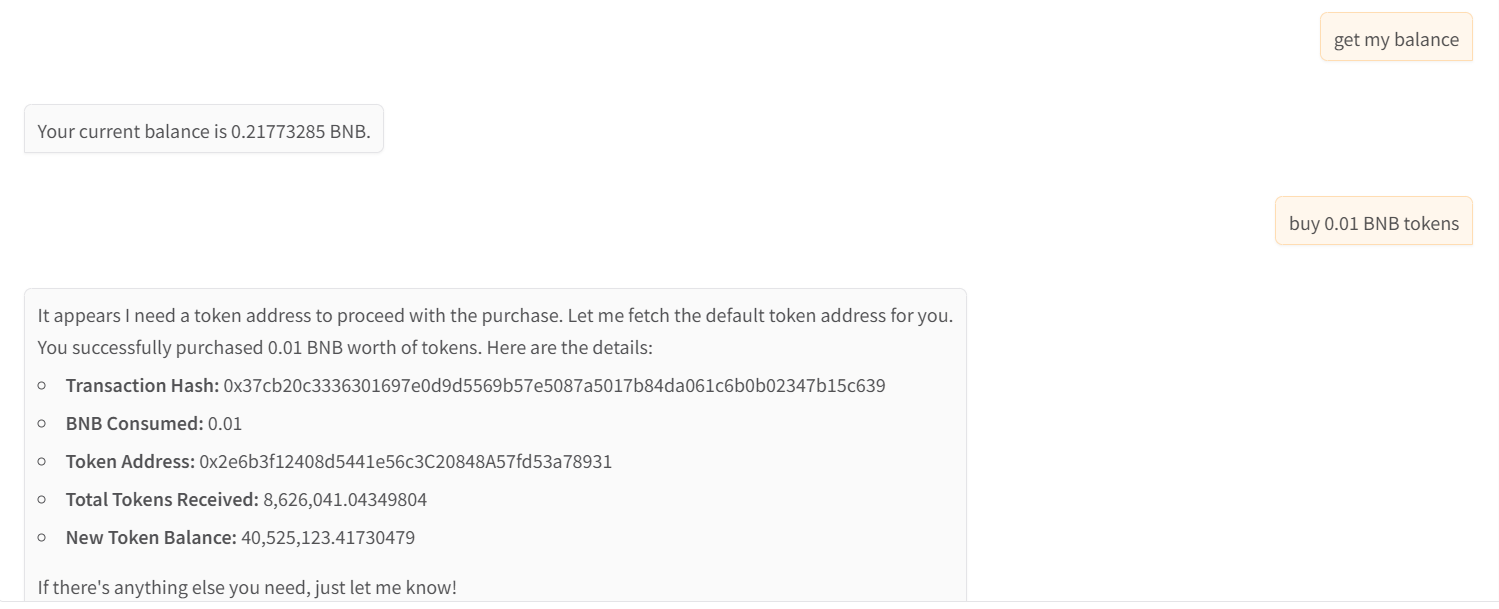
- show wallet and buy tokens
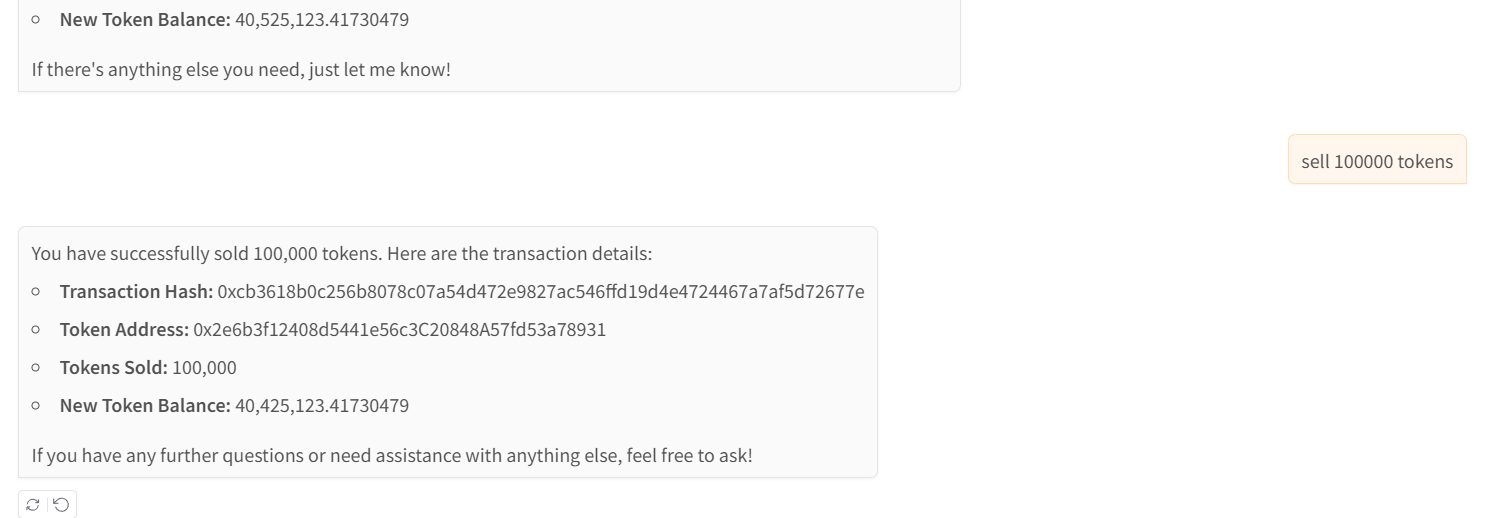
- sell tokens
Установка Beeper
У этого сервера нет опубликованного пакета — он собирается из исходников. Открой репозиторий и следуй инструкции в README.
▸ github.com/intentos-labs/beeper-mcpFAQ
Beeper MCP бесплатный?
Да, Beeper MCP бесплатный — установка в пару кликов через Unyly без оплаты.
Нужен ли API-ключ для Beeper?
Нет, Beeper работает без API-ключей и переменных окружения.
Beeper — hosted или self-hosted?
Доступен hosted-вариант: Unyly запускает сервер в облаке, локальная установка не обязательна.
Как установить Beeper в Claude Desktop, Claude Code или Cursor?
Открой Beeper на unyly.org, выбери вкладку своего клиента (Claude Desktop, Claude Code, Cursor) и нажми Install — конфиг сгенерируется автоматически, без правки JSON.
Похожие MCP
GitHub
PRs, issues, code search, CI status
 автор: GitHub
Filesystem
Secure file operations with configurable access controls.
Memory
Knowledge graph-based persistent memory system.
Template MCP Server
A CLI tool to create a new Model Context Protocol server project with TypeScript support, dual transport options, and an extensible structure
 автор: mcpdotdirect
Compare Beeper with
Не уверен что выбрать?
Найди свой стек за 60 секунд
Автор?
Embed-бейдж для README
Похожее
Все в категории development