
Blackhole Server
БесплатноНе проверенModel Context Protocol server for the Blackhole DEX on Avalanche, providing 32 tools for swaps, liquidity, CL positions, voting, locks, gauges, bribes, yield qu

Описание
Model Context Protocol server for the Blackhole DEX on Avalanche, providing 32 tools for swaps, liquidity, CL positions, voting, locks, gauges, bribes, yield queries, vote leaderboard, epoch state, allowances, pool status, risk flags, and transaction execution.
README
Model Context Protocol server for the Blackhole DEX on Avalanche. Provides 48 tools for swaps, liquidity, CL positions, zaps, voting, locks, gauges, bribes, portfolio queries, pool analytics, gas estimation, and transaction execution.
Tools
| Category | Tools |
|---|---|
| Swap | swap_steps, quote |
| Liquidity (V2) | add_liquidity_steps, remove_liquidity_steps, withdraw_liquidity_steps |
| Liquidity (CL) | add_liquidity_cl_steps, create_cl_pool_steps |
| Deposit math | get_deposit_amounts |
| Zap | zap_add_liquidity_steps, zap_mint_cl_steps, zap_increase_liquidity_steps, zap_remove_liquidity_steps, zap_split_plan |
| Staking | stake_liquidity_steps, unstake_liquidity_steps |
| Fees & Emissions | claim_fees_steps, claim_emissions_steps, claim_rebase_steps, claim_voting_rewards_steps, claim_voting_rewards_payload |
| Locks (veNFT) | create_lock_steps, increase_lock_steps, merge_lock_steps, lock_advanced_steps |
| Voting | vote_steps, get_lock_vote_state, vote_leaderboard |
| Epoch | get_epoch_state |
| Gauges & Bribes | create_gauge_steps, add_bribes_steps |
| Portfolio & discovery | resolve_address, get_token_balances, get_user_positions, get_user_locks, get_whitelisted_tokens, get_opportunities |
| Pools, yield & ALM | pool_yield, get_pool_status, get_pool_lp_providers, get_alm_vaults, get_tokenomics |
| CL math & simulation | cl_tick_to_price, cl_price_to_tick, cl_position_detail, cl_apr_simulator |
| Operational / Safety | get_allowances, estimate_gas_and_tx_cost |
| Execution | execute_transactions |
Installation
1. Stdio -- for MCP clients (Claude Desktop, Cursor, Codex)
Cursor (.cursor/mcp.json)
{
  "mcpServers": {
    "blackhole-mcp": {
      "command": "npx",
      "args": ["@blackhole-dex/blackhole-mcp-server"],
      "env": {
        "PRIVATE_KEY": "0x..."
      }
    }
  }
}
Or from source:
{
  "mcpServers": {
    "blackhole-mcp": {
      "command": "bash",
      "args": ["-lc", "cd /path/to/mcp-server && NODE_ENV=prod npx tsx src/index.ts"],
      "env": {
        "PRIVATE_KEY": "0x..."
      }
    }
  }
}
Claude Desktop
Option A — one command (recommended):
From npm:
claude mcp add --scope user blackhole-mcp -- npx @blackhole-dex/blackhole-mcp-server
From source:
claude mcp add --scope user blackhole-mcp -- bash -lc "cd /path/to/mcp-server && NODE_ENV=prod npx tsx src/index.ts"
--scope user writes to your global Claude config (~/.claude.json) so the server is available in every project. Restart Claude Desktop after running.
Option B — manual JSON (~/Library/Application Support/Claude/claude_desktop_config.json on macOS, %APPDATA%\Claude\claude_desktop_config.json on Windows):
From npm:
{
  "mcpServers": {
    "blackhole-mcp": {
      "command": "npx",
      "args": ["@blackhole-dex/blackhole-mcp-server"]
    }
  }
}
From source:
{
  "mcpServers": {
    "blackhole-mcp": {
      "command": "bash",
      "args": ["-lc", "cd /path/to/mcp-server && NODE_ENV=prod npx tsx src/index.ts"]
    }
  }
}
Restart Claude Desktop after editing the file.
Codex
Codex reads MCP server config from ~/.codex/config.toml (global) or .codex/config.toml (project-scoped, trusted projects only). The CLI and IDE extension share this file. See the Codex MCP docs for details.
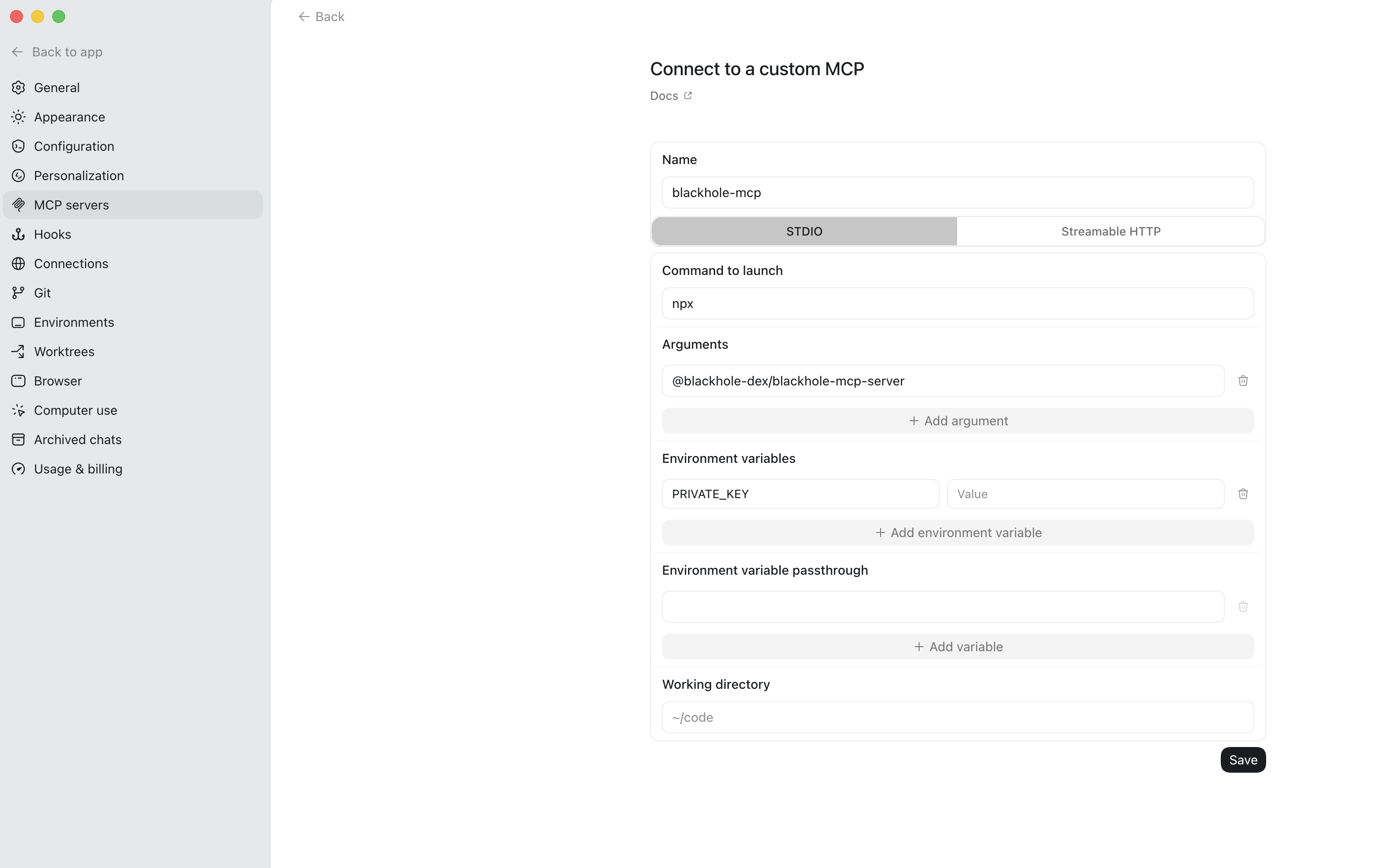
Option A — Codex app / IDE (UI)
- Open Settings (gear icon) in the Codex app or IDE extension.
- Go to MCP settings and add a server (or choose Open config.toml and paste the TOML from Option C below).
- Set the command to
npxwith args@blackhole-dex/blackhole-mcp-server, and addPRIVATE_KEYunder environment variables if you plan to execute transactions.
Option B — CLI:
From npm:
codex mcp add blackhole-mcp --env PRIVATE_KEY=0x... -- npx @blackhole-dex/blackhole-mcp-server
From source:
codex mcp add blackhole-mcp --env PRIVATE_KEY=0x... -- bash -lc "cd /path/to/mcp-server && NODE_ENV=prod npx tsx src/index.ts"
In the Codex TUI, use /mcp to verify the server is active.
Option C — manual config.toml (~/.codex/config.toml or .codex/config.toml in the project):
From npm:
[mcp_servers.blackhole-mcp]
command = "npx"
args = ["@blackhole-dex/blackhole-mcp-server"]

[mcp_servers.blackhole-mcp.env]
PRIVATE_KEY = "0x..."
From source:
[mcp_servers.blackhole-mcp]
command = "bash"
args = ["-lc", "cd /path/to/mcp-server && NODE_ENV=prod npx tsx src/index.ts"]

[mcp_servers.blackhole-mcp.env]
PRIVATE_KEY = "0x..."
2. Library -- import into your own Node.js app
npm install @blackhole-dex/blackhole-mcp-server
import { createMcpServer } from "@blackhole-dex/blackhole-mcp-server";
import { StdioServerTransport } from "@modelcontextprotocol/sdk/server/stdio.js";

const server = createMcpServer();
const transport = new StdioServerTransport();
await server.connect(transport);
Options:
- Exported API:
createMcpServer() - Also exported:
toolDefinitions,toolHandlers
Environment
The server uses production Avalanche mainnet configuration.
| Env | Network | RPC |
|---|---|---|
prod |
Avalanche Mainnet | https://api.avax.network/ext/bc/C/rpc |
Optional runtime variables:
| Variable | Purpose |
|---|---|
RPC_URL |
Override the Avalanche C-Chain RPC endpoint used for reads and execution. |
BASIC_GRAPH_URL |
Override the basic pools subgraph URL. |
CL_GRAPH_URL |
Override the concentrated-liquidity subgraph URL. |
GAMMA_VAULT_ADDRESSES |
Comma-separated Gamma vault allowlist override. |
PRIVATE_KEY |
Private key used by execute_transactions. The server derives userAddress from this key for any tool that needs it. |
USER_ADDRESS |
Read-only fallback address when no private key is configured. |
When PRIVATE_KEY is configured, tools with userAddress can omit it; the server fills in the private key-derived address. execute_transactions requires the private key and will only broadcast when called with confirm: true.
Установка Blackhole Server
У этого сервера нет опубликованного пакета — он собирается из исходников. Открой репозиторий и следуй инструкции в README.
▸ github.com/BlackHoleDEX/mcpFAQ
Blackhole Server MCP бесплатный?
Да, Blackhole Server MCP бесплатный — установка в пару кликов через Unyly без оплаты.
Нужен ли API-ключ для Blackhole Server?
Нет, Blackhole Server работает без API-ключей и переменных окружения.
Blackhole Server — hosted или self-hosted?
Доступен hosted-вариант: Unyly запускает сервер в облаке, локальная установка не обязательна.
Как установить Blackhole Server в Claude Desktop, Claude Code или Cursor?
Открой Blackhole Server на unyly.org, выбери вкладку своего клиента (Claude Desktop, Claude Code, Cursor) и нажми Install — конфиг сгенерируется автоматически, без правки JSON.
Похожие MCP
GitHub
PRs, issues, code search, CI status
 автор: GitHub
Filesystem
Secure file operations with configurable access controls.
Memory
Knowledge graph-based persistent memory system.
Template MCP Server
A CLI tool to create a new Model Context Protocol server project with TypeScript support, dual transport options, and an extensible structure
 автор: mcpdotdirect
Compare Blackhole Server with
Не уверен что выбрать?
Найди свой стек за 60 секунд
Автор?
Embed-бейдж для README
Похожее
Все в категории development