
BPMN
БесплатноНе проверенAn MCP server that enables AI assistants to programmatically create, modify, and export BPMN 2.0 workflow diagrams. It supports managing various process element

Описание
An MCP server that enables AI assistants to programmatically create, modify, and export BPMN 2.0 workflow diagrams. It supports managing various process elements and sequence flows while providing export capabilities to standard XML and SVG formats.
README
A Model Context Protocol (MCP) server for creating and manipulating BPMN 2.0 workflow diagrams programmatically. This server enables AI assistants and other tools to generate, edit, and export business process diagrams in the standard BPMN format.
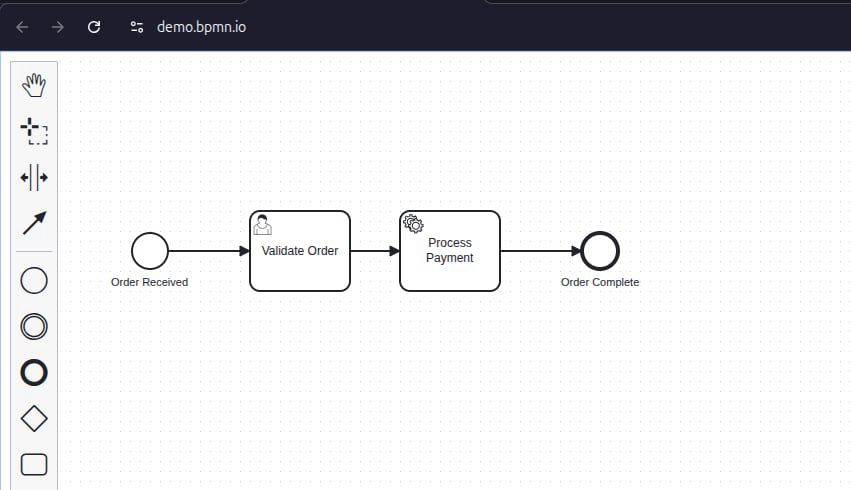
Features
- Create BPMN Diagrams: Generate new workflow diagrams from scratch
- Add Process Elements: Insert events, tasks, gateways, and subprocesses
- Connect Elements: Create sequence flows between workflow components
- Export Formats: Save diagrams as BPMN 2.0 XML or SVG
- Import Support: Load and modify existing BPMN XML files
- Smart Hints: Get helpful nudges to ensure complete workflows with proper connections
Installation
Prerequisites
- Node.js (v16 or higher)
- npm or yarn
Local Setup
- Clone the repository:
git clone https://github.com/dattmavis/BPMN-MCP.git
cd BPMN-MCP
- Install dependencies:
npm install
- Build the project:
npm run build
Configuration
For Claude Desktop
Add the following to your Claude Desktop configuration file:
macOS: ~/Library/Application Support/Claude/claude_desktop_config.json
Windows: %APPDATA%\Claude\claude_desktop_config.json
{
  "mcpServers": {
    "bpmn": {
      "command": "node",
      "args": ["/absolute/path/to/BPMN-MCP/dist/index.js"]
    }
  }
}
Replace /absolute/path/to/BPMN-MCP with the actual path where you cloned this repository.
For Other AI Tools
This MCP server works with any tool that supports the Model Context Protocol. Configure it to run:
node /path/to/BPMN-MCP/dist/index.js
Usage
Once configured, you can ask your AI assistant to create BPMN diagrams. Here are some example requests:
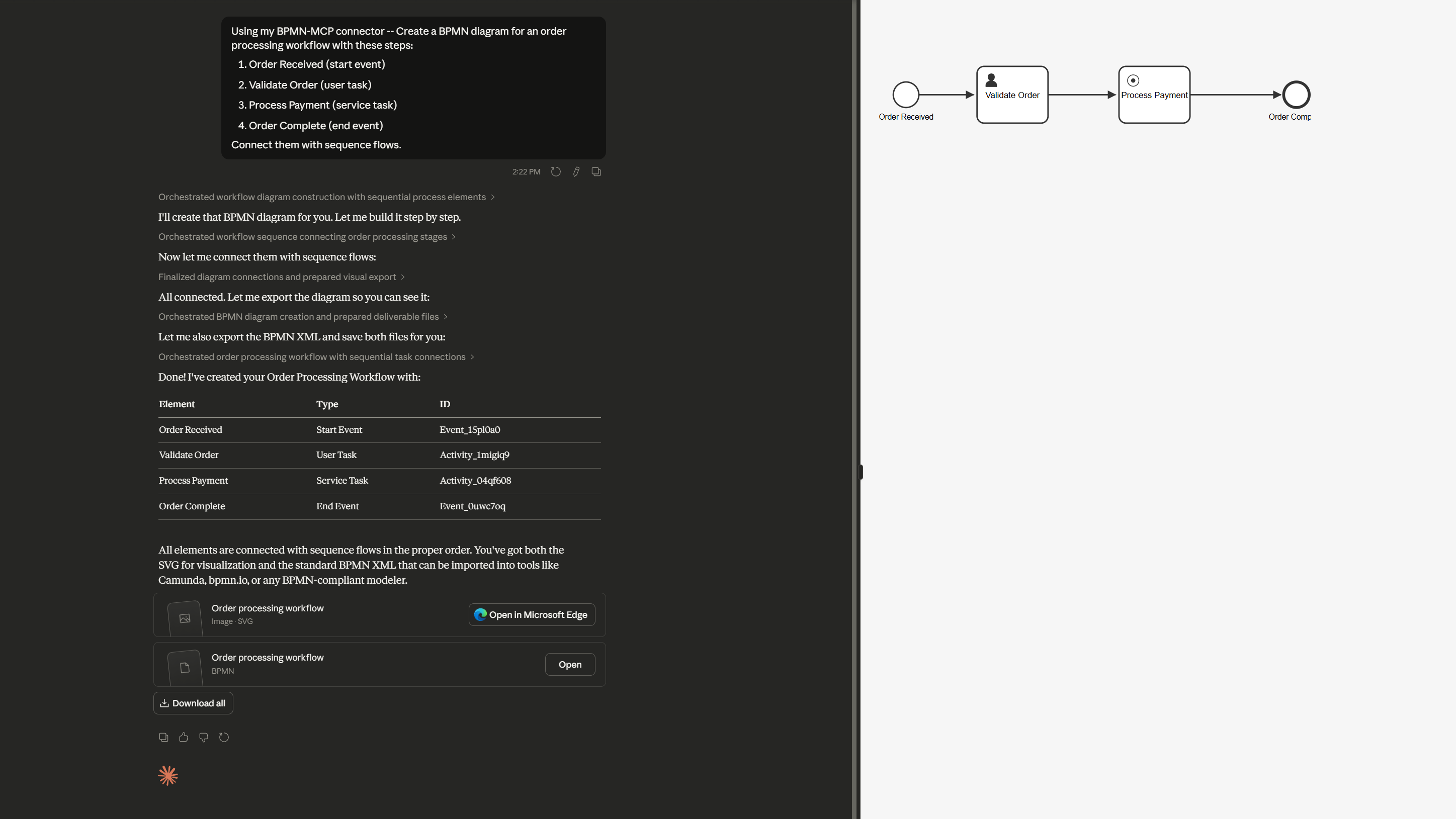
Creating a Simple Workflow
Create a BPMN diagram for an order processing workflow with these steps:
1. Order Received (start event)
2. Validate Order (user task)
3. Process Payment (service task)
4. Order Complete (end event)

Connect them with sequence flows.
Creating a Workflow with Decision Points
Create a BPMN diagram for customer support ticket routing:
- Start: Ticket Received
- Task: Categorize Ticket
- Gateway: Check Priority
  - If High: Escalate to Senior Support
  - If Normal: Assign to Support Team
- Both paths lead to: Ticket Resolved (end)
Available Tools
The MCP server provides these tools:
create_bpmn_diagram
Creates a new BPMN diagram and returns a diagram ID.
add_bpmn_element
Adds an element to the diagram. Supported types:
- Events:
bpmn:StartEvent,bpmn:EndEvent,bpmn:IntermediateCatchEvent,bpmn:IntermediateThrowEvent - Tasks:
bpmn:Task,bpmn:UserTask,bpmn:ServiceTask,bpmn:ScriptTask,bpmn:ManualTask,bpmn:BusinessRuleTask,bpmn:SendTask,bpmn:ReceiveTask - Gateways:
bpmn:ExclusiveGateway,bpmn:ParallelGateway,bpmn:InclusiveGateway,bpmn:EventBasedGateway - Other:
bpmn:SubProcess
connect_bpmn_elements
Creates a sequence flow between two elements.
export_bpmn_xml
Exports the diagram as BPMN 2.0 XML format.
export_bpmn_svg
Exports the diagram as SVG for visualization.
list_bpmn_elements
Lists all elements in a diagram.
import_bpmn_xml
Imports an existing BPMN XML file for editing.
Example Output
The server generates standard BPMN 2.0 XML files that can be opened in:
- Camunda Modeler
- bpmn.io
- Any BPMN 2.0 compliant tool
Example XML output:
<?xml version="1.0" encoding="UTF-8"?>
<bpmn:definitions xmlns:bpmn="http://www.omg.org/spec/BPMN/20100524/MODEL"
                   xmlns:bpmndi="http://www.omg.org/spec/BPMN/20100524/DI"
                   xmlns:dc="http://www.omg.org/spec/DD/20100524/DC"
                   xmlns:di="http://www.omg.org/spec/DD/20100524/DI">
  <bpmn:process id="Process_1" isExecutable="true">
    <bpmn:startEvent id="Event_1" name="Start">
      <bpmn:outgoing>Flow_1</bpmn:outgoing>
    </bpmn:startEvent>
    <bpmn:task id="Task_1" name="Process">
      <bpmn:incoming>Flow_1</bpmn:incoming>
      <bpmn:outgoing>Flow_2</bpmn:outgoing>
    </bpmn:task>
    <bpmn:endEvent id="Event_2" name="End">
      <bpmn:incoming>Flow_2</bpmn:incoming>
    </bpmn:endEvent>
    <bpmn:sequenceFlow id="Flow_1" sourceRef="Event_1" targetRef="Task_1" />
    <bpmn:sequenceFlow id="Flow_2" sourceRef="Task_1" targetRef="Event_2" />
  </bpmn:process>
  <!-- Diagram information omitted for brevity -->
</bpmn:definitions>
Development
Running in Development Mode
npm run watch
This will rebuild the project automatically when source files change.
Testing
You can test the server manually using the MCP protocol:
node dist/index.js
Then send JSON-RPC requests via stdin. Example:
{"jsonrpc":"2.0","id":1,"method":"tools/list","params":{}}
Technical Details
Architecture
- Runtime: Node.js with TypeScript
- BPMN Engine: bpmn-js (headless mode with jsdom)
- Protocol: Model Context Protocol (MCP)
- Output: BPMN 2.0 XML standard
Smart Workflow Hints
The server includes helpful hints to ensure complete diagrams:
- Reminds you to connect elements when adding tasks/events
- Warns when exporting diagrams with disconnected elements
- Suggests using
connect_bpmn_elementsto create proper workflows
License
MIT
Contributing
Contributions are welcome! Please feel free to submit issues or pull requests.
Support
For issues or questions:
- Open an issue on GitHub
- Check existing issues for solutions
Related Projects
- bpmn-js - BPMN 2.0 rendering toolkit
- Model Context Protocol - Protocol specification
Установить BPMN в Claude Desktop, Claude Code, Cursor
unyly install bpmn-mcpСтавит в Claude Desktop, Claude Code, Cursor и VS Code — сам разбирается с npx, uvx и сборкой из исходников.
Впервые? Поставь CLI: curl -fsSL https://unyly.org/install | sh
Или настроить вручную
Выполни в терминале:
claude mcp add bpmn-mcp -- npx -y github:dattmavis/BPMN-MCPПошаговые гайды: как установить BPMN
FAQ
BPMN MCP бесплатный?
Да, BPMN MCP бесплатный — установка в пару кликов через Unyly без оплаты.
Нужен ли API-ключ для BPMN?
Нет, BPMN работает без API-ключей и переменных окружения.
BPMN — hosted или self-hosted?
Self-hosted: сервер запускается локально на твоей машине командой из раздела установки.
Как установить BPMN в Claude Desktop, Claude Code или Cursor?
Открой BPMN на unyly.org, выбери вкладку своего клиента (Claude Desktop, Claude Code, Cursor) и нажми Install — конфиг сгенерируется автоматически, без правки JSON.
Похожие MCP
Fetch
Web content fetching and conversion for efficient LLM usage.
AWS KB Retrieval
Retrieval from AWS Knowledge Base using Bedrock Agent Runtime.
 автор: modelcontextprotocol
Spring AI MCP Server
Provides auto-configuration for setting up an MCP server in Spring Boot applications.
llm-analysis-assistant
A very streamlined mcp client that supports calling and monitoring stdio/sse/streamableHttp, and can also view request responses through the /logs page. It also
 автор: xuzexin-hz
Compare BPMN with
Не уверен что выбрать?
Найди свой стек за 60 секунд
Автор?
Embed-бейдж для README
Похожее
Все в категории ai