
BraveMCP
БесплатноНе проверенA local-first browser extension and MCP server that captures your browsing history, bookmarks, highlights, and notes, making them searchable by Claude Desktop a

Описание
A local-first browser extension and MCP server that captures your browsing history, bookmarks, highlights, and notes, making them searchable by Claude Desktop as a personal memory assistant.
README
MIT License Version Local First MCP Compliant
BraveMCP is a local-first browser extension + MCP server that captures everything you browse — pages, bookmarks, highlights, notes — and makes it searchable by Claude Desktop as a personal "second brain."
Everything stays on your machine. No cloud. No tracking. Just your own memory, given to Claude.
Demo
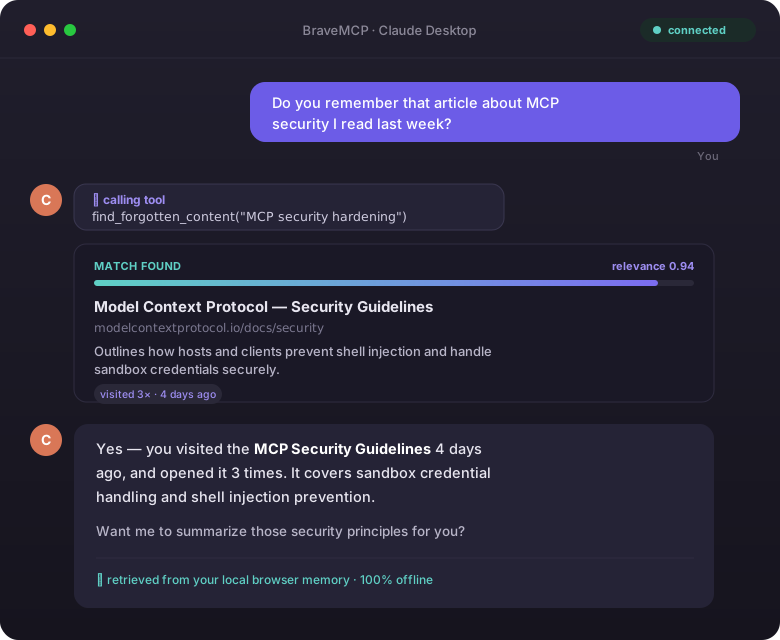
Claude answers a vague "do you remember…" question by searching your local browser memory — fully offline. A real screen-recorded GIF can replace this mockup; see docs/RECORDING.md.
What It Does
| Without BraveMCP | With BraveMCP |
|---|---|
| "I don't have access to your history" | Claude searches your browsing history directly |
| You copy-paste URLs manually | Extension auto-captures pages as you browse |
| Forgotten tabs lost forever | Time-decay search resurfaces what you forgot |
| Manual research summaries | Claude synthesizes your sessions automatically |
Example
You: "Do you remember that article about MCP security I read last week?"
Claude: (calls
find_forgotten_content) → "Yes — you visited MCP Security Guidelines 4 days ago, 3 times. It covers sandbox credential handling and shell injection prevention. Want a summary?"
How It Works
Brave Browser
    ↓ (tab visits, bookmarks, highlights)
Extension (Manifest V3)
    ↓ POST /api/...
HTTP Bridge (Express :3747)
    ↓
MCP Server ←→ SQLite + ChromaDB
    ↓ stdio JSON-RPC
Claude Desktop
- Extension — Manifest V3. Auto-captures tab changes, bookmarks, and context-menu text highlights.
- HTTP Bridge — Express server on port
3747, runs inside the MCP server process to receive extension payloads. - Storage — SQLite (FTS5 full-text search) + ChromaDB (local vector embeddings). Nothing leaves your machine.
- AI Pipeline — Ollama (
llama3.2/nomic-embed-text) for local summarization and embeddings, with Anthropic API as fallback. - MCP Server — Exposes 16 tools to Claude Desktop over stdio.
Quick Start
Prerequisites
- Node.js v18+
- Brave or Chrome browser
- Claude Desktop
- (Optional) Ollama for local AI —
ollama pull llama3.2 && ollama pull nomic-embed-text - (Optional) Python 3.10+ for ChromaDB vector search —
pip install chromadb
Install
git clone https://github.com/glatinone/BraveMCP.git
cd BraveMCP
npm run setup
npm run setup handles everything: installs dependencies, builds TypeScript, and checks ports.
Connect to Claude Desktop
Add this to %APPDATA%\Claude\claude_desktop_config.json (Windows) or ~/Library/Application Support/Claude/claude_desktop_config.json (macOS):
{
  "mcpServers": {
    "brave-memory": {
      "command": "node",
      "args": ["/absolute/path/to/BraveMCP/mcp-server/dist/index.js"]
    }
  }
}
Restart Claude Desktop.
Load the Browser Extension
- Open
brave://extensions(orchrome://extensions) - Enable Developer mode
- Click Load unpacked → select the
/extensionfolder
(Optional) Start ChromaDB for Semantic Search
pip install chromadb
chroma run --path ./storage/chroma
ChromaDB runs at http://localhost:8000. Without it, BraveMCP falls back to SQLite keyword search — still works great.
Available MCP Tools
Once connected, Claude can call any of these 16 tools:
| Tool | What it does |
|---|---|
get_open_tabs |
Get your currently open browser tabs |
get_active_tab |
Get the tab you're looking at right now |
get_bookmarks |
Retrieve your saved bookmarks |
search_memory |
Keyword + semantic search across your history |
find_related_content |
Find pages related to a search query |
find_forgotten_content |
Resurface old content using time-decay + visit scoring |
capture_current_page |
Save the active page's content to memory |
save_note |
Save a freeform note |
save_bookmark |
Save a bookmark with a folder |
summarize_open_tabs |
Synthesize what you're currently researching |
summarize_research_topic |
Deep-dive summary on a specific topic from your history |
get_research_sessions |
Auto-clustered browsing sessions by domain/topic |
generate_weekly_digest |
Weekly summary of your browsing and research gaps |
suggest_tab_cleanup |
Recommends tabs to close, archive, or keep |
get_all_open_tabs |
Get the live, id-tagged array of every open tab — call first when organizing tabs |
apply_tab_grouping |
Apply semantic tab groups to the browser, validated by a critic engine (min score 90/100) before staging |
Page Capture Flow
The extension auto-syncs tab visits in the background. For full page content (text body + AI summary), click "Capture Content" in the extension popup. This sends the page body to the MCP server, which stores it in SQLite and generates an AI summary and vector embedding.
Claude can also save a page directly: capture_current_page(url, title, content, summary).
Security
The HTTP bridge listens on localhost:3747 for the extension only — but a
plain localhost server is reachable by any browser tab's JavaScript, not
just the extension. The bridge enforces an Origin allowlist so that only
the extension itself (chrome-extension://… / moz-extension://…) or a
same-machine, non-browser client (no Origin header, e.g. a CLI script) can
call it. An ordinary website has no way to spoof its Origin header, so it
cannot reach /api/capture, /api/note, /api/stage-groups, etc. — closing
off a memory-poisoning path where a malicious page could otherwise plant
content into the local database that Claude later treats as trusted research.
See mcp-server/src/security/origin.ts.
Project Structure
BraveMCP/
├── extension/              # Manifest V3 browser extension
│   ├── background.js       # Service worker: tab sync, bookmarks
│   ├── content.js          # DOM extraction for page capture
│   ├── manifest.json
│   └── popup/              # Extension UI
├── mcp-server/             # Node.js MCP server
│   ├── src/
│   │   ├── index.ts        # MCP tools + Express HTTP bridge
│   │   ├── storage/
│   │   │   ├── database.ts # SQLite schema, FTS5, migrations
│   │   │   └── chroma.ts   # ChromaDB client
│   │   └── ai/
│   │       └── pipeline.ts # Embeddings + summarization pipeline
│   └── tsconfig.json
├── scripts/
│   └── setup.js            # One-command setup script
├── storage/                # SQLite DB lives here (git-ignored)
└── package.json            # Root: runs setup script
Roadmap
- Phase 1 — MCP server scaffold
- Phase 2 — SQLite storage layer (FTS5, migrations)
- Phase 3 — Browser extension (Manifest V3)
- Phase 4 — Vector search + AI pipeline (Ollama / Anthropic fallback)
- Phase 5 — Advanced tools (digest, sessions, forgotten content, tab cleanup)
- Phase 6 — Polish + public release
Contributing
See CONTRIBUTING.md for guidelines.
License
MIT — built by Yehezkiel Tampubolon
Установка BraveMCP
У этого сервера нет опубликованного пакета — он собирается из исходников. Открой репозиторий и следуй инструкции в README.
▸ github.com/glatinone/BraveMCPFAQ
BraveMCP MCP бесплатный?
Да, BraveMCP MCP бесплатный — установка в пару кликов через Unyly без оплаты.
Нужен ли API-ключ для BraveMCP?
Нет, BraveMCP работает без API-ключей и переменных окружения.
BraveMCP — hosted или self-hosted?
Self-hosted: сервер запускается локально на твоей машине командой из раздела установки.
Как установить BraveMCP в Claude Desktop, Claude Code или Cursor?
Открой BraveMCP на unyly.org, выбери вкладку своего клиента (Claude Desktop, Claude Code, Cursor) и нажми Install — конфиг сгенерируется автоматически, без правки JSON.
Похожие MCP
Playwright
Browser automation, scraping, screenshots
 автор: Microsoft
Puppeteer
Browser automation and web scraping.
 автор: modelcontextprotocol
opentabs-dev/opentabs
Plugin-based MCP server + Chrome extension that gives AI agents access to web applications through the user's authenticated browser session. 100+ plugins with a
 автор: opentabs-dev
robhunter/agentdeals
1,500+ developer infrastructure deals, free tiers, and startup programs across 54 categories. Search deals, compare vendors, plan stacks, and track pricing chan
 автор: robhunter
Compare BraveMCP with
Не уверен что выбрать?
Найди свой стек за 60 секунд
Автор?
Embed-бейдж для README
Похожее
Все в категории browse