
Broker
БесплатноНе проверенEnables AI agents to securely perform privileged actions like creating GitHub issues by minting short-lived, single-purpose tokens on demand, with policy enforc

Описание
Enables AI agents to securely perform privileged actions like creating GitHub issues by minting short-lived, single-purpose tokens on demand, with policy enforcement and audit logging.
README
A capability broker for AI agents. When an agent needs to perform a privileged action — like creating a GitHub issue — Broker does not hand it a standing credential. Instead it mints a fresh, short-lived, single-purpose token at the moment of use, spends it on exactly one API call, and records the whole lifecycle to a tamper-evident audit log. If the requested action falls outside policy, Broker refuses without ever minting a token.
The thesis: an agent should never hold a credential it isn't using right now.
The problem
The default way to give an AI agent access to GitHub is to hand it a personal access token. That token is:
- long-lived — valid for months, often until manually revoked;
- broadly scoped — usually far more than the one thing the agent needs;
- ambient — it sits in the process environment, available to any code path, logged in stack traces, exfiltrated if the agent is prompt-injected.
Broker replaces that model with capabilities: narrow, expiring grants minted on demand and governed by policy.
What Broker does
agent asks: "create issue in Abhishekvoid/broker-mcp"
        │
        ▼
   ┌─────────┐   deny → audit "policy.decision {allowed:false}"  → no token minted
   │ POLICY  │
   └─────────┘   allow
        │
        ▼
   ┌─────────┐   GitHub App JWT ──► installation access token (~1h TTL)
   │  MINT   │   wrapped as a Capability; raw token never leaves Broker
   └─────────┘
        │
        ▼
   ┌─────────┐   POST /repos/{repo}/issues with the minted token
   │   USE   │
   └─────────┘
        │
        ▼
   ┌─────────┐   append minted → used → outcome to audit.jsonl
   │  AUDIT  │
   └─────────┘
        │
        ▼
   returns { number, url, capability } — the public capability object,
   with the token field stripped.
Concretely:
- Policy first. Every request is evaluated against an allowlist (
broker/policy.py) before any credential exists. Wrong repo or wrong action →PolicyDenied, logged, nothing minted. - Mint on use. Broker signs a JWT with a GitHub App private key and exchanges
it for an installation access token scoped to
issues:writewith GitHub's server-side ~1-hour TTL (broker/github.py). - Spend once. That token authorizes exactly one API call. It is held in a private
field of the
Capabilityand stripped from anything returned to the caller (broker/capability.py→to_public_dict()). - Audit everything. Each stage appends a JSON line to
audit.jsonl(broker/audit.py). Tokens are never written to the log.
The capability lifecycle, as recorded
A real allow-then-deny run from audit.jsonl:
{"event":"policy.decision","action":"github.issues.create","repo":"Abhishekvoid/broker-mcp","allowed":true,"reason":"matches allowlist"}
{"event":"capability.minted","capability_id":"CAP-FFE6701E","provider":"github","scope":"issues:write","ttl_seconds":3598,"expires_at":"2026-07-11T08:34:05Z"}
{"event":"capability.used","capability_id":"CAP-FFE6701E","outcome":"success","resource":"https://github.com/Abhishekvoid/broker-mcp/issues/4"}
{"event":"policy.decision","action":"github.issues.create","repo":"Abhishekvoid/some-other-repo","allowed":false,"reason":"repo Abhishekvoid/some-other-repo not in allowlist"}
Note the last line: a denied request produces a decision record and no capability.minted
event — the deny path never touches a credential.
Quickstart
1. Create a GitHub App
- Register a GitHub App with Issues: Read & write permission.
- Generate a private key (
.pem) and store it outside the repo (e.g.~/.broker-secrets/). - Install the App on the target repository; note the App ID and Installation ID.
2. Configure
python -m venv .venv
.venv/Scripts/activate        # Windows
pip install -r requirements.txt

cp .env.example .env          # then fill in your App ID, Installation ID, and .pem path
Set the allowlisted repo in broker/policy.py (ALLOWED_REPO).
3. Run the demo
python -m examples.create_issue
This runs the allow path (mints a capability, creates a real issue, prints the public
capability object) and the deny path (policy refusal, no token), then points you at
audit.jsonl for the full trail.
MCP integration (Claude Desktop)
Broker exposes its capability pipeline as an MCP server (broker/mcp_server.py),
so an MCP client such as Claude Desktop can call github_create_issue as a tool. The
tool call flows through the exact same policy → mint → use → audit pipeline.
A ready-to-edit config ships in this repo as claude_desktop_config.sample.json. Copy it into Claude Desktop's config file, replacing the placeholder paths and IDs:
Standard (installer) build:
%APPDATA%\Claude\claude_desktop_config.json
Store / MSIX build (filesystem-virtualized — this is where the app actually reads config, and a common source of "my MCP server never launches"):
%LOCALAPPDATA%\Packages\Claude_<publisherId>\LocalCache\Roaming\Claude\claude_desktop_config.json
After editing, fully quit Claude Desktop from the system tray (not just the window)
and reopen it. On launch it spawns Broker over stdio; a logs\mcp-server-broker.log
appears next to the config, and github_create_issue becomes available in chat.
You can verify the server independently of any GUI — this is what Claude Desktop does under the hood:
python -m broker.mcp_server # speaks MCP JSON-RPC over stdio
Demo
The full loop, driven from Claude Desktop calling Broker's github_create_issue tool.
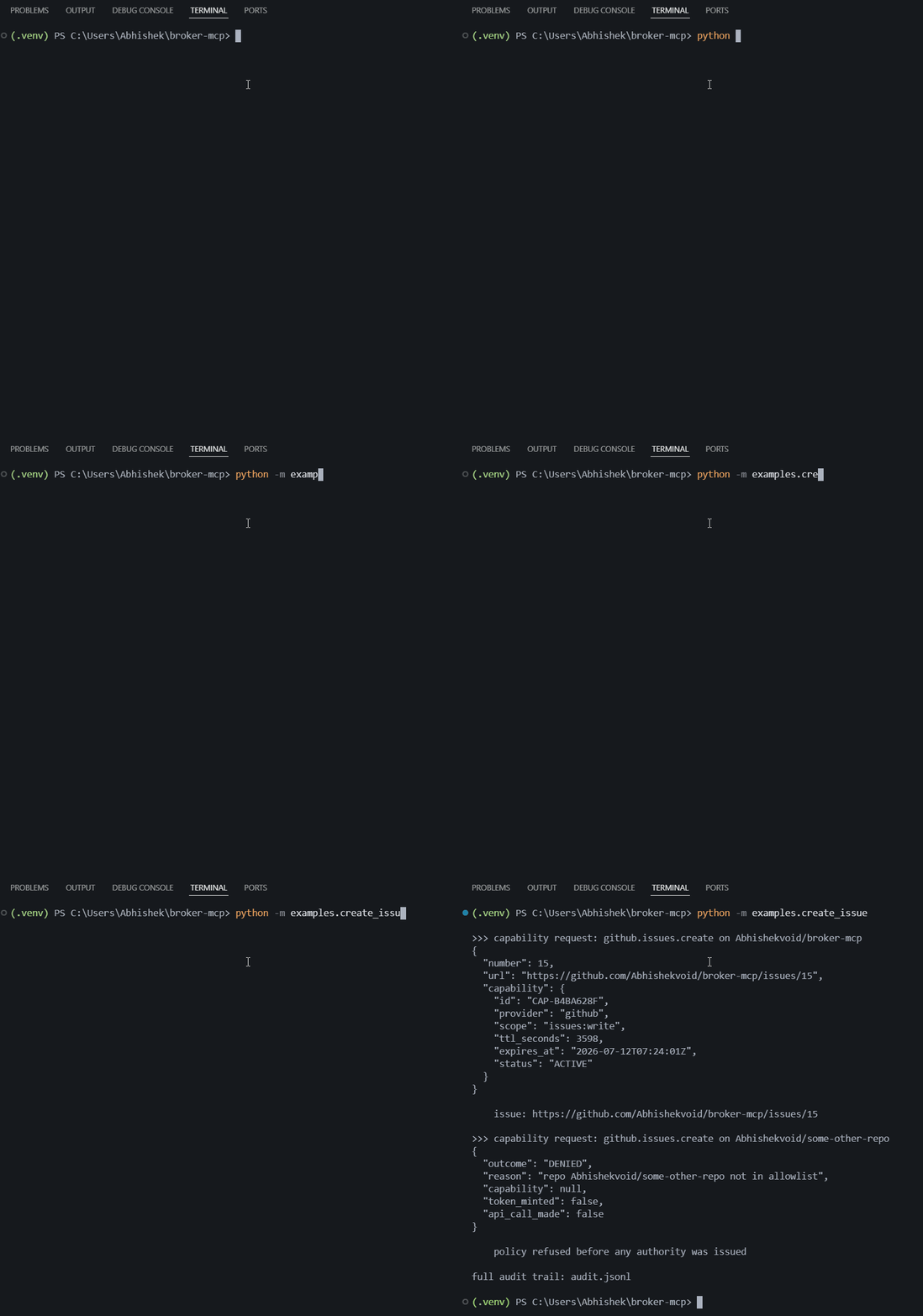
Running examples/create_issue.py in the terminal — the allowed call succeeds and
is audited, then two seconds later the denied call is refused by policy and audited
as allowed:false:
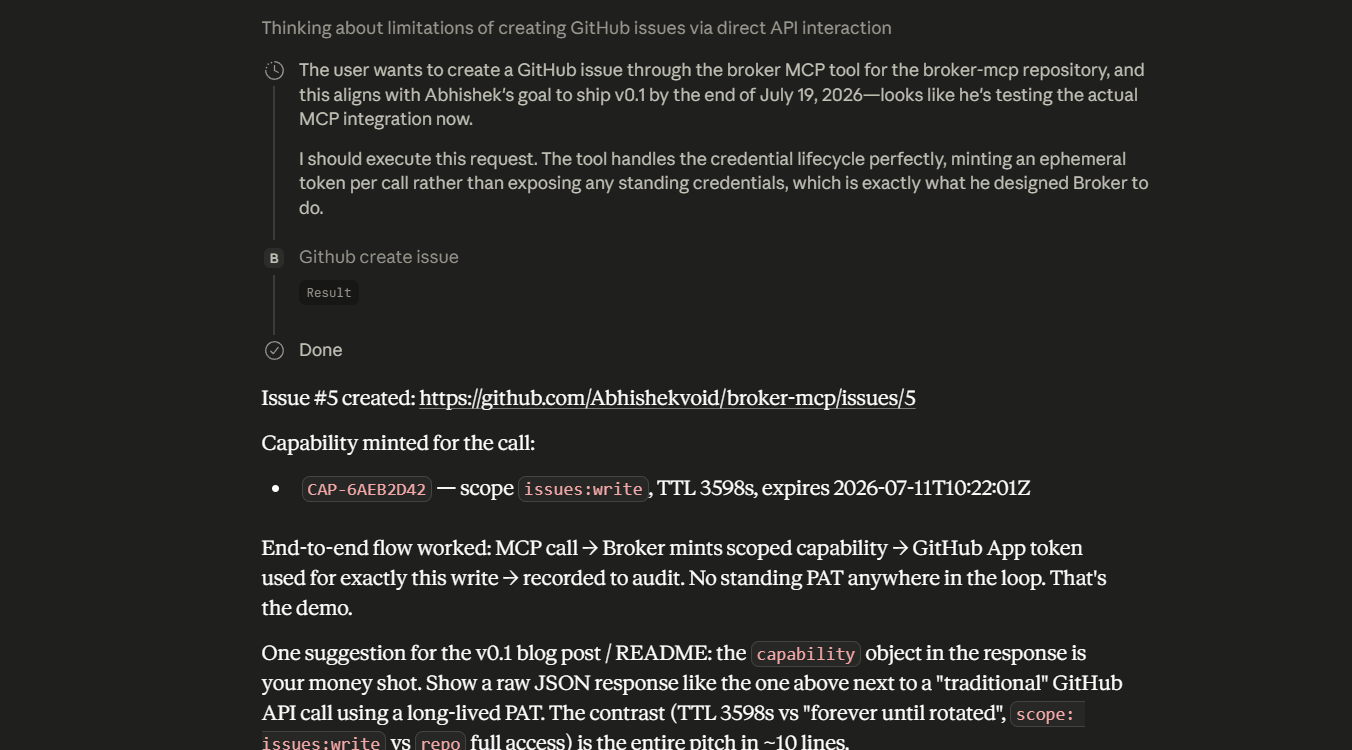
Allow path — Claude invokes the tool; Broker evaluates policy, mints a scoped
capability, makes the call, and returns the public capability object (issue #5,
CAP-6AEB2D42, scope issues:write, TTL 3598s):
The resulting issue on GitHub, opened by the App installation — no personal token involved:
![GitHub issue "issued via MCP" opened by broker-mcp[bot]](https://raw.githubusercontent.com/Abhishekvoid/broker-mcp/main/docs/demo-02-github-issue.png)
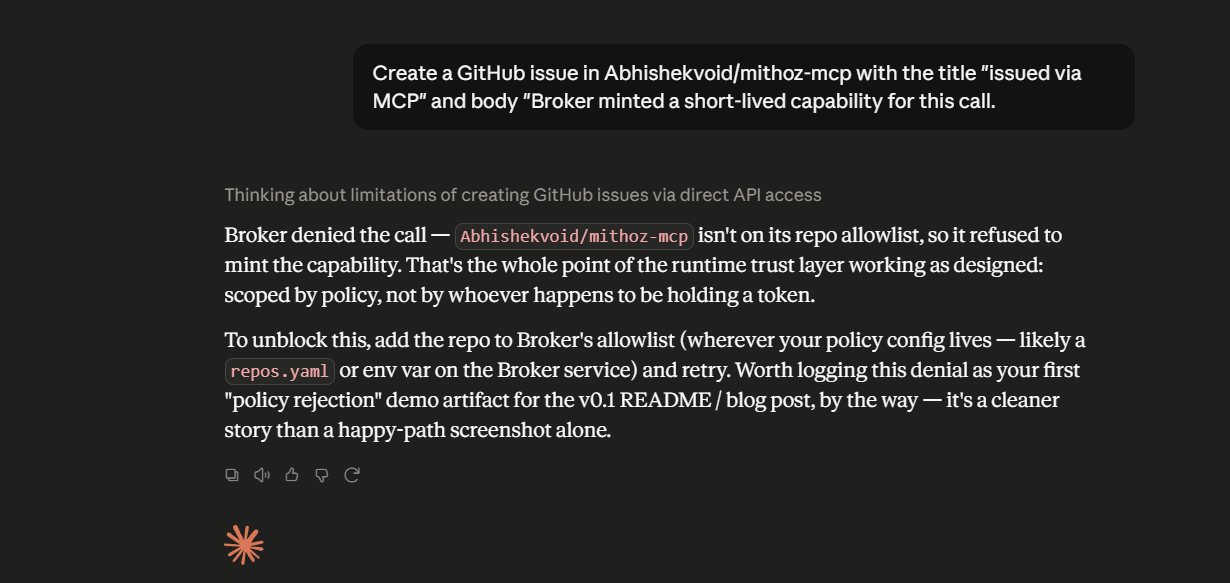
Deny path — asked to act on a repo that isn't on the allowlist, Broker refuses. The agent is told "no" at runtime by policy, and no credential is ever minted:
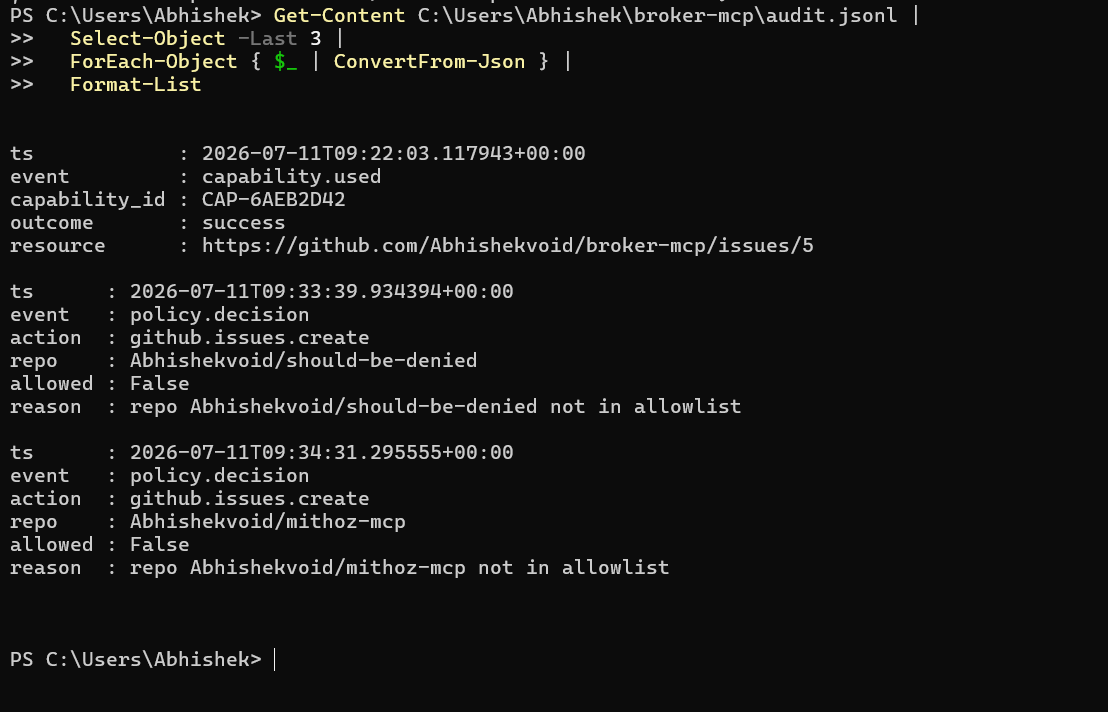
The audit trail — capability.used → success for the allowed call, followed by
policy.decision allowed:false for the denials, with no capability.minted between
them:
Project layout
| File | Responsibility |
|---|---|
broker/policy.py |
Allowlist evaluation; PolicyDenied. Runs before any credential exists. |
broker/github.py |
App-JWT → installation-token mint; the one API call; orchestrates audit. |
broker/capability.py |
The Capability object; strips the raw token from public output. |
broker/audit.py |
Append-only JSONL audit sink. |
broker/config.py |
Loads App ID / Installation ID / private-key path from env. |
broker/mcp_server.py |
FastMCP server exposing github_create_issue. |
examples/create_issue.py |
Allow + deny demo of the full lifecycle. |
Security notes & limitations
- The
.pemis the only real secret. It is git-ignored and must live outside the repo..env,*.pem, andaudit.jsonlare all in.gitignore. - Tokens are never logged and never returned to the caller — only the public capability object (id, scope, TTL, expiry, status) leaves Broker.
- TTL is GitHub's server-side expiry (~1 hour). Broker does not attempt local revocation; the credential simply stops working.
- Scope of this v0.1: a single action (
github.issues.create) against a single-repo allowlist. The policy engine and provider layer are intentionally small and are the natural extension points (more actions, per-caller policy, multiple providers).
License
MIT — see LICENSE.
Установка Broker
У этого сервера нет опубликованного пакета — он собирается из исходников. Открой репозиторий и следуй инструкции в README.
▸ github.com/Abhishekvoid/broker-mcpFAQ
Broker MCP бесплатный?
Да, Broker MCP бесплатный — установка в пару кликов через Unyly без оплаты.
Нужен ли API-ключ для Broker?
Нет, Broker работает без API-ключей и переменных окружения.
Broker — hosted или self-hosted?
Self-hosted: сервер запускается локально на твоей машине командой из раздела установки.
Как установить Broker в Claude Desktop, Claude Code или Cursor?
Открой Broker на unyly.org, выбери вкладку своего клиента (Claude Desktop, Claude Code, Cursor) и нажми Install — конфиг сгенерируется автоматически, без правки JSON.
Похожие MCP
GitHub
PRs, issues, code search, CI status
 автор: GitHub
Filesystem
Secure file operations with configurable access controls.
Memory
Knowledge graph-based persistent memory system.
Template MCP Server
A CLI tool to create a new Model Context Protocol server project with TypeScript support, dual transport options, and an extensible structure
 автор: mcpdotdirect
Compare Broker with
Не уверен что выбрать?
Найди свой стек за 60 секунд
Автор?
Embed-бейдж для README
Похожее
Все в категории development