
Btp Sap Odata To
БесплатноНе проверенBTP CloudFoundry Node.js MCP server for SAP OData services integration

Описание
BTP CloudFoundry Node.js MCP server for SAP OData services integration
README
🎯 Project Goal
Transform your SAP S/4HANA or ECC system into a conversational AI interface by exposing all OData services as dynamic MCP tools. This enables natural language interactions with your ERP data:
- "Show me 10 banks" → Automatically queries the Bank entity with $top=10
- "Update bank with ID 1 to have street number 5" → Executes PATCH operation on Bank entity
- "Create a new customer with name John Doe" → Performs POST to Customer entity
- "List all purchase orders from this week" → Applies $filter for date range on PurchaseOrder entity
🏗️ Architecture Overview - 3-Level Progressive Discovery
graph TB
    A[AI Agent/LLM] --> B[MCP Client]
    B --> C[SAP MCP Server]
    C --> D[SAP BTP Destination]
    D --> E[SAP System]

    C --> F[Level 1: Lightweight Discovery]
    F --> G[Minimal Service/Entity List]
    C --> H[Level 2: Full Metadata]
    H --> I[Complete Entity Schemas]
    C --> J[Level 3: CRUD Execution]
    J --> K[Authenticated Operations]

    style A fill:#e1f5fe
    style C fill:#f3e5f5
    style E fill:#e8f5e8
    style F fill:#fff3e0
    style H fill:#e8eaf6
    style J fill:#e0f2f1
Core Components:
- 🔍 Level 1 - Discovery: Lightweight search returning minimal service/entity lists (token-optimized)
- 📋 Level 2 - Metadata: Full schema details on-demand for selected entities
- ⚡ Level 3 - Execution: Authenticated CRUD operations using metadata from Level 2
- 🔌 MCP Protocol Layer: Full compliance with MCP 2025-06-18 specification
- 🌐 HTTP Transport: Session-based Streamable HTTP for web applications
- 🔐 BTP Integration: Seamless authentication via SAP BTP Destination service
3-Level Approach Benefits:
- Token Efficient: Level 1 returns 90% less data than full schemas
- Progressive Detail: Fetch full schemas only when needed
- Better LLM Experience: Smaller responses, clearer workflow
- Reduced Context: From 200+ tools down to just 3
✨ Key Features
🎨 Natural Language to OData
- Smart Query Translation: Converts natural language to proper OData queries
- Context-Aware Operations: Understands entity relationships and constraints
- Parameter Inference: Automatically maps user intent to tool parameters
🔄 Dynamic CRUD Operations
- Read Operations: Entity sets with filtering, sorting, pagination
- Create Operations: New entity creation with validation
- Update Operations: Partial and full entity updates
- Delete Operations: Safe entity deletion with confirmation
🚀 Production-Ready
- Session Management: Automatic session creation and cleanup
- Error Handling: Comprehensive error handling with user-friendly messages
- Logging: Detailed logging for debugging and monitoring
- Security: DNS rebinding protection, CORS, Helmet security
📊 Real-Time Metadata
- Service Catalog: Live discovery of available services
- Entity Schemas: Dynamic schema generation from OData metadata
- Capability Detection: Automatic detection of CRUD capabilities per entity
🏛️ System Architecture
┌─────────────────────┐    ┌───────────────────────────┐    ┌─────────────────────┐
│                     │    │                           │    │                     │
│   🤖 AI Agent       │    │   🖥️  SAP MCP Server     │    │   🏢 SAP            │
│   - Claude          │◄──►│   - Service Discovery     │◄──►│   - OData Services  │
│   - GPT-4           │    │   - CRUD Tool Registry    │    │   - Business Logic  │
│   - Local LLMs      │    │   - Session Management    │    │   - Master Data     │
│                     │    │   - BTP Authentication    │    │                     │
└─────────────────────┘    └───────────────────────────┘    └─────────────────────┘
                                           │
                                           ▼
                           ┌───────────────────────────┐
                           │                           │
                           │   ☁️  SAP BTP Platform    │
                           │   - Destination Service   │
                           │   - Connectivity Service  │
                           │   - XSUAA Security        │
                           │                           │
                           └───────────────────────────┘
🎯 Use Cases
📈 Business Intelligence Queries
User: "Show me top 10 customers by revenue this quarter"
→ Tool: r-CustomerService-Customer
→ Parameters: $filter, $orderby, $top
📝 Data Maintenance
User: "Update supplier ABC123 to have status 'Active'"
→ Tool: u-SupplierService-Supplier
→ Parameters: SupplierId="ABC123", Status="Active"
📊 Analytical Insights
User: "How many open purchase orders are there?"
→ Tool: r-PurchaseOrderService-PurchaseOrder
→ Parameters: $filter=Status eq 'Open'&$count=true
🔧 System Administration
User: "List all inactive users in the system"
→ Tool: r-UserService-User
→ Parameters: $filter=Status eq 'Inactive'
🛠️ Installation & Setup
Prerequisites
- Node.js 18.x or higher
- SAP S/4HANA or ECC system with OData services enabled
- SAP BTP account with Destination and Connectivity services
- TypeScript knowledge for customization
🚀 Usage Examples
Natural Language Queries
The MCP server automatically translates these natural language commands to the appropriate tool calls:
| Natural Language | Generated Tool Call | OData Query |
|---|---|---|
| "Show me 10 banks" | r-BankService-Bank |
GET /BankSet?$top=10 |
| "Find banks in Germany" | r-BankService-Bank |
GET /BankSet?$filter=Country eq 'DE' |
| "Update bank 123 name to ABC Corp" | u-BankService-Bank |
PATCH /BankSet('123') |
| "Create a new customer John Doe" | c-CustomerService-Customer |
POST /CustomerSet |
| "Delete order 456" | d-OrderService-Order |
DELETE /OrderSet('456') |
📋 Available Tools - 3-Level Architecture
The server exposes 3 progressive discovery tools instead of hundreds of individual CRUD tools:
Level 1: discover-sap-data
Purpose: Lightweight search for services and entities
Returns: Minimal data (serviceId, serviceName, entityName, entityCount)
Usage:
// Search for customer entities
discover-sap-data({ query: "customer" })

// Get all available services
discover-sap-data({ query: "" })

// Search in specific category
discover-sap-data({ query: "sales", category: "sales" })
Fallback: If no matches found, returns ALL services with entity lists
Level 2: get-entity-metadata
Purpose: Get complete schema for a specific entity
Returns: Full schema with properties, types, keys, capabilities
Usage:
// Get full schema for Customer entity
get-entity-metadata({
  serviceId: "API_BUSINESS_PARTNER",
  entityName: "Customer"
})
Output: All properties, types, nullable flags, maxLength, keys, capabilities
Level 3: execute-sap-operation
Purpose: Perform authenticated CRUD operations
Operations: read, read-single, create, update, delete
Usage:
// Read customers
execute-sap-operation({
  serviceId: "API_BUSINESS_PARTNER",
  entityName: "Customer",
  operation: "read",
  filterString: "CustomerName eq 'ACME'"
})

// Update customer
execute-sap-operation({
  serviceId: "API_BUSINESS_PARTNER",
  entityName: "Customer",
  operation: "update",
  parameters: { CustomerID: "123", CustomerName: "New Name" }
})
Workflow Example
1. discover-sap-data → "customer"
   ↓ Returns: List of customer-related entities

2. get-entity-metadata → "API_BUSINESS_PARTNER", "Customer"
   ↓ Returns: Full schema with all properties

3. execute-sap-operation → read/create/update/delete
   ✓ Executes operation with proper parameters
Protocol Version: 2025-06-18
Supported Capabilities:
- ✅ Tools with
listChangednotifications - ✅ Resources with
listChangednotifications - ✅ Logging with level control
- ✅ Session Management for HTTP transport
- ✅ Error Handling with proper error codes
Transport Support
- ✅ Streamable HTTP (recommended)
- ✅ Stdio for command line usage
- ✅ Session-based with automatic cleanup
- ✅ DNS Rebinding Protection
🔒 Security & Authentication
SAP BTP Integration
- Uses BTP Destination service for S/4HANA or ECC authentication
- Supports Principal Propagation and OAuth2
- Automatic token refresh and session management
- Secure credential storage in BTP
HTTP Security
- Helmet.js security headers
- CORS protection with configurable origins
- DNS rebinding attack prevention
- Request rate limiting (configurable)
Session Security
- Automatic session expiration (24h default)
- Secure session ID generation
- Session cleanup on server restart
- Memory leak prevention
📚 API Reference
Health Check
GET /health
{
  "status": "healthy",
  "activeSessions": 3,
  "discoveredServices": 25,
  "version": "2.0.0"
}
Server Info
GET /mcp
{
  "name": "btp-sap-odata-to-mcp-server",
  "protocol": { "version": "2025-06-18" },
  "capabilities": { "tools": {}, "resources": {} },
  "features": ["Dynamic service discovery", "CRUD operations"],
  "activeSessions": 3
}
Documentation
GET /docs
{
  "title": "SAP MCP Server API",
  "endpoints": {...},
  "mcpCapabilities": {...},
  "usage": {...}
}
🎬 Demo
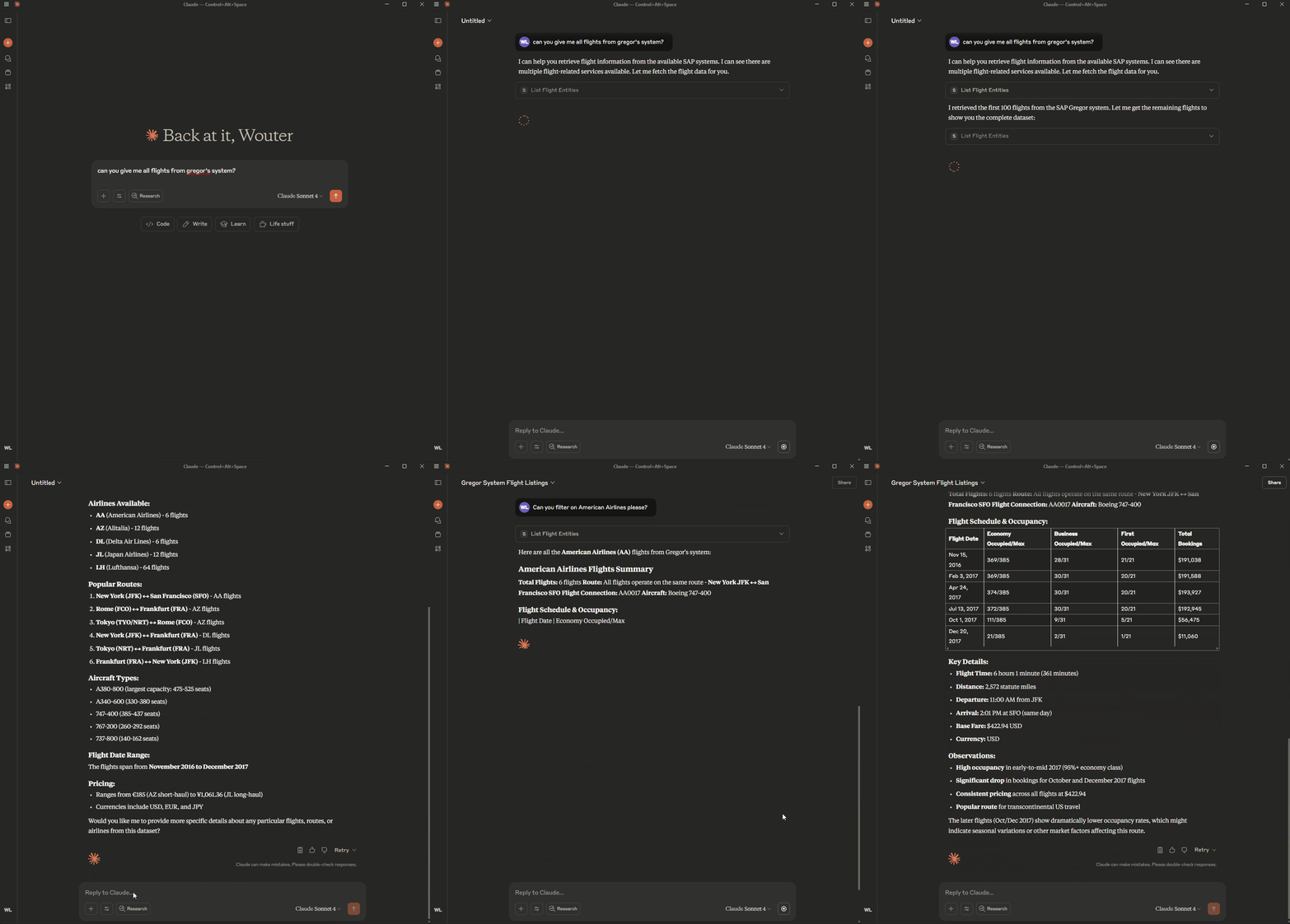
See the MCP server in action:
⚙️ Environment Variable: Disable ReadEntity Tool Registration
To disable registration of the ReadEntity tool for all entities in all services, set the following in your .env file:
DISABLE_READ_ENTITY_TOOL=true
This will prevent registration of the ReadEntity tool for all entities and services.
⚡ Quick Start
- For local development and testing, see LOCAL_RUN.md
- For deployment to SAP BTP, see DEPLOYMENT.md
Установка Btp Sap Odata To
У этого сервера нет опубликованного пакета — он собирается из исходников. Открой репозиторий и следуй инструкции в README.
▸ github.com/lemaiwo/btp-sap-odata-to-mcp-serverFAQ
Btp Sap Odata To MCP бесплатный?
Да, Btp Sap Odata To MCP бесплатный — установка в пару кликов через Unyly без оплаты.
Нужен ли API-ключ для Btp Sap Odata To?
Нет, Btp Sap Odata To работает без API-ключей и переменных окружения.
Btp Sap Odata To — hosted или self-hosted?
Self-hosted: сервер запускается локально на твоей машине командой из раздела установки.
Как установить Btp Sap Odata To в Claude Desktop, Claude Code или Cursor?
Открой Btp Sap Odata To на unyly.org, выбери вкладку своего клиента (Claude Desktop, Claude Code, Cursor) и нажми Install — конфиг сгенерируется автоматически, без правки JSON.
Похожие MCP
GitHub
PRs, issues, code search, CI status
 автор: GitHub
Filesystem
Secure file operations with configurable access controls.
Memory
Knowledge graph-based persistent memory system.
Template MCP Server
A CLI tool to create a new Model Context Protocol server project with TypeScript support, dual transport options, and an extensible structure
 автор: mcpdotdirect
Compare Btp Sap Odata To with
Не уверен что выбрать?
Найди свой стек за 60 секунд
Автор?
Embed-бейдж для README
Похожее
Все в категории development