
Buddy.ai
БесплатноНе проверенA full-stack agentic AI assistant powered by Google ADK, React, FastAPI, PostgreSQL, MCP, and RAG, enabling conversational task management, adaptive planning, f

Описание
A full-stack agentic AI assistant powered by Google ADK, React, FastAPI, PostgreSQL, MCP, and RAG, enabling conversational task management, adaptive planning, financial insights, knowledge retrieval, and autonomous tool-driven workflows through modular AI skills.
README
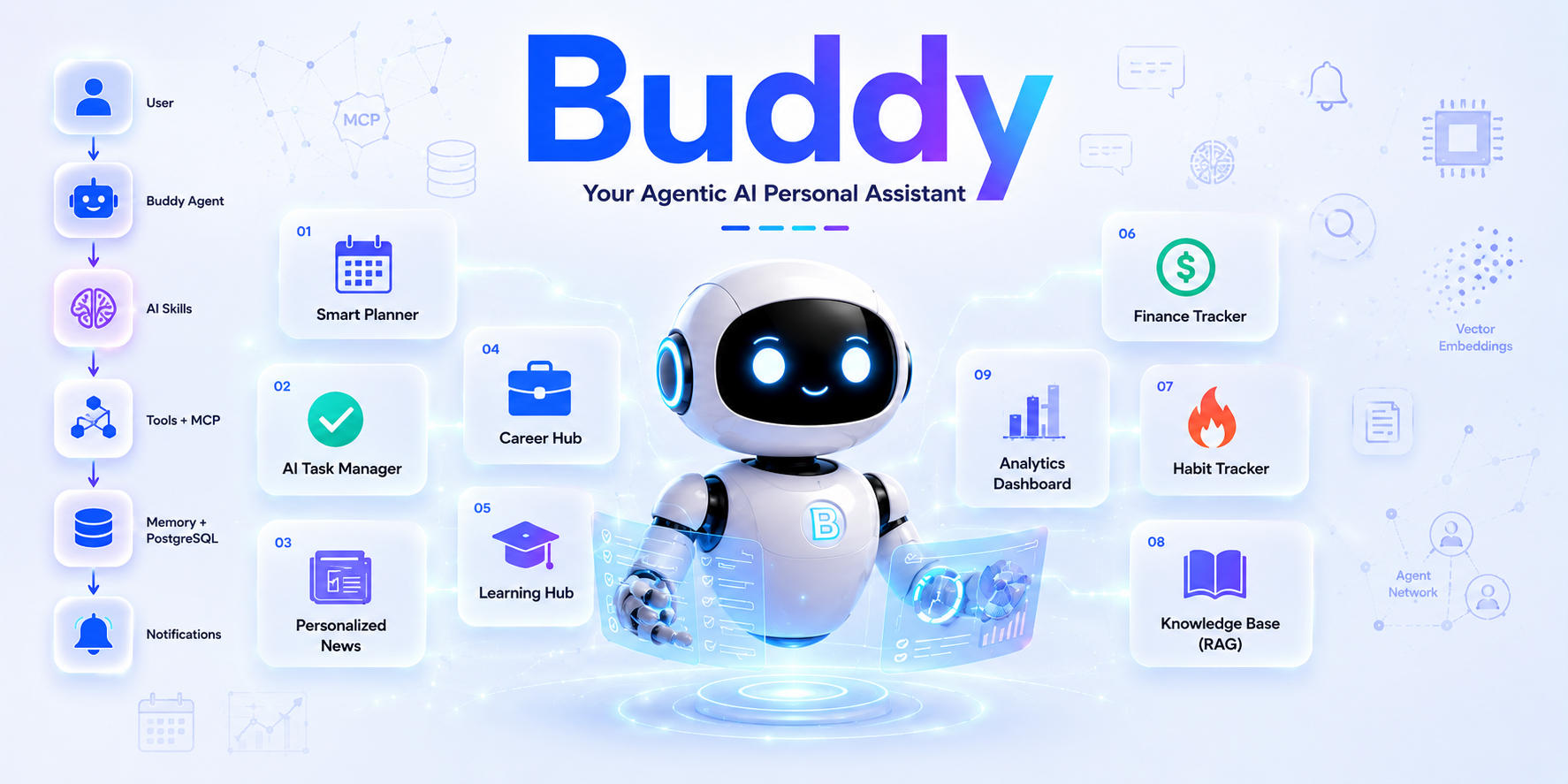
🤖 Buddy
Your Agentic AI Personal Assistant
One root agent. Nine life skills. Zero wasted context.
Buddy is a single conversational agent that plans your day, tracks your tasks, curates your tech news, manages your job search, sequences your learning, watches your budget, keeps your habit streaks, remembers your notes, and reports on all of it — so you talk to one assistant instead of juggling nine apps.
✨ What is Buddy?
Buddy is built on Google's Agent Development Kit (ADK) as one root agent that loads a different "skill" — its own tools, prompts, and data boundaries — depending on what you're doing, instead of running nine separate bots. It standardizes tool access through MCP, keeps a two-tier memory (short-term session state + long-term semantic recall over pgvector), and treats safety as a first-class feature: every consequential action needs your explicit confirmation before it happens.
🛠️ Technology Stack
| 🏷️ Category | 🚀 Technologies |
|---|---|
| 🎨 Frontend | React 19, Vite 6, TypeScript, Tailwind CSS v4, shadcn/ui, Base UI, React Router, Recharts |
| ⚙️ Backend | FastAPI, Google Agent Development Kit (ADK), SQLAlchemy (Async), Pydantic, Alembic, APScheduler, LiteLLM |
| 🤖 AI & Agent Framework | Google ADK, MCP (Model Context Protocol), Multi-Skill Agent Architecture, Progressive Disclosure, Tool Calling |
| 🧠 LLM Providers | Gemini, Groq, Hugging Face Inference Providers |
| 🗄️ Database | PostgreSQL, pgvector |
| 💾 Memory Architecture | Short-Term Session Memory, Long-Term Semantic Memory (PostgreSQL + pgvector) |
| 📂 Object Storage | Cloudinary, Cloudflare R2 |
| 🔍 Vector Search | pgvector (Semantic Embeddings & Similarity Search) |
| 🔗 Tool Integration | Custom buddy-mcp Server, arXiv API, GitHub API, Hacker News API |
| 📄 Document Processing | pdfplumber, python-docx, ReportLab, DefusedXML |
| 📊 Analytics & Visualization | Recharts |
| ⏰ Scheduling & Notifications | APScheduler, SMTP Email Notifications |
| 🔒 Security & Guardrails | Human-in-the-Loop (HITL), Prompt Injection Protection, PII Redaction, Tool Allow-listing, Secret Scanning, Semgrep Static Analysis |
| 📈 Observability | LangSmith |
| 🧪 Testing & Evaluation | Pytest, Evaluation-Driven Development (EDD), Golden Test Cases, Tool Trajectory Validation |
| 🐳 Containerization | Docker, Docker Compose |
| 🛠️ Development Tools | Git, GitHub, Ruff, Black, Pre-commit Hooks, Detect-Secrets |
| ☁️ Deployment (Planned) | Google Cloud Run / Railway / Render |
🧩 The Nine Skills
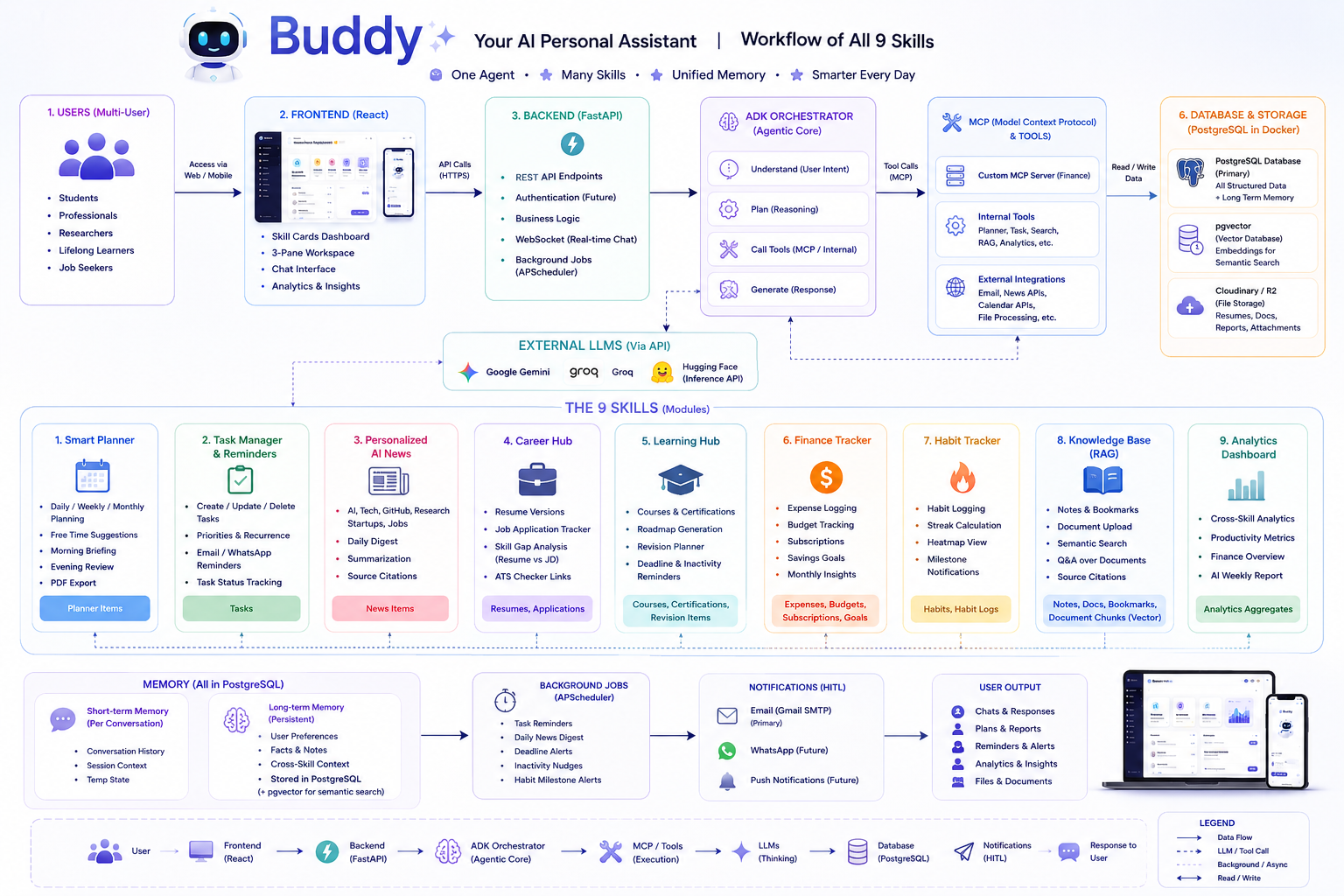
| # | Skill | What it does |
|---|---|---|
| 📅 | Smart Planner | Turns your stated tasks into an actual time-blocked daily schedule |
| ✅ | Task Manager | Priority-aware tasks with timed reminders, so nothing slips through |
| 📰 | Personalized News | Daily digest aggregated from arXiv, GitHub, and Hacker News |
| 💼 | Career Hub | Resume versions + job application tracker in one place |
| 🎓 | Learning Hub | Course roadmaps, deadlines, and spaced revision nudges |
| 💰 | Finance Tracker | Conversational expense logging with real-time budget checks |
| 🔥 | Habit Tracker | Streaks and milestone celebrations that keep motivation alive |
| 📚 | Knowledge Base | Semantic search over your own notes and documents (RAG) |
| 📊 | Analytics Dashboard | Cross-skill reporting on what actually happened this week |
🏗️ System Architecture
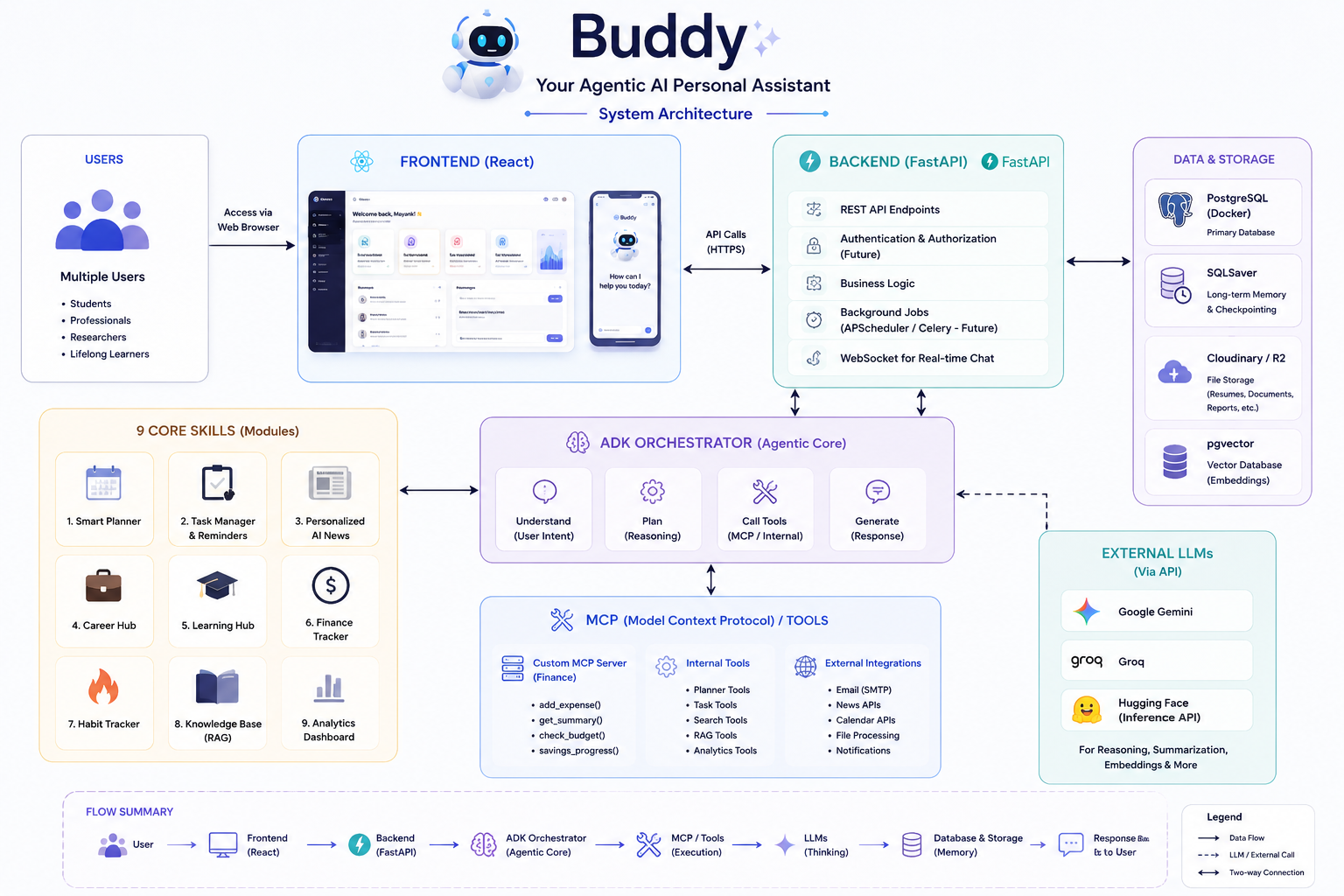
Frontend (React) → Backend (FastAPI) → ADK Orchestrator (Agentic Core) → MCP / Tools → External LLMs (Gemini, Groq, Hugging Face) → PostgreSQL + pgvector for memory and storage.
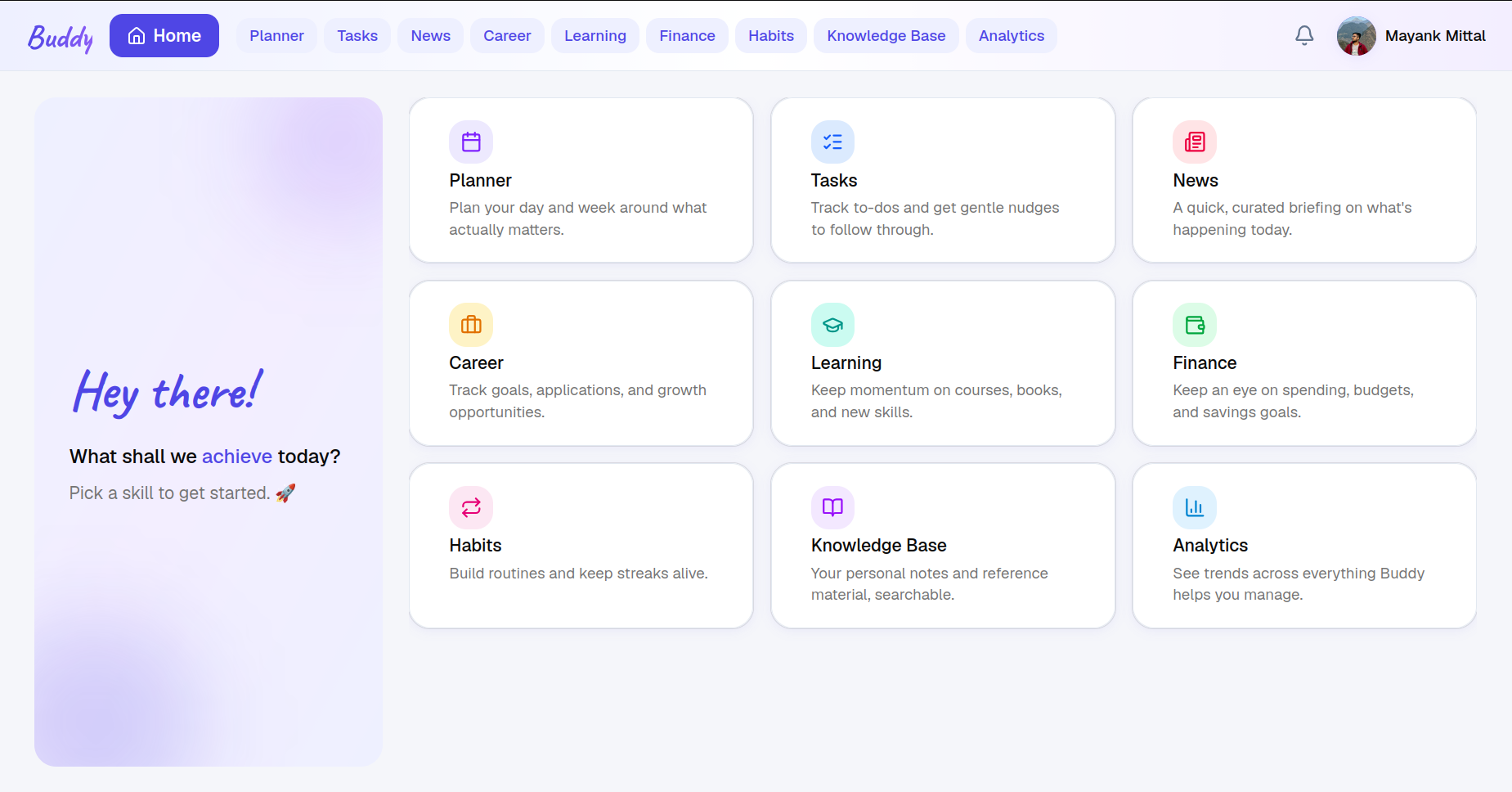
🧩 Dashboard
buddy/
  frontend/            # frontend app
  backend/             # FastAPI backend
    app/
      core/            # core config, settings, db, etc.
      skills/          # agent skills
      common/          # shared utilities
    requirements.txt
  mcp-servers/
    buddy-mcp/         # MCP server(s)
  docs/
    guardrails/        # per-skill security specs + threat model
  evals/               # golden-case evaluation harness
  assets/              # README/writeup images
  docker-compose.yml   # local Postgres (pgvector) for development
  .env.example
🗄️ Database Schema
All 28 tables live in one Postgres database (backend/app/core/models.py, migrated via
Alembic — backend/alembic/versions/), grouped here by what they back:
| Domain | Tables |
|---|---|
| Accounts & auth | users, refresh_tokens, password_reset_tokens |
| Core / cross-skill | conversations, messages, memory_facts, user_profile, notification_preferences, notifications |
| Tasks | tasks |
| Planner | planner_items |
| Learning Hub | courses, certifications, revision_items |
| Career Hub | resumes, job_applications |
| Habit Tracker | habits, habit_logs |
| Finance Tracker | expenses, budgets, subscriptions, savings_goals, savings_entries |
| Personalized News | news_items |
| Knowledge Base | notes, bookmarks, documents, document_chunks |
Notes:
usersbacks real accounts (signup/login) — everything else stays the single-user schema it always was (no per-accountuser_idscoping on tasks/habits/finance/etc.). See the "🔑 Authentication & Accounts" section below.memory_factsis Buddy's long-term semantic memory (pgvector embeddings, shared across every skill via theremember/recalltools), separate fromconversations/messages, which are just per-session chat history.document_chunksholds pgvector embeddings for the Knowledge Base's RAG search overdocuments.
⚙️ Backend Setup
The backend is a Python/FastAPI project located in backend/.
1. Create and activate a virtual environment
cd backend
python3 -m venv venv
source venv/bin/activate   # On Windows: venv\Scripts\activate
2. Install dependencies
pip install --upgrade pip
pip install -r requirements.txt
3. Configure environment variables
The backend reads a single .env file from the project root (shared with docker-compose.yml).
From the project root:
cp .env.example .env
Then fill in any secrets (GEMINI_API_KEY, LANGSMITH_API_KEY, etc.). Settings are loaded via
backend/app/core/config.py (get_settings()), which reads and caches these environment
variables using pydantic-settings.
4. Run the development server
From the backend/ directory, with the virtual environment activated:
uvicorn app.main:app --reload
The API will be available at http://localhost:8000. Check that it's running:
curl http://localhost:8000/health
# {"status":"ok"}
Interactive API docs are available at http://localhost:8000/docs.
CORS is enabled for http://localhost:5173 (the default Vite frontend dev server port).
5. Start Postgres with pgvector
A docker-compose.yml is provided at the project root for local development. It reads
POSTGRES_USER, POSTGRES_PASSWORD, and POSTGRES_DB from the root .env file, and persists
data in a named volume (buddy_db_data) so it survives container restarts.
Make sure you've created .env from .env.example (see step 3), then from the project root:
docker compose up -d
Verify Postgres is up and reachable:
docker compose ps
# db should show state "Up"/"healthy"

docker compose exec db pg_isready -U buddy
# should print: /var/run/postgresql:5432 - accepting connections

psql "postgresql://buddy:buddy@localhost:5432/buddy" -c "select 1;"
# (requires psql installed locally) should print a row with "1"
To stop the database:
docker compose down
6. Run database migrations
Schema is managed with Alembic (backend/alembic/). With Postgres running and the venv
activated, from the backend/ directory:
alembic upgrade head
This creates the vector extension and the conversations, messages, and memory_facts
tables. To create a new migration after changing models in app/core/models.py:
alembic revision --autogenerate -m "description of change"
🔌 Deactivating the Virtual Environment
deactivate
🖥️ Frontend Setup
The frontend is a React + TypeScript app (Vite) located in frontend/, styled with Tailwind CSS
and shadcn/ui (neutral theme), with zustand for state (auth session, theme) and
react-hot-toast for notifications. Requires Node.js 18, 20, or 22+.
1. Install dependencies
cd frontend
npm install
2. Configure environment variables
cp .env.example .env
VITE_API_URL should point at the backend (defaults to http://localhost:8000).
3. Run the dev server
npm run dev
The app is served at http://localhost:5173. With the backend running, sign up at
/signup, then log in at /login — every other route redirects there until you do.
🔑 Authentication & Accounts
Custom FastAPI auth — no third-party auth provider. Sign up with an email or mobile number as your username, name, current occupation, current CTC (optional), gender, and date of birth; log in with just username + password (eye icon to show/hide it).
Libraries:
- PyJWT — short-lived (15 min) access tokens.
- argon2-cffi — Argon2 password hashing (not bcrypt/sha256).
- Stdlib
secrets+hashlib— opaque, SHA-256-hashed refresh and password-reset tokens (not JWTs, so they're individually revocable from the DB rather than just expiring).
How it works:
- JWT access tokens + rotating refresh tokens, both in HttpOnly, SameSite=Lax
cookies — never touched by frontend JS, so there's nothing for an XSS payload to
steal via
document.cookie. Every/api/auth/refreshcall revokes the old refresh token and issues a new one (rotation), rather than reusing the same one indefinitely. - Signup does not log you in.
POST /api/auth/signuponly creates the account (201, no cookies set) — the frontend sends you to/loginafterward, so signup and login stay two distinct, explicit steps. - Forgot / reset password:
POST /api/auth/forgot-passwordemails a one-hour, single-use reset link (only for email-shaped usernames — no SMS/WhatsApp integration exists to reach a mobile-number username); always returns the same generic response either way, so it can't be used to enumerate which accounts exist.POST /api/auth/reset-passwordconsumes that token and revokes every existing refresh token for the account, forcing a fresh login everywhere. - Scope note:
usersbacks real accounts, but the rest of the app's data (tasks, habits, finance, etc.) is still the single-user schema it always was — see the "🗄️ Database Schema" section above.
On top of the base auth system:
- Theme picker (Settings page) — 8 colour themes (Light, Dark, Dracula, Synthwave,
Forest, Corporate, Luxury, Cupcake), inspired by DaisyUI's popular theme names but
implemented as plain CSS-variable overrides swapped via a
data-themeattribute (not thedaisyuiTailwind plugin itself, which would collide with this app's existing shadcn/ui component classes). Persisted tolocalStorageviazustand. - Toast notifications (
react-hot-toast, wrapped infrontend/src/lib/toast.tsx) — every create/update/delete/upload across all 9 skills shows a top-center toast for 3 seconds, with a close (✕) button, and clicking anywhere outside a toast dismisses it too. One sharedshowSuccess/showErrorpair keeps every notification in the app looking and behaving the same way. zustandfor client state —authStore(session/user) andthemeStore(active theme), both small enough to not need Redux/Context-provider boilerplate.
🔐 Security Scanning
Static analysis rules live in .semgrep.yml (repo root) — a few
project-specific rules (SQL string-formatting, eval/exec/pickle
misuse, hardcoded-credential patterns) on top of Semgrep's own p/python,
p/security-audit, and p/secrets registry packs. See
docs/guardrails/ for the broader security/guardrail design this
supports.
Run it:
make security-scan
The first run creates an isolated venv at .tools/semgrep-venv and
installs Semgrep into it automatically — Semgrep is never installed
into backend/venv. (It was, once, during setup — installing it there
downgraded shared dependencies mcp/opentelemetry/jsonschema to
versions incompatible with google-adk/litellm and took the running
backend down until those were reinstalled from requirements.txt. Keep
security/lint tooling in its own venv.)
🪝 Pre-commit Hooks
.pre-commit-config.yaml runs, on every commit: the Semgrep scan above
(scoped to just the changed .py files, for speed), a detect-secrets
scan, black + ruff (lint, auto-fixing) + a ruff-based import-sort
check, standard hygiene checks (no private keys, no merge-conflict
markers, etc.), and a hard block on committing any .env, .env.<env>,
*.pem, *.key, or SSH private-key-named file (.env.example is
deliberately exempted — it's the committed template).
One-time setup (uses the same isolated venv as Semgrep above — never
backend/venv):
.tools/semgrep-venv/bin/pip install pre-commit detect-secrets
.tools/semgrep-venv/bin/pre-commit install
detect-secrets needs a baseline of already-reviewed "findings" (mostly
false positives — this project's dev-only buddy:buddy@localhost
placeholder DB credentials, and Alembic's own auto-generated revision
hashes, both of which look like secrets to a pattern-matcher but aren't).
Generate/refresh it with:
.tools/semgrep-venv/bin/detect-secrets scan > .secrets.baseline
git add .secrets.baseline
Run against the whole repo at any time with:
.tools/semgrep-venv/bin/pre-commit run --all-files
Note: right after (re)generating .secrets.baseline, the detect-secrets
hook will report "the baseline file was updated" and fail once — this is
normal (it's syncing line-number metadata) and resolves itself once
.secrets.baseline is actually committed; it does not mean a real secret
was found.
Установка Buddy.ai
У этого сервера нет опубликованного пакета — он собирается из исходников. Открой репозиторий и следуй инструкции в README.
▸ github.com/mayankmittal29/Buddy.aiFAQ
Buddy.ai MCP бесплатный?
Да, Buddy.ai MCP бесплатный — установка в пару кликов через Unyly без оплаты.
Нужен ли API-ключ для Buddy.ai?
Нет, Buddy.ai работает без API-ключей и переменных окружения.
Buddy.ai — hosted или self-hosted?
Self-hosted: сервер запускается локально на твоей машине командой из раздела установки.
Как установить Buddy.ai в Claude Desktop, Claude Code или Cursor?
Открой Buddy.ai на unyly.org, выбери вкладку своего клиента (Claude Desktop, Claude Code, Cursor) и нажми Install — конфиг сгенерируется автоматически, без правки JSON.
Похожие MCP
Notion
Read and write pages in your workspace
 автор: Notion
Linear
Issues, cycles, triage — from Claude
 автор: Linear
Google Drive
Search and read your Drive files
 автор: Google
mindsdb/mindsdb
Connect and unify data across various platforms and databases with [MindsDB as a single MCP server](https://docs.mindsdb.com/mcp/overview).
 автор: mindsdb
fulcradynamics/fulcra-context-mcp
MCP server for accessing personal health and biometric data including sleep stages, heart rate, HRV, glucose, workouts, calendar, and location via the Fulcra Li
 автор: fulcradynamics
aymericzip/intlayer
A MCP Server that enhance your IDE with AI-powered assistance for Intlayer i18n / CMS tool: smart CLI access, access to the docs.
 автор: aymericzip
rinadelph/Agent-MCP
A framework for creating multi-agent systems using MCP for coordinated AI collaboration, featuring task management, shared context, and RAG capabilities.
 автор: rinadelph
WhenLabs-org/when
Developer toolkit: auto-detect stack for AI context files, catch port conflicts, validate .env schemas, spot docs drift, audit dependency licenses, and time cod
 автор: WhenLabs-org
Beltran12138/wecom-docs-mcp-server
WeCom (Enterprise WeChat) document operations via MCP: create, read, and edit Docs and Smartsheets (9 tools). Fills the doc-CRUD gap — existing WeCom MCP server
 автор: Beltran12138
madbonez/caldav-mcp
Universal MCP server for CalDAV protocol integration. Works with any CalDAV-compatible calendar server including Yandex Calendar, Google Calendar (via CalDAV),
 автор: madbonez
Compare Buddy.ai with
Не уверен что выбрать?
Найди свой стек за 60 секунд
Автор?
Embed-бейдж для README
Похожее
Все в категории productivity