
Business Mcp Servers
БесплатноНе проверенA collection of production-ready MCP (Model Context Protocol) server examples built with FastMCP, designed to teach you how to create servers that solve real bu

Описание
A collection of production-ready MCP (Model Context Protocol) server examples built with FastMCP, designed to teach you how to create servers that solve real business problems. Created by hamishfromatech
README
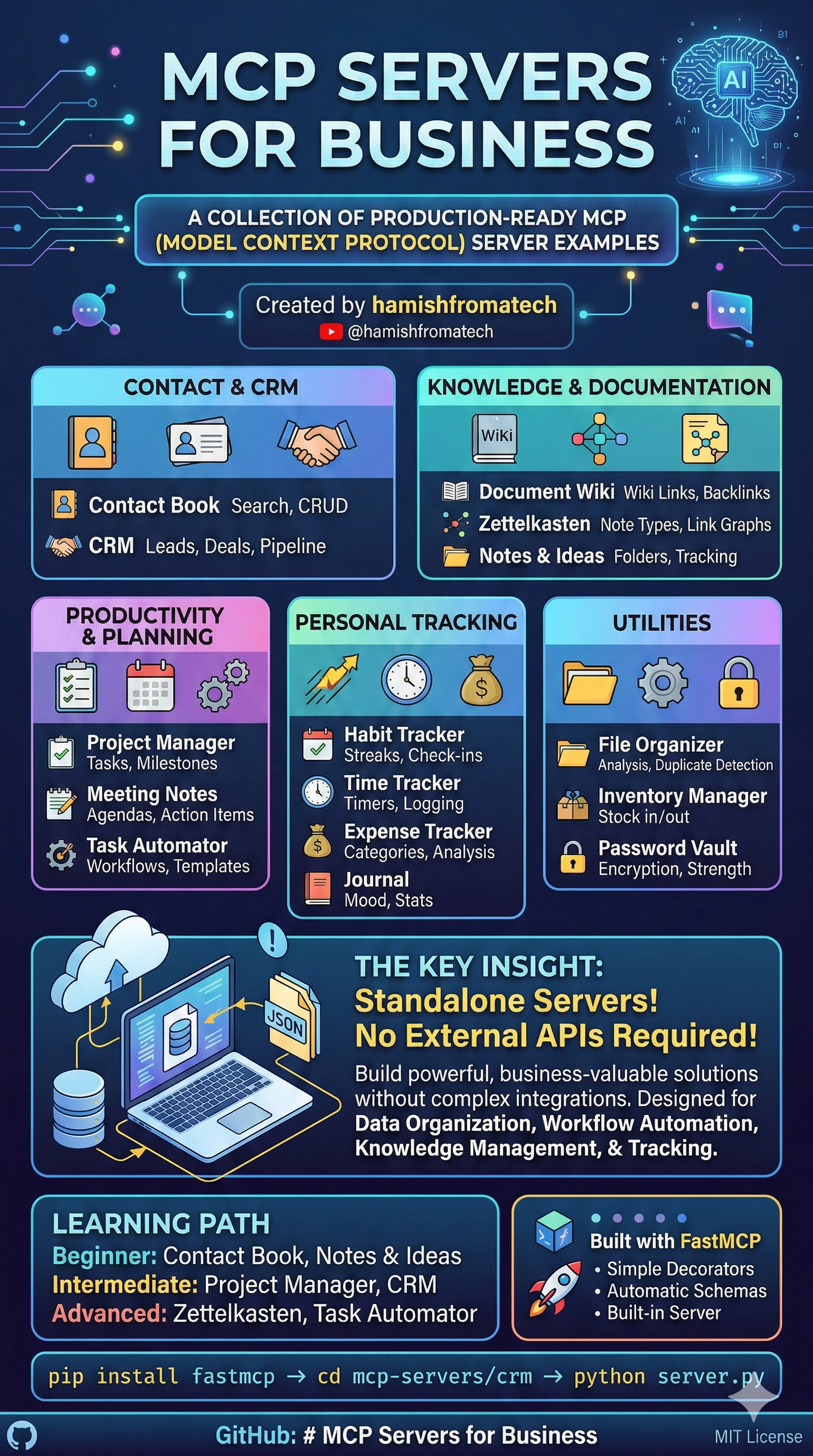
A collection of production-ready MCP (Model Context Protocol) server examples built with FastMCP, designed to teach you how to create servers that solve real business problems.
Created by hamishfromatech - YouTube

What This Repository Is
This repository contains 22 fully-functional MCP servers that demonstrate patterns, tools, and resources you can use as reference when building your own MCP servers. Each server is self-contained, well-documented, and showcases different aspects of the MCP protocol.
The key insight: These servers don't need to connect to any external applications or services. They're designed to work standalone, proving that you can build powerful, business-valuable MCP servers without complex integrations.
Why This Matters
Many MCP tutorials focus on connecting to external APIs (Slack, GitHub, Google, etc.). But real business value often comes from:
- Data organization - Structuring information for AI to query
- Workflow automation - Creating repeatable processes
- Knowledge management - Building searchable systems
- Tracking & analytics - Monitoring habits, time, expenses
This repository proves that MCP servers can deliver all of this without a single external API key.
Servers Overview
Contact & CRM
| Server | Description | Key Features | Data File |
|---|---|---|---|
| Contact Book | Manage contacts with search and organization | CRUD operations, search | contacts.json |
| CRM | Customer relationship management | Leads, deals, pipeline tracking, interactions | crm.json |
Knowledge & Documentation
| Server | Description | Key Features | Data File |
|---|---|---|---|
| Document Wiki | Wiki with bi-directional linking | Wiki links [[title]], categories, tags, backlinks |
wiki.json |
| Zettelkasten | Slip-box note-taking system | Note types, link graphs, hub detection, orphan finding | zettelkasten.json |
| Notes & Ideas | Quick capture and organization | Folders, pinning, archiving, idea tracking | notes.json |
Productivity & Planning
| Server | Description | Key Features | Data File |
|---|---|---|---|
| Career Manager | Complete career management system | Resume builder, job applications, interview practice, skills inventory, networking | ~/.career-manager/*.json |
| Project Manager | Projects, tasks, milestones, teams | Task hierarchy, assignments, progress tracking | projects.json |
| Kanban | Kanban board with visual interface | Web UI, CLI tools, task management, board statistics, drag-and-drop ready | kanban_data.json |
| Meeting Notes | Meetings, agendas, action items | Attendees, notes, action item tracking | meetings.json |
| Task Automator | Workflows and templates | Triggers, template rendering, quick actions | automator.json |
Personal Tracking
| Server | Description | Key Features | Data File |
|---|---|---|---|
| Habit Tracker | Daily habit tracking with streaks | Check-ins, streaks, leaderboards, weekly overviews | habits.json |
| Time Tracker | Time tracking with timers | Start/stop timer, manual logging, billable rates | time.json |
| Expense Tracker | Expense and budget management | Categories, budgets, spending analysis | expenses.json |
| Journal | Personal journal entries | Mood tracking, tags, calendar view, writing stats | journal.json |
Utilities
| Server | Description | Key Features | Data File |
|---|---|---|---|
| File Organizer | Organize and categorize files | File analysis, duplicate detection, organization rules | organizer.json |
| Inventory Manager | Stock and product management | Stock in/out, transfers, low-stock alerts | inventory.json |
| Password Vault | Secure credential storage | Encryption, password generation, strength checking | vault.json |
Developer Tools
| Server | Description | Key Features | Data File |
|---|---|---|---|
| Skills Server | Expose Claude Code skills as MCP resources | Skill discovery, dynamic loading, resource URIs | None (reads filesystem) |
| Code Reviewer | Code review management | Review sessions, issue tracking, code standards | code_reviewer.json |
| Design Audit | Web design auditing | UI/UX issues, design systems, accessibility checks | design_audit.json |
| Tech Debt Tracker | Technical debt management | Debt tracking, refactoring tasks, quality metrics | tech_debt.json |
Quick Start
Each server is standalone and can be run independently:
# Install FastMCP
pip install fastmcp

# Navigate to any server
cd mcp-servers/contact-book

# Run the server
python server.py
Data Persistence: Each server automatically creates a data/ directory on first use. All your data is stored in JSON files and persists across server restarts. You can find your data at mcp-servers/<server-name>/data/<server-name>.json.
Key Concepts Demonstrated
1. Tools
Every server exposes tools that AI assistants can call:
@mcp.tool
def create_contact(name: str, email: str = None) -> dict:
    """Create a new contact."""
    # Implementation
2. Resources
Resources provide read-only data access:
@mcp.resource("contacts://all")
def get_all_contacts() -> str:
    """Resource providing all contacts as formatted list."""
    return formatted_contact_list
3. Persistent Storage
All servers feature JSON-based persistent storage - data survives server restarts:
# Data persistence setup
DATA_DIR = Path(__file__).parent / "data"
DATA_FILE = DATA_DIR / "contacts.json"

def _load_data() -> dict:
    if DATA_FILE.exists():
        with open(DATA_FILE, "r", encoding="utf-8") as f:
            return json.load(f)
    return {"contacts": {}, "next_id": 1}

def _save_data(data: dict) -> None:
    DATA_DIR.mkdir(parents=True, exist_ok=True)
    with open(DATA_FILE, "w", encoding="utf-8") as f:
        json.dump(data, f, indent=2, default=str)
Each server stores its data in a dedicated data/ directory:
- Automatic loading - Data loads on server startup
- Auto-save - Changes persist immediately after each operation
- Portable - JSON files can be backed up, migrated, or inspected easily
- No external dependencies - Uses only Python's built-in
jsonmodule
Backing up your data: Simply copy the data/ folder from any server. To reset a server, delete its data/ folder.
4. Type Safety
All tools use proper type hints for better AI understanding:
def create_task(
    title: str,
    priority: str = "medium",  # low, medium, high, urgent
    due_date: Optional[str] = None
) -> dict:
5. Enums for Controlled Values
Status values and categories use Enums:
class TaskStatus(str, Enum):
    TODO = "todo"
    IN_PROGRESS = "in_progress"
    DONE = "done"
Architecture Patterns
CRUD Pattern
Most servers follow a consistent CRUD pattern:
create_*- Create new recordsget_*- Retrieve by IDlist_*- List with filtersupdate_*- Modify recordsdelete_*- Remove recordssearch_*- Full-text search
Analytics Pattern
Many servers include analytics tools:
get_*_summary- Aggregated statisticsget_*_history- Historical dataget_*_stats- Overall metrics
Linking Pattern
Knowledge systems use bi-directional linking:
- Track outgoing links in content
- Calculate backlinks
- Find paths between notes
- Identify hub and orphan notes
Project Structure
mcp-servers/
├── career-manager/
│   ├── server.py              # Career management with 70+ tools
│   ├── README.md              # Server-specific documentation
│   └── pyproject.toml         # Package configuration
├── contact-book/
│   ├── server.py              # Main server implementation
│   ├── README.md              # Server-specific documentation
│   └── data/                  # Persistent storage (auto-created)
│       └── contacts.json      # Contact data
├── crm/
│   ├── server.py
│   └── data/
│       └── crm.json           # Leads, deals, customers, interactions
├── document-wiki/
│   ├── server.py
│   └── data/
│       └── wiki.json          # Documents, categories
├── expense-tracker/
│   ├── server.py
│   └── data/
│       └── expenses.json      # Expenses, budgets, categories
├── file-organizer/
│   ├── server.py
│   └── data/
│       └── organizer.json     # Rules, file registry
├── habit-tracker/
│   ├── server.py
│   └── data/
│       └── habits.json        # Habits, check-ins
├── inventory-manager/
│   ├── server.py
│   └── data/
│       └── inventory.json     # Products, stock, movements
├── kanban-mcp/
│   ├── kanban_server.py
│   ├── models.py
│   ├── storage.py
│   ├── cli.py
│   └── kanban_data.json       # Boards, tasks, columns
├── journal/
│   ├── server.py
│   └── data/
│       └── journal.json       # Entries, tags
├── meeting-notes/
│   ├── server.py
│   └── data/
│       └── meetings.json      # Meetings, action items
├── notes-ideas/
│   ├── server.py
│   └── data/
│       └── notes.json         # Notes, folders
├── password-vault/
│   ├── server.py
│   └── data/
│       └── vault.json         # Encrypted credentials
├── project-manager/
│   ├── server.py
│   └── data/
│       └── projects.json      # Projects, tasks, milestones
├── task-automator/
│   ├── server.py
│   └── data/
│       └── automator.json     # Workflows, templates
├── time-tracker/
│   ├── server.py
│   └── data/
│       └── time.json          # Time entries, projects
├── zettelkasten/
│   ├── server.py
│   └── data/
│       └── zettelkasten.json  # Notes, links, tags
├── skills-server/
│   └── server.py              # No persistence (reads from filesystem)
├── code-reviewer/
│   ├── server.py
│   ├── README.md
│   └── data/
│       └── code_reviewer.json # Reviews, issues, standards
├── design-audit/
│   ├── server.py
│   ├── README.md
│   └── data/
│       └── design_audit.json  # Audits, issues, design systems
└── tech-debt-tracker/
    ├── server.py
    ├── README.md
    └── data/
        └── tech_debt.json     # Debt items, tasks, metrics
Learning Path
Beginner: Start with these simple, focused servers:
- Contact Book - Basic CRUD operations
- Notes & Ideas - Simple note management
- Habit Tracker - Daily tracking patterns
Intermediate: These introduce more complex relationships:
- Project Manager - Hierarchical tasks, team management
- CRM - Multi-entity relationships (leads, deals, customers)
- Meeting Notes - Agendas, attendees, action items
- Kanban - Web UI, CLI tools, board management
Advanced: Sophisticated patterns and algorithms:
- Zettelkasten - Link graphs, pathfinding, hub detection
- Document Wiki - Wiki link parsing, backlinks
- Task Automator - Workflows, triggers, template rendering
- Skills Server - File system scanning, resource templates, dynamic resource generation
- Career Manager - Resume generation, job application tracking, interview practice, skill gap analysis
- Code Reviewer - Review sessions, issue tracking with categories/severity, code standards
- Design Audit - Design systems, accessibility compliance, WCAG tracking
- Tech Debt Tracker - Interest tracking, snapshots, quality metrics
Why FastMCP?
All servers use FastMCP because it provides:
- Simple decorators -
@mcp.tooland@mcp.resource - Automatic schema generation - Type hints become JSON schemas
- Built-in server - No boilerplate code needed
- Development mode - Hot reload during development
Contributing
This is an educational repository. Feel free to:
- Use these servers as starting points for your own projects
- Suggest improvements or new server ideas
- Report issues or documentation gaps
Data Management
Backup
Simply copy the data/ directory from any server:
cp -r mcp-servers/contact-book/data/ backup/contact-book/
Migration
Data files are plain JSON - you can:
- Edit them directly with any text editor
- Import/export to other systems
- Version control your data with git
Reset
To reset a server's data, delete its JSON file:
rm mcp-servers/contact-book/data/contacts.json
The server will start fresh on next run.
License
MIT License - Use these examples freely for learning and building your own MCP servers.
Learn more about MCP and AI development: YouTube - Hamish from a Tech
Feedback & Community
Found this MCP server genuinely useful? I'd love to hear from you.
- Email: [email protected]
- Join our free Open Source AI Builders Club on Skool: https://www.skool.com/open-source-ai-builders-club/about?ref=da946a67c5c646e991b96ea9ce7ad9e4
Установка Business Mcp Servers
У этого сервера нет опубликованного пакета — он собирается из исходников. Открой репозиторий и следуй инструкции в README.
▸ github.com/hamishfromatech/business-mcp-serversFAQ
Business Mcp Servers MCP бесплатный?
Да, Business Mcp Servers MCP бесплатный — установка в пару кликов через Unyly без оплаты.
Нужен ли API-ключ для Business Mcp Servers?
Нет, Business Mcp Servers работает без API-ключей и переменных окружения.
Business Mcp Servers — hosted или self-hosted?
Self-hosted: сервер запускается локально на твоей машине командой из раздела установки.
Как установить Business Mcp Servers в Claude Desktop, Claude Code или Cursor?
Открой Business Mcp Servers на unyly.org, выбери вкладку своего клиента (Claude Desktop, Claude Code, Cursor) и нажми Install — конфиг сгенерируется автоматически, без правки JSON.
Похожие MCP
GitHub
PRs, issues, code search, CI status
 автор: GitHub
Filesystem
Secure file operations with configurable access controls.
Memory
Knowledge graph-based persistent memory system.
Template MCP Server
A CLI tool to create a new Model Context Protocol server project with TypeScript support, dual transport options, and an extensible structure
 автор: mcpdotdirect
Compare Business Mcp Servers with
Не уверен что выбрать?
Найди свой стек за 60 секунд
Автор?
Embed-бейдж для README
Похожее
Все в категории development