
BuyWhere
БесплатноНе проверенCross-border product catalog for AI agents. Search and compare products from US and South East Asian markets via Model Context Protocol.

Описание
Cross-border product catalog for AI agents. Search and compare products from US and South East Asian markets via Model Context Protocol.
README
AI agents use BuyWhere to search products, compare prices, and discover deals across Singapore and US merchants in real time.
Install in 30 Seconds
export BUYWHERE_API_KEY=bw_live_xxxx
npx -y @buywhere/mcp-server
Use with Claude Desktop, Cursor, VS Code Copilot, Cline, Windsurf, OpenCode, Codex, Continue.dev, and any MCP-compatible client.
- npm: https://www.npmjs.com/package/@buywhere/mcp-server
- GitHub: https://github.com/BuyWhere/buywhere-mcp
- MCP Registry: https://registry.modelcontextprotocol.io/?q=io.github.BuyWhere%2Fbuywhere-mcp

Or get one in 3 seconds, no signup, no email: POST /v1/auth/register · Legacy form: buywhere.ai/api-keys
npm version npm downloads npm weekly downloads License: MIT Node version TypeScript GitHub stars Smithery MCP Registry Hashnode Blog
AI Agents: Use This Package To
- Search products across Singapore, SEA, and US markets by keyword, category, or price range
- Compare prices across Lazada, Shopee, Amazon, and local retailers in a single query
- Find deals and track real-time pricing with multi-currency support
- Build shopping agents that recommend, compare, and link to products programmatically
- Discover product catalogs with structured taxonomy for any region
Build With BuyWhere Challenge — $5,000 in Prizes
Join the "Build With BuyWhere" AI Agent Developer Challenge! Use the BuyWhere MCP server to create AI agents that search, compare, and recommend products across Singapore, SEA, and US markets.
- Prize pool: $5,000 USD
- Deadline: June 30, 2026
- Challenge page: buywhere.ai/challenge
Product search API for AI agents via Model Context Protocol. Built for AI agent commerce, not store management.
Official MCP Registry listing: io.github.BuyWhere/buywhere-mcp
Works with Claude Desktop, Cursor, VS Code Copilot, Cline, Windsurf, OpenCode, Codex, Continue.dev, and any MCP-compatible client. Also supports Agent-to-Agent (A2A) protocol.
Demo
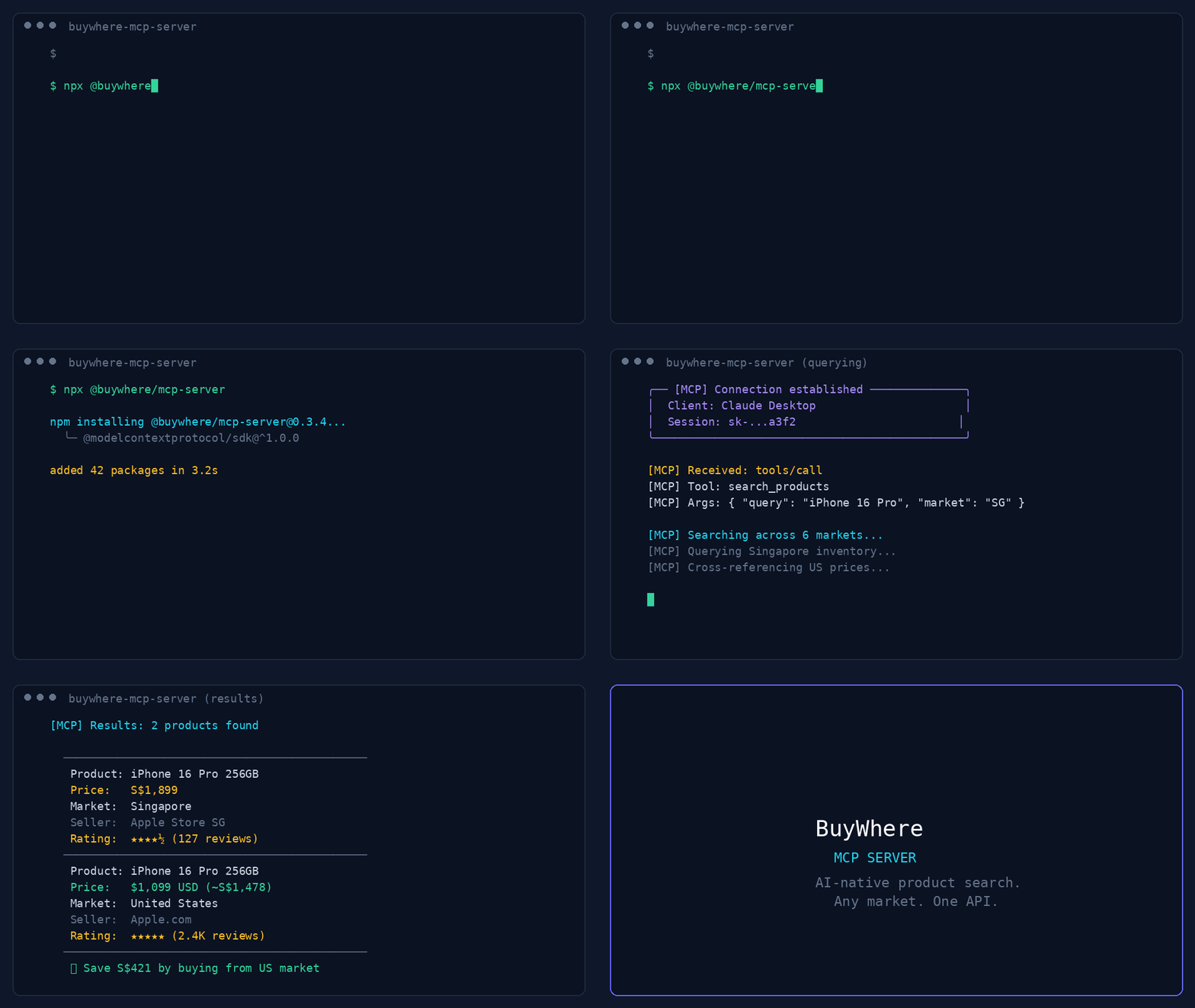
44-second demo: product search, deal discovery, price comparison, and multi-region support.
User:   "Find me wireless earbuds under $50 available in Singapore"
Agent:  [calls search_products → returns 5 matching products]

User:   "Compare the top 3"
Agent:  [calls compare_prices → side-by-side with best-value pick]
Quick Start
Get a key in 3 seconds — no signup, no email:
# 1. Register (one call, returns api_key instantly)
curl -X POST https://api.buywhere.ai/v1/auth/register \
  -H "Content-Type: application/json" \
  -d '{"agent_name":"your-agent"}'
# → {"api_key":"bw_...","tier":"unverified","rate_limit":{"rpm":20,"daily":1000}}

# 2. Use the key
export BUYWHERE_API_KEY=bw_...
npx -y @buywhere/mcp-server
Legacy email signup (60s, manual approval) → buywhere.ai/api-keys
Tutorials
- Part 1: MCP for Ecommerce — The Missing Infrastructure Layer for AI Agent Shopping — Architecture and why agents need a product catalog API
- Part 2: Build a Real Shopping Agent in 15 Minutes — Hands-on: set up MCP server, search products, compare prices, build a working agent
From the Blog
Read the BuyWhere Engineering Blog for deep dives on MCP architecture, agent commerce, and the ecosystem.
Also follow the BuyWhere Hashnode blog mirror for the same engineering content on Hashnode.
- MCP for Ecommerce 2026 — How AI agents search real products, compare prices across markets, and why MCP is the standard
- Building Production MCP Servers — Architecture, tool design patterns, and distribution from 0 to 1,700+ daily npm downloads
- MCP Server Ecosystem 2026 — Every MCP category mapped (4,800+ servers across 40+ domains)
- AI Agent Commerce: Missing Infrastructure — Why shopping is the last unbuilt layer of the agent-native economy
- Cross-Border Price Comparison Tutorial — Build a shopping agent in 10 minutes with BuyWhere MCP
Tools
| Tool | Description |
|---|---|
search_products |
Search catalog by keyword, category, price, region |
get_product |
Full product details by ID (prices, specs, images) |
compare_prices |
Side-by-side comparison of 2–5 products |
get_price |
Current prices across all merchants for one product |
get_affiliate_link |
Click-tracked affiliate URL for a product |
get_catalog |
Available product category taxonomy |
MCP Client Configuration
Framework quickstarts:
- CrewAI: API key · BuyWhere quickstart
- Mastra: API key · BuyWhere quickstart
Claude Desktop
Add to claude_desktop_config.json:
{
  "mcpServers": {
    "buywhere": {
      "command": "npx",
      "args": ["-y", "@buywhere/mcp-server"],
      "env": { "BUYWHERE_API_KEY": "bw_live_xxxx" }
    }
  }
}
Cursor / VS Code / Cline
Add to your MCP settings file:
{
  "mcpServers": {
    "buywhere": {
      "command": "npx",
      "args": ["-y", "@buywhere/mcp-server"],
      "env": { "BUYWHERE_API_KEY": "bw_live_xxxx" }
    }
  }
}
Windsurf
Add to ~/.windsurf/mcp.json:
{
  "mcpServers": {
    "buywhere": {
      "command": "npx",
      "args": ["-y", "@buywhere/mcp-server"],
      "env": { "BUYWHERE_API_KEY": "bw_live_xxxx" }
    }
  }
}
OpenCode / Codex
Add to opencode.json:
{
  "mcpServers": {
    "buywhere": {
      "command": "npx",
      "args": ["-y", "@buywhere/mcp-server"],
      "env": { "BUYWHERE_API_KEY": "bw_live_xxxx" }
    }
  }
}
Continue.dev (VS Code / JetBrains)
Add to ~/.continue/config.json:
{
  "experimental": {
    "mcpServers": {
      "buywhere": {
        "command": "npx",
        "args": ["-y", "@buywhere/mcp-server"],
        "env": { "BUYWHERE_API_KEY": "bw_live_xxxx" }
      }
    }
  }
}
Mastra
Mastra is a TypeScript-first AI agent framework with native MCP support.
npm install @mastra/core @mastra/mcp
import { Mastra } from '@mastra/core';
import { MastraMCPClient } from '@mastra/mcp';

const buywhere = new MastraMCPClient({
  name: 'buywhere',
  server: {
    url: new URL('https://api.buywhere.ai/mcp'),
    requestInit: {
      headers: { 'Authorization': `Bearer ${process.env.BUYWHERE_API_KEY}` },
    },
  },
});

const agent = new Mastra({
  agents: {
    shoppingAgent: {
      instructions: 'You are a shopping assistant. Use BuyWhere to find and compare products.',
      tools: await buywhere.tools(),
    },
  },
});

const result = await agent.agents.shoppingAgent.generate(
  'Find me the best deal on a Sony WH-1000XM5 in Singapore'
);
Full guide: BuyWhere + Mastra Integration
LangChain
Use BuyWhere tools in LangChain agents via the MCP adapter:
from langchain_mcp_adapters.client import MultiServerMCPClient
from langgraph.prebuilt import create_react_agent
from langchain_anthropic import ChatAnthropic

async def main():
    async with MultiServerMCPClient({
        "buywhere": {
            "url": "https://api.buywhere.ai/mcp",
            "transport": "streamable_http",
            "headers": {"Authorization": f"Bearer {BUYWHERE_API_KEY}"},
        }
    }) as client:
        tools = await client.get_tools()
        agent = create_react_agent(ChatAnthropic(model="claude-sonnet-4-5"), tools)
        result = await agent.ainvoke({"messages": [("user", "Find the cheapest Sony headphones in Singapore")]})
LlamaIndex
Connect BuyWhere via LlamaIndex MCP client:
from llama_index.tools.mcp import BasicMCPClient, McpToolSpec
from llama_index.agent.openai import OpenAIAgent

async def main():
    mcp_client = BasicMCPClient(
        command_or_url="https://api.buywhere.ai/mcp",
        headers={"Authorization": f"Bearer {BUYWHERE_API_KEY}"},
    )
    mcp_tool_spec = McpToolSpec(client=mcp_client)
    tools = mcp_tool_spec.to_tool_list()
    agent = OpenAIAgent.from_tools(tools)
    response = await agent.achat("Compare prices for iPhone 16 Pro across Singapore and US")
CrewAI
Use BuyWhere in a CrewAI agent with MCP tool integration:
from crewai import Agent, Task, Crew
from crewai_tools import MCPServerAdapter

buywhere_server = MCPServerAdapter(
    server_params={
        "url": "https://api.buywhere.ai/mcp",
        "headers": {"Authorization": f"Bearer {BUYWHERE_API_KEY}"},
        "transport": "streamable-http",
    }
)

shopping_agent = Agent(
    role="Shopping Research Analyst",
    goal="Find the best deals across Singapore and US markets",
    tools=[buywhere_server],
)

task = Task(
    description="Find the best price for Sony WH-1000XM5 headphones across all available markets",
    agent=shopping_agent,
    expected_output="Product comparison with prices and merchant links",
)

crew = Crew(agents=[shopping_agent], tasks=[task])
result = crew.kickoff()
Configuration
| Variable | Default | Description |
|---|---|---|
BUYWHERE_API_KEY |
(required) | API key (no signup: POST /v1/auth/register {"agent_name":"<name>"}) — returns instantly, no email verification |
BUYWHERE_API_URL |
https://api.buywhere.ai/mcp |
Custom API base URL |
Install
# Run directly (no install)
npx -y @buywhere/mcp-server

# Install globally
npm install -g @buywhere/mcp-server
buywhere-mcp
Use Cases
- Shopping agents — build AI agents that search, compare, recommend products across markets
- Price comparison — multi-market pricing in a single query across Lazada, Shopee, Amazon, local retailers
- Deal discovery — find best-value products with real-time pricing and inventory
- Ecommerce automation — integrate product search into any MCP-compatible app
- Cross-border commerce — compare prices between Singapore, SEA, and US markets
- Agent-to-Agent commerce — delegate shopping tasks between agents via A2A protocol
Architecture
Developer's AI Agent (Claude, Cursor, etc.)
  │
  ├── MCP Protocol (stdio)
  │
  ├── @buywhere/mcp-server
  │     ├── search_products(q, category, min_price, max_price, country_code)
  │     ├── get_product(product_id)
  │     ├── compare_prices(product_ids[])
  │     ├── get_price(product_id)
  │     ├── get_affiliate_link(product_id, platform)
  │     └── get_catalog()
  │
  └── BuyWhere API (api.buywhere.ai)
        └── Product catalog across SG and US merchants
Development
git clone https://github.com/BuyWhere/buywhere-mcp.git
cd buywhere-mcp
npm install
npm run build
npm start
Why BuyWhere?
BuyWhere is a product search API for AI agents. We aggregate product data from Singapore and US merchants into a single, agent-friendly interface — no store management, no Shopify integration. Just search and compare products in real time.
- One API — all markets, all retailers
- Agent-native — built for MCP from day one
- Real-time — live pricing and availability
- Developer-first — no SDK needed, just add the server
Works Well With
These complementary MCP packages extend BuyWhere into powerful multi-tool workflows:
- @modelcontextprotocol/server-filesystem — Save shopping results and product research to your local filesystem. Combine with BuyWhere to export deal lists, price comparisons, and product specs as structured files.
- @supabase/mcp-server-supabase — Store favorite products, user preferences, and price alerts in Supabase. Persist shopping history across agent sessions.
- n8n-mcp — Automate price monitoring workflows. Build no-code pipelines that watch BuyWhere prices and trigger notifications on price drops.
- tavily-mcp — Research products before buying. Use Tavily to find reviews and comparisons, then use BuyWhere to get current prices and purchase links.
- @playwright/mcp — E2E test your shopping agent interactions. Verify that product search, price comparison, and checkout flows work correctly in browser automation.
Protocols
| Protocol | Support |
|---|---|
| MCP (Model Context Protocol) | Full support — 6 tools, stdio transport |
| A2A (Agent-to-Agent) | Multi-agent task delegation — Agent Card |
Contributing
See CONTRIBUTING.md for how to report issues, submit PRs, and suggest features.
From the Blog
Learn more about MCP servers and the BuyWhere ecosystem:
- MCP server discovery — Understanding the MCP server discovery gap
- Building production MCP servers — Production best practices for MCP servers
- MCP servers that earn their context window — MCP servers that maximize context window value
- MCP ecommerce guide — Definitive guide to MCP for ecommerce
- BuyWhere MCP launch — Announcing the BuyWhere MCP server launch
- MCP server ecosystem 2026 — Complete guide to the MCP server ecosystem in 2026
Support
If you find this project useful:
- ⭐ Star the repo — it helps others discover BuyWhere
- 🐛 Open an issue for bugs or feature requests
- 💬 Start a discussion for questions or ideas
- 📣 Share it with other developers who build AI agent tools
License
MIT
Установить BuyWhere в Claude Desktop, Claude Code, Cursor
unyly install buywhereСтавит в Claude Desktop, Claude Code, Cursor и VS Code — сам разбирается с npx, uvx и сборкой из исходников.
Впервые? Поставь CLI: curl -fsSL https://unyly.org/install | sh
Или настроить вручную
Выполни в терминале:
claude mcp add buywhere -- npx -y @buywhere/mcp-serverFAQ
BuyWhere MCP бесплатный?
Да, BuyWhere MCP бесплатный — установка в пару кликов через Unyly без оплаты.
Нужен ли API-ключ для BuyWhere?
Нет, BuyWhere работает без API-ключей и переменных окружения.
BuyWhere — hosted или self-hosted?
Доступен hosted-вариант: Unyly запускает сервер в облаке, локальная установка не обязательна.
Как установить BuyWhere в Claude Desktop, Claude Code или Cursor?
Открой BuyWhere на unyly.org, выбери вкладку своего клиента (Claude Desktop, Claude Code, Cursor) и нажми Install — конфиг сгенерируется автоматически, без правки JSON.
Похожие MCP
Fetch
Web content fetching and conversion for efficient LLM usage.
AWS KB Retrieval
Retrieval from AWS Knowledge Base using Bedrock Agent Runtime.
 автор: modelcontextprotocol
Spring AI MCP Server
Provides auto-configuration for setting up an MCP server in Spring Boot applications.
llm-analysis-assistant
A very streamlined mcp client that supports calling and monitoring stdio/sse/streamableHttp, and can also view request responses through the /logs page. It also
 автор: xuzexin-hz
Compare BuyWhere with
Не уверен что выбрать?
Найди свой стек за 60 секунд
Автор?
Embed-бейдж для README
Похожее
Все в категории ai