
capsulerun/bash
БесплатноНе проверенSandboxed bash for agents. Run untrusted commands in WebAssembly sandboxes with no setup required.

Описание
Sandboxed bash for agents. Run untrusted commands in WebAssembly sandboxes with no setup required.
README


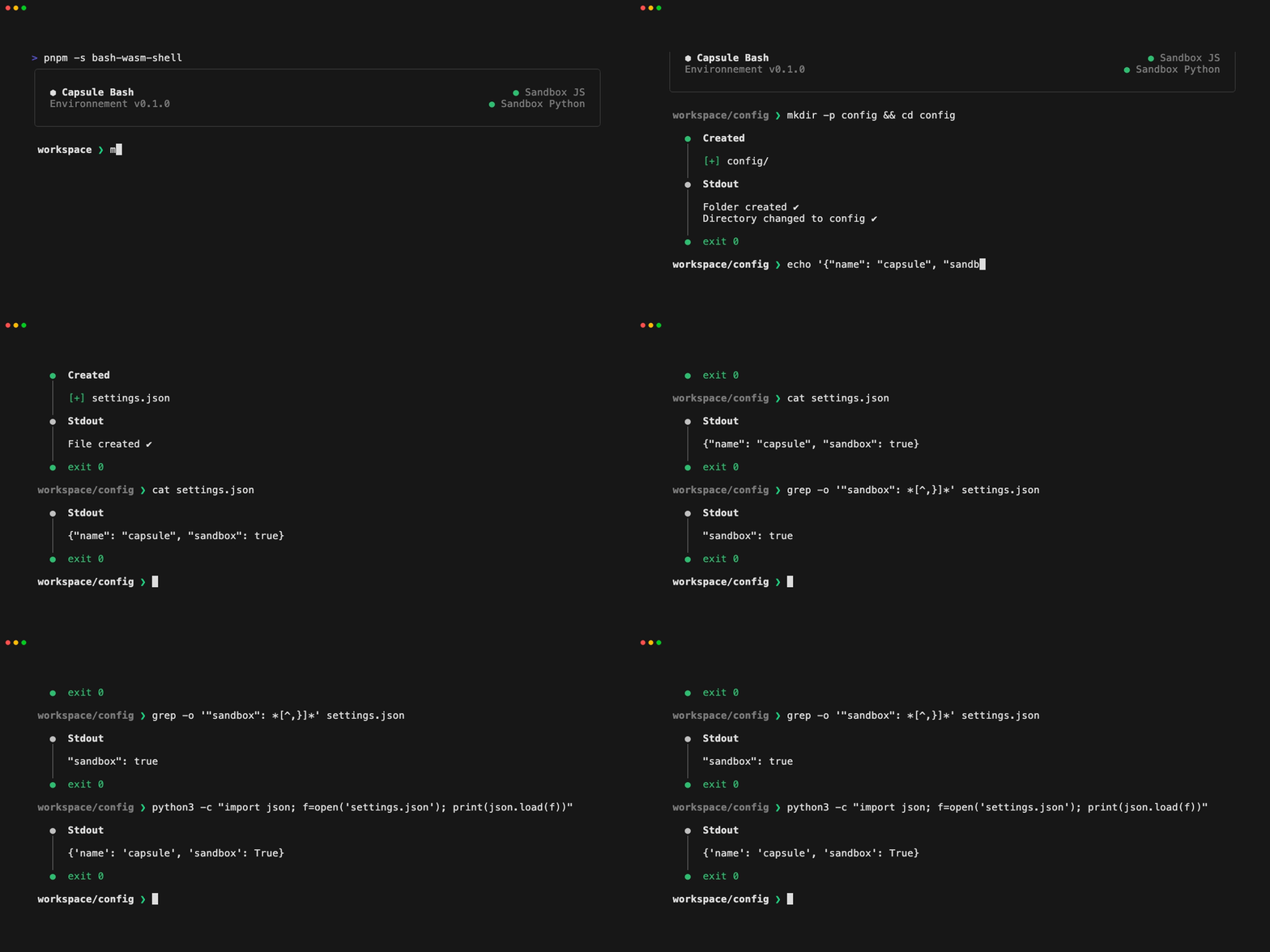
Overview
Capsule Bash is a command interpreter built for executing untrusted commands. It provides a bash-like interface to interact with the filesystem and run commands in a sandboxed environment.
Commands and sandboxes: Bash commands are reimplemented in TypeScript and run code inside isolated sandboxes. The sandbox layer is modular, so we can plug in any runtime that implements the interface. The default
WasmRuntimeuses Capsule runtime to run commands inside WebAssembly sandboxes.Instant feedback: Traditional bash treats silence as success. In agentic workflows for example, that forces a second call just to confirm the first one worked. Capsule Bash returns structured output for every command. Exit code, stdout, stderr, and a diff of filesystem changes.
Workspace isolation: Commands operates in a mounted workspace directory. The host filesystem is not accessible from inside the sandbox. You get full visibility into what is executed without exposing your system. The workspace is persistent and stays alive until you reset it manually.
Getting Started
TypeScript SDK
npm install @capsule-run/bash @capsule-run/bash-wasm
Run it:
import { Bash } from '@capsule-run/bash';
import { WasmRuntime } from '@capsule-run/bash-wasm';

const bash = new Bash({ runtime: new WasmRuntime() });

const result = await bash.run('mkdir src && touch src/index.ts');

console.log(result);

/**
Result {
  stdout: "Folder created ✔\nFile created ✔",
  stderr: "",
  diff: { created: ['src/index.ts'], modified: [], deleted: [] },
  state: { cwd: '/', env: {} },
  duration: 10,
  exitCode: 0,
}
**/
Interactive shell
Clone the repository, then run from the project root:
pnpm -s bash-wasm-shell
[!IMPORTANT] Python and pip are required to compile the Python sandbox. Both sandboxes (JS and Python) are needed to run the shell.
MCP server
{
  "mcpServers": {
    "capsule": {
      "command": "npx",
      "args": ["-y", "@capsule-run/bash-mcp"]
    }
  }
}
See the MCP Readme for configuration details.
Documentation
Bash Options
| Parameter | Description | Type | Default |
|---|---|---|---|
runtime |
Runtime to use for the sandbox | Runtime class |
None |
customCommands |
Custom commands to add to the bash instance | CustomCommand[] |
[] |
hostWorkspace |
Host workspace directory | string |
".capsule/session/workspace" |
initialCwd |
Initial working directory | string |
"/workspace" |
Runtime
The runtime is the engine that runs the bash commands. WasmRuntime is available by default to run the commands in a WebAssembly sandbox.
import { Bash } from '@capsule-run/bash';
import { WasmRuntime } from '@capsule-run/bash-wasm';

const bash = new Bash({ runtime: new WasmRuntime() });
Custom Commands
import { Bash, createCommand } from '@capsule-run/bash';
import { WasmRuntime } from '@capsule-run/bash-wasm';

const firstCustomCommand = createCommand('hello', async (opts, state) => {
  return { stdout: 'Hello', stderr: '', exitCode: 0 };
});

const bash = new Bash({
  runtime: new WasmRuntime(),
  customCommands: [firstCustomCommand],
});
Host Workspace
The host workspace is the directory on the host system that is mounted to the sandbox. It can be any folder in the project directory. By default, it is set to .capsule/session/workspace.
const bash = new Bash({ runtime: new WasmRuntime(), hostWorkspace: 'customFolder' });
Initial Working Directory
The initial working directory is where bash commands are executed. By default it is set to /workspace. You can set it to any directory inside the sandbox filesystem.
const bash = new Bash({ runtime: new WasmRuntime(), initialCwd: '/' });
Run
Use the run method to execute a command in the sandbox.
const bash = new Bash({ runtime: new WasmRuntime() });

const result = await bash.run('mkdir src && touch src/index.ts');

console.log(result);
Response Format
{
  stdout: string,
  stderr: string,
  diff: { created: string[], modified: string[], deleted: string[] }, // Files and directories changes
  state: { cwd: string, env: Record<string, string> }, // last state of the sandbox
  duration: number, // Duration in milliseconds
  exitCode: number
}
Preload
Use the preload method to warm up a sandbox before running commands. By default it preloads the JS sandbox.
const bash = new Bash({ runtime: new WasmRuntime() });

await bash.preload(); // js by default
await bash.preload('python'); // python
Reset
Use the reset method to clear the bash instance and restore the sandbox filesystem to its initial state.
const bash = new Bash({ runtime: new WasmRuntime() });

await bash.reset();
Limitations
WasmRuntimeruns in Node.js only, browser environments are not supported with the existing runtime yet- Not all bash commands are implemented yet. See
packages/bash/src/commands/for the current list. Feel free to open an issue to request a new one.
Contributing
Contributions are welcome, whether it's documentation, new commands, or bug reports.
Adding or improving commands
Commands live in packages/bash/src/commands/. To contribute:
- Fork the repository
- Create a feature branch:
git checkout -b feature/amazing-command - Add or update your command in
packages/bash/src/commands/ - Add unit tests
- Open a pull request
License
Apache License 2.0. See LICENSE for details.
Установка capsulerun/bash
У этого сервера нет опубликованного пакета — он собирается из исходников. Открой репозиторий и следуй инструкции в README.
▸ github.com/capsulerun/bashFAQ
capsulerun/bash MCP бесплатный?
Да, capsulerun/bash MCP бесплатный — установка в пару кликов через Unyly без оплаты.
Нужен ли API-ключ для capsulerun/bash?
Нет, capsulerun/bash работает без API-ключей и переменных окружения.
capsulerun/bash — hosted или self-hosted?
Self-hosted: сервер запускается локально на твоей машине командой из раздела установки.
Как установить capsulerun/bash в Claude Desktop, Claude Code или Cursor?
Открой capsulerun/bash на unyly.org, выбери вкладку своего клиента (Claude Desktop, Claude Code, Cursor) и нажми Install — конфиг сгенерируется автоматически, без правки JSON.
Похожие MCP
GitHub
PRs, issues, code search, CI status
 автор: GitHub
Filesystem
Secure file operations with configurable access controls.
Memory
Knowledge graph-based persistent memory system.
Template MCP Server
A CLI tool to create a new Model Context Protocol server project with TypeScript support, dual transport options, and an extensible structure
 автор: mcpdotdirect
Compare capsulerun/bash with
Не уверен что выбрать?
Найди свой стек за 60 секунд
Автор?
Embed-бейдж для README
Похожее
Все в категории development