
Carto Server
БесплатноНе проверенEnables AI coding tools to query your live codebase for routes, import graph, domain context, and blast radius, eliminating hallucinations about project structu

Описание
Enables AI coding tools to query your live codebase for routes, import graph, domain context, and blast radius, eliminating hallucinations about project structure.
README
Package a repo once, and every AI tool then knows what breaks before it changes anything. AI writes faster than you can verify, so structure ships unguarded. Carto maps your codebase into one portable container (imports, domains, blast radius, predictive risk) and grades every diff before it lands, blocking the dangerous ones before they reach disk. One local SQLite file. No cloud.
Docs · Quickstart · Tools · ANCI Spec · Benchmarks · Changelog
CI npm version MIT License npm downloads
AI writes faster than you can verify.
Your agent can change 40 files before you understand the first one. Tests catch broken behavior. Linters catch broken syntax. Neither sees what it did to the shape of your system.
Carto packs that shape into one portable container: the import graph, domains, blast radius, and predictive risk, held in one local SQLite file. So any AI tool knows what breaks before the diff lands, and Carto can block a HIGH-risk edit before it ever reaches disk. Not passive context you hope the AI reads: context that pushes back.
And because it is packaged once, every AI tool shares it instead of re-reading your whole codebase from scratch each session (Cursor builds its own index, Copilot builds its own, Claude Code builds its own, none of them remembering what they learned yesterday).
Docker made apps portable. Carto makes codebases portable for AI. Package a repo once and every AI tool understands it in seconds, instead of re-indexing from scratch every session.
One SQLite file on your disk. No network. No telemetry. No cloud.
| 🗺️ Architecture | Import graph, routes, models, and auto-detected domains - the whole shape of the repo, mapped once. |
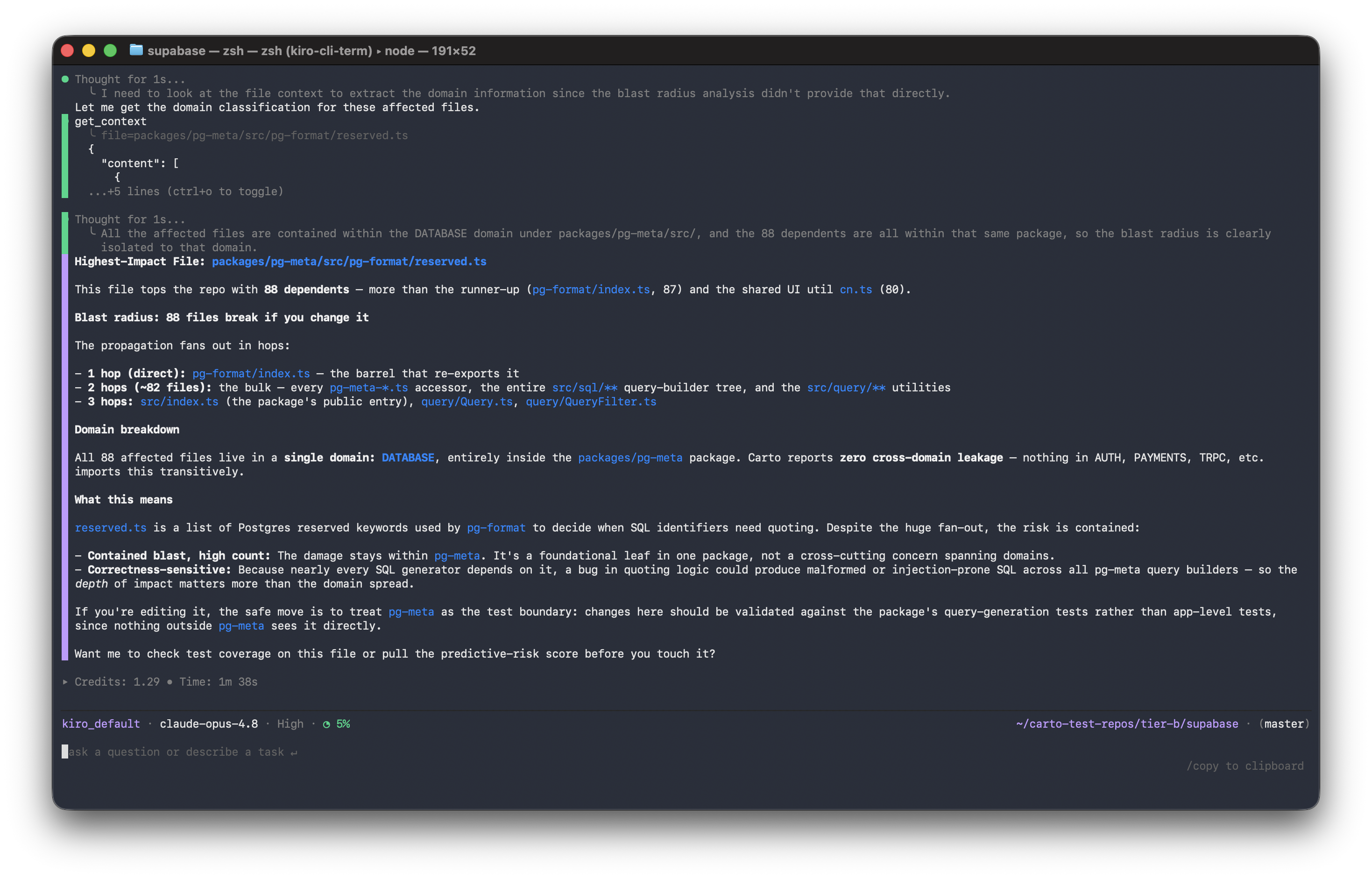
| 💥 Blast Radius | "Touch this file and 22 things break." Transitive impact of any change, in microseconds. |
| 🧠 Memory | Every decision and validated diff is remembered across sessions. Ask "did we agree on snake_case here?" six weeks later and get the actual verdict. |
| ⏳ History | Snapshots every commit. Tracks drift, churn, and architectural events. The container gets smarter the longer the repo lives. |
| 🎯 Predictive Risk | Every file scored 0–1: P(this causes the next incident). High-risk files surface before the PR is opened. |
| 📦 Portable (ANCI) | The structural core is an open format - .carto/anci.{yaml,bin}, stamped with its source commit + a content digest so it's versioned and verifiable. Any AI tool can read it without re-indexing. |
| 🔐 Verifiable | Every container is stamped with its source commit, grammar versions, and a sha256 content digest. Same repo → same digest. Integrity is checked on load. |
Use Carto
| ### 🧑💻 I use AI coding tools | ### 🔧 I'm building AI dev tools |
| Install once and Carto auto-wires into every AI tool on your machine. Your assistant instantly knows your architecture, remembers past decisions, and gets blocked from risky edits. → Quick start | Consume the portable container directly via the ANCI format, or query it live through a compact MCP surface (a core-10 plus parameterized families). Stop building your own index. → Build on Carto |
Works with: Cursor · Claude Code · Codex · Kiro · Claude Desktop · Windsurf · VS Code Copilot · Zed · JetBrains
Quick start
npm install -g carto-md
cd your-project
carto init
That's it. carto init reads your repo, builds the container, and wires itself into every AI tool it finds. Restart the tool. Your AI now knows your codebase - and keeps a memory of every decision it makes inside it.
Wiring it into your AI tool
carto init auto-detects the AI tools on your machine and writes each one's MCP config for you. If you'd rather wire it by hand, the MCP server config is just:
{
  "mcpServers": {
    "carto": {
      "command": "carto",
      "args": ["serve"]
    }
  }
}
Point any MCP client at that and restart it - the tool spawns carto serve on demand, and every chat starts with your architecture, blast radius, and past decisions already loaded. Exact config file per tool is below.
Manual MCP wiring for every other tool (if it wasn't auto-detected)
Cursor - ~/.cursor/mcp.json
{ "mcpServers": { "carto": { "command": "carto", "args": ["serve"], "cwd": "/your/project" } } }
Claude Code - <project>/.mcp.json
claude mcp add carto -- carto serve
Codex - ~/.codex/config.toml
[mcp_servers.carto]
command = "carto"
args = ["serve"]
Kiro - ~/.kiro/settings/mcp.json
{ "mcpServers": { "carto": { "command": "carto", "args": ["serve"], "cwd": "/your/project" } } }
Claude Desktop
- macOS:
~/Library/Application Support/Claude/claude_desktop_config.json - Windows:
%APPDATA%\Claude\claude_desktop_config.json - Linux:
~/.config/Claude/claude_desktop_config.json
{ "mcpServers": { "carto": { "command": "carto", "args": ["serve"], "cwd": "/your/project" } } }
VS Code Copilot - .vscode/mcp.json
{ "servers": { "carto": { "type": "stdio", "command": "carto", "args": ["serve"] } } }
Windsurf - ~/.codeium/windsurf/mcp_config.json
{ "mcpServers": { "carto": { "command": "carto", "args": ["serve"], "cwd": "/your/project" } } }
How it works
carto initbuilds the container. It parses your repo (imports, routes, models, domains, blast radius), writes it to.carto/, and auto-wires every AI tool on your machine.- Your AI loads it instead of re-reading everything. Every chat starts with the architecture already known - the right 6–12 files, not the usual 40+.
- Every proposed diff is checked first. Risky changes are graded before they hit your screen - and
carto mcp-middlewarecan block a HIGH-risk edit before it ever reaches disk. Carto also nudges: "coupling jumped in AUTH," "two sessions are editing this file." - The container remembers - and knows when it's stale. Decisions, validations, and drift accumulate in one SQLite file, so the next session picks up where the last left off. And if the repo moves ahead of the index, queries warn "graph is N commits stale" instead of silently serving old numbers.
An index is not a container
Most tools build an index - a snapshot of what's in the repo right now. Stateless. Thrown away at the end of the session. Rebuilt from scratch by the next tool.
A container is different: portable, versioned, and verifiable. Carto's engine keeps five kinds of memory a plain index can't - all queryable live over MCP:
- Structural - imports, routes, models, domains, blast radius.
- Episodic - every diff validated, every decision made. Queryable weeks later.
- Temporal - snapshots, churn, deltas. "AUTH grew 18 files and lost stability when
billing.tsmoved out." - Semantic - invariants and conventions mined from the import graph, not declared by humans.
- Procedural - patterns mined from git history. "When a route is added, auth middleware is touched 89% of the time."
All five run live in the engine - one SQLite file (.carto/carto.db), queried over MCP. The portable container file - the open ANCI export any tool can read without Carto's runtime - today carries the structural core (import graph, domains, routes, models, blast radius), stamped with its source commit + a content digest so it's versioned and verifiable. Making the other four memories portable in the file is on the roadmap.
Your AI tool sees files. Carto's container sees architecture, history, and consequences.
Is this Docker?
No. Docker containerizes compute - the OS, libraries, and binaries a CPU needs to run your code anywhere. Carto containerizes context - the import graph, blast radius, and structural boundaries an LLM needs to reason about your code without re-reading it.
There's no daemon, no image pull, no virtual network. A Carto container is just a lightweight .carto/ folder: a local SQLite database plus an open ANCI map. It costs nothing while idle, answers a blast-radius query in microseconds on a 7,500-file repo, and never touches the cloud. Any AI agent - Claude Code, Cursor, or your CI pipeline - taps into it instantly instead of re-indexing from scratch.
Build once, load anywhere
The whole point of a container is that it's one file you can move. Build it on one machine, load it on another - no re-index, no Carto runtime needed to read it.
# machine A - build and pack into a single file
carto init
carto export --out myrepo.anci        # one file: yaml + bitmap + manifest

# machine B - load it, no re-parsing the repo
carto load myrepo.anci                 # unpacks + verifies the content digest
carto impact src/auth/session.ts       # blast radius, instantly
Copy it, attach it to a release, or hand it to a teammate - the receiving machine gets the full structural container in seconds. The digest is verified on load, and loaded contents are treated as untrusted data, never instructions.
Under the hood
your repo
   ↓
carto init ──────────── parse (tree-sitter, 17 languages)
   ↓
┌─────────────────────────────────────────────────────┐
│  the container  ── .carto/                            │
│                                                       │
│   ├── carto.db        SQLite: graph, routes, models,  │
│   │                   domains, decisions, history     │
│   ├── bitmap.bin      Roaring Bitmap reverse-dep       │
│   │                   graph - blast radius in µs       │
│   └── anci.{yaml,bin} portable open format - `carto export`     │
│                       packs it into one verifiable .anci file   │
└─────────────────────────────────────────────────────┘
   ↓
your AI tool  ── loads it via MCP (core-10 + families) or ANCI directly
Blast radius is not search. Search finds files that mention something. Blast radius finds files that break when you change something - transitively, over the real import graph. On a 7,500-file repo, one query returns in ~3 microseconds thanks to the bitmap engine.
Build on Carto
The container is an open format. Read it without running Carto's engine:
const { loadAnci } = require('carto-md/src/anci/consumer');
const reader = loadAnci('./.carto');

reader.domains;                            // [{ name: 'AUTH', file_count: 42 }, ...]
reader.getHighImpactFiles(5);              // top 5 by transitive dependents
reader.blastRadius('src/auth/session.ts'); // { count, hops, files: [...] }
Or query it live through the MCP server your AI tool already runs.
Tools your AI can call
A small core is exposed by default (≈10 tools), with the rest collapsed into a handful of parameterized families - so your AI tool spends its context on your codebase, not on a tool menu.
| Core tool | What it's for |
|---|---|
get_architecture · get_context |
Orient in the repo; full context for one file |
impact |
Blast radius / multi-file simulate / neighbors / data flow - what breaks if I touch this? (mode=) |
validate_diff |
Grade a proposed diff (risk + violations) |
get_change_plan |
Natural-language intent → files to touch |
memory |
Episodic memory - search past decisions, logs, sessions, interventions (kind=) |
history |
Temporal history - drift, hotspots, evolution, churn, health (view=) |
patterns |
Mined invariants / conventions / canonical exemplar / co-change patterns (kind=) |
get_predictive_risk · get_minimal_context_for_intent |
Risk score per file; token-budgeted context picker |
Beyond the core, org(view=…) covers multi-repo, and advanced/experimental tools (get_routes,
get_models, get_gaps, scaffold_for_intent, …) are available by widening the surface with
CARTO_MCP_TIER=advanced (or all), or carto.config.json → mcp.tier. The ~30 former sibling
tools (get_blast_radius, did_we_discuss_this, …) still resolve as deprecated shims that
forward to the new families with byte-identical output.
Full reference at docs/api/. You don't need to memorize any of these - your AI picks the right one mid-task.
How fast
Fresh runs on real open-source repos (Apple M-series, 8 CPUs, 8 GB RAM):
| Repo | Files | First index | Re-index | Container size |
|---|---|---|---|---|
| cal.com | 4,352 | 3.9s | 805ms | 3.1 MB |
| supabase/supabase | 6,358 | 5.9s | 967ms | 4.8 MB |
| vercel/next.js | 6,193 | 6.9s | 978ms | 15.1 MB |
| microsoft/vscode | 7,567 | 8.6s | 1.1s | 14.3 MB |
Query latency on vscode (7,567 files): validate_diff p50 84 µs · get_blast_radius p50 2.7 µs · get_high_impact_files p50 750 ns. Full table in docs/scale.md.
Languages
Import graph + symbols: JavaScript/TypeScript · Python · Go · Rust · Java/Kotlin · C/C++ · C# · Ruby · PHP · Swift · Dart · R · Prisma · HTML
Routes: Express · Next.js · tRPC · React Router · FastAPI · Flask · Django · Gin · Echo · Chi · Actix · Axum · Rocket · Spring · JAX-RS · ASP.NET · Rails · Sinatra
Models: Prisma · Zod · Drizzle · Pydantic · SQLAlchemy · Django · Go structs · Rust structs · JPA · ActiveRecord · Eloquent
Planned (not yet extracted end-to-end): EF Core.
CLI
| Command | What it does |
|---|---|
carto init |
Build the container, generate AGENTS.md, install git hooks, wire every AI tool found |
carto sync |
Re-build changed files (auto-runs on commit / checkout / merge / rebase) |
carto export |
Pack the container into one portable, verifiable .anci file |
carto load <file> |
Load an .anci container into a queryable .carto/ - no re-index, digest verified |
carto serve |
Start the MCP server (your AI tool runs this) |
carto impact <file> |
Blast radius of one file |
carto pr-impact |
Diff-shaped impact report between two refs |
carto check |
Domain health, cross-domain violations, drift |
carto status |
One-screen project health |
carto doctor |
9-check setup diagnostic |
carto why <file> |
3-line file summary |
carto explain <intent> |
Natural-language intent → architectural plan |
What Carto never does
- Sends your code anywhere. Local only. SQLite on disk. No telemetry.
- Writes secrets into the container.
.cartoignoreblocks.envand credential files by default. - Touches your manual notes. Only writes between
<!-- CARTO:AUTO -->markers. - Costs money. MIT. Free forever.
Origin
I was building Emfirge - a cloud security agent that maps AWS infrastructure into a graph and simulates the blast radius of every change. The AI inside it kept hallucinating about resources it had only half-seen, so I wrote a module that mapped every account into a structured graph the AI could query directly. The hallucinations stopped.
Carto is that idea, applied to source code: package a system into a container the AI can query - and it stops guessing, and stops forgetting.
License
MIT. Free forever.
Your code changes. Carto knows. Every AI you use knows - and remembers.
Установить Carto Server в Claude Desktop, Claude Code, Cursor
unyly install carto-mcp-serverСтавит в Claude Desktop, Claude Code, Cursor и VS Code — сам разбирается с npx, uvx и сборкой из исходников.
Впервые? Поставь CLI: curl -fsSL https://unyly.org/install | sh
Или настроить вручную
Выполни в терминале:
claude mcp add carto-mcp-server -- npx -y carto-mdFAQ
Carto Server MCP бесплатный?
Да, Carto Server MCP бесплатный — установка в пару кликов через Unyly без оплаты.
Нужен ли API-ключ для Carto Server?
Нет, Carto Server работает без API-ключей и переменных окружения.
Carto Server — hosted или self-hosted?
Self-hosted: сервер запускается локально на твоей машине командой из раздела установки.
Как установить Carto Server в Claude Desktop, Claude Code или Cursor?
Открой Carto Server на unyly.org, выбери вкладку своего клиента (Claude Desktop, Claude Code, Cursor) и нажми Install — конфиг сгенерируется автоматически, без правки JSON.
Похожие MCP
Fetch
Web content fetching and conversion for efficient LLM usage.
AWS KB Retrieval
Retrieval from AWS Knowledge Base using Bedrock Agent Runtime.
 автор: modelcontextprotocol
Spring AI MCP Server
Provides auto-configuration for setting up an MCP server in Spring Boot applications.
llm-analysis-assistant
A very streamlined mcp client that supports calling and monitoring stdio/sse/streamableHttp, and can also view request responses through the /logs page. It also
 автор: xuzexin-hz
Compare Carto Server with
Не уверен что выбрать?
Найди свой стек за 60 секунд
Автор?
Embed-бейдж для README
Похожее
Все в категории ai