
CatalogReady
БесплатноНе проверенMCP server for auditing product pages to determine AI shopping agent readiness, providing a 0–100 score and actionable fixes.

Описание
MCP server for auditing product pages to determine AI shopping agent readiness, providing a 0–100 score and actionable fixes.
README
Can AI shopping agents actually read your product page?
CatalogReady is the open-source Lighthouse for AI shopping. Point it at a product page and get a transparent 0–100 readiness score, the exact product data machines can and cannot read, unsupported marketing claims, and paste-ready fixes.
Offline · deterministic rules · no API key · never writes to your store.
The benchmark result
40 of 50 real product pages (80%) were not ready for AI shopping agents — even though every page was reachable and auditable.
The benchmark covers 50 different domains across fashion, electronics, home, beauty, and grocery. It uses one GET per page and the same deterministic audit as the CLI: no model, no synthetic data, and no points for generated fixes. See every score and the methodology →
Benchmark earns trust. The case makes it memorable. The scorecard makes it shareable.
A real skincare contrast: CeraVe Intensive Moisturizing Cream scored 16/100 with 4 high-severity findings. Another mainstream skincare page — The Ordinary Niacinamide 10% + Zinc 1% — scored 91/100 with no high-severity findings: a 75-point gap in machine-readable product identity and evidence.
CatalogReady benchmark: CeraVe scored 16 while The Ordinary scored 91
Reproduce the full 50-page benchmark:
uv run python scripts/benchmark.py benchmark/urls.txt benchmark/BENCHMARK.md
The benchmark measures fetched static HTML, not product quality, popularity, or observed ranking in an AI answer.
See it in action
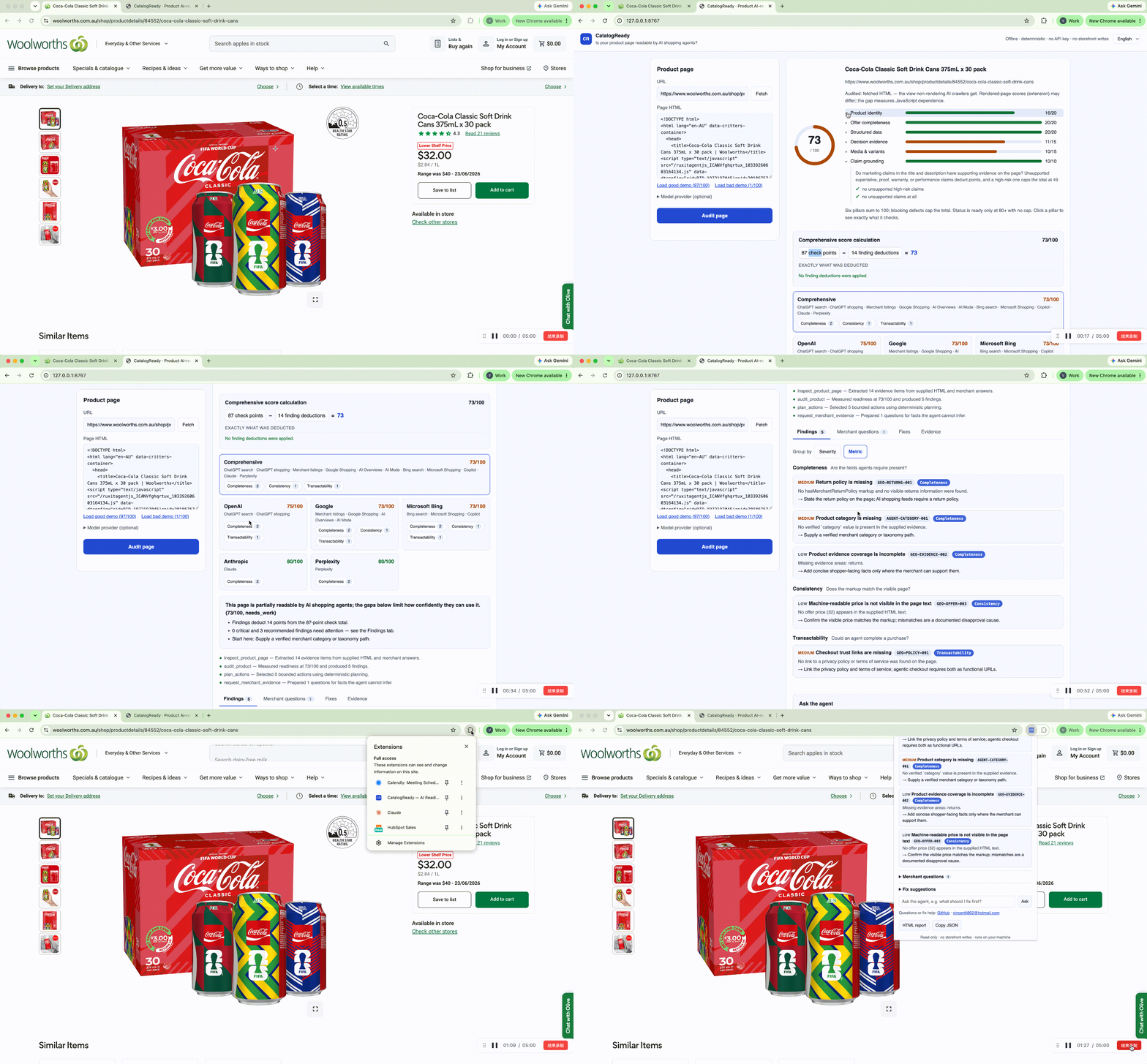
Audit a live product page from the CatalogReady browser extension, compare the platform-specific readiness scores, inspect every deduction, and generate evidence-backed fixes without writing to the storefront.
uvx --from catalogready-ai catalogready https://your-store.com/products/example
  Waterproof Commuter Shoe – Blue

  CatalogReady Score: 82/100 (ready)

  Product identity      16/20
  Offer completeness    20/20
  Structured data       20/20
  Decision evidence     14/15
  Media & variants       2/15
  Claim grounding       10/10

  0 critical · 2 recommended · 0 minor findings
  Full report: catalogready-report.html
The HTML report is a single self-contained file: score dial, per-pillar breakdown, every finding with a stable rule ID, the questions only the merchant can answer, a recommended Product JSON-LD block built strictly from evidence found on the page, and a downloadable PNG score card.
Why this exists
ChatGPT shopping, Google AI results, and Perplexity buy-flows read product pages with machines, not eyes. A page can look perfect to humans while being invisible or untrustworthy to an AI shopping agent: missing stable IDs, incomplete offers, absent Product JSON-LD, and marketing claims with no supporting evidence.
CatalogReady checks what the machines check — deterministically, locally, and with a score that survives scrutiny:
- Only your page earns points. Nothing CatalogReady generates contributes to the score.
- Blocking defects cap the score. Duplicate IDs, incomplete offers, missing structured data, or an unsupported high-risk claim hard-cap the number, no matter how complete everything else is.
- Every finding cites evidence and carries a rule ID you can grep for. docs/RULES.md documents every rule with its source — Google's merchant-listing requirements, OpenAI's Agentic Commerce feed spec, Bing's Copilot grounding guidelines, and the published crawler documentation of OpenAI, Perplexity, and Anthropic.
See docs/scoring-methodology.md for the full rubric and caps.
Quick start with ChatGPT, Claude, Gemini, or DeepSeek
Use CatalogReady with the chat app you already have open — no plugin, no account linking, no API key. The tool computes the real score; your chatbot explains it and plans the fixes.
Step 1 — install uv (once, skip if you have it):
# macOS / Linux
curl -LsSf https://astral.sh/uv/install.sh | sh
# Windows (PowerShell)
powershell -ExecutionPolicy ByPass -c "irm https://astral.sh/uv/install.ps1 | iex"
Step 2 — audit your product page (one command, replace the URL):
uvx --from catalogready-ai catalogready audit https://your-store.com/products/example --json > audit.json
This writes audit.json (the full result) and catalogready-report.html
(a visual report you can open in a browser).
Step 3 — open your chatbox: chatgpt.com · claude.ai · gemini.google.com · chat.deepseek.com
Step 4 — copy this prompt into the chat:
I ran CatalogReady (github.com/PO-VINCENT/ai-shopping-audit), an
open-source auditor that scores product pages 0–100 for AI-shopping
readiness using deterministic rules. Below is the JSON result for my
product page. Act as my e-commerce consultant:
1. Explain the score, the pillar breakdown, and any caps in plain language.
2. Prioritize the findings into a fix list, most damaging first.
3. Show me the corrected Product JSON-LD using ONLY facts present in
   this JSON — do not invent product data.
4. Tell me which merchant questions I must answer and why they matter.
Here is the audit JSON:
Step 5 — paste the contents of audit.json right below the prompt and
send. (Or attach audit.json as a file — ChatGPT, Claude, and Gemini
all accept file uploads.)
Step 6 — keep the conversation going. Good follow-ups: "Rewrite my product title following the fix list" · "Explain rule GEO-PRODUCT-003" · "I fixed the JSON-LD — what should I verify after deploying?" (Re-run Step 2 after each fix to watch the score climb.)
Prefer your assistant to run the audit itself? (MCP)
Agentic assistants can call CatalogReady as a tool via its MCP server. Then just ask: "Fetch https://store.example/products/x and run the CatalogReady agent on the HTML — summarize the score and the top fixes."
Claude Code — one line:
claude mcp add catalogready -- uvx --from catalogready-ai catalogready-mcp
ChatGPT / Codex CLI
Add to ~/.codex/config.toml (or a trusted project's .codex/config.toml):
[mcp_servers.catalogready]
command = "uvx"
args = ["--from", "catalogready-ai", "catalogready-mcp"]
startup_timeout_sec = 20
tool_timeout_sec = 120
ChatGPT's web/desktop connectors expect remote MCP servers; for a local audit tool, Codex CLI is the supported path today.
Claude Desktop
Add to claude_desktop_config.json → mcpServers:
{
  "mcpServers": {
    "catalogready": {
      "command": "uvx",
      "args": ["--from", "catalogready-ai", "catalogready-mcp"]
    }
  }
}
Gemini CLI
Add to .gemini/settings.json (this repo ships one):
{
  "mcpServers": {
    "catalogready": {
      "command": "uvx",
      "args": ["--from", "catalogready-ai", "catalogready-mcp"],
      "trust": false
    }
  }
}
Gemini Enterprise can use the A2A agent card instead — see docs/INTEROPERABILITY.md.
DeepSeek (as the model inside CatalogReady)
DeepSeek has no MCP client, so the integration runs the other way: use DeepSeek as the optional model powering CatalogReady's chat answers and listing drafts:
# .env next to where you run the server
DEEPSEEK_API_KEY=…
DEEPSEEK_MODEL=deepseek-chat
Then pick DeepSeek in the dashboard/extension, or --provider deepseek.
The same pattern works for OpenAI, Gemini, and Claude keys — see
docs/BYO-KEYS.md.
The full guide — including Copilot (VS Code agent mode) and each vendor as the BYO model inside CatalogReady — is docs/QUICKSTART-AI-ASSISTANTS.md.
Install and run
# one-off (recommended for a first try)
uvx --from catalogready-ai catalogready https://your-store.com/products/example

# or as a checkout
uv sync
uv run catalogready audit https://your-store.com/products/example

# fully offline: audit a saved page instead of fetching it
uv run catalogready audit https://your-store.com/products/example saved-page.html

# machine-readable output
uv run catalogready audit <url> [saved.html] --json

# also fetch product images to check marketplace size minimums (max 3 requests)
uv run catalogready audit <url> --online
Fetching is exactly one HTTP GET for the page you name. The audit engine itself makes no network calls — the test suite runs with networking disabled.
Try it on the bundled examples without touching the network:
uv run catalogready audit https://example.com/products/cr-001 examples/demo-store/index.html
uv run catalogready catalog examples/messy-apparel.csv   # scores 51/100, and shows exactly why
What gets checked
| Pillar | Examples of rules |
|---|---|
| Product identity | stable ID (SKU/GTIN/MPN), brand, category, canonical URL |
| Offer completeness | price + currency + availability, complete Offer markup |
| Structured data | Product JSON-LD present, valid, consistent with the visible page |
| Decision evidence | description, specifications, shipping/returns/care/limitations on the page |
| Media & variants | primary image, image count, variant attributes and identity |
| Claim grounding | superlatives, “clinically proven”, warranty and performance claims checked against page evidence |
When facts are missing, CatalogReady asks instead of inventing: the report
lists the questions only the merchant can answer, and
--answers merchant-answers.json resumes the audit with verified values.
Interactive agent session
catalogready chat opens a Claude Code-style terminal session over the
bounded agent — audit, ask, answer, fix:
catalogready> /audit https://your-store.com/products/example
● inspect_product_page — Extracted 3 evidence items ...
● audit_product — Measured readiness at 1/100 and produced 14 findings.

  CatalogReady Score: 1/100 (needs_work)
  ...
  [blocking] price: What is the current verified product price?

catalogready> why is offer completeness low?
Offer completeness: 0/20
  ✗ price
  ✗ currency
  ...

catalogready> /answers sku=CR-100 price=49.00 currency=AUD availability=in_stock
catalogready> /draft
Isolated preview validation: 1 → 29 (+28), status validated.

catalogready> /report
The agent pauses for facts it cannot verify instead of inventing them;
/answers resumes it. Free-text questions are answered deterministically
from the audit result; set /provider openai (or gemini, claude,
deepseek — keys via server environment variables only) for open-ended,
model-answered questions grounded strictly in the audit JSON.
Interactive dashboard
One command serves the web UI and the local API on the same port and opens your browser:
uvx --from catalogready-ai catalogready dashboard # or: uv run catalogready dashboard
Enter a product URL and press Audit — the local server fetches the page for you (one request). Or paste the HTML / load the built-in good/bad demos to stay fully offline. Every audit produces a plain-language summary conclusion, auto-drafted fix suggestions with an isolated preview validation, expandable per-pillar score explanations, inline merchant questions, a paste-ready JSON-LD patch, an "Ask the agent" chat window, and a downloadable HTML report. The UI follows your browser language (English / 中文, switchable in the header). Everything runs locally; the page never asks for API keys.
Why the extension and the URL fetch can score differently: the extension audits the rendered page (what a browsing agent sees); the URL fetch audits the static HTML (what non-rendering crawlers like OAI-SearchBot and PerplexityBot receive). Both views are labeled in the UI, and the gap between them measures your page's JavaScript dependence — content that only exists after rendering is invisible to most AI crawlers, which is why Google recommends putting Product data in the initial HTML.
How it compares
| CatalogReady | Google Rich Results Test | Generic SEO crawlers | AI copy generators | |
|---|---|---|---|---|
| Validates Product schema syntax | ✓ | ✓ | partial | ✗ |
| Scores completeness for AI shopping agents | ✓ | ✗ | ✗ | ✗ |
| Checks marketing claims against evidence | ✓ | ✗ | ✗ | ✗ |
| Runs offline, no account, no API key | ✓ | ✗ | ✗ | ✗ |
| Hands you a paste-ready JSON-LD fix | ✓ | ✗ | ✗ | generated, ungrounded |
Bring your own model key (optional)
Everything above runs with no key. To enable model-assisted planning,
chat answers, and listing drafts, put a provider key in the server's
.env — see docs/BYO-KEYS.md. Keys never enter the
dashboard, the extension, or tool arguments.
Also in the box
The audit engine is a vendor-neutral service with several thin surfaces. These are secondary to the page audit and documented in docs/ROADMAP.md:
catalogready catalog feed.csv— CSV catalog audit with the same deduction-and-cap scoring.catalogready-api— HTTP server with OpenAPI docs and an A2A agent card.- A Chromium extension (
browser-extension/) — one click on any product page captures the rendered HTML and shows the score, findings, merchant questions, auto-drafted fixes, and the ask-the-agent box. Works on bot-protected storefronts because it reads what your browser rendered. - Optional model-assisted listing drafts (OpenAI, Gemini, Claude, DeepSeek) with bring-your-own keys via server environment variables — never in tool arguments or browser storage — and deterministic claim evaluation with publishing safety caps.
Guarantees
- The deterministic core requires no API key and makes no network calls.
- CatalogReady never writes to a storefront, feed, or merchant system.
- It never invents product attributes, citations, or rankings.
- A readiness score is not a promise of ranking or citation by any AI system — and any tool that promises that is guessing.
Contributing
Rule proposals are the most valuable contribution — see
CONTRIBUTING.md and the issue templates. Run the suite
with python -m unittest discover -s tests -v; it must pass offline.
Architecture and module design: docs/repository-design.md · Rules with sources: docs/RULES.md · Metrics & landscape: docs/METRICS.md · Scoring: docs/scoring-methodology.md · Interoperability: docs/INTEROPERABILITY.md · Roadmap: docs/ROADMAP.md · Browser extension privacy: docs/PRIVACY.md
Contact
Built by Vincent Po Li. Questions, fix help, partnership, or feedback:
- Issues / discussions: github.com/PO-VINCENT/ai-shopping-audit
- Email: [email protected]
- LinkedIn: vincent-po-li
- X: @Vincent_Po_Li
- 小红书 (Xiaohongshu):
vincent726217
Licensed under Apache-2.0.
Установка CatalogReady
У этого сервера нет опубликованного пакета — он собирается из исходников. Открой репозиторий и следуй инструкции в README.
▸ github.com/PO-VINCENT/ai-shopping-auditFAQ
CatalogReady MCP бесплатный?
Да, CatalogReady MCP бесплатный — установка в пару кликов через Unyly без оплаты.
Нужен ли API-ключ для CatalogReady?
Нет, CatalogReady работает без API-ключей и переменных окружения.
CatalogReady — hosted или self-hosted?
Self-hosted: сервер запускается локально на твоей машине командой из раздела установки.
Как установить CatalogReady в Claude Desktop, Claude Code или Cursor?
Открой CatalogReady на unyly.org, выбери вкладку своего клиента (Claude Desktop, Claude Code, Cursor) и нажми Install — конфиг сгенерируется автоматически, без правки JSON.
Похожие MCP
Fetch
Web content fetching and conversion for efficient LLM usage.
AWS KB Retrieval
Retrieval from AWS Knowledge Base using Bedrock Agent Runtime.
 автор: modelcontextprotocol
Spring AI MCP Server
Provides auto-configuration for setting up an MCP server in Spring Boot applications.
llm-analysis-assistant
A very streamlined mcp client that supports calling and monitoring stdio/sse/streamableHttp, and can also view request responses through the /logs page. It also
 автор: xuzexin-hz
Compare CatalogReady with
Не уверен что выбрать?
Найди свой стек за 60 секунд
Автор?
Embed-бейдж для README
Похожее
Все в категории ai