
Ccbookmark
БесплатноНе проверенBookmark, resume, and export Claude Code conversations — CLI + MCP + web UI

Описание
Bookmark, resume, and export Claude Code conversations — CLI + MCP + web UI
README
Bookmark, resume, and export your Claude Code conversations.
Claude Code keeps every session on disk, but there's no good way to curate the
ones that matter: bookmark them, tag them, keep them past the 30‑day cleanup,
jump back into one by id, or seed a conversation into a different project.
ccbookmark does exactly that — from the terminal, from a web UI, or from inside
Claude Code itself via MCP.

Why
Claude Code already does a lot natively — --resume, --continue, /rewind,
forking, and a plain‑text /export. What it doesn't do:
| Gap | ccbookmark |
|---|---|
| Resume is scoped to the project it started in | Export a conversation into any other project and resume it there |
| Transcripts are auto‑deleted after ~30 days | Bookmark the ones you care about into a durable library |
| No way to curate / tag / search your own picks | A SQLite‑indexed library with extracted summaries, tags, and search |
| History tooling is read‑only viewers | A save → list → restore/export workflow over CLI + MCP + web |
There are plenty of JSONL viewers and "search my history" MCP servers. The thing that's genuinely rare — and what this tool is built around — is a curated, resumable library you can move between projects.
How it works
Claude Code stores each session as a JSONL file:
~/.claude/projects/<encoded-cwd>/<session-id>.jsonl
where <encoded-cwd> is the absolute working directory with every / and .
replaced by -. claude --resume <session-id> finds a session by reading that
file from the project dir derived from the cwd. The JSONL holds the full history:
user/assistant turns, embedded file contents, cwd, gitBranch, version,
an ai-title, and any compaction summaries.
ccbookmark reads those files, copies the ones you bookmark into its own library,
and indexes their metadata:
~/.ccbookmark/                 # override with CCBOOKMARK_HOME
  archive/<session-id>.jsonl   # verbatim copy (preserves embedded files)
  index.db                     # SQLite metadata + extracted summaries
| Command | What it does |
|---|---|
| save | Parse a live session, copy its JSONL into the library, index metadata + an extracted summary (ai-title + compaction summary + first prompt). No API key needed. |
| list | Browse bookmarks (newest first); filter by text / tag. |
| show | Title, summary, cwd, branch, message & token counts, touched files. |
| restore | Copy the JSONL back to its project dir so claude --resume <id> works again. |
| export | Copy a bookmark into a different project, re‑pathing its cwd. |
| delete | Remove from the library (optionally purge the archived JSONL). |
Install
Requires uv and Python 3.11+.
git clone https://github.com/kiliancm94/ccbookmark.git
cd ccbookmark
uv sync --extra dev
Quick start
# Bookmark the most recent session in the current project (or pass --id / --cwd)
uv run ccbookmark save --tag work
uv run ccbookmark save --id <session-id> --tag research

uv run ccbookmark list --query parser
uv run ccbookmark show <session-id>

# Make a bookmark resumable again, then run the printed command
uv run ccbookmark restore <session-id>

# Copy a conversation into another project (fresh id avoids collisions);
# embedded file paths under the old cwd are re-pathed too (--no-rewrite-paths to skip)
uv run ccbookmark export <session-id> /path/to/other/repo --new-id

# Delete one, or bulk-delete by tag / text query
uv run ccbookmark delete <session-id> --purge
uv run ccbookmark delete --tag scratch --purge
Optional: richer summaries via the Claude API
Summaries are extracted from the JSONL by default (no key, no cost). To rewrite a summary with the Claude API instead, install the extra and set a key:
uv sync --extra summary           # adds the `anthropic` dependency
export ANTHROPIC_API_KEY=sk-ant-...
uv run ccbookmark save --regenerate
# model defaults to claude-opus-4-8; override with CCBOOKMARK_SUMMARY_MODEL
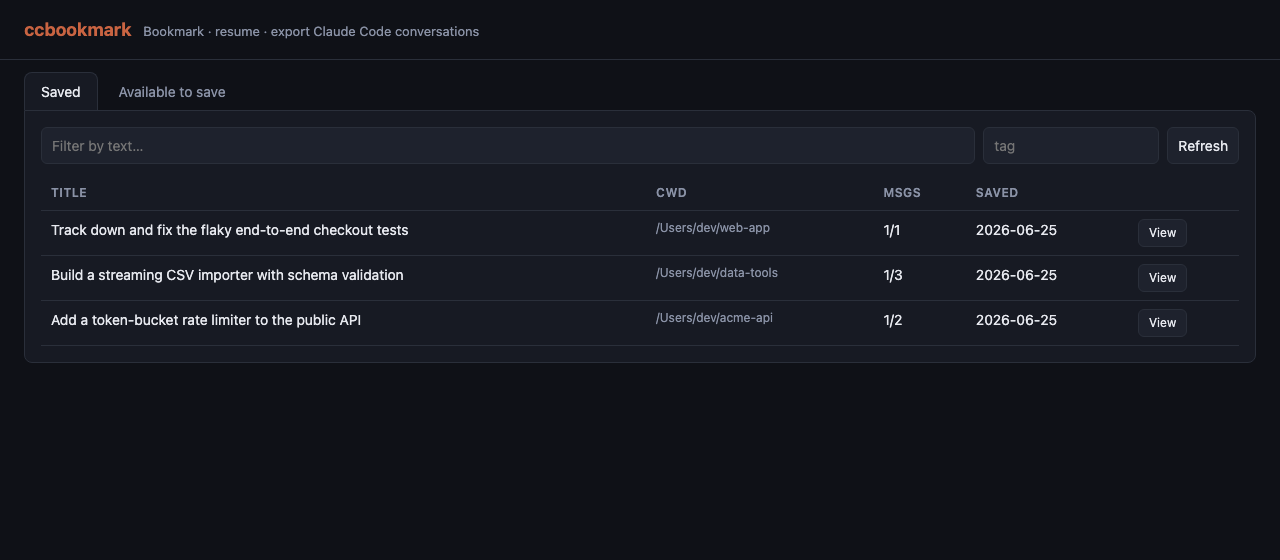
Web UI
uv run ccbookmark-web # http://127.0.0.1:8765
A single‑page UI (no build step) with two tabs:
- Saved — browse/search your bookmarks; click a row for a detail drawer with
the summary, files, and metadata, plus Restore, Export to project…, and
Delete. Restore/Export show the exact
claude --resumecommand (click to copy). - Available to save — lists live Claude Code sessions (across all projects, or
filtered by
cwd) with one‑click Save.
Override the bind address with CCBOOKMARK_HOST / CCBOOKMARK_PORT.
Use it from inside Claude Code (MCP)
Register the MCP server, then ask Claude things like "bookmark this conversation" or "list my bookmarked conversations":
# run from your clone of this repo
claude mcp add --scope user ccbookmark -- uv run --directory "$(pwd)" ccbookmark-mcp
Tools exposed: save_conversation, list_saved, show_conversation,
restore_conversation, export_conversation, delete_saved.
An MCP server can't reliably know the current session id, so
save_conversationdefaults to the most recently modified session in the givencwd. Pass an explicitsession_idto be certain.
Architecture
cli.py / mcp_server.py / web.py   thin interfaces (CLI · MCP · FastAPI + static UI)
            |
          core.py            save / list / list_live / show / restore / export / delete
           /    \
      store.py   parser.py   SQLite index   |   stream-parse JSONL -> SessionMeta
            \    /
           paths.py          path<->project-dir encoding, locate session files
All three interfaces are thin wrappers over one engine (core.py), so they stay
in lockstep.
How it compares
| Tool | Bookmark/curate | Resume | Export to other project | Web UI | MCP server |
|---|---|---|---|---|---|
| ccbookmark | ✅ | ✅ | ✅ | ✅ | ✅ |
Claude Code (native --resume//export) |
– | ✅ (same project) | – | – | – |
| claude-session-restore | – | ✅ | – | – | ✅ |
| claude-vault | ✅ | – | – | – | – |
| claude-code-viewer | – | ✅ | – | ✅ | – |
Resume‑by‑id, viewers, and history‑search MCP servers are well covered elsewhere;
the curated, cross‑project‑exportable library over CLI + MCP + web is what
ccbookmark adds.
Notes / limitations
- Restore only copies the JSONL back if it's missing; it never overwrites a live session.
- Export rewrites the top‑level
cwd(andsessionIdwith--new-id) and, by default, any embedded file path under the original cwd — so file references follow the conversation to the new project. Pass--no-rewrite-pathsto keep the original absolute paths. Content that merely mentions a path (not a path value) is left untouched.
Development
uv run pytest
uv run ruff check . && uv run ruff format --check .
uv run pyright
License
MIT © Kilian Cañizares Mata
Установка Ccbookmark
У этого сервера нет опубликованного пакета — он собирается из исходников. Открой репозиторий и следуй инструкции в README.
▸ github.com/kiliancm94/ccbookmarkFAQ
Ccbookmark MCP бесплатный?
Да, Ccbookmark MCP бесплатный — установка в пару кликов через Unyly без оплаты.
Нужен ли API-ключ для Ccbookmark?
Нет, Ccbookmark работает без API-ключей и переменных окружения.
Ccbookmark — hosted или self-hosted?
Self-hosted: сервер запускается локально на твоей машине командой из раздела установки.
Как установить Ccbookmark в Claude Desktop, Claude Code или Cursor?
Открой Ccbookmark на unyly.org, выбери вкладку своего клиента (Claude Desktop, Claude Code, Cursor) и нажми Install — конфиг сгенерируется автоматически, без правки JSON.
Похожие MCP
GitHub
PRs, issues, code search, CI status
 автор: GitHub
Filesystem
Secure file operations with configurable access controls.
Memory
Knowledge graph-based persistent memory system.
Template MCP Server
A CLI tool to create a new Model Context Protocol server project with TypeScript support, dual transport options, and an extensible structure
 автор: mcpdotdirect
Amap Maps Mcp Server
MCP server for using the AMap Maps API
 автор: duxiaohui
Supabase
Database, auth and storage
 автор: Supabase
Everything
Reference / test server with prompts, resources, and tools.
Git
Tools to read, search, and manipulate Git repositories.
Sequential Thinking
Dynamic and reflective problem-solving through thought sequences.
Time
Time and timezone conversion capabilities.
Compare Ccbookmark with
Не уверен что выбрать?
Найди свой стек за 60 секунд
Автор?
Embed-бейдж для README
Похожее
Все в категории development