
Central Server
БесплатноНе проверенEnables AI assistants to query HPE Aruba Networking Central data (sites, devices, clients, alerts, events) through natural language.

Описание
Enables AI assistants to query HPE Aruba Networking Central data (sites, devices, clients, alerts, events) through natural language.
README


Community MCP server for HPE Aruba Networking Central. This exposes your Central data as tools that AI assistants can query directly.
[!WARNING] Unofficial Community Project
This is not an officially supported product of HPE. It is provided as-is, with no warranty or guarantee of fitness for any purpose.
- Review your organization's corporate device and data policies before connecting this server to any AI assistant.
- Never share credentials (API secrets, API keys) with AI model providers unless your security policy explicitly permits it.
- All read operations query live data from your HPE Aruba Networking Central instance. Recommended to test MCP server use in non-production or lab environments where possible before running on production.
Table of Contents
Overview
central-mcp-server wraps Central REST APIs and exposes them as MCP (Model Context Protocol) tools — 25 MCP tools spanning 85+ distinct Central REST API endpoints. Once configured, AI assistants like Claude or GitHub Copilot can answer questions like:
- "Which sites have poor health scores right now?"
- "Show me all failed wireless clients at HQ in the last 24 hours."
- "Show me all online access points at the Chicago office."
- "What events happened on switch SW-CORE-01 yesterday?"
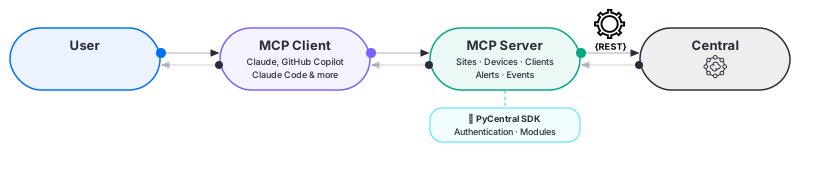
See the full overview guide for a deeper look at capabilities, limitations, and how the server works.
Getting Started
Getting Your Credentials
You need three values to connect this server to Central's REST APIs: CENTRAL_BASE_URL, CENTRAL_CLIENT_ID, and CENTRAL_CLIENT_SECRET.
API Gateway Base URL (CENTRAL_BASE_URL)
The API gateway base URL for your Central account (e.g. https://us5.api.central.arubanetworks.com).
For instructions on how to locate your base URL, see Finding Your Base URL in Central.
API Client Credentials (CENTRAL_CLIENT_ID & CENTRAL_CLIENT_SECRET)
OAuth credentials created through the HPE GreenLake Platform:
- Log in to your HPE GreenLake account and open Manage Workspace.
- Click Personal API clients.
- Click Create Personal API client.
- Give it a nickname (e.g.
central-mcp-server) and select your HPE Aruba Networking Central instance from the service dropdown. - Click Create personal API client.
- Copy both the Client ID and Client Secret immediately. The platform does not store the secret and it cannot be retrieved later.
Full guide: Generating and Managing Access Tokens
Installation
Install uv if you haven't already. It's the only prerequisite.
Using an MCP client (Claude Desktop, Claude Code, GitHub Copilot)?
No install command needed. Jump to MCP Client Configuration, the client fetches and runs the server automatically via uvx.
Want the server as a persistent CLI tool on your PATH?
uv tool install --prerelease=allow central-mcp-server
--prerelease=allowis required because this server depends onpycentral, which currently only has a pre-release version on PyPI. uv skips pre-releases by default.
See the full setup guide for prerequisites, troubleshooting, and step-by-step instructions.
MCP Client Configuration
Replace the placeholder values with your actual credentials in all examples below.
Optional: Code Mode Transform (DYNAMIC_TOOLS)
DYNAMIC_TOOLS is optional and only affects startup behavior:
- Code Mode is enabled only when
DYNAMIC_TOOLSis set totrue(case-insensitive). - Code Mode is disabled when
DYNAMIC_TOOLSis not set or set to any other value. - Variable name is strict: use
DYNAMIC_TOOLS(plural).DYNAMIC_TOOLis ignored.
When enabled, the server starts with CodeMode() and exposes Code Mode meta-tools to the client. When disabled, the server runs without the transform and exposes the normal registered tool catalog directly. Recommended to use CodeMode() when you have multiple MCP servers running to preserve your context window.
Claude Desktop
Add to ~/Library/Application Support/Claude/claude_desktop_config.json (macOS) or %APPDATA%\Claude\claude_desktop_config.json (Windows):
{
  "mcpServers": {
    "central-mcp": {
      "command": "uvx",
      "args": ["--prerelease=allow", "central-mcp-server"],
      "env": {
        "CENTRAL_BASE_URL": "your-central-base-url",
        "CENTRAL_CLIENT_ID": "your-client-id",
        "CENTRAL_CLIENT_SECRET": "your-client-secret"
      }
    }
  }
}
See the Claude Desktop setup guide for full steps and troubleshooting.
Claude Code
claude mcp add central-mcp \
  -e CENTRAL_BASE_URL=your-central-base-url \
  -e CENTRAL_CLIENT_ID=your-client-id \
  -e CENTRAL_CLIENT_SECRET=your-client-secret \
  -- uvx --prerelease=allow central-mcp-server
See the Claude Code setup guide for full steps and troubleshooting.
GitHub Copilot (VS Code)
Add .vscode/mcp.json to your workspace root and add that path to .gitignore to keep credentials out of version control:
{
  "servers": {
    "central-mcp": {
      "type": "stdio",
      "command": "uvx",
      "args": ["--prerelease=allow", "central-mcp-server"],
      "env": {
        "CENTRAL_BASE_URL": "your-central-base-url",
        "CENTRAL_CLIENT_ID": "your-client-id",
        "CENTRAL_CLIENT_SECRET": "your-client-secret"
      }
    }
  }
}
Add to .gitignore:
.vscode/mcp.json
See the GitHub CoPilot setup guide for full steps and troubleshooting.
HTTP Transport (Streamable HTTP)
By default the server runs over stdio, which is the right choice for most MCP clients. If you need to run the server as a persistent HTTP process — for example, to share it across multiple clients or to connect via a remote URL — you can switch to the streamable-http transport.
Step 1 — Install the server as a CLI tool (if you haven't already):
uv tool install --prerelease=allow central-mcp-server
--prerelease=allowis required because this server depends onpycentral, which currently only has a pre-release version on PyPI.
Step 2 — Create a .env file in your working directory with your credentials and transport settings:
CENTRAL_BASE_URL=your-central-base-url
CENTRAL_CLIENT_ID=your-client-id
CENTRAL_CLIENT_SECRET=your-client-secret
MCP_TRANSPORT=http
MCP_HOST=127.0.0.1
MCP_PORT=8000
| Variable | Default | Description |
|---|---|---|
MCP_TRANSPORT |
stdio |
Transport mode: stdio or http |
MCP_HOST |
127.0.0.1 |
Host to bind when using HTTP transport |
MCP_PORT |
8000 |
Port to listen on when using HTTP transport |
Step 3 — Start the server:
# If installed via uv tool install:
central-mcp-server

# If running from source:
python server.py
The MCP endpoint will be available at http://<MCP_HOST>:<MCP_PORT>/mcp.
Step 4 — Connect your MCP client to the running server:
claude mcp add central-mcp --transport http --url http://127.0.0.1:8000/mcp
Or add it to your MCP client config:
{
  "mcpServers": {
    "central-mcp": {
      "type": "http",
      "url": "http://127.0.0.1:8000/mcp"
    }
  }
}
Note: Credentials must be set in the server's environment (via
.envor OS env vars) before starting it. They are not passed through the HTTP client config.
What You Can Ask
Once connected, you can ask your AI assistant questions like:
- "Give me a health overview of all sites."
- "Which sites are in poor health right now?"
- "Show me all access points at the Chicago office."
- "List the switches in the London campus and show CPU and PoE trends for SG34L5002Y."
- "How healthy is the BLR gateway cluster, and what's its client capacity trend?"
- "What critical alerts are active across the network?"
- "Find all failed wireless clients at HQ in the last 24 hours."
- "What events happened on switch SW-CORE-01 yesterday?"
- "Ping 8.8.8.8 from switch SW-CORE-01."
- "Run 'show version' and 'show interfaces brief' on switch SG43KN5017."
- "Bounce PoE on port 1/1/6 of switch SG43KN5017."
See Central MCP Server in Action for real query examples across all supported clients.
Example Queries
New to driving an AI assistant over your network? See What You Can Ask — a guided tour of real questions across every tool category (site health, devices, APs, switches, gateways, WLANs, clients, alerts, events, and live diagnostics), each shown with the answer it returns and a list of related questions to try.
Tool Categories
%%{init: {'theme':'base', 'themeVariables': {'background': '#0b0f1a'}}}%%
graph TD
    MCP["Central MCP Server"] --> Sites["Sites"]
    MCP --> Devices["Device Inventory"]
    MCP --> Clients["Clients"]
    MCP --> Alerts["Alerts"]
    MCP --> Events["Events"]
    MCP --> DevMon["Device Monitoring"]
    MCP --> WLAN["WLAN"]
    MCP --> Troubleshooting["Troubleshooting"]

    classDef mcp fill:#05cc93,color:#001b14,stroke:#000000,stroke-width:2px;
    classDef tool fill:#0070f8,color:#ffffff,stroke:#000000,stroke-width:1.5px;

    class MCP mcp;
    class Sites,Devices,DevMon,Clients,Alerts,Events,WLAN,Troubleshooting tool;

    linkStyle default stroke:#ffffff,stroke-width:2px;
Tools
These 25 tools reach 85+ distinct Central REST API endpoints — a single tool such as central_get_switch_details fans out to as many as 9 endpoints via its include parameter.
Sites
| Tool | Description |
|---|---|
central_get_sites |
Detailed health metrics for one or more sites (device/client/alert counts, health score) |
central_get_summary |
Lightweight mapping of all site names to IDs and health scores |
Devices
| Tool | Description |
|---|---|
central_get_devices |
Filtered list of devices — filter by type, site, model, serial number, and more |
central_find_device |
Look up a single device by serial number or device name |
AP Monitoring
| Tool | Description |
|---|---|
central_get_aps |
Filtered list of access points — filter by site, serial number, status, model, firmware version, deployment, or cluster |
central_get_ap_details |
Detailed snapshot for a single AP by serial number; optionally embed richer radio (RF health) and uplink-port data via include. |
central_get_ap_trends |
Time-series trends for an AP, a radio (radio_number), or an uplink port (port_index) over a time window — CPU/memory/power/throughput, RF channel/noise, port errors. |
Switch Monitoring
| Tool | Description |
|---|---|
central_get_switches |
Filtered list of switches — filter by site, model, status (title-case Online/Offline), or deployment (Standalone/Stack/VSX); each item embeds a current hardware-trend snapshot. |
central_get_switch_details |
Detailed snapshot for a single switch (or stack conductor) by serial number; optionally add interfaces, VLANs, PoE, LAG, VSX, stack members, and hardware health via include. |
central_get_switch_trends |
Time-series trends for a switch at hardware scope (CPU/memory/temperature/PoE/power) or interface scope (throughput/error counters) over a time window — all metrics returned per sample. |
Gateway Monitoring
| Tool | Description |
|---|---|
central_get_gateways |
Filtered list of gateways — filter by site, serial number, device name, model, status (title-case Online/Offline), or cluster name. |
central_get_gateway_details |
Detailed snapshot for a single gateway by serial number; optionally add ports, tunnels, uplinks, and VLANs via include. |
central_get_gateway_trends |
Time-series trends for a gateway, port (port_number), tunnel (tunnel_name), or uplink (link_tag) over a time window — CPU/memory/availability/temperature, throughput, errors. |
central_get_gateway_cluster |
Snapshot of a gateway cluster — members and per-member tunnel health; optionally add cluster tunnels, VLAN-mismatch summary, and connectivity graph via include. |
central_get_cluster_capacity_trends |
Capacity trend samples for a cluster — client and device (AP/switch) counts and percentages vs maximum capacity over a time window. |
WLAN
| Tool | Description |
|---|---|
central_get_wlans |
Configured WLANs (SSIDs) with optional filtering by WLAN name, site, and sort fields; filter by serial_number to list WLANs broadcast by a specific AP. |
central_get_wlan_stats |
Throughput trend samples (tx/rx bps) for a specific WLAN over a selected time window |
Clients
| Tool | Description |
|---|---|
central_get_clients |
Filtered list of clients — filter by connection type, status, VLAN, WLAN, and more |
central_find_client |
Look up a single client by MAC address |
Alerts
| Tool | Description |
|---|---|
central_get_alerts |
Active, cleared, or deferred alerts for a site — filter by device type or category |
Events
| Tool | Description |
|---|---|
central_get_events |
Events for a site, device, or client within a time window |
central_get_events_count |
Event count breakdown by type with response_mode="full" (counts) or response_mode="compact" (ranked event id/name pairs + lists) |
Troubleshooting
| Tool | Description |
|---|---|
central_run_network_test |
Run a live network diagnostic (ping, traceroute, http, https, tcp, nslookup) against a device — device family resolved automatically from serial number |
central_run_show_commands |
Execute show commands on a device; auto-validates against the device's supported command catalog and returns the catalog on any mismatch |
central_bounce_port |
Bounce ports or toggle PoE on CX/AOS-S switches and gateways — fetches live interface state and requires user confirmation before executing |
LLM Workflow for Events
Use this sequence for faster, lower-token event investigations:
- For site-level queries, call events tools with
site_idonly. - For device/client queries, pass
site_idpluscontext_typeandcontext_identifier. - Call
central_get_events_countwithresponse_mode="compact"to get rankedevent_names(each withevent_id+event_name),source_types, andcategories. - Pick the top category/source/event name as your likely starting point.
- Call
central_get_eventswith targeted filters (category,source_type, and/orevent_id) to fetch detailed records. - Use
central_get_events_countwithresponse_mode="full"only when exact per-item counts are required.
Guided Prompts
The server includes 12 built-in prompts to help AI assistants run common workflows:
| Prompt | Description |
|---|---|
network_health_overview |
Full network health overview across all sites |
troubleshoot_site |
Deep-dive troubleshooting for a specific site |
client_connectivity_check |
Investigate connectivity status for a client by MAC address |
investigate_device_events |
Review recent events for a specific device |
site_event_summary |
Summarize all events at a site within a time window |
failed_clients_investigation |
Find and diagnose all failed clients at a site |
site_client_overview |
Overview of client connectivity at a site |
device_type_health |
Health check for all devices of a specific type at a site |
top_event_drivers |
Identify dominant event drivers at a site and pull supporting evidence |
critical_alerts_review |
Review all active critical alerts across the network |
wlan_health_check |
Assess WLAN health using client failures and related events over a time window |
compare_site_health |
Compare health metrics side-by-side across multiple sites |
Dev Setup
git clone <Github Server URL>
cd central-mcp-server
Create and activate a virtual environment, then install dependencies:
python3 -m venv .venv
source .venv/bin/activate
uv sync
Create .env with your credentials:
CENTRAL_BASE_URL=your-central-base-url
CENTRAL_CLIENT_ID=your-client-id
CENTRAL_CLIENT_SECRET=your-client-secret
Run the server:
python3 server.py
To install and test the package locally before publishing:
uv tool install .
Установить Central Server в Claude Desktop, Claude Code, Cursor
unyly install central-mcp-serverСтавит в Claude Desktop, Claude Code, Cursor и VS Code — сам разбирается с npx, uvx и сборкой из исходников.
Впервые? Поставь CLI: curl -fsSL https://unyly.org/install | sh
Или настроить вручную
Выполни в терминале:
claude mcp add central-mcp-server -- uvx central-mcp-serverFAQ
Central Server MCP бесплатный?
Да, Central Server MCP бесплатный — установка в пару кликов через Unyly без оплаты.
Нужен ли API-ключ для Central Server?
Нет, Central Server работает без API-ключей и переменных окружения.
Central Server — hosted или self-hosted?
Доступен hosted-вариант: Unyly запускает сервер в облаке, локальная установка не обязательна.
Как установить Central Server в Claude Desktop, Claude Code или Cursor?
Открой Central Server на unyly.org, выбери вкладку своего клиента (Claude Desktop, Claude Code, Cursor) и нажми Install — конфиг сгенерируется автоматически, без правки JSON.
Похожие MCP
Fetch
Web content fetching and conversion for efficient LLM usage.
AWS KB Retrieval
Retrieval from AWS Knowledge Base using Bedrock Agent Runtime.
 автор: modelcontextprotocol
Spring AI MCP Server
Provides auto-configuration for setting up an MCP server in Spring Boot applications.
llm-analysis-assistant
A very streamlined mcp client that supports calling and monitoring stdio/sse/streamableHttp, and can also view request responses through the /logs page. It also
 автор: xuzexin-hz
Compare Central Server with
Не уверен что выбрать?
Найди свой стек за 60 секунд
Автор?
Embed-бейдж для README
Похожее
Все в категории ai