
Charles Server
БесплатноНе проверенIntegrates Charles Proxy with MCP clients to provide real-time and historical network traffic capture and structured analysis. It features a summary-first appro

Описание
Integrates Charles Proxy with MCP clients to provide real-time and historical network traffic capture and structured analysis. It features a summary-first approach that filters noise and desensitizes data for efficient, low-token agent debugging and monitoring.
README
Docs | Tool Contract | AGENTS | Agent Workflow Guide | English README
仓库维护公告(2026-04-21)
本仓库的公开 Git 历史已于 2026-04-21 重新整理。如果你在该日期之前克隆过本仓库,请在继续贡献前重新克隆。不要从旧的本地克隆直接合并或推送,否则可能会把过期历史重新引入仓库。
Charles MCP Server 用于把 Charles Proxy 接入 MCP 客户端,让 agent 可以稳定地读取实时流量、分析历史录包,并在需要时再展开单条请求细节。
它解决的核心问题只有三个:
- 录制还在进行时,agent 也能持续读取当前 session 的增量流量
- live 与 history 统一走结构化分析,不再让 agent 直接消费原始抓包字典
- 默认使用 summary-first 输出,先看热点与摘要,再 drill-down 到单条 detail
本次更新方向(v3.0)
v3.0 的更新方向是:charles-mcp 的能力开始从“流量查看/筛选”向“逆向工程工作流”延伸。
- 在保留原有 live/history 分析能力的基础上,新增 reverse-analysis 工具链(导入、查询、解码、回放、签名候选分析、live 逆向会话)。
- 目标是让 agent 不只看到流量,还能围绕认证、签名、参数变异与可重放性,形成更完整的逆向分析闭环。
快速开始
1. 开启 Charles Web Interface
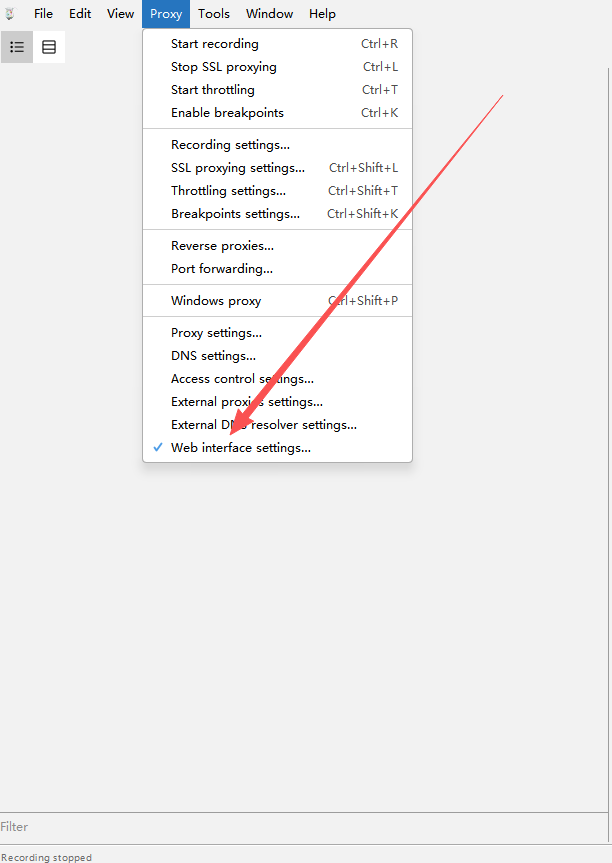
在 Charles 中依次进入:Proxy -> Web Interface Settings
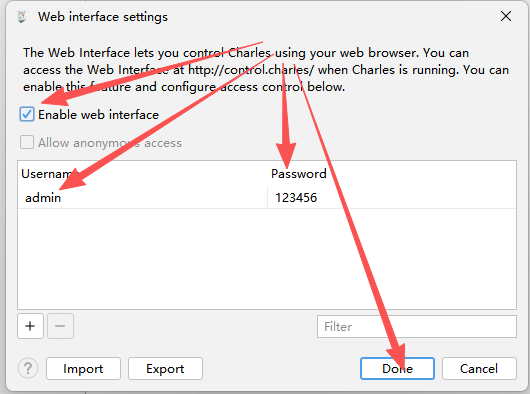
请确认:
- 勾选
Enable web interface - 用户名为
admin - 密码为
123456
菜单位置示意:
设置窗口示意:
2. 安装并配置到 MCP 客户端
无需 clone 仓库,无需手动创建虚拟环境。需要先安装 uv。
Claude Code CLI
claude mcp add-json charles '{
  "type": "stdio",
  "command": "uvx",
  "args": ["charles-mcp"],
  "env": {
    "CHARLES_USER": "admin",
    "CHARLES_PASS": "123456",
    "CHARLES_MANAGE_LIFECYCLE": "false"
  }
}'
Claude Desktop / Cursor / 通用 JSON 配置
{
  "mcpServers": {
    "charles": {
      "command": "uvx",
      "args": ["charles-mcp"],
      "env": {
        "CHARLES_USER": "admin",
        "CHARLES_PASS": "123456",
        "CHARLES_MANAGE_LIFECYCLE": "false"
      }
    }
  }
}
Codex CLI
[mcp_servers.charles]
command = "uvx"
args = ["charles-mcp"]

[mcp_servers.charles.env]
CHARLES_USER = "admin"
CHARLES_PASS = "123456"
CHARLES_MANAGE_LIFECYCLE = "false"
让 AI 自动安装
将以下提示词复制粘贴给任意 AI agent(Claude Code、ChatGPT、Gemini CLI、Cursor Agent 等),agent 会自动完成安装和配置:
🔴 点击展开自动安装提示词(推荐)
Install the "charles-mcp" MCP server and configure it for my MCP client. Follow these steps exactly:

Step 1 — Detect OS:
  Determine if this machine runs Windows, macOS, or Linux.

Step 2 — Ensure uv is installed:
  Run: uv --version
  If the command fails (uv not found):
    - macOS/Linux: run: curl -LsSf https://astral.sh/uv/install.sh | sh
    - Windows: run: powershell -ExecutionPolicy ByPass -c "irm https://astral.sh/uv/install.ps1 | iex"
  After installing, verify uv works: uv --version

Step 3 — Detect which MCP client is installed:
  Check in this order and use the FIRST match:

  a) Claude Code — run: claude --version
     If it succeeds, run this command and skip to Step 5:
       claude mcp add-json charles '{"type":"stdio","command":"uvx","args":["charles-mcp"],"env":{"CHARLES_USER":"admin","CHARLES_PASS":"123456","CHARLES_MANAGE_LIFECYCLE":"false"}}'

  b) Claude Desktop — check if config file exists:
     - macOS:   ~/Library/Application Support/Claude/claude_desktop_config.json
     - Windows: %APPDATA%\Claude\claude_desktop_config.json
     - Linux:   ~/.config/Claude/claude_desktop_config.json

  c) Cursor — check if any of these exist:
     - ~/.cursor/mcp.json
     - .cursor/mcp.json (in current project)

  d) Windsurf — check if exists:
     - ~/.codeium/windsurf/mcp_config.json

  If none detected, ask the user which client they use.

Step 4 — Write config (for clients b/c/d):
  The config entry to add is:
    "charles": {
      "command": "uvx",
      "args": ["charles-mcp"],
      "env": {
        "CHARLES_USER": "admin",
        "CHARLES_PASS": "123456",
        "CHARLES_MANAGE_LIFECYCLE": "false"
      }
    }

  IMPORTANT: If the config file already exists, read it first, parse the JSON,
  add the "charles" key inside "mcpServers" (create "mcpServers" if absent),
  and write back. Do NOT overwrite other existing MCP server entries.
  If the file does not exist, create it with:
    { "mcpServers": { "charles": { ... } } }

Step 5 — Verify:
  Run: uvx charles-mcp
  Wait 3 seconds then terminate the process.
  If it starts without import errors, the installation is successful.

Step 6 — Report:
  Print: "charles-mcp installed successfully. Please restart your MCP client to load the new server."
  Also mention that Charles Proxy must be running with Web Interface enabled (Proxy → Web Interface Settings, username: admin, password: 123456).
前置条件
- Python 3.10+
- 本机已启动 Charles Proxy
- Charles Web Interface 已启用
- Charles 代理默认监听
127.0.0.1:8888
推荐默认保持 CHARLES_MANAGE_LIFECYCLE=false。除非你明确希望 MCP server 接管 Charles 生命周期,否则不要让它在退出时关闭你的 Charles 进程。
环境变量
| 变量 | 默认值 | 说明 |
|---|---|---|
CHARLES_USER |
admin |
Charles Web Interface 用户名 |
CHARLES_PASS |
123456 |
Charles Web Interface 密码 |
CHARLES_PROXY_HOST |
127.0.0.1 |
Charles 代理主机 |
CHARLES_PROXY_PORT |
8888 |
Charles 代理端口 |
CHARLES_CONFIG_PATH |
自动探测 | Charles 配置文件路径 |
CHARLES_REQUEST_TIMEOUT |
10 |
控制面 HTTP 超时秒数 |
CHARLES_MAX_STOPTIME |
3600 |
有界录制最大时长 |
CHARLES_MANAGE_LIFECYCLE |
false |
是否由 MCP server 管理 Charles 启停 |
CHARLES_REVERSE_STATE_DIR |
${CHARLES_STATE_DIR}/reverse |
reverse-analysis 的 SQLite 与工件状态目录 |
CHARLES_VNEXT_STATE_DIR |
旧变量 | 旧版 reverse-analysis 状态目录。主 charles-mcp 首次启动时会自动迁移到 CHARLES_REVERSE_STATE_DIR |
推荐使用路径
实时分析
start_live_capturegroup_capture_analysisquery_live_capture_entriesget_traffic_entry_detailstop_live_capture
这条路径的目标是先用最少 token 找到热点,再按需展开单条请求。
历史分析
list_recordingsanalyze_recorded_trafficgroup_capture_analysis(source="history")get_traffic_entry_detail
这条路径适合先浏览录包,再对结构化 summary 做筛选和 drill-down。
当前版本重点变化(v3.0.3)
- 默认公开工具面已收紧为 canonical 31 个工具;legacy aliases(
filter_func、proxy_by_time、list_sessions)不再默认暴露。 - 新增显式兼容开关:
create_server(expose_legacy_tools=True)或环境变量CHARLES_EXPOSE_LEGACY_TOOLS=true可启用 legacy 兼容层。 - 文档入口收口到
docs/README.md,并新增docs/migrations/legacy-tools.md作为 legacy 迁移权威说明。 - 新增 Agent 执行规范文档:仓库根目录增加
AGENTS.md,并新增docs/agent-workflows.md作为任务化调用手册。 - README 与
docs/contracts/tools.md增加 Agent 文档入口,统一使用仓库相对路径,便于跨环境查看。 - 高频入口工具描述已补齐最小必要语义(identity 保留、summary-first、peek/read 差异),并新增契约测试避免文档与工具描述漂移。
- 功能方向开始向逆向工程发展:引入 reverse-analysis 工具面,覆盖导入、解码、回放、签名候选发现与 live 逆向分析工作流。
read_live_capture与peek_live_capture现在只返回路由级摘要字段,例如host、method、path、status,不再直接抛出完整原始 Charles entry,避免在实时轮询时快速打满上下文。query_live_capture_entries改为只读分析入口,不会推进 live cursor。你可以基于同一个capture_id反复换过滤条件查询,而不会把历史增量“消费掉”。analyze_recorded_traffic和query_live_capture_entries的 summary 项会显式返回matched_fields与match_reasons,便于 agent 解释“为什么这条流量被选中”。get_traffic_entry_detail默认include_full_body=false、max_body_chars=2048。如果 detail 估算输出超过约 12,000 字符,会在warnings中提示缩小范围或关闭 full body。- detail / summary 输出会自动剥离
null值,并隐藏header_map、parsed_json、parsed_form、lower_name等内部字段;需要查看头信息时请使用headers列表。
工具总览
README 只覆盖推荐使用的主流程工具。兼容保留入口不在本文档中展开。
Live capture tools
| 工具 | 作用 | 何时使用 |
|---|---|---|
start_live_capture |
启动或接管当前 live capture,并返回 capture_id;默认 adopt_existing=true、reset_session=false,不会清空 Charles 当前已抓到的流量 |
开始实时观察前 |
read_live_capture |
按 cursor 增量读取 live capture,并只返回紧凑路由摘要 | 连续消费新增流量、只想先看 host/path/status 时 |
peek_live_capture |
预览新增流量但不推进 cursor,并只返回紧凑路由摘要 | 想先看一眼而不改变读取进度时 |
stop_live_capture |
结束 capture,并在需要时持久化快照 | 收尾或导出本次实时抓包时 |
query_live_capture_entries |
对 live capture 输出结构化 summary,且不推进 cursor;支持 since_seconds=N 只看最近 N 秒内的流量 |
想从实时流量里反复筛关键请求时 |
Analysis tools
| 工具 | 作用 | 何时使用 |
|---|---|---|
group_capture_analysis |
对 live 或 history 结果聚合分组 | 先看热点 host、path、status 时 |
get_capture_analysis_stats |
返回分类统计结果 | 想快速知道 API、静态资源、错误流量占比时 |
get_traffic_entry_detail |
读取单条 entry 的 detail,并在响应过大时给出 warnings | 已经拿到目标 entry_id,准备 drill-down 时 |
analyze_recorded_traffic |
对指定录包或最新录包输出结构化 summary,并附带匹配原因 | 想分析历史 .chlsj 时 |
History tools
| 工具 | 作用 | 何时使用 |
|---|---|---|
list_recordings |
列出当前已保存的录包文件 | 想先知道有哪些历史录包时 |
get_recording_snapshot |
读取某个录包的原始快照 | 需要完整查看某个保存快照时 |
query_recorded_traffic |
直接对最新录包做轻量过滤 | 需要快速查找 host、method、regex 命中时 |
Status and control tools
| 工具 | 作用 | 何时使用 |
|---|---|---|
charles_status |
查看 Charles 连接状态与当前 live capture 状态 | 怀疑连接异常或想确认 capture 是否仍在活动时 |
throttling |
设置 Charles 弱网预设 | 需要模拟 3G / 4G / 5G / off 等网络条件时 |
reset_environment |
恢复 Charles 配置并清理当前环境 | 需要回到干净环境时 |
Reverse analysis tools
| 工具 | 作用 | 何时使用 |
|---|---|---|
reverse_import_session |
将官方 Charles XML / native session 导入 canonical reverse store | 想从已导出的 Charles 会话开始回放、解码或签名分析时 |
reverse_list_captures |
列出已导入的 reverse-analysis capture | 想选择已落库的 reverse 数据集时 |
reverse_query_entries |
通过路由字段过滤已导入的 reverse entry | 想先缩小候选请求范围再看 detail / replay 时 |
reverse_get_entry_detail |
返回单条已导入 reverse entry 的 canonical detail | 想深挖某一条基线请求时 |
reverse_decode_entry_body |
解码已存储的 request / response body,支持 descriptor 驱动的 protobuf | 想拿到结构化 payload 视图时 |
reverse_replay_entry |
对单条已导入请求做 replay,可附带变异参数 | 想验证请求可重放性或参数敏感性时 |
reverse_discover_signature_candidates |
对多条已导入请求做对比并给出疑似签名字段排名 | 想定位动态 auth / sign 参数时 |
reverse_list_findings |
查看已持久化的 replay / signature finding | 想回看已有逆向证据时 |
reverse_charles_recording_status |
返回 Charles 当前录制状态和 reverse live session 状态 | 想确认 reverse live 分析是否已就绪时 |
reverse_start_live_analysis |
启动 reverse live session,并通过官方导出页面抓取当前 Charles session | 想持续追踪新产生的逆向目标流量时 |
reverse_peek_live_entries |
读取新的 reverse live entry,但不推进 reverse cursor | 想预览新增流量而不消费状态时 |
reverse_read_live_entries |
读取并消费新的 reverse live entry | 想推进 reverse live 分析进度时 |
reverse_stop_live_analysis |
停止 reverse live session,并按需恢复 Charles 录制状态 | 想干净收尾 reverse live 分析时 |
reverse_analyze_live_login_flow |
对新增 live 流量做登录 / 鉴权相关打分并给出后续动作建议 | 想分析登录、拿 token、建立 session 的流程时 |
reverse_analyze_live_api_flow |
对新增 live 流量做 API 工作流打分并给出后续动作建议 | 想分析业务 API 请求链路时 |
reverse_analyze_live_signature_flow |
聚焦签名敏感请求,并生成更偏向变异实验的建议 | 想分析 sign、nonce、timestamp 等保护机制时 |
关键使用约定
1. 默认返回原始数据
所有工具默认返回完整原始内容,不做脱敏处理。如果上层需要 masking,应由 MCP 客户端或 agent 自行处理。
2. 先 summary,再 detail
推荐先用 group_capture_analysis、query_live_capture_entries 或 analyze_recorded_traffic 确认目标,再调用 get_traffic_entry_detail。
默认不要一开始就请求 include_full_body=true。
3. 输出已针对 token 预算优化
所有 summary 和 detail 输出都经过了序列化瘦身:
header_map、parsed_json、parsed_form、lower_name等内部字段不再出现在输出中- 值为
null的字段在序列化时自动剥离 - detail 视图中
full_text存在时,冗余的preview_text会被移除
默认参数已调低以保护上下文窗口:
| 参数 | 旧默认 | 新默认 |
|---|---|---|
max_items |
20 | 10 |
max_preview_chars |
256 | 128 |
max_headers_per_side |
8 | 6 |
max_body_chars |
4096 | 2048 |
如需更大范围查看,仍可手动传入更高的值。
4. history detail 需要稳定 source identity
history summary 会返回 recording_path,live summary 会返回 capture_id。
对 get_traffic_entry_detail:
- history 场景优先传
recording_path - live 场景优先传
capture_id
5. stop_live_capture 的失败是可恢复的
stop_live_capture 有两个稳定结束态:
status="stopped":真正关闭完成status="stop_failed":短重试后仍失败,但 capture 仍保留
当返回 stop_failed 时,应同时关注:
recoverableactive_capture_preserved
如果结果是:
{
  "status": "stop_failed",
  "recoverable": true,
  "active_capture_preserved": true
}
说明当前 capture 仍然可继续读取、诊断、再次 stop,而不是已经被关闭。
开发
CI 会强制 ruff / mypy / pytest 三件套通过后才允许合入。本地建议同步跑:
python -m ruff check charles_mcp tests
python -m mypy charles_mcp
python -m pytest -q
常用本地启动:
python charles-mcp-server.py
python -c "from charles_mcp.main import main; main()"
更新日志
2026-06-23 (main, 未发版)
本次迭代聚焦"agent 默认行为更安全 / 重复轮询更省 / 历史代码可维护"三个方向。
- 修复 agent 误清空 Charles 流量:
start_live_capture的默认参数由reset_session=true改为adopt_existing=true / reset_session=false / start_recording_if_stopped=true。默认行为现在是接管用户当前 session(不清空),并确保 Charles 在录制。想要清空再开始时仍可显式传reset_session=true。 - 引导 agent 优先使用 live 平面:
start_live_capture/query_live_capture_entries描述新增"实时流量首选入口"语义;list_recordings/query_recorded_traffic/analyze_recorded_traffic/get_recording_snapshot显式标注为 history-plane opt-in,仅在用户明确提到.chlsj时使用。charles_status输出新增recommended_next_action字段,根据连通性与活动 capture 状态给出下一步建议。 query_live_capture_entries新增since_seconds参数:传since_seconds=N即可只看最近 N 秒内的流量,无需手动维护 cursor。- reverse SQLite 启用 WAL + 复合索引:写入不再阻塞读取;
list_entries在WHERE capture_id=? ORDER BY sequence_no与status_in / UPPER(method) IN ...等组合下走专用复合索引,不再使用临时 B-tree 排序。 - live 轮询 normalize/classify 差分缓存:基于 raw entry 稳定 hash 的 entry 级缓存让重复
query_live_capture_entries调用对未变化的流量跳过classify_entry+normalize_entry。 - reverse workflow_service 拆分:1052 行单文件拆为
workflows/包,含_BaseLiveWorkflow基类与LoginWorkflow/ApiWorkflow/SignatureWorkflow三个策略类;WorkflowService类签名与公开 API 完全不变。 - CI 升级为三件套强制:新增
lintjob 跑ruff check+mypy charles_mcp,与既有test矩阵并行;任一失败阻塞合入。Ruff 规则集精简为 E/F/W/I/N/UP(去掉低信号的 D 系列与 E501),现存 757 个 ruff 噪音与 13 个 mypy 错误已全部清零。 - PR 模板:新增
.github/pull_request_template.md。
2026-04-21 (v3.0.3)
- 完成公开仓库历史整理,为整改后的公开历史发布做准备。
2026-04-15 (v3.0.2)
- 默认公开工具面收紧为 canonical 31 个工具,legacy aliases 改为显式兼容层(默认不公开)。
- 新增兼容开关:
expose_legacy_tools参数与CHARLES_EXPOSE_LEGACY_TOOLS环境变量(参数优先级高于环境变量)。 - 新增 docs hub(
docs/README.md)与 legacy 迁移文档(docs/migrations/legacy-tools.md),并统一入口导航。 docs/contracts/tools.md明确 canonical public surface,并新增稳定可解析的 JSON 区域用于测试对齐。
2026-04-14 (v3.0.1)
- 接入并发布 Agent 执行规范文档:新增仓库根目录
AGENTS.md与docs/agent-workflows.md。 - 在
README与docs/contracts/tools.md增加 Agent 文档入口链接,统一使用仓库相对路径。 - 同步高频入口工具最小提示语,并新增文档/工具语义契约测试,确保规则持续与 MCP 描述保持一致。
2026-04-14 (v3.0.0)
- 引入 reverse-analysis 主工具面,覆盖导入、查询、解码、回放、签名候选发现与 live 逆向分析流程,能力边界从“流量查看”扩展到“逆向工作流”。
- 升级 live/history 的结构化分析路径:
query_live_capture_entries保持只读、summary 增加匹配原因、detail 输出默认更轻量并在大响应时给出预警。 - 对外文档更新为
v3.0语义:README 新版特性区块显式标注版本号,并同步中英文说明。
2026-04-13 (v2.0.2)
- 新增基于 Trusted Publisher(OIDC)的 GitHub Actions 自动发版流程,可在正式 GitHub Release 发布后自动同步到 PyPI。
- 增加发版保护:校验 Release tag 与项目版本一致,并执行
twine check --strict。 - 补齐仓库可见性与发版元数据,确保 GitHub Release 与 PyPI 发布链路保持一致。
2026-03-27 (v2.0.1)
- 限制历史录包路径读取:历史快照相关入口现在只允许访问受管目录中的
.chlsj文件,避免通过工具接口读取任意本地 JSON 文件 - 修复 live 扫描窗口:
query_live_capture_entries与相关 live 分析路径现在真正遵循scan_limit,不再静默只扫描一个很小的固定窗口 - 修复 body 过滤漏报:
request_body_contains与response_body_contains不再只匹配截断后的 preview 文本,能正确覆盖更完整的请求与响应体 - 调整运行时数据目录:安装环境默认改用用户状态目录保存快照与备份,避免把运行时数据写进包安装目录
- 发布
2.0.1:同步了以上修复,并已更新 GitHub 与 PyPI 版本
2026-03-13 (v2)
- 修复
lower_name校验崩溃:HeaderKV.lower_name添加默认值与自动计算 validator,解决get_traffic_entry_detail输出校验报错'lower_name' is a required property导致工具完全不可用的问题 - 修复游标逻辑陷阱:
query_live_capture_entries改为只读分析(不再推进内部 cursor),避免 agent 反复调用后历史数据被"消费"、始终返回空列表的问题 - 防止 Context 爆炸:
read_live_capture和peek_live_capture返回前自动将原始 entry 压缩为路由摘要(host/method/path/status),不再把完整 HTTP 请求/响应原文直接抛给大模型 - 打破 Agent 死循环:以上三个修复共同消除了 agent 在实时分析时因 detail 崩溃 → 回退查询 → 游标已过无数据 → 不断重试的死循环模式
- 改善工具描述:所有 live/history 工具补充了使用指引、副作用说明和推荐调用路径
2026-03-13
- Token 预算优化:序列化输出瘦身约 50%,解决多次
get_traffic_entry_detail后触发 Context limit reached 的问题header_map、parsed_json、parsed_form、lower_name标记为内部字段,不再出现在工具输出中TrafficQueryResult和TrafficDetailResult自动剥离null值- detail 视图中
full_text存在时自动去除冗余的preview_text
- 降低默认参数:
max_items20→10、max_preview_chars256→128、max_headers_per_side8→6、max_body_chars4096→2048 - 大响应预警:
get_traffic_entry_detail输出超过 12,000 字符时,在warnings中提示 agent 缩小请求范围
2026-03-11
- 移除已废弃的 redaction 体系:删除
include_sensitive参数和全部redactions_applied/redacted/sensitive_included字段,减少工具签名噪音 - 修复
errors_only预设语义:该预设现在会自动注入has_error=True,只返回真正出错的流量 - HTTP 连接复用:
LiveCaptureService在 start → read → stop 全生命周期复用同一 HTTP 连接,减少高频轮询时的 TCP 开销 - entry_id 计算轻量化:从 JSON 全序列化改为管道拼接关键字段后 SHA1,避免对大 body 做不必要的序列化
另见
来源说明
本项目最初受到 tianhetonghua/Charles-mcp-server 的启发,由于该项目使用体验较差,此后代码库已进行了大幅重写与重组,面向不同的架构和使用场景,并由当前维护者独立持续维护。
前作核心能力是围绕缓存展开;而本项目的目标是让通用 AI agent 在 Claude Code、Codex、Cursor 等 MCP 客户端里,稳定、低 token、可重复地分析实时流量和历史录包。
后续实现主要围绕这些差异化目标展开:
- 统一 live capture 与 history analysis 的工具语义,而不是让 agent 在“收割”“过滤”“录包”之间切换不同心智模型
- 默认走 summary-first、detail-on-demand,避免 agent 一上来就消费大块原始抓包,导致上下文快速爆掉
- 提供稳定的
capture_id、cursor、recording_path语义,让 agent 可以反复查询而不会把实时数据“读没了” - 提供更严格的工具契约、错误边界和可恢复行为,适配 AI Agent 生态对协议一致性和自动化稳定性的要求
前作提供了起点,而这个仓库则是在不同目标下逐步演进出的独立实现。
Установить Charles Server в Claude Desktop, Claude Code, Cursor
unyly install charles-mcp-serverСтавит в Claude Desktop, Claude Code, Cursor и VS Code — сам разбирается с npx, uvx и сборкой из исходников.
Впервые? Поставь CLI: curl -fsSL https://unyly.org/install | sh
Или настроить вручную
Выполни в терминале:
claude mcp add charles-mcp-server -- uvx charles-mcpПошаговые гайды: как установить Charles Server
FAQ
Charles Server MCP бесплатный?
Да, Charles Server MCP бесплатный — установка в пару кликов через Unyly без оплаты.
Нужен ли API-ключ для Charles Server?
Нет, Charles Server работает без API-ключей и переменных окружения.
Charles Server — hosted или self-hosted?
Self-hosted: сервер запускается локально на твоей машине командой из раздела установки.
Как установить Charles Server в Claude Desktop, Claude Code или Cursor?
Открой Charles Server на unyly.org, выбери вкладку своего клиента (Claude Desktop, Claude Code, Cursor) и нажми Install — конфиг сгенерируется автоматически, без правки JSON.
Похожие MCP
Fetch
Web content fetching and conversion for efficient LLM usage.
AWS KB Retrieval
Retrieval from AWS Knowledge Base using Bedrock Agent Runtime.
 автор: modelcontextprotocol
Spring AI MCP Server
Provides auto-configuration for setting up an MCP server in Spring Boot applications.
llm-analysis-assistant
A very streamlined mcp client that supports calling and monitoring stdio/sse/streamableHttp, and can also view request responses through the /logs page. It also
 автор: xuzexin-hz
Compare Charles Server with
Не уверен что выбрать?
Найди свой стек за 60 секунд
Автор?
Embed-бейдж для README
Похожее
Все в категории ai