
Cirrus
БесплатноНе проверенOpen-source, local-first iCloud desktop workspace for Photos, Find My, Notes, Contacts & Calendar, with encrypted sessions and a local MCP server for AI clients

Описание
Open-source, local-first iCloud desktop workspace for Photos, Find My, Notes, Contacts & Calendar, with encrypted sessions and a local MCP server for AI clients. Windows, macOS & Linux. | 开源、本地优先的 iCloud 桌面工作区,覆盖照片、Find My、备忘录、联系人和日历,支持加密会话与 AI 客户端的本地 MCP 接入,运行于 Windows、macOS 和 Linux。
README

Cirrus
A local-first iCloud desktop workspace for photos, devices, notes, contacts, and calendar.
Work directly with your iCloud data in a native window, with encrypted local sessions and configurable MCP access.



English | 简体中文
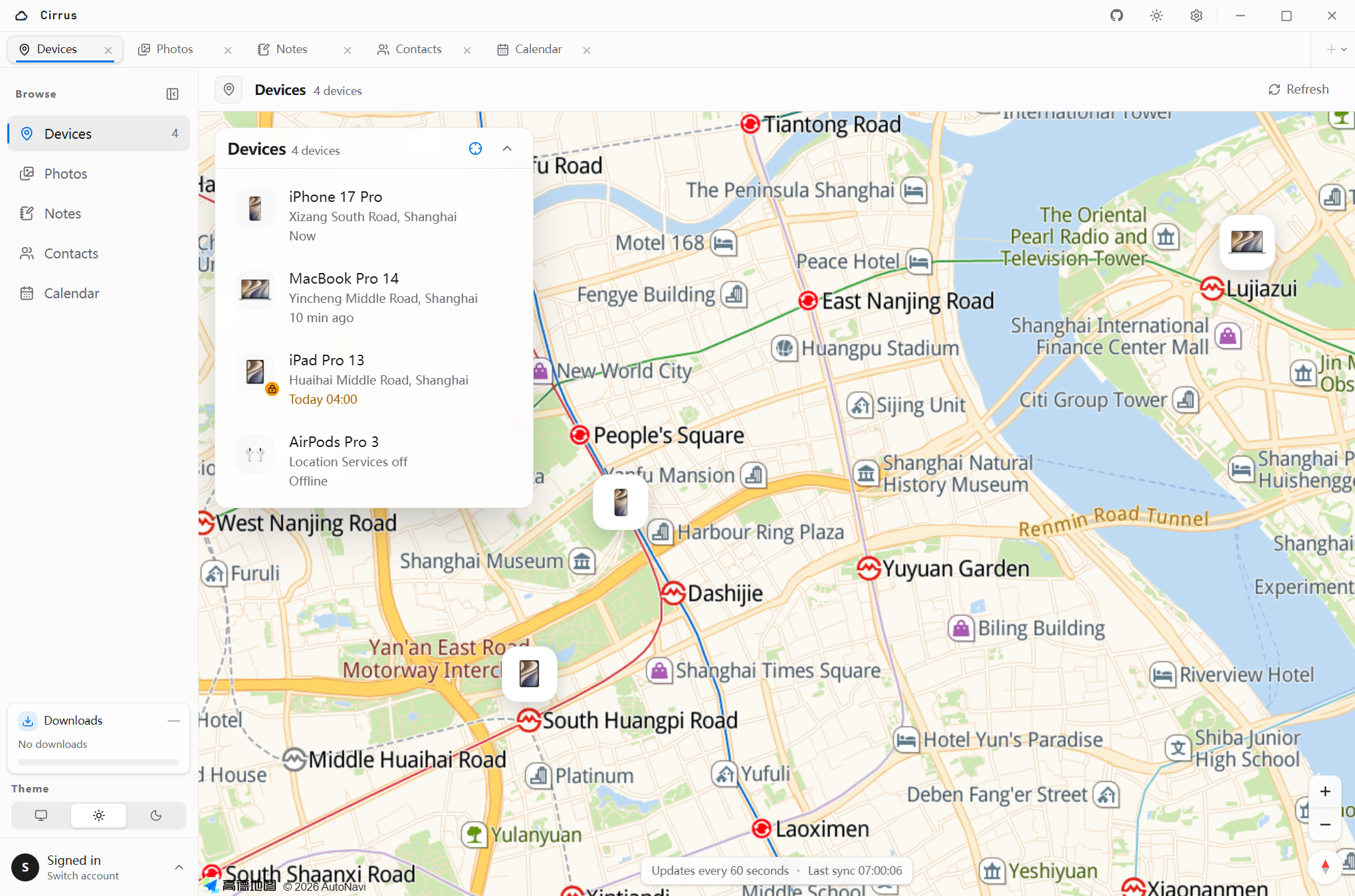
Screenshots use mock accounts, simulated coordinates, and AMap tiles. No personal account, device, media, or note content is shown.
Why Cirrus
Cirrus is a local-first desktop client for the iCloud services people use every day. It replaces a patchwork of browser tabs with one native workspace for photos, devices, storage, iCloud Drive, notes, contacts, and calendar.
| 5 | 19 | 13 | 3 |
|---|---|---|---|
| iCloud areas | MCP tools | client presets | desktop platforms |
- Native Tauri app for Windows, macOS, and Linux.
- One Apple ID and 2FA session across supported iCloud services.
- Original photo and video downloads with account-scoped history.
- Multi-account switching with encrypted local sessions.
- Configurable MCP access with per-account and per-tool switches.
- No Cirrus account, cloud relay, or telemetry.
Features
Photos and video
- Browse the iCloud Photo Library in a responsive grid.
- Open photos and videos in a full-screen viewer.
- Download original files instead of thumbnails.
- Download by date range with account-scoped task history.
- Configure download concurrency and bandwidth limits.
- Move selected photos and videos to Recently Deleted.
Find My devices
- View iPhone, iPad, Mac, AirPods, and other Apple devices.
- See device artwork, battery, availability, and location status.
- Review Activation Lock and Lost Mode information.
- Play a sound directly from the device detail view.
iCloud Drive and storage
- Browse and download files from iCloud Drive.
- Review total, available, and category usage from the iCloud storage quota endpoint.
- Open iCloud's storage management page directly from Cirrus.
Notes, contacts, and calendar
- Create, edit, delete, browse, and retrieve image attachments from iCloud Notes with folders and search. MCP note reads can return text and images interleaved in document order.
- View contacts, phone numbers, email addresses, and postal addresses.
- Read, create, edit, and delete calendar events in day, week, and month views.
- Keep each view ready when switching between workspace tabs.
Desktop workspace
- 11 interface languages: English, Simplified and Traditional Chinese, Japanese, Korean, Spanish, French, German, Portuguese, Russian, and Arabic.
- Light, dark, system, and six color themes.
- Multiple Apple accounts with session reuse.
- Local storage for accounts, avatars, encrypted sessions, and download history.
MCP
- Optional stdio and Streamable HTTP MCP access for AI clients and automation.
- Client configuration tabs for Claude Code, Cursor, CodeBuddy Code, ZCode, TRAE, VS Code, Windsurf, Codex, DeepSeek Harness, OpenCode, Pi, Cherry Studio, and Qoder.
- Per-account and per-tool MCP switches; accounts and tools are enabled by default and can be individually blocked.
- 27 MCP tools covering account status, devices, Find My sound, photo browsing and deletion, iCloud Drive, note CRUD and images, downloads, contacts, calendar event CRUD, and profile images.
- Image-capable results use native MCP image content blocks for direct inline rendering: device artwork is returned by default and photo lists attach up to 20 thumbnails. Signed URLs remain in
structuredContent; Base64 image payloads are not duplicated there. - Stdio and Streamable HTTP use the local database and encrypted session vault directly. Cirrus has no desktop bridge, runtime discovery file, or bridge fallback path.
- MCP call history is stored in SQLite and available under Settings → MCP → History; requests and responses are bounded and redacted, with no tokens or image Base64 stored.
- Apple ID, password, and two-factor codes stay inside Cirrus and are never returned to the MCP client.
- Both transports are loopback-only and use a per-run random bearer token.
Install
Download the latest build for Windows, macOS, or Linux from GitHub Releases, or build from source below.
Windows requires WebView2. Linux runtime support requires WebKitGTK 4.1 and a Secret Service implementation.
Build from source
Requirements:
- Node.js 22.13+
- pnpm 10+
- Rust 1.88+
- Windows 10/11 with WebView2
- macOS with Xcode Command Line Tools
- Linux with WebKitGTK 4.1, an AppIndicator library, and Secret Service development packages
pnpm install
make dev       # start the desktop app in development mode
make package   # build the platform installers
For map rendering, copy .env.example to .env.local and set:
VITE_AMAP_KEY=
VITE_AMAP_SECURITY_CODE=
VITE_GOOGLE_MAPS_API_KEY=
VITE_AMAP_KEY is the AMap Web JS API key, and VITE_GOOGLE_MAPS_API_KEY is the Google Maps JavaScript API key. You can also choose a provider and enter its key under Settings → Maps, where it is stored in local SQLite.
For Google Maps, enable both Maps JavaScript API and Geocoding API in Google Cloud. Google Maps may be unavailable in mainland China. Map credentials are stored together in the app data SQLite database cirrus.db under the cirrus.amap* and cirrus.googleMaps* keys inside app_state.desktop_settings. On Windows the default database path is %APPDATA%\com.cirrus\cirrus.db.
Usage
- Sign in with your Apple ID and password.
- Complete two-factor authentication.
- Open Devices, Photos, Storage, iCloud Drive, Notes, Contacts, or Calendar from the sidebar or workspace tabs.
To use MCP, open Settings → MCP, enable MCP, choose the matching client tab to copy or write its config, and turn off any iCloud account that MCP must not use. MCP exposes 27 account, device, photo browsing and deletion, iCloud Drive, note CRUD and image, download, contact, calendar event CRUD, profile image, and logout tools. The Streamable HTTP tab shows the current /mcp endpoint, bearer token, and a ready-to-copy client configuration.
The first sign-in requires 2FA. Later launches restore the encrypted session when it is still valid.
Privacy and storage
Cirrus runs entirely on your machine and talks directly to Apple. There is no Cirrus account, cloud relay, or telemetry service. The MCP service listens only on 127.0.0.1, is enabled by default, and requires a per-run bearer token.
Local data is stored in:
Windows: %APPDATA%\com.cirrus\cirrus.db
macOS:   ~/Library/Application Support/com.cirrus/cirrus.db
Linux:   ~/.local/share/com.cirrus/cirrus.db
- Account metadata and download tasks live in SQLite tables.
- Theme, language, map, download, sidebar, tab, MCP enabled state, and access policies live in the SQLite
app_statetable. - MCP tool call history lives in the SQLite
mcp_call_historytable and keeps the latest 1000 entries by default. - Frontend
localStorageis only a startup cache; legacy localStorage and JSON settings are migrated into SQLite automatically. - Cached avatars are stored locally.
- Session cookies and tokens are encrypted with AES-256-GCM before being written to SQLite.
- The encryption key is stored in Windows Credential Manager, macOS Keychain, or Linux Secret Service.
- Your password is never persisted.
- MCP ports and per-run tokens remain in a runtime discovery file rather than settings rows.
Tech stack
- Desktop shell: Tauri 2
- Backend: Rust
- Frontend: Vue 3, TypeScript, Tailwind CSS
- Storage: SQLite with WAL
- Map: AMap Web API or Google Maps JavaScript API
Development
pnpm typecheck
pnpm lint
pnpm test
cargo test --workspace
pnpm build:mcp   # optional MCP stdio executable for development
cargo clippy --workspace --all-targets -- -D warnings
The repository contains a Cargo workspace (src-tauri, crates/cirrus-core, and crates/cirrus-mcp) and a pnpm workspace (apps/desktop).
MCP transports
Cirrus supports two MCP transports:
- Streamable HTTP runs inside the desktop process and listens on
http://127.0.0.1:5226/mcpwhen enabled. It does not start a separate console process. - stdio launches the standalone native
cirrus-mcpbinary directly (cirrus-mcp.exeon Windows). It opens the Cirrus database and encrypted session vault itself and executes account-scoped tools locally, so the desktop HTTP bridge does not need to be running. The desktop app is only required for interactive sign-in. The oldercirrus-mcp-serverlauncher remains available as a compatibility alias.
In development, Cirrus looks for the native executable next to the running application, for example:
target/debug/cirrus-mcp.exe
CIRRUS_DATA_DIR can override the data directory for portable or development setups. Client configurations include that environment variable only when a custom directory is active; default installations omit it and let the native server resolve its standard data directory itself. All transports use local mode only. Headless deployments that cannot access the OS credential store can provide the existing vault key through CIRRUS_SESSION_KEY or CIRRUS_SESSION_KEY_FILE; the standalone server never creates a new vault key. CIRRUS_MCP_DOWNLOAD_SPEED_LIMIT optionally sets a local download limit in bytes per second.
If Settings → MCP reports that the MCP executable was not found, build the development executables first:
cargo build -p cirrus-mcp
# or
pnpm build:mcp
Reopen the MCP settings or restart Cirrus after building. For packaged builds, use pnpm build:mcp:sidecar; it builds and copies both cirrus-mcp-<target> and cirrus-mcp-server-<target> (with .exe suffixes on Windows), where src-tauri/tauri.mcp.conf.json includes both as Tauri sidecars in the installer.
Standalone MCP installation
Settings → MCP → Access → Local stdio includes an MCP engine panel. It can independently install, update, reinstall, or uninstall the native binary and legacy compatibility launcher under ~/.cirrus/bin. New client configurations prefer the native cirrus-mcp executable; if it is not installed, Cirrus falls back to the copy bundled with the desktop application.
Both stdio and HTTP can use the same native executable:
cirrus-mcp
cirrus-mcp --http --http-host 127.0.0.1 --http-port 5226 --http-path /mcp
cirrus-mcp --authorize-keychain  # interactive one-time OS credential authorization
cirrus-mcp-server  # legacy launcher, forwards to cirrus-mcp
Do not add --authorize-keychain to MCP client arguments; run it once from a terminal if the OS credential store requires explicit background access.
Limitations
- Release builds are not notarized; macOS may show a Gatekeeper warning.
- Linux session restore requires a Secret Service implementation.
- iCloud uses private web APIs that may change without notice.
- iCloud Drive currently supports browsing and downloading; uploading and deleting are not yet implemented.
- Note editing preserves existing inline images and lets you edit the text around them; adding, removing, or moving attachments is not supported yet.
- Deleted photos and videos are moved to Recently Deleted and can be recovered from iCloud.
- Recurring calendar events remain read-only in this version.
- The device map requires an AMap or Google Maps API key.
- Cirrus currently covers Photos, Find My, iCloud storage, iCloud Drive, Notes, Contacts, and Calendar, but not Mail.
- MCP exposes the main Cirrus account, device, photo, iCloud Drive, download, note, contact, and calendar operations over local stdio or Streamable HTTP.
Trademarks and legal risk
Cirrus is an independent project. It is not affiliated with, endorsed by, sponsored by, or approved by Apple Inc.
The maintainer does not sell Cirrus or charge for its use. Non-commercial status may reduce some enforcement exposure, but it does not eliminate trademark, unfair-competition, platform-policy, or Apple service-terms risk. The Apache-2.0 license still permits downstream commercial use.
Apple, iCloud, Find My, iPhone, iPad, Mac, and AirPods are trademarks of Apple Inc. These names appear only in descriptive text to identify compatibility and supported features. Cirrus does not use Apple logos and does not present itself as an official Apple product.
Using a third-party trademark descriptively can still be challenged. In particular:
- Avoid using
iCloudin the Cirrus product name, repository slug, domain, social handle, installer name, or logo. - Do not use Apple logos, product artwork, or Apple-style branding in a way that suggests endorsement.
- No trademark clearance has been performed for
Cirrus. Perform a separate trademark search before commercial distribution. - The project uses undocumented iCloud web endpoints. This may stop working at any time and may conflict with Apple's terms of service.
- The Apache-2.0 license grants rights to the source code only; it does not grant any trademark rights.
This section is a practical notice, not legal advice. For public or commercial distribution, review Apple's trademark guidelines and consult qualified counsel.
Disclaimer
Cirrus is an independent project and is not affiliated with, endorsed by, or sponsored by Apple Inc. It uses undocumented iCloud web endpoints and is intended for personal use and learning. Use it at your own risk and comply with Apple's terms of service.
License
Установка Cirrus
У этого сервера нет опубликованного пакета — он собирается из исходников. Открой репозиторий и следуй инструкции в README.
▸ github.com/zhukj125/cirrusFAQ
Cirrus MCP бесплатный?
Да, Cirrus MCP бесплатный — установка в пару кликов через Unyly без оплаты.
Нужен ли API-ключ для Cirrus?
Нет, Cirrus работает без API-ключей и переменных окружения.
Cirrus — hosted или self-hosted?
Self-hosted: сервер запускается локально на твоей машине командой из раздела установки.
Как установить Cirrus в Claude Desktop, Claude Code или Cursor?
Открой Cirrus на unyly.org, выбери вкладку своего клиента (Claude Desktop, Claude Code, Cursor) и нажми Install — конфиг сгенерируется автоматически, без правки JSON.
Похожие MCP
ARA
Generate images, video and audio from any AI agent — one connector.
 автор: ARA
Omni Video
An MCP server that transforms LLM-enabled IDEs into professional video editors by pre-processing footage into text proxies, generating motion graphics via HTML/
 автор: buildwithtaza
YouTube
Transcripts, channel stats, search
 автор: YouTube
EverArt
AI image generation using various models.
 автор: modelcontextprotocol
gpu-bridge/mcp-server
GPU inference API for LLMs, image and video generation, TTS, Whisper, embeddings, reranking and OCR, paid per use via x402 or an API key.
 автор: gpu-bridge
merterbak/Grok-MCP
Access xAI's Grok API with agentic tool calling, image generation, vision and file support.
 автор: merterbak
SureScaleAI/openai-gpt-image-mcp
Image generation and editing with OpenAI's GPT image models.
 автор: SureScaleAI
YangLiangwei/PersonalizationMCP
Aggregate personal data from Steam, YouTube, Bilibili, Spotify, Reddit and other gaming, music, video and social platforms, with OAuth2 and token management.
 автор: YangLiangwei
AceDataCloud/MCPFlux
Flux image generation and editing from Black Forest Labs via the Ace Data Cloud API.
 автор: AceDataCloud
AceDataCloud/MCPNanoBanana
Nano Banana image generation and editing, including virtual try-on and product placement in realistic scenes.
автор: AceDataCloudCompare Cirrus with
Не уверен что выбрать?
Найди свой стек за 60 секунд
Автор?
Embed-бейдж для README
Похожее
Все в категории media