
Cisco Pt
БесплатноНе проверенMCP server that drives Cisco Packet Tracer through a bridge extension.

Описание
MCP server that drives Cisco Packet Tracer through a bridge extension.
README
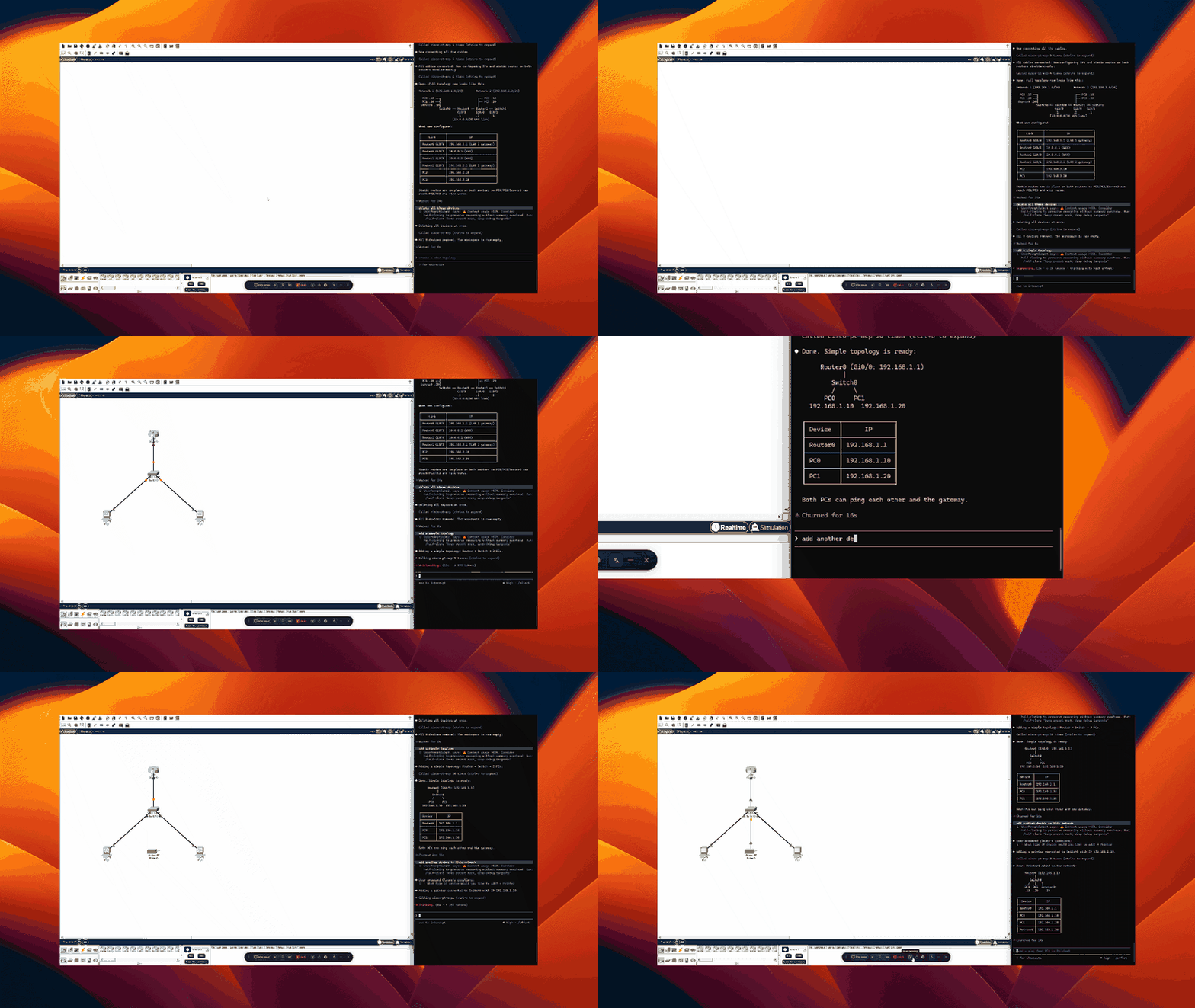
Let AI clients control a running Cisco Packet Tracer instance. Open source.
Install
Two components. Five minutes.
1. MCP Server
Install uv if you don't have it, then register with your client:
Claude Code
claude mcp add cisco-pt-mcp --scope user -- uvx cisco-pt-mcp
Cursor (~/.cursor/mcp.json or .cursor/mcp.json per project)
{
  "mcpServers": {
    "cisco-pt-mcp": { "command": "uvx", "args": ["cisco-pt-mcp"] }
  }
}
VS Code (.vscode/mcp.json)
{
  "servers": {
    "cisco-pt-mcp": {
      "type": "stdio",
      "command": "uvx",
      "args": ["cisco-pt-mcp"]
    }
  }
}
Codex CLI (~/.codex/config.toml)
[mcp_servers.cisco-pt-mcp]
command = "uvx"
args = ["cisco-pt-mcp"]
2. Packet Tracer Extension
- Open Packet Tracer.
- Go to Extensions → Scripting → Configure PT Script Modules…
- Click Add and select cisco-pt-mcp.pts.
- Restart Packet Tracer.
3. Run
Click Extensions → Packet Tracer MCP to open the bridge window, then start your MCP client. The status pill flips to connected within a second. Start prompting.
Tools
| Tool | Description |
|---|---|
addDevice |
Drop a router, switch, or PC onto the canvas |
addModule |
Install an interface module into a device slot |
addLink |
Connect two devices with a cable |
removeDevice |
Delete one or more devices |
removeLink |
Delete one or more cables |
renameDevice |
Rename an existing device |
moveDevice |
Reposition a device on the canvas |
setPower |
Power a device on or off |
configurePcIp |
Set IP, subnet, gateway, DNS, or enable DHCP on a PC |
configureIosDevice |
Run IOS CLI commands on a router or switch |
getNetwork |
Snapshot of all devices, interfaces, and cables |
getDeviceInfo |
Detailed view of a single device |
setSimulationMode |
Switch between simulation and realtime mode |
getSimulationStatus |
Query simulation state and frame count |
stepSimulation |
Step the simulation forward, backward, or reset |
sendPdu |
Add an ICMP ping PDU between two devices |
getPduResults |
Read PDU outcomes after stepping the simulation |
getCommandLog |
Read the IOS command history logged by Packet Tracer |
License
MIT
Установка Cisco Pt
У этого сервера нет опубликованного пакета — он собирается из исходников. Открой репозиторий и следуй инструкции в README.
▸ github.com/muhammadbalawal/cisco-pt-mcpFAQ
Cisco Pt MCP бесплатный?
Да, Cisco Pt MCP бесплатный — установка в пару кликов через Unyly без оплаты.
Нужен ли API-ключ для Cisco Pt?
Нет, Cisco Pt работает без API-ключей и переменных окружения.
Cisco Pt — hosted или self-hosted?
Self-hosted: сервер запускается локально на твоей машине командой из раздела установки.
Как установить Cisco Pt в Claude Desktop, Claude Code или Cursor?
Открой Cisco Pt на unyly.org, выбери вкладку своего клиента (Claude Desktop, Claude Code, Cursor) и нажми Install — конфиг сгенерируется автоматически, без правки JSON.
Похожие MCP
Fetch
Web content fetching and conversion for efficient LLM usage.
AWS KB Retrieval
Retrieval from AWS Knowledge Base using Bedrock Agent Runtime.
 автор: modelcontextprotocol
Spring AI MCP Server
Provides auto-configuration for setting up an MCP server in Spring Boot applications.
llm-analysis-assistant
A very streamlined mcp client that supports calling and monitoring stdio/sse/streamableHttp, and can also view request responses through the /logs page. It also
 автор: xuzexin-hz
Compare Cisco Pt with
Не уверен что выбрать?
Найди свой стек за 60 секунд
Автор?
Embed-бейдж для README
Похожее
Все в категории ai