
Claude Graph
БесплатноНе проверенA local knowledge graph of your codebase for Claude Code on macOS, exposing structural data via MCP tools for querying calls, imports, test coverage, and impact

Описание
A local knowledge graph of your codebase for Claude Code on macOS, exposing structural data via MCP tools for querying calls, imports, test coverage, and impact analysis.
README






A local knowledge graph of your codebase, built specifically for Claude Code on macOS. Parses your repo with Tree-sitter, stores a structural graph (functions, classes, calls, imports, test coverage) in a local SQLite file, and exposes it to Claude Code over MCP so it can answer "what calls this", "what would break if I change this file", and "is this covered by a test" — without reading the whole repo.
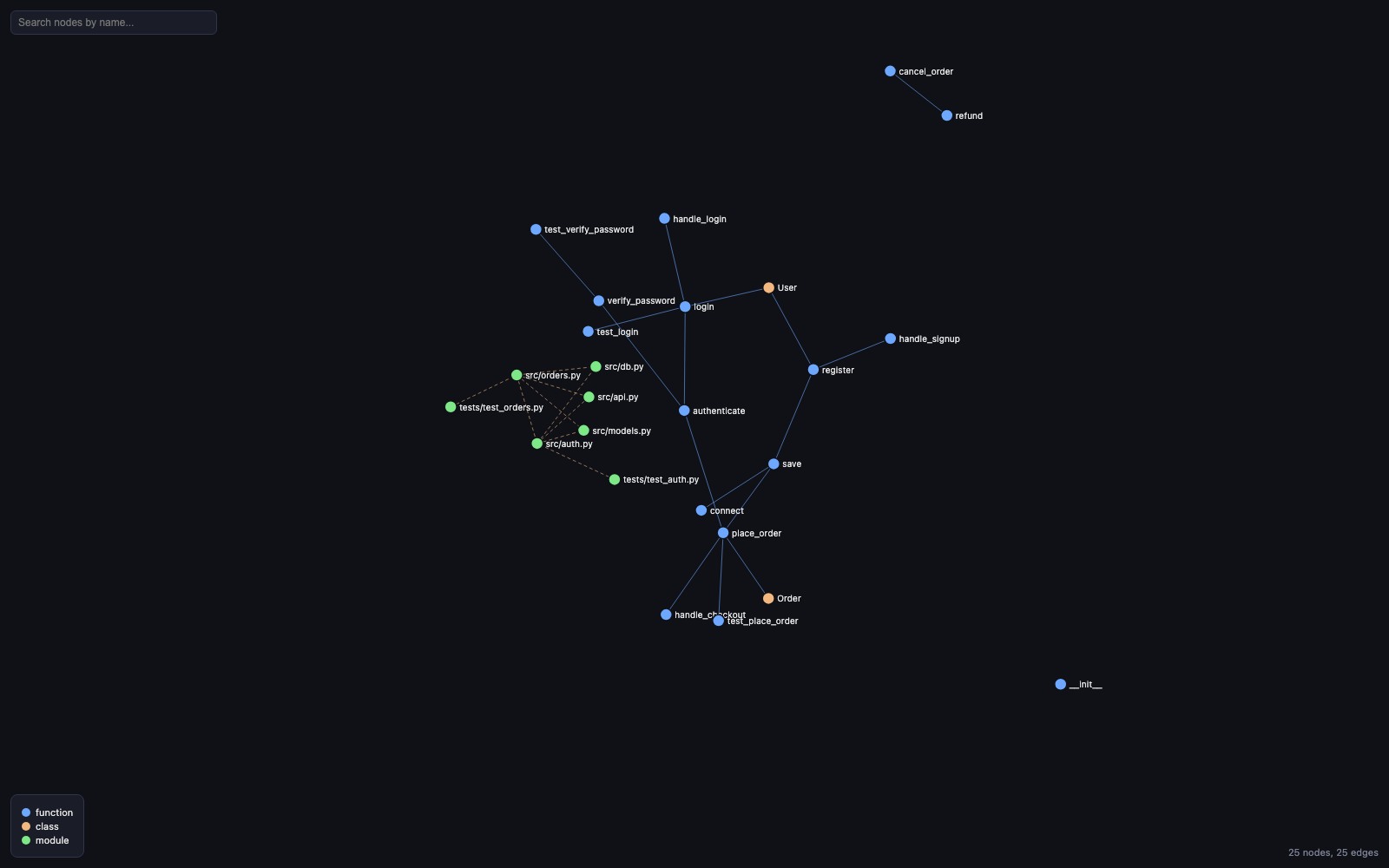
Why this exists, and what it deliberately doesn't do
Built for a corporate setting with one hard requirement: everything happens locally, with zero network calls, ever.
- No cloud or local embeddings/semantic search. Claude Code itself is already the LLM in the loop — it reads the candidates this tool returns (keyword search + graph neighbors) and does the semantic reasoning itself. No vectors, no model downloads, no API calls.
- No hooks. Nothing runs automatically when you edit a file. You (or
Claude Code) call
build_or_update_graphexplicitly. - No multi-platform support. This only configures Claude Code. It won't touch Cursor, Windsurf, Zed, or anything else.
- No home-directory writes. Everything this tool writes lives inside
the repository you run it in (
.claude-graph/,.mcp.json,.claude/skills/). - No telemetry, no daemon, no multi-repo registry.
See tests/test_no_network.py for the automated proof: it runs a full
build + query + impact + search + viz + MCP server startup cycle with
outbound sockets disabled and asserts nothing tries to connect anywhere.
Contents
- Requirements
- Install
- CLI
- MCP tools
- Graph visualization
- Supported languages
- How calls are resolved
- Search behavior
- Known limitations
- For teammates installing this themselves
- Releasing (maintainers)
Requirements
- macOS
- Python 3.11+
- git
Install
pip install claude-graph
GitHub Packages doesn't support pip-installable Python packages directly (only npm, Docker, Maven, Gradle, NuGet, and RubyGems are native registry types there), so if you'd rather install straight from this repo without going through PyPI, each release also ships the wheel as a downloadable asset:
pip install https://github.com/mohansagark/claude-graph/releases/download/v0.1.2/claude_graph-0.1.2-py3-none-any.whl
Or from source, for local development or to track main:
git clone https://github.com/mohansagark/claude-graph.git
cd claude-graph
pip install -e .
Docker
A container image is published to GitHub Container Registry on every release — this is a real GitHub Package, unlike the two options above:
docker pull ghcr.io/mohansagark/claude-graph:latest
docker run --rm -v "$PWD:/repo" ghcr.io/mohansagark/claude-graph build
Every command mounts your repo at /repo and takes the same arguments as
the native CLI, e.g. docker run --rm -v "$PWD:/repo" ghcr.io/mohansagark/claude-graph viz --symbol foo.
Note this is more friction than pip install for day-to-day use — in
particular, wiring claude-graph serve up as Claude Code's MCP server via
Docker means .mcp.json's command becomes a docker run -v ... invocation
instead of a bare binary, which is why claude-graph install (below)
generates the native-binary form by default. Docker is mainly useful when
you don't want a Python environment on the host at all.
Then, inside the project you want a graph for:
cd /path/to/your/project
claude-graph install   # writes .mcp.json and .claude/skills/ in that repo
claude-graph build      # parses the repo and writes .claude-graph/graph.db
Restart Claude Code (or run /mcp to confirm claude-graph is
connected) and ask it something structural, e.g. "what calls
parse_file in this repo?"
Build first. Calling any of the MCP query tools (query_graph_tool,
get_impact_radius_tool, search_nodes_tool) before a graph has ever
been built will not error — it silently returns empty results, and as a
side effect creates an empty .claude-graph/graph.db file. Run
claude-graph build (or let Claude Code call build_or_update_graph
first) before expecting real answers.
CLI
| Command | What it does |
|---|---|
claude-graph build |
Full parse of every git-tracked file |
claude-graph update |
Re-parses only changed files since the last build |
claude-graph status |
Prints node/edge/file counts |
claude-graph install |
Writes .mcp.json and .claude/skills/ for this repo |
claude-graph serve |
Starts the MCP server (stdio) — Claude Code launches this itself |
claude-graph viz |
Render an interactive HTML graph view (--symbol NAME or --impact FILE... to scope it, -o PATH to change the output path) |
Every command accepts --repo PATH to target a repo other than the
current directory.
MCP tools
| Tool | Purpose |
|---|---|
build_or_update_graph |
Full build if no graph exists, incremental update otherwise |
get_graph_stats |
Node/edge/file counts, languages detected |
query_graph_tool |
callers_of / callees_of / imports_of / tests_for / file_summary |
get_impact_radius_tool |
Blast radius of a set of changed files |
search_nodes_tool |
Keyword search over function/class names and signatures |
render_graph_tool |
Render the graph (or a scoped neighborhood) to a self-contained local HTML file |
Graph visualization
claude-graph viz (or the render_graph_tool MCP tool) writes a single
self-contained HTML file to .claude-graph/graph.html — open it directly in
a browser via file://, no server involved. It embeds a vendored copy of
D3 (ISC license) directly into the file, so it works fully offline, same as
everything else in this tool. The screenshot above is real output — a small
demo app rendered with claude-graph viz, no scoping.
claude-graph viz                              # the whole graph
claude-graph viz --symbol NAME                # a function/class's direct
                                               # callers, callees, and its
                                               # file's imports
claude-graph viz --impact FILE [FILE...]      # the impact radius of those
                  [--depth N]                  # changed files, laid out
                                               # visually
claude-graph viz -o custom/path.html          # change the output path
Click a node to highlight its direct neighborhood and see its file/line in a side panel; drag to reposition; scroll to zoom; type in the search box to find a node by name. There's no node cap yet, so a whole-repo view on a very large codebase (thousands of nodes) may render slowly — see Known limitations.
Supported languages
Python, JavaScript, TypeScript, TSX out of the box. Add more by
dropping a .claude-graph/languages.toml into your repo — see
claude_graph/default_languages.toml for the schema (extensions,
tree-sitter grammar name, and the node types that count as a
function/class/import/call for that grammar). No code change needed.
How calls are resolved
- A
callsedge's source (caller) is always a function-kind node — only functions/methods make calls in this graph. - A
callsedge's target prefers a function match; if no function with that name exists, it falls back to a class match (a call to a class name is treated as an instantiation, e.g.Foo()). - One
callsedge is recorded per call site. If the same function callsbar()twice, you get two edges — this is intentional, not a bug, so call counts reflect actual call-site frequency.
Search behavior
- Search runs over SQLite FTS5 when available. Your query is split into
tokens and each token is wrapped as a quoted phrase before being
handed to FTS5 (e.g.
foo-bar bazbecomes"foo-bar" "baz") — FTS5's own query operators (AND,OR,NEAR, prefix*, column filters, etc.) are not supported by design; special characters are treated as literal text, not syntax. - If the local SQLite build lacks FTS5, search falls back to a
LIKEquery, with%,_, and\escaped so wildcard-like characters in your query are matched literally rather than interpreted as SQL wildcards. - An empty or whitespace-only query returns
[]immediately in both modes.
Known limitations
- Bare-name, coarse node model. Nodes are keyed by
(file, kind, name), not by fully-qualified path — so two same-kind, same-named symbols in the same file (e.g. two methods named the same thing on two different classes in that file) collapse into a single graph node, and cross-file call resolution is a global name-heuristic: a call tosave()is matched against every function namedsave()in the graph, not just the one actually in scope. Two files with a same-named function can therefore produce over-broadcallers_of/callees_ofresults (or, in the same-file collision case, an under-broad merged one). This is a deliberate precision/recall trade-off for a tool whose answers are read by an LLM that can disambiguate from context — better to flag too much than miss a real caller. See the docstrings inclaude_graph/query.pyfor where this shows up in each query function. tests_forlinking is naming-convention only (test_foo.py/foo_test.py/foo.spec.ts/foo.test.tsmatched againstfoo.py/foo.ts). Tests that don't follow one of these conventions aren't linked.- Import resolution is best-effort path matching, not real module
resolution — it won't follow
tsconfig.jsonpath aliases or Python namespace packages. - Incremental
updateonly re-links edges for files whose content changed. If you move a symbol to another file, calls into it from files you didn't touch keep pointing at the old resolution until the next fullclaude-graph build. claude-graph viz's whole-graph view has no node cap. On a very large codebase this can be slow or cluttered in the browser; scope it with--symbolor--impactfor a focused view instead. It can also pick up vendored/minified third-party files checked into the repo (e.g. a bundled.jslibrary) as noisy, densely-connected nodes — exclude them via.claude-graph/languages.tomlif that happens.
For teammates installing this themselves
git clone https://github.com/mohansagark/claude-graph.git
cd claude-graph
python3 -m venv .venv && source .venv/bin/activate
pip install -e ".[dev]"
pytest
Releasing (maintainers)
Publishing to PyPI is automated via
.github/workflows/publish.yml using PyPI
Trusted Publishing (OIDC — no API token stored in this repo). Bump the
version in pyproject.toml, then cut a
GitHub Release;
publishing the release triggers the workflow, which builds the sdist/wheel
and uploads them to PyPI.
License
Установка Claude Graph
У этого сервера нет опубликованного пакета — он собирается из исходников. Открой репозиторий и следуй инструкции в README.
▸ github.com/mohansagark/claude-graphFAQ
Claude Graph MCP бесплатный?
Да, Claude Graph MCP бесплатный — установка в пару кликов через Unyly без оплаты.
Нужен ли API-ключ для Claude Graph?
Нет, Claude Graph работает без API-ключей и переменных окружения.
Claude Graph — hosted или self-hosted?
Self-hosted: сервер запускается локально на твоей машине командой из раздела установки.
Как установить Claude Graph в Claude Desktop, Claude Code или Cursor?
Открой Claude Graph на unyly.org, выбери вкладку своего клиента (Claude Desktop, Claude Code, Cursor) и нажми Install — конфиг сгенерируется автоматически, без правки JSON.
Похожие MCP
GitHub
PRs, issues, code search, CI status
 автор: GitHub
Filesystem
Secure file operations with configurable access controls.
Memory
Knowledge graph-based persistent memory system.
Template MCP Server
A CLI tool to create a new Model Context Protocol server project with TypeScript support, dual transport options, and an extensible structure
 автор: mcpdotdirect
Compare Claude Graph with
Не уверен что выбрать?
Найди свой стек за 60 секунд
Автор?
Embed-бейдж для README
Похожее
Все в категории development