
Claudia
БесплатноНе проверенEnables AI agents to manage hierarchical tasks, track progress, handle dependencies, and coordinate work through an MCP server.

Описание
Enables AI agents to manage hierarchical tasks, track progress, handle dependencies, and coordinate work through an MCP server.
README
A task management system built for AI agents.
Official website: https://claudiacli.com/
Claudia provides structured task tracking with a Model Context Protocol (MCP) server, enabling AI assistants like Claude to manage their own work through hierarchical tasks, dependencies, sprints, and acceptance criteria verification.
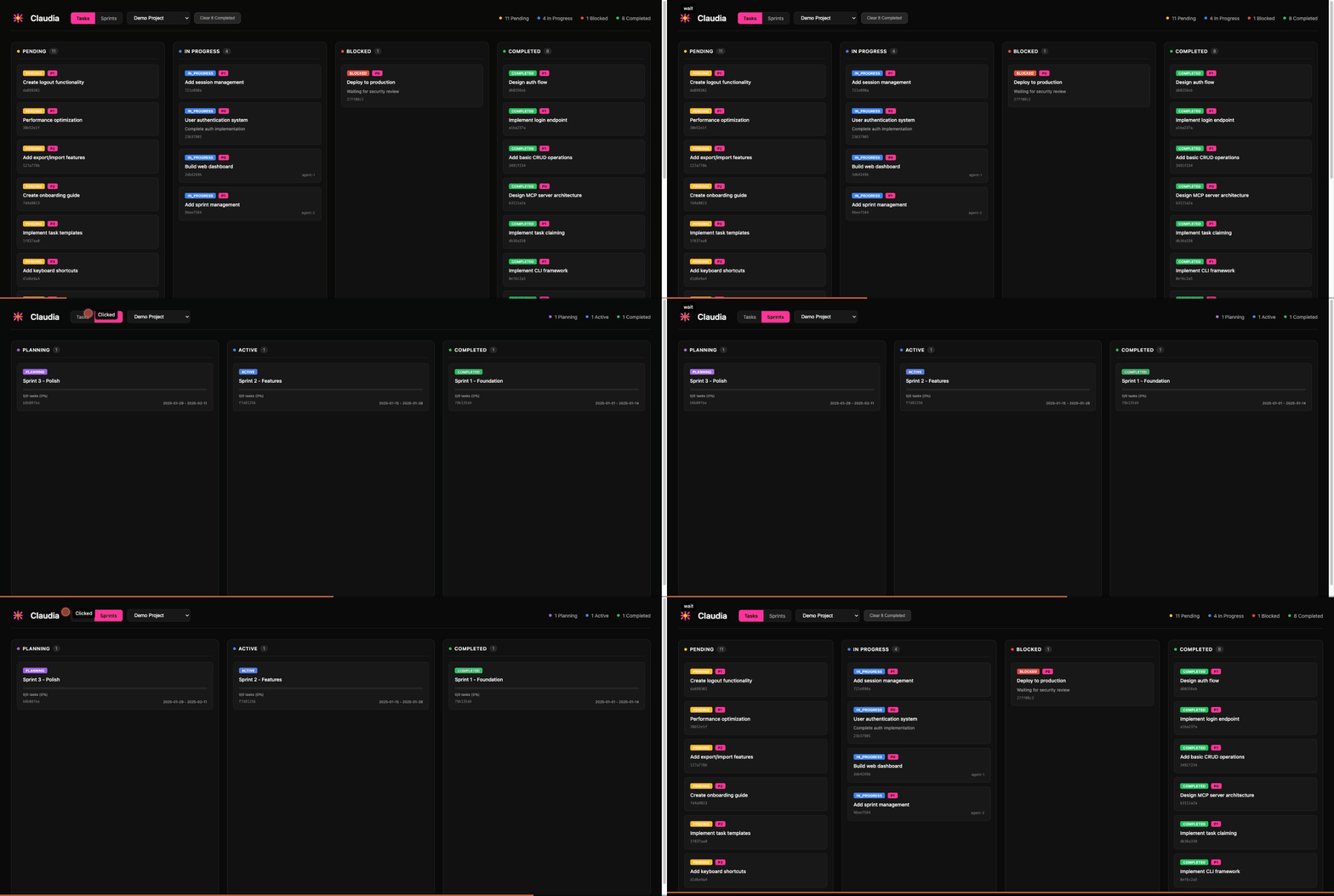
Why Claudia?
AI agents need a way to:
- Track progress across complex, multi-step tasks
- Coordinate when multiple agents work on the same project
- Remember context between sessions (64KB JSON storage per task)
- Verify work against acceptance criteria before completion
- Organize work into sprints and project hierarchies
Claudia provides all of this through both a CLI and MCP server interface.
Quick Start
# Install Bun if you haven't already
curl -fsSL https://bun.sh/install | bash

# Clone and build
git clone https://github.com/yuvalsuede/claudia.git
cd claudia
bun install
bun run build

# Initialize and start using
./claudia db init
./claudia task create --title "My first task"
./claudia task list
Try the Demo
See Claudia in action with sample data:
# Seed demo project with sample tasks and sprints
bun run seed:demo

# Open the web dashboard
./claudia @@ --port 3333
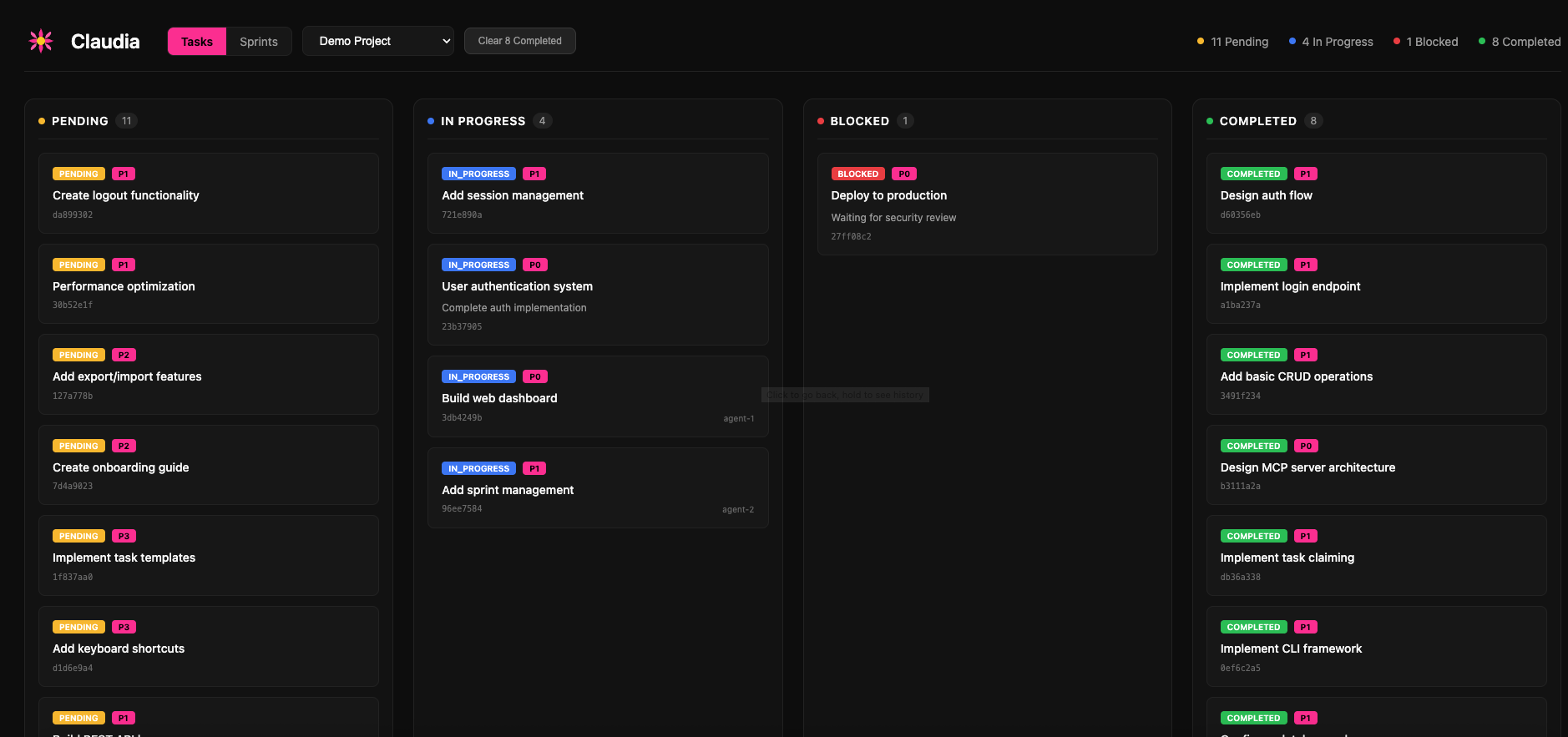
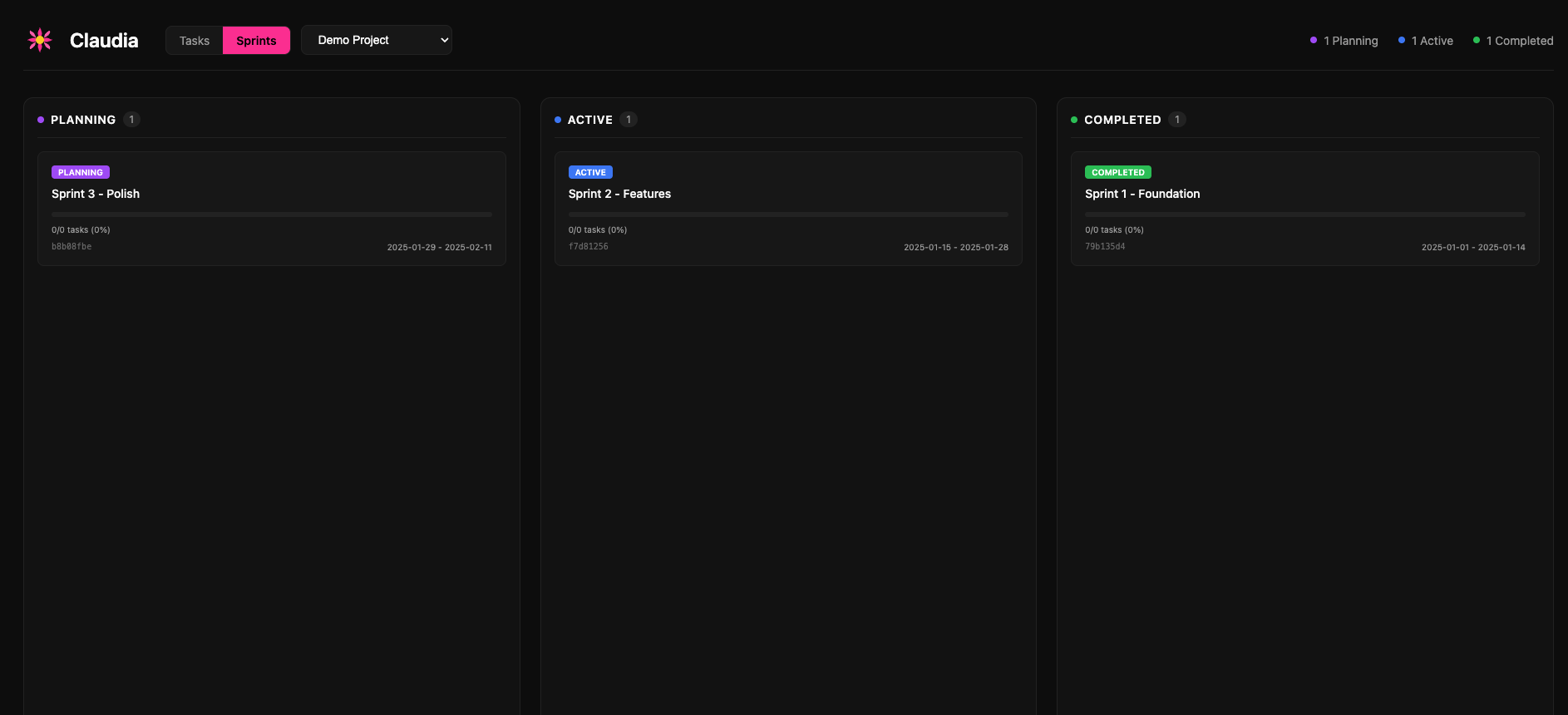
Then open http://localhost:3333 in your browser to explore the kanban board and sprint views.
Screenshots
Task Board
Sprint Management
Features
| Feature | Description |
|---|---|
| Hierarchical Tasks | Parent-child relationships with tree visualization |
| State Machine | Validated transitions: pending → in_progress → verification → completed |
| Dependencies | Block tasks until prerequisites complete, with cycle detection |
| Sprints | Group tasks into time-boxed work periods |
| Multi-Project | Isolated task namespaces with auto-detection from working directory |
| Agent Memory | 64KB JSON context storage per task |
| Acceptance Criteria | Define and verify requirements before task completion |
| Multi-Agent Coordination | Atomic task claiming, optimistic locking, conflict detection |
| Web Dashboard | Visual kanban board with project/sprint filtering |
| MCP Server | Drop-in integration with Claude Code and other MCP clients |
Installation
Prerequisites
- Bun runtime (v1.0+)
From Source
git clone https://github.com/yuvalsuede/claudia.git
cd claudia
bun install
Build Standalone Binary
bun run build
# Creates ./claudia binary

# Optional: install globally
cp claudia ~/.bun/bin/
Usage
CLI Commands
Task Management
# Create a task
claudia task create --title "Implement feature X" --priority p1

# Create with acceptance criteria
claudia task create --title "Add login" --acceptance-criteria "Has email field" --acceptance-criteria "Has password field"

# List tasks
claudia task list
claudia task list --status in_progress --priority p0,p1

# Show task details
claudia task show <task-id>

# Update a task
claudia task update <task-id> --title "New title" --priority p0

# Transition status
claudia task transition <task-id> --to in_progress

# Delete a task
claudia task delete <task-id> --force
Task Hierarchy
# Create a subtask
claudia task create --title "Subtask" --parent <parent-id>

# View task tree
claudia task tree              # Full tree
claudia task tree <task-id>    # Subtree from task
Task Context (Agent Memory)
# Set context (overwrites)
claudia task context-set <task-id> '{"key": "value"}'

# Merge context (deep merge)
claudia task context-merge <task-id> '{"additional": "data"}'

# Get context
claudia task context-get <task-id>
Dependencies
# Add dependency (task depends on blocker)
claudia task depends <task-id> --on <blocker-id>

# Remove dependency
claudia task undepends <task-id> --on <blocker-id>

# Show dependencies
claudia task deps <task-id>

# List blocked tasks
claudia task blocked

# List ready tasks (all deps satisfied)
claudia task ready
Sprints
# Create a sprint
claudia sprint create --name "Sprint 1" --start 2024-01-15 --end 2024-01-29

# List sprints
claudia sprint list

# Show sprint with tasks
claudia sprint show <sprint-id>

# Activate a sprint
claudia sprint activate <sprint-id>
Projects
# Create a project
claudia project create --name "My Project" --path /path/to/project

# List projects
claudia project list

# Select active project
claudia project select <project-id>

# Show current project
claudia project current
Web Dashboard
# Open dashboard in browser
claudia @@

# Custom port
claudia @@ --port 8080
The dashboard provides:
- Tasks View: Kanban board with drag-and-drop columns
- Sprints View: Sprint cards with progress indicators
- Project Filter: Scope views to specific projects
- Clear Completed: Archive finished tasks
MCP Server Integration
Start the MCP server for use with Claude Code:
claudia mcp
Claude Code Configuration
Add to .mcp.json in your project root:
{
  "mcpServers": {
    "claudia": {
      "command": "/path/to/claudia",
      "args": ["mcp"]
    }
  }
}
Or for development (without building):
{
  "mcpServers": {
    "claudia": {
      "command": "bun",
      "args": ["run", "/path/to/claudia/src/mcp/server.ts"],
      "cwd": "/path/to/claudia"
    }
  }
}
After adding the config, restart Claude Code to connect.
Available MCP Tools
Compound Operations (Recommended for agents)
| Tool | Description |
|---|---|
task_start |
Create and start a task in one operation |
task_finish |
Complete a task with optional summary |
task_workspace |
Get current agent's workspace context |
task_handoff |
Transfer task to another agent |
task_abandon |
Release task back to pending |
Task Management
| Tool | Description |
|---|---|
task_create |
Create a new task |
task_read |
Get task by ID |
task_update |
Update task fields |
task_delete |
Delete a task |
task_list |
Query tasks with filters |
task_transition |
Change task status |
task_tree |
Get hierarchical task view |
Coordination
| Tool | Description |
|---|---|
task_claim |
Atomically claim a task |
task_release |
Release a claimed task |
task_blocked |
List blocked tasks |
task_ready |
List ready tasks |
task_dependency_add |
Add task dependency |
Verification
| Tool | Description |
|---|---|
task_verify |
Mark criterion as verified |
task_verification_status |
Get verification progress |
See the full MCP tools reference below for complete documentation.
Task Workflow
┌─────────┐     ┌─────────────┐     ┌──────────────┐     ┌───────────┐
│ pending │────▶│ in_progress │────▶│ verification │────▶│ completed │
└─────────┘     └─────────────┘     └──────────────┘     └───────────┘
     │                │                    │                    │
     ▼                ▼                    ▼                    ▼
┌─────────┐                         ┌──────────┐
│ blocked │                         │ archived │ (terminal)
└─────────┘                         └──────────┘
Valid transitions:
pending→in_progress,blocked,archivedin_progress→pending,verification,completed,blocked,archivedverification→in_progress,completed,blocked,archivedblocked→pending,in_progress,archivedcompleted→in_progress,archivedarchived→ (terminal state)
Tasks can skip verification if no acceptance criteria are defined.
Multi-Agent Coordination
Claudia supports multiple AI agents working concurrently on the same project.
Task Claiming
// Claim before working
const result = await task_claim({ task_id: "uuid", agent_id: "agent-1" });
if (result.success) {
  // Task is yours - proceed
} else {
  // Already claimed by another agent
}

// Release when done or on failure
await task_release({ task_id: "uuid", agent_id: "agent-1" });
Optimistic Locking
// Read task first
const task = await task_read({ id: "uuid" });

// Update with version check
await task_update({
  id: task.id,
  title: "Updated",
  version: task.version  // Fails if modified by another agent
});
Recommended Pattern
task_ready- List tasks with satisfied dependenciestask_claim- Atomically reserve a tasktask_transition- Move toin_progresstask_context_merge- Save progresstask_transition- Move tocompleted- On failure:
task_release- Let another agent retry
Configuration
| Environment Variable | Description | Default |
|---|---|---|
CLAUDIA_DB |
Database file path | ~/.claudia/tasks.db |
Development
# Development mode
bun run dev

# Run tests
bun test

# Type checking
bun run typecheck
Exit Codes
| Code | Meaning |
|---|---|
| 0 | Success |
| 1 | General error |
| 2 | Resource not found |
| 3 | Conflict (version mismatch) |
| 4 | Validation error |
| 5 | Storage error |
MCP Tools Reference
Compound Operations
task_start
Create and start a task in one operation. Auto-claims for the current agent.
{
  "title": "Task title",
  "description": "Optional description",
  "priority": "p0|p1|p2|p3",
  "parent_id": "optional-parent-uuid",
  "acceptance_criteria": ["criterion 1", "criterion 2"]
}
task_finish
Complete a task with optional summary.
{
  "id": "task-uuid",
  "summary": "Optional completion summary"
}
task_workspace
Get current agent's workspace context including claimed tasks.
{
  "include_completed": false
}
task_handoff
Transfer task to another agent.
{
  "task_id": "task-uuid",
  "to_agent_id": "target-agent",
  "notes": "Optional handoff notes"
}
task_abandon
Release task back to pending with reason.
{
  "task_id": "task-uuid",
  "reason": "Why abandoning"
}
Task CRUD
task_create
{
  "title": "Required title",
  "description": "Optional",
  "status": "pending",
  "priority": "p0|p1|p2|p3",
  "parent_id": "uuid",
  "sprint_id": "uuid",
  "tags": ["tag1", "tag2"],
  "assignee": "name",
  "acceptance_criteria": ["criterion"]
}
task_read
{ "id": "task-uuid" }
task_update
{
  "id": "task-uuid",
  "title": "New title",
  "version": 1
}
task_delete
{ "id": "task-uuid" }
task_list
{
  "status": ["pending", "in_progress"],
  "priority": ["p0", "p1"],
  "parent_id": "uuid",
  "sprint_id": "uuid",
  "assignee": "name",
  "limit": 100,
  "offset": 0
}
task_transition
{
  "id": "task-uuid",
  "to": "in_progress"
}
task_tree
{
  "id": "optional-root-uuid",
  "depth": 5
}
Bulk Operations
task_create_many
{
  "tasks": [
    { "title": "Task 1" },
    { "title": "Task 2" }
  ],
  "parent_id": "optional-common-parent",
  "sprint_id": "optional-common-sprint"
}
task_update_many
{
  "ids": ["uuid1", "uuid2"],
  "updates": {
    "priority": "p1",
    "assignee": "agent-1"
  }
}
task_transition_many
{
  "ids": ["uuid1", "uuid2"],
  "to": "completed",
  "skip_invalid": true
}
Dependencies & Coordination
task_dependency_add
{
  "task_id": "blocked-task",
  "depends_on_id": "blocking-task"
}
task_dependency_remove
{
  "task_id": "task-uuid",
  "depends_on_id": "dependency-uuid"
}
task_dependencies
{ "task_id": "task-uuid" }
task_blocked
List all tasks with unsatisfied dependencies.
task_ready
List all tasks ready to work on (dependencies satisfied).
task_claim
{
  "task_id": "task-uuid",
  "agent_id": "claiming-agent"
}
task_release
{
  "task_id": "task-uuid",
  "agent_id": "releasing-agent"
}
Context Storage
task_context_set
Overwrite task context (max 64KB).
{
  "id": "task-uuid",
  "context": { "any": "json data" }
}
task_context_merge
Deep merge into existing context.
{
  "id": "task-uuid",
  "context": { "additional": "data" }
}
task_context_get
{ "id": "task-uuid" }
Verification
task_verify
Mark an acceptance criterion as verified.
{
  "task_id": "task-uuid",
  "criterion_id": "criterion-uuid",
  "evidence": "Optional verification evidence"
}
task_verification_status
Get verification progress for a task.
{ "task_id": "task-uuid" }
Sprints
sprint_create
{
  "name": "Sprint 1",
  "start_at": "2024-01-15",
  "end_at": "2024-01-29"
}
sprint_list
{ "include_archived": false }
sprint_show
{ "id": "sprint-uuid" }
sprint_update
{
  "id": "sprint-uuid",
  "name": "New name",
  "status": "active"
}
sprint_delete
{ "id": "sprint-uuid" }
sprint_activate
{ "id": "sprint-uuid" }
Projects
project_create
{
  "name": "Project name",
  "description": "Optional",
  "path": "/optional/directory/path"
}
project_list
List all projects.
project_read
{ "id": "project-uuid" }
project_update
{
  "id": "project-uuid",
  "name": "New name"
}
project_delete
{ "id": "project-uuid" }
project_select
{ "id": "project-uuid" }
project_current
{ "cwd": "/optional/path/for/autodetect" }
Contributing
We welcome contributions! Please see CONTRIBUTING.md for guidelines.
License
GPLv3 - see LICENSE for details.
Установка Claudia
У этого сервера нет опубликованного пакета — он собирается из исходников. Открой репозиторий и следуй инструкции в README.
▸ github.com/yuvalsuede/claudiaFAQ
Claudia MCP бесплатный?
Да, Claudia MCP бесплатный — установка в пару кликов через Unyly без оплаты.
Нужен ли API-ключ для Claudia?
Нет, Claudia работает без API-ключей и переменных окружения.
Claudia — hosted или self-hosted?
Self-hosted: сервер запускается локально на твоей машине командой из раздела установки.
Как установить Claudia в Claude Desktop, Claude Code или Cursor?
Открой Claudia на unyly.org, выбери вкладку своего клиента (Claude Desktop, Claude Code, Cursor) и нажми Install — конфиг сгенерируется автоматически, без правки JSON.
Похожие MCP
Opencode Omniroute Plugin
OpenCode plugin for the OmniRoute AI Gateway. Drives dynamic model discovery, /connect auth flow, and multi-instance OmniRoute providers via the official @openc
 автор: GitHub Actions
Roblox Studio
Enables AI coding tools to control Roblox Studio for workspace exploration, instance manipulation, and script management. It provides tools for playtesting, sce
 автор: paralov
Antigravity Drawio
MCP server that enables AI assistants to create, parse, render, and validate Draw.io diagrams programmatically.
 автор: S-SUJAN-S
Fetch
Web content fetching and conversion for efficient LLM usage.
AWS KB Retrieval
Retrieval from AWS Knowledge Base using Bedrock Agent Runtime.
 автор: modelcontextprotocol
Spring AI MCP Server
Provides auto-configuration for setting up an MCP server in Spring Boot applications.
llm-analysis-assistant
A very streamlined mcp client that supports calling and monitoring stdio/sse/streamableHttp, and can also view request responses through the /logs page. It also
 автор: xuzexin-hz
MCP-Agent
A simple, composable framework to build agents using Model Context Protocol by [LastMile AI](https://www.lastmileai.dev)
 автор: lastmile-ai
Spring AI MCP Client
Provides auto-configuration for MCP client functionality in Spring Boot applications.
mcp.natoma.ai
A Hosted MCP Platform to discover, install, manage and deploy MCP servers by [Natoma Labs](https://www.natoma.ai)
Compare Claudia with
Не уверен что выбрать?
Найди свой стек за 60 секунд
Автор?
Embed-бейдж для README
Похожее
Все в категории ai