
Clihub
БесплатноНе проверенInstall Claude Code, Codex, Gemini, Qwen Code, Kiro, Cursor & Goose — keep their skills in sync, with one-command rollback.

Описание
Install Claude Code, Codex, Gemini, Qwen Code, Kiro, Cursor & Goose — keep their skills in sync, with one-command rollback.
README

clihub
npm version npm downloads license node
English | 简体中文
The reproducible control plane for AI coding CLIs. One tool to install Claude Code, Codex, Gemini CLI, Qwen Code, Kiro, Cursor, Goose, and OpenCode — keep their skills / MCP / memory / system-prompts in sync across every CLI, switch accounts · endpoints · proxies per CLI, and pin the whole stack to a signed clihub.lock.json with one-command rollback when an update bites. Drive it from a terminal TUI, a scriptable CLI, or a native desktop GUI — all three share one kernel.
 |
 |
| Desktop GUI — Tauri 2 + Svelte 5 | Terminal TUI — clihub |
curl -fsSL https://raw.githubusercontent.com/wikieden/clihub/main/scripts/install.sh | sh
clihub preset apply starter
That's it. Your stack installed, core skills fanned out to every CLI, your prior ~/.claude snapshotted and recoverable.
Who's it for? Newcomers, individual developers, and teams/enterprises each get a different slice — see docs/21-VALUE.md.
Why clihub
Every AI coding CLI ships its own bespoke skill / plugin / MCP layout. If you run more than one, you end up:
- Re-installing the same skill four times in four different folders.
- Hand-syncing
superpowersinto eight different layouts —~/.claude/skills/,~/.codex/skills/,~/.gemini/commands/*.toml,~/.qwen/commands/*.toml,~/.kiro/steering/,~/.cursor/commands/*.md,~/.config/goose/recipes/*.yaml,~/.config/opencode/skills/. - Nuking your config on an unrelated upgrade and having no way back.
clihub solves all three:
| clihub | claude-skills | multica | ccpi | oh-my-claudecode | |
|---|---|---|---|---|---|
| Installs the CLIs themselves | ✅ | ❌ | ❌ | ❌ | ❌ |
| Cross-CLI skill fan-out (8 CLIs) | ✅ | ✅ | partial | ❌ (CC only) | ❌ |
| Presets that bundle tools + skills + MCP | ✅ | ❌ | ❌ | ❌ | ❌ |
Backup / one-command rollback of ~/.claude & siblings |
✅ | ❌ | ❌ | ❌ | ❌ |
| Per-tool version pin + rollback | ✅ | ❌ | ❌ | ❌ | ❌ |
| Multi-account profile switching | ✅ | ❌ | ❌ | ❌ | ❌ |
| Per-CLI endpoint + model binding | ✅ | ❌ | ❌ | ❌ | ❌ |
| Per-CLI + GUI proxy management | ✅ | ❌ | ❌ | ❌ | ❌ |
| Multi-source catalog federation | ✅ | ❌ | ❌ | ❌ | ❌ |
| Skill security audit | ✅ | ❌ | ❌ | ❌ | ❌ |
| One memory / system-prompt source → every CLI | ✅ | ❌ | ❌ | ❌ | ❌ |
| Cross-machine E2E-encrypted config sync | ✅ | ❌ | ❌ | ❌ | ❌ |
| Signed catalogs (ed25519 supply-chain trust) | ✅ | ❌ | ❌ | ❌ | ❌ |
| Add a new CLI via JSON spec (no fork) | ✅ | ❌ | ❌ | ❌ | ❌ |
| Lockfile compliance / CI drift gate | ✅ | ❌ | ❌ | ❌ | ❌ |
| Terminal TUI + native desktop GUI | ✅ | ❌ | partial | ❌ | ❌ |
| Single-binary distribution | npm | shell | npm | npm | CC plugin |
Install
# one-liner (auto-falls back to git clone + build if npm package not yet published)
curl -fsSL https://raw.githubusercontent.com/wikieden/clihub/main/scripts/install.sh | sh

# or directly
npm install -g @wikieden/clihub
bun add -g @wikieden/clihub
Or run it as a container without installing anything locally:
docker run --rm -it -v ~/.claude:/root/.claude wikieden/clihub
docker run --rm -it wikieden/clihub doctor
Desktop app: download the unsigned macOS / Windows / Linux build from Releases (tag desktop-v*). It bundles a standalone daemon — no bun or repo checkout needed. Code-signing / notarization is pending, so you may need to allow it past Gatekeeper / SmartScreen on first launch.
Requirements: Node ≥ 18 (or Bun), on Linux / macOS / WSL.
Quickstart
clihub wizard                          # guided first-run setup (recommended)
clihub                                 # interactive TUI main menu

# or scripted:
clihub tool install claude-code
clihub tool install codex
clihub skill install superpowers       # auto-fans out to every installed CLI
clihub preset apply fullstack          # tools + skills + MCP bundle
clihub doctor                          # health check across every CLI
clihub backup                          # snapshot ~/.claude before risky upgrades
clihub rollback                        # restore the most recent snapshot
Three+1 faces of clihub
All four share the same @clihub/core kernel — golden parity: a GUI panel, a CLI command, and a direct kernel call return identical results. No logic forks.
- CLI —
clihub <subcommand>, headless/CI-friendly. The scriptable face. - Terminal TUI — bare
clihubopens an interactive menu (@clack/prompts). The guided face. - Desktop GUI — a native Tauri 2 + Svelte 5 app (10 panels). Spawns a loopback
@clihub/daemonsidecar and binds each panel to the same kernel functions. The visual face. - Claude Code skill — installed at
~/.claude/skills/clihub/;/clihubinside Claude Code opens the menu and the model runs operations on your behalf. The in-agent face.
Walkthrough
Terminal TUI
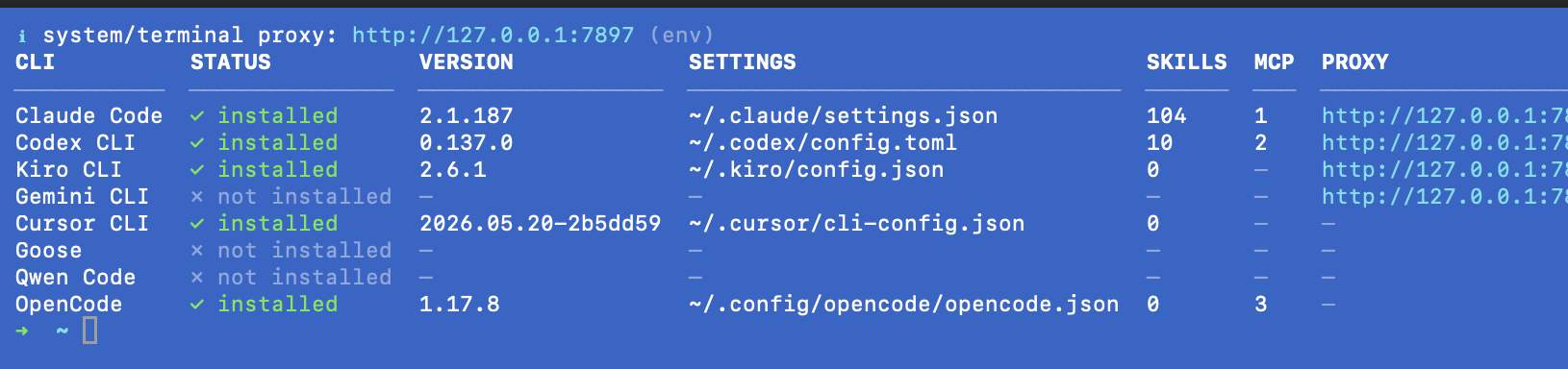
Run clihub with no arguments for the interactive menu — install CLIs, fan out skills, set a proxy or endpoint per CLI, all guided. And clihub doctor gives a one-glance cross-CLI health matrix: install status, version, native settings path, skills/MCP counts, and the active proxy per CLI.
Desktop GUI
The desktop app leads with the moat — health, drift, and lockfile compliance — not a provider dropdown. Ten panels, four themes.
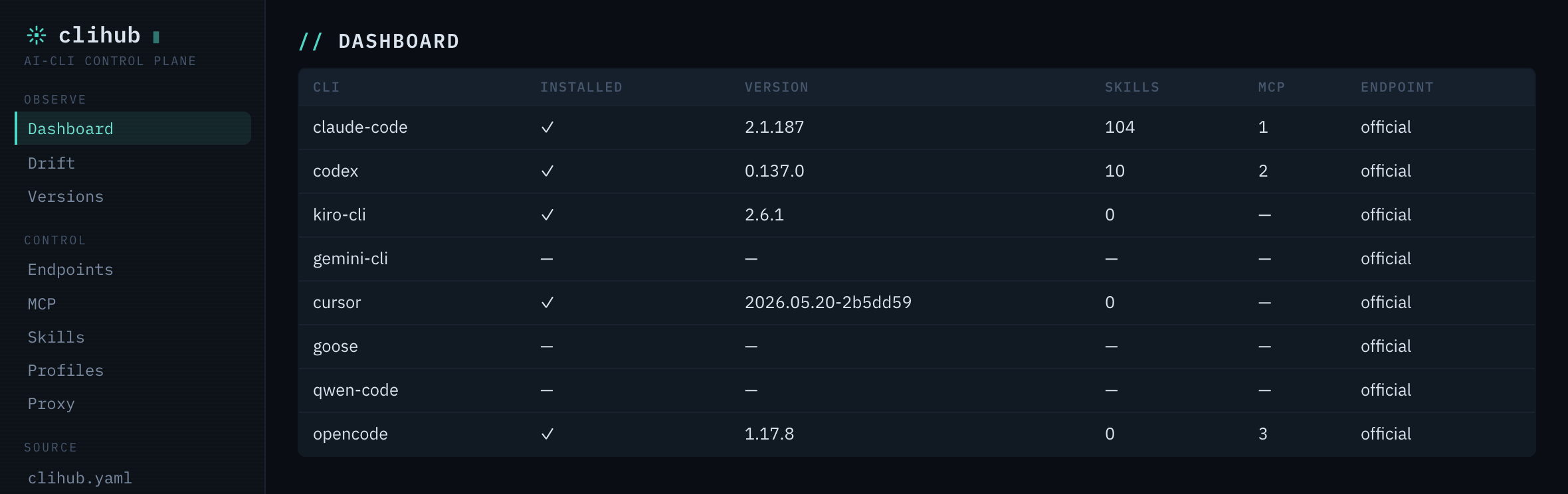
Dashboard — cross-CLI health + version matrix at a glance:
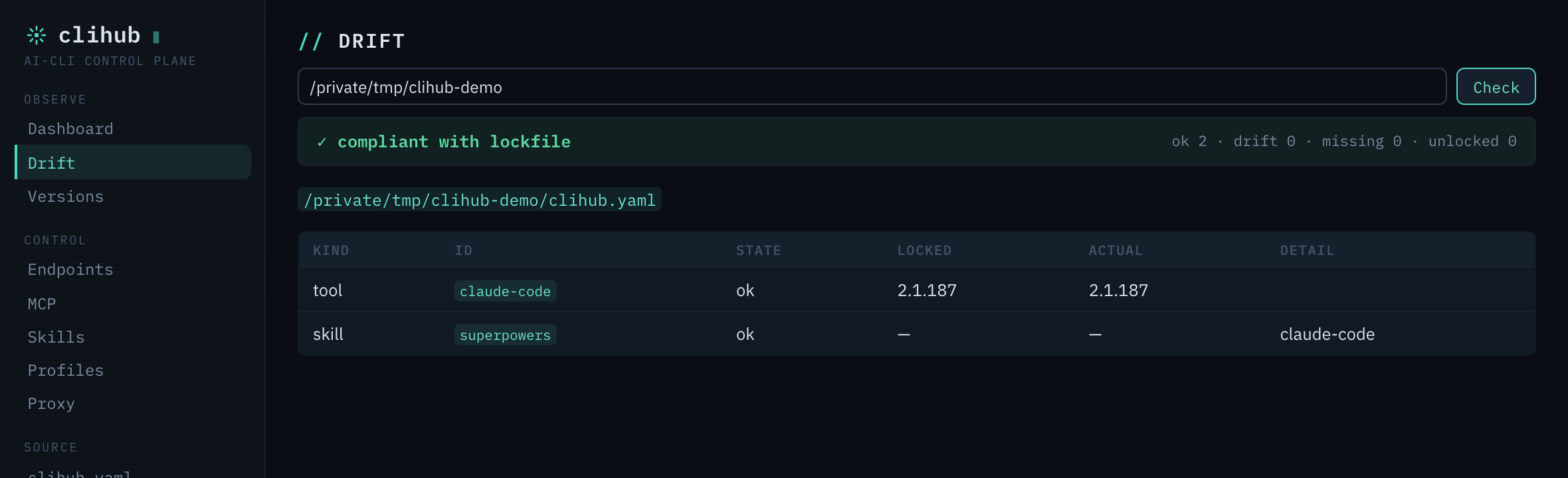
Drift — does this machine still match the signed clihub.lock.json? (ok / drift / missing):
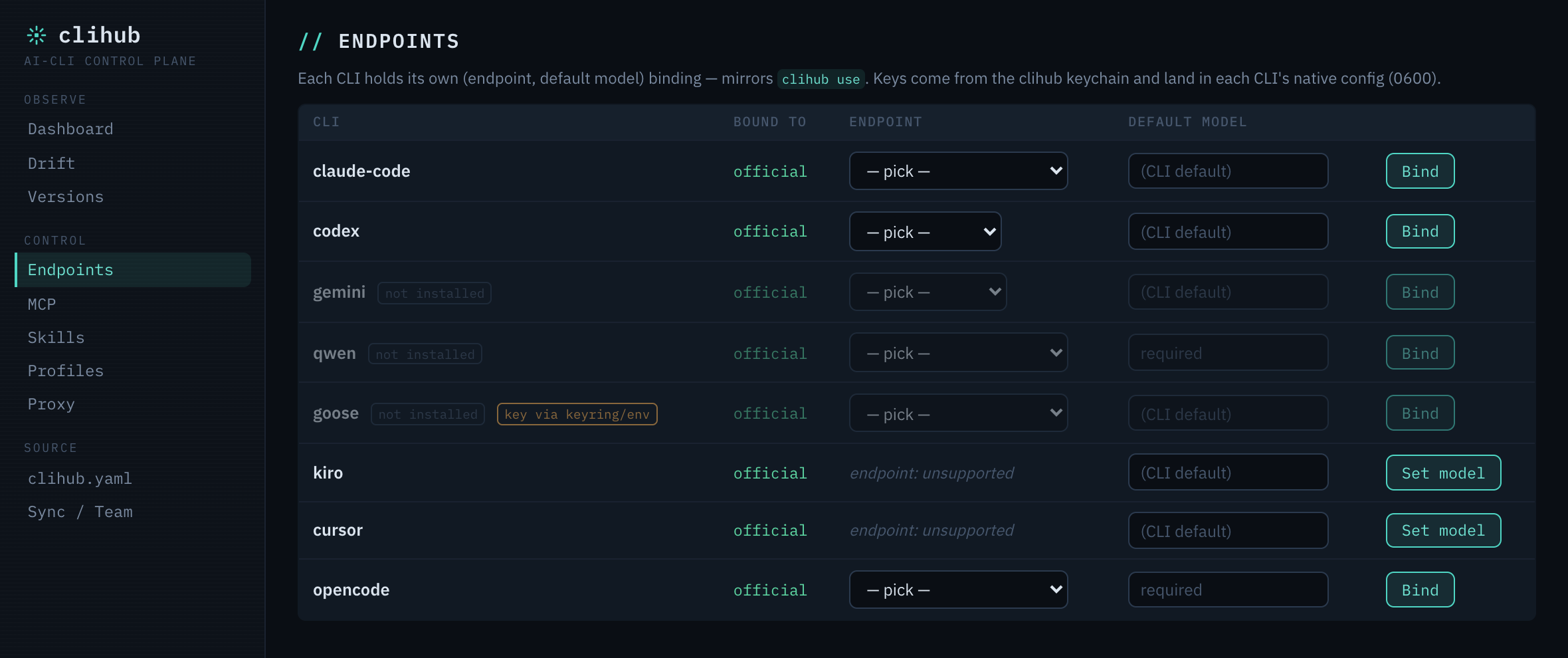
Endpoints — bind each CLI to an LLM endpoint + default model; keys come from the keychain and land in each CLI's native config (0600):
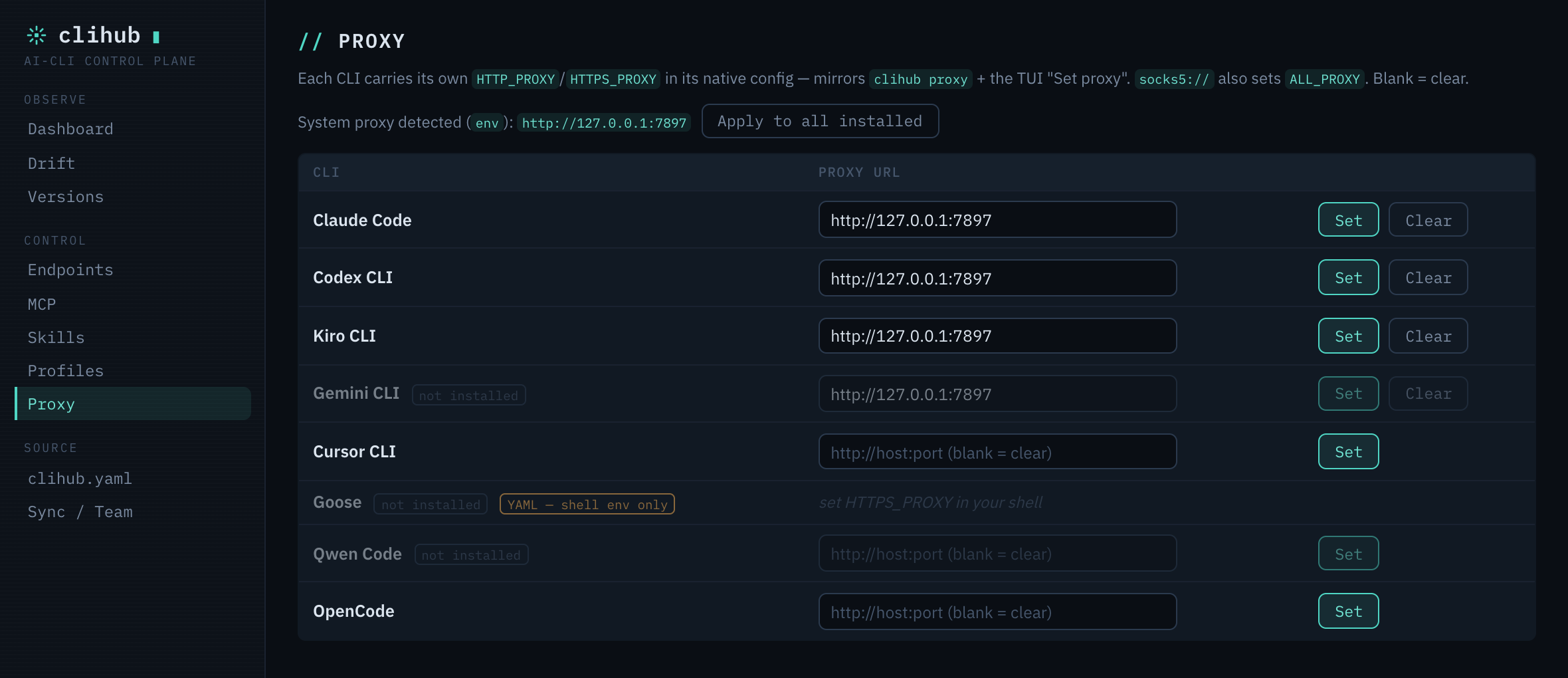
Proxy — set each CLI's HTTP(S)_PROXY (or apply the detected system proxy to all) — the same clihub proxy action, in the GUI:
Currently supported
CLIs (8): Claude Code, OpenAI Codex CLI, Gemini CLI, Qwen Code, Kiro CLI, Cursor CLI, Block Goose, OpenCode.
Surfaces: scriptable CLI, interactive TUI, native desktop GUI (10 panels: Dashboard · Drift · Endpoints · MCP · Skills · Profiles · Proxy · Versions · clihub.yaml · Sync/Team), and a Claude Code skill (/clihub). All over one @clihub/core kernel via a loopback @clihub/daemon.
Skills: 30 in the catalog — superpowers, oh-my-claudecode, codegraph, tdd, review, frontend-design, api-design, database-migrations, caveman, lark-im, lark-doc, lark-wiki, … (full list).
MCP servers: 14 — filesystem, github, gitlab, postgres, sqlite, git, slack, brave-search, fetch, playwright, memory, sequential-thinking, context7, deepwiki (full list).
Presets (8):
starter— Claude Code + 5 core skills (1-min setup).fullstack— full-stack skills (frontend, backend, DB, review, security, git).python/go/rust— language dev bundles (review, tdd, security).research— web search + synthesis + planning + docs.devops— deploy, security, performance, git.lark-office— Lark / Feishu collaboration suite.
Config management (CLI + GUI, per CLI): version pin/rollback · ~/.claude backup/rollback · multi-account profiles + keychain · endpoint + model binding · proxy + CA bundle · MCP servers · skills · system-prompt + memory fan-out.
Reproducibility: clihub.yaml → signed clihub.lock.json → status --strict CI drift gate · clihub diff · clihub ci (GitHub/GitLab) · clihub team (git-backed shared config) · cross-machine E2E-encrypted sync.
Languages: English, 简体中文, 日本語, 한국어, Español (auto-detected from $LANG, override via CLIHUB_LANG).
Commands
clihub                              TUI main menu
clihub tool list
clihub tool install <id>[@version]  pin a specific build
clihub tool rollback <id>           restore the previous installed version
clihub tool history <id>
clihub tool uninstall <id>
clihub tool update [id]
clihub skill list [--permissions]
clihub skill install <id|git-url|path> [--tool <cli>]
clihub skill uninstall <id> [--tool <cli>]
clihub skill audit [id] [--json]    flag shell/hooks/network/symlink risks
clihub plugin <list|install|uninstall|update> [id] [--tool <cli>]
clihub preset list
clihub preset apply <id>
clihub catalog <sync|status|verify>
clihub catalog add <name> <url>     federate an extra catalog source
clihub catalog list|priority|sync-all
clihub catalog keygen [dir]         ed25519 keypair for signing a catalog (publisher)
clihub catalog sign <key> [pub]     sign the synced catalog manifest
clihub catalog trust add <name> <pubkey> --source <url>   pin a publisher key
clihub catalog trust list|rm        manage trusted publisher keys
clihub profile <create|use|list|current|rm|clone|show>
clihub profile baseurl <set|unset|show>   point a profile at LiteLLM/Nyro
clihub profile hook <bash|zsh|fish>        auto-switch profile per dir's clihub.yaml on cd
clihub auth <set|get|list|rm|backend>      per-profile keychain secrets
clihub auth status [--json]                cross-CLI login + token-expiry visibility
clihub auth login <provider> [--browser|--refresh]   OAuth login (device grant / PKCE browser / refresh)
clihub proxy <set|unset|show|test> [--tool <id>]   HTTP/HTTPS/SOCKS5 + CA bundle (per-CLI with --tool)
clihub recommend [--json]                  suggest skills/presets from installed CLIs + project
clihub doctor [id] [--fix] [--check-network]
clihub search <query>
clihub watch
clihub completion <bash|zsh|fish|powershell|man>
clihub backup | backup list | restore <id> | rollback
clihub config <show|get|set|unset> [key] [value]
clihub yaml
clihub wizard [--dry-run]                  guided first-run: CLIs + preset + proxy + accounts + config
clihub init [--from-installed] [--schema] [--scaffold]  scaffold clihub.yaml (+ .editorconfig/.gitignore/CI)
clihub apply [--plan]                      converge this machine to clihub.yaml
clihub lock                                pin resolved versions to clihub.lock.json
clihub install [--frozen]                  install from clihub.yaml (or lockfile)
clihub status [--json] [--strict]          check this machine vs clihub.lock.json (CI gate)
clihub diff <a> [b]                        diff two clihub.lock.json (added/removed/upgraded)
clihub mcp <list|add|remove|reconcile> [id]  manage MCP servers across CLIs (JSON · Codex TOML)
clihub schema [--out FILE]                  emit clihub.yaml JSON Schema (editor autocomplete)
clihub ci [github|gitlab] [--out FILE]       generate a CI workflow that validates clihub.yaml
clihub team <add|list|pull|use|push|rm>      share clihub config across a team via a git repo
clihub pack <docker|brew|scoop> [--out FILE] generate a distribution manifest
clihub conformance [dir] [--json]            validate a catalog against the clihub specs
clihub memory <generate|plan> [--user] [--all] [--check]   one source → every CLI's memory file
clihub prompt <set|show|sync>              one system prompt → every CLI (managed block)
clihub usage [--json]                      cross-CLI token rollup (tokens only, never $)
clihub sync export [--out FILE]            E2E-encrypted config bundle (profiles + sources + config)
clihub sync import <FILE> [--plan]         restore on another machine (passphrase-protected)
clihub provider list                       declarative providers (user + catalog)
clihub provider add <spec.json>            teach clihub a new CLI from a JSON spec — no fork
clihub provider remove <id>
clihub use <endpoint> [--for <cli>] [--model <m>] [--skip-key]   bind an endpoint + default model PER CLI (writes its native config; key from keychain, 0600)
clihub use current                         one line per CLI: endpoint · model
clihub use clear [--for <cli>]             restore official defaults (claude-code: OAuth resumes)
clihub model <cli> <model>                 set one CLI's default model only (the kiro/cursor path)
clihub endpoint [list]                     endpoint preset catalog (`endpoint use` → deprecated alias of `use`)
clihub daemon <start|stop|status>          loopback GUI sidecar (bearer token in ~/.clihub/daemon.json, 0600)
clihub self-update
Full reference: docs/02-CLI-COMMANDS.md.
Repo layout
clihub/
├── packages/
│   ├── core/        @clihub/core — providers, settings, backup, skill adapters, catalog, binding, proxy, i18n
│   ├── cli/         @wikieden/clihub — clihub binary (cac + @clack/prompts TUI)
│   ├── daemon/      @clihub/daemon — loopback HTTP+WS sidecar (1:1 kernel route table; the GUI's only IPC surface)
│   ├── skill/       SKILL.md + /clihub slash command (installed to ~/.claude/)
│   ├── statusline/  statusline installer (preserved from v0.0)
│   └── catalog/     skills.json / tools.json / presets.json / mcp.json / endpoints.json (signed)
├── clihub-desktop/  Tauri 2 (Rust shell) + Svelte 5 SPA — the desktop GUI
├── scripts/         install.sh, dev-test.sh (sandboxed manual test), test-install.sh
└── docs/            architecture, commands, version plan, gateway design, i18n, security/backup
Develop
bun install
bun packages/cli/src/cli.ts        # run CLI from source
bun run typecheck                  # tsc across workspaces
bun test                           # @clihub/core + daemon test suites
bash scripts/dev-test.sh           # interactive TUI in an isolated $HOME (won't touch your real config)

# desktop GUI
cd clihub-desktop && bun tauri dev # vite + Rust shell; spawns the daemon
Statusline
The two-line statusline from v0.0 lives at packages/statusline/:
bash packages/statusline/install.sh
Roadmap
- v0.1–0.12 ✅ — providers, 30 skills, presets, cross-tool fan-out, i18n, per-CLI TUI, MCP catalog;
watch/search/ completion / man; proxy + CA;doctor --fix; multi-account profiles + keychain + per-profileBASE_URL; per-tool version pin/rollback; skill audit; catalog federation; Cursor + Goose providers; HTTP/SSE MCP;apply/lock/install --frozen; memory generate; E2E-encrypted sync; signed catalogs (ed25519 + trust store); declarative provider SDK;statusdrift gate;schema. - v1.0–1.50 ✅ — stable frozen surface (
clihub.yamlv1 ·clihub.lock.jsonv1 ·@clihub/coreAPI).ci(GitHub/GitLab) ·team(git-backed) ·auth status·pack(docker/brew/scoop) ·auth login(device / browser-PKCE / refresh) ·conformance· discoveryrecommend·cd-aware profile auto-switch · lockfilediff· unifiedclihub mcp· first-run wizard + scaffold · per-CLI proxy injection · opt-in config auto-backup · podman real-CLI test harness. Coverage to 7 CLIs (Qwen Code, Codex MCP, Cursor + Goose skill sync). - v1.55–1.60 ✅ —
clihub prompt(one system-prompt → every CLI) ·clihub usage(token rollup, tokens-only) · cloud-folder sync transport +sync --watchredaction guard ·self-update· lockfile provider + system-prompt hashes feedstatus --strict. - v1.61–1.65 ✅ —
@clihub/daemonloopback sidecar (bearer + CORS + SSE) · Tauri 2 + Svelte 5 desktop GUI · per-CLI provider binding (clihub use— catalog v2 multi-protocolurls, claude/codex/gemini/qwen/goose adapters, kiro/cursor model-only, lockfilebindings+status --strictgate) · GUI redesign (multi-theme control-plane) · OpenCode as the 8th CLI. - v1.66–1.68 ✅ — OpenCode parity (catalog MCP + usage) · desktop release pipeline (
tauri-action, macOS-universal / Windows / Linux, unsigned) · packaged-app crash fix (runtime daemon resolution) · bun-less compiled daemon sidecar (a user machine needs neither bun nor the repo). - next — per-CLI proxy in the GUI (CLI ↔ GUI parity, landed on
main) · macOS notarization / Windows code-signing (funded) · the optional, off-by-default local gateway is gated behind an adoption + budget review (design only — see docs/26-GATEWAY-DESIGN.md).
See docs/24-VERSION-PLAN.md, docs/23-ARCHITECTURE.md, and CHANGELOG.md.
License
MIT.
Установить Clihub в Claude Desktop, Claude Code, Cursor
unyly install clihubСтавит в Claude Desktop, Claude Code, Cursor и VS Code — сам разбирается с npx, uvx и сборкой из исходников.
Впервые? Поставь CLI: curl -fsSL https://unyly.org/install | sh
Или настроить вручную
Выполни в терминале:
claude mcp add clihub -- npx -y @wikieden/clihubFAQ
Clihub MCP бесплатный?
Да, Clihub MCP бесплатный — установка в пару кликов через Unyly без оплаты.
Нужен ли API-ключ для Clihub?
Нет, Clihub работает без API-ключей и переменных окружения.
Clihub — hosted или self-hosted?
Self-hosted: сервер запускается локально на твоей машине командой из раздела установки.
Как установить Clihub в Claude Desktop, Claude Code или Cursor?
Открой Clihub на unyly.org, выбери вкладку своего клиента (Claude Desktop, Claude Code, Cursor) и нажми Install — конфиг сгенерируется автоматически, без правки JSON.
Похожие MCP
GitHub
PRs, issues, code search, CI status
 автор: GitHub
Filesystem
Secure file operations with configurable access controls.
Memory
Knowledge graph-based persistent memory system.
Template MCP Server
A CLI tool to create a new Model Context Protocol server project with TypeScript support, dual transport options, and an extensible structure
 автор: mcpdotdirect
Compare Clihub with
Не уверен что выбрать?
Найди свой стек за 60 секунд
Автор?
Embed-бейдж для README
Похожее
Все в категории development