
Cloudflare Fleet
БесплатноНе проверенAudit Cloudflare zones, detect configuration drift, and review changes through a shared dashboard, CLI, and MCP server.

Описание
Audit Cloudflare zones, detect configuration drift, and review changes through a shared dashboard, CLI, and MCP server.
README
Cloudflare Fleet is a self-hosted control plane for auditing and aligning Cloudflare zones. It turns settings, DNS, DNSSEC, Email Routing, rules, and account resources into one comparable matrix; lets operators define expected state for exact zone scopes; and keeps supported mutations behind fresh reads, exact plans, human confirmation, durable activity, and scoped verification.
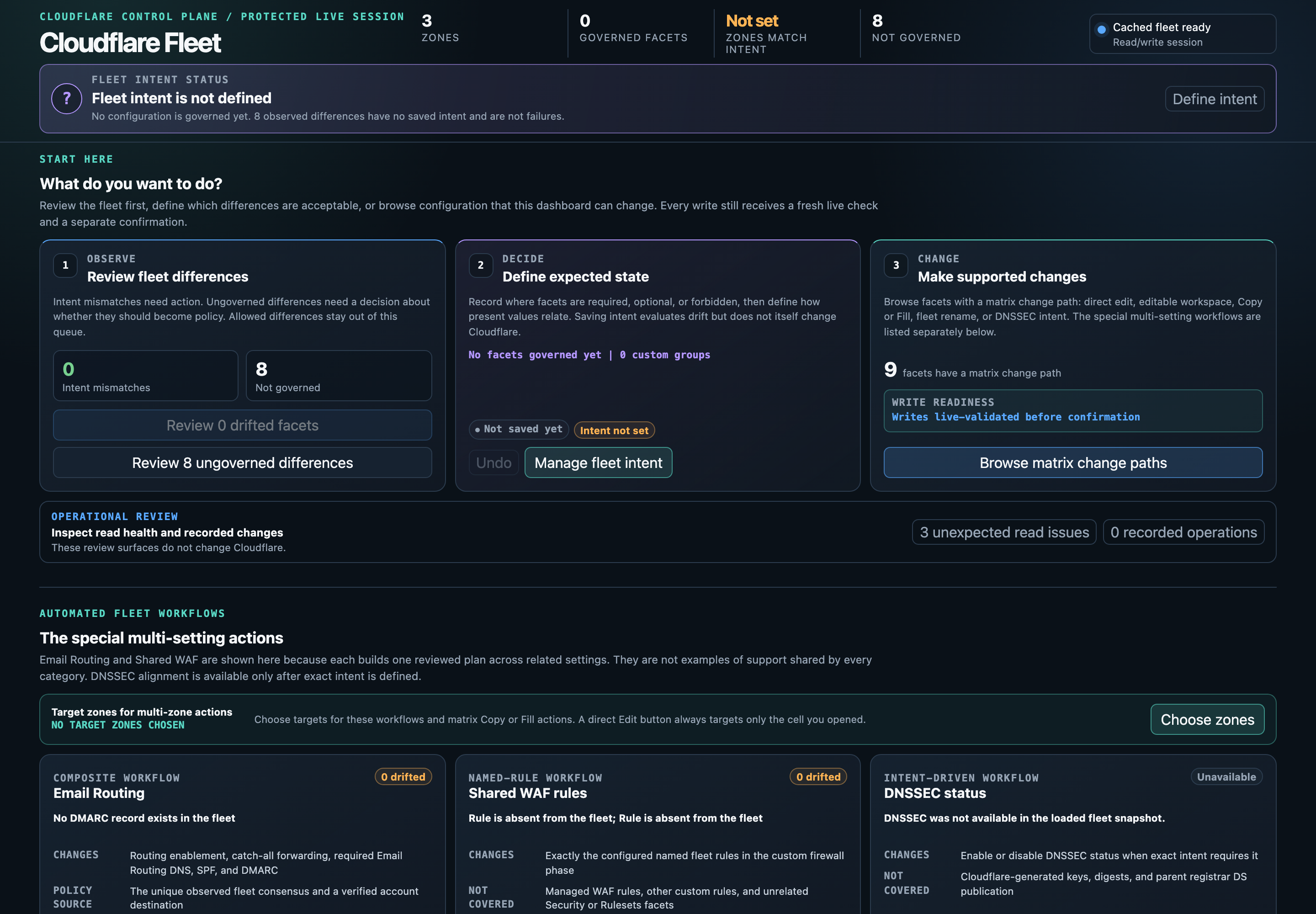
The same browser application runs in two modes:
- An Access-protected Cloudflare Worker with D1 persistence for hosted access
- An ephemeral local loopback broker on macOS for a complete local workflow
Neither mode exposes the Cloudflare API token to browser JavaScript. Hosted configuration defaults to read-only. CLI and stdio MCP clients can use the hosted Worker and its shared D1 state, while standalone local mode remains available explicitly.
What Fleet does
- Compares normalized configuration across every selected zone without hiding raw source values
- Separates observed differences from saved fleet intent, acknowledged exceptions, and expected coverage gaps
- Turns supported exact and forbidden intent into first-class cell, row, and policy alignment reviews
- Models compatibility domains as strict canonical passthrough intent that rejects independent web behavior
- Governs a Free zone's single rate rule and its complementary hostname WAF skip as one fail-safe posture
- Audits core fleet posture in Markdown, JSON, or self-contained HTML, with an optional deep account and endpoint pass
- Plans single or batched settings, DNS, DNSSEC, Email Routing, and ruleset changes through endpoint-specific adapters
- Displays targets, before and after values, methods, endpoints, and request bodies before a write
- Saves pending activity before mutation, verifies authoritative resources afterward, and offers guarded undo only when the inverse is lossless
- Keeps the hosted Cloudflare proxy inside explicit read and write allowlists
The documentation site includes a copyable getting-started guide, the complete architecture, deployment guide, security model, screenshots, and accessible visual diagrams.
Quick start
Node.js 22 or newer is required. Install a tagged GitHub source package so the command is copied into npm's global prefix and remains usable if a checkout is moved or deleted. Choose the tag from GitHub Releases.
npm install --global "github:j-256/cloudflare-fleet#v0.1.0"

export CLOUDFLARE_API_TOKEN="your-account-token"
export CLOUDFLARE_ACCOUNT_ID="your-account-id"

cloudflare-fleet doctor --live
cloudflare-fleet audit
The first command installs the canonical cloudflare-fleet CLI, the macOS dashboard launcher, and the stdio MCP server as one versioned package. Fleet remains private on the npm registry to prevent accidental publication; tagged GitHub source is the supported distribution channel.
Do not use npm install --global . for a durable installation. npm normally links that command back to the current checkout, so moving or deleting the clone breaks the global executable. Contributors can use the checkout-local npm scripts and ./launch.sh, or install a tagged GitHub source package alongside the checkout.
Credentials and permissions
Fleet reads CLOUDFLARE_API_TOKEN and CLOUDFLARE_ACCOUNT_ID from the launching environment. Put them in your shell's secret-loading workflow or secret manager, not in this repository, an MCP file with literal values, or a committed dotenv file.
Create a token scoped to only the intended account and zones. Zone Read is the baseline for doctor --live and zone discovery. Complete inventory calls product-specific surfaces, so add the matching groups for the products you use, commonly Zone Settings Read, DNS Read, Email Routing Rules Read, Zone WAF Read, Workers Routes Read, Firewall Services Read, Health Checks, and Load Balancers. Canonical alias coverage also reads zone Worker routes, SSL for SaaS custom hostnames, rulesets, load balancers, health checks, waiting rooms, Web3 hostnames, snippets, plus account Workers custom domains and Pages projects. Missing optional access remains visible as coverage evidence instead of being treated as trustworthy absence.
Keep the token read-only unless you plan to use reviewed writes. Supported mutations commonly require the corresponding Zone Settings Write, DNS Write, Email Routing Rules Edit, or Zone WAF Write group. Deep audit account surfaces can require additional account-level read groups for Workers, Pages, D1, KV, R2, Queues, Workflows, and Registrar. Cloudflare maintains the authoritative API token permission groups; rerun the audit after changing a token so its actual coverage is explicit.
Configuration and profiles
No configuration file is required for a first run. These commands explain the effective paths, credential presence, local dependencies, and file safety without printing either credential value:
cloudflare-fleet config show
cloudflare-fleet doctor
cloudflare-fleet doctor --live
State and policy are operator data, not package data. They survive installation, updates, and uninstallation. State defaults to $XDG_STATE_HOME/cloudflare-fleet/state.json or ~/.local/state/cloudflare-fleet/state.json; policy defaults to $XDG_CONFIG_HOME/cloudflare-fleet/fleet-policy.json or ~/.config/cloudflare-fleet/fleet-policy.json. Files Fleet creates use mode 0600, and doctor warns about unsafe existing permissions or symbolic links.
Path precedence is command flag, Fleet environment variable, XDG environment variable, then per-user default. Fleet-specific environment paths must be absolute:
export CLOUDFLARE_FLEET_STATE_FILE="$HOME/.local/state/cloudflare-fleet/production.json"
export CLOUDFLARE_FLEET_POLICY_FILE="$HOME/.config/cloudflare-fleet/production-policy.json"
cloudflare-fleet config show
Use --state-file and --policy-file for a one-command profile instead. The example policy is fleet-policy.example.json; copy it to the path reported by config show only when an operator exception is needed. Live state, policy, deployment configuration, and secrets stay untracked.
Local dashboard
The local dashboard requires macOS, jq, curl, a Chromium-compatible browser, and the normal account credentials. It starts read-only when no mode flag is supplied:
cloudflare-fleet dashboard
Use cloudflare-fleet dashboard --write only when you intend to review and apply supported changes. The launcher opens a normal browser tab through a random loopback broker, persists intent and activity to the selected state file, and removes its private runtime after the last dashboard connection closes. ./launch.sh accepts the same options from a source checkout and also defaults to read-only.
Use cloudflare-fleet dashboard --fresh to bypass the inventory cache for one launch. Debug mode is intentionally separate: cloudflare-fleet dashboard --debug-port 9224 creates an isolated browser profile with direct Cloudflare transport for development and browser automation; it cannot persist intent or activity through the broker.
Read-only audit
The CLI reads live Cloudflare inventory and configured Fleet state without sending mutations. Progress goes to stderr so stdout remains pipeable.
cloudflare-fleet audit
cloudflare-fleet audit --format json
cloudflare-fleet audit --format html > audit.html
cloudflare-fleet audit --deep --fail-on warning
Core findings cover inventory gaps, fleet intent, canonical alias behavior and attachments, DNSSEC transitions, Email Routing policy, shared WAF rules, editable settings, TLS and certificate posture, duplicate DNS, mail policy, and ruleset health. Deep mode adds bounded public DNS, endpoint, Registrar, Pages, Workers, storage, binding, route, and dependency evidence. Use --state-file or --policy-file to select explicit documents.
Deep Worker checks independently flag Cron triggers without an exported scheduled handler, even when invocation logs or other account reads are unavailable. Findings include the Worker identity, observed schedules and handlers, read time, and explicit coverage. Missing metadata produces an unknown assessment. Review whether to restore an intended handler or remove an obsolete trigger; a mismatch alone does not establish that removal is safe. Invocation exception metrics describe all event paths and do not establish the HTTP failure rate.
--fail-on exits with a distinct policy status after rendering the complete report. Authentication, inventory, argument, and rendering failures remain operational errors. The deep audit is a point-in-time review of every proxied exact hostname; it does not schedule probes or retain endpoint state.
Hosted deployment
Hosted Fleet needs a locked self-hosting release, Cloudflare zone, D1 database, self-hosted Access application, custom-domain Worker, and account API token. Choose a tagged GitHub Release that includes cloudflare-fleet-VERSION-self-hosted.tgz and its .sha256 file. The CLI-only tarball and GitHub's automatic source downloads are not this bundle. Earlier tags without that asset do not support the release checks below.
release_version="REPLACE_WITH_RELEASE_VERSION"
release_url="https://github.com/j-256/cloudflare-fleet/releases/download/v${release_version}"
release_archive="cloudflare-fleet-${release_version}-self-hosted.tgz"
mkdir "cloudflare-fleet-${release_version}"
cd "cloudflare-fleet-${release_version}"
curl --fail --location --remote-name "$release_url/$release_archive"
curl --fail --location --remote-name "$release_url/$release_archive.sha256"
shasum -a 256 -c "$release_archive.sha256" && tar -xzf "$release_archive"
cd package
npm ci --include=dev
npx wrangler d1 create cloudflare-fleet
Stop if a download, checksum, or command fails. Record the database ID, create the Access application, and load your own account, database, Access, and credential environment values as described in the deployment guide. Run configuration and deployment from the extracted package directory using its own CLI, not a global command that might point to another release:
npm run fleet -- hosted configure \
  --account-id "$CLOUDFLARE_ACCOUNT_ID" \
  --database-id "$CLOUDFLARE_FLEET_D1_DATABASE_ID" \
  --hostname fleet.example.com \
  --access-aud "$CLOUDFLARE_ACCESS_AUD" \
  --access-team-domain "$CLOUDFLARE_ACCESS_TEAM_DOMAIN"

npm run build:hosted
npm run fleet -- hosted check --version "$release_version"
npm run db:migrate:remote
npm run fleet -- hosted check --version "$release_version" --live --install
umask 077
printf 'CLOUDFLARE_API_TOKEN="%s"\n' "$CLOUDFLARE_API_TOKEN" > .dev.vars.production
npm run deploy -- --secrets-file .dev.vars.production
# After configuring the client's hosted origin and Access credentials:
npm run fleet -- hosted verify --version "$release_version"
The generator writes mode-restricted wrangler.jsonc and defaults it to backend-enforced read-only mode. The archive carries the dependency lock, migrations, assets, and content identity; it contains no credentials or operator state. Keep generated configuration and secret files private and outside version control. The checks never deploy, migrate, or roll back anything. See the deployment guide for upgrades, backups, rollback limits, and CLI/MCP verification. Checksums detect changed bytes, not publisher identity; obtain both files from the trusted release channel.
An existing installation can optionally use gated GitHub Actions deployment. It is disabled for an unconfigured clone, requires protected main and a dedicated production environment, deploys only the same-run verified archive, and verifies the live release and Access boundary. Pending migrations stop deployment for separate operator review; self-hosting does not require this automation.
The generated Worker also carries bounded CPU and subrequest ceilings. These are Workers Standard safeguards rather than a claim of Free compatibility; the deployment guide records the measured headroom, exact Free fallback, and operational consequence.
wrangler.example.jsonc documents the portable binding shape. fleet-policy.example.json documents optional typed operator exceptions. Live account IDs, D1 IDs, Access values, policy exceptions, fleet state, and secrets do not belong in Git.
One shared fleet from every device
Configure each CLI or MCP process with the same hosted origin and expected account:
export CLOUDFLARE_FLEET_URL="https://fleet.example.com"
export CLOUDFLARE_FLEET_ACCOUNT_ID="your-account-id"
cloudflare-fleet config show
cloudflare-fleet doctor --live
cloudflare-fleet dashboard
Load CLOUDFLARE_FLEET_ACCESS_CLIENT_ID and CLOUDFLARE_FLEET_ACCESS_CLIENT_SECRET from a private secret manager into that process environment. Use a dedicated, expiring Access service token and an application-specific Service Auth policy that includes only that token. Preserve human login and MFA policies. Alternatively, supply an unexpired Access application JWT through CLOUDFLARE_FLEET_ACCESS_TOKEN, not both methods. See Cloudflare's service-token authentication. Credential values never belong in arguments, URLs, public files, or shared MCP configuration.
The hosted Worker holds the account API token. Ordinary remote clients do not need it and never forward it. Audits, intent, alignment, bounded changes, activity, Worker records, and guarded undo use the selected hosted backend. Release-management checks are an explicit exception: live preflight and post-deployment verification run on the operator's machine and require local Workers Scripts Read and D1 Read credentials. The MCP transport is still stdio: install the CLI on each agent host and inherit the hosted environment. There is no public remote HTTP MCP endpoint.
D1 is authoritative for shared intent, activity, and Worker records. Cloudflare remains authoritative for live resources; the deployed Worker configuration supplies operator policy exceptions. dashboard opens the hosted URL, where deployment policy determines write access. A hosted URL selects hosted mode without silent local fallback; local file flags are rejected. Use CLOUDFLARE_FLEET_BACKEND=local deliberately for standalone work or export. Without a hosted URL, standalone mode remains the default. Standalone files are not synchronized replicas and should not be used as a second production authority.
Before upgrading, back up both stores, apply all D1 migrations, and deploy the matching Worker and client versions. 0004_shared_control_state.sql adds account-scoped recovery archives; the Worker diagnostics migration supplies the shared execution lease. doctor --live checks authentication, account binding, the command protocol, and required D1 tables.
For populated stores, use reviewed reconciliation instead of a force import:
umask 077
CLOUDFLARE_FLEET_BACKEND=local cloudflare-fleet state export > local-backup.json
cloudflare-fleet state export > hosted-backup.json
jq '{state: ., intentSource: "incoming"}' local-backup.json > reconciliation.json
cloudflare-fleet state plan --input reconciliation.json --format json
cloudflare-fleet state apply --input reconciliation.json --expect-plan REVIEWED_DIGEST
Review the complete plan before applying. intentSource must explicitly select incoming or hosted for zone intent and conflicting Worker intent. Distinct activity and incident histories are retained; conflicting record identities and pending operations block reconciliation. Apply rechecks the exact plan under the shared lock, archives the previous hosted state, atomically persists the merge, and verifies the result. Input is bounded to 2 MiB and each apply to 500 additional activities. Keep large histories in reviewed batches. Export --archive-id ID reads an earlier state without changing anything; reconcile that archive as incoming to restore intent while retaining newer history.
Browser, CLI, and MCP mutations share an account-wide lease. A lost response is never automatically retried. Pending activity blocks subsequent writes even after lease expiration. Stop old clients, independently inspect affected live resources, and use cloudflare-fleet recovery plan|apply --input FILE --expect-plan REVIEWED_DIGEST (digest for apply only) with:
{"activityId":"activity-ID","reason":"Stopped the old client and inspected the affected live resources","stoppedClientsAndInspectedResources":true}
Recovery preserves the original plan as a failed execution with an explicitly unknown outcome and no automatic inverse. Zero confirmed completions does not mean zero applied writes. Recovery does not retry, reverse, or verify Cloudflare changes.
| Shared-state outcome | CLI | MCP |
|---|---|---|
| Export state or inspect recovery archive | state export |
get_fleet_state |
| Review and reconcile stores | state plan, state apply |
plan_state_reconciliation, apply_state_reconciliation |
| Close an interrupted journal after investigation | recovery plan, recovery apply |
plan_activity_recovery, apply_activity_recovery |
Worker diagnostics and schedule recovery
Open Diagnose Worker in the dashboard after an alert, failed request, or unexpected scheduled behavior, or use cloudflare-fleet worker inspect --input FILE --format json and MCP inspect_worker. Requests must provide worker (one exact Worker name) or findingId (deep.worker-scheduled-handler-missing:WORKER or deep.worker-trigger-coverage-unknown:WORKER); when both are supplied they must identify the same Worker. Empty selectors and worker_name are rejected before configuration reads. Inspection defaults to the preceding hour; explicit UTC start and end must describe a past window of at most 24 hours. Evidence pages contain at most 200 records. Continue with nextCursor and the original window; counts describe each page, not an account-wide total. Optional zoneIds narrow route reads to the supplied zones; logs:false explicitly skips invocation reads without treating them as failed.
{"worker":"example-worker","limit":50,"zoneIds":["example-zone-id"]}
Reports separate configuration observations, inferred trigger cause, confidence, missing checks, and next actions. Serving deployments include traffic allocation and per-version handlers. Binding names/types and resource identifiers are projected without values. Invocation records are deduplicated within a page; console messages do not inflate counts. HTTP response statuses remain separate from event outcomes, and an old-version 503 does not establish a serving-version failure or prove a bootstrap cause. Denied logs leave configuration diagnosis available with unknown log coverage. Current $metadata.requestId identifies invocations; $workers.requestId remains supported when the metadata request ID is absent. $metadata.id identifies the log record and supplies the pagination cursor, never an invocation fallback. A malformed metadata request ID is excluded rather than replaced by a legacy value. Only cf-worker-event records count, so related console records do not create extra invocations.
Each sample includes nullable cpuTimeMs and wallTimeMs, preserving finite nonnegative execution durations within JavaScript's safe numeric range, including zero. These fields do not measure scheduler delay. Fleet does not infer a delay from telemetry event.scheduledTime: its serialization units are not established by the scheduled handler API contract, which describes the handler input. Unsupported or missing timings stay null; older stored reports may omit the additive fields.
Logging configuration reports effective enabled from nested observability.logs.enabled, falling back to legacy observability.enabled only when the nested setting is absent. observabilityEnabled retains the legacy setting independently. persist and invocationLogs expose explicit nested values; headSamplingRate uses the nested rate before the legacy rate and accepts only values from zero to one. Missing or malformed settings stay null instead of assuming provider defaults. Cloudflare documents log enablement and persistence separate from export. Enabled collection, persistence, and full sampling still do not establish complete evidence or health.
Each version has independent handlerEvidence. An explicit handler array uses source script-handlers. Fleet recognizes the observed assets-only version shape (script.handlers:null, an explicitly empty script etag, direct-serving static assets with raw_run_worker_first:false, empty bindings, and no contradictory named exports or Worker-first routing) as an empty handler set with source assets-only-metadata. This is a conservative inference from combined metadata, not a rule that all null handlers or asset-first routes mean no script. The Cloudflare version API describes etag as a script content hash and handlers as default exports. Unrecognized null, missing, or malformed handlers stay unknown while valid binding projections remain available. Compatibility still checks every serving version, so an assets-only version cannot satisfy a retained Cron trigger. Fixed reasonCode/reason diagnostics distinguish local metadata gaps from access denial or other read failures without exposing arbitrary upstream error text.
Only allowlisted invocation fields and fixed known error signatures are returned. Fleet does not fetch source bundles or expose request headers, bodies, cookies, Access assertions, secret values, or arbitrary error messages. Narrow projection is not a promise that free-form error text can be perfectly redacted. The sanitized console-event reproduction preserves the heterogeneous record shape that exposed an upstream Workers Observability MCP validator's assumption that $workers.outcome is always present. It is not a Fleet defect; Fleet skips console records when counting invocations.
| Operator outcome | CLI worker command |
MCP tool |
|---|---|---|
| Inspect scoped evidence | inspect |
inspect_worker |
| Save a fresh incident | record |
record_worker_incident |
| Read intent and incident history | history |
list_worker_incidents |
| Review and save schedule intent | intent-plan, intent-apply |
plan_worker_intent, apply_worker_intent |
| Review and change the exact schedule set | schedules-plan, schedules-apply |
plan_fleet_change, apply_fleet_change |
| Verify and save fresh post-change evidence | verify |
verify_worker_incident |
| Review and execute guarded inverse | undo-plan, undo-apply |
plan_activity_undo, apply_activity_undo |
Each CLI command takes --input FILE|-; apply additionally requires --expect-plan DIGEST. Use cloudflare-fleet worker --help for input fields. MCP apply requires signed interactive confirmation, and the dashboard requires an explicit unchecked review acknowledgement. Read-only dashboards allow inspection and planning but cannot save incidents, intent, verification records, or Cloudflare changes.
Schedule intent is explicit: disabled means an empty set, exact names the desired set, and unmanaged authorizes no change. Managed intent requires owner, identifying the deployment configuration, and reconciliation, describing the reviewed companion edit. Use history's revision as expectedRevision when saving intent. Fleet stores this review, never patches an arbitrary local file, and never silently becomes a second deployment configuration authority. A saved conflicting intent blocks an online schedule plan.
For an operator-confirmed obsolete trigger, the bounded change document is:
{
  "kind": "worker-schedules-update",
  "worker": "example-worker",
  "intent": {
    "mode": "disabled",
    "crons": [],
    "owner": "example-project:wrangler.jsonc",
    "reconciliation": "Set triggers.crons to [] in the owning environment before deployment"
  }
}
cloudflare-fleet worker schedules-plan --input schedule-change.json --format json
# Review the complete plan and reconcile the owning configuration before applying
cloudflare-fleet worker schedules-apply --input schedule-change.json --expect-plan sha256:APPROVED_DIGEST --format json
The digest binds the account, Worker, exact observed and desired schedules, serving deployment, and saved intent revision. Apply locks, replans, journals the old schedule set before writing, changes only the schedules endpoint, and rereads schedules and deployment. Drift stops the operation. No route, binding, credential, database, or code deployment is changed. Guarded undo is offered only for verified writes whose saved post-change schedules and deployment still match; review the owning configuration again when restoring the prior set. A missing or failed journal prevents writing. After an uncertain write or verification failure, inspect activity and fresh configuration before preparing another plan; do not assume that retry or inverse is safe.
Configuration acceptance is not runtime health. Cloudflare documents up to 15 minutes for Cron propagation and the difference between omitted triggers and an explicit empty array: omission preserves schedules; an empty array removes them. Verification uses the recorded activity ID and excludes evidence before the propagation boundary. It reports propagation-pending, awaiting-evidence, observed-failures, configuration-drift, or observed-healthy. Healthy describes only fresh serving-version invocations, requires evidence for each retained Cron expression, and cannot prove universal success or permanent absence of a removed trigger. Historical aggregate errors and silence alone do not decide health.
Incident capture and verification append bounded reports with supersession links, retaining earlier evidence. Local state stores optional workers intent/history alongside operation activity in the private state file. Hosted mode uses account-scoped D1 documents and a leased write lock. Apply all repository D1 migrations before upgrading a hosted instance or importing state; restore Worker records and operation activity together to preserve incident links and guarded recovery. See the deployment recovery notes.
Operator CLI and MCP
The fleet CLI exposes the dashboard's complete headless operator contract: audit, intent persistence, intent alignment, coverage-gap adoption, bounded direct changes, durable activity, guarded undo, hosted configuration, and state import. Text is the default for operators; --format json emits one structured JSON document on stdout while progress and diagnostics remain on stderr.
cloudflare-fleet alignment list --format json
cloudflare-fleet alignment plan --policy POLICY_ID --format json
cloudflare-fleet alignment apply --policy POLICY_ID \
  --expect-plan 'sha256:...' --format json

cloudflare-fleet adoption list --lens gaps --format json
cloudflare-fleet adoption plan --input adoption.json --format json
cloudflare-fleet adoption apply --input adoption.json \
  --expect-plan 'sha256:...' --format json

umask 077
cloudflare-fleet intent show > fleet-intent.json
cloudflare-fleet intent aliases --format json
cloudflare-fleet intent rate-limits --format json
cloudflare-fleet intent plan --input fleet-intent.json --format json
cloudflare-fleet intent apply --input fleet-intent.json \
  --expect-plan 'sha256:...' --format json

cloudflare-fleet schema change > fleet-change.schema.json
cloudflare-fleet change plan --input change.json --format json
cloudflare-fleet change apply --input change.json \
  --expect-plan 'sha256:...' --format json

# fleet-changes.json is {"changes": [CHANGE, ...]}
cloudflare-fleet change plan --input fleet-changes.json --format json
cloudflare-fleet change apply --input fleet-changes.json \
  --expect-plan 'sha256:...' --format json

cloudflare-fleet activity list --format json
cloudflare-fleet activity undo plan --id ACTIVITY_ID --format json
cloudflare-fleet activity undo apply --id ACTIVITY_ID \
  --expect-plan 'sha256:...' --format json
Select an alignment policy with --policy ID, a complete matrix row with --category CATEGORY --key KEY [--phase PHASE], or repeat --zone-id ID with a row selector to target cells. intent show emits an editable complete document in text mode; intent apply validates its account and revision, computes collection-level differences, and persists it atomically only if the reviewed digest still matches. schema change describes the discriminated direct-change vocabulary for settings, DNS, Email Routing, rulesets, safe copies, fleet rename, and shared-policy alignment. It accepts operator outcomes and identifiers, never arbitrary HTTP methods or API paths. change plan and change apply accept either one such request or a { "changes": [...] } envelope. A batch composes fresh reads, blocks as a unit if any member is blocked or targets overlap, and records one digest-bound activity. Worker schedule changes retain their dedicated single-change workflow because saved intent and serving deployment evidence are part of their guard.
Every Cloudflare apply repeats fresh scoped planning inside the exclusive write lock, writes a pending activity record before mutation, executes in order, and verifies authoritative resources afterward. Guarded undo is available only for a lossless inverse and is blocked when fresh reads differ from the recorded post-write state. The CLI is deliberately noninteractive, so its caller is responsible for presenting and approving the complete plan before passing the digest.
The stable exit contract is documented by cloudflare-fleet --help: success is 0, runtime failure is 1, invalid usage is 2, a missing dependency is 3, blocked or attention-required outcomes are 4, a changed plan is 5, a write failure is 6, and a verification failure is 7.
Bounded retrieval
Start with a small read, resolve exact identifiers, and inspect the relevant facet before planning a change. The CLI and MCP use the same retrieval service in local and hosted modes:
| Operator question | CLI | MCP |
|---|---|---|
| Which operations failed on this zone? | activity list --zone-id ID --status write-failed |
list_activity |
| What did one operation change? | activity get --id ID |
get_activity |
| Which stored policies target this group or zone? | intent list --group-id ID or intent list --zone-id ID |
list_fleet_policies |
| What does one policy require? | intent get --id ID |
get_fleet_policy |
| What is this zone's exact identifier? | zone list --name example.com |
list_zones |
| Which records or rules can I inspect? | resource list --kind dns-record --zone-id ID |
list_resources |
| What normalized facet key should I use? | facet list --category "Zone settings" |
list_facets |
| Why does this value agree or conflict with intent? | facet inspect --category "Zone settings" --key always_use_https --zone-id ID |
inspect_facet |
Use cloudflare-fleet help retrieval for all filters and short options. MCP clients can discover the static fleet://catalog/retrieval resource without credentials. It lists supported resource kinds, facet categories, and the workflow from discovery to planning. Resource discovery supports DNS records, zone settings, rulesets, zone/custom ruleset rules, and Email Routing rules; facet discovery covers the dashboard's comparison categories. Exact IDs, rule parent IDs, phases, and capability labels come from observed resources. Capability labels describe supported planners, not permission grants or a promise that a subsequent plan will be applicable.
List responses use items, total, returned, nextCursor, pageLimited, and valueTruncated. Pages default to 20 items, accept up to 100, and stop before their item payload exceeds 128 KiB. Activity, policy, and resource lists default to view: "summary"; request view: "full" or CLI --view full for bounded details. Individual values larger than 32 KiB return truncated: true, a byte count, digest, preview, and bounded child keys instead of a partial value that resembles a complete one. Activity and policy detail accept path as exact object keys or array indexes; repeat CLI --path, for example activity get --id ID --path plans --path 0 --path operations. Exact resource reads also accept a path with an ID and full view. Complete stored documents remain available through intent show / get_fleet_intent and state export / get_fleet_state.
Continue with nextCursor and the original filters, view, and limit. A cursor binds the account, query, and stored revision or observed-content digest. Changed state requires restarting without the cursor; pages are not a historical snapshot. Live pages reread their scope and do not use the write planner's baseline cache. Scope metadata identifies required zone and account surfaces, rule phases, zone count, and whether the listed zone IDs were truncated. freshness distinguishes live reads from stored state and gives read time and revision. coverage.complete describes only the requested scope. The CLI exits with attention status 4 for incomplete live coverage. An empty incomplete result does not establish absence; an incomplete facet inspection reports unknown observation and intent status, withholds action metadata, and retains bounded failure diagnostics and the hosted request ID.
Resource reads restrict upstream work to one zone and one family after account membership discovery. An exact DNS record, setting, Email Routing rule, or ruleset ID uses its detail endpoint; rulesetId / --ruleset-id narrows rule discovery to one parent ruleset. Facet inspection reads the selected category's required surfaces across account zones because group precedence, uniqueness constraints, and composite facets need that context. It combines comparison values, inspection values, effective and overridden policies, conflicts, active or stale acknowledgements, and action identifiers. Its policy explanations are paginated. A stored policy-list zone filter selects declared group membership; use facet inspection to determine effective governance. An absent governed facet stays unresolved rather than silently disappearing from the explanation.
Hosted activity lists filter and page in D1, projecting summaries before returning results. Detail lookup selects one record. Counts and JSON filters can still scan matching account history; smaller responses do not imply constant database work. Local reads load the entire state file before filtering. Collection reads follow provider pagination metadata and fail with incomplete coverage if pagination stalls or exceeds the bounded page/item limits. Additional pages and cross-zone facet reads still consume provider requests and the existing hosted Free-plan budget.
Activity response migration: cloudflare-fleet activity list and MCP list_activity return paginated items summaries. Consumers of the older unbounded entries response should follow cursors and use detail lookup, or export the complete state when full history is required. The legacy hosted activity-list command and complete intent/state exports retain their shapes. Summaries preserve recorded outcome, execution progress, verification count, timestamps, undo linkage, and recorded inverse availability. A fresh undo plan must still verify live state before an inverse can be applied.
The stdio MCP server gives compatible agents a narrower tool surface than a raw Cloudflare API proxy. It uses the selected local or hosted backend and is part of the same installed package:
cloudflare-fleet mcp
Start with get_runtime_status after connecting. It returns the same redacted path, credential-presence, dependency, and optional live-access diagnosis as cloudflare-fleet doctor, so an agent can explain missing setup before attempting fleet work.
Use plan_facet_intent and apply_facet_intent to record known-good state or assign one observed value to several groups without constructing a complete intent document. A bounded request identifies facets by category and key, selects groupIds or zoneIds, and chooses mode: current preserves each zone's exact value and proven absence, source uses sourceZoneId for all selected groups, saved keeps the expectation from policyId while changing its coverage, and absent forbids presence. Source assignment replaces conflicting exceptions inside the chosen scope while retaining intent outside it. removeGroupIds explicitly removes this facet's old group assignments; absentOutside: true explicitly replaces other scopes for the facet with an all-zones absence default. Planning requires complete live reads for the selected surfaces. Apply repeats those reads under the shared lock and rejects a changed digest before revision-safe persistence. These tools change saved intent only. For recovery, retain get_fleet_intent before the edit and the revision returned by apply; restore the prior contents with that post-save revision through plan_fleet_intent and apply_fleet_intent. A later edit blocks that restoration until it is reconciled.
Codex
For standalone mode, add the server to ~/.codex/config.toml and explicitly forward the account credential variables from the environment that launches Codex. For shared mode, forward the hosted URL, expected account, and chosen Access credential variables described above instead:
[mcp_servers.cloudflare_fleet]
command = "cloudflare-fleet"
args = ["mcp"]
env_vars = ["CLOUDFLARE_API_TOKEN", "CLOUDFLARE_ACCOUNT_ID"]
Run codex mcp list to inspect the configured server, then use /mcp in a Codex session and ask Fleet for get_runtime_status. Codex documents the stdio fields in its MCP configuration guide.
Claude Code
Register the command at user scope so it is available across projects, then launch Claude Code from the shell that exports the credentials:
claude mcp add --transport stdio --scope user cloudflare-fleet -- cloudflare-fleet mcp
claude mcp list
Use /mcp in a Claude Code session to inspect the connection and ask Fleet for get_runtime_status. The registration stores the command and arguments, not literal credential values. Claude Code documents scopes, stdio registration, and environment expansion in its MCP guide.
Other MCP clients
Use the standard stdio command-plus-arguments shape and arrange for the client process to inherit the credentials:
{
  "mcpServers": {
    "cloudflare-fleet": {
      "command": "cloudflare-fleet",
      "args": ["mcp"]
    }
  }
}
For an explicit standalone profile, append --state-file /absolute/path/state.json and --policy-file /absolute/path/fleet-policy.json to the MCP arguments. In Codex, add those strings to args; in Claude Code, place them after cloudflare-fleet mcp in the registration command. Omit these file arguments for shared hosted mode.
The server registers diagnostic, read, plan, and apply tools for fleet audit, complete intent persistence, single or batched intent alignment, coverage-gap adoption, single or batched bounded direct changes, activity inspection, and guarded undo. Plan tools expose the canonical request, digest, and ordered operations. Mutation tools show only changed leaves for comparable updates, summarize an oversized value to a length, digest, and head preview, place the negative decision first, authenticate short-lived method-bound confirmation state, and call the service's fresh apply path only after approval. Single-change tools retain per-review-field approval. Explicit apply_alignments and apply_fleet_changes batches present bounded review pages with Reviewed / Continue, followed by a separate Approve entire batch decision. Every review page and the final decision are required; acknowledging a page never authorizes a write. The signed state binds both the field count and approval mode, so missing pages, wrong decision types, or a missing final approval fail closed. Tool results include typed structured content plus an equivalent serialized JSON text block for clients that have not adopted structured results. Tool-specific output schemas describe the meaningful result fields instead of one generic envelope.
- Diagnose:
get_runtime_status - Read:
audit_fleet,describe_zone_alias_policy,describe_hostname_scoped_rate_limit_policy,get_fleet_intent,list_alignment_candidates,list_adoption_candidates,list_activity,get_activity,list_fleet_policies,get_fleet_policy,list_zones,list_resources,list_facets, andinspect_facet - Plan:
plan_fleet_intent,plan_alignment,plan_fleet_adoption,plan_fleet_change,plan_fleet_changes, andplan_activity_undo - Apply:
apply_fleet_intent,apply_alignment,apply_alignments,apply_fleet_adoption,apply_fleet_change,apply_fleet_changes, andapply_activity_undo
Read and plan tools work without interactive approval. Apply tools additionally require an MCP client that supports input elicitation. In the Codex terminal, Left/Right or Page Up/Down navigate review fields; Enter records the selected answer, and the last field submits the complete form. Escape cancels without applying. Reviews budget the heading, field title, body, choices, and navigation for an 80-column by 24-row reference layout. MCP does not report the client viewport, so smaller windows or different client renderers can still clip text: resize until each page is fully visible, or use the CLI or dashboard to review and apply the same bounded plan. Do not approve a clipped review. Batch digest, validation time, and scope totals appear with the final decision.
Alignment plan and apply derive their read requirements from the selected facets before requesting inventory. Each preparation reads fresh account membership and only the required surfaces and ruleset phases; alignment and direct-change batches compose shared reads. A short-lived candidate inventory supplies an optional membership guard, never evidence that a facet is absent or aligned. Cross-zone reads remain deliberate: overlapping policies and portable copy sources need the complete account membership, even for a cell or fixed-group selector. Protocol messages use stdout and diagnostics use stderr. The package version is reported consistently by the CLI, package metadata, and MCP server identity.
Failed or omitted required reads return blocked with coverage.complete: false, bounded coverage.failures, the total failureCount, and a truncated flag. Failures identify the affected zone, surface and ruleset when applicable, HTTP status, and whether the read failed, timed out, was cancelled, or was not performed. No plan is emitted for incomplete coverage, and one blocked scope withholds the complete batch plan. A successful exact read and an absent resource are distinct from an unsuccessful read. Candidate listing also marks incomplete coverage as unavailable instead of treating it as confirmed drift.
Commands aborted at their deadline and propagated upstream timeouts return HTTP 504 with a server-generated error.diagnostics.requestId, the command, elapsed time, deadline, last reported progress, bounded error source locations, and bounded upstream method, path, status and abort classification when available. Other propagated upstream errors return HTTP 502; command cancellation returns HTTP 408. A per-resource timeout retained by inventory instead returns blocked coverage, not HTTP 504. The hosted client separately classifies cancellation, timeout, network failure, redirect, access denial, and unexpected responses with the command, stage, attempt count, read-only status, and HTTP status when available. It does not expose raw transport error text. The remote CLI's JSON output and MCP structured errors preserve both diagnostic forms; text errors include the request ID when one exists.
Structured Worker log objects fleet.command.failed and fleet.command.incomplete-inventory correlate with the response, without raw provider error messages, query strings, request bodies or credentials. Coverage logs are bounded and emitted once per affected command, using the deployment's Workers Logs sampling and retention.
The deadline is cooperative cancellation, not a guarantee that every storage operation stops at that instant. The MCP apply flow retries one network failure only while refreshing its read-only plan before it requests confirmation. This pre-confirmation retry cannot write and is labeled pre-confirmation-replan in transport diagnostics. Cancellation, timeout, redirect, access denial, unexpected responses, other command reads, and every write remain single-attempt. A failed write may have an unknown outcome and requires activity and resource inspection before further action.
Cloudflare GET requests honor Retry-After when the API returns HTTP 429. Both dashboard proxies preserve that delay. Concurrent reads through the same API client wait for the latest shared cooldown, including extensions received while they are waiting; cancellation stops a waiting read before it sends another request. Exhausted throttling fails the inventory operation instead of presenting partial coverage as trustworthy drift, and mutating requests are never automatically retried. The same bounded retry behavior applies to CLI and MCP reads.
Standalone CLI and MCP processes inherit CLOUDFLARE_API_TOKEN and CLOUDFLARE_ACCOUNT_ID; shared clients inherit the hosted configuration and scoped Access credentials instead. Keep secrets in the launching process environment instead of tracked or shared client configuration. Durable state is independent of the npm installation, so reinstalling the binary cannot replace operator data. Both backends can return sensitive fleet configuration in JSON, audits, plans, and activity.
Daily operating loop
Use diagnostics and an audit before opening a write-capable surface, especially after changing credentials, profiles, or versions:
cloudflare-fleet doctor --live
cloudflare-fleet audit --fail-on warning
cloudflare-fleet dashboard
The dashboard command is read-only by default. When a supported correction is needed, either relaunch with --write and use the visual confirmation or use a CLI/MCP plan followed by its digest-bound apply command. Inspect the durable result and guarded recovery options with cloudflare-fleet activity list and cloudflare-fleet activity undo plan --id ACTIVITY_ID.
Use cloudflare-fleet config show whenever profile selection is unclear, cloudflare-fleet dashboard --fresh when the next browser session must bypass cached inventory, and cloudflare-fleet audit --deep for a broader point-in-time account and endpoint review.
Update or uninstall
Choose a newer tag from GitHub Releases, install it over the existing package, and rerun the live doctor:
npm install --global "github:j-256/cloudflare-fleet#v0.1.0"
cloudflare-fleet --version
cloudflare-fleet doctor --live
Remove only the installed program with npm uninstall --global cloudflare-fleet. npm does not remove the state and policy paths reported by cloudflare-fleet config show, so an uninstall or reinstall cannot silently discard fleet intent or activity.
Fleet intent and writes
Fleet intent defines presence and value constraints independently. Broader groups act as baselines, contained groups refine them, and partial overlaps remain peers. Exact acknowledgements bind one policy, zone, and observed normalized value, then become stale if that context changes. Saving intent evaluates drift but never writes Cloudflare.
The typed Zone aliases / canonical-web-passthrough facet is an opt-in policy for compatibility domains. It is fixed to required presence and exact value: status, target scheme and host, path preservation, query preservation, subdomain matching, subdomain preservation, serving apex and wildcard DNS, and an empty unexpected-resource envelope all participate in equality. cloudflare-fleet intent aliases --format json and the MCP describe_zone_alias_policy tool return reusable values plus initial templates for j256.dev, strangelaser.com, and strangelasers.net; the dashboard loads the matching template when one of those zones is selected.
The typed Rate limiting / hostname-scoped-free-rate-limit facet is also opt-in, required, and exact. It combines one http_ratelimit block rule with every custom WAF skip that targets that phase. The selected hostname set belongs to the composite value even though the Free rate-rule expression cannot match Host: Fleet derives one complementary skip in the earlier http_request_firewall_custom phase so every other host bypasses the zone's rate rule. Missing or extra skips, an unsupported rate expression, multiple rate rules, or incomplete reads make the posture unhealthy instead of silently widening protection.
Cloudflare's documented Free envelope, verified 2026-09-06, is one rate rule per zone with Path and Verified Bot match fields, IP counting, a 10-second counting and mitigation period, and Block. The paired skip consumes one of the Free plan's five custom WAF rules. Fleet's reusable values expose an intentionally unused slot and a 100 requests per 10 seconds API-path starter; that threshold is an example, not a workload claim, and should be replaced with a measured service baseline. If all five custom-rule slots are occupied, Fleet blocks creation of the required skip; the Free-compatible choices are to reclaim a custom-rule slot or leave the rate-limit slot unused, while an upgrade buys more custom-rule capacity. The starter uses the default Cloudflare block response. Cloudflare documents custom rate-limit responses as Pro and above, so Fleet will preserve an identical response already observed on a Free zone but will not introduce one there. The Free fallback is Cloudflare's default block response; Pro is needed only when a tailored response is a service requirement.
The relationship changes the write order. Fleet creates or restores the WAF skip before enabling the rate rule, disables an active rate rule before changing host scope, and removes the rate rule before its skip. If a later write fails, the remaining state is disabled or over-exempt rather than rate-limited on unintended hosts. Guarded inverse reverses those transitions in the corresponding safe order. cloudflare-fleet intent rate-limits --format json and MCP describe_hostname_scoped_rate_limit_policy return the strict facet, constraints, Free limits, relationship, and reusable values without reading or writing Cloudflare.
The canonicalization-dns-mail-security-v1 envelope allows proxied apex and wildcard DNS used by the redirect, non-web and mail or ownership-verification DNS, one canonical dynamic redirect, ordinary TLS and zone posture, and shared security rulesets. Additional web-serving DNS, redirects, application rules, Worker routes or custom domains, Pages domains, SSL for SaaS custom hostnames, load balancers, health checks, waiting rooms, Web3 hostnames, and snippets are reported individually with the canonical target as owner evidence. A failed relevant read blocks alignment. Legacy Page Rules remain an explicit coverage limitation because Cloudflare rejects that endpoint for account-owned tokens, so Fleet never presents their absence as proven.
Alias cleanup reuses the ordinary alignment state machine. Fleet can edit or create the canonical redirect and remove only extra DNS records or rules that have lossless inverse adapters. Required serving DNS and the selected canonical rule are never collateral cleanup targets; unsupported attachments block the complete alignment and direct the operator to the product-specific workflow.
Review alignment appears on a supported policy, matrix row, and individual drifting cell. Exact intent can edit supported zone settings, Email Routing's skip_wizard and support_subaddress settings, DNS records, DNSSEC status, API-managed Email Routing rules, redirects, and ruleset rules, and it can fill missing DNS records and portable rules from a matching fleet source. Forbidden intent can remove supported DNS records and rules through reversible adapters. Conflicts, must-differ choices, required values without an exact expectation, missing portable sources, generated resources, and unsupported endpoint shapes stay visibly blocked with their exact reason beside the disabled action.
A row or policy review is all-or-nothing: every unacknowledged drift cell in that action scope must have a deterministic adapter. A cell review deliberately narrows the requested change to one zone. Both forms reread the relevant facet across every account zone, reject changed fleet membership or incomplete reads, reevaluate the latest saved intent, and only then build the confirmation.
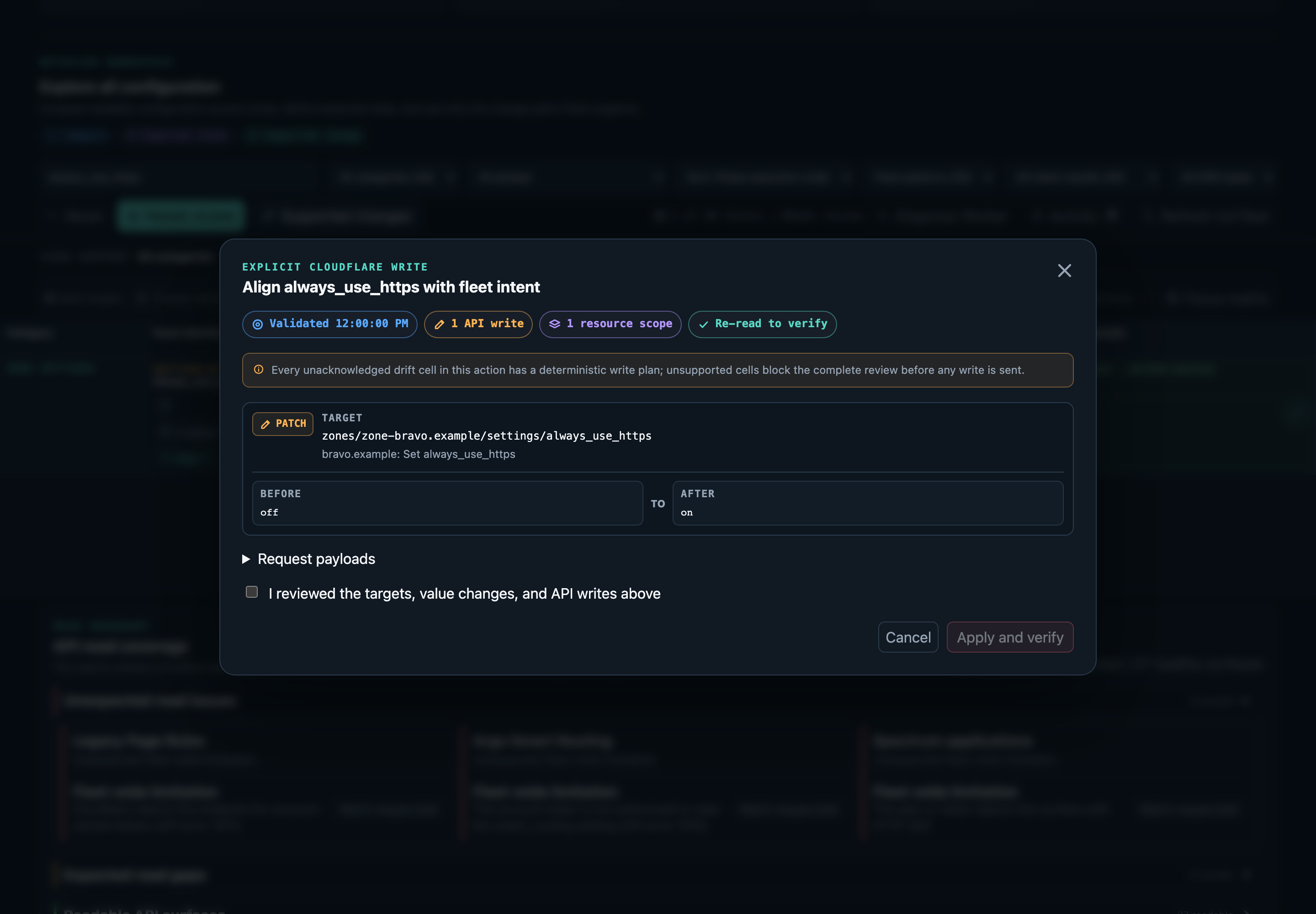
Endpoint adapters strip server fields, preserve target-specific identity, and refuse unsupported shapes. The confirmation contains the live validation time, affected zones, methods, endpoints, and focused current-to-desired deltas. The planner keeps the complete canonical request and payloads bound to the digest and signed confirmation state through apply. A pending activity record is durable before execution. Verification rereads exact affected resources and patches the matrix and persistent snapshot once.
Clearing or bypassing the inventory cache never removes intent or activity. Hosted sessions use transactional D1 state; local sessions use revisioned sections in the ignored account-scoped state file.
Adoption and coverage gaps
Adoption inspects ungoverned configuration and turns observed values into saved fleet intent. It never writes Cloudflare; it only proposes and persists the intent that ordinary alignment later enforces. A candidate is any facet that differs across zones and is not already governed by a policy.
cloudflare-fleet adoption list defaults to a coverage-gap lens that surfaces the present-on-most, missing-on-few pattern. A presence gap is a facet present on most zones and absent on a few outlier zones; a value gap is a facet whose leading value covers most zones while a minority of zones diverge. Zone-specific and tied variants are not treated as gaps. Each gap names its outlier zones, and a per-zone outlier tally counts how many gaps each zone is an outlier in, so the zones that most often fall outside the fleet consensus are visible at a glance. Use --lens all to list every candidate instead of only gaps, and narrow the view with --zone HOSTNAME, --category, --confidence high|review, --classification, --search, and --limit.
A zone whose relevant surface could not be read is never reported as a missing gap. Incomplete inventory sets coverageComplete to false and names the affected zones, so absence is never inferred from an unread zone.
cloudflare-fleet adoption list --lens gaps --format json
cloudflare-fleet adoption plan --input adoption.json --format json
cloudflare-fleet adoption apply --input adoption.json \
  --expect-plan 'sha256:...' --format json
plan and apply read an adoption request of the shape { adopt, exempt }. Each adopt entry names one candidate to govern plus optional overrides; new presence defaults to required, so a governed facet's outlier zones surface as drift for later review. Each exempt entry names one or more zones and a reason and is recorded as an acknowledgement bound to the adopted policy; the acknowledgement clears the missing status for those zones so an intended exception is not repeatedly flagged. Adoption reuses the revision-guarded intent store: plan returns an exact digest-bound diff, and apply replans under the shared write lock and persists only when the digest and saved intent revision still match.
The MCP tools mirror the CLI. list_adoption_candidates reads candidates and gaps with named outlier zones, plan_fleet_adoption returns the digest-bound intent diff, and apply_fleet_adoption persists the reviewed adoption after signed interactive confirmation. All three operate on fleet intent alone and perform no Cloudflare write.
Documentation and screenshots
The official documentation is published at docs.cloudflare-fleet.lasers.app. Its dependency-free source lives under docs/, and every clone can preview and build the same static artifact locally:
npm run docs:serve
The tracked Workers Static Assets configuration contains no account identifier, custom domain, route, runtime binding, or secret. Validate the portable deployment shape without Cloudflare credentials:
npm run build:docs
npm run deploy:docs:dry-run
Automated documentation publication is not enabled by the source defaults. Repository maintainers can opt their fork into publishing through externally stored GitHub variables, environment configuration, and a Cloudflare token as described in CONTRIBUTING.md.
Public product screenshots are automated:
npx playwright install chromium
npm run screenshots
The capture script drives the real dashboard through its deterministic local test broker. It uses reserved example hostnames, documentation IP addresses, the synthetic example-worker, synthetic configuration, and a literal fake test token. It does not read shell Cloudflare credentials, ignored operator files, D1, the hosted Worker, or a live API endpoint.
CI and release verification run npm run screenshots:ci and retain the generated images as browser evidence. After successful default-branch verification and any enabled deployments, CI publishes the generated cover to docs/screenshots/cover.png through an image-only pull request that retains the required checks and merges automatically. Repository settings must allow automatic merging and Actions-created pull requests; the workflow never approves pull request reviews. A superseded source revision cannot publish its cover; the newer revision's workflow owns that update. Pull requests render without publishing.
Development
Install the exact lockfile and browser once per checkout:
npm ci
npx playwright install chromium
Run the complete deterministic verification surface:
npm test
npm run test:e2e
npm run test:e2e:ergonomics
shellcheck launch.sh
npm run build:hosted
npx wrangler deploy --dry-run --config wrangler.example.jsonc
npm run build:docs
npm run deploy:docs:dry-run
npm run check:install
npm run build:self-hosted -- --output self-hosted-dist
npm run check:self-hosted -- --directory self-hosted-dist
npm run check:publication
npm run test:all combines the unit and browser suites. The browser suite serves the shipped dashboard through its real loopback broker and replaces only the upstream Cloudflare transport with a stateful local fake. Playwright failure artifacts stay under ignored test-results/ because traces and screenshots can contain rendered configuration.
An opt-in live read-only journey is available through npm run test:e2e:live:read-only. It requires account credentials, bypasses cached inventory, isolates state and cache, and enforces GET at both the broker and test transport. Keep its ignored artifacts private.
Publication safety
Run the publication gate before proposing a public change:
npm run check:publication
The checker rejects operator files, unexpected symbolic links, machine-private paths, malformed screenshots, and broken local documentation links. It also requires the public documentation, security guidance, CI, Workers Static Assets deployment, release workflow, install smoke test, and synthetic product screenshots that make the repository independently useful.
Security
Read SECURITY.md and the security architecture before enabling writes. Do not report suspected vulnerabilities through a public issue, and never attach live tokens, state files, audit reports, or fleet screenshots to a public report.
Contributing
See CONTRIBUTING.md for setup, verification, screenshot, documentation, and pull request guidance.
Cover image density
The project cover is rendered at 4x pixel density while preserving its logical viewport, so enlarged previews retain more detail. Higher density does not increase the displayed text size; use zoom to inspect small labels.
License
Cloudflare Fleet is licensed under AGPL-3.0-only.
Cloudflare is a trademark of Cloudflare, Inc. This independent project is not affiliated with or endorsed by Cloudflare, Inc.
Установка Cloudflare Fleet
У этого сервера нет опубликованного пакета — он собирается из исходников. Открой репозиторий и следуй инструкции в README.
▸ github.com/j-256/cloudflare-fleetFAQ
Cloudflare Fleet MCP бесплатный?
Да, Cloudflare Fleet MCP бесплатный — установка в пару кликов через Unyly без оплаты.
Нужен ли API-ключ для Cloudflare Fleet?
Нет, Cloudflare Fleet работает без API-ключей и переменных окружения.
Cloudflare Fleet — hosted или self-hosted?
Self-hosted: сервер запускается локально на твоей машине командой из раздела установки.
Как установить Cloudflare Fleet в Claude Desktop, Claude Code или Cursor?
Открой Cloudflare Fleet на unyly.org, выбери вкладку своего клиента (Claude Desktop, Claude Code, Cursor) и нажми Install — конфиг сгенерируется автоматически, без правки JSON.
Похожие MCP
GitHub
PRs, issues, code search, CI status
 автор: GitHub
Filesystem
Secure file operations with configurable access controls.
Memory
Knowledge graph-based persistent memory system.

Unyly Deploy
Deploy sites and MCP servers to Unyly straight from your AI agent
 автор: Unyly
Amap Maps Mcp Server
MCP server for using the AMap Maps API
 автор: duxiaohui
PayMCP
Lightweight payments layer for MCP servers: turn tools into paid endpoints with a two-line decorator. [PyPI](https://pypi.org/project/paymcp/) · [npm](https://w
 автор: blustAI
Server For Power BI
Enables exploring Microsoft Fabric / Power BI workspaces and semantic models, and executing ad-hoc DAX queries.
 автор: Mitsubishi-Fuso
Gpt Image 2 Mcp
RunAPI GPT Image 2 MCP server for image generation: create tasks, poll results, and check pricing across 1 model from Claude Code, Codex, Cursor, and VS Code.
 автор: runapi-ai
Template MCP Server
A CLI tool to create a new Model Context Protocol server project with TypeScript support, dual transport options, and an extensible structure
 автор: mcpdotdirect
Supabase
Database, auth and storage
 автор: Supabase
Compare Cloudflare Fleet with
Не уверен что выбрать?
Найди свой стек за 60 секунд
Автор?
Embed-бейдж для README
Похожее
Все в категории development