
Code Shot
БесплатноНе проверенRenders source code as beautiful SVG or PNG images with syntax highlighting, line numbers, and diff support. Ideal for AI agents to present code visually to hum

Описание
Renders source code as beautiful SVG or PNG images with syntax highlighting, line numbers, and diff support. Ideal for AI agents to present code visually to humans or for sharing snippets.
README
MCP server that renders source code as beautiful images. Perfect for AI agents to show code visually to humans on mobile devices, or for sharing syntax-highlighted snippets.
Example
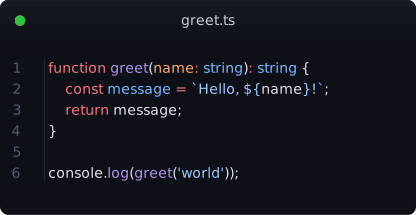
Generated from this TypeScript snippet with theme: github-dark and title: greet.ts:
function greet(name: string): string {
  const message = `Hello, ${name}!`;
  return message;
}

console.log(greet('world'));
Tools
render_code
Render source code as SVG or PNG with full syntax highlighting.
| Param | Type | Default | Description |
|---|---|---|---|
code |
string | required | Source code to render |
language |
string | auto-detect | Language (ts, rust, py, go, js, and 40+ more) |
theme |
string | github-dark |
Color theme (nord, dracula, catppuccin, one-dark-pro, etc.) |
title |
string | — | Window title bar text (e.g. filename) |
show_line_numbers |
boolean | true |
Line number gutter |
font_size |
number | 14 |
Font size in px |
output_format |
svg|png |
svg |
SVG is crisp & copyable; PNG is raster |
width |
number | auto | Code area width in characters |
padding |
number | 16 |
Padding in px |
render_diff
Render a git unified diff with color-coded additions/deletions and language-aware syntax highlighting.
| Param | Type | Default | Description |
|---|---|---|---|
diff |
string | required | Unified diff content (git diff output) |
highlight_language |
string | auto-detect | Language for highlighting within hunks. Auto-detected from diff --git header (e.g. file.ts → TypeScript). Set to "diff" for plain diff highlighting. |
| ... | — | — | Same options as render_code |
Diff lines are highlighted with:
@@hunk headers → blue background+additions → green background (#1b4520dark /#dafbe1light)-deletions → red background (#4f1818dark /#ffebe9light)
Syntax highlighting is applied per-hunk in the detected language — not just plain diff markup.
Themes
18 bundled themes:
| Dark | Light |
|---|---|
| github-dark | github-light |
| nord | one-light |
| one-dark-pro | material-theme-lighter |
| dracula | min-light |
| dracula-soft | solarized-light |
| catppuccin-mocha | catppuccin-latte |
| material-theme | vitesse-light |
| min-dark | — |
| solarized-dark | — |
| vitesse-dark | — |
Test Suite
46 tests across two runners:
npm test # Build → MCP integration tests (cobasaja) → Unit tests (node --test)
- 5 MCP integration tests (
tests/code-shot.test.ts) — tool discovery, rendering, error cases - 37 unit tests (
tests/*.node-test.ts) — renderSvg structure, diffToLines parsing, guessLanguage heuristics
Usage with Hermes
Add to ~/.hermes/config.yaml:
mcp_servers:
  code-shot:
    command: "npx"
    args: ["-y", "@thesimonharms/code-shot"]
Or from local build:
mcp_servers:
  code-shot:
    command: "node"
    args: ["/path/to/code-shot/dist/index.js"]
Configuration
Set defaults via ~/.code-shotrc (JSON):
{
  "theme": "nord",
  "show_line_numbers": true,
  "font_size": 14,
  "padding": 16
}
Also checked (in order): ~/.code-shotrc > ~/.code-shotrc.json > ~/.config/code-shot/config.json.
Tool call arguments override config file values.
Usage with Claude Code / Cursor
{
  "mcpServers": {
    "code-shot": {
      "command": "node",
      "args": ["/path/to/code-shot/dist/index.js"]
    }
  }
}
Development
npm install
npm run build    # tsc
npm test        # build + cobasaja + node --test
How it works
- Shiki tokenizes the code with full syntax highlighting (grammars for 40+ languages)
- SVG renderer builds a pixel-perfect SVG with monospace positioning, window chrome, line numbers, and diff markers
- Optional PNG via
@resvg/resvg-jsfor platforms that don't support SVG natively - Language auto-detection via shebang parsing and code heuristics (18 language patterns)
- Diff language detection from
diff --git a/file.ext b/file.extheaders
No browser, no DOM, no headless Chromium — pure math-based SVG generation.
License
MIT
Установить Code Shot в Claude Desktop, Claude Code, Cursor
unyly install code-shotСтавит в Claude Desktop, Claude Code, Cursor и VS Code — сам разбирается с npx, uvx и сборкой из исходников.
Впервые? Поставь CLI: curl -fsSL https://unyly.org/install | sh
Или настроить вручную
Выполни в терминале:
claude mcp add code-shot -- npx -y @thesimonharms/code-shotFAQ
Code Shot MCP бесплатный?
Да, Code Shot MCP бесплатный — установка в пару кликов через Unyly без оплаты.
Нужен ли API-ключ для Code Shot?
Нет, Code Shot работает без API-ключей и переменных окружения.
Code Shot — hosted или self-hosted?
Self-hosted: сервер запускается локально на твоей машине командой из раздела установки.
Как установить Code Shot в Claude Desktop, Claude Code или Cursor?
Открой Code Shot на unyly.org, выбери вкладку своего клиента (Claude Desktop, Claude Code, Cursor) и нажми Install — конфиг сгенерируется автоматически, без правки JSON.
Похожие MCP
GitHub
PRs, issues, code search, CI status
 автор: GitHub
Filesystem
Secure file operations with configurable access controls.
Memory
Knowledge graph-based persistent memory system.
Template MCP Server
A CLI tool to create a new Model Context Protocol server project with TypeScript support, dual transport options, and an extensible structure
 автор: mcpdotdirect
Compare Code Shot with
Не уверен что выбрать?
Найди свой стек за 60 секунд
Автор?
Embed-бейдж для README
Похожее
Все в категории development