

Описание
Code Sync MCP Server
README
Hot reload your remote containerized Python applications directly from your IDE using MCP (Model Context Protocol).
The Code Sync MCP architecture bridges the gap between local development and remote containers for interpreted languages - Python, Ruby, or other interpreted code in your local editor and instantly see changes reflected in containers running anywhere (staging, development clusters, cloud environments, or even production). No compilation step needed - changes take effect immediately.
What It Does
- Instant remote sync: Changes in your local editor appear immediately in containers running anywhere
- Multi-environment support: Each developer can target their own remote environment
- Minimal container changes: Just wrap your existing entrypoint—no Dockerfile rewrites needed
- IDE integration: Works through MCP tools in editors like Cursor
- Secure remote access: API key authentication for production-safe remote connections
Demo
The included docker-compose.yaml runs everything locally with a demo app.
This demo shows introducing a bug in a health check, seeing it break immediately, then fixing it in real-time.
How It Works
When you make a code change in your editor:
- MCP tool call triggers from your editor (e.g., Cursor)
- Local rsync generates a patch of your changes
- Remote Proxy (running in your cloud/staging environment) receives the patch and routes to the appropriate deployment
- Sidecar (running alongside your app container) applies changes to a shared volume
- Your remote app gets restarted automatically with the new code
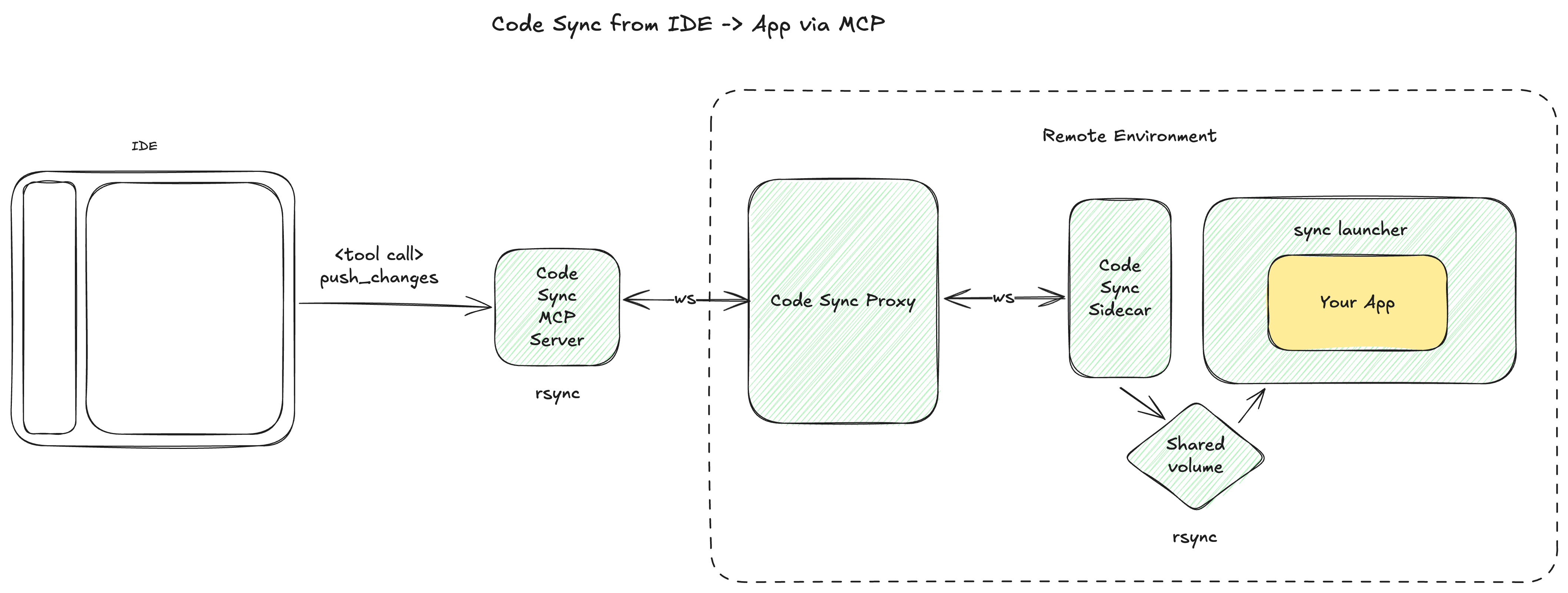
All components except the MCP server run in your remote environment
Setup Guide
Prerequisites
- Remote Docker/container environment (Kubernetes, Docker Swarm, cloud instances, etc.)
- Local editor with MCP support (like Cursor)
- An API key for securing remote connections
1. Deploy the Proxy to your remote environment
The proxy is a central websocket server that routes code changes to the right containers.
Deploy code-sync-proxy with:
PROXY_API_KEY=your-secret-key-here
You only need one proxy per remote environment for all your applications and developers.
2. Configure Your Remote Application (Per App/Deployment)
For each app deployment, you need two changes:
A) Modify your container entrypoint
Replace your existing entrypoint with this wrapper that waits for the sync system:
# Simple one-liner approach (recommended)
sh -c "while [ ! -f /app-files/.sidecar/rsync-launcher.sh ]; do echo 'Waiting for sync...'; sleep 1; done && /app-files/.sidecar/rsync-launcher.sh 'YOUR_ORIGINAL_COMMAND_HERE'"
Or use the provided script template.
B) Add the sidecar container to your remote deployment
Deploy code-sync-sidecar container alongside your app with these environment variables:
BIFROST_API_URL=http://your-proxy-url
BIFROST_API_KEY=your-secret-key-here   # Same as proxy
BIFROST_APP_ID=my-app                  # Unique app identifier
BIFROST_DEPLOYMENT_ID=dev-john         # Unique deployment name
Deployment examples:
- Kubernetes: Add as a sidecar container in your pod spec
- Docker Compose: Add as an additional service with shared volumes
- ECS: Add as a sidecar container in your task definition
C) [If Required] Ensure you app has permissions for syncing (if not running as root)
Add to your Dockerfile:
RUN useradd -m appuser
RUN chown -R appuser:appuser /app
USER appuser
3. Configure Your Editor
For Cursor, add this to your local MCP settings pointing to your remote proxy:
{
  "mcpServers": {
    "code-sync": {
      "command": "uvx code-sync-mcp",
      "env": {
        "BIFROST_API_KEY": "your-secret-key-here",
        "BIFROST_WS_API_URL": "ws://your-proxy-url",
        "BIFROST_API_URL": "http://your-proxy-url"
      }
    }
  }
}
You'll see these tools become available:

Then you need to add a .bifrost.json file to your app's root:
{
    "app_id": "my-app",
    "deployment_id": "dev-john",
    "app_root": "absolute/path/to/code/root"
}
Usage
Once set up, use the push_changes tool in your editor to sync your local code changes to any remote container. The system respects your .gitignore file automatically.
Example workflow:
- Edit a file locally in Cursor
- Use the
push_changesMCP tool - See changes immediately reflected in your remote staging environment
- Debug, iterate, and test—all without leaving your local editor
Architecture Deep Dive
The system has four main components:
code-sync-mcp-server (Local)
- Runs locally in your editor
- Exposes
push_changesMCP tool - Uses
rsyncto efficiently detect and package changes - Respects
.gitignorerules
code-sync-proxy (Remote)
- Central websocket server (FastAPI-based) running your remote environment
- Routes change batches to correct sidecar instances
- Handles authentication and connection management
- One instance serves all apps and developers
code-sync-sidecar (Remote)
- Runs alongside each container in your remote environment
- Receives change batches via websocket
- Syncs files to shared volume with main app
- Sends
SIGHUPto trigger app restart
rsync-launcher.sh (Remote)
- Wrapper script for your remote application
- Syncs files from shared volume into app directory
- Handles graceful restarts on file changes
- Minimal modification to existing containers
Key Benefits for Remote Development
- Eliminate the deploy-test cycle: No more waiting for CI/CD for simple changes
- True remote development: Work with remote databases, services, and infrastructure
- Multiple remote environments: Each developer can target their own remote staging
- Production-like testing: Test in environments that match production exactly
Local Demo (For Testing)
Prerequisites
Before running the local demo, ensure you have the following installed:
- MCP Client: Install Cursor for this demo
- Rsync (version 3.4.1 or newer):
- macOS:
brew install rsync && rsync --version - Other platforms: Verify your version with
rsync --versionand upgrade if needed
- macOS:
Setup and Configuration
1. Clone and Start Services
# Clone the repository
git clone https://github.com/bifrostinc/code-sync-mcp.git

# Start the local environment
docker-compose up
2. Open Project in Cursor
cursor ./demo-app
3. Configure MCP Server
Add the following configuration to your Cursor MCP settings:
{
  "mcpServers": {
    "code-sync": {
      "command": "uvx code-sync-mcp",
      "env": {
        "UV_PYTHON": "3.13",
        "BIFROST_API_KEY": "test-secret-key",
        "BIFROST_WS_API_URL": "ws://localhost:8000",
        "BIFROST_API_URL": "http://localhost:8000"
      }
    }
  }
}
Testing the Demo
Make a code change in
demo-app/app.py(try adding an Exception to the health check)Deploy your changes by typing in the Cursor chat window:
deploy these changesExample:
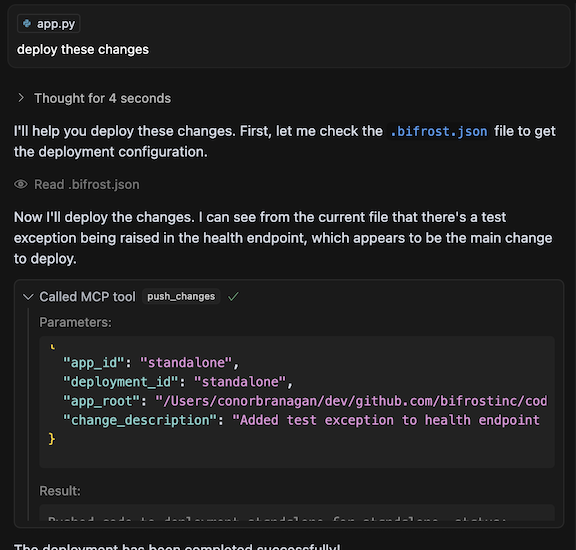
Observe the results:
- Check the logs for deployment activity
- Visit http://localhost:8080/health to see the updated service
- Note any errors that may occur during deployment
Real Usage: In a real deployment, the proxy and sidecar components would run in your remote infrastructure rather than locally. This demo simulates that environment on your local machine for testing purposes.
Установка Code Sync
У этого сервера нет опубликованного пакета — он собирается из исходников. Открой репозиторий и следуй инструкции в README.
▸ github.com/bifrostinc/code-sync-mcpFAQ
Code Sync MCP бесплатный?
Да, Code Sync MCP бесплатный — установка в пару кликов через Unyly без оплаты.
Нужен ли API-ключ для Code Sync?
Нет, Code Sync работает без API-ключей и переменных окружения.
Code Sync — hosted или self-hosted?
Self-hosted: сервер запускается локально на твоей машине командой из раздела установки.
Как установить Code Sync в Claude Desktop, Claude Code или Cursor?
Открой Code Sync на unyly.org, выбери вкладку своего клиента (Claude Desktop, Claude Code, Cursor) и нажми Install — конфиг сгенерируется автоматически, без правки JSON.
Похожие MCP
GitHub
PRs, issues, code search, CI status
 автор: GitHub
Filesystem
Secure file operations with configurable access controls.
Memory
Knowledge graph-based persistent memory system.
Template MCP Server
A CLI tool to create a new Model Context Protocol server project with TypeScript support, dual transport options, and an extensible structure
 автор: mcpdotdirect
Compare Code Sync with
Не уверен что выбрать?
Найди свой стек за 60 секунд
Автор?
Embed-бейдж для README
Похожее
Все в категории development