
Comfy Draftsman
БесплатноНе проверенThe MCP server that drafts ComfyUI workflows a human can actually read. It lets coding agents build, repair, port, validate, and run ComfyUI workflows against y

Описание
The MCP server that drafts ComfyUI workflows a human can actually read. It lets coding agents build, repair, port, validate, and run ComfyUI workflows against your own ComfyUI instance, delivering clean, organized, fully-labeled workflows.
README
The MCP server that drafts ComfyUI workflows a human can actually read.
A local-first Model Context Protocol server that lets coding agents (Claude Code, Claude Desktop, Cursor, ...) build, repair, port, validate, and run ComfyUI workflows against your own ComfyUI instance — and deliver them as clean, organized, fully-labeled workflows: computed layout, colored stage groups, titled nodes, green-highlighted "knobs you may touch", and markdown guidance notes explaining which tuned settings to leave alone and why.
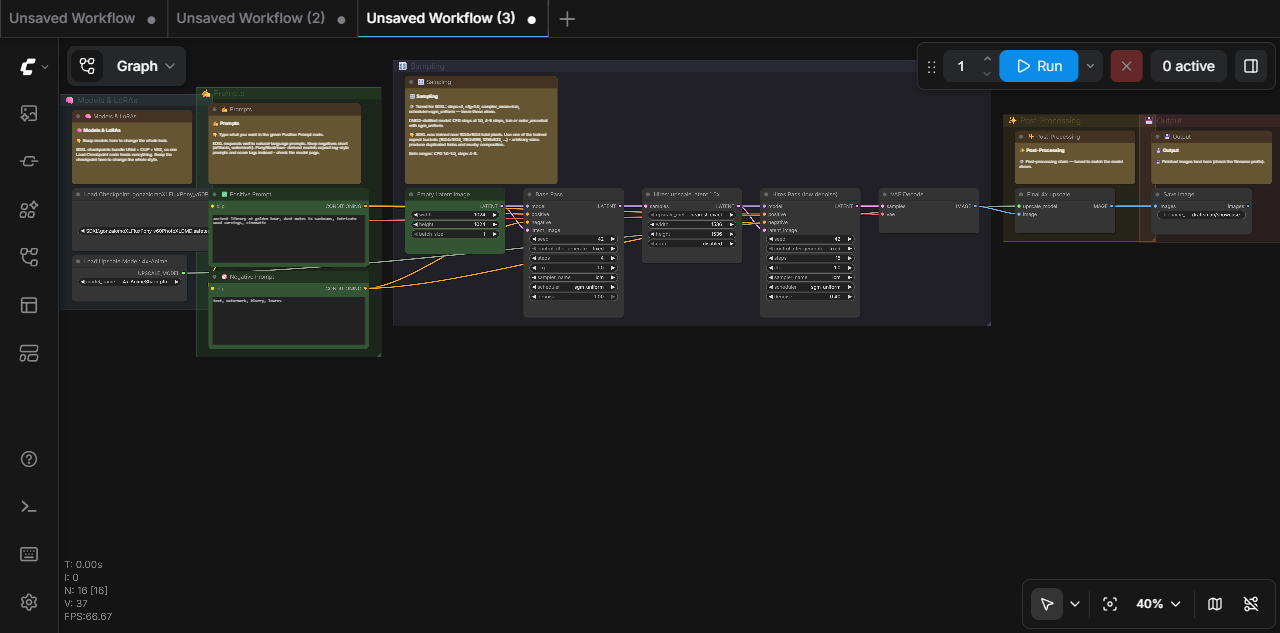
Every agent tool for ComfyUI can emit raw API-format JSON — a working but unreadable pile of unpositioned nodes. Draftsman's reason to exist is the finished drawing:
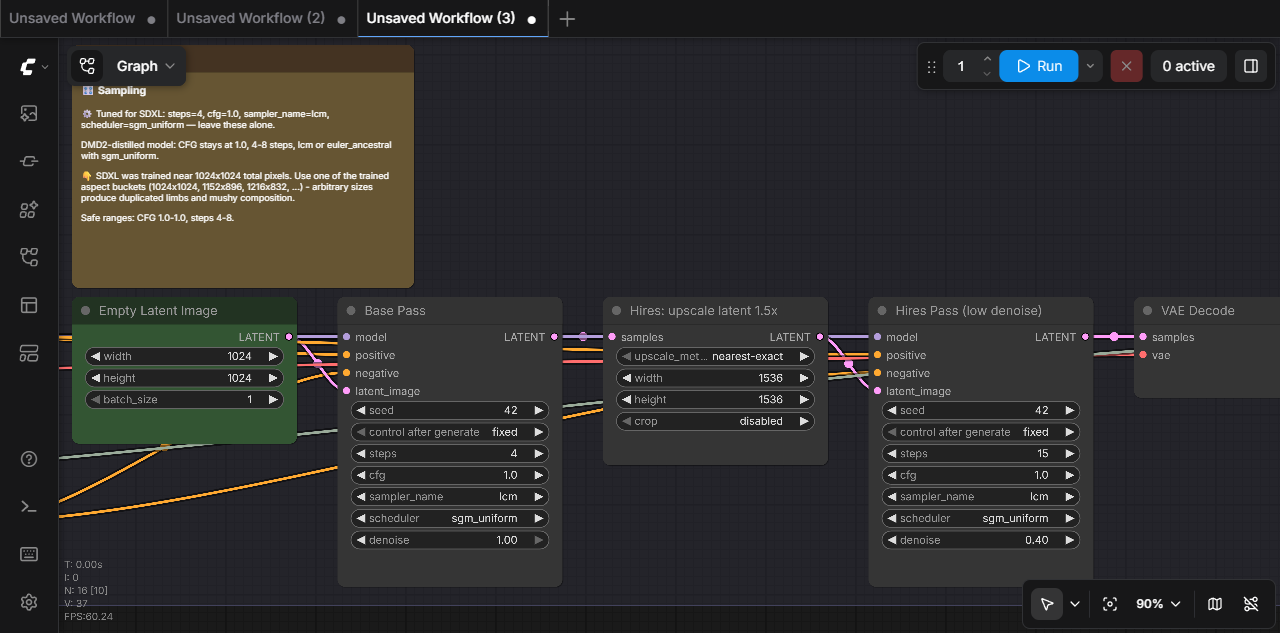
The note above was generated automatically: draftsman detected the checkpoint was a DMD-distilled SDXL merge and tuned CFG to 1.0, 4 steps, lcm/sgm_uniform — then wrote down why, so the person opening the workflow doesn't "fix" it back to CFG 7.
What it does
- Draft — seed from ComfyUI's bundled templates (always current with the latest models) or build from scratch with semantic graph operations (
add_node,connect,set_widget— validated against the live instance's schemas). - Organize — the differentiator: pipeline-stage auto-layout, colored groups, human titles (
✅ Positive Prompt,Base Pass), green highlights on user-editable knobs, and generated notes in two registers: "👇 type your prompt here" vs "⚙️ turbo model — CFG stays at 1.0". - Diagnose & modernize — hand it an old broken workflow: it reports every incompatibility against your live instance (renamed nodes, changed widget layouts, missing model files with closest-installed suggestions) and resolves missing custom nodes to installable packs via the official Comfy Registry.
- Port — retarget across model families (
sdxl→flux, ...): swaps loader topology (checkpoint ⇄ separate UNET/CLIP/VAE loaders) and rewires consumers, retunes CFG/steps/samplers and technique nodes (FaceDetailer settings are family-specific — there is no universal detailer config), swaps latent node classes, picks installed model files, and flags everything needing human judgment. - Validate & prove — structural + live validation, then an actual render with an inline preview, before the workflow is ever delivered.
- V3 dynamic combos — modern nodes whose choices reveal conditional sub-widgets (
COMFY_DYNAMICCOMBO_V3— e.g.SaveImageAdvanced'sformat, Depth-Anything-3'smode/output) are first-class: their values are set, round-tripped, validated, and serialized to the API's dotted-key form (output.normalization), so a graph containing them runs end-to-end through the draftsman alone. - Run & watch — run any workflow (one you just built, or one already saved in your ComfyUI) and see the output right in the conversation: previews come back as downscaled thumbnails to keep the chat light, with
view_outputfetching full resolution on demand. Long renders can queue in the background (wait=False) with live step progress viaget_run_status. Upload source images for img2img/inpaint, and manage the queue when something needs interrupting. - Learn — a two-layer knowledge system: a curated per-family floor (SD1.5/SDXL/SD3.5/FLUX/Krea-2/Chroma/Qwen-Image/Wan/LTX, variant-aware for turbo/lightning/DMD/distills) plus a persistent learned overlay: when the agent researches better settings for a new model,
record_learningsaves them so every future session starts smarter. A learned entry can carry its owndetectblock, so a brand-new model researched once becomes self-detecting next session instead of being mistaken for a lookalike family. - Stay current — ground truth is your running ComfyUI (
/object_info, live templates, live model lists), never a bundled snapshot.
Requirements
- Python ≥ 3.11 with uv (or pip)
- A running ComfyUI instance (default
http://127.0.0.1:8188)
Install
Claude Code:
claude mcp add comfy-draftsman \
  -e COMFYUI_URL=http://127.0.0.1:8188 \
  -e COMFYUI_MOUNT_DIR=/path/your/agent/can/reach \
  -- uvx --from git+https://github.com/EnragedAntelope/comfy-draftsman comfy-draftsman
Claude Desktop / other MCP clients (mcpServers config):
{
  "mcpServers": {
    "comfy-draftsman": {
      "command": "uvx",
      "args": ["--from", "git+https://github.com/EnragedAntelope/comfy-draftsman", "comfy-draftsman"],
      "env": {
        "COMFYUI_URL": "http://127.0.0.1:8188",
        "COMFYUI_MOUNT_DIR": "/path/your/agent/can/reach"
      }
    }
  }
}
COMFYUI_MOUNT_DIR is optional but recommended: it's a folder your agent (or a
sandboxed client like Claude Desktop / Cowork) can actually read, and save_output
/ run_workflow relocate finished renders there — otherwise renders stay inside
ComfyUI's output/ tree and every save needs an explicit dest_dir. On Windows use
a native path, e.g. C:\\Users\\you\\comfy-renders. See Configuration
for all environment variables.
Then just ask your agent things like:
"Build me a Krea workflow with LoRA support and a face detailer, labeled so my friend can use it."
"Here's an old SD1.5 workflow JSON that doesn't load anymore — fix it and port it to SDXL."
"Take this workflow I downloaded and make it neat and organized."
Configuration
| Env var | Default | Purpose |
|---|---|---|
COMFYUI_URL |
http://127.0.0.1:8188 |
The ComfyUI instance to drive |
DRAFTSMAN_SESSION_DIR |
~/.comfy-draftsman/sessions |
Where in-progress workflows persist |
DRAFTSMAN_LEARNED_DIR |
~/.comfy-draftsman/learned |
Persistent learned model knowledge |
COMFYUI_MOUNT_DIR |
(unset) | Folder a sandboxed client can reach; save_output (and run_workflow's auto-relocate) copy finished renders here out of ComfyUI's output/ tree |
DRAFTSMAN_TIMEOUT |
30 |
HTTP timeout (seconds) |
COMFY_API_KEY |
(unset) | Comfy Org API key for partner/* nodes (Luma, Seedance, Kling, Runway); injected into the prompt payload's extra_data so headless queues authenticate |
Reducing permission prompts
Building a workflow makes many tool calls (schema lookups, validation, layout), so
your agent may ask to approve each one. Draftsman marks its read-only tools with MCP
readOnlyHint annotations and batches schema lookups (get_node_info takes a list),
but the actual prompting is your client's policy. To "approve once", add the
read-only tools to your client's allowlist — see docs/PERMISSIONS.md
for a copy-paste Claude Code permissions.allow block (and the tradeoffs of allowing
the mutating tools like run_workflow / save_workflow).
Tools
Discovery — get_instance_info, search_nodes, get_node_info (long combo lists — fonts, model files — are capped for chat-friendliness; choices_filter='substring' / max_choices=N browse the full list), list_models (per-folder, with search substring filtering; metadata_for='file.safetensors' returns a LoRA's embedded training metadata — base model and top trigger tags — so trigger words come from ground truth, not guesses), list_templates, list_workflows (what's already in ComfyUI's workflow browser)
Authoring — create_workflow (blank or template-seeded), import_workflow (paste UI/API-format JSON, or name=... to load one straight from ComfyUI's workflow browser — no pasting), inspect_workflow (for subgraph-packaged workflows — how newer bundled templates ship — it lists each subgraph's inner nodes and wiring), edit_workflow (batched ops with strict per-op schemas — a failing op stops the batch and leaves the graph unchanged; widget values are checked against the live schema at write time, so a made-up sampler or model filename fails immediately with closest-match suggestions instead of at run time; supports Note/MarkdownNote annotation nodes via their single text widget; connect reports when it replaces an existing link; returns a compact delta — summary=true for the full graph), organize_workflow (never overwrites human-authored node titles), lint_workflow (readability checks, including no-prompt-preview: a wildcard-generated positive prompt should pass through a Show Text node so the user sees the final text)
Correctness — validate_workflow (live checks + closest-match suggestions), diagnose_workflow (validation + registry resolution of missing nodes), port_workflow (cross-family model ports like SDXL→Flux — missing-node repair is diagnose_workflow/resolve_missing_nodes, not this)
Execution & delivery — run_workflow (validates, renders, returns an inline preview thumbnail; wait=False queues in the background; allow_invalid=True submits past the local validator when you're sure a graph is fine; save_dir=... — or a configured COMFYUI_MOUNT_DIR — auto-relocates the finished renders and returns their saved_paths, so one call gets you a presentable file), get_run_status (queue position, live step progress, outputs when done), view_output (fetch any rendered image so the agent — and you — can see it; downscaled by default, max_dim=None for full resolution), save_output (copy a finished render out of ComfyUI's output/ tree into a folder the caller can reach — needed because ComfyUI's save nodes only write inside output/ and reject absolute paths; takes a prompt_id or an explicit filename), upload_image (put a source image/mask into ComfyUI's input folder for img2img / inpaint / ControlNet), manage_queue (status / interrupt / clear / delete / free memory), save_workflow (validates first — refuses to save a broken workflow unless allow_invalid=True — then lands in ComfyUI's workflow browser; never overwrites an existing workflow file unless overwrite=True — a taken name saves as <name> (draftsman) so your original is preserved), export_workflow_json
Ecosystem & knowledge — resolve_missing_nodes, search_node_packs, get_model_guidance, record_learning
Prompts — build_workflow, modernize_workflow (guided flows) · Resources — draftsman://workflow-format, draftsman://knowledge/{family}
Run it and see the result
Whether the agent just built a workflow or imported one you already had, running it puts the picture in the conversation. A real session looks like this:
You: Run my "ZITx Zimage Turbo" workflow and show me what it makes.
Agent: One of its model files was moved since it was saved — I've repointed the checkpoint loader to the installed file. Rendering now… done in 9 seconds. Here's the result:
The full-resolution file is
ZIT_00042_.pngin ComfyUI's output folder — want me to copy it somewhere, tweak the prompt, or queue a batch of variations?

The agent sees the same image you do, so "make it warmer and less cluttered"
works as a follow-up. Long renders queue in the background with live step
progress; inline previews are size-optimized thumbnails (the files on disk are
untouched originals), and view_output fetches full resolution on demand.
With COMFYUI_MOUNT_DIR set, finished renders are also copied to a folder your
agent can reach, so sandboxed clients can hand you the actual file.
How it stays correct
- The graph model round-trips ComfyUI's UI workflow format (schema 0.4, including subgraph
definitions) faithfully and serializes to API format with the fiddly bits handled: positional widget arrays (includingcontrol_after_generateslots — even the ones the frontend adds by name to legacy seed widgets with no schema flag), V3 dynamic-combo dotted keys, converted-widget connections, PrimitiveNode baking, Reroute tracing, mute/bypass semantics. - Headless runs match the browser. Behaviors ComfyUI implements in frontend JS — which the raw
/promptAPI never performs — are replayed at submit time: custom pack-specific widget inputs (e.g. a LoRA autocomplete box) are serialized instead of dropped,%date:…%filename tokens are substituted, and seeds onrandomize/increment/decrementre-roll per run (run_workflow(roll_seeds=False)to opt out). Combo-value validation blocks on missing model files and core-node enums but only warns on custom nodes that repopulate their pickers client-side, so it doesn't flood. - Subgraph-packaged workflows run. Instances are flattened to API format the way the frontend does it at queue time (boundary rewiring, promoted
proxyWidgetsvalues, nested definitions), andvalidatechecks the inner nodes too, with each finding tagged with its subgraph provenance. - Everything is validated against the live
/object_info— combo checks double as "is this model actually installed" checks, refreshed right before every run/save. - The test suite includes protocol-level end-to-end tests that build, validate, organize, render, and save real workflows on a real ComfyUI instance — including a subgraph-packaged one.
- Module map, data flow, and design gotchas: docs/ARCHITECTURE.md.
Security notes
- Runs over stdio only; the server opens no listening port.
- Talks only to the ComfyUI URL you configure and (read-only) the official Comfy Registry at
api.comfy.org. - It never installs custom nodes.
resolve_missing_nodestells you which pack provides a missing node and how to install it yourself — custom node packs execute arbitrary code, so that decision stays with you.
Development
git clone https://github.com/EnragedAntelope/comfy-draftsman
cd comfy-draftsman
uv sync --group dev
uv run pytest                 # unit tests (no ComfyUI needed)
uv run pytest -m integration  # needs a live instance: COMFYUI_TEST_URL=http://127.0.0.1:8288
uv run ruff check .
The repo's .comfyui-test/ convention (gitignored) holds a disposable ComfyUI clone for integration testing — see tests/test_integration_live.py.
Acknowledgments
The execution-side tools — view_output, upload_image, background runs with
get_run_status progress, and manage_queue — were inspired by
KerbalTheGathering/ComfyUI_MCP,
whose author suggested merging those capabilities into draftsman. They were
re-implemented independently for this codebase; the ideas (return-refs-by-default
with a dedicated view tool, thumbnail downscaling, websocket progress tracking)
are credited to KerbalTheGathering.
License
MIT
Установка Comfy Draftsman
У этого сервера нет опубликованного пакета — он собирается из исходников. Открой репозиторий и следуй инструкции в README.
▸ github.com/EnragedAntelope/comfy-draftsmanFAQ
Comfy Draftsman MCP бесплатный?
Да, Comfy Draftsman MCP бесплатный — установка в пару кликов через Unyly без оплаты.
Нужен ли API-ключ для Comfy Draftsman?
Нет, Comfy Draftsman работает без API-ключей и переменных окружения.
Comfy Draftsman — hosted или self-hosted?
Self-hosted: сервер запускается локально на твоей машине командой из раздела установки.
Как установить Comfy Draftsman в Claude Desktop, Claude Code или Cursor?
Открой Comfy Draftsman на unyly.org, выбери вкладку своего клиента (Claude Desktop, Claude Code, Cursor) и нажми Install — конфиг сгенерируется автоматически, без правки JSON.
Похожие MCP
GitHub
PRs, issues, code search, CI status
 автор: GitHub
Filesystem
Secure file operations with configurable access controls.
Memory
Knowledge graph-based persistent memory system.
Template MCP Server
A CLI tool to create a new Model Context Protocol server project with TypeScript support, dual transport options, and an extensible structure
 автор: mcpdotdirect
Compare Comfy Draftsman with
Не уверен что выбрать?
Найди свой стек за 60 секунд
Автор?
Embed-бейдж для README
Похожее
Все в категории development