
Commerce Cloud Server
БесплатноНе проверенConnects AI applications with Salesforce Commerce Cloud for product management, order analysis, custom object operations, and content asset management.

Описание
Connects AI applications with Salesforce Commerce Cloud for product management, order analysis, custom object operations, and content asset management.
README
A server that helps connect your AI applications with Salesforce Commerce Cloud. It uses the Model Context Protocol (MCP) to make data exchange between your AI client application and Commerce Cloud instance.
✨ Features
- 🛍️ Product management and updates
- 📊 Order analysis and insights
- 🗂️ Custom object operations
- 📄 Content asset management
- ⚙️ Environment-based configuration
🔄 Flow Diagram
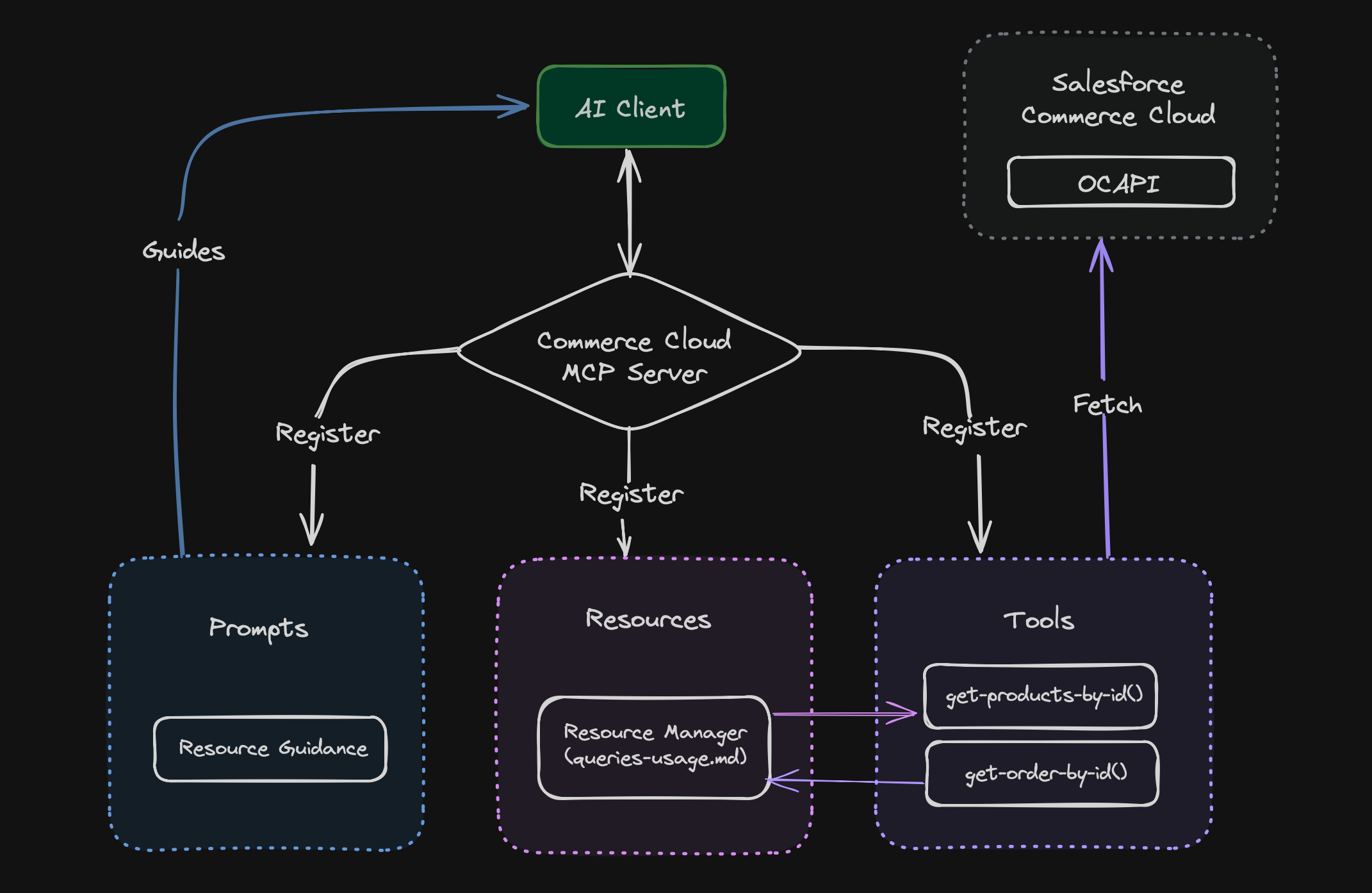
🚀 Setup Instructions
Prerequisites
- Node.js version 22 or higher
- Git
- A Salesforce Commerce Cloud instance with OCAPI access
- An MCP client application (like Claude Desktop App)
Installation Steps
- Clone the repository:
git clone https://github.com/your-username/commercecloud-mcp-server.git
cd commercecloud-mcp-server
- Install dependencies:
npm install
- Create and configure your environment file:
cp .env.example .env
Edit the .env file with your Salesforce Commerce Cloud credentials.
- Build the project:
npm run build
Import OCAPI configurations:
The OCAPI configuration files are located in the
data/ocapidirectory. Import them into your SFCC Business Manager:- Log into Business Manager
- Navigate to Administration > Site Development > Open Commerce API Settings
- For each JSON file in the
data/ocapidirectory:- Select the appropriate API type (Shop/Data)
- Copy the contents of the JSON file
- Paste into the configuration field
- Click "Save"
These configurations enable the necessary endpoints for the MCP server to function.
Configure your MCP client application (Example - Claude Desktop App):
- Open Claude Desktop App
- Go to File > Settings > Developer > Edit Config
- This will open a folder containing a file
claude_desktop_config.json - Open the file in an editor and add the server details:
{
  "mcpServers": {
    "commercecloud": {
      "command": "node",
      "args": ["/ABSOLUTE/PATH/TO/commercecloud-mcp-server/dist/index.js"]
    }
  }
}
Note: Replace /ABSOLUTE/PATH/TO/ with the actual path to your project folder.
📋 Use Cases
| Use Case Name | Description | Implementation Status |
|---|---|---|
| Product Details | Fetch product information from Commerce Cloud | ✅ Supported Now |
| Product Updates | Generate product descriptions from images and update product details automatically | ✅ Supported Now |
| Order Details | Analyze order patterns and get insights about customer purchase behavior | ✅ Supported Now |
| Custom Objects | Read, Write, and Create custom objects | ✅ Supported Now |
| Content Assets | Fetch content assets from Commerce Cloud | ✅ Supported Now |
| Content Updates | Generate content body from design images and update content assets automatically | ✅ Supported Now |
| Site Preferences | Manage site-specific configurations and preferences | 🔄 Future Implementation |
| Promotions & Campaign | Manage promotions and campaigns | 🔄 Future Implementation |
| Job Configurations | Manage job configurations | 🔄 Future Implementation |
📚 Supporting Documentation
📄 License
This project is licensed under the MIT License - see the LICENSE file for details.
👥 Credits
Greater minds than mine are behind creating tools that made this project possible. I would like to mention those projects
- colinhacks for (zod).
- Egoist for (tsup)
I hope you find this tool useful! 🌟
Made with ❤️ by Brinsil.
Установка Commerce Cloud Server
У этого сервера нет опубликованного пакета — он собирается из исходников. Открой репозиторий и следуй инструкции в README.
▸ github.com/brinzl/commercecloud-mcp-serverFAQ
Commerce Cloud Server MCP бесплатный?
Да, Commerce Cloud Server MCP бесплатный — установка в пару кликов через Unyly без оплаты.
Нужен ли API-ключ для Commerce Cloud Server?
Нет, Commerce Cloud Server работает без API-ключей и переменных окружения.
Commerce Cloud Server — hosted или self-hosted?
Доступен hosted-вариант: Unyly запускает сервер в облаке, локальная установка не обязательна.
Как установить Commerce Cloud Server в Claude Desktop, Claude Code или Cursor?
Открой Commerce Cloud Server на unyly.org, выбери вкладку своего клиента (Claude Desktop, Claude Code, Cursor) и нажми Install — конфиг сгенерируется автоматически, без правки JSON.
Похожие MCP
Fetch
Web content fetching and conversion for efficient LLM usage.
AWS KB Retrieval
Retrieval from AWS Knowledge Base using Bedrock Agent Runtime.
 автор: modelcontextprotocol
Spring AI MCP Server
Provides auto-configuration for setting up an MCP server in Spring Boot applications.
llm-analysis-assistant
A very streamlined mcp client that supports calling and monitoring stdio/sse/streamableHttp, and can also view request responses through the /logs page. It also
 автор: xuzexin-hz
Compare Commerce Cloud Server with
Не уверен что выбрать?
Найди свой стек за 60 секунд
Автор?
Embed-бейдж для README
Похожее
Все в категории ai