
Companion For Claude
БесплатноНе проверен🟠 Cowork with Claude inside your Obsidian vault — chat, agent mode, sandboxed HTML artifacts, evidence-backed research, and an MCP bridge to Claude Code. Free,

Описание
🟠 Cowork with Claude inside your Obsidian vault — chat, agent mode, sandboxed HTML artifacts, evidence-backed research, and an MCP bridge to Claude Code. Free, MIT, bring your own key.
README
Chat with Claude inside your Obsidian vault — notes as
context, interactive claude-html artifacts, agent mode with reviewable
writes, and a local MCP bridge so Claude Code works on the same notes. Your
vault stays the single source of truth.
CI Obsidian downloads License: MIT
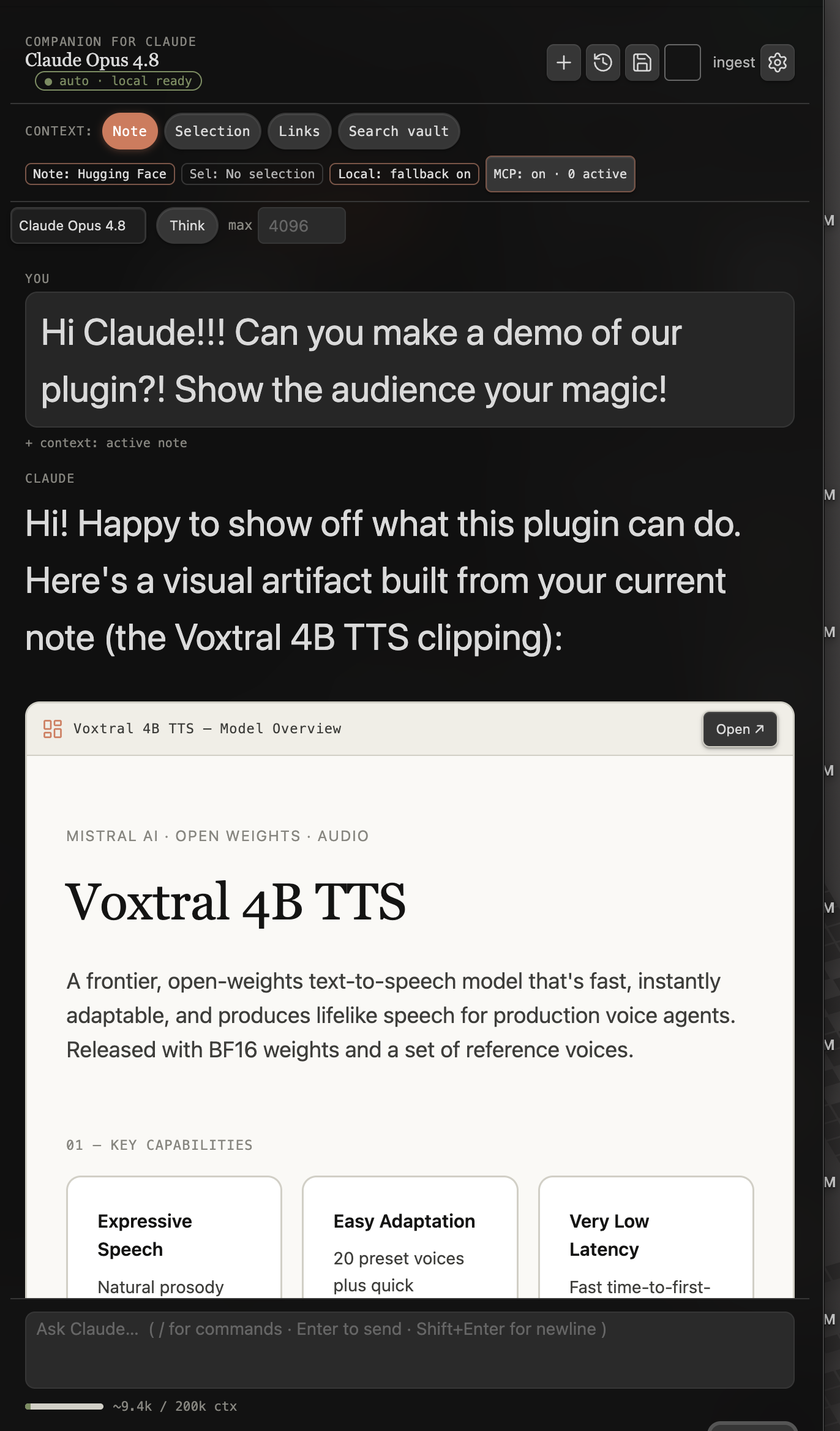
Bring your own credential. Companion for Claude talks to the Anthropic Messages API with your credential — nothing is sent anywhere else. On desktop, direct network access is required for Claude and the local MCP bridge; on mobile, chat, artifacts, and semantic search all work, with only the MCP bridge and session import gated off (desktop/Electron only). Three auth modes:
- API key (default, recommended) — a standard
sk-ant-api…key from console.anthropic.com. This is the mode used for community-store builds.- Long-term OAuth token (power users) — paste a token from
claude setup-token(sk-ant-oat…) to authenticate as your Claude subscription; usage draws on your plan rather than pay-as-you-go API credit.- Import from environment — read
ANTHROPIC_API_KEY/ANTHROPIC_AUTH_TOKEN(+ANTHROPIC_BASE_URL) from the environment, the way the CLI does.An optional base URL override points any mode at a gateway/proxy. The key stays the default so the plugin remains community-store eligible; the token and environment modes are clearly marked as power-user options.
Features
Chat & context
- Chat in a side panel — streaming responses, Markdown-rendered, with per-message Copy / Insert / Save as note / Regenerate actions and hover-to-copy on every code block.
- First-run in seconds — a keyless vault shows an in-chat Connect to Claude card; paste your key and start, without opening settings. Your typed message is never discarded while unconfigured.
- Errors don't lose work — if a turn fails mid-stream, the partial reply is kept and a Retry appears; a truncated reply offers retry with a higher limit; attachments survive failed sends and Regenerate.
- Continue the active workspace — empty Chat surfaces one relevant card for the active note or research project. Research Desk and Workbench can hand the canonical project back to Companion without sending a request automatically; ordinary notes remain note-focused.
- Vault-aware context —
@-mention notes, folders, or the whole vault; toggle context pills for your active note, the current selection, linked & backlinked notes, or a vault search. Keyword search by default; semantic search is on by default and fuses with keywords, using a built-in on-device model (one-time ~45MB model + ~23MB ONNX runtime download from huggingface.co / cdn.jsdelivr.net, offered on first run, cached and fully offline afterwards) or a local Ollama server. Search stays keyword-only until the model is downloaded. The index also covers vault PDFs — text is extracted with pdf.js and every chunk keeps its page number, so results cite the page. The ONNX runtime isort-wasm-simd-threaded.asyncify.wasm, shipped by the@huggingface/transformersdependency; it executes the embedding model on-device and makes no network requests of its own. - PDFs & images in chat — @-mention any PDF or image in your vault, or paste a screenshot straight into the composer; Claude reads it natively (vision + document understanding). Attachments are per-message pills you can remove before sending.
- In-chat model & reasoning controls — switch model per message (Opus / Sonnet / Haiku), toggle extended thinking with an effort dial, stream the model's reasoning in a collapsible panel, and set per-message temperature / max tokens. Controls are model-aware — anything a model would reject is hidden, not broken.
- Slash commands — type
/in the composer for a fuzzy palette: summarize, ask, improve, artifact, plan, canvas, workflows, capture, build, research, and more. A run shows as a compact command chip, not a wall of prompt text. - Conversation history — chats persist across restarts; resume any past conversation from a fuzzy picker, or delete one there (two-tap confirm).
- Prompt caching — repeated context (system prompt, tools, conversation history) is cached server-side automatically, cutting input cost by up to ~10× on long conversations. The cost estimate in the usage bar accounts for cache reads and writes.
- Live usage display — a context-window gauge plus running session token totals (and an estimated cost on API-key auth, or a subscription marker on OAuth), so there are no billing surprises.
- Save & test connection — one click confirms settings are saved and the credential works, with readable, actionable errors.
- Commands — Open chat panel, New chat, Resume a past conversation, Generate implementation plan from current note, Turn selection / note into an artifact, Ask Claude about my vault, Hand off current note to Claude Code (build).
Artifacts & generation
The artifact design system takes its aesthetic cues from Thariq Shihipar's “unreasonable effectiveness of HTML” gallery (vendored as a pinned submodule at the monorepo root) — an original reformulation, not a copy — so the plans, reports, and dashboards Claude generates look gallery-grade. See the NOTICE for full attribution.
- Interactive artifacts — Claude emits a
claude-htmlblock; Companion renders it inline in a sandboxed iframe, opens it in your browser, or saves it as a note that stays interactive and portable. - Canvas mind maps —
/canvas(or just ask): Claude searches your vault and builds a native Obsidian Canvas — file nodes wired to your real notes, labeled edges, labeled groups that cluster related nodes, auto-layout. A write like any other: gated and confirmed before the .canvas file is created. Also available to Claude Code over the MCP bridge. - Bases from your frontmatter — ask for "a reading tracker" or "a project dashboard" and Claude builds a native Obsidian Base (.base database view) with table, cards, list, or map views, nested and/or/not filters, and column summaries (Sum, Average, Median…), discovering your real frontmatter properties first. Write-gated and confirmed, in chat and over the MCP bridge.
- Indexing & tags — saved artifacts and chats get YAML frontmatter
(
title,tags,summary,type) so they index in the tag pane, search, and Dataview, with optional local-model auto-tagging. - Spec → build handoff — turn a plan note into a build spec + a live
tracker (a
claude-htmlprogress board) and hand it to Claude Code.
Evidence-backed research workflow
Use /research in the Companion composer to open the native Research Desk.
This guided daily view selects one active project, shows its stage and document
progress, explains the deterministic next best action, and keeps a focused
attention queue. Guidance can be pinned or dismissed, and no model request is
made merely by opening or navigating the Desk.
Use Open advanced research workbench from the command palette for the full record-level interface. Its grouped Build, Write, Assure, and Expand navigation covers Overview, Sources, Evidence, Claims, Outline, Draft, Audit, Intelligence, and Discover. Getting started is guided rather than blank:
- Triage clippings (Research Desk, one click) — groups your clippings
inbox into research themes with one model call, tags each note with its
research/<theme>tag, and writes aClippings/Triage.mdboard with wikilinks, source URLs, and a potential project per theme. - Add source is capture-first, not a form — drop a URL (clipped to clean markdown and auto-tagged), drop or upload a file (PDFs land in project assets), or fuzzy-pick an existing vault note. One gesture per source.
- New project from active note (Research Desk or command palette) — drafts a sharp research question grounded in the open note, creates the project, imports the note as the first source, and lands on Discover with a pre-derived query, so the preliminary scholarly search is one click away.
The end-to-end workflow is:
- Create a project with a focused research question.
- Import a source so its metadata and captured-content fingerprint are saved.
Sources can be web pages (fetched and reduced to clean readable markdown
automatically, powered by Defuddle — no third-party extraction services
involved), PDFs, DOI or arXiv references, Zotero items (a
zotero_keyresolves full bibliographic metadata from your library when you set a Zotero user id in settings), or existing vault notes. - Capture an exact excerpt with a source locator as evidence.
- Review the excerpt and locator, then mark the evidence reviewed or rejected. Draft with Claude writes a grounded interpretation of the excerpt for you to edit before saving.
- Build claims with separate supporting, challenging, and contextual evidence relations. Sharpen with Claude rewrites the draft proposition, grounded in the evidence you checked — no new facts allowed.
- Generate an evidence-backed outline that carries the excerpt, source, locator, and fingerprint forward.
- Draft sections from their grounded claim and evidence packets.
- Revise with an explicit intent and claim-preservation validation, then review the preview before replacing the section.
- Run the audit and repair stale sources, broken references, missing locators, and unsupported claims.
The vault's Markdown records are canonical and remain readable without the plugin. Only reviewed, locatable, non-stale evidence linked to a valid source counts as trusted support; proposed evidence never satisfies a claim. Revision responses that lose required claims, introduce unsupported citations, use stale grounding, or violate the structured response contract are blocked before any document write.
 A
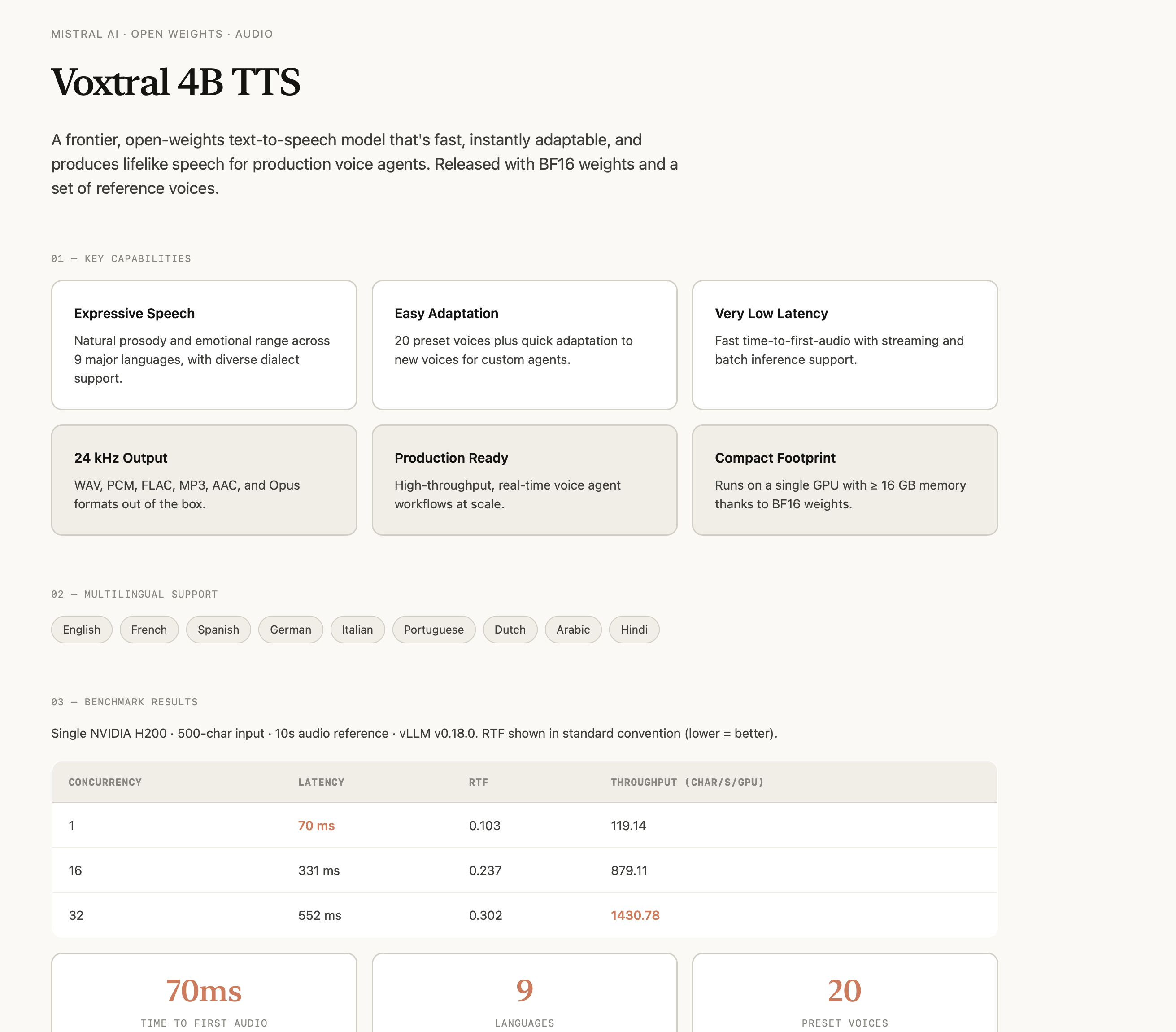
A claude-html artifact rendered inline — interactive, sandboxed, and saved as a plain Markdown note.
Agent & automation
One agent, three surfaces: agent mode in chat (everywhere), the MCP bridge for Claude Code (desktop), and cloud sessions (mobile-friendly) — same vault, same confirm-before-write guardrails, wherever you are.
- Agent mode (vault tools in chat) — Claude can search your vault, read notes, and follow links on its own while answering, showing each step as an expandable tool chip. Read-only by default; an optional setting also lets it create and edit notes, with a confirmation dialog before every write ("Allow", "Allow for this session", or "Deny"). Turn it all off in settings for plain chat with pre-attached context. The same agent runs fully local on tool-capable Ollama models — Companion reads each model's metadata and tells you when it can't drive tools, and a composer indicator shows when the current backend reasons before answering.
- Web search & fetch tools (opt-in) — let the agent search the public web (DuckDuckGo keyless, or Brave with an API key) and read pages as clean markdown. Off by default; fires only on explicit searches, with URLs cited.
- External MCP servers (MCP client) — the agent also consumes tools from other MCP servers (HTTP or, on desktop, stdio), namespaced per server and confirm-per-call. Companion is the two-way hub: your vault is served to Claude Code while the agent uses everything else.
- Apply edits as reviewable diffs — ask Claude to improve or fix a note and it proposes the change as a red/green diff; you accept or reject each hunk before anything is written, and Claude is told exactly what you accepted. Works even with write tools off — the review is the permission.
- Inline rewrite in the editor — select text, then Rewrite selection with Claude… (command palette or right-click menu): pick a preset (improve, grammar, shorten, expand, tone) or type your own instruction, and review the result as the same per-hunk diff before it lands. No chat round-trip.
- Link suggestions while you write — the Related panel surfaces unlinked mentions (note titles and aliases sitting in your prose as plain text) with one-click linking, or Review & link all as a single diff. A Connections section lists the note's one-hop graph neighborhood — backlinks, outgoing links, and typed ontology relations — as grouped lists. No embeddings needed for either; they work alongside the semantic related-notes list.
- Consolidated memory — merge captured session digests into one evolving "What Claude Knows" note (manual command or auto after each capture). It's a normal note — agent mode reads it back with its own tools, so Claude remembers your projects, decisions, and preferences across chats.
- Never lose functionality (offline) — an Auto backend transparently falls back to a local Ollama model when Claude is offline or out of usage, with a live connectivity indicator; or run Local only for full offline use. Cheap utility work (summaries, auto-tagging) can route to Ollama too — on its own smaller model if you like. Any OpenAI-compatible endpoint (LM Studio, mlx-lm, vLLM) can serve chat, utility work, or embeddings instead.
- Agent bridge — optionally expose the vault as a local MCP server so Claude Code and Claude Desktop operate on the same notes (details below).
- Cloud sessions (mobile-friendly) — dispatch a Claude Code cloud session that works your vault's Git repo and writes replies back as notes pulled over HTTPS — the agent path that works from a phone, where the local bridge can't run. Experimental (Anthropic's Routines API is in beta); setup is a guided checklist under Agent in the cloud in settings.
 |
 |
|---|---|
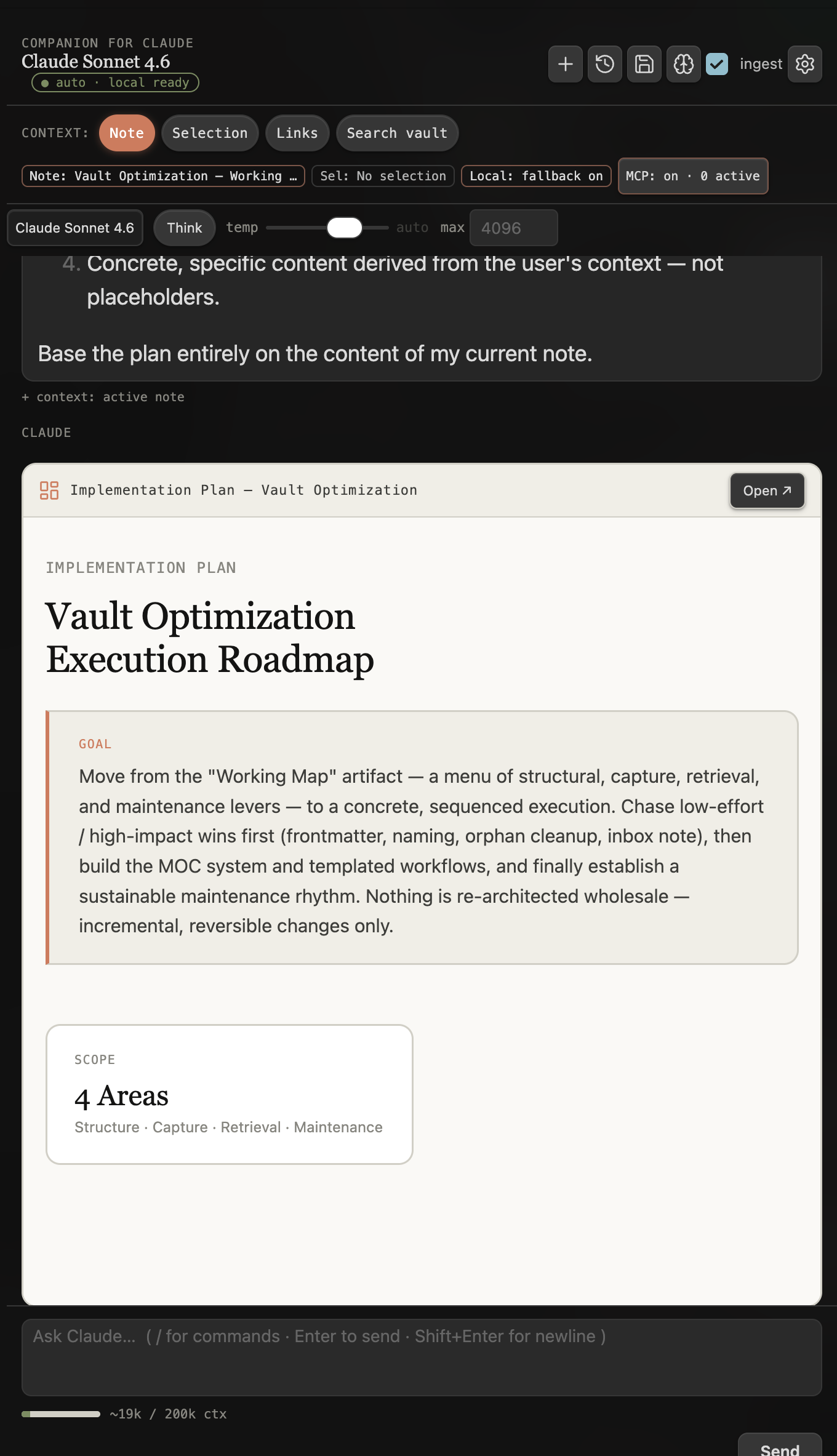
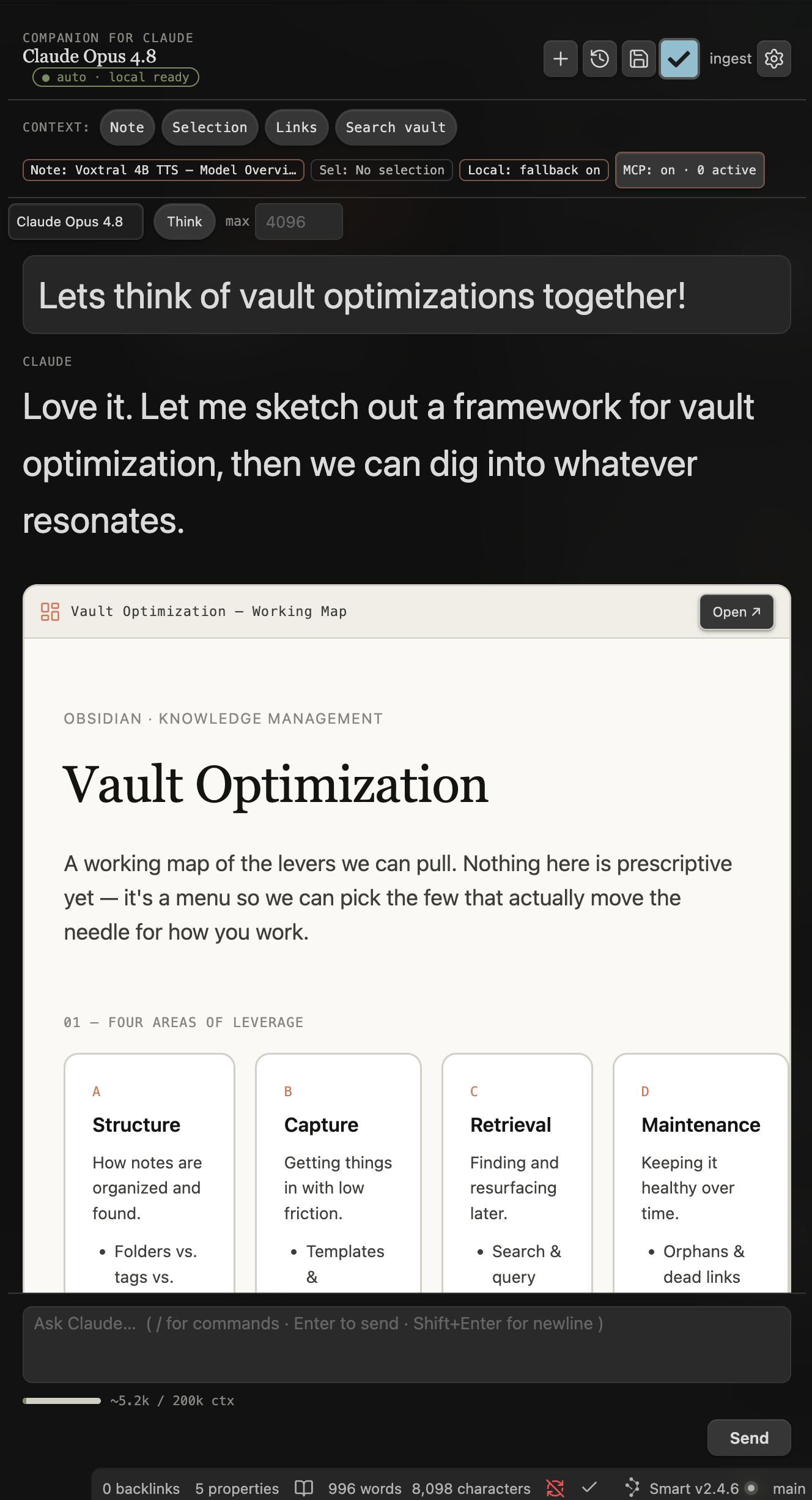
| A prioritized roadmap artifact, produced by an advisor persona surveying the vault over the bridge. | A generated working map — a canvas-style overview built from real notes. |
Typed sources & ontology (on by default)
- Typed source capture — watch a clippings
inbox (default
Clippings/) and enrich new clips with typed frontmatter (article, video, dataset) from per-type schemas. Auto-enrichment asks for one-time consent first (it sends each new inbox file to your utility model); the Enrich note as source command works manually either way. - Clipper schema sync — export Web Clipper templates generated from those schemas (command or Source capture settings). Imported into the official Web Clipper, clips arrive already typed with everything the page knows; enrichment only fills what it couldn't.
- Source inbox — a touch-first triage view of everything in the inbox that isn't typed yet, with one-tap enrich and Enrich all. Built for clipping from your phone.
- Organize clippings — one command takes the existing pile: every clip is
enriched (meaningful title, tags, summary), a batch model call infers a
domain/project folder per clip (preferring your existing folders), and a
review modal shows each old path → new path before accepted moves rename and
file clips into
<Organized folder>/<domain>/(defaultLibrary/), collision-safe, with links updated. - Vault ontology — schema notes in an
Ontology/folder define note types and typed wikilink relations; on first run Companion offers to create the default schemas (or run Seed ontology any time), and notes Claude creates conform to your schemas (advisory, never blocking). Configure under Vault ontology in settings.
Install
From the community store (recommended): Settings → Community plugins → Browse → search Companion for Claude → Install → Enable, or use this direct link. Then open Settings → Companion for Claude and paste your Anthropic API key.
From source (development):
cd obsidian-plugin && pnpm install && pnpm run build- Copy
main.js,manifest.json, andstyles.cssinto<your-vault>/.obsidian/plugins/claude-companion/. - Enable Companion for Claude in Settings → Community plugins.
For active development use pnpm run dev (esbuild watch) and symlink the plugin
folder into a test vault.
Agent bridge (MCP server, desktop)
Companion can optionally expose your vault as a local MCP server, so Claude Code and
Claude Desktop work against the same knowledge base you chat with here.
The bridge is off by default — chat, agent mode, and the build handoff all work
without it (the handoff uses the official obsidian CLI when the bridge is
disabled).
Enable it in Settings → Companion for Claude → Agent bridge — MCP server (desktop). The server binds to 127.0.0.1 only (never the network), requires a bearer token, and shows ready-to-paste connection snippets for both clients.
| Read tools (always exposed) | Write tools (require Allow writes) |
|---|---|
vault_search |
note_create |
note_read |
note_append |
list_recent |
note_update |
vault_tags |
update_frontmatter |
list_titles |
note_move |
get_backlinks |
base_create |
get_outgoing_links |
canvas_create |
frontmatter_query |
research_project_create |
research_project_read |
research_source_import |
research_audit |
research_evidence_capture |
research_evidence_review |
|
research_claim_create |
|
research_claim_link |
|
research_outline_generate |
That is 10 always-available read/audit tools and 14 write-gated mutation tools
(24 advertised tools when writes are enabled), plus the optional web_search
and web_fetch read tools when enabled in settings. Research Workbench reads
and audits remain available with writes disabled. Creating projects, importing
sources, capturing or reviewing evidence, creating or linking claims, and
generating outlines requires Allow writes; agent mode also keeps its normal
per-action confirmation gate. Evidence review applies only to evidence records
and accepts reviewed or rejected.
Permanent legacy aliases remain callable for compatibility, but are intentionally not advertised as user-facing commands. This does not change the bridge security boundary: it remains loopback-only and requires a non-empty bearer token.
With Vault ontology enabled, note_create also accepts type / properties
for schema-conformant typed notes.
Claude Code:
claude mcp add --transport http obsidian-vault \
  http://127.0.0.1:22360/mcp --header "Authorization: Bearer <token>"
Claude Desktop (claude_desktop_config.json, via mcp-remote):
{
  "mcpServers": {
    "obsidian-vault": {
      "command": "npx",
      "args": ["-y", "mcp-remote", "http://127.0.0.1:22360/mcp",
               "--header", "Authorization: Bearer <token>"]
    }
  }
}
Now ask Claude Code "search my vault for X" or "create a note summarizing this" and it operates directly on your Obsidian notes.
How artifacts work
When Claude returns a fenced ```claude-html block, Companion renders
the document inside a sandboxed iframe (allow-scripts but not
allow-same-origin) — interactions and scripts run, but the artifact can't
touch your vault or cookies. A restrictive iframe CSP also blocks network calls
and form submissions. Set a height per-block with ```claude-html height=720.
Saving an artifact writes a Markdown note containing that same block, so the artifact lives in your vault, renders in Reading view, and travels with your notes.
The claude-html block
You can author these by hand too:
```claude-html height=600
<!DOCTYPE html>
<html><head><meta charset="utf-8"><title>Hello</title></head>
<body style="font-family:ui-serif;background:#FAF9F5;padding:40px">
  <h1 style="color:#141413">It renders inline.</h1>
</body></html>
```
Development & testing
The Obsidian-free logic (SSE parsing, artifact extraction, search scoring) is factored into pure modules so it can be unit-tested without a running app.
pnpm run typecheck   # tsc --noEmit
pnpm run lint        # eslint
pnpm test            # vitest (unit tests in test/)
pnpm run build       # typecheck + production bundle
CI runs all four on every push/PR (Node 20 & 22) in the monorepo. A manual smoke-test checklist lives in CONTRIBUTING.md.
Releases
| Store listing | Companion for Claude (claude-companion) |
| Source of truth | cavi-ai/claude-obsidian monorepo, obsidian-plugin/ |
| Release repo | cavi-ai/companion-for-claude — built main.js, manifest.json, styles.css attached per release |
| Versioning | manifest.json = versions.json = package.json = git tag (exact version, no v prefix) |
Releases are cut by the monorepo's release workflow, which runs the full gate (typecheck, lint, tests, build, audit), mirrors the plugin to the release repo, and publishes the tagged GitHub release the store serves.
License
MIT — see LICENSE.
Установка Companion For Claude
У этого сервера нет опубликованного пакета — он собирается из исходников. Открой репозиторий и следуй инструкции в README.
▸ github.com/cavi-ai/companion-for-claudeFAQ
Companion For Claude MCP бесплатный?
Да, Companion For Claude MCP бесплатный — установка в пару кликов через Unyly без оплаты.
Нужен ли API-ключ для Companion For Claude?
Нет, Companion For Claude работает без API-ключей и переменных окружения.
Companion For Claude — hosted или self-hosted?
Self-hosted: сервер запускается локально на твоей машине командой из раздела установки.
Как установить Companion For Claude в Claude Desktop, Claude Code или Cursor?
Открой Companion For Claude на unyly.org, выбери вкладку своего клиента (Claude Desktop, Claude Code, Cursor) и нажми Install — конфиг сгенерируется автоматически, без правки JSON.
Похожие MCP
Gmail
Read, send and search emails from Claude
 автор: Google
Slack
Send, search and summarize Slack messages
 автор: Slack
Runbear
No-code MCP client for team chat platforms, such as Slack, Microsoft Teams, and Discord.
Discord Server
A community discord server dedicated to MCP by [Frank Fiegel](https://github.com/punkpeye)
Compare Companion For Claude with
Не уверен что выбрать?
Найди свой стек за 60 секунд
Автор?
Embed-бейдж для README
Похожее
Все в категории communication