
Contextium Server
БесплатноНе проверенMCP server for Contextium — pipe team SOPs, coding standards, agents, skills, and workflows directly into Claude, Cursor, and other AI coding assistants.

Описание
MCP server for Contextium — pipe team SOPs, coding standards, agents, skills, and workflows directly into Claude, Cursor, and other AI coding assistants.
README
contextium-io/contextium-mcp-server MCP server
Give Claude your team's brain. Pipe SOPs, coding standards, agents, and workflows directly into Claude Desktop, Claude Code, Cursor, and any MCP-compatible assistant.
Stop copy-pasting context into every chat. Contextium is a shared knowledge platform that connects your team's documentation, AI agents, skills, and workflows to Claude via MCP — so the right context is always there, automatically.
npm version npm downloads MCP Registry License: MIT
See it in action
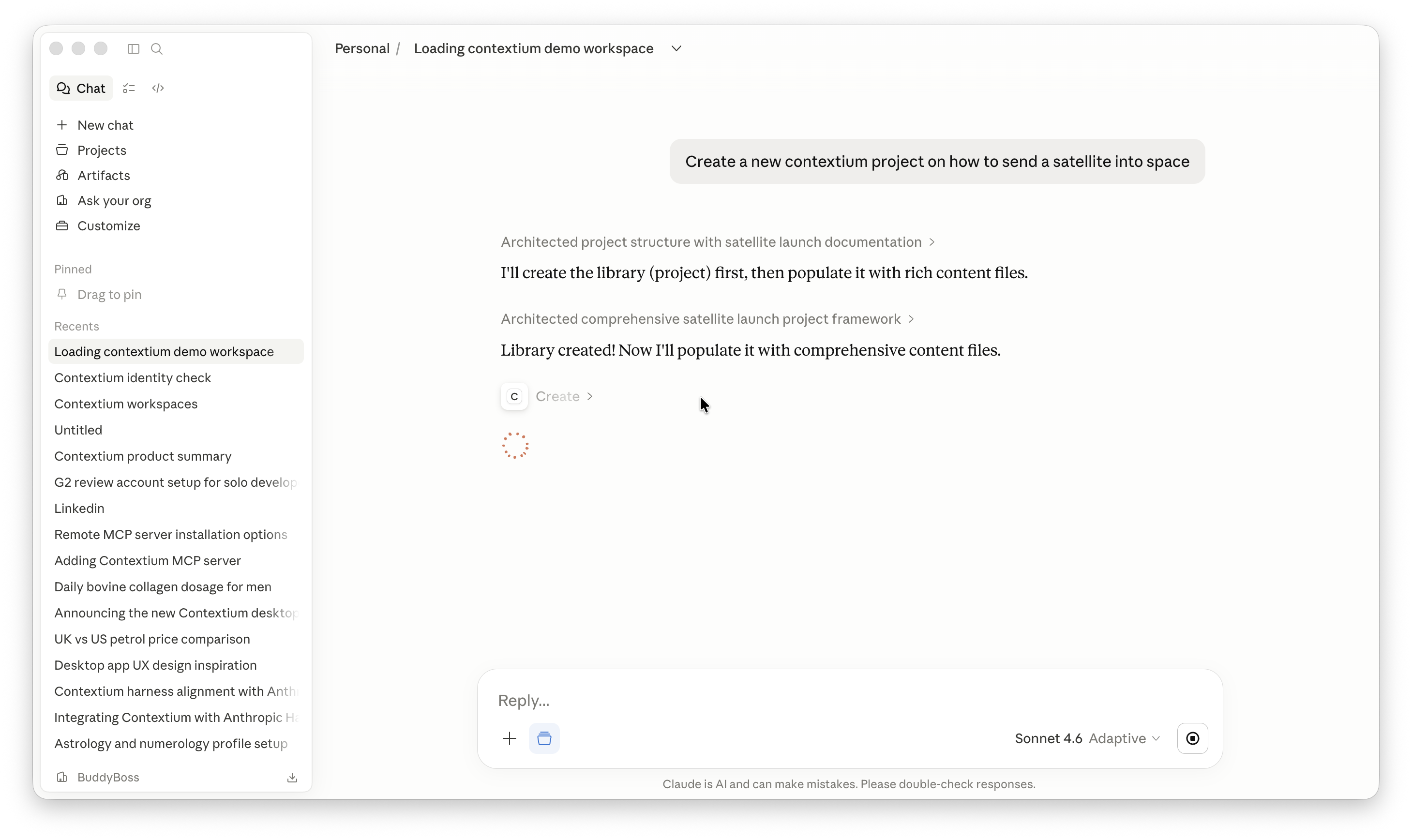
Ask Claude to create a Contextium project — it architects the full structure and populates it with content via MCP:
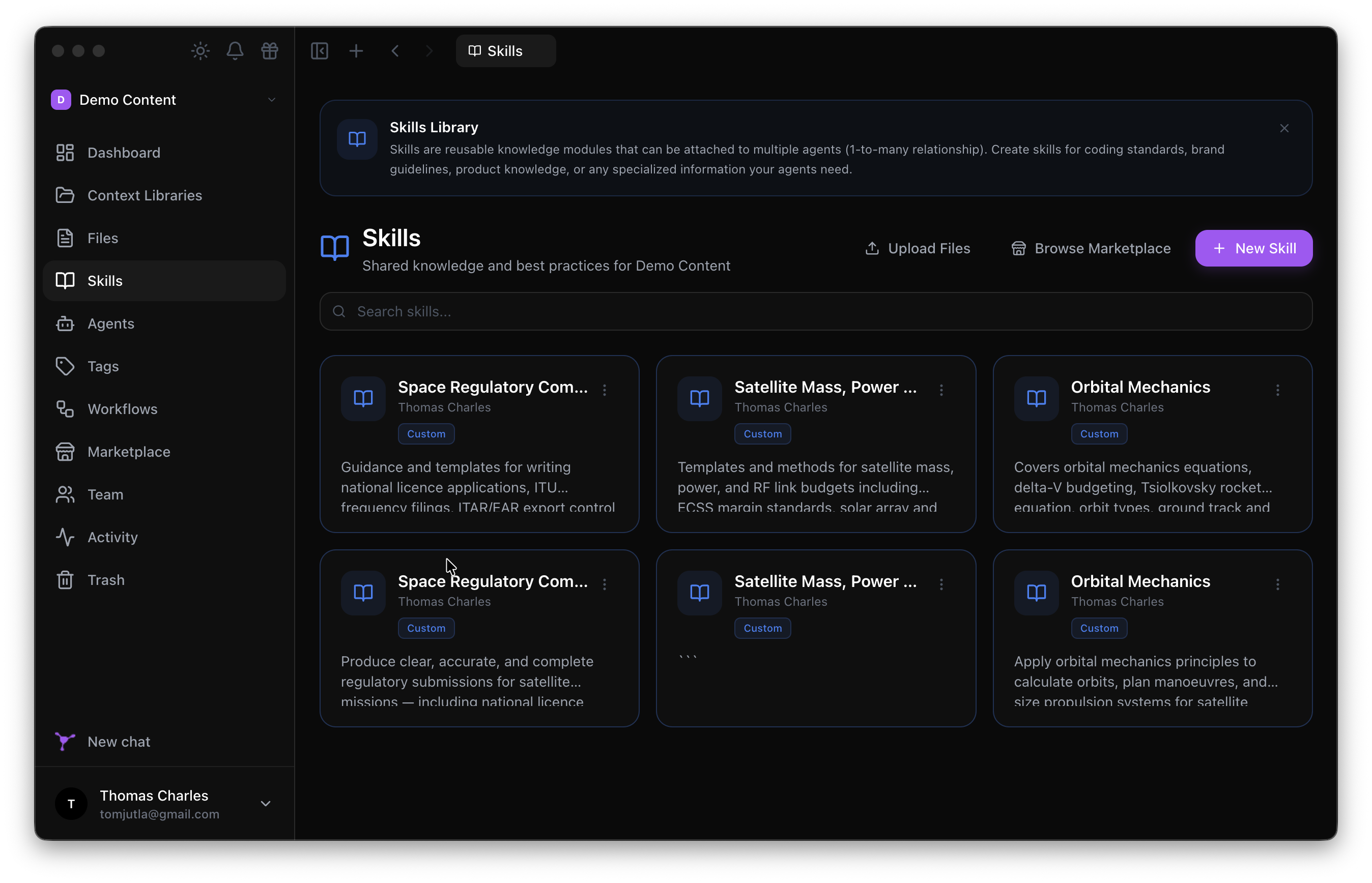
The result appears instantly in the Contextium Desktop app, ready for your whole team:
Get connected in 2 minutes
Step 1 — Add to Claude Desktop
macOS: ~/Library/Application Support/Claude/claude_desktop_config.json
Windows: %APPDATA%\Claude\claude_desktop_config.json
{
  "mcpServers": {
    "contextium": {
      "command": "npx",
      "args": ["@contextium/mcp-server"]
    }
  }
}
Step 2 — Authenticate
npx @contextium/mcp-server setup
A browser window opens. Log in, select your workspace, and authorise. Done.
Step 3 — You're live
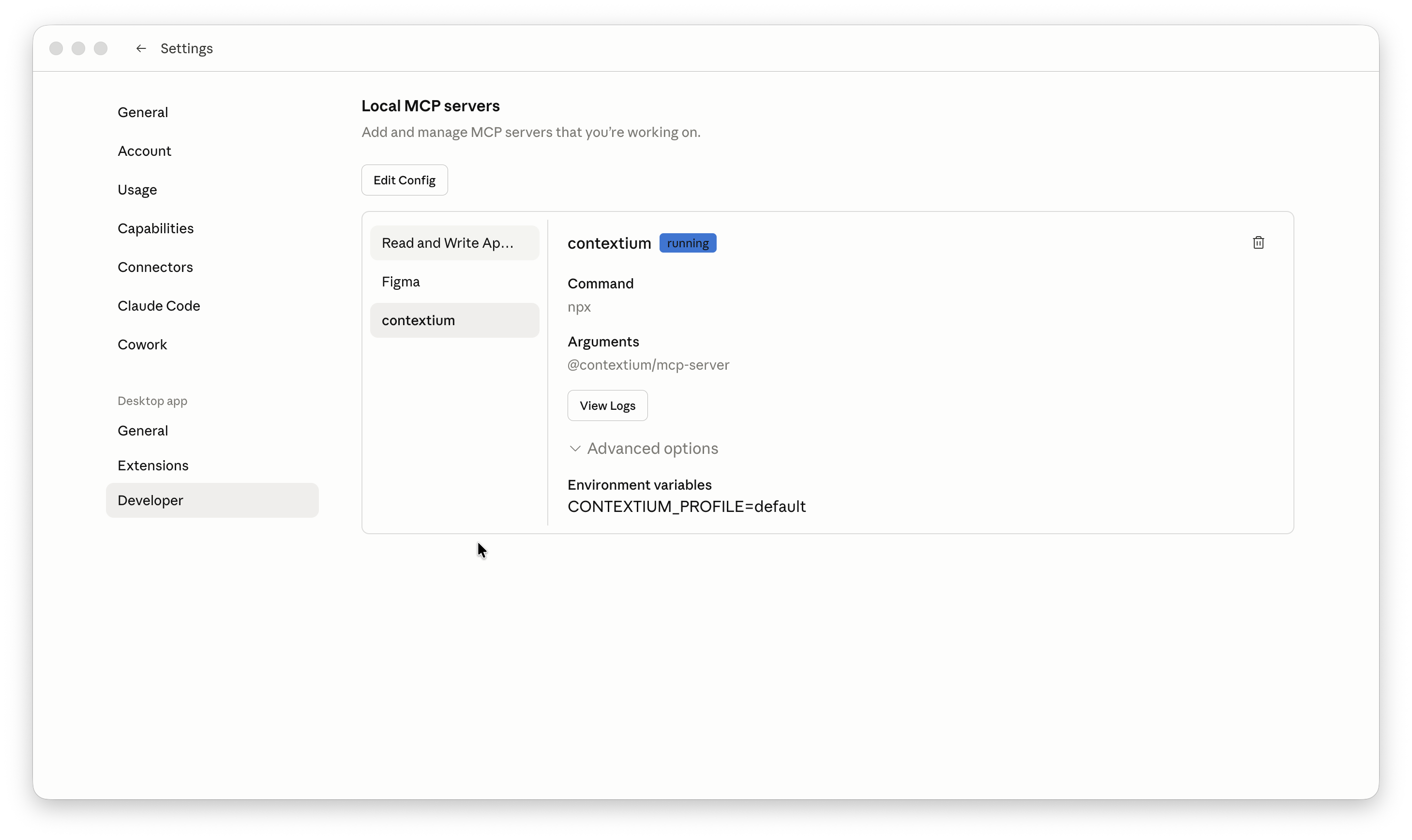
Contextium appears as running in Claude Desktop's Developer settings:
What you can do
| Say to Claude | What happens |
|---|---|
| "Create a new Contextium project for our API docs" | Claude architects and populates a full library |
| "Load my onboarding workflow" | Full team context loads into the session |
| "Find anything about our authentication approach" | Searches across all your Contextium libraries |
| "What agents do we have set up?" | Lists your team's AI agents with descriptions |
| "Add this decision to our architecture library" | Creates a versioned file in Contextium |
| "Browse the marketplace for a skill" | Searches and installs from the Contextium Marketplace |
Built-in tool instructions
Every tool ships with structured descriptions so Claude Desktop and other platforms understand exactly how and when to use each tool — no prompt engineering required on your end.
Full tool reference
Core CRUD
| Tool | What it does |
|---|---|
list |
List any resource — workspaces, libraries, files, agents, skills, workflows, tags, members |
get |
Retrieve full details of any resource by ID — including member profiles |
create |
Create any resource — files, libraries, agents, skills, workflows, tags |
update |
Update any existing resource — files, agents, workflows, skills, tags |
delete |
Delete files and resources (moves to trash, restorable) |
search |
Semantic search across all documentation |
search_by_tags |
Filter resources by tag |
manage_relationship |
Link agents to skills, apply tags, manage associations |
Workflows & Projects
| Tool | What it does |
|---|---|
load_workflow |
Load a full workflow — bundles agents, skills, and libraries into context |
new_project |
Guided flow to create a new Contextium project |
resume_project |
Resume work from a previous session handoff |
harness |
Structured feature development — get next phase, mark complete, close session |
Skills
| Tool | What it does |
|---|---|
list_skills |
List all skills in the workspace Skills Library |
get_skill |
Retrieve a skill's full markdown content by ID or name |
update_skill |
Update a skill's title or content |
Tasks
| Tool | What it does |
|---|---|
add_task |
Add a task to a workflow (accepts workflow name or ID) |
update_task_status |
Update a task's status — not_started, in_progress, done |
list_tasks |
List tasks for a workflow or across the workspace |
Identities
| Tool | What it does |
|---|---|
list_identities |
List all identities in the workspace |
get_identity |
Retrieve full identity details |
create_identity |
Create a new identity — voice, tone, role, and audience |
update_identity |
Update an existing identity |
delete_identity |
Delete an identity |
Team
| Tool | What it does |
|---|---|
notify_team_members |
Notify workspace members about a file, workflow, agent, or library |
Integrations & Utilities
| Tool | What it does |
|---|---|
figma_sync |
Sync Figma designs into a Contextium library |
marketplace |
Browse, search, and install from the Contextium Marketplace |
contextium_status |
Check auth status, current workspace, and available resources |
contextium_help |
Show available tools and usage guidance |
Works with
- Claude Desktop
- Claude Code
- Cursor
- Any MCP-compatible client
Requirements: Node.js ≥ 18
Links
- Website: https://contextium.io
- npm: https://www.npmjs.com/package/@contextium/mcp-server
- MCP Registry: https://registry.modelcontextprotocol.io
- Docs: https://contextium.io/docs/integrations-mcp
- Support: [email protected]
Установка Contextium Server
У этого сервера нет опубликованного пакета — он собирается из исходников. Открой репозиторий и следуй инструкции в README.
▸ github.com/contextium-io/contextium-mcp-serverFAQ
Contextium Server MCP бесплатный?
Да, Contextium Server MCP бесплатный — установка в пару кликов через Unyly без оплаты.
Нужен ли API-ключ для Contextium Server?
Нет, Contextium Server работает без API-ключей и переменных окружения.
Contextium Server — hosted или self-hosted?
Доступен hosted-вариант: Unyly запускает сервер в облаке, локальная установка не обязательна.
Как установить Contextium Server в Claude Desktop, Claude Code или Cursor?
Открой Contextium Server на unyly.org, выбери вкладку своего клиента (Claude Desktop, Claude Code, Cursor) и нажми Install — конфиг сгенерируется автоматически, без правки JSON.
Похожие MCP
Fetch
Web content fetching and conversion for efficient LLM usage.
AWS KB Retrieval
Retrieval from AWS Knowledge Base using Bedrock Agent Runtime.
 автор: modelcontextprotocol
Spring AI MCP Server
Provides auto-configuration for setting up an MCP server in Spring Boot applications.
llm-analysis-assistant
A very streamlined mcp client that supports calling and monitoring stdio/sse/streamableHttp, and can also view request responses through the /logs page. It also
 автор: xuzexin-hz
Compare Contextium Server with
Не уверен что выбрать?
Найди свой стек за 60 секунд
Автор?
Embed-бейдж для README
Похожее
Все в категории ai