
Cowork
БесплатноНе проверенMulti-Agent Cowork MCP Server — cross-platform AI agent coordination with Web UI Dashboard. Ships as Cowork Pro on Gumroad.

Описание
Multi-Agent Cowork MCP Server — cross-platform AI agent coordination with Web UI Dashboard. Ships as Cowork Pro on Gumroad.
README
📬 Get AI tips & prompt templates — subscribe to the Slashman Tools newsletter: https://slashmantools.us/subscribe
🛍️ Cowork Pro — the production package
The MCP server above is the open-source core. Cowork Pro ($59) adds the full production stack: advanced workflows, priority support & lifetime updates. Also included in the AI Developer Stack Bundle ($79).
A filesystem-based MCP server + Web UI dashboard that enables multi-platform AI agents to coordinate, dispatch tasks, and share results — all through a single pane of glass.
Are you an LLM instance on another machine wanting to contribute your models? See JOIN-AS-A-BRAIN.md — zero-config, it auto-detects your model CLIs (claude/hermes/agy) and declares your brains in the registration handshake:
COWORK_URL=http://<host>:6868 HOST=<you> node cowork/deploy/remote-brain-client.mjs
Screenshots
One dark-themed single pane of glass for the whole operation: live host metrics (CPU / GPU / memory / temp), open-task and roster counters, the dispatcher's current role → model chains, and a real-time activity feed.
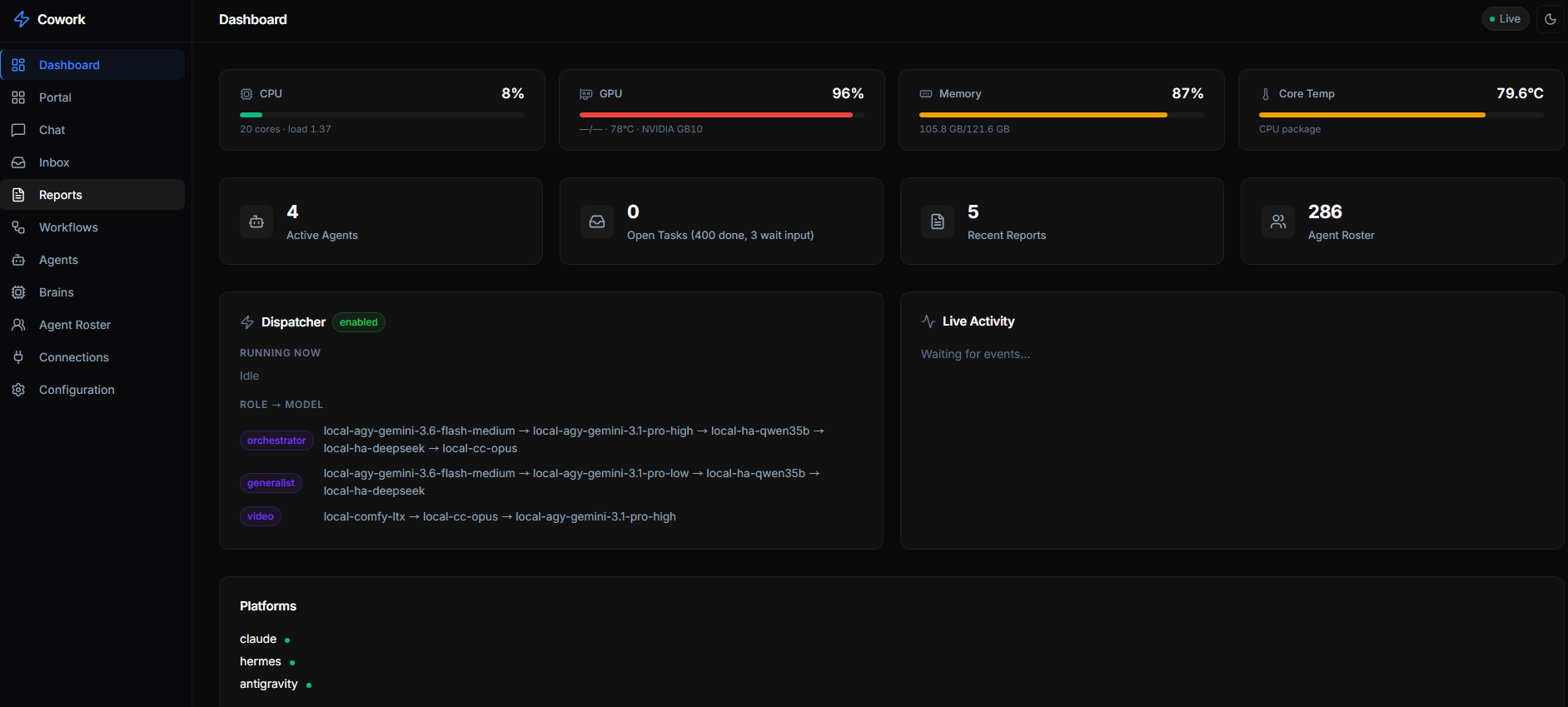
The Workflows, Task Inbox, Brains, Connections, and Chat views are shown in context throughout this README.
Supported Platforms
| Platform | Agents | Format |
|---|---|---|
| Claude Code | ~285 | .md with YAML frontmatter |
| Antigravity (AGY) | Built-in + skills | SKILL.md |
| Hermes Agent | 39 skills | SKILL.md + triggers |
| Gemini CLI | Converted from source | .md subagents |
| GitHub Copilot | Same as Claude | .md agents |
| Codex | Converted | .toml agents |
| Cursor | Converted | .mdc rules |
| + 7 more | See agency-agents repo | Various formats |
Quick Start
Prerequisites
Node.js ≥ 20 (tested with v22)
npm ≥ 10
The agency-agents repo — bundled as a git submodule at
cowork/agency-agents(the 285-agent roster). Clone with submodules:git clone --recurse-submodules https://github.com/slashman413/cowork # already cloned without it? initialise the submodule: git submodule update --init
Fast path — two scripts (recommended)
From the repo root, after cloning with submodules (above):
# 1. Build + launch the server (installs deps, builds, starts a systemd user service)
deploy/install-server.sh

# 2. Drop the coordination skill + MCP connection into your agent clients on this box
deploy/install-skill.sh            # auto-detects Claude Code / Hermes / Antigravity
install-server.sh generates a systemd unit with this machine's real node path and
working dir (nothing to hand-edit), or pass --foreground to launch in the terminal and
--build-only to stop after building. install-skill.sh copies the right per-client
skill into place and, for Claude Code, merges mcpServers.cowork into ~/.claude.json
non-destructively (add --url http://<host>:6868 for a remote server; --client claude|hermes|agy|all
to target one). The numbered steps below are the same thing, broken out for when you want
to do it by hand.
1. Install Dependencies
cd cowork/server
npm install
2. Configure Settings
Config lives outside the repo. The tracked cowork/config.json is a sanitized
template only. On first run the server copies it to ~/.cowork/config.json —
your real per-server config (host binding, registered brains, chains). Edit that
copy, not the template; the server also persists all live dashboard/API edits there,
so your personal host/brain settings never touch the repo. Override the location with
the COWORK_CONFIG env var.
Edit ~/.cowork/config.json to match your environment:
{
  "server": {
    "port": 6868,          // ← Change the port here
    "host": "0.0.0.0",     // ← Bind address (0.0.0.0 = all interfaces)
    "name": "cowork-mcp",
    "version": "1.0.0",
    "apiKey": null          // ← Set a string to require API key auth, or null for open
  },
  "paths": {
    "agencyAgents": "./agency-agents",  // ← Path to agency-agents repo
    "inbox": "./inbox",
    "status": "./.status",
    "decisions": "./decisions",
    "workflows": "./workflows",
    "artifacts": "./artifacts",
    "inputs": "./inputs"
  }
}
All paths are relative to
cowork/(the parent ofserver/). Use~for home directory paths (e.g.,~/.claude/agents).
Key Settings
| Setting | Default | Description |
|---|---|---|
server.port |
6868 |
HTTP port for MCP endpoint + Web UI |
server.host |
0.0.0.0 |
Bind address (127.0.0.1 for local-only) |
server.apiKey |
null |
API key for authentication (null = no auth) |
paths.agencyAgents |
./agency-agents |
Path to the agency-agents repo |
platforms.*.enabled |
true |
Enable/disable individual platforms |
platforms.*.agentsDir |
varies | Where platform-specific agents live on disk |
services.*.enabled |
false |
Enable/disable service health monitoring |
3. Start the Server
# Development mode (with hot-reload)
cd cowork/server
npm run dev

# Production mode
npm run build
npm start
You should see:
🤝 Cowork MCP Server running at http://0.0.0.0:6868
   MCP endpoint: http://0.0.0.0:6868/mcp
   Web Dashboard: http://0.0.0.0:6868/
   REST API: http://0.0.0.0:6868/api/
   Roster loaded: 285 agents across 19 divisions
4. Open the Dashboard
Open http://localhost:6868 in your browser.
Connecting AI Agents
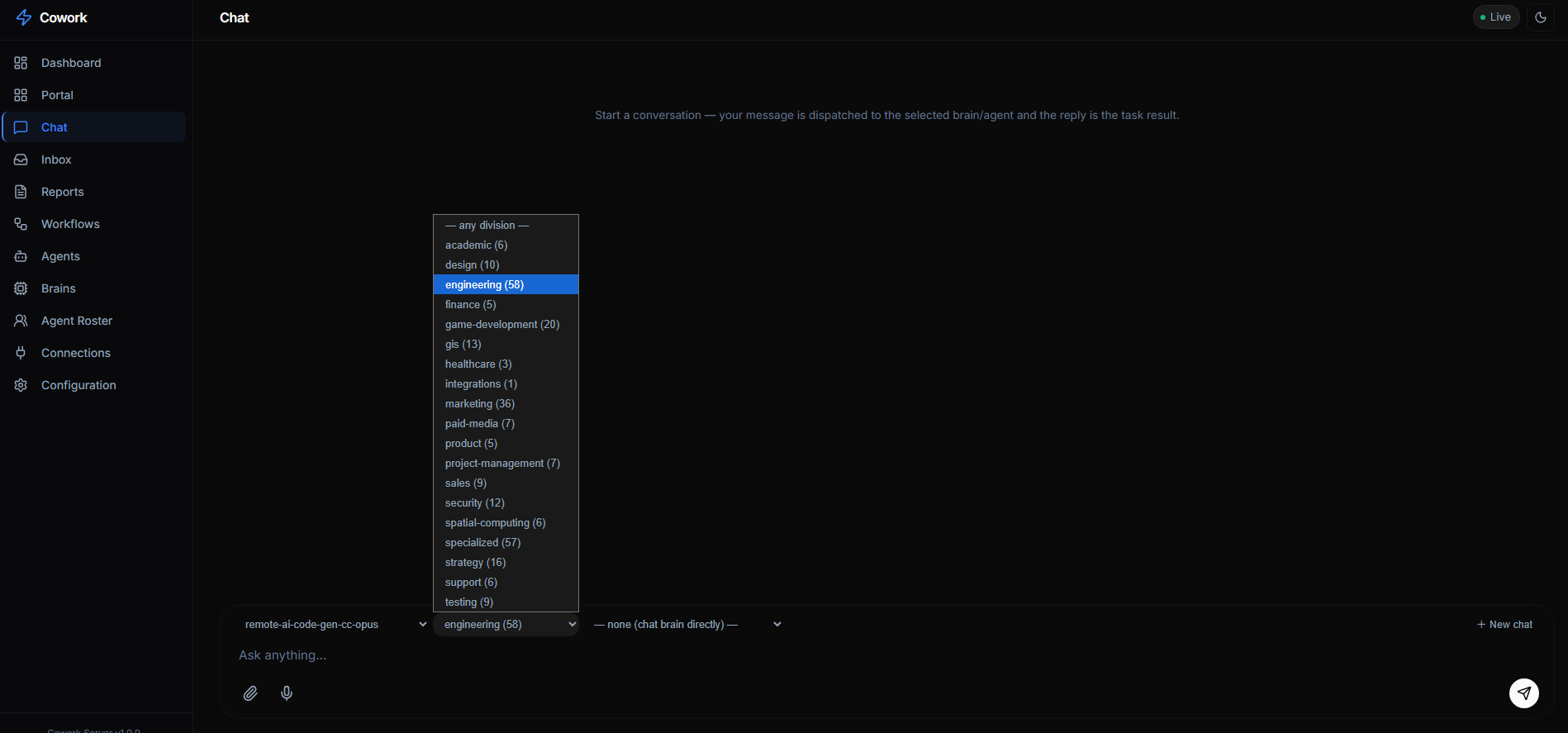
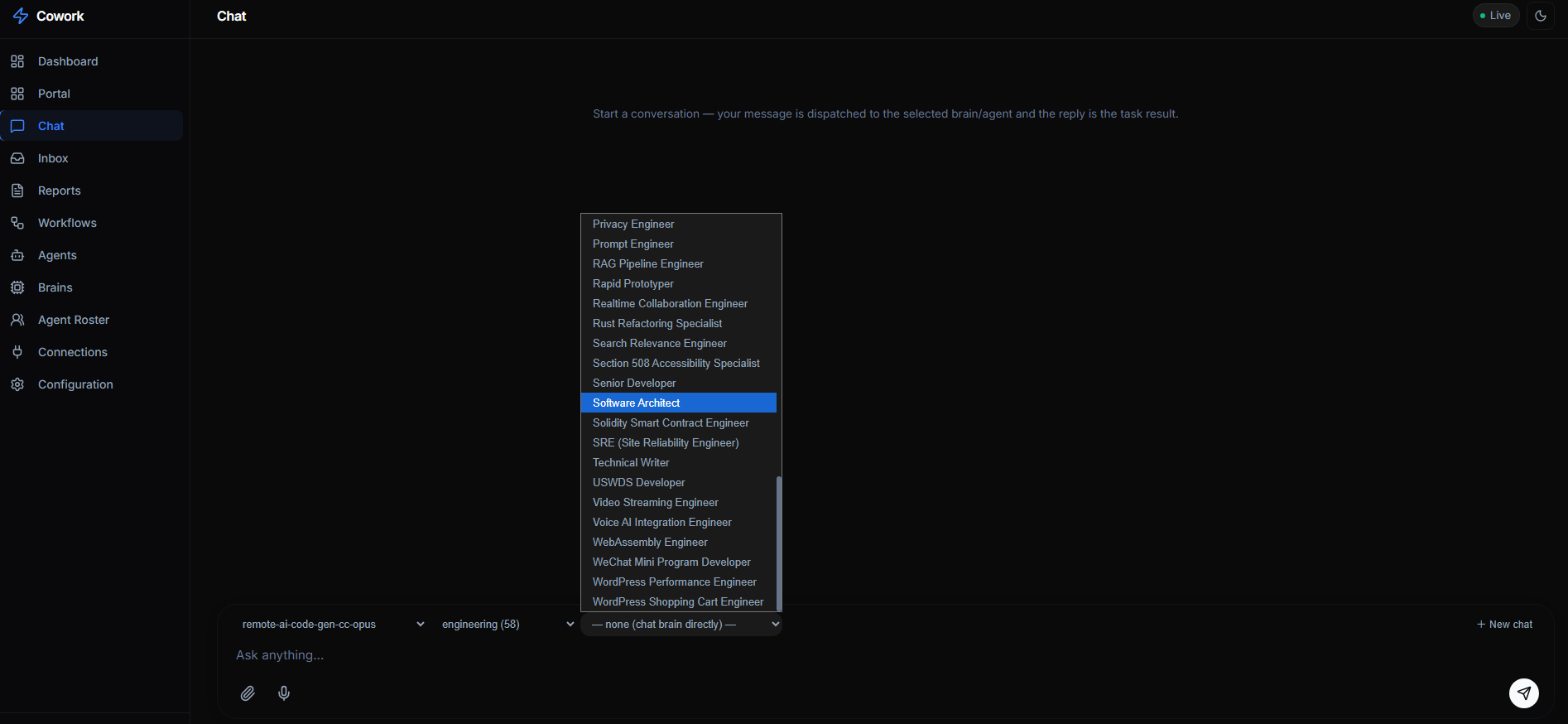
The fastest way to talk to any connected model is the dashboard's Chat view: pick a brain, optionally scope it to a division and a specific roster agent, and your message is dispatched as a task — the reply is the task result.
| Pick a division | …then a roster persona |
|---|---|
 |
 |
For programmatic access, wire the MCP connection into your agent clients:
Scripted (recommended): deploy/install-skill.sh installs the cowork coordination
skill and wires the MCP connection for every agent client detected on the box — one command
instead of hand-editing each config:
deploy/install-skill.sh                          # auto-detect all clients, localhost server
deploy/install-skill.sh --client claude          # just Claude Code
deploy/install-skill.sh --client all --url http://cowork-host:6868   # remote server, every client
It drops the per-client skill (canonical copies in deploy/skills/) into the client's live
skill dir and, for Claude Code, merges the mcpServers.cowork entry into ~/.claude.json
without disturbing your other servers. The manual per-client config is below for reference.
Claude Code
Add to your MCP configuration (~/.claude.json or project-level):
{
  "mcpServers": {
    "cowork": {
      "url": "http://localhost:6868/mcp",
      "transport": "streamable-http"
    }
  }
}
Then in Claude Code, the agent can call:
Use the cowork MCP tools: register_agent, create_task, get_roster, etc.
Antigravity (AGY)
Add to your AGY MCP settings:
{
  "mcpServers": {
    "cowork": {
      "url": "http://localhost:6868/mcp"
    }
  }
}
Hermes Agent
Configure the MCP endpoint in Hermes:
{
  "mcp_endpoints": {
    "cowork": "http://localhost:6868/mcp"
  }
}
Any MCP-Compatible Client
The server speaks standard MCP over Streamable HTTP. Any client that supports
MCP can connect to http://localhost:6868/mcp.
Task Execution — the Dispatcher
The server includes a dispatcher that turns queued tasks into real agent runs.
Output becomes the task result; the full transcript is saved as result.md in the
task's artifacts dir.
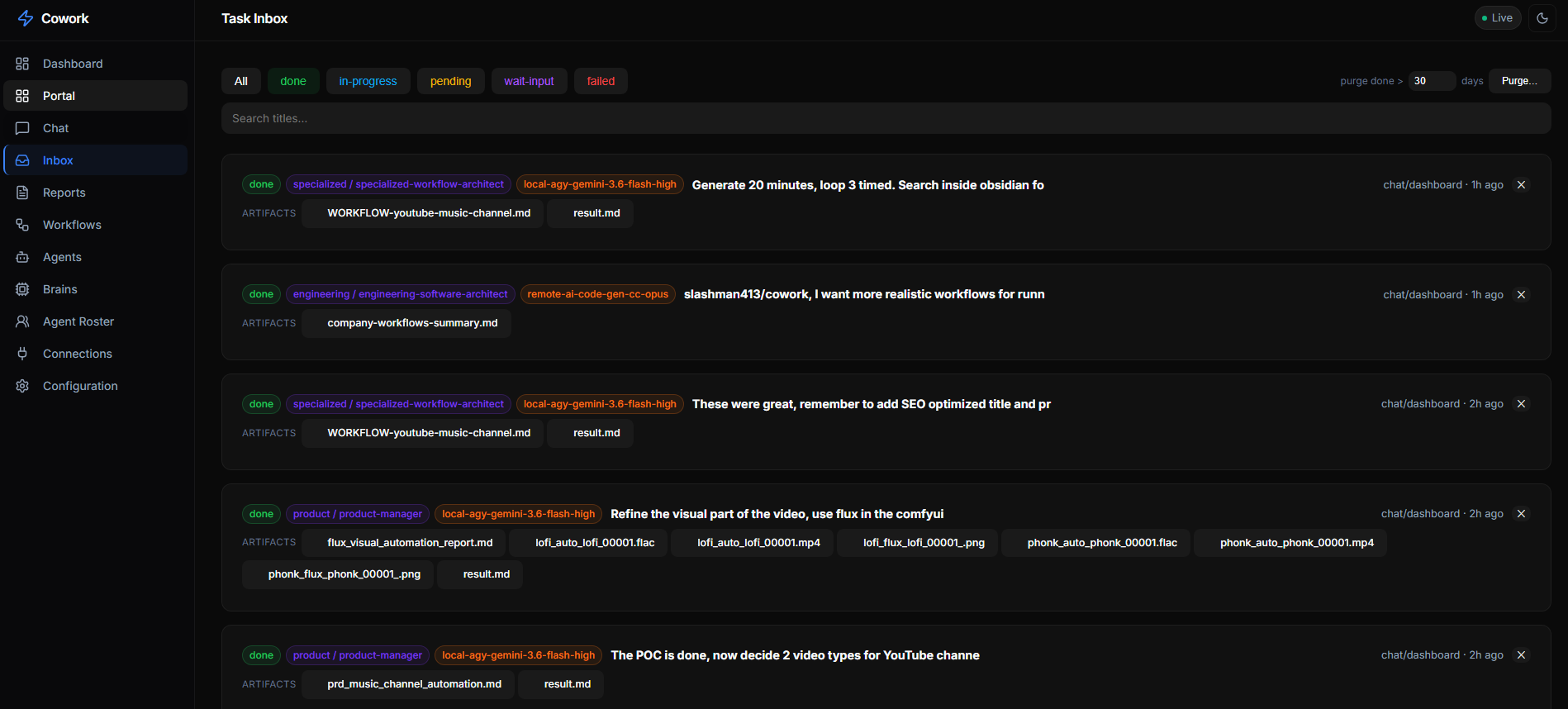
Every task lands in the Task Inbox, tagged with the division/agent that ran it and the brain it ran on, with its output artifacts attached and filterable by status (done · in-progress · pending · wait-input · failed).
Two-stage roster routing
An unassigned task is routed in two stages by an orchestrator/classifier brain
(default Qwen3.6-35B-A3B, orchestration.classifier):
- Division — pick 1 of 19 divisions (testing, engineering, security, …).
- Agent — pick 1 of ~285 roster agents in that division. The chosen agent's
full
.mdpersona becomes the system prompt.
The agent then runs on a brain fallback chain (below). Skip the classifier by
targeting directly: context.agent: "<roster-slug>" or a special-executor name.
Tag a task manual to never auto-execute.
Executors: special agents + the 285-agent roster
- Special executors (
config.json → orchestration.agents) — onlyorchestrator,generalist,video; each is{description, brains: [...]}with its own chain.videoruns the ComfyUI LTX pipeline (deploy/video-pipeline.sh; LTX only — never Wan/Hunyuan/SVD). - Roster agents — the ~285 personas in the
agency-agentssubmodule, grouped into 19 divisions. They have no chain of their own; they run on the division's chain if one is set, else the global default.
Brain fallback chains (GET /api/chains)
- Global default —
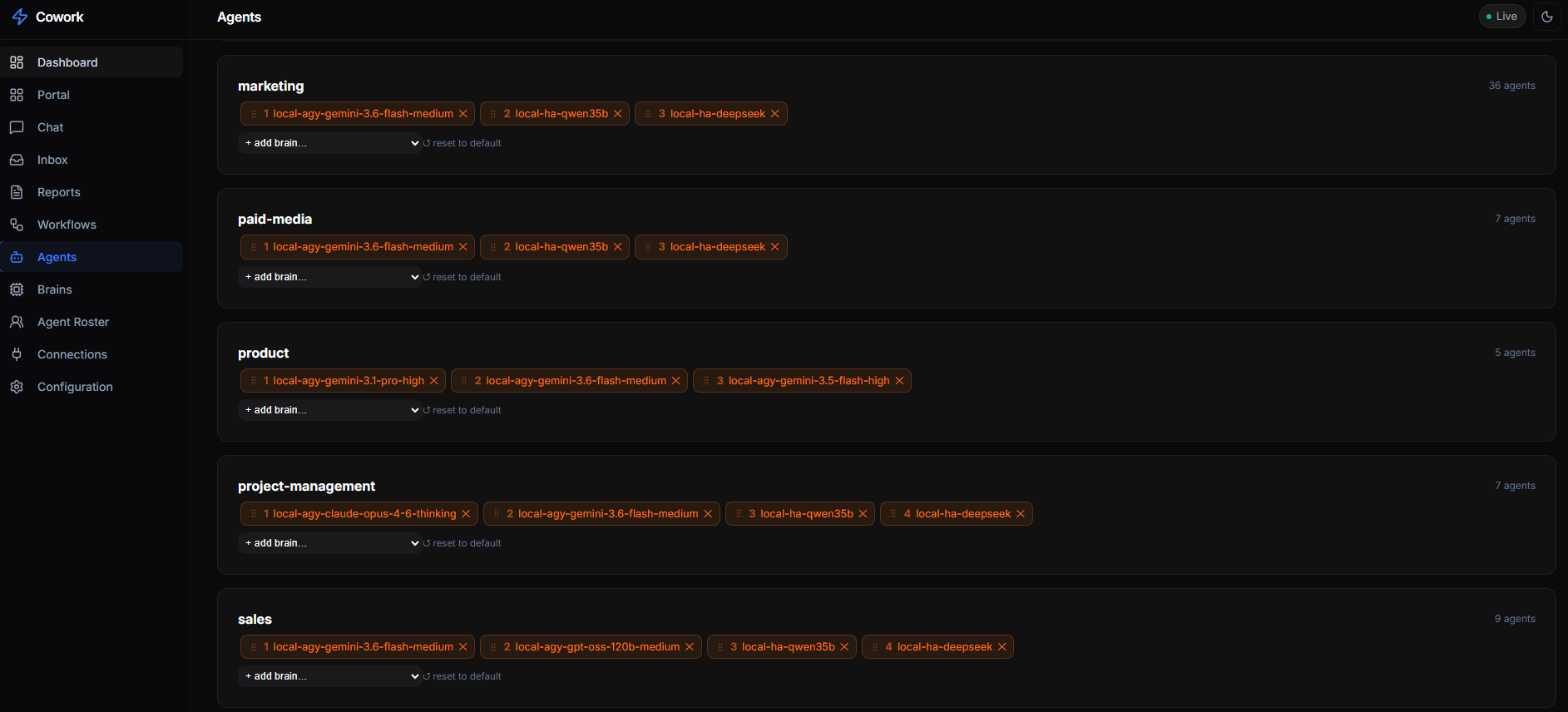
orchestration.defaultChain; drag-reorder in the Brains view (PUT /api/chains/default). - Per-division override —
orchestration.divisionChains[<division>]; set/clear in the Agents view (PUT /api/chains/division/:division; empty = use default).
A chain runs top → bottom: the task runs on chain[0]; on failure the dispatcher
hands over to chain[1], then [2]… recording the failed brain on the task
each attempt, until success or the chain is exhausted. Pin a single task to one
brain with context.brain: "<id>".
The Agents view exposes the per-division chain for every division — drag to reorder,
+ add brain…, or reset to the global default. No template edits, no restart.
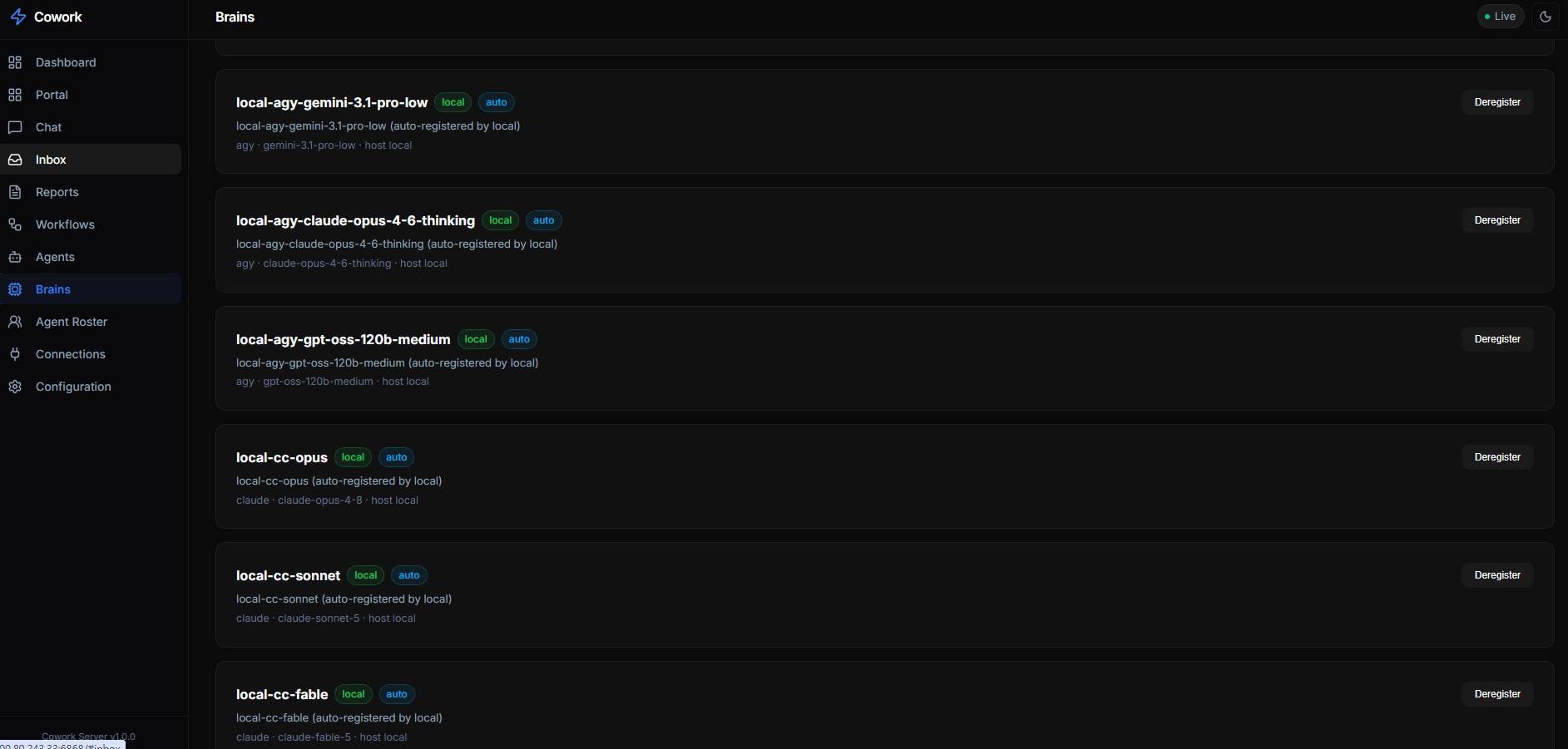
Brains — named execution identities (model × platform × location)
config.json → orchestration.brains (GET /api/brains) names each brain a chain
can reference. The Brains view lists every registered brain — its platform
(claude / agy / hermes), underlying model, location, and whether it was
auto-registered by a connecting client — with one-click deregister:
| Alias | Location | Runs |
|---|---|---|
local-ha-qwen35b / -qwen27b / -deepseek |
local | Hermes on that model |
local-cc-opus / -sonnet / -fable |
local | Claude Code on that model |
local-agy-* / local-comfy-ltx |
local | Antigravity/Gemini / ComfyUI-LTX video |
remote-<host>-cc-sonnet |
remote | Claude Code on another machine |
Local brains the dispatcher spawns here. Remote brains it leaves pending
and publishes the brain id onto the task's context.brain so that machine's
client can discover and claim it (the client filters list_inbox for tasks whose
context.brain is one of its own ids). If no client claims a remote rung within
orchestration.remoteGraceMs (default 60 s), the dispatcher advances to the next
brain in the chain, so a clientless remote rung never stalls a task.
Artifacts work for both: local brains save files to $COWORK_ARTIFACTS_DIR
(the dispatcher collects them from disk); remote brains save to the same env dir
and the client uploads each file via POST /api/artifacts/:taskId/:file.
Either way they land in artifacts/<task-id>/ and become downloadable from the
Inbox.
Input files flow the other way — a person attaches files for the brain to
read. Attach them in the Chat composer (📎) or on any Inbox card ("+ Attach
files"); they are stored under inputs/<task-id>/ and mirrored onto
context.inputFiles. The dispatcher points a local brain at their absolute
paths in the prompt; a remote brain client downloads them (GET /api/inputs/:taskId)
before running and lists their local paths in the prompt. Inputs survive a re-run.
Failed tasks & re-run. When a task exhausts its whole fallback chain (every
brain failed verification) it finishes flagged failed: true. The Inbox groups
these under a red "failed" filter (kept out of the green "done" count) and
offers a confirm-gated ↻ Re-run that resets the task to pending from the top
of its chain (POST /api/inbox/:id/rerun) — preserving its brief and attached inputs.
Auto-registered brains (clients-capability protocol)
A connecting MCP client DECLARES the brains it can run via the register_agent
tool's brains field; the server auto-adds them to the registry (marked dynamic,
owned by that client). One machine can offer several models at once. Auto-registered
brains persist and are removed only by deregister_agent or the Brains view
(never on heartbeat timeout); removal cascades out of the default chain, every
division chain, and every special agent. Manage all of this from the dashboard's
Agents and Brains views.
Wiring a remote brain machine
deploy/remote-brain-client.mjs is a zero-dependency (Node 18+) Cowork MCP
client that does exactly that loop. Its header comment documents every env var.
Quickest — run it directly (foreground; good for a first test). One brain:
git clone https://github.com/slashman413/cowork
COWORK_URL=http://<cowork-host>:6868 EXEC=claude MODEL=claude-sonnet-5 \
  BRAIN_ID=remote-<host>-cc-sonnet \
  node cowork/deploy/remote-brain-client.mjs
Several brains from one machine (declares them all; each becomes a targetable brain):
COWORK_URL=http://<cowork-host>:6868 EXEC=claude HOST=<host> \
  BRAINS='[{"id":"remote-<host>-cc-opus","model":"claude-opus-4-8"},
           {"id":"remote-<host>-cc-sonnet","model":"claude-sonnet-5"}]' \
  node cowork/deploy/remote-brain-client.mjs
As a boot service (recommended for permanent machines):
mkdir -p ~/.config/cowork-remote-brain
cp cowork/deploy/remote-brain-client.env.example ~/.config/cowork-remote-brain/aicodegen.env
# edit: COWORK_URL, BRAINS (or BRAIN_ID), EXEC, HOST, COWORK_CLIENT_JS
cp cowork/deploy/[email protected] ~/.config/systemd/user/
systemctl --user daemon-reload && systemctl --user enable --now cowork-remote-brain@aicodegen
It connects to COWORK_URL/mcp, register_agents (declaring its BRAINS, which
auto-register into the registry), then polls and claims only tasks whose
context.brain is one of its brain ids, runs the matching EXEC/MODEL, and
complete_tasks with its result and uploaded artifacts — appearing in Connections like any other
client. Flexible: the same script serves any brain by changing env only.
Scalable: add machines/brains by adding <name>.env files; claims are atomic
(single-process compare-and-set) so even multiple clients on the same brain id
never double-run a task — first claim wins.
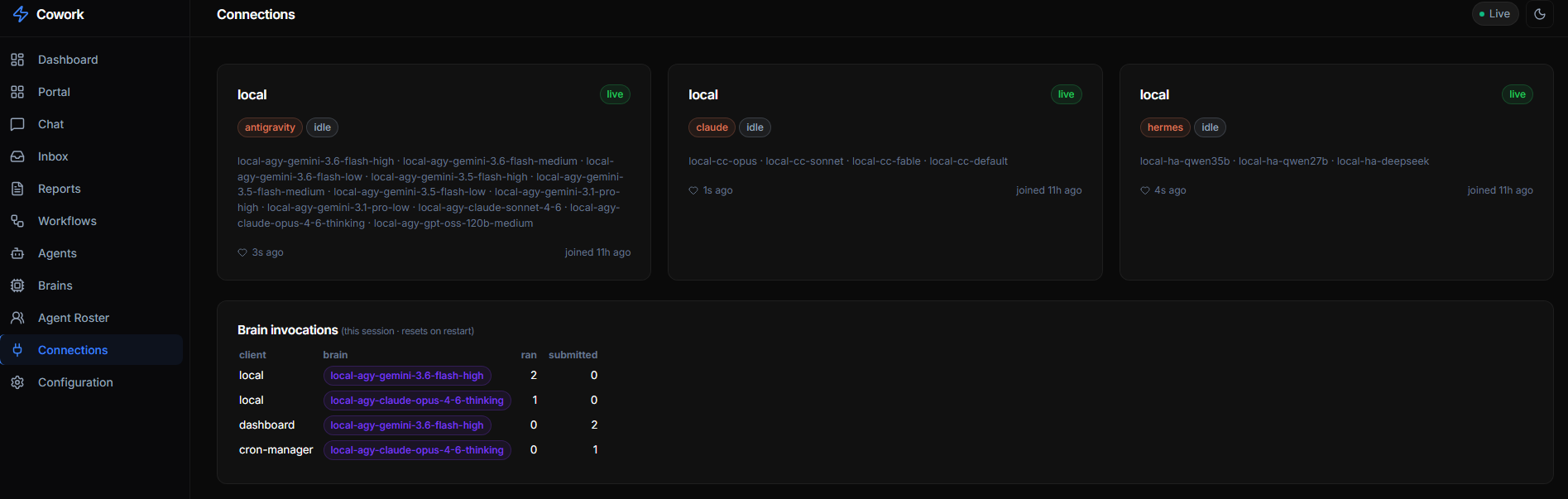
Every connected client shows up live in the Connections view — grouped by platform, listing the brains it offers, its idle/busy state, and a per-session tally of how many tasks each brain has run vs. submitted:
The always-on coordinator agent shown in Connections as cowork/orchestrator
polls the inbox, two-stage-routes unassigned tasks, reclaims orphans, and
dispatches; transient per-task workers appear as e.g.
testing / Workflow Optimizer · local-ha-qwen35b or video · local-comfy-ltx
while running.
CEO flow: tell Hermes (e.g. via Discord) an idea → Hermes creates ONE task with
context.agent: "orchestrator" → the orchestrator decomposes it into subtasks via
POST /api/inbox → each subtask is two-stage-routed to a roster agent on its brain
chain → results and artifacts appear live on the dashboard.
LLM classifier — no task left behind
An unassigned task (e.g. a free-text idea filed straight from Discord) no longer
stalls: the dispatcher runs the two-stage LLM router (default Qwen3.6-35B-A3B
via Hermes, orchestration.classifier in config.json) that reads the task, picks
a division, then a roster agent, which then dispatches normally on that agent's
brain chain. Tag a task manual to skip both routing and dispatch.
Stale-claim reclaim
orchestration.staleClaimMs (default 30 min) reclaims any in-progress task
whose claiming agent has disappeared — a crashed/exited live agent or a
dispatcher killed mid-run — back to pending so the work is retried. A task
still owned by a heartbeating agent is never touched.
Dispatcher status: GET /api/dispatcher. Tune orchestration.maxConcurrent /
taskTimeoutMs / pollIntervalMs / classifier / staleClaimMs in config.
Deployment (systemd) & Remote Access
Easiest — deploy/install-server.sh generates and enables the user service with this
machine's resolved node path and working dir:
deploy/install-server.sh # build + install & start the cowork-mcp user service
Manual equivalent (the tracked deploy/cowork-mcp.service has /home/USER placeholders
you must edit first — the script fills them in for you):
cp deploy/cowork-mcp.service ~/.config/systemd/user/   # then edit the USER/paths inside
systemctl --user daemon-reload
systemctl --user enable --now cowork-mcp
With server.host: "0.0.0.0" the dashboard is reachable from other machines at
http://<host-ip>:6868/ (LAN or Tailscale IP — 0.0.0.0 itself is a bind
address, not a URL). Set server.apiKey (or COWORK_API_KEY) if the host is
reachable beyond trusted networks.
MCP Tools Reference
Once connected, agents have access to these tools:
| Tool | Description |
|---|---|
register_agent |
Register this client; optionally DECLARE the brains it can run |
deregister_agent |
Remove this client and cascade-remove every brain it registered |
heartbeat |
Update status and current task |
get_roster |
Search ~285 agents across 19 divisions |
create_task |
Create a task for another agent/platform |
claim_task |
Claim a pending inbox task |
complete_task |
Mark a task as done with results |
list_inbox |
List inbox tasks with status/platform filters |
get_dashboard |
Get full dashboard data (active agents, inbox stats, etc.) |
Example: Cross-Platform Task Dispatch
You: "Review the auth code in saas-starter"

AGY Agent calls:
  create_task(
    title: "Review auth middleware",
    from_platform: "antigravity",
    from_agent: "self",
    to_platform: "claude",
    to_agent: "engineering-code-reviewer",
    priority: "normal"
  )

→ Task appears in dashboard inbox
→ Claude Code picks it up, runs review
→ Claude calls complete_task(...) with its result + artifacts
→ Result + artifacts appear on the task card
Workflows — declarative pipelines, two execution modes
A workflow is a version-controlled template (workflows/<id>.json). It runs
in one of two modes, chosen per template with "mode":
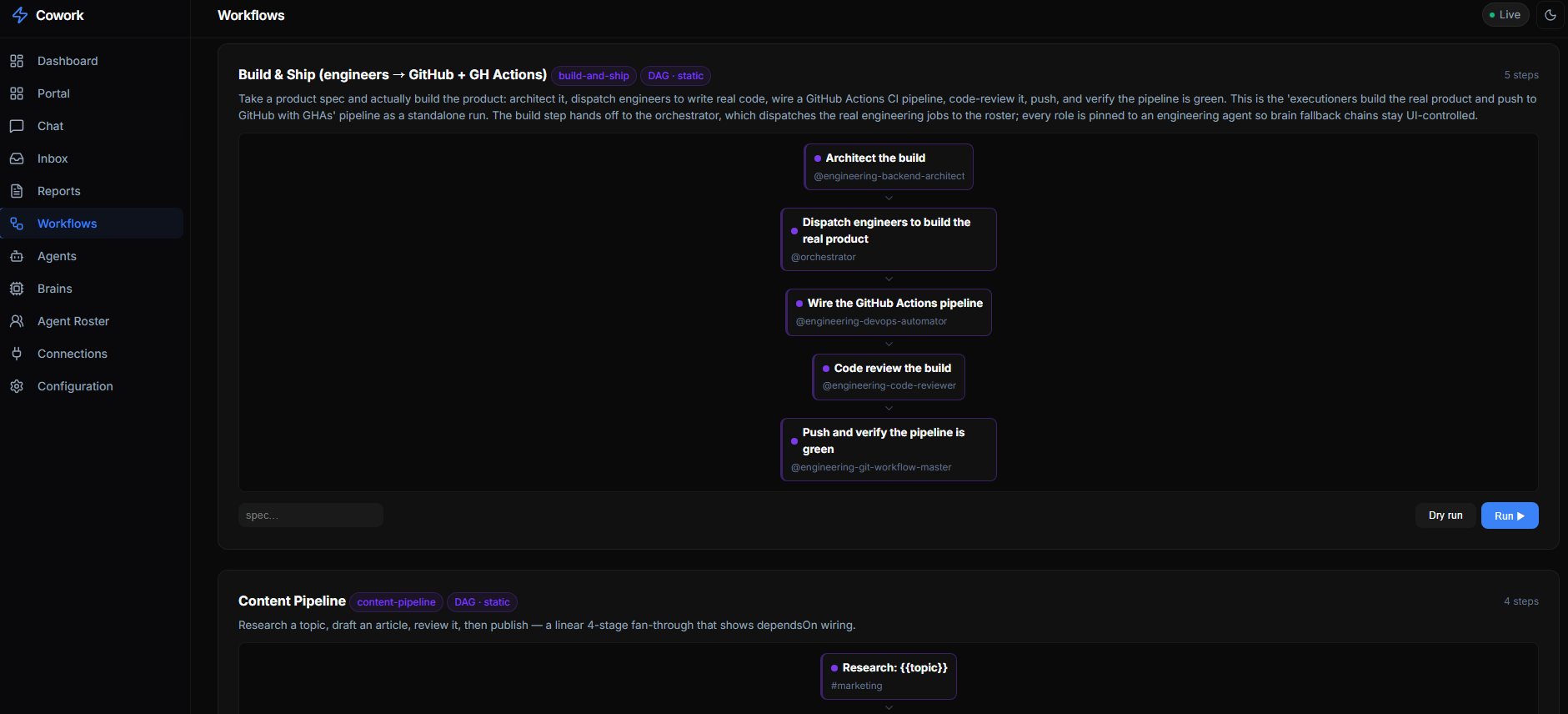
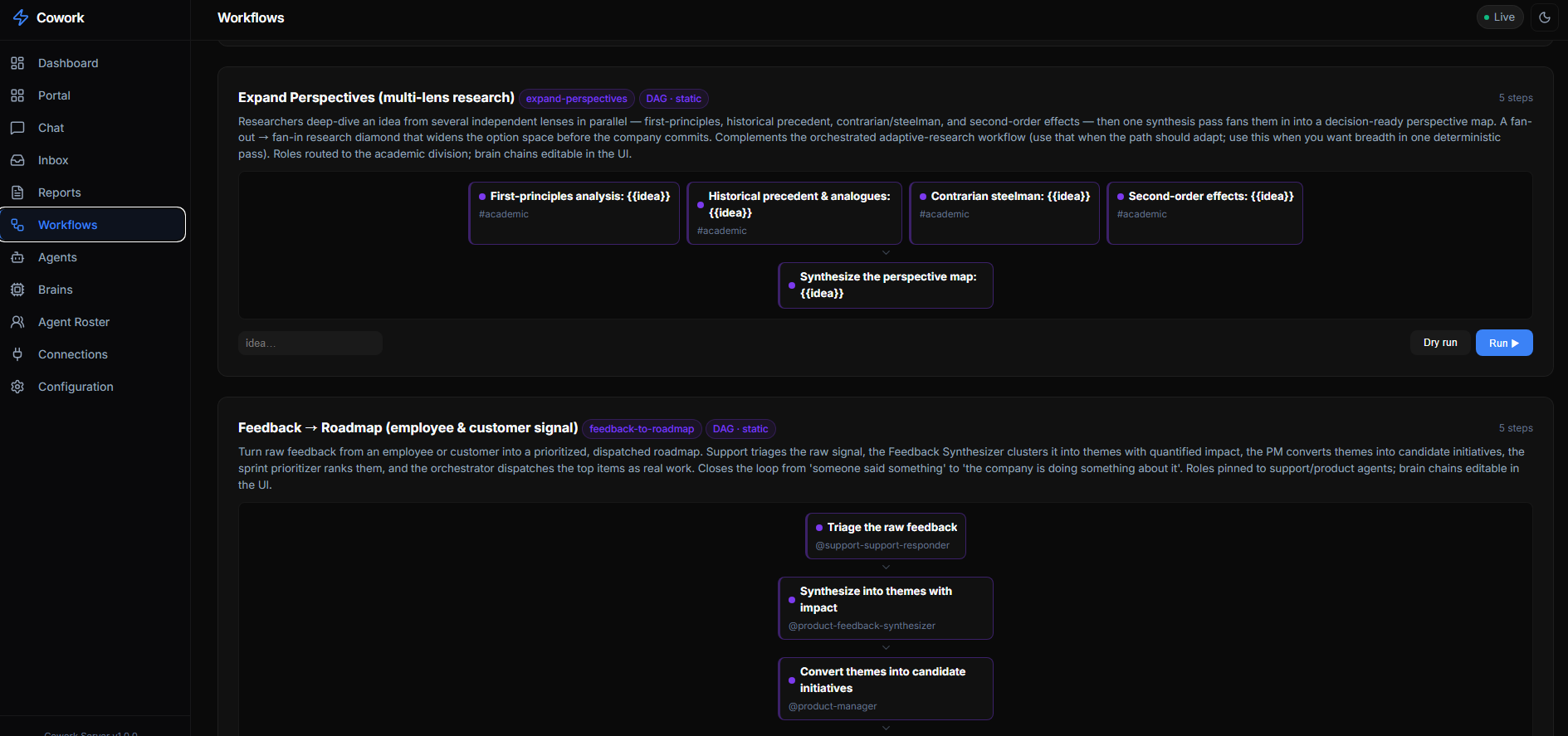
The Workflows view renders each template as a live graph — sequential fan-through pipelines and parallel fan-out/fan-in diamonds alike — with every step pinned to a division or agent, plus Dry run (inspect the resolved plan) and Run controls:
build-and-ship — a 5-step engineering pipeline |
expand-perspectives — parallel multi-lens fan-out → synthesis |
|---|---|
 |
 |
dag(default) — static & deterministic. The steps form a DAG wired bydependsOn; the whole graph is expanded into inbox tasks up front and the dispatcher walks it in dependency order. No new execution engine: expansion just pre-wires the tasks the dispatcher runs anyway. A multi-step job becomes reusable and inspectable instead of an LLM re-planning from scratch every time.orchestrated— adaptive & orchestrator-driven. The steps are a library of candidate moves; nothing is planned up front. After each step finishes, the orchestrator brain decides the next step automatically from thegoal+ the results so far — or answersDONE. The path taken adapts to what comes back. Every decision (the step it chose + its rationale) is logged toworkflow-runs/<runId>.jsonand rendered as a decision log in the dashboard.
DAG mode
A template is a list of steps; each step is a task with a stable key that other
steps reference in dependsOn (resolved to real task ids at run time):
{
  "id": "content-pipeline",
  "params": ["topic"],
  "steps": [
    { "key": "research", "title": "Research: {{topic}}", "division": "marketing" },
    { "key": "draft",    "title": "Draft {{topic}}", "division": "marketing", "dependsOn": ["research"] },
    { "key": "review",   "title": "Review {{topic}}", "agent": "code-reviewer", "dependsOn": ["draft"] },
    { "key": "publish",  "title": "Publish {{topic}}", "division": "marketing", "dependsOn": ["review"] }
  ]
}
Run it (or dry-run to inspect the resolved plan without creating anything):
curl -s -X POST localhost:6868/api/workflows/content-pipeline/run \
  -H 'content-type: application/json' -d '{"params":{"topic":"RISC-V laptops"}}'
Every task a run creates carries context.workflowId, context.workflowRunId,
and context.stepKey so the Workflows tab in the dashboard can group a run
and render its DAG with per-node live status. Templates are validated on load
(unique keys, deps exist, and the graph is acyclic — a cycle would deadlock
dependsOn forever); a template that fails validation is skipped rather than
crashing the list, and the reason is surfaced in the dashboard (and at
GET /api/workflows-invalid) so a malformed template is easy to fix. Steps can
pin an agent, division, or brain, or leave them off and let the router pick.
Orchestrated (adaptive) mode
Set "mode": "orchestrated", give the template a goal, and list the steps as a
candidate library (dependsOn becomes an optional hint used to wire a step's
inputs when its upstream has already run). Running it writes a run record and
creates no tasks — the dispatcher's orchestrator loop makes the first
decision on its next tick, then one more after each step completes:
{
  "id": "adaptive-research",
  "mode": "orchestrated",
  "goal": "Produce a decision-ready brief answering: {{question}}",
  "params": ["question"],
  "steps": [
    { "key": "scope",     "title": "Scope the question", "division": "operations" },
    { "key": "survey",    "title": "Broad survey", "division": "operations" },
    { "key": "deep-dive", "title": "Deep dive on the crux" },
    { "key": "counter",   "title": "Steelman the opposing view" },
    { "key": "brief",     "title": "Write the decision brief" }
  ]
}
The orchestrator brain (the router model — orchestration.classifier, else the
first local runnable brain in the orchestrator/default chain) is prompted with the
goal, the completed steps and their results, and the remaining candidates; it
replies with one step key or DONE. orchestration.maxWorkflowSteps (default 12)
force-finishes a run whose orchestrator never says DONE.
Both modes stamp every task with context.workflowId, context.workflowRunId,
and context.stepKey so the Workflows tab groups a run and renders it live —
a DAG for static runs, a decision timeline for adaptive ones. Templates are
validated on load (unique keys, deps exist, and — for DAG mode — the graph is
acyclic); a template that fails validation is skipped rather than crashing the
list, and the reason is surfaced in the dashboard (and at
GET /api/workflows-invalid).
The engine (validation, cycle detection, topological expansion, DAG wiring, run
reconstruction, and the orchestrated decision loop) is covered by a test suite —
cd server && npm test.
Shipped company workflows
The workflows/ directory ships a set of realistic, cross-functional company
pipelines. Each step pins a division or agent (never a brain), so
the brain fallback chain for every role stays editable from the dashboard's
Agents view (orchestration.agents[*].brains for special agents;
divisionChains[*] / defaultChain for roster agents) — change who runs a step
without touching the template.
| Workflow | Mode | What it does |
|---|---|---|
idea-to-launch |
dag | The flagship. CEO brief → market research + perspectives → PM spec → architecture → engineers build the real product & push to GitHub with GH Actions → marketing promos + email auto-replies → sales enablement → finance model → Chief-of-Staff go/no-go review. params: idea |
product-spec |
dag | PM writes a build-ready PRD, fed by user research + engineering feasibility, then cut into a shippable first sprint. params: idea |
build-and-ship |
dag | Take a spec → architect → dispatch engineers to build real code → wire the GitHub Actions CI pipeline → code review → push & verify the pipeline is green. params: spec |
feedback-to-roadmap |
dag | Raw feedback from an employee/customer → triage → synthesize into themes → PM initiatives → prioritized roadmap → dispatch the "Now" items as real work. params: feedback |
gtm-campaign |
dag | Marketing + sales wire a launch: offer & promo angles → email sequences + inbound auto-reply rules → content → sales enablement → success metrics. params: product |
finance-close |
dag | The accounting cycle: bookkeeper reconciles → FP&A variance → forward model → CFO sign-off + board summary. params: period |
expand-perspectives |
dag | Researchers deep-dive an idea from four independent lenses (first-principles, precedent, contrarian, second-order) in parallel, then synthesize a decision-ready perspective map. params: idea |
adaptive-research |
orchestrated | Adaptive deep research — the orchestrator drills only where the goal needs it. params: question |
plan-execution |
orchestrated | Turns a plan into dispatched jobs and drives them to verified completion. params: plan |
content-pipeline |
dag | Research → draft → review → publish. params: topic |
product-brief |
dag | Market + tech + risk fan-out → one-page go/no-go brief. params: idea |
# Run the flagship end-to-end company workflow:
curl -s -X POST localhost:6868/api/workflows/idea-to-launch/run \
  -H 'content-type: application/json' -d '{"params":{"idea":"a self-hosted receipts scanner"}}'
REST API
The Web UI uses these endpoints (also available for scripts/integrations):
| Method | Path | Description |
|---|---|---|
GET |
/api/status |
Dashboard overview data |
GET |
/api/agents |
All active agents (id → name) |
GET |
/api/connections |
Live MCP clients (heartbeat) + per-brain ran/submitted counters |
GET |
/api/inbox?status=pending |
Inbox tasks (filterable) |
POST |
/api/inbox |
Create a new task; optional inputs: [{token,name}] attaches uploaded files |
PATCH |
/api/inbox/:id |
Claim or complete a task |
POST |
/api/inbox/:id/rerun |
Re-queue a FAILED (chain-exhausted) task — reset to pending from the top of its chain, keep its inputs |
GET/POST |
/api/inbox/:id/inputs |
List / attach input files to an existing task ({inputs:[{token,name}]}) |
POST |
/api/uploads?name=<file> |
Stage an uploaded file (raw body) → {token} to pass as a task input |
GET |
/api/inputs/:taskId, /:taskId/:file |
List / download a task's attached input files |
GET |
/api/workflows / /api/workflows/:id |
Declarative workflow templates (validated) |
GET |
/api/workflows-invalid |
Templates that failed to load, with the reason (JSON/validation errors) |
POST |
/api/workflows/:id/run |
Start a run: expand a DAG template into tasks, or begin an orchestrated run; { params, dryRun } |
GET |
/api/workflow-runs / /api/workflow-runs/:runId |
Runs for the run view (DAG grouped from tasks; orchestrated from run records + decision log) |
GET |
/api/roster?division=engineering |
Agent roster (filterable) |
GET |
/api/roster-divisions |
Roster grouped by division (for the Agents view) |
GET |
/api/dispatcher |
Special agents + brains + defaultChain + divisionChains + running |
GET/PUT |
/api/chains, /chains/default, /chains/division/:div |
Read/edit brain fallback chains |
GET/PUT/DELETE |
/api/brains, /api/brains/:id |
Brain registry (cascades on delete) |
GET/PUT/DELETE |
/api/agents-config, /api/agents-config/:name |
Special-executor chains |
GET/POST |
/api/artifacts/:taskId, /:taskId/:file |
List/download; POST (raw body) uploads a file from a remote brain |
GET |
/api/config |
Current configuration |
GET |
/api/events |
SSE event stream |
Directory Structure
cowork/
├── config.json              # TEMPLATE only — real config at ~/.cowork/config.json
├── README.md                # This file
├── PROTOCOL.md              # Protocol specification
├── JOIN-AS-A-BRAIN.md       # Onboarding for a remote brain client
├── agency-agents/           # git SUBMODULE — the ~285-agent roster
├── workflows/               # Workflow templates (*.json) — DAG + orchestrated
├── workflow-runs/           # Orchestrated run records + decision logs (gitignored)
├── server/                  # MCP Server + Web UI
│   ├── src/                 # TypeScript source
│   └── public/              # Web UI (HTML/CSS/JS)
├── deploy/                  # systemd units, remote-brain client, presets, skills
├── inbox/                   # Task queue (JSON files, auto-managed)
├── artifacts/               # Per-task OUTPUT files (audio/video/md), downloadable
├── inputs/                  # Per-task INPUT files a person attached for the brain (gitignored)
├── decisions/               # Decision log
└── .status/                 # Runtime state (auto-managed)
Debugging
MCP Inspector
Test the MCP endpoint with the official inspector:
npx @modelcontextprotocol/inspector http://localhost:6868/mcp
This opens a web UI at http://localhost:6274 where you can browse and test all MCP tools interactively.
curl Examples
# Check server status
curl http://localhost:6868/api/status | jq

# List active agents
curl http://localhost:6868/api/agents | jq

# List pending inbox tasks
curl "http://localhost:6868/api/inbox?status=pending" | jq

# Browse engineering agents in roster
curl "http://localhost:6868/api/roster?division=engineering" | jq

# Watch real-time events
curl -N http://localhost:6868/api/events
Test MCP Tool Calls
# Register a test agent
curl -X POST http://localhost:6868/mcp \
  -H "Content-Type: application/json" \
  -d '{
    "jsonrpc": "2.0",
    "method": "tools/call",
    "params": {
      "name": "register_agent",
      "arguments": {
        "platform": "antigravity",
        "agent_name": "test-agent",
        "current_task": "Testing MCP connection"
      }
    },
    "id": 1
  }'

# Get dashboard data
curl -X POST http://localhost:6868/mcp \
  -H "Content-Type: application/json" \
  -d '{
    "jsonrpc": "2.0",
    "method": "tools/call",
    "params": {
      "name": "get_dashboard",
      "arguments": {}
    },
    "id": 2
  }'
Configuration Reference
Full config.json Example
{
  "server": {
    "port": 6868,
    "host": "0.0.0.0",
    "name": "cowork-mcp",
    "version": "1.0.0",
    "apiKey": null
  },
  "paths": {
    "agencyAgents": "./agency-agents",
    "inbox": "./inbox",
    "status": "./.status",
    "decisions": "./decisions",
    "workflows": "./workflows",
    "artifacts": "./artifacts",
    "inputs": "./inputs"
  },
  "platforms": {
    "claude": {
      "enabled": true,
      "agentsDir": "~/.claude/agents",
      "color": "#D97757"
    },
    "hermes": {
      "enabled": true,
      "skillsDir": "../hermes-agent/skills",
      "color": "#7C3AED"
    },
    "antigravity": {
      "enabled": true,
      "skillsDir": "~/.gemini/config/skills",
      "color": "#0EA5E9"
    }
  },
  "services": {
    "forgejo": { "url": "http://localhost:3001", "enabled": true },
    "vllm35b": { "url": "http://localhost:8000/v1", "enabled": false },
    "vllm27b": { "url": "http://localhost:8001/v1", "enabled": false },
    "firecrawl": { "url": "http://localhost:3002", "enabled": false }
  },
  "inbox": {
    "autoArchiveDays": 30,
    "maxRetries": 3
  }
}
Environment-Specific Overrides
The real config is read from ~/.cowork/config.json by default. Point at a
different file with the COWORK_CONFIG env var (and override the port / API key
without editing any file):
COWORK_CONFIG=~/.cowork/config.staging.json COWORK_PORT=6900 npm start
The roster is cached in memory and rescanned at most once per COWORK_ROSTER_TTL_MS
(default 30000). New agents / a submodule bump propagate within that window with no
restart; set 0 to rescan on every query, or a larger value to reduce disk work.
🛒 相關產品
- Cowork Pro ($59) - Full production stack for the multi-agent cowork framework: advanced workflows, priority support & lifetime updates.
License
Internal tool — part of the slashman413 workspace automation suite.
Установка Cowork
У этого сервера нет опубликованного пакета — он собирается из исходников. Открой репозиторий и следуй инструкции в README.
▸ github.com/slashman413/coworkFAQ
Cowork MCP бесплатный?
Да, Cowork MCP бесплатный — установка в пару кликов через Unyly без оплаты.
Нужен ли API-ключ для Cowork?
Нет, Cowork работает без API-ключей и переменных окружения.
Cowork — hosted или self-hosted?
Self-hosted: сервер запускается локально на твоей машине командой из раздела установки.
Как установить Cowork в Claude Desktop, Claude Code или Cursor?
Открой Cowork на unyly.org, выбери вкладку своего клиента (Claude Desktop, Claude Code, Cursor) и нажми Install — конфиг сгенерируется автоматически, без правки JSON.
Похожие MCP
GitHub
PRs, issues, code search, CI status
 автор: GitHub
Filesystem
Secure file operations with configurable access controls.
Memory
Knowledge graph-based persistent memory system.
Template MCP Server
A CLI tool to create a new Model Context Protocol server project with TypeScript support, dual transport options, and an extensible structure
 автор: mcpdotdirect
Amap Maps Mcp Server
MCP server for using the AMap Maps API
 автор: duxiaohui
Supabase
Database, auth and storage
 автор: Supabase
Everything
Reference / test server with prompts, resources, and tools.
Git
Tools to read, search, and manipulate Git repositories.
Sequential Thinking
Dynamic and reflective problem-solving through thought sequences.
Time
Time and timezone conversion capabilities.
Compare Cowork with
Не уверен что выбрать?
Найди свой стек за 60 секунд
Автор?
Embed-бейдж для README
Похожее
Все в категории development