
Crabeye Bridge
БесплатноНе проверенConsolidates multiple upstream MCP servers behind a single STDIO interface, exposing search_tools and run_tool to avoid context bloat.

Описание
Consolidates multiple upstream MCP servers behind a single STDIO interface, exposing search_tools and run_tool to avoid context bloat.
README
One MCP connection for all your tools — with discovery, namespacing, and execution policies.
Every MCP server you add to your AI assistant means another connection, another set of tool definitions injected into the context window, and no way to search or control them centrally. Wire up ten servers with a hundred tools each and your assistant is burning tokens on a thousand tool schemas before the conversation even starts — most of which it will never call.
crabeye-mcp-bridge consolidates all your upstream MCP servers behind a single STDIO interface and exposes exactly two tools to the assistant: search_tools and run_tool. Tools from every server are discovered, namespaced, and indexed at startup, but none of them touch the context window until the assistant actually searches for them. You can have a thousand tools ready to go without bloating the context, with fuzzy search to find them and per-tool execution policies to control what runs freely, what needs approval, and what is blocked.
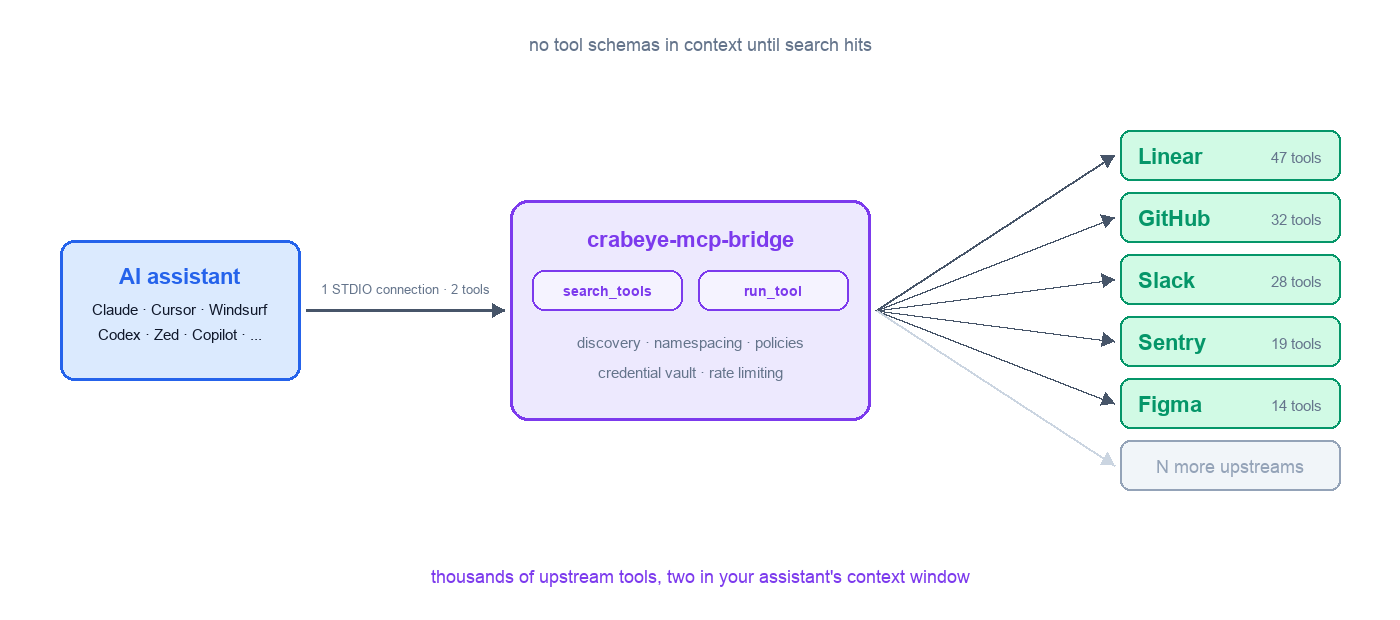
Quick start
The fastest way to get started is with init, which discovers your MCP client configs and sets up the bridge automatically:
npx @crabeye-ai/crabeye-mcp-bridge init
This scans for config files from Claude Desktop, Cursor, VS Code Copilot, Windsurf, Zed, Cline, Roo Code, opencode, and Continue.dev, lets you pick which ones to use, and optionally injects the bridge entry. After that, just run npx @crabeye-ai/crabeye-mcp-bridge — no --config flag needed.
opencode and Continue.dev are surfaced as detect-only: their config schemas don't fit the rename-and-inject pipeline, so init prints a manual snippet for them instead of rewriting the file.
To undo, run npx @crabeye-ai/crabeye-mcp-bridge restore.
Manual setup
If you prefer to set things up manually, say your MCP client config looks like this today:
{
  "mcpServers": {
    "linear": {
      "command": "npx",
      "args": ["-y", "@anthropic/linear-mcp-server"]
    },
    "github": {
      "command": "npx",
      "args": ["-y", "@anthropic/github-mcp-server"],
      "env": {
        "GITHUB_TOKEN": "ghp_..."
      }
    }
  }
}
First, store your secrets in the encrypted credential store:
crabeye-mcp-bridge credential set github-pat ghp_abc123
Then rename mcpServers to upstreamMcpServers, add the bridge, and replace hardcoded tokens with ${credential:key} references:
{
  "mcpServers": {
    "bridge": {
      "command": "npx",
      "args": ["-y", "@crabeye-ai/crabeye-mcp-bridge", "--config", "/path/to/this/file.json"]
    }
  },
  "upstreamMcpServers": {
    "linear": {
      "command": "npx",
      "args": ["-y", "@anthropic/linear-mcp-server"]
    },
    "github": {
      "command": "npx",
      "args": ["-y", "@anthropic/github-mcp-server"],
      "env": {
        "GITHUB_TOKEN": "${credential:github-pat}"
      }
    }
  }
}
That's it. Your AI assistant now has access to all tools from all configured servers through a single connection. The bridge automatically excludes itself from mcpServers to avoid recursion, so pointing --config at the same file is safe.
The bridge also reads upstreamServers (shorthand), servers (VS Code Copilot), and context_servers (Zed) as input keys. See docs/configuration.md for the full priority order and self-exclusion rules.
Alternatively, you can add the bridge alongside your existing mcpServers entries without renaming anything — the bridge will pick up the other servers from mcpServers automatically (excluding itself). Disable the other MCP servers in your client so the assistant uses the bridge as the single entry point.
Install as a Claude Code plugin
Register the bridge's repo as a Claude Code marketplace, then install the plugin:
/plugin marketplace add crabeye-ai/crabeye-mcp-bridge
/plugin install crabeye-mcp-bridge@crabeye
Claude Code auto-registers the bridge as an MCP server. If you haven't configured upstreams yet, the bridge's startup error will surface in Claude Code's MCP server log — run npx @crabeye-ai/crabeye-mcp-bridge init in a terminal to discover and import existing MCP server configs from your other clients.
Features
- Discovery + search. Two meta-tools (
search_tools,run_tool) instead of N×M tool definitions in context. See docs/how-it-works.md. - Configuration. STDIO, HTTP, and SSE upstreams; categories; multi-source config keys. See docs/configuration.md.
- Authentication. Encrypted credential store, OS-keychain-backed master key,
${credential:key}templates, and a one-shotauth <server>OAuth flow for HTTP upstreams. See docs/auth.md. - Policies. Per-tool / per-server / global tool policies (
always/prompt/never), rate limiting, discovery modes. See docs/policies.md. - STDIO manager. STDIO upstreams routed through a per-user manager process so multiple bridges share a single subprocess per upstream. See docs/stdio-manager.md.
- CLI.
init,restore,credential,daemon,--validate. See docs/cli.md.
License
MIT
Установка Crabeye Bridge
У этого сервера нет опубликованного пакета — он собирается из исходников. Открой репозиторий и следуй инструкции в README.
▸ github.com/crabeye-ai/crabeye-mcp-bridgeFAQ
Crabeye Bridge MCP бесплатный?
Да, Crabeye Bridge MCP бесплатный — установка в пару кликов через Unyly без оплаты.
Нужен ли API-ключ для Crabeye Bridge?
Нет, Crabeye Bridge работает без API-ключей и переменных окружения.
Crabeye Bridge — hosted или self-hosted?
Self-hosted: сервер запускается локально на твоей машине командой из раздела установки.
Как установить Crabeye Bridge в Claude Desktop, Claude Code или Cursor?
Открой Crabeye Bridge на unyly.org, выбери вкладку своего клиента (Claude Desktop, Claude Code, Cursor) и нажми Install — конфиг сгенерируется автоматически, без правки JSON.
Похожие MCP
GitHub
PRs, issues, code search, CI status
 автор: GitHub
Filesystem
Secure file operations with configurable access controls.
Memory
Knowledge graph-based persistent memory system.
Template MCP Server
A CLI tool to create a new Model Context Protocol server project with TypeScript support, dual transport options, and an extensible structure
 автор: mcpdotdirect
Compare Crabeye Bridge with
Не уверен что выбрать?
Найди свой стек за 60 секунд
Автор?
Embed-бейдж для README
Похожее
Все в категории development