
Crosspost
БесплатноНе проверенMCP server that lets AI agents cross-post content to Telegram, Discord, Mastodon, Bluesky, and Reddit — using free APIs only.

Описание
MCP server that lets AI agents cross-post content to Telegram, Discord, Mastodon, Bluesky, and Reddit — using free APIs only.
README
MCP server that lets AI agents cross-post content to Telegram, Discord, Mastodon, Bluesky, and Reddit — using free APIs only.
CI Python 3.11+ License: MIT MCP FastMCP
Why crosspost-mcp
AI agents can now draft, research, and refine content end-to-end — but publishing to social media is still the manual bottleneck. crosspost-mcp closes that gap by exposing posting tools over the Model Context Protocol, so Claude Desktop, Cursor, and other MCP-compatible clients can publish on your behalf with a single prompt.
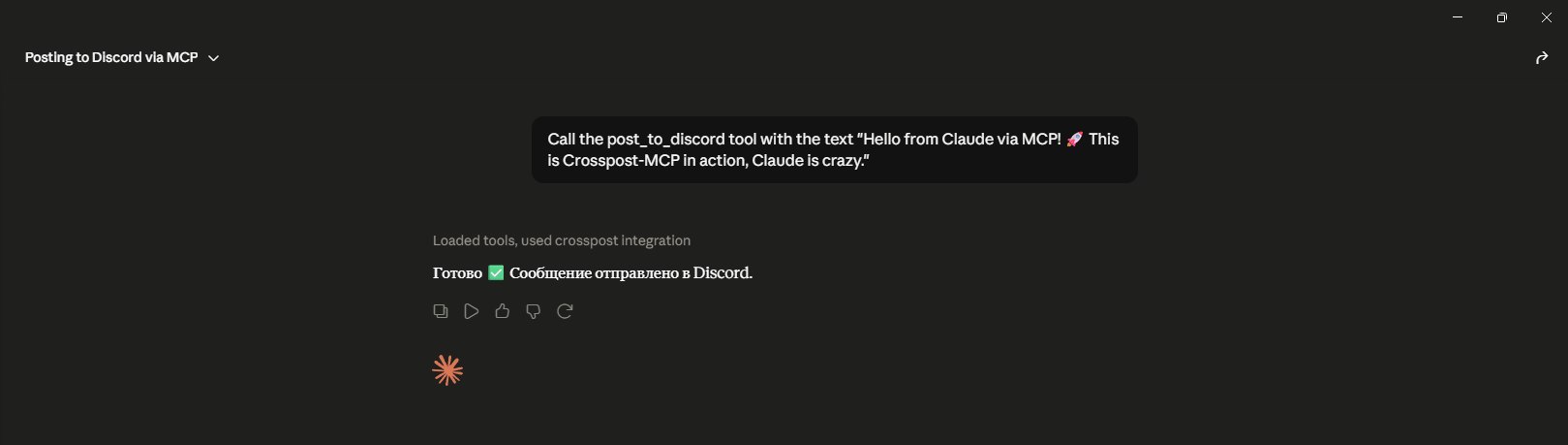
Demo
Claude calls post_to_discord and the message appears in your channel instantly:
Features
- Free APIs only — no paid SaaS middlemen; Telegram Bot API, Discord webhooks, and upcoming platform APIs are all free-tier friendly
- Async parallel posting —
post_to_allfans out to every configured platform concurrently - Type-hinted — full Python type annotations on tools and platform modules
- Dataclass configs — frozen dataclasses per platform with clear missing-variable errors
- Easy to extend — add a new platform by dropping a module in
platforms/and registering a tool
Supported Platforms
| Platform | Status | Free Tier | Notes |
|---|---|---|---|
| Telegram | ✅ v0.1.0 | unlimited | Bot API |
| Discord | ✅ v0.1.0 | unlimited | webhooks |
| Mastodon | 🚧 v0.2.0 | unlimited | requires instance |
| Bluesky | 🚧 v0.3.0 | unlimited | App Password |
| 🚧 v0.4.0 | rate-limited | OAuth |
🚀 Quick Start
Clone & install
git clone https://github.com/Aleksey-Panf/crosspost-mcp.git
cd crosspost-mcp
pip install -e .
Setup credentials
Copy the example env file and fill in your tokens:
cp .env.example .env
Edit .env with your Telegram bot token, Discord webhook URL, and any other platform credentials you plan to use.
Add to Claude Desktop
Open your Claude Desktop MCP config:
- macOS:
~/Library/Application Support/Claude/claude_desktop_config.json - Windows:
%APPDATA%\Claude\claude_desktop_config.json
Add the server entry (adjust the path to your clone):
{
  "mcpServers": {
    "crosspost-mcp": {
      "command": "crosspost-mcp",
      "cwd": "/path/to/crosspost-mcp",
      "env": {
        "TELEGRAM_BOT_TOKEN": "your_bot_token",
        "TELEGRAM_CHAT_ID": "your_chat_id",
        "DISCORD_WEBHOOK_URL": "https://discord.com/api/webhooks/..."
      }
    }
  }
}
Tip: If
crosspost-mcpis not on your PATH, use the full path to the executable inside your virtualenv, or pointcommandtopythonwithargs: ["-m", "crosspost_mcp.server"].
Cursor users can add the same block under Settings → MCP → Add server.
Restart Claude Desktop
Fully quit and relaunch Claude Desktop (or reload MCP in Cursor). The post_to_telegram, post_to_discord, and post_to_all tools should appear in the tool list.
Usage Examples
Give your AI agent natural-language instructions — it picks the right MCP tool automatically.
Example 1 — Discord only
Post to Discord: "v0.1.0 is live — crosspost-mcp now supports Telegram and Discord webhooks."
Claude calls post_to_discord with the message text and returns the Discord message_id and channel_id.
Example 2 — Telegram only
Announce on Telegram that we shipped parallel cross-posting. Use bold for the version number.
Claude calls post_to_telegram with HTML formatting (<b>v0.1.0</b>) and confirms the message_id.
Example 3 — Cross-post everywhere
Cross-post this to all platforms: "New blog post is up — link in bio."
Claude calls post_to_all, which posts to Telegram and Discord in parallel and returns a combined status (ok, partial, or error) with per-platform results.
🔧 Tool Reference
post_to_telegram
Post a message to the configured Telegram channel.
| Signature | post_to_telegram(text: str) -> dict |
| Arguments | text — message body (max 4,096 chars). Supports HTML: <b>, <i>, <code>, <a href=""> |
| Returns | Platform result dict |
Example response:
{
  "platform": "telegram",
  "status": "ok",
  "message_id": 42,
  "chat_id": -1001234567890
}
post_to_discord
Post a message to the configured Discord channel via webhook.
| Signature | post_to_discord(text: str) -> dict |
| Arguments | text — message content (max 2,000 chars). Supports Discord markdown: **bold**, *italic*, `code`, ```block``` |
| Returns | Platform result dict |
Example response:
{
  "platform": "discord",
  "status": "ok",
  "message_id": "1234567890123456789",
  "channel_id": "9876543210987654321"
}
post_to_all
Cross-post the same message to all configured platforms in parallel.
| Signature | post_to_all(text: str) -> dict |
| Arguments | text — message text. Platforms enforce their own length limits independently |
| Returns | Aggregated result with overall status and per-platform entries |
Individual platform failures do not abort the others. Each failure is reported with status: "error" and an error message.
Example response:
{
  "status": "ok",
  "results": [
    {
      "platform": "telegram",
      "status": "ok",
      "message_id": 42,
      "chat_id": -1001234567890
    },
    {
      "platform": "discord",
      "status": "ok",
      "message_id": "1234567890123456789",
      "channel_id": "9876543210987654321"
    }
  ]
}
Getting Credentials
Telegram
- Open Telegram and message @BotFather.
- Send
/newbot, follow the prompts, and copy the bot token. - Add the bot as an admin to your target channel with Post Messages permission.
- Get the chat ID:
- For public channels, use
@channelname(include the@). - For private channels, forward a channel message to @userinfobot or call
getUpdateson the Bot API after posting in the channel.
- For public channels, use
- Set
TELEGRAM_BOT_TOKENandTELEGRAM_CHAT_IDin your.env.
Discord
- Open your Discord server and go to the target channel.
- Click the gear icon → Integrations → Webhooks → New Webhook.
- Name the webhook, select the channel, and click Copy Webhook URL.
- Set
DISCORD_WEBHOOK_URLin your.env.
No bot application or OAuth flow required — webhooks are the simplest path for AI agent posting.
Project Structure
crosspost-mcp/
├── assets/                          # Screenshots and demo images
├── src/
│   └── crosspost_mcp/
│       ├── __init__.py
│       ├── config.py                # Dataclass configs loaded from .env
│       ├── server.py                # FastMCP server and tool definitions
│       └── platforms/
│           ├── __init__.py
│           ├── telegram.py          # Telegram Bot API client
│           └── discord.py           # Discord webhook client
├── tests/
├── .env.example                     # Credential template
├── pyproject.toml
└── README.md
Roadmap
- Telegram support
- Discord support
- Parallel cross-posting
- Mastodon support (v0.2.0)
- Bluesky support (v0.3.0)
- Reddit support (v0.4.0)
- Media/image attachments
- Scheduled posting
Contributing
Contributions are welcome — bug reports, platform modules, and documentation improvements all help. Open an issue to discuss larger changes before submitting a pull request.
Custom MCP Development
I build production-ready MCP servers on demand for custom platforms and workflows.
- Delivery: 3–7 days
- Workflow: Async-only, no calls
- Payment: USDT
- Contact: Telegram @AlexAi14 or open a GitHub issue
License
MIT — see LICENSE for details.
Topics: mcp · model-context-protocol · fastmcp · telegram-bot · discord-webhook · ai-agents · claude · llm-tools
Установка Crosspost
У этого сервера нет опубликованного пакета — он собирается из исходников. Открой репозиторий и следуй инструкции в README.
▸ github.com/Aleksey-Panf/crosspost-mcpFAQ
Crosspost MCP бесплатный?
Да, Crosspost MCP бесплатный — установка в пару кликов через Unyly без оплаты.
Нужен ли API-ключ для Crosspost?
Нет, Crosspost работает без API-ключей и переменных окружения.
Crosspost — hosted или self-hosted?
Доступен hosted-вариант: Unyly запускает сервер в облаке, локальная установка не обязательна.
Как установить Crosspost в Claude Desktop, Claude Code или Cursor?
Открой Crosspost на unyly.org, выбери вкладку своего клиента (Claude Desktop, Claude Code, Cursor) и нажми Install — конфиг сгенерируется автоматически, без правки JSON.
Похожие MCP
Gmail
Read, send and search emails from Claude
 автор: Google
Slack
Send, search and summarize Slack messages
 автор: Slack
Runbear
No-code MCP client for team chat platforms, such as Slack, Microsoft Teams, and Discord.
Discord Server
A community discord server dedicated to MCP by [Frank Fiegel](https://github.com/punkpeye)
Compare Crosspost with
Не уверен что выбрать?
Найди свой стек за 60 секунд
Автор?
Embed-бейдж для README
Похожее
Все в категории communication