
CutterMCP Plus
БесплатноНе проверенEnables LLMs to automate reverse engineering tasks using Cutter, including function analysis, decompilation, disassembly, and more.

Описание
Enables LLMs to automate reverse engineering tasks using Cutter, including function analysis, decompilation, disassembly, and more.
README

CutterMCP+
Automated Reverse Engineering via LLMs
Cutter is a powerful, user-friendly, and completely free reverse engineering tool.
Now, combined with modern Large Language Models (LLMs), they can do even more.
🤖 “Give AI a sharp cutter!”
Demos
Demo 1: Hackthebox Behind the Scenes (Easy level illeagal instruction bypass, Level: very easy)
As demonstrated in the video below, this plugin enables Cutter to automatically solve simple reverse engineering CTF challenges(From hack the box).
The LLM can notice anti-analysis techniques such as illegal instruction ud2. In this case, ud2 jammed the decompiler and produced incomplete result.
claude-sonnet-3.7 noticed this and tried to read the assembly directly to get around it. The entire process took about a minute to find the correct answer, without human intervention.
https://github.com/user-attachments/assets/bc86df16-93e1-473f-8eb4-3161a7b4a48e
(The video has not been accelerated.)
Demo 2: Hackthebox Virtually Mad (VM analysis. Level: Medium)
This is a VM analysis challenge. You need to reverse the opcode and figure out the rules. There are functions that are called in key parts via function pointers, so these are not listed by cutter.
So, the more intelligent `claude-opus-4' was used.
With prompt: Let's do a CTF reverse analysis challenge. virtually.mad. this is an ELF file. Cutter MCP is ready for you. You can call cutter to help you complete the challenge.
With no intervention claude-opus-4 completed the challenge using cutter.
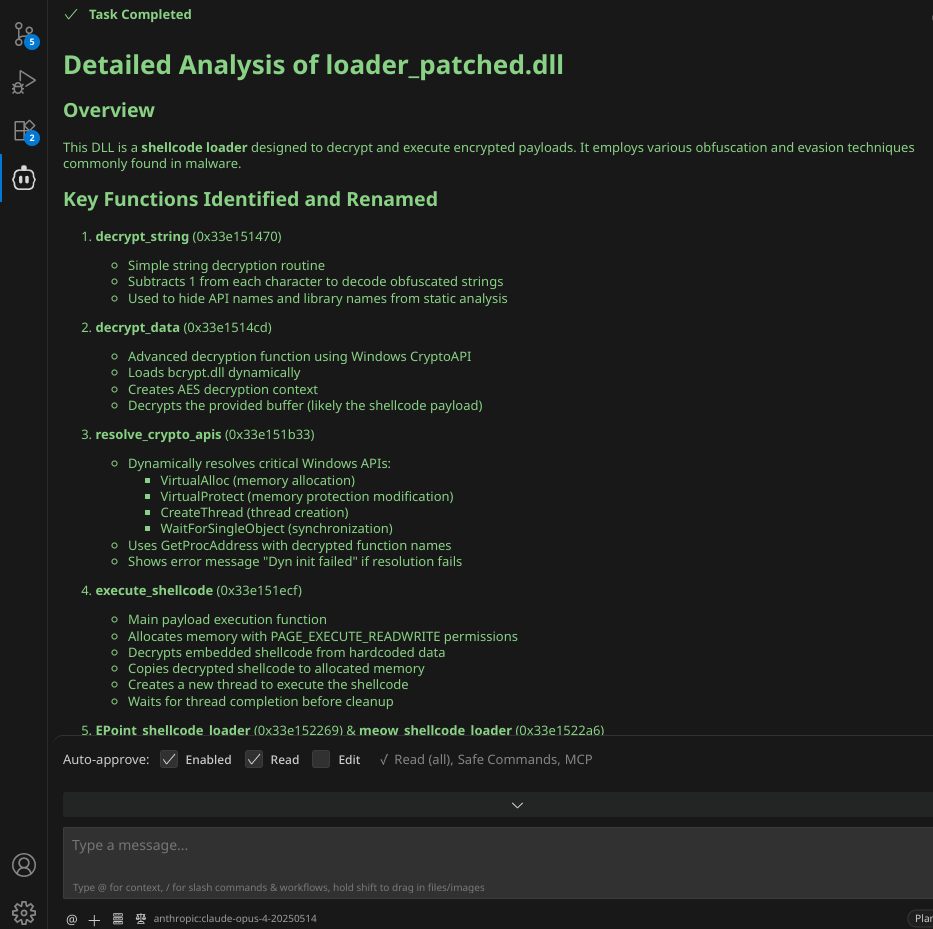
Demo 3: ShellcodeEncrypt2DLL (Malware sample, VirusTotal 0/72)
It can also assist in malware analysis workflows, helping you accelerate tasks or extract key information.
In my previous project, there was a shellcode loader that achieved a VirusTotal score of 0/72 (ehmm...at that time I mean), but it was unable to withstand analysis by LLMs.
The analysis results from claude-opus-4 are completely correct, and the function has been renamed, a guess has been made: Hey, this is a shellcode loader.
The entire process took a few minutes and also required no human intervention.
Available functionality:
list_functions()
function_detail()
list_globals()
list_strings()
list_segments()
list_vars()
list_entry_points()
decompile()
disasm_text()
disasm_json()
disasm_by_func_text()
disasm_by_func_json()
xrefs_to()
rename_function()
rename_local_variable()
set_comment()
set_local_variable_type()
current_address()
current_function()
read_bytes()
How to use?
First, make sure that cutter and python3 are installed.
Dependencies:
pip install -r requirements.txt
requirements.txt is used for the standalone mcp_server.py wrapper.
The Cutter plugin itself is mcp_plugin.py. It now uses Python's standard library HTTP server so it does not require FastAPI, Pydantic, or Starlette inside Cutter's embedded Python.
Cutter plugin:
mcp_plugin.py runs inside Cutter and exposes a local HTTP API that mcp_server.py uses.
Default local endpoints:
http://127.0.0.1:8000/api/v1
http://127.0.0.1:8000/api/v1/health
http://127.0.0.1:8000/docs
- Run Cutter
- Go to Edit -> Preferences -> Plugins
- You can find the plugin directory location in the dialog.
- Copy
mcp_plugin.pyto the<cutter_plugins>/pythonfolder(not themcp_server.py) - Restart your cutter
MCP Host:
For example (in cline, cursor etc) in MCP config file.
STDIO mode:
{
  "mcpServers": {
    "cuttermcp-plus": {
      "command": "python",
      "args": [
        "<ABSOLUTE/PATH/TO>/mcp_server.py"
      ]
    }
  }
}
Streamable HTTP mode:
Start the Cutter plugin server first, then start the MCP wrapper:
python mcp_server.py --http --host 127.0.0.1 --port 9000
Then use a config like this:
{
  "mcpServers": {
    "cutter-mcp-http": {
      "autoApprove": [],
      "disabled": false,
      "timeout": 60,
      "type": "streamableHttp",
      "url": "http://127.0.0.1:9000/"
    }
  }
}
LLM
In most cases, claude-sonnet-4 is good enough.
gemini-2.5-pro It can also solve the vast majority of tasks, and it’s a bit cheaper than sonnet-4.
I don't have permission to access OpenAI's o3 model, so I didn't do any testing. o4-mini can also effectively solve simple CTF questions, but since I don't have permission, I won't provide the thought process.
Models such as gemini-2.5-flash and gpt-4.1-mini their performance may not be satisfactory.
Is this safe?
For example, When analyzing malware the string in the data section may cause injection. So, do not automatically agree to all execute commands.
Also, be aware of the spending on tokens.
TODO
- Save tokens.
Special Thanks
Amey Pathak: Creator of the first CutterMCP
He's definitely cool. He got OSED certificate at the age of 19.
Without his project, this project probably wouldn't exist.
Установка CutterMCP Plus
У этого сервера нет опубликованного пакета — он собирается из исходников. Открой репозиторий и следуй инструкции в README.
▸ github.com/restkhz/CutterMCP-plusFAQ
CutterMCP Plus MCP бесплатный?
Да, CutterMCP Plus MCP бесплатный — установка в пару кликов через Unyly без оплаты.
Нужен ли API-ключ для CutterMCP Plus?
Нет, CutterMCP Plus работает без API-ключей и переменных окружения.
CutterMCP Plus — hosted или self-hosted?
Self-hosted: сервер запускается локально на твоей машине командой из раздела установки.
Как установить CutterMCP Plus в Claude Desktop, Claude Code или Cursor?
Открой CutterMCP Plus на unyly.org, выбери вкладку своего клиента (Claude Desktop, Claude Code, Cursor) и нажми Install — конфиг сгенерируется автоматически, без правки JSON.
Похожие MCP
GitHub
PRs, issues, code search, CI status
 автор: GitHub
Filesystem
Secure file operations with configurable access controls.
Memory
Knowledge graph-based persistent memory system.
Template MCP Server
A CLI tool to create a new Model Context Protocol server project with TypeScript support, dual transport options, and an extensible structure
 автор: mcpdotdirect
Compare CutterMCP Plus with
Не уверен что выбрать?
Найди свой стек за 60 секунд
Автор?
Embed-бейдж для README
Похожее
Все в категории development