
Database Query App
БесплатноНе проверенMCP App for Querying and Managing Databases (with UI support in e.g. Claude Desktop!)

Описание
MCP App for Querying and Managing Databases (with UI support in e.g. Claude Desktop!)
README
A mature Model Context Protocol app — not just a server — written in C# / .NET 10 that lets LLM clients manage PostgreSQL and SQL Server databases through Dapper, with a full interactive UI rendered directly inside the client.
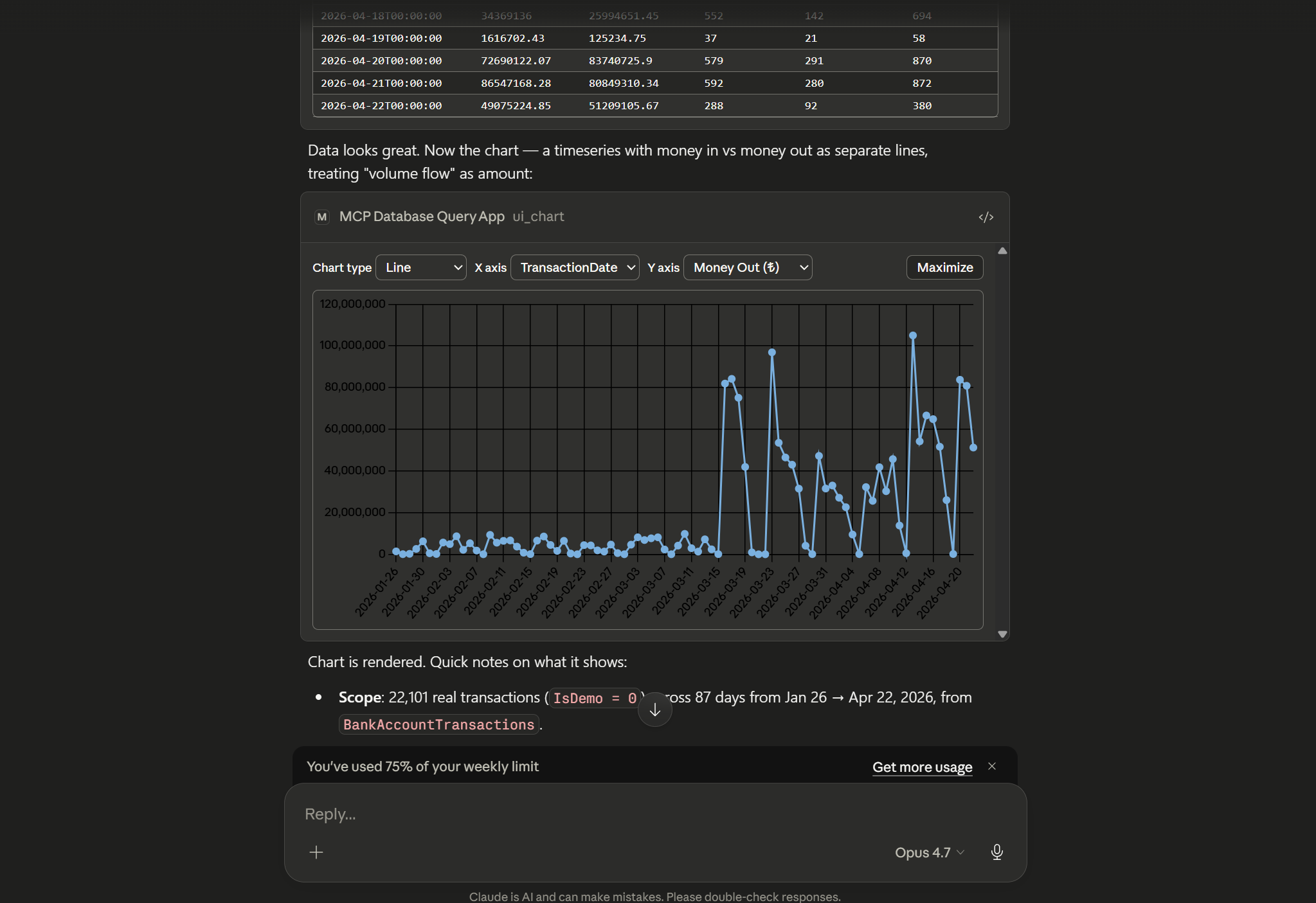
Ask the model for a query. It runs the SQL, streams back results, and opens a live, sortable grid / filterable schema viewer / Chart.js visualisation inside your MCP client via the MCP Apps protocol — no separate window, no screenshots, no context loss.
Highlights
- MCP App, not just an MCP server — ships a results grid, SQL builder, schema explorer, and Chart.js charting as MCP UI resources that hosts with MCP UI support (e.g. Claude Desktop) render inline.
- Read-only by default — writes and DDL are blocked unless a session explicitly opts in. Destructive tools ask for confirmation before running.
- Encrypted credential storage — saved database passwords are encrypted with AES-256-GCM using a master key you control.
- Pagination & limits — every query has a hard row cap with cursor-based paging for large result sets.
- Both transports — stdio (default) or HTTP/SSE.
Quick install
Option 1 — Drop-in .mcpb extension (Claude Desktop)
Grab the bundle for your platform and open it in Claude Desktop. The
.mcpb is a self-contained single-file package of the server, its .NET
runtime, and the UI assets — no dotnet or Node install on the host.
.mcpb is a Claude Desktop format; Claude Code and other hosts should
use Option 2.
| Platform | Download |
|---|---|
| Windows x64 | mcp-database-query-app-win-x64-jit.mcpb |
| Windows ARM64 | mcp-database-query-app-win-arm64-jit.mcpb |
| macOS (Apple Silicon) | mcp-database-query-app-osx-arm64-jit.mcpb |
| Linux x64 | mcp-database-query-app-linux-x64-jit.mcpb |
| Linux ARM64 | mcp-database-query-app-linux-arm64-jit.mcpb |
Double-click the .mcpb, or drag it into Claude Desktop's
Settings → Extensions. On first install, Claude Desktop will prompt
for the user-config values declared in manifest.json (master key,
read-only toggle, max result limit, UI toggle). Read-only is on by
default.
Option 2 — mcpServers JSON config
For Claude Code, Cursor, Windsurf, or any other host that reads an
mcpServers block, point command at the extracted server binary (from
a .mcpb or a dotnet publish output):
{
  "mcpServers": {
    "database": {
      "command": "/absolute/path/to/mcp-database-query-app",
      "env": {
        "McpDatabaseQueryApp__Transport__Stdio__Enabled": "true",
        "McpDatabaseQueryApp__Transport__Http__Enabled": "false",
        "McpDatabaseQueryApp__ReadOnlyByDefault": "true",
        "McpDatabaseQueryApp__MaxResultLimit": "5000",
        "McpDatabaseQueryApp__Ui__Enabled": "true",
        "McpDatabaseQueryApp__Secrets__KeyRef": "ENV:MCP_DATABASE_QUERY_APP_MASTER_KEY",
        "MCP_DATABASE_QUERY_APP_MASTER_KEY": "<base64-encoded 32+ byte secret>"
      }
    }
  }
}
On Windows, point command at mcp-database-query-app.exe. Generate a
master key with openssl rand -base64 32.
Claude Code also accepts the same server via CLI — the flags below
produce an equivalent entry in your project's .mcp.json:
claude mcp add database \
  --env McpDatabaseQueryApp__ReadOnlyByDefault=true \
  --env McpDatabaseQueryApp__Ui__Enabled=true \
  --env McpDatabaseQueryApp__Secrets__KeyRef=ENV:MCP_DATABASE_QUERY_APP_MASTER_KEY \
  --env MCP_DATABASE_QUERY_APP_MASTER_KEY="$(openssl rand -base64 32)" \
  -- /absolute/path/to/mcp-database-query-app
Features
- Connection management — open, ping, disconnect, and save pre-defined connection profiles.
- Querying — parameterised SELECTs, paged results, non-query execution, and EXPLAIN plans.
- Schema introspection — list schemas, tables, columns, keys, indexes, roles, and databases, with batched describe calls.
- Saved scripts & notes — store SQL snippets and attach notes to database objects.
- Interactive UI — sortable/filterable results grid, SQL builder, schema viewer, and charting, all rendered inside the MCP host.
- Guided prompts —
explore-database,safe-write,migrate-script,explain-slow-queryseed the model with a workflow. - Auto-completion — resource and prompt-argument completion backed by a per-connection metadata cache.
- Confirmations — destructive operations are gated behind MCP elicitation prompts.
Configuration
appsettings.json controls process-wide behaviour. Runtime metadata
(pre-defined connections, saved scripts, cached result sets) is stored in
a SQLite database under %APPDATA%/McpDatabaseQueryApp/mcp-database-query-app.db. Passwords are
encrypted with AES-256-GCM using a key resolved from
McpDatabaseQueryApp:Secrets:KeyRef (UserSecrets:…, Env:…, File:…, or
Literal:…).
{
  "McpDatabaseQueryApp": {
    "MetadataDbPath": "%APPDATA%/McpDatabaseQueryApp/mcp-database-query-app.db",
    "DefaultResultLimit": 500,
    "MaxResultLimit": 50000,
    "AllowDisableLimit": true,
    "ReadOnlyByDefault": true,
    "Transport": {
      "Stdio": { "Enabled": true },
      "Http":  { "Enabled": false, "Urls": "http://127.0.0.1:5218" }
    },
    "Ui": { "Enabled": true },
    "Secrets": { "KeyRef": "UserSecrets:McpDatabaseQueryApp:MasterKey" }
  }
}
Every setting above is overridable via environment variable using the
double-underscore convention (McpDatabaseQueryApp__ReadOnlyByDefault=true).
Seeding pre-defined connections
Normally connections are saved interactively (db_predefined_create, or the
UI). For headless deployments — an MCP server launched by an orchestrator
with no operator to click through setup — you can declare connections in
configuration under McpDatabaseQueryApp:Connections. They are encrypted and
upserted into the metadata store at startup, so the model can immediately
db_connect to them by name.
{
  "McpDatabaseQueryApp": {
    "Secrets": { "KeyRef": "ENV:MCP_DATABASE_QUERY_APP_MASTER_KEY" },
    "Connections": [
      {
        "Name": "scraper",
        "Provider": "Postgres",
        "Host": "db.internal",
        "Port": 5432,
        "Database": "etsy_listings",
        "Username": "etsy",
        "Password": "etsy_secret",
        "SslMode": "Disable",
        "ReadOnly": true,
        "DefaultSchema": "es",
        "Tags": ["scraper"]
      }
    ]
  }
}
The same, via environment variables (note the indexed __0__ segments):
McpDatabaseQueryApp__Connections__0__Name=scraper
McpDatabaseQueryApp__Connections__0__Provider=Postgres
McpDatabaseQueryApp__Connections__0__Host=db.internal
McpDatabaseQueryApp__Connections__0__Port=5432
McpDatabaseQueryApp__Connections__0__Database=etsy_listings
McpDatabaseQueryApp__Connections__0__Username=etsy
McpDatabaseQueryApp__Connections__0__Password=etsy_secret
McpDatabaseQueryApp__Connections__0__SslMode=Disable
McpDatabaseQueryApp__Connections__0__ReadOnly=true
McpDatabaseQueryApp__Connections__0__DefaultSchema=es
Seeding from a connection string
If you'd rather hand the server a full connection string, set
McpDatabaseQueryApp:ConnectionStrings:<name> — the same shape as the
conventional ConnectionStrings section, but namespaced under this app so
it never collides with (or silently inherits) a host process's top-level
ConnectionStrings. Each entry becomes a read-only connection named after
its key, and the provider is inferred from the keywords:
# env: a Host= keyword implies Postgres; Server=/Data Source= without Host implies SQL Server
McpDatabaseQueryApp__ConnectionStrings__scraper=Host=db.internal;Port=5434;Database=etsy_listings;User ID=etsy;Password=etsy_secret;SSL Mode=Disable
McpDatabaseQueryApp__Secrets__KeyRef=ENV:MCP_DATABASE_QUERY_APP_MASTER_KEY
{
  "McpDatabaseQueryApp": {
    "ConnectionStrings": {
      "scraper": "Host=db.internal;Port=5434;Database=etsy_listings;User ID=etsy;Password=etsy_secret;SSL Mode=Disable"
    }
  }
}
For finer control alongside a connection string — read-write, a default
schema, an explicit provider, or tags — put the connection string on a
Connections entry instead; discrete fields set on the same entry take
precedence over the parsed ones:
{
  "McpDatabaseQueryApp": {
    "Connections": [
      {
        "Name": "scraper",
        "ConnectionString": "Host=db.internal;Database=etsy_listings;Username=etsy;Password=etsy_secret",
        "ReadOnly": true,
        "DefaultSchema": "es"
      }
    ]
  }
}
Notes:
- A master key is required. Seeded passwords are encrypted with the key
resolved from
McpDatabaseQueryApp:Secrets:KeyRef. If that key is missing, the affected entry is logged and skipped (the server still starts). - Seeding is idempotent — entries are keyed by
Name, so restarting refreshes existing rows rather than duplicating them. Edit the config and restart to update a connection. ReadOnlydefaults totrue.SslModedefaults to the provider's natural default when neither a discrete field nor the connection string specifies it (Preferfor Postgres,Require/Mandatory for SQL Server); setSslMode=Disable(Postgres) orEncrypt=false(SQL Server) for databases without TLS.- Provider inference is a heuristic: a
Hostkeyword ⇒ Postgres;Server/Data SourcewithoutHost⇒ SQL Server; otherwise it falls back to Postgres. SetProviderexplicitly to override (e.g. a Postgres string that usesServer=). - Required per connection (from discrete fields, the connection string, or a
mix):
Name, provider,Host,Database,Username,Password. A malformed entry is skipped without aborting the others.
Build from source
Requires the .NET 10 SDK (10.0.201+) and Node.js 18+.
dotnet build
dotnet test

# stdio (default)
dotnet run --project src/McpDatabaseQueryApp.Server

# HTTP/SSE
McpDatabaseQueryApp__Transport__Http__Enabled=true dotnet run --project src/McpDatabaseQueryApp.Server
License
Установка Database Query App
У этого сервера нет опубликованного пакета — он собирается из исходников. Открой репозиторий и следуй инструкции в README.
▸ github.com/Trojaner/mcp-database-query-appFAQ
Database Query App MCP бесплатный?
Да, Database Query App MCP бесплатный — установка в пару кликов через Unyly без оплаты.
Нужен ли API-ключ для Database Query App?
Нет, Database Query App работает без API-ключей и переменных окружения.
Database Query App — hosted или self-hosted?
Self-hosted: сервер запускается локально на твоей машине командой из раздела установки.
Как установить Database Query App в Claude Desktop, Claude Code или Cursor?
Открой Database Query App на unyly.org, выбери вкладку своего клиента (Claude Desktop, Claude Code, Cursor) и нажми Install — конфиг сгенерируется автоматически, без правки JSON.
Похожие MCP
wenb1n-dev/SmartDB_MCP
A universal database MCP server supporting simultaneous connections to multiple databases. It provides tools for database operations, health analysis, SQL optim
 автор: wenb1n-dev
Postgres Server
This server enables interaction with PostgreSQL databases through the Model Context Protocol, optimized for the AWS Bedrock AgentCore Runtime. It provides tools
 автор: madhurprash
Postgres
Query your database in natural language
 автор: Anthropic
PostgreSQL
Read-only database access with schema inspection.
автор: modelcontextprotocolCompare Database Query App with
Не уверен что выбрать?
Найди свой стек за 60 секунд
Автор?
Embed-бейдж для README
Похожее
Все в категории data